Wiper control system and Vehicle speed calculation for ABS using Wheel Speed sensor
Project 1
Wiper control system and Vehicle speed calculation for ABS using Wheel Speed sensor
1. Develop Simulink/state flow modules for the wiper control system based on the given conditions.
Conditions:
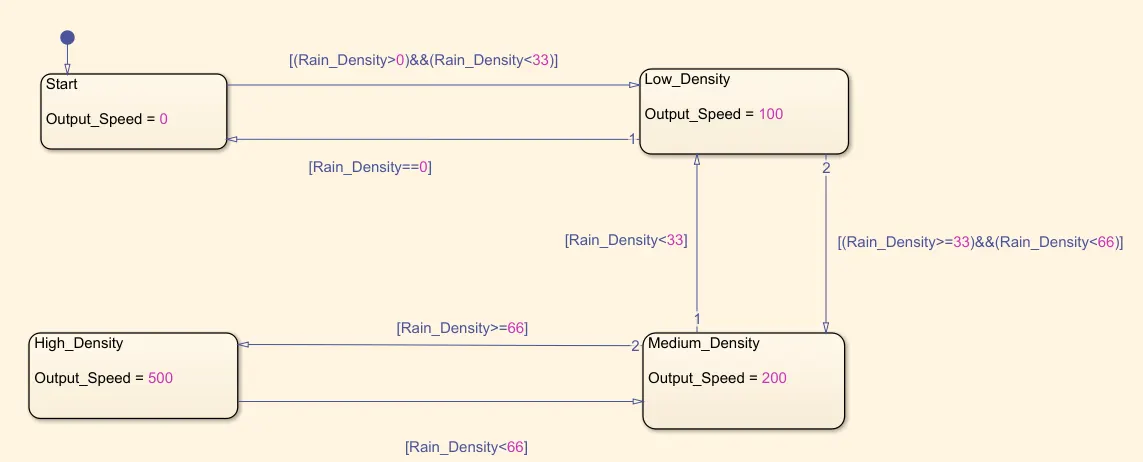
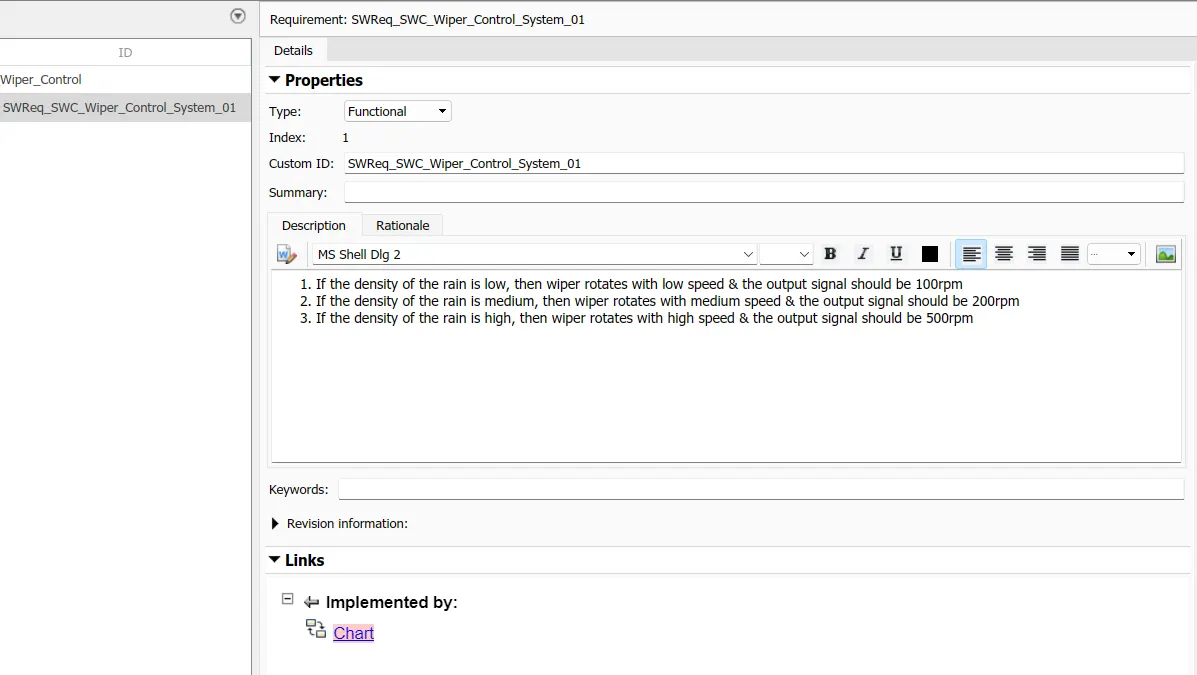
- If the density of the rain is low, then wiper rotates with low speed, the output signal should be 100rpm
- If the density of the rain is medium, then wiper rotates with low speed, the output signal should be 200rpm
- If the density of the rain is high, then wiper rotates with low speed, the output signal should be 500rpm
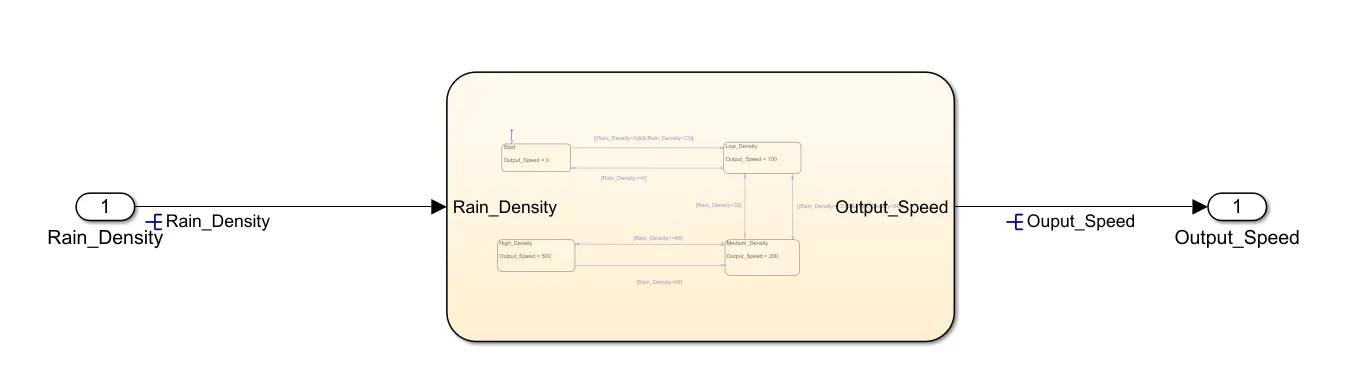
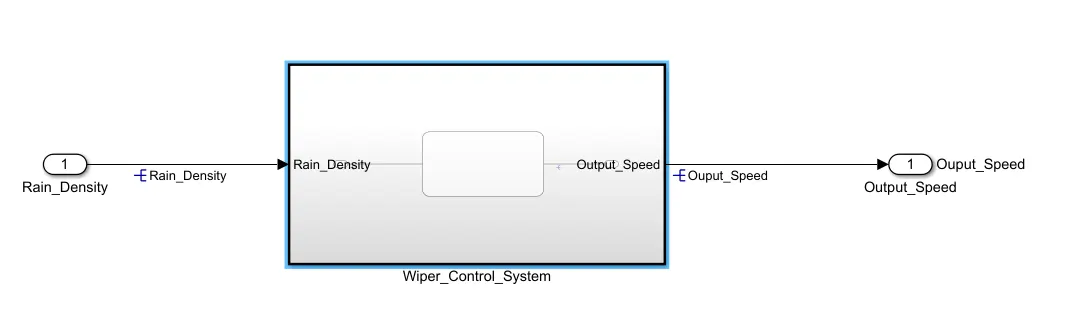
1. Simulink/state flow modules for wiper control system:
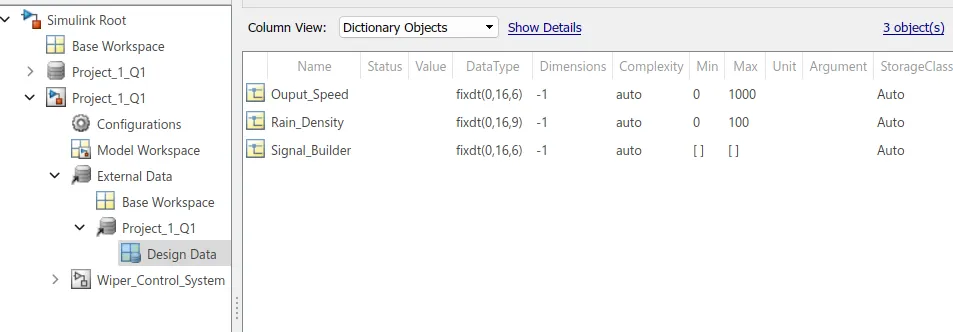
2. SLDD file
3. Requirement tagging
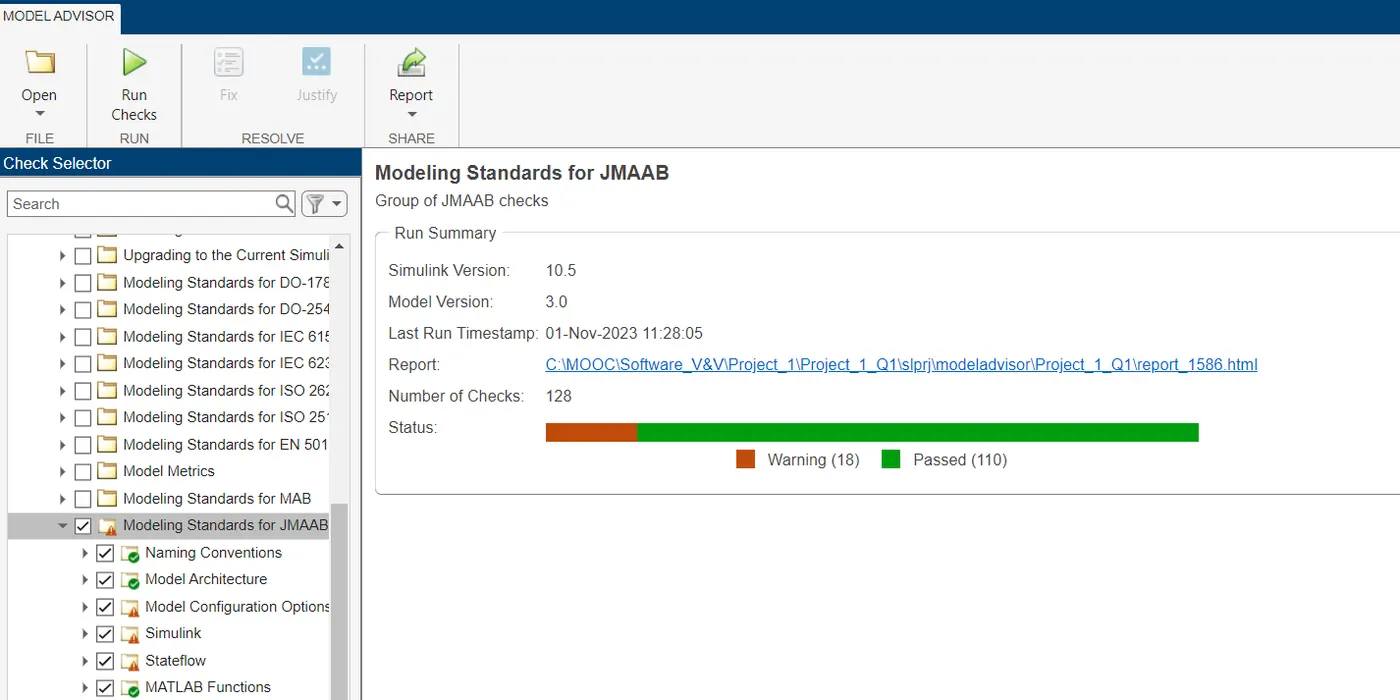
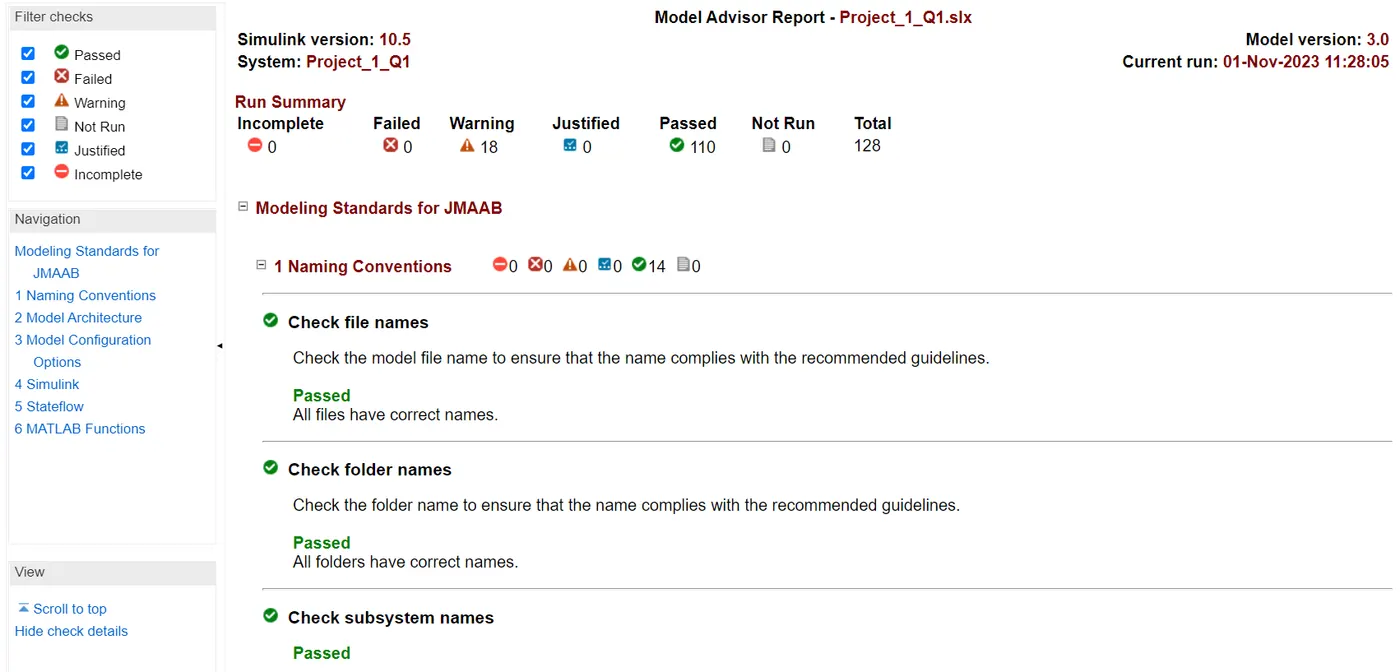
4) Model advisor - JMAAB compliance report
5) Fixed-point Tool
- create subsystem and connect input and output block
- Go to "APP TAB"-->select "fixed point tool box"
- Click on "NEW “choose-->Iterative fixed-point conversion
- Performed following operation one by one
- Prepare
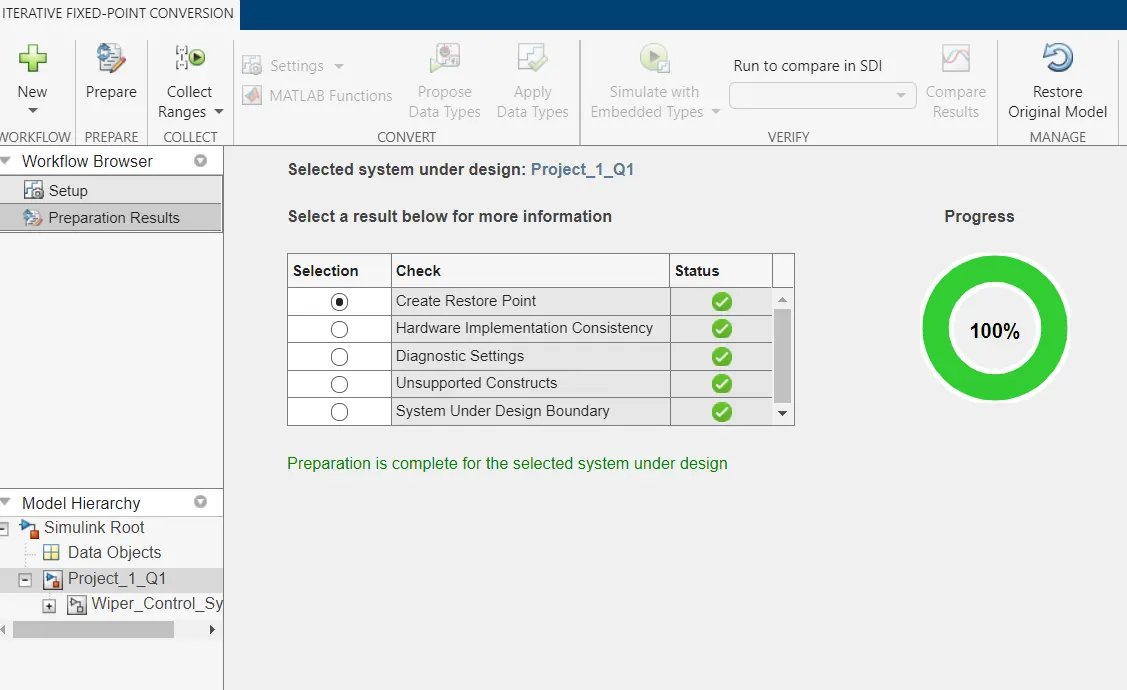
collect ranges--> click on collect ranges> propose data types
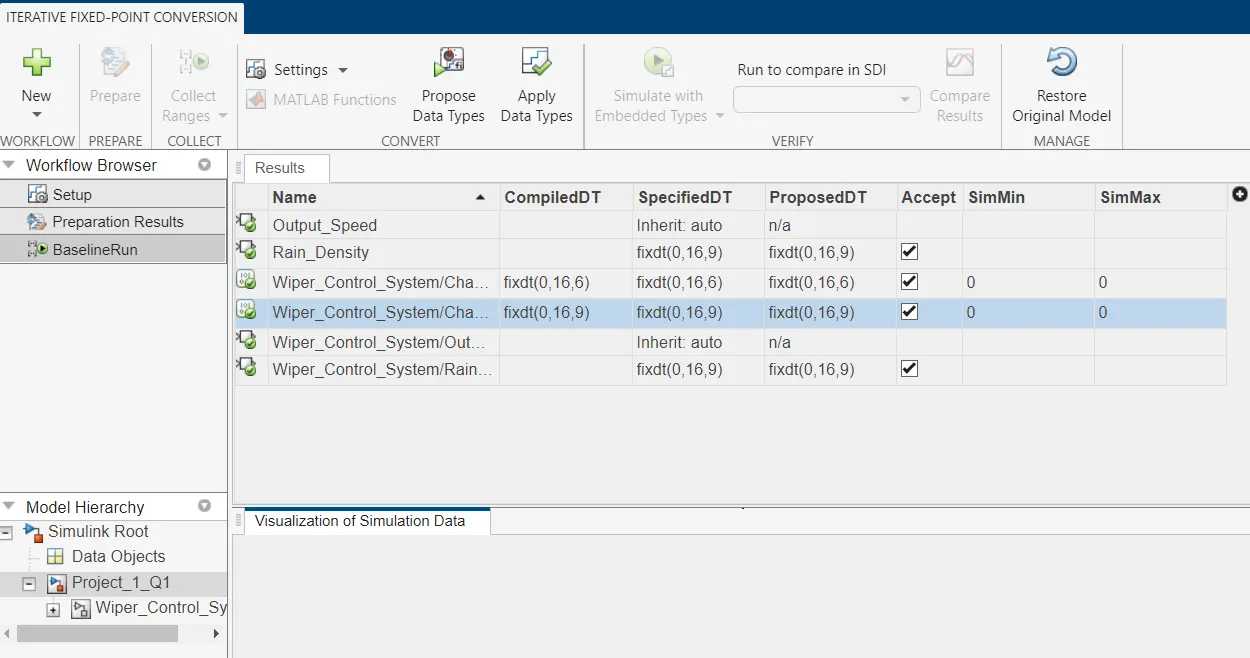
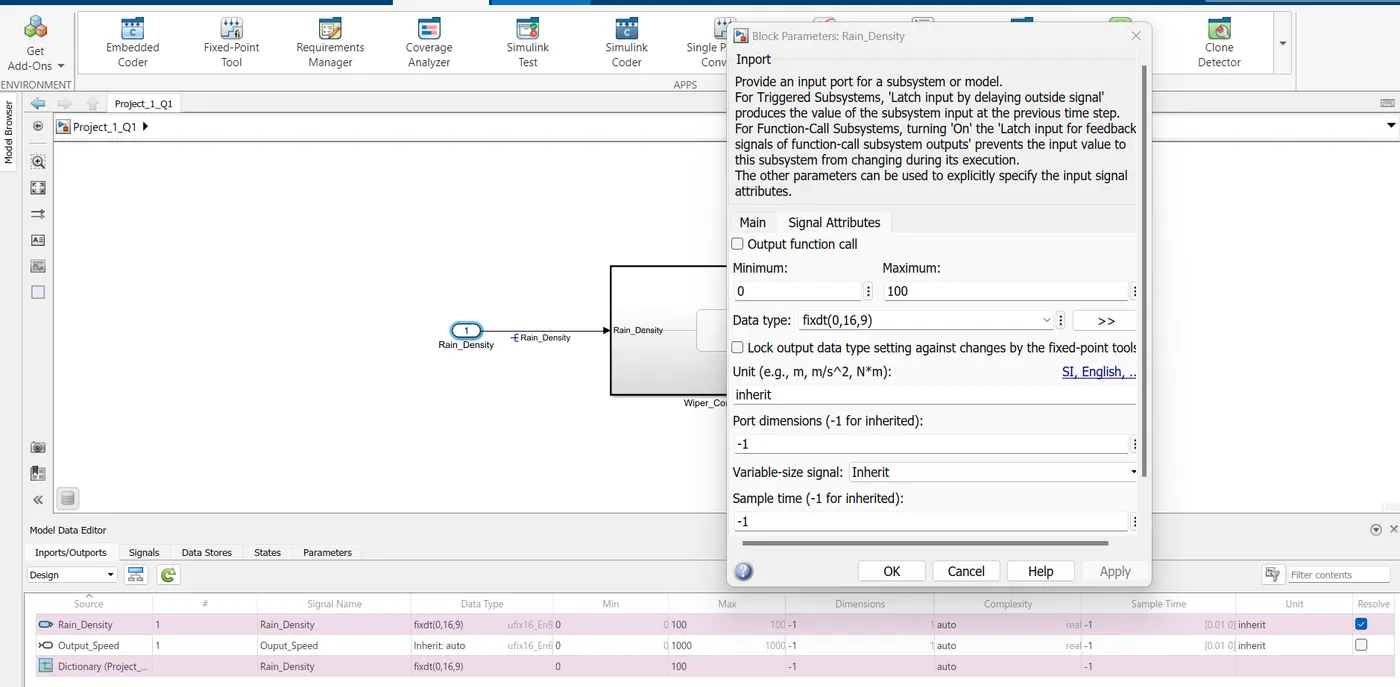
Accept the proposed data types. The proposed data type is reflected in the SLDD file:
6) SLDV Design error detection report
Set the design verifier configuration:
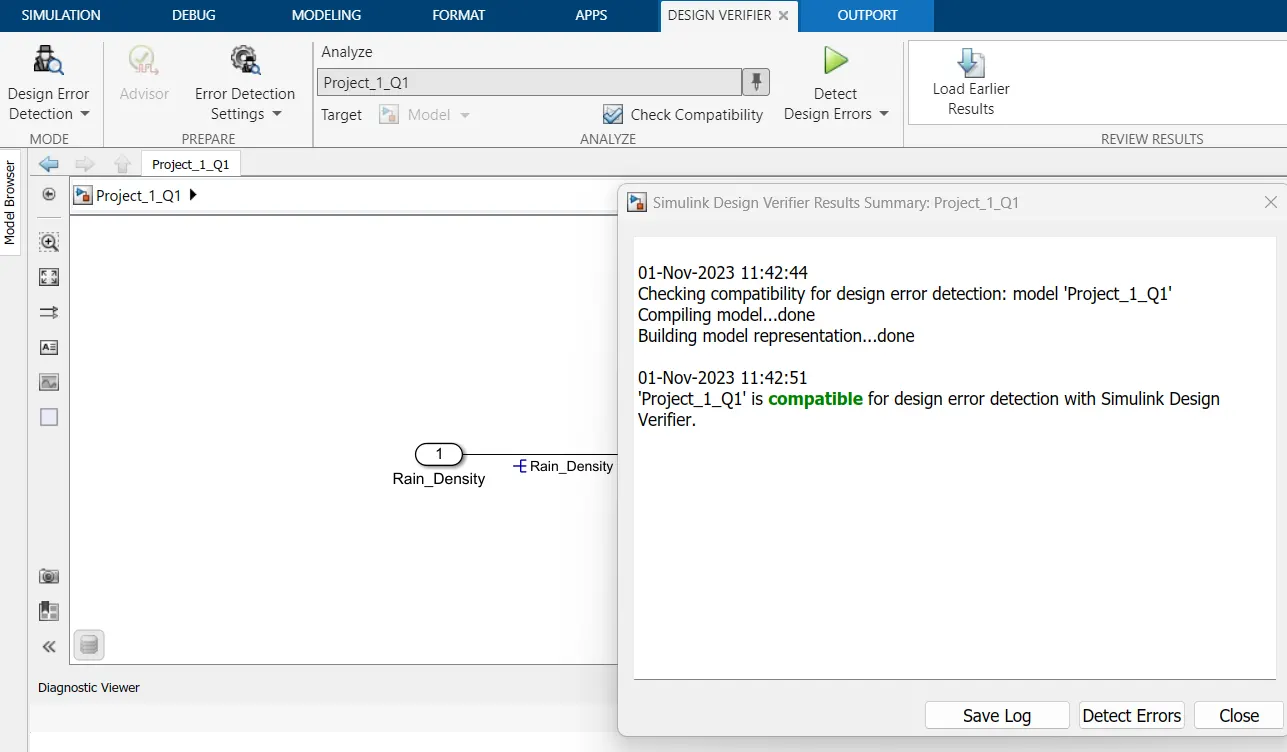
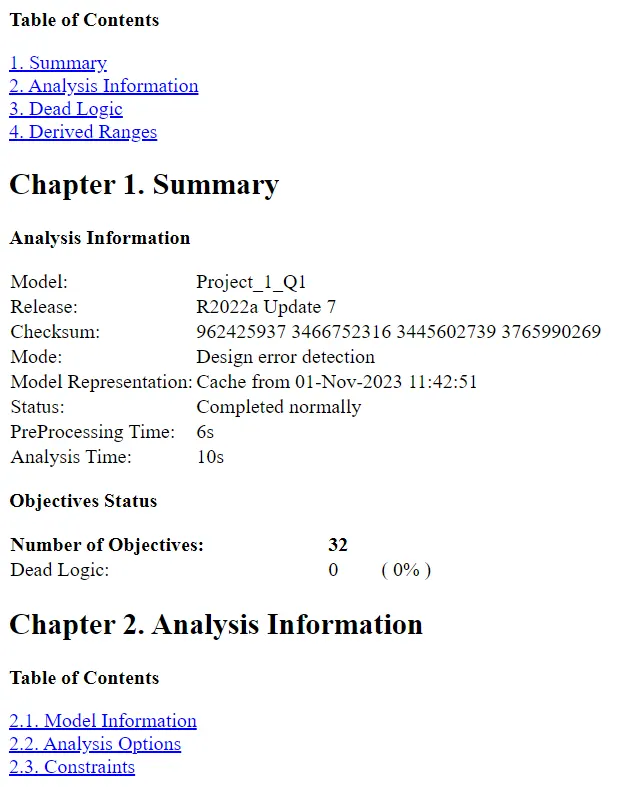
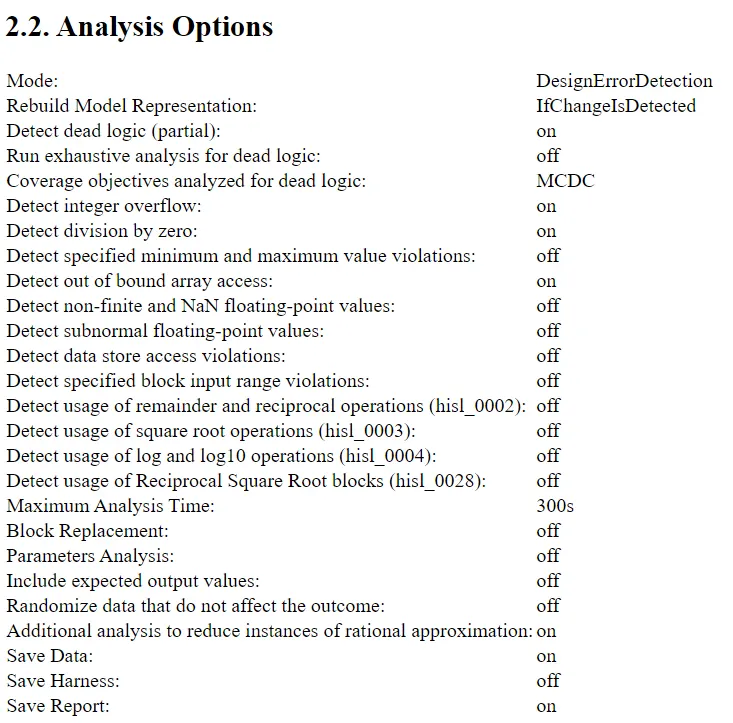
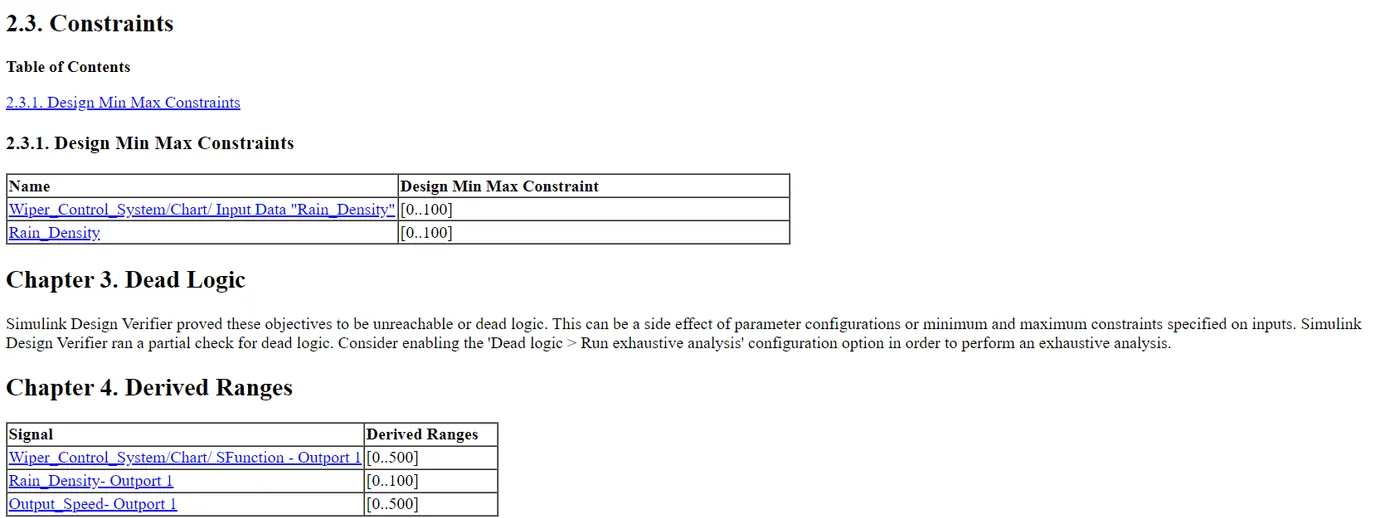
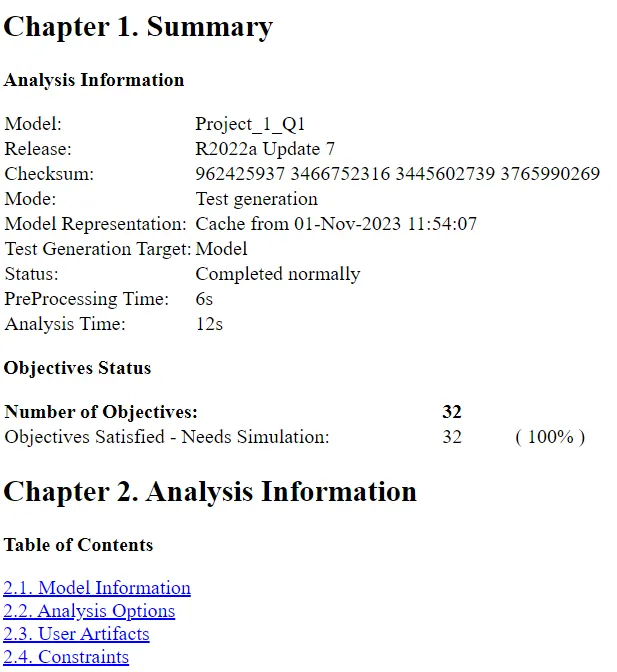
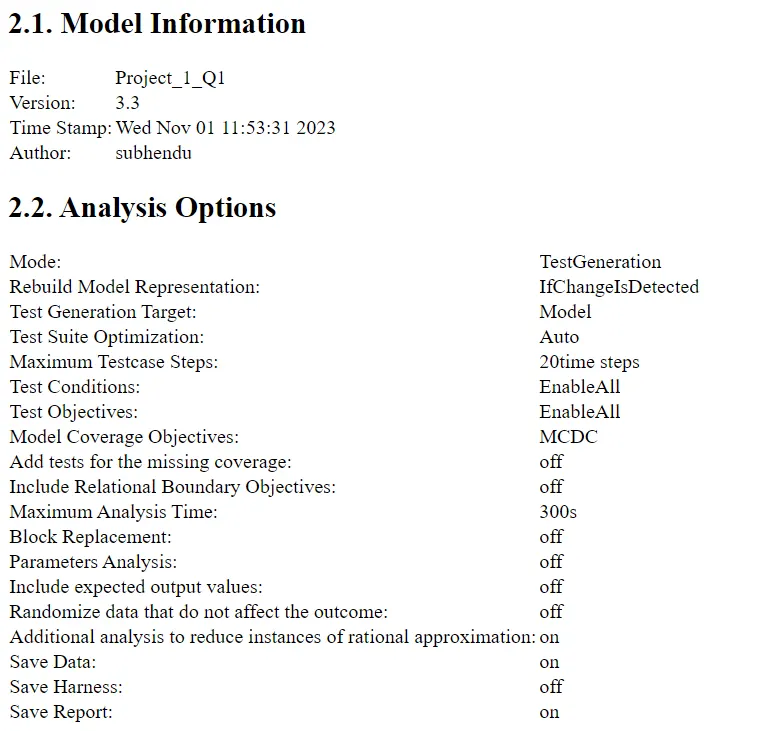
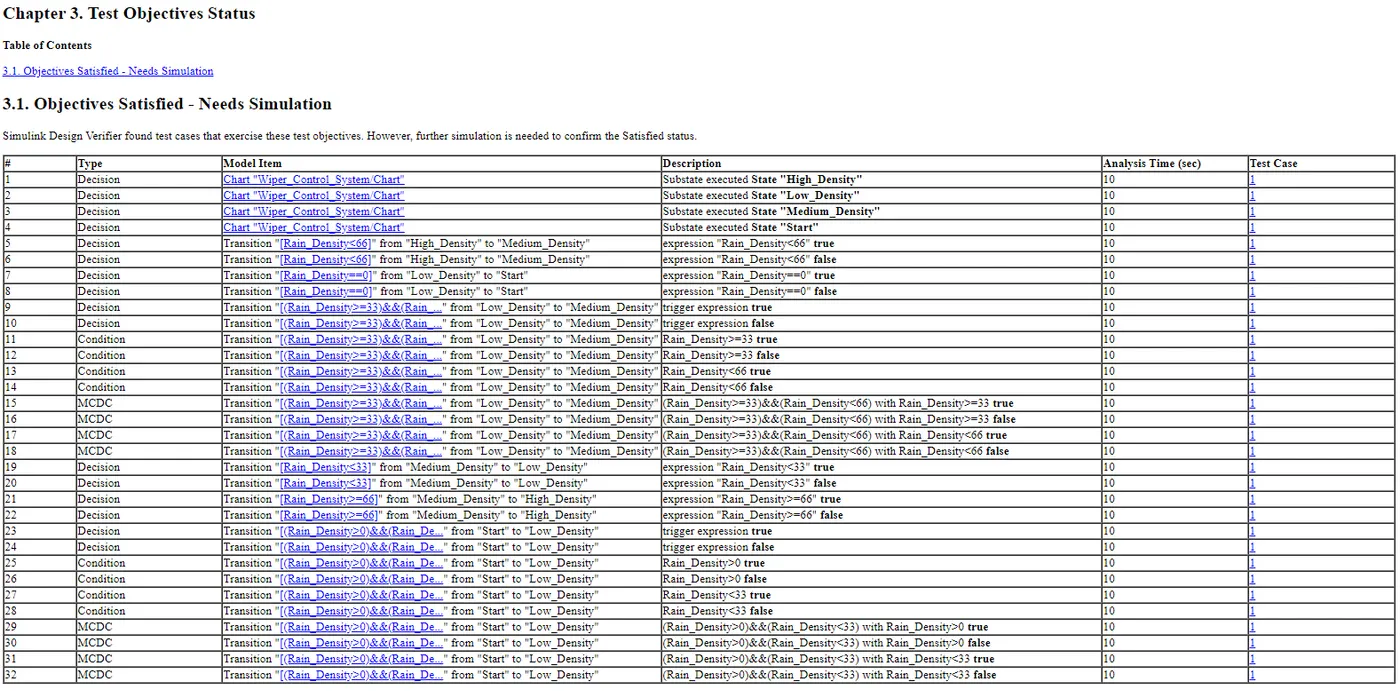
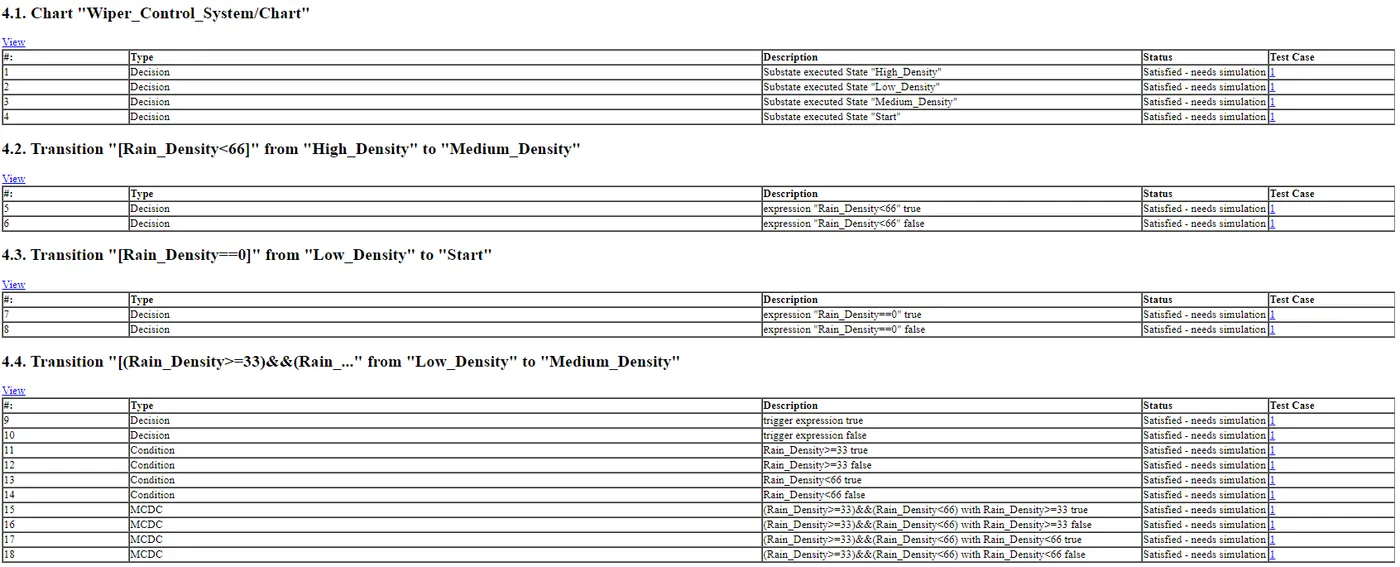
7) SLDV test generation report
Set the design verifier test generation settings:
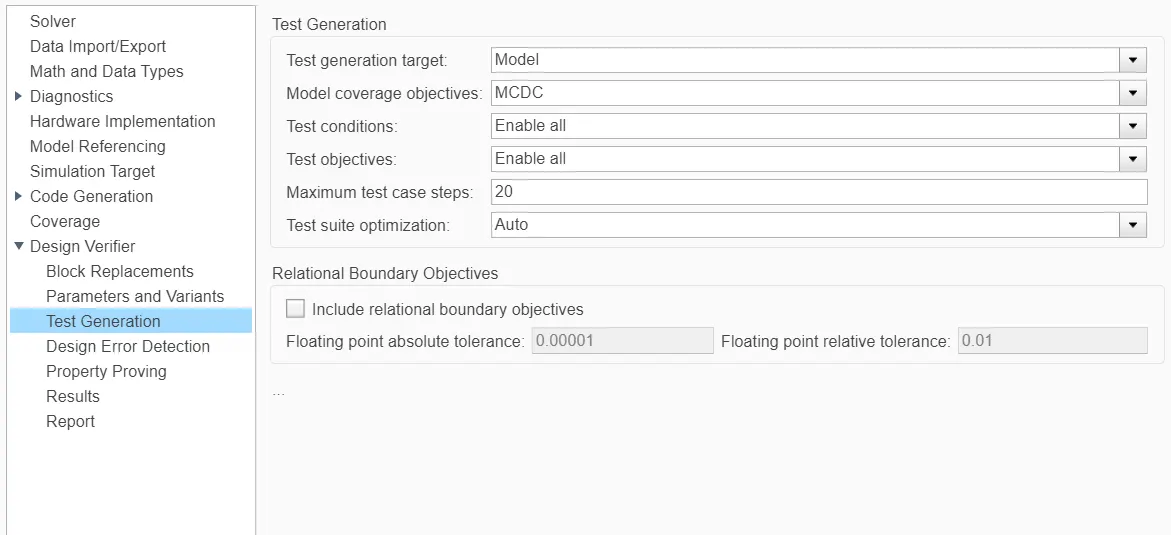
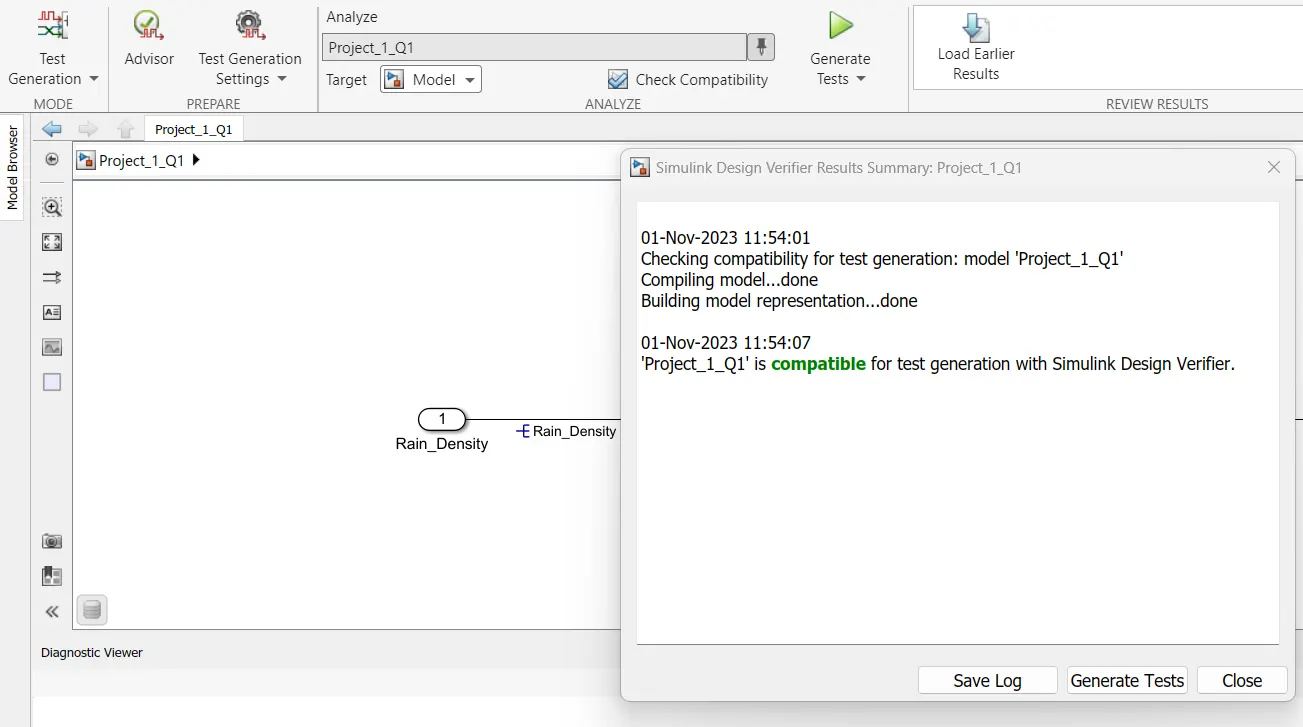
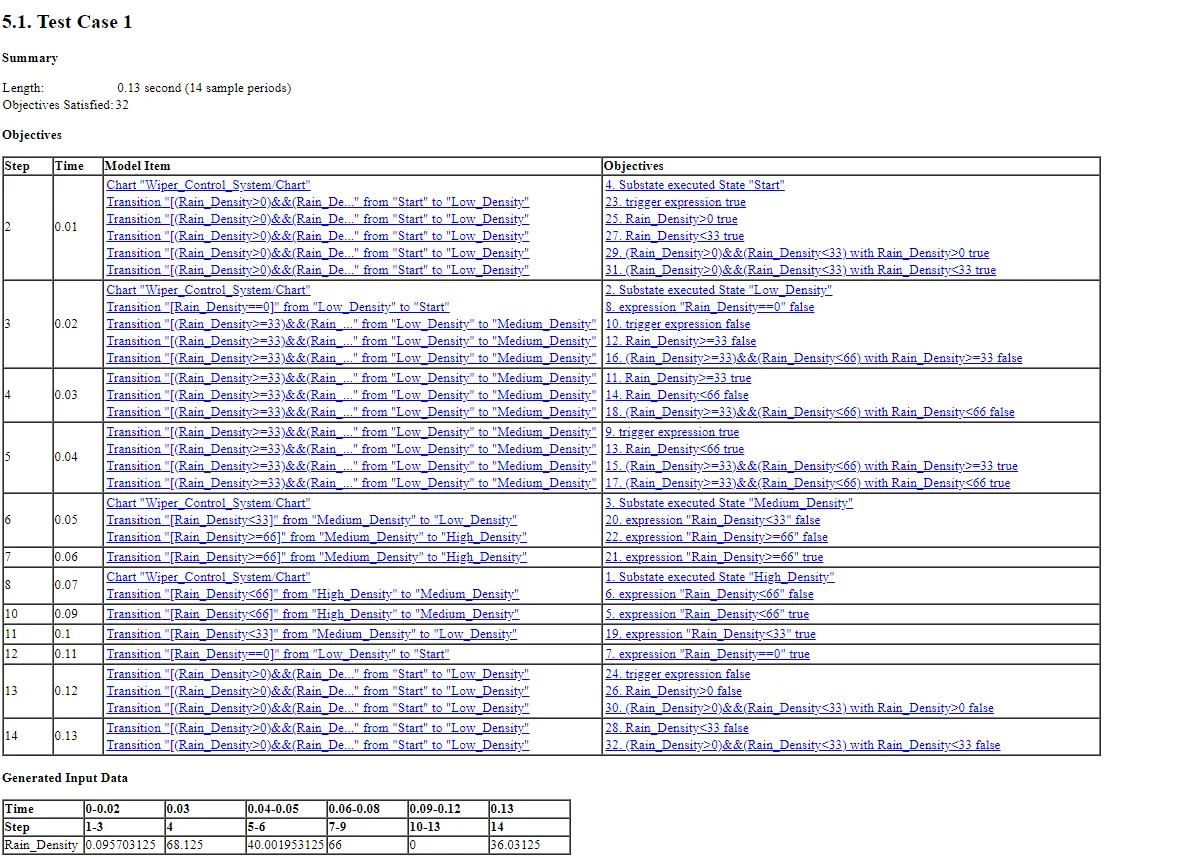
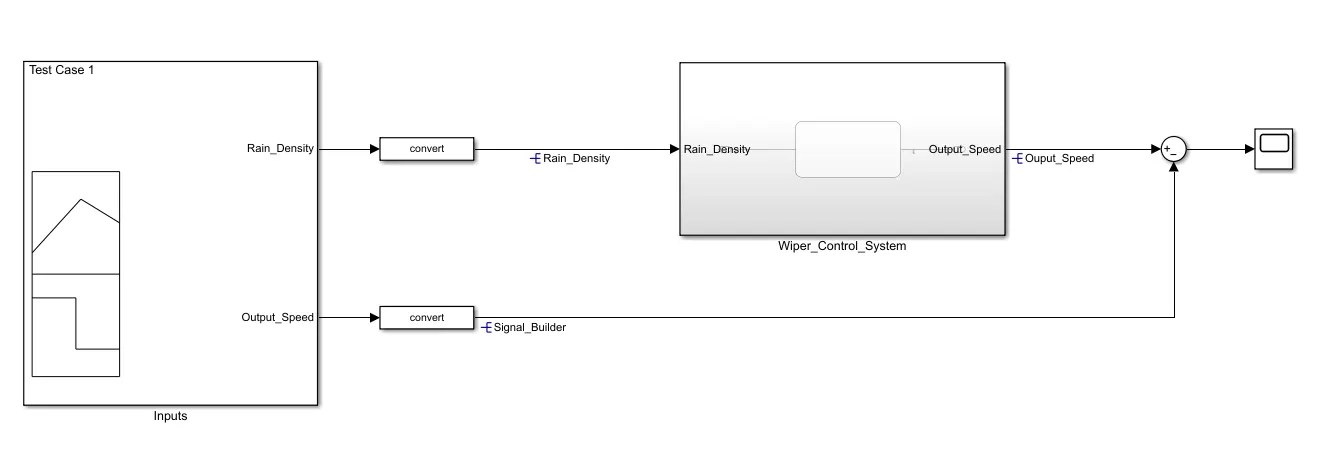
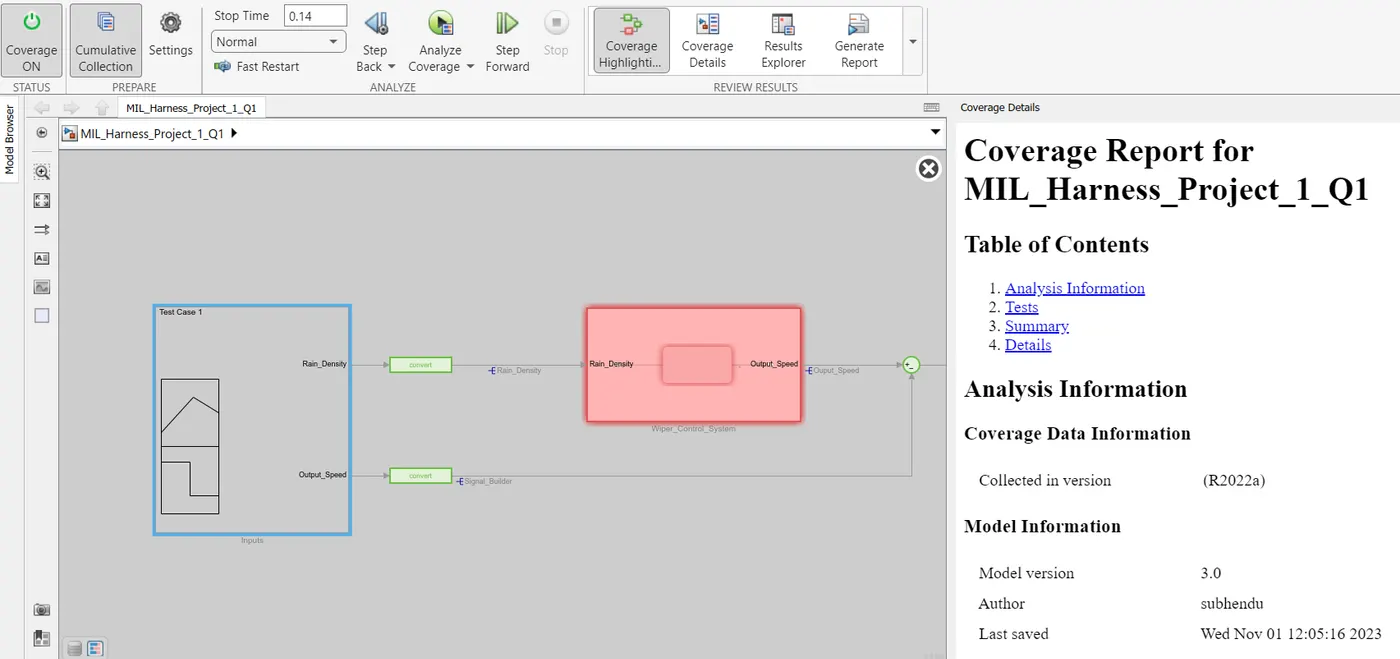
8) The functional test MIL harness, coverage Reports
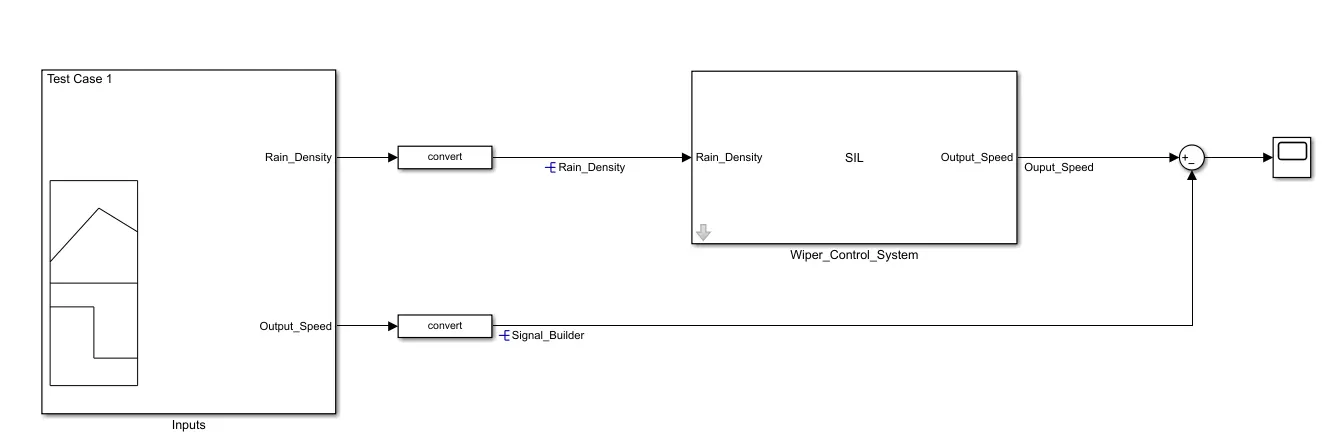
Test Harness for MIL
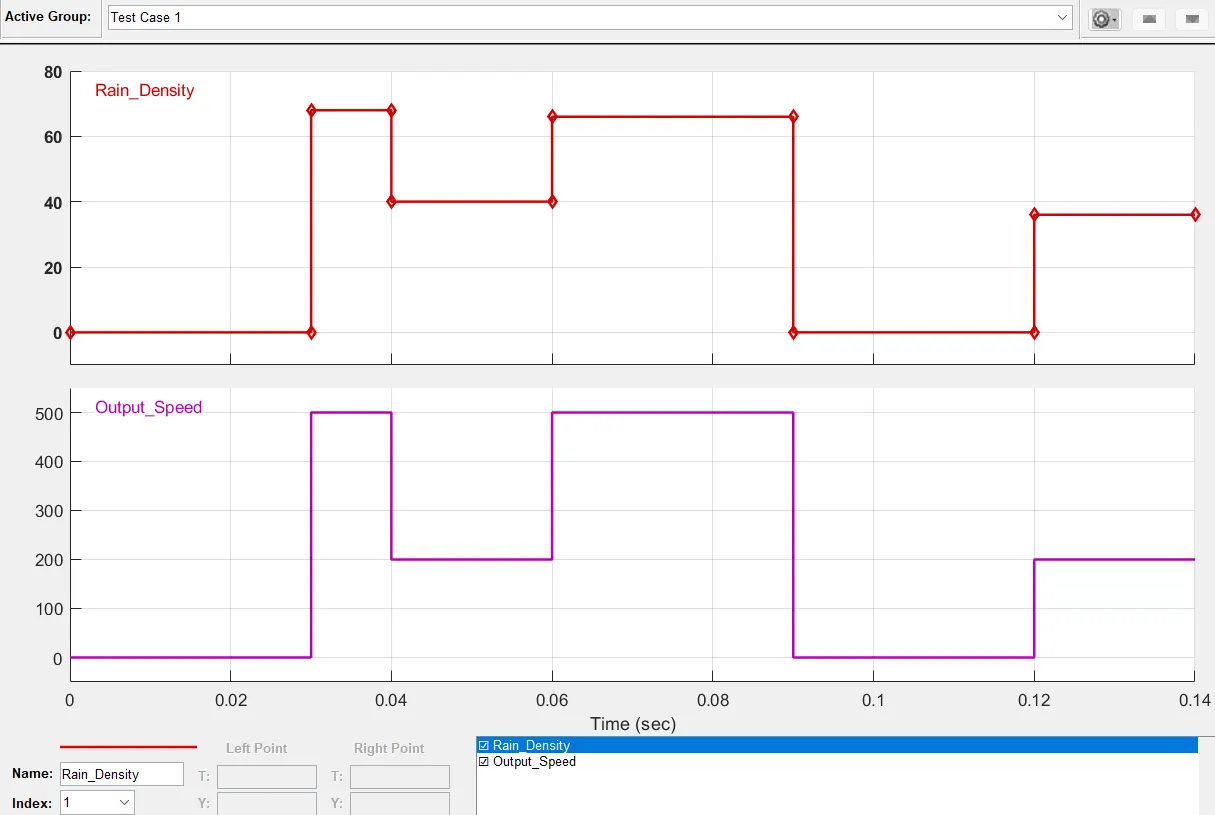
Signal Builder :
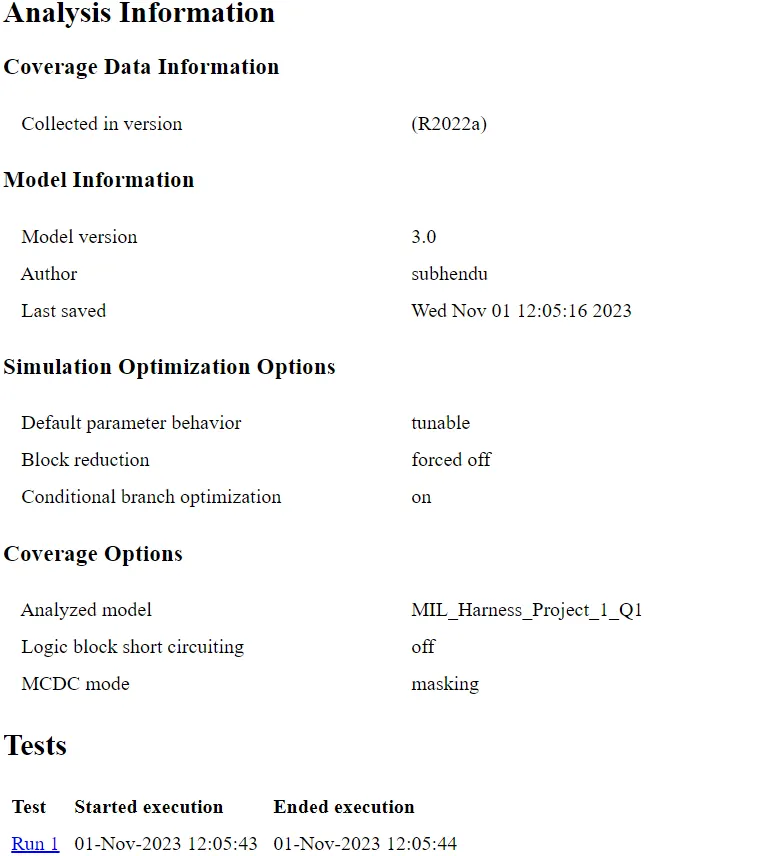
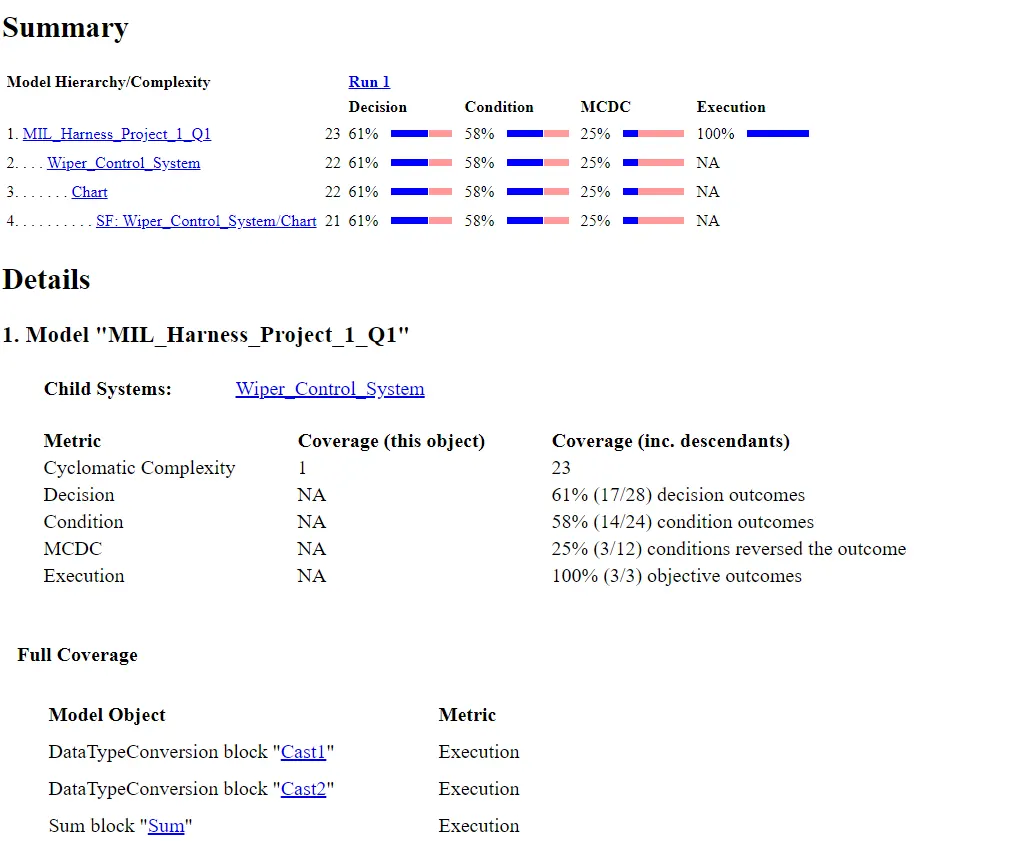
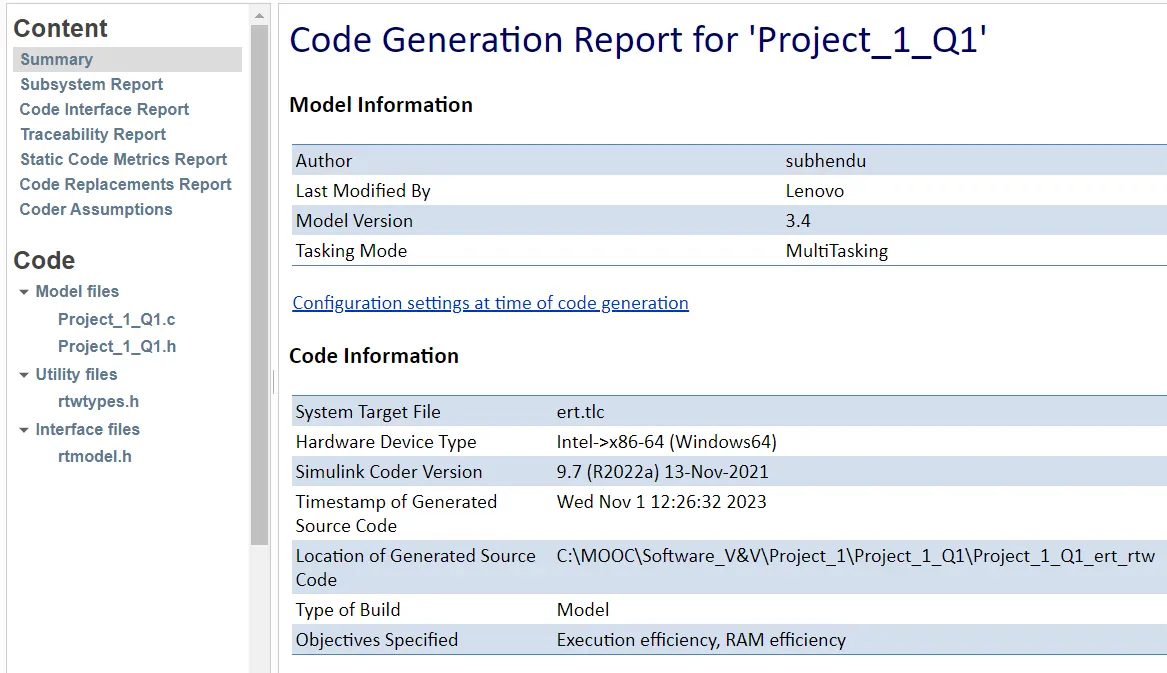
Auto-code Generation Report, Main .c & .h file:
-Open the model >>Model setting and make Code generation setting as 'embedded c' and make'treat as atomic subsystem'>>click on 'Embedded coder'>>And 'Generates code and built the models'
/*
 * Academic License - for use in teaching, academic research, and meeting
 * course requirements at degree granting institutions only.  Not for
 * government, commercial, or other organizational use.
 *
 * File: Project_1_Q1.h
 *
 * Code generated for Simulink model 'Project_1_Q1'.
 *
 * Model version                  : 3.4
 * Simulink Coder version         : 9.7 (R2022a) 13-Nov-2021
 * C/C++ source code generated on : Wed Nov  1 12:26:32 2023
 *
 * Target selection: ert.tlc
 * Embedded hardware selection: Intel->x86-64 (Windows64)
 * Code generation objectives:
 *    1. Execution efficiency
 *    2. RAM efficiency
 * Validation result: Not run
 */

#ifndef RTW_HEADER_Project_1_Q1_h_
#define RTW_HEADER_Project_1_Q1_h_
#ifndef Project_1_Q1_COMMON_INCLUDES_
#define Project_1_Q1_COMMON_INCLUDES_
#include "rtwtypes.h"
#endif                                 /* Project_1_Q1_COMMON_INCLUDES_ */

/* Model Code Variants */

/* Macros for accessing real-time model data structure */
#ifndef rtmGetErrorStatus
#define rtmGetErrorStatus(rtm)         ((rtm)->errorStatus)
#endif

#ifndef rtmSetErrorStatus
#define rtmSetErrorStatus(rtm, val)    ((rtm)->errorStatus = (val))
#endif

#define Project_1_Q1_M                 (rtM)

/* Forward declaration for rtModel */
typedef struct tag_RTM RT_MODEL;

/* Block signals and states (default storage) for system '' */
typedef struct {
  uint8_T is_active_c3_Project_1_Q1;   /* '/Chart' */
  uint8_T is_c3_Project_1_Q1;          /* '/Chart' */
} DW;

/* External inputs (root inport signals with default storage) */
typedef struct {
  uint16_T Rain_Density;               /* '/Rain_Density' */
} ExtU;

/* External outputs (root outports fed by signals with default storage) */
typedef struct {
  uint16_T Ouput_Speed;                /* '/Output_Speed' */
} ExtY;

/* Real-time Model Data Structure */
struct tag_RTM {
  const char_T * volatile errorStatus;
};

/* Block signals and states (default storage) */
extern DW rtDW;

/* External inputs (root inport signals with default storage) */
extern ExtU rtU;

/* External outputs (root outports fed by signals with default storage) */
extern ExtY rtY;

/* Model entry point functions */
extern void Project_1_Q1_initialize(void);
extern void Project_1_Q1_step(void);

/* Real-time Model object */
extern RT_MODEL *const rtM;

/*-
 * The generated code includes comments that allow you to trace directly
 * back to the appropriate location in the model.  The basic format
 * is /block_name, where system is the system number (uniquely
 * assigned by Simulink) and block_name is the name of the block.
 *
 * Use the MATLAB hilite_system command to trace the generated code back
 * to the model.  For example,
 *
 * hilite_system('')    - opens system 3
 * hilite_system('/Kp') - opens and selects block Kp which resides in S3
 *
 * Here is the system hierarchy for this model
 *
 * '' : 'Project_1_Q1'
 * ''   : 'Project_1_Q1/Wiper_Control_System'
 * ''   : 'Project_1_Q1/Wiper_Control_System/Chart'
 */
#endif                                 /* RTW_HEADER_Project_1_Q1_h_ */

/*
 * File trailer for generated code.
 *
 * [EOF]
 */
/*
* Academic License - for use in teaching, academic research, and meeting
* course requirements at degree granting institutions only. Not for
* government, commercial, or other organizational use.
*
* File: Project_1_Q1.c
*
* Code generated for Simulink model 'Project_1_Q1'.
*
* Model version : 3.4
* Simulink Coder version : 9.7 (R2022a) 13-Nov-2021
* C/C++ source code generated on : Wed Nov 1 12:26:32 2023
*
* Target selection: ert.tlc
* Embedded hardware selection: Intel->x86-64 (Windows64)
* Code generation objectives:
* 1. Execution efficiency
* 2. RAM efficiency
* Validation result: Not run
*/
#include "Project_1_Q1.h"
#include "rtwtypes.h"
/* Named constants for Chart: '/Chart' */
#define IN_High_Density ((uint8_T)1U)
#define IN_Low_Density ((uint8_T)2U)
#define IN_Medium_Density ((uint8_T)3U)
#define IN_Start ((uint8_T)4U)
#ifndef UCHAR_MAX
#include
#endif
#if ( UCHAR_MAX != (0xFFU) ) || ( SCHAR_MAX != (0x7F) )
#error Code was generated for compiler with different sized uchar/char. \
Consider adjusting Test hardware word size settings on the \
Hardware Implementation pane to match your compiler word sizes as \
defined in limits.h of the compiler. Alternatively, you can \
select the Test hardware is the same as production hardware option and \
select the Enable portable word sizes option on the Code Generation > \
Verification pane for ERT based targets, which will disable the \
preprocessor word size checks.
#endif
#if ( USHRT_MAX != (0xFFFFU) ) || ( SHRT_MAX != (0x7FFF) )
#error Code was generated for compiler with different sized ushort/short. \
Consider adjusting Test hardware word size settings on the \
Hardware Implementation pane to match your compiler word sizes as \
defined in limits.h of the compiler. Alternatively, you can \
select the Test hardware is the same as production hardware option and \
select the Enable portable word sizes option on the Code Generation > \
Verification pane for ERT based targets, which will disable the \
preprocessor word size checks.
#endif
#if ( UINT_MAX != (0xFFFFFFFFU) ) || ( INT_MAX != (0x7FFFFFFF) )
#error Code was generated for compiler with different sized uint/int. \
Consider adjusting Test hardware word size settings on the \
Hardware Implementation pane to match your compiler word sizes as \
defined in limits.h of the compiler. Alternatively, you can \
select the Test hardware is the same as production hardware option and \
select the Enable portable word sizes option on the Code Generation > \
Verification pane for ERT based targets, which will disable the \
preprocessor word size checks.
#endif
#if ( ULONG_MAX != (0xFFFFFFFFU) ) || ( LONG_MAX != (0x7FFFFFFF) )
#error Code was generated for compiler with different sized ulong/long. \
Consider adjusting Test hardware word size settings on the \
Hardware Implementation pane to match your compiler word sizes as \
defined in limits.h of the compiler. Alternatively, you can \
select the Test hardware is the same as production hardware option and \
select the Enable portable word sizes option on the Code Generation > \
Verification pane for ERT based targets, which will disable the \
preprocessor word size checks.
#endif
/* Skipping ulong_long/long_long check: insufficient preprocessor integer range. */
/* Block signals and states (default storage) */
DW rtDW;
/* External inputs (root inport signals with default storage) */
ExtU rtU;
/* External outputs (root outports fed by signals with default storage) */
ExtY rtY;
/* Real-time model */
static RT_MODEL rtM_;
RT_MODEL *const rtM = &rtM_;
/* Model step function */
void Project_1_Q1_step(void)
{
/* Outputs for Atomic SubSystem: '/Wiper_Control_System' */
/* Chart: '/Chart' incorporates:
* Inport: '/Rain_Density'
*/
if (rtDW.is_active_c3_Project_1_Q1 == 0U) {
rtDW.is_active_c3_Project_1_Q1 = 1U;
rtDW.is_c3_Project_1_Q1 = IN_Start;
/* Outport: '/Output_Speed' */
rtY.Ouput_Speed = 0U;
} else {
switch (rtDW.is_c3_Project_1_Q1) {
case IN_High_Density:
if (rtU.Rain_Density < 33792) {
rtDW.is_c3_Project_1_Q1 = IN_Medium_Density;
/* Outport: '/Output_Speed' */
rtY.Ouput_Speed = 12800U;
} else {
/* Outport: '/Output_Speed' */
rtY.Ouput_Speed = 32000U;
}
break;
case IN_Low_Density:
if (rtU.Rain_Density == 0) {
rtDW.is_c3_Project_1_Q1 = IN_Start;
/* Outport: '/Output_Speed' */
rtY.Ouput_Speed = 0U;
} else if ((rtU.Rain_Density >= 16896) && (rtU.Rain_Density < 33792)) {
rtDW.is_c3_Project_1_Q1 = IN_Medium_Density;
/* Outport: '/Output_Speed' */
rtY.Ouput_Speed = 12800U;
} else {
/* Outport: '/Output_Speed' */
rtY.Ouput_Speed = 6400U;
}
break;
case IN_Medium_Density:
if (rtU.Rain_Density < 16896) {
rtDW.is_c3_Project_1_Q1 = IN_Low_Density;
/* Outport: '/Output_Speed' */
rtY.Ouput_Speed = 6400U;
} else if (rtU.Rain_Density >= 33792) {
rtDW.is_c3_Project_1_Q1 = IN_High_Density;
/* Outport: '/Output_Speed' */
rtY.Ouput_Speed = 32000U;
} else {
/* Outport: '/Output_Speed' */
rtY.Ouput_Speed = 12800U;
}
break;
default:
/* case IN_Start: */
if ((rtU.Rain_Density > 0) && (rtU.Rain_Density < 16896)) {
rtDW.is_c3_Project_1_Q1 = IN_Low_Density;
/* Outport: '/Output_Speed' */
rtY.Ouput_Speed = 6400U;
} else {
/* Outport: '/Output_Speed' */
rtY.Ouput_Speed = 0U;
}
break;
}
}
/* End of Chart: '/Chart' */
/* End of Outputs for SubSystem: '/Wiper_Control_System' */
}
/* Model initialize function */
void Project_1_Q1_initialize(void)
{
/* (no initialization code required) */
}
/*
* File trailer for generated code.
*
* [EOF]
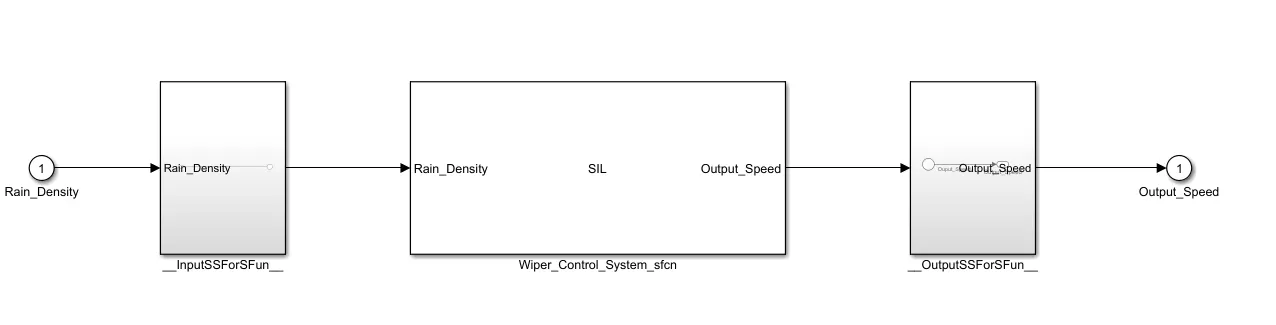
*/SIL Harness
9. Poly space analysis report / outputs
Steps to create a Polyspace Report:
Initially, open the Polyspace in that new project click on start new project.
The Project Properties dialogue box will open in that give the project name as we saved in the MATLAB,then select the location where it we need to save after that click Next or use the default location.
Then ,it asks for the Projrct source,click on browserand select the folder where th .c file are generated then optionally we can add the include folder then clock on finish,the polyspace environment will open.
In the configuraton settings option called Target & compiler select the source code language as c,change the target processor as X86_64.
In the coding standards & code Metrics in that enable the check MISRA C:2004 also select the calculate the code metrics option
After that go to bug finder analysis under that select the default one.
Go to reporting enable the generate report option and ouput formet as PDF or any file we need
Finally save the polyspace and run the Bug Finder.
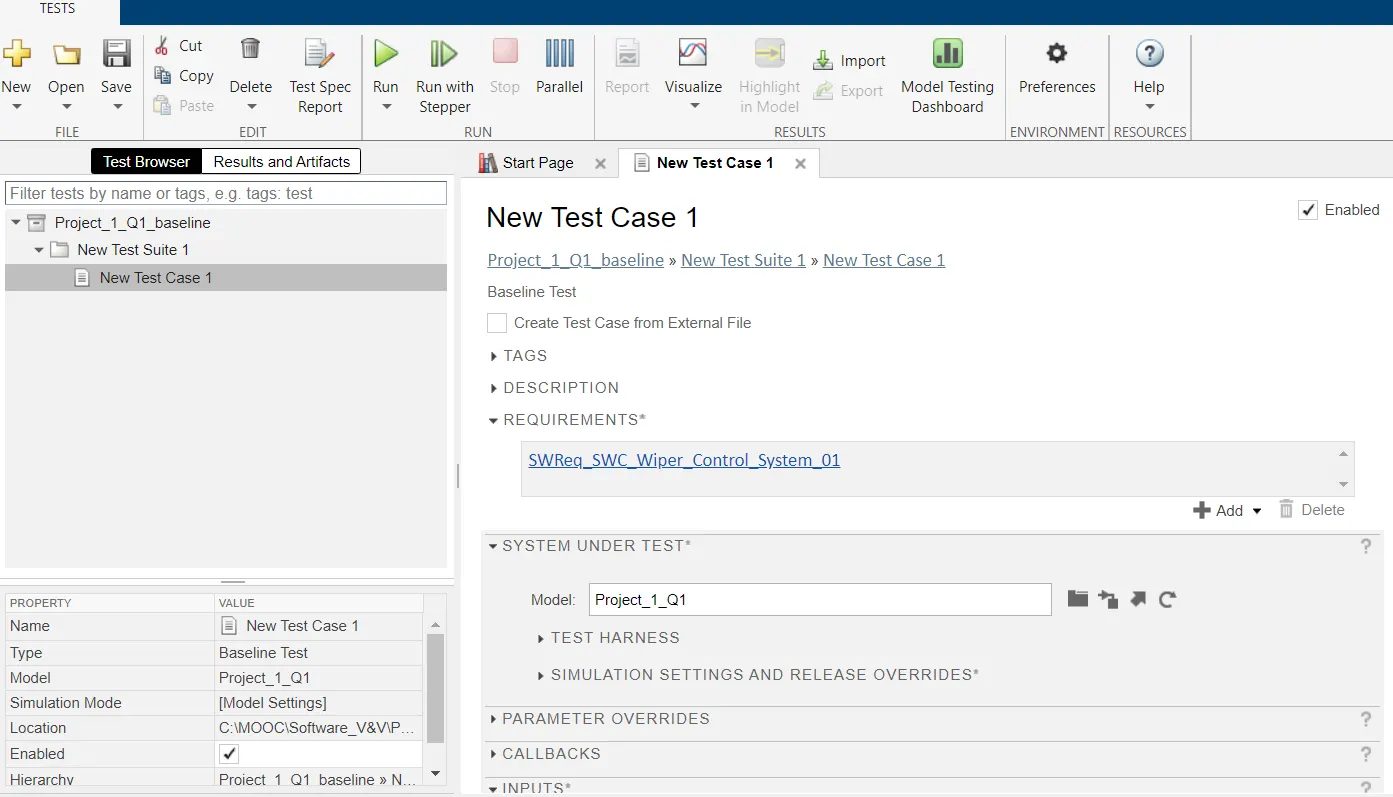
10.Test manager reports – baseline & back-to-back testing
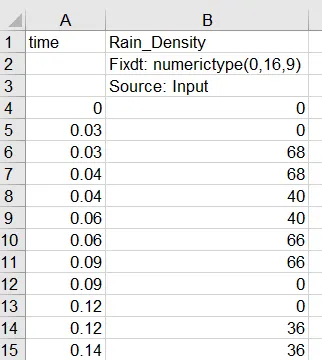
Input:
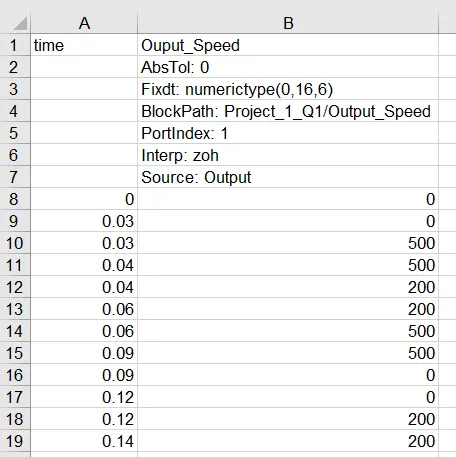
Output :
2.Vehicle speed calculation for ABS using Wheel Speed sensor
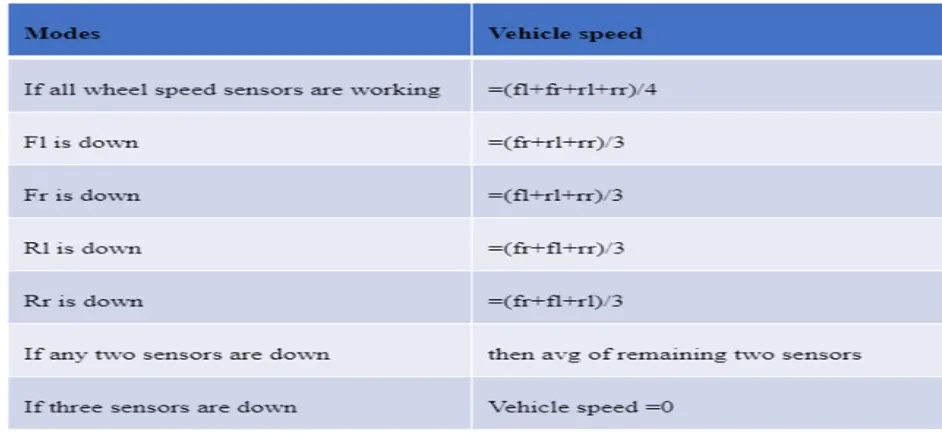
Develop Simulink/state flow model for the vehicle speed calculation unit inside the ABS system for the below conditions.
Description of Challenge:
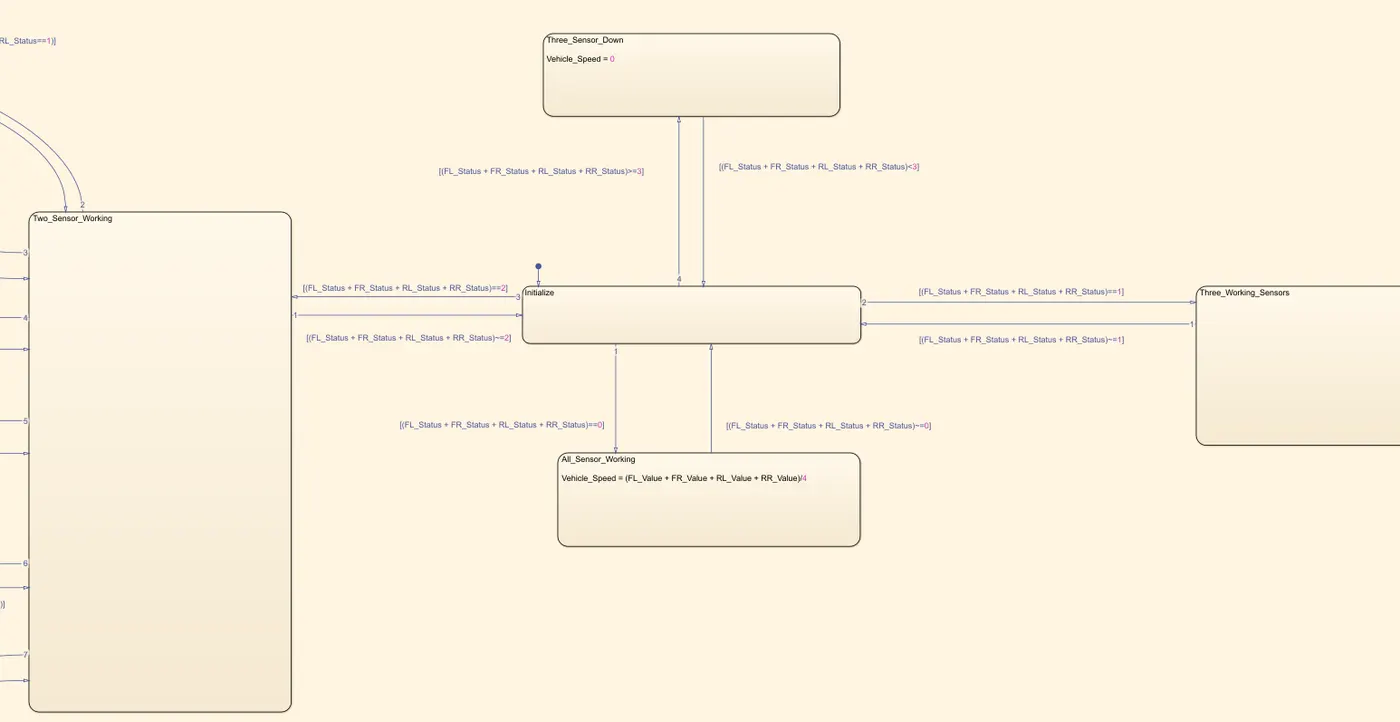
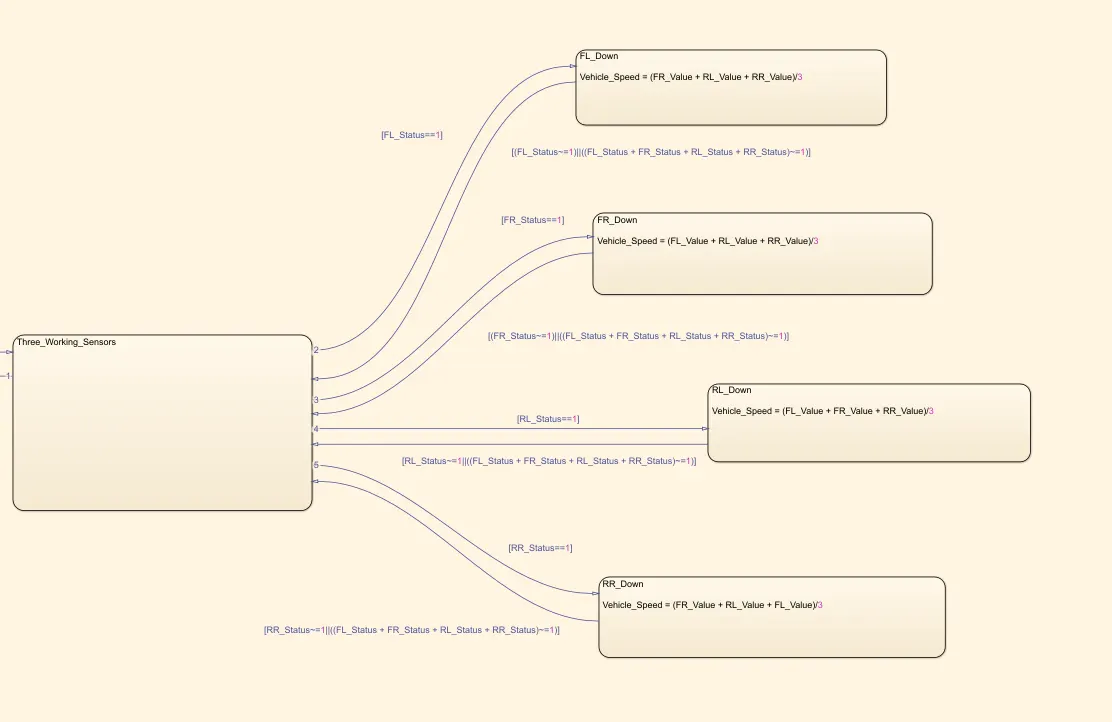
fl, fr, rl and rr are the wheel speeds of front left, front right, rear left and rear right respectively.
1. Simulink Model
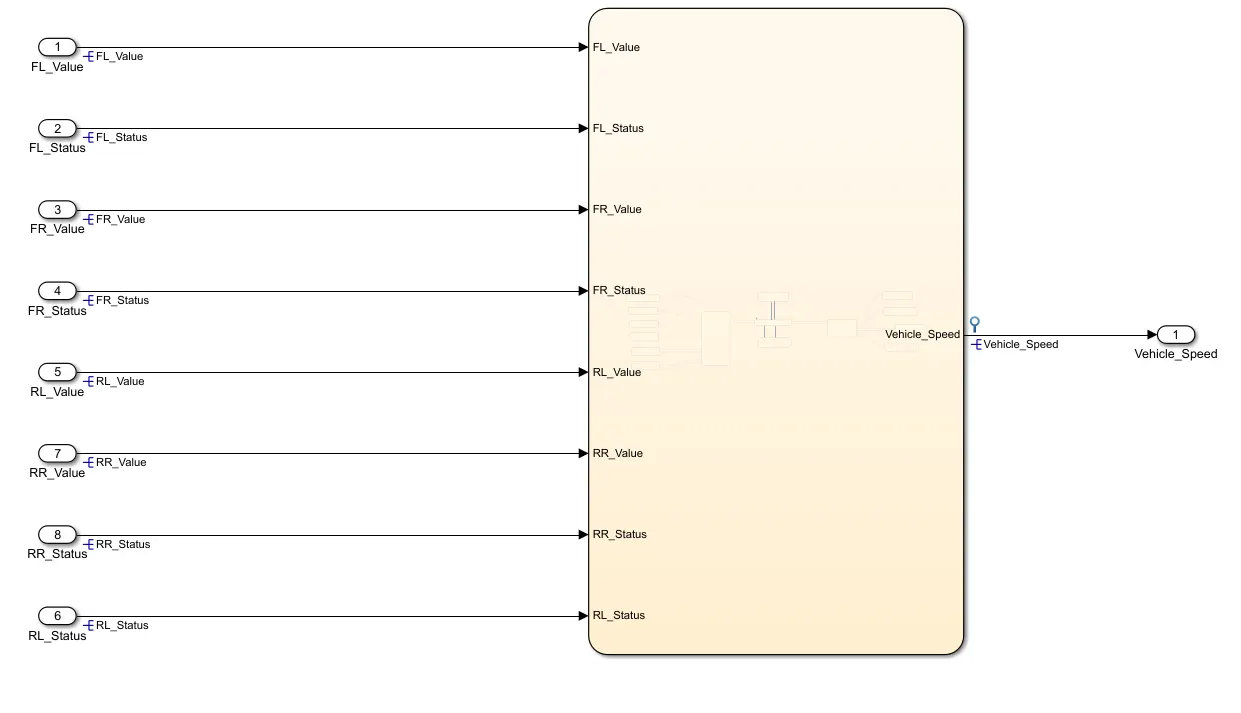
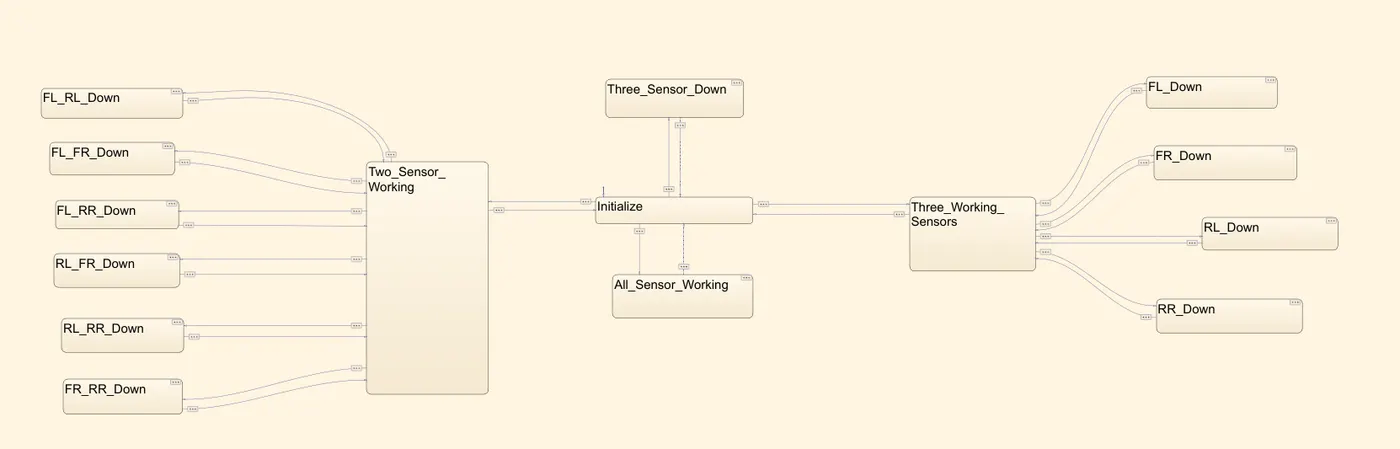
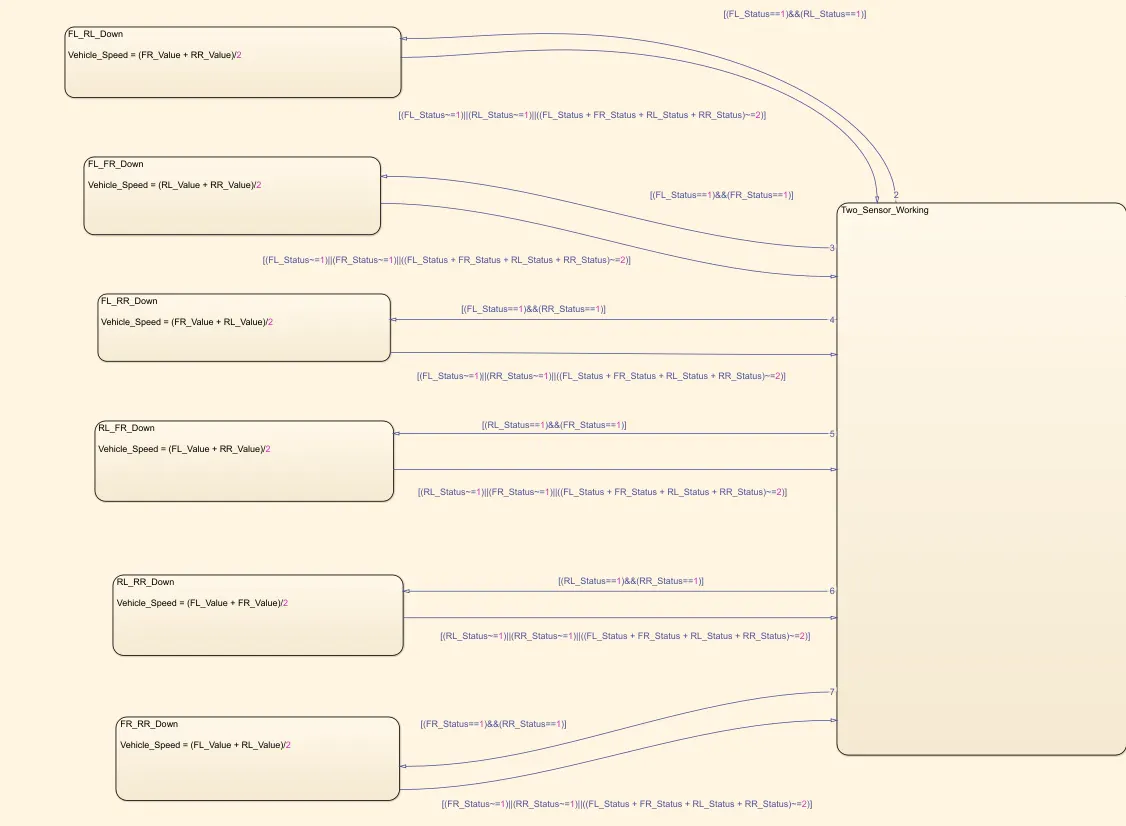
Chart:
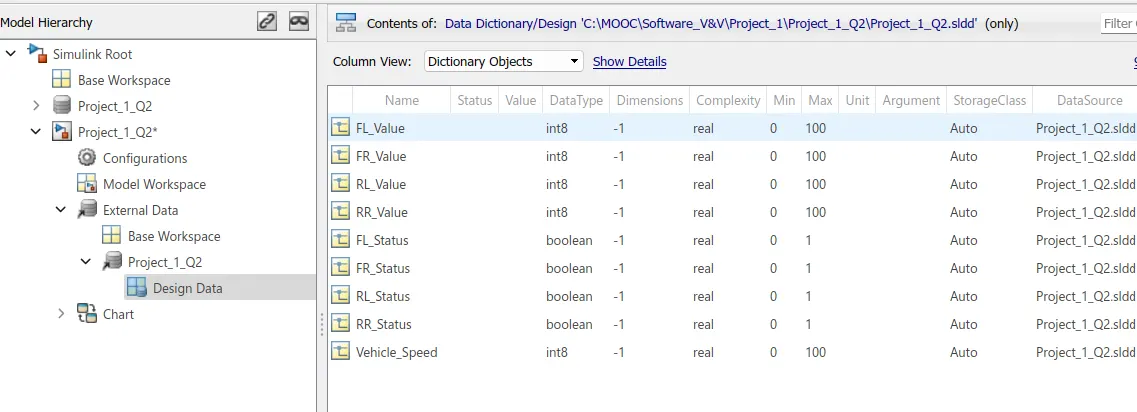
2.SLDD file
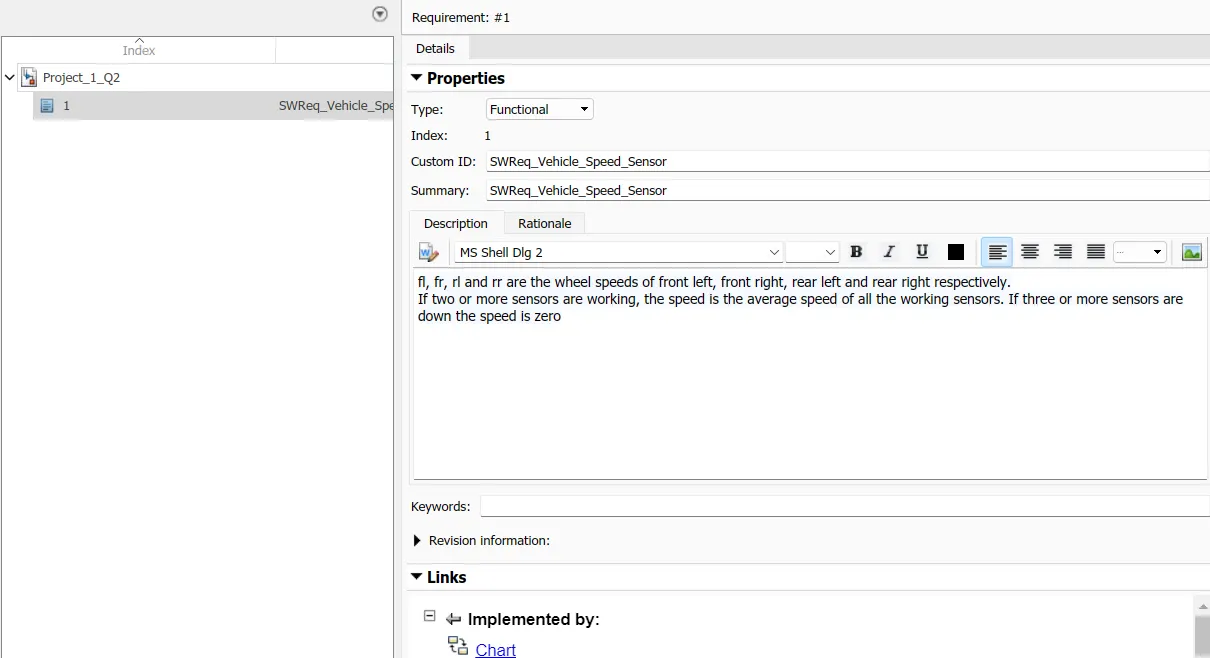
3. Requirement tagging report
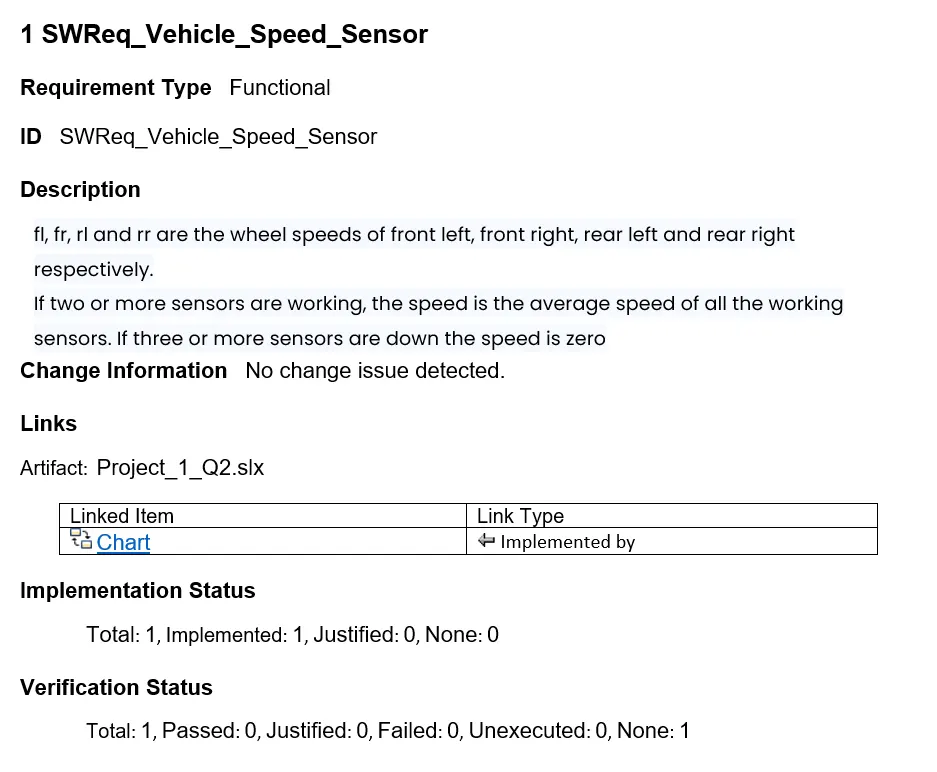
4.Model advisor - JMAAB compliance report
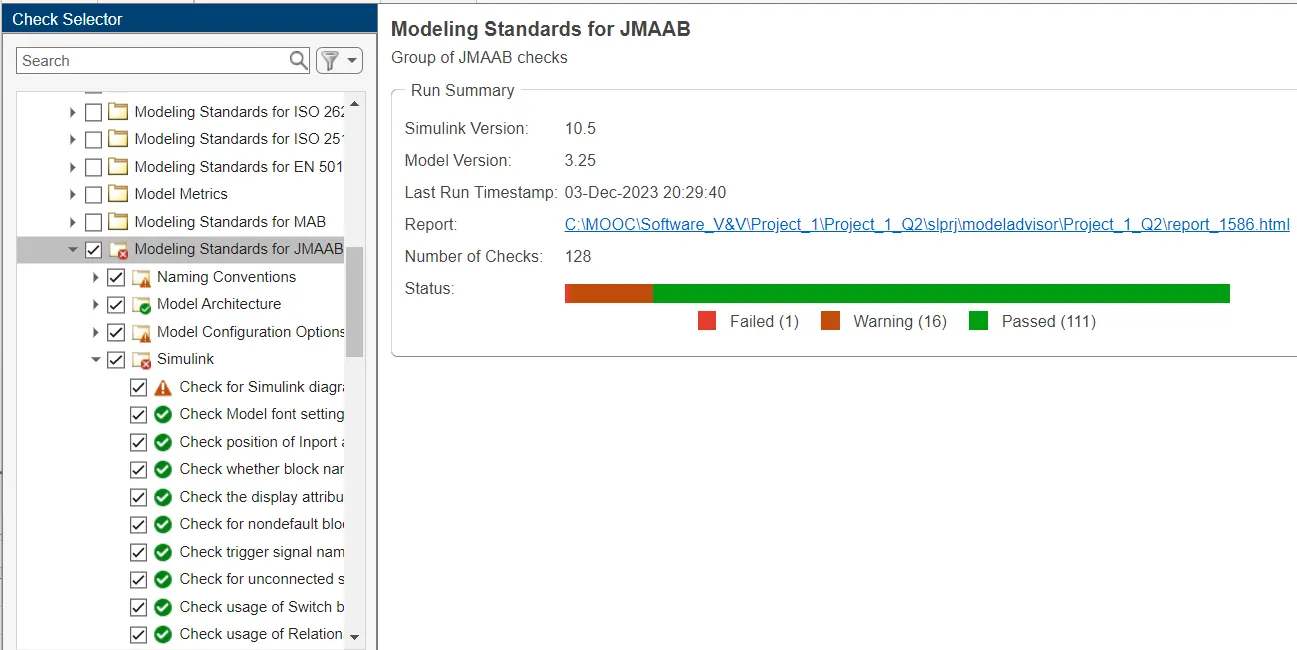
5.Fixed-point Tool
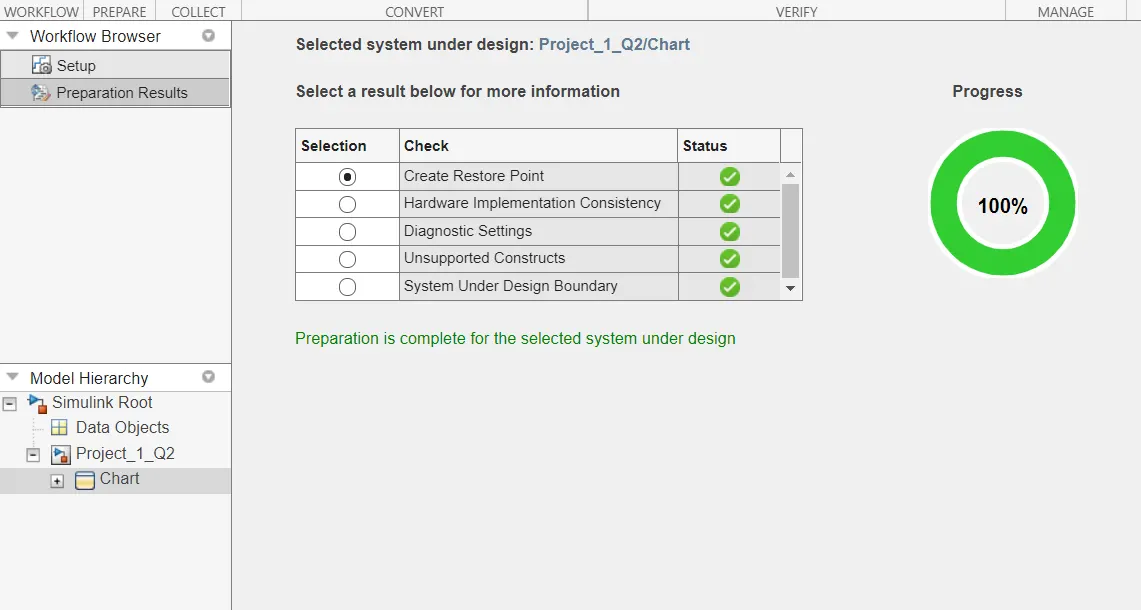
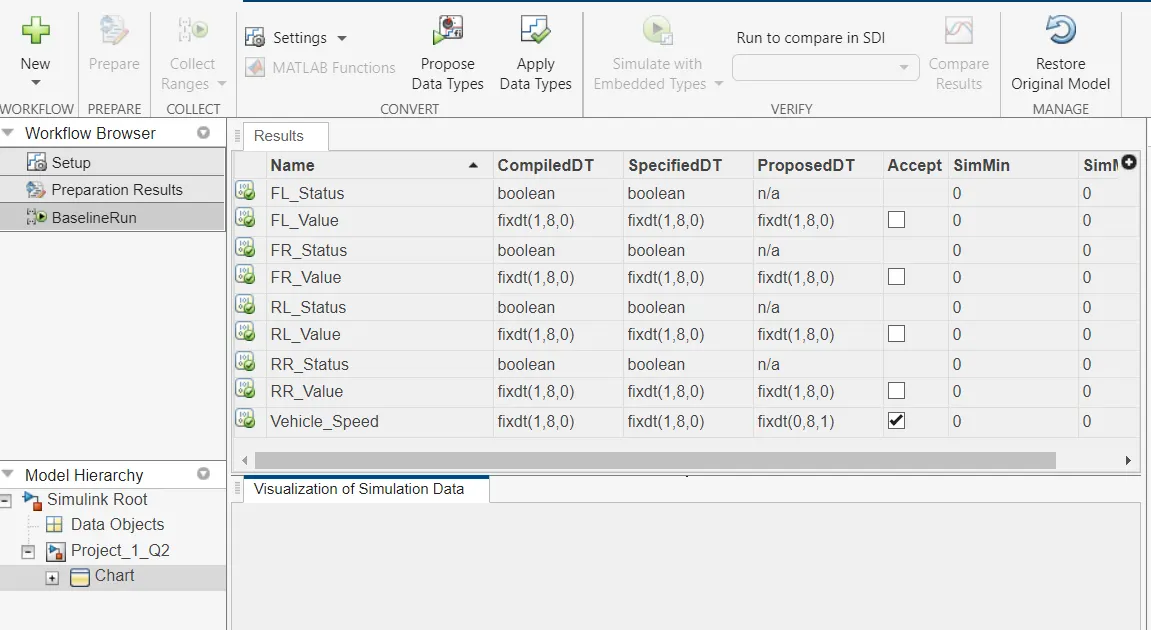
6.SLDV Design error detection report
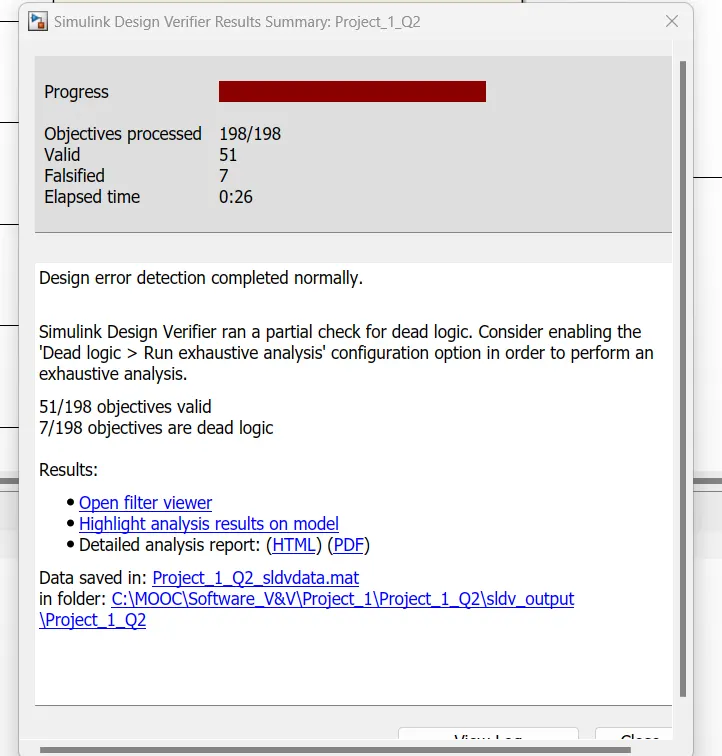
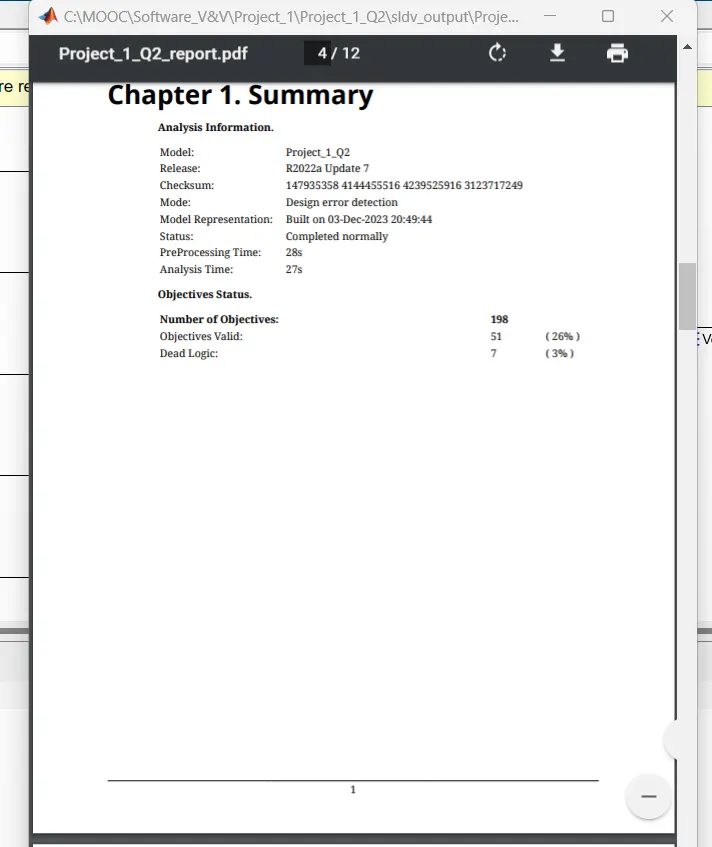
7. SLDV Test generation report
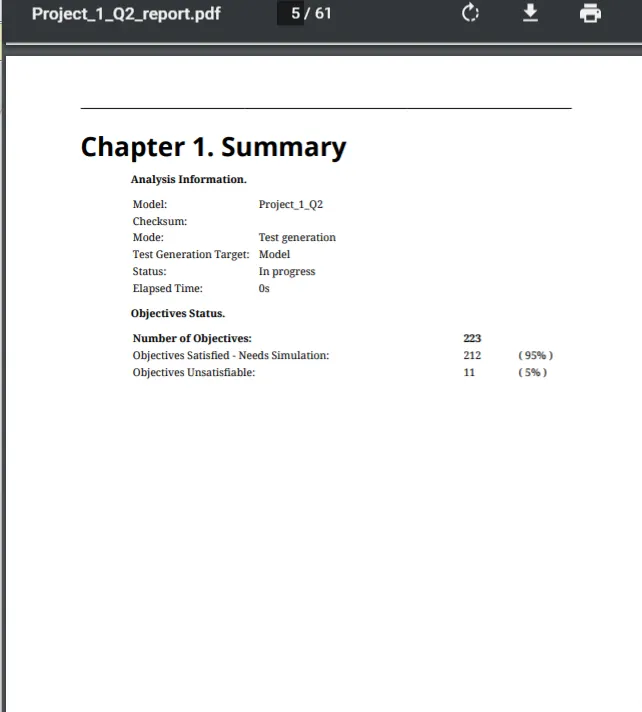
8. Code Generation
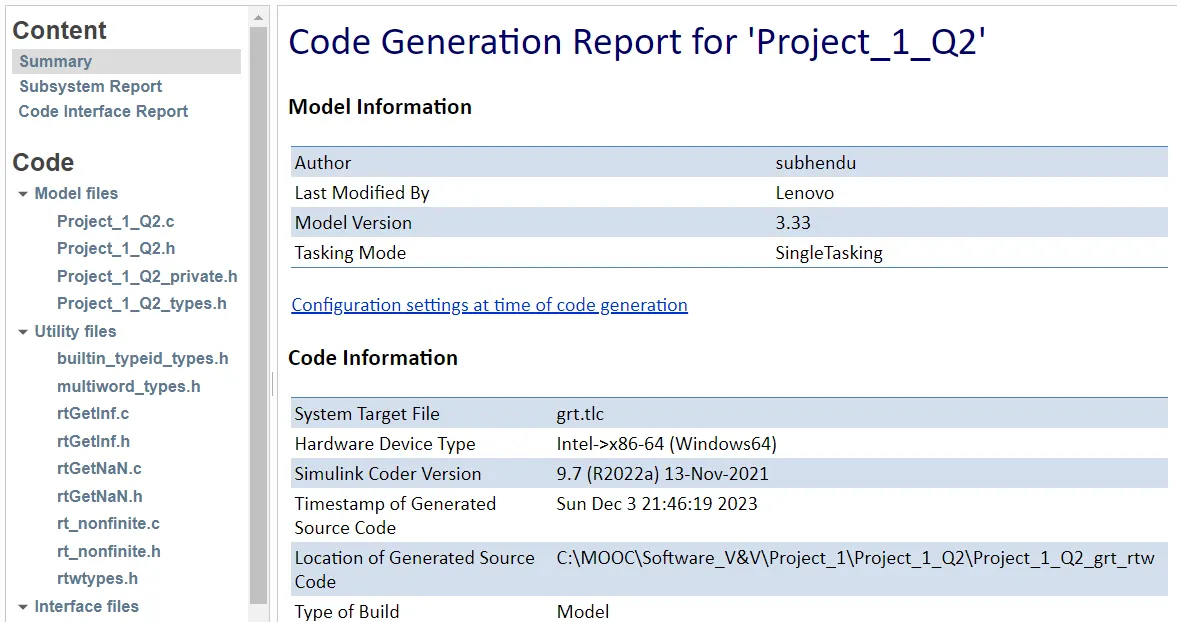
Project_1_Q2.h:
/*
 * Project_1_Q2.h
 *
 * Academic License - for use in teaching, academic research, and meeting
 * course requirements at degree granting institutions only.  Not for
 * government, commercial, or other organizational use.
 *
 * Code generation for model "Project_1_Q2".
 *
 * Model version              : 3.33
 * Simulink Coder version : 9.7 (R2022a) 13-Nov-2021
 * C source code generated on : Sun Dec  3 21:46:19 2023
 *
 * Target selection: grt.tlc
 * Note: GRT includes extra infrastructure and instrumentation for prototyping
 * Embedded hardware selection: Intel->x86-64 (Windows64)
 * Code generation objectives: Unspecified
 * Validation result: Not run
 */

#ifndef RTW_HEADER_Project_1_Q2_h_
#define RTW_HEADER_Project_1_Q2_h_
#ifndef Project_1_Q2_COMMON_INCLUDES_
#define Project_1_Q2_COMMON_INCLUDES_
#include "rtwtypes.h"
#include "rtw_continuous.h"
#include "rtw_solver.h"
#include "rt_logging.h"
#endif                                 /* Project_1_Q2_COMMON_INCLUDES_ */

#include "Project_1_Q2_types.h"
#include
#include
#include
#include "rt_nonfinite.h"

/* Macros for accessing real-time model data structure */
#ifndef rtmGetFinalTime
#define rtmGetFinalTime(rtm)           ((rtm)->Timing.tFinal)
#endif

#ifndef rtmGetRTWLogInfo
#define rtmGetRTWLogInfo(rtm)          ((rtm)->rtwLogInfo)
#endif

#ifndef rtmGetErrorStatus
#define rtmGetErrorStatus(rtm)         ((rtm)->errorStatus)
#endif

#ifndef rtmSetErrorStatus
#define rtmSetErrorStatus(rtm, val)    ((rtm)->errorStatus = (val))
#endif

#ifndef rtmGetStopRequested
#define rtmGetStopRequested(rtm)       ((rtm)->Timing.stopRequestedFlag)
#endif

#ifndef rtmSetStopRequested
#define rtmSetStopRequested(rtm, val)  ((rtm)->Timing.stopRequestedFlag = (val))
#endif

#ifndef rtmGetStopRequestedPtr
#define rtmGetStopRequestedPtr(rtm)    (&((rtm)->Timing.stopRequestedFlag))
#endif

#ifndef rtmGetT
#define rtmGetT(rtm)                   ((rtm)->Timing.taskTime0)
#endif

#ifndef rtmGetTFinal
#define rtmGetTFinal(rtm)              ((rtm)->Timing.tFinal)
#endif

#ifndef rtmGetTPtr
#define rtmGetTPtr(rtm)                (&(rtm)->Timing.taskTime0)
#endif

/* Block signals (default storage) */
typedef struct {
  int8_T Vehicle_Speed;                /* '/Chart' */
} B_Project_1_Q2_T;

/* Block states (default storage) for system '' */
typedef struct {
  uint8_T is_active_c3_Project_1_Q2;   /* '/Chart' */
  uint8_T is_c3_Project_1_Q2;          /* '/Chart' */
} DW_Project_1_Q2_T;

/* External inputs (root inport signals with default storage) */
typedef struct {
  int8_T FL_Value;                     /* '/FL_Value' */
  boolean_T FL_Status;                 /* '/FL_Status' */
  int8_T FR_Value;                     /* '/FR_Value' */
  boolean_T FR_Status;                 /* '/FR_Status' */
  int8_T RL_Value;                     /* '/RL_Value' */
  boolean_T RL_Status;                 /* '/RL_Status' */
  int8_T RR_Value;                     /* '/RR_Value' */
  boolean_T RR_Status;                 /* '/RR_Status' */
} ExtU_Project_1_Q2_T;

/* External outputs (root outports fed by signals with default storage) */
typedef struct {
  int8_T Vehicle_Speed;                /* '/Vehicle_Speed' */
} ExtY_Project_1_Q2_T;

/* Real-time Model Data Structure */
struct tag_RTM_Project_1_Q2_T {
  const char_T *errorStatus;
  RTWLogInfo *rtwLogInfo;

  /*
   * Timing:
   * The following substructure contains information regarding
   * the timing information for the model.
   */
  struct {
    time_T taskTime0;
    uint32_T clockTick0;
    uint32_T clockTickH0;
    time_T stepSize0;
    time_T tFinal;
    boolean_T stopRequestedFlag;
  } Timing;
};

/* Block signals (default storage) */
extern B_Project_1_Q2_T Project_1_Q2_B;

/* Block states (default storage) */
extern DW_Project_1_Q2_T Project_1_Q2_DW;

/* External inputs (root inport signals with default storage) */
extern ExtU_Project_1_Q2_T Project_1_Q2_U;

/* External outputs (root outports fed by signals with default storage) */
extern ExtY_Project_1_Q2_T Project_1_Q2_Y;

/* Model entry point functions */
extern void Project_1_Q2_initialize(void);
extern void Project_1_Q2_step(void);
extern void Project_1_Q2_terminate(void);

/* Real-time Model object */
extern RT_MODEL_Project_1_Q2_T *const Project_1_Q2_M;

/*-
 * The generated code includes comments that allow you to trace directly
 * back to the appropriate location in the model.  The basic format
 * is /block_name, where system is the system number (uniquely
 * assigned by Simulink) and block_name is the name of the block.
 *
 * Use the MATLAB hilite_system command to trace the generated code back
 * to the model.  For example,
 *
 * hilite_system('')    - opens system 3
 * hilite_system('/Kp') - opens and selects block Kp which resides in S3
 *
 * Here is the system hierarchy for this model
 *
 * '' : 'Project_1_Q2'
 * ''   : 'Project_1_Q2/Chart'
 */
#endif                                 /* RTW_HEADER_Project_1_Q2_h_ */
Project_1_Q2.c:
          int32_T tmp;
          Project_1_Q2_DW.is_c3_Project_1_Q2 = Project_1_Q2_IN_FR_Down;
          tmp = Project_1_Q2_U.FL_Value + Project_1_Q2_U.RL_Value;
          if (tmp > 127) {
            tmp = 127;
          } else if (tmp < -128) {
            tmp = -128;
          }

          tmp += Project_1_Q2_U.RR_Value;
          if (tmp > 127) {
            tmp = 127;
          } else if (tmp < -128) {
            tmp = -128;
          }

          Project_1_Q2_B.Vehicle_Speed = (int8_T)rt_roundd_snf((real_T)tmp / 3.0);
        } else if (Project_1_Q2_U.RL_Status) {
          int32_T tmp;
          Project_1_Q2_DW.is_c3_Project_1_Q2 = Project_1_Q2_IN_RL_Down;
          tmp = Project_1_Q2_U.FL_Value + Project_1_Q2_U.FR_Value;
          if (tmp > 127) {
            tmp = 127;
          } else if (tmp < -128) {
            tmp = -128;
          }

          tmp += Project_1_Q2_U.RR_Value;
          if (tmp > 127) {
            tmp = 127;
          } else if (tmp < -128) {
            tmp = -128;
          }

          Project_1_Q2_B.Vehicle_Speed = (int8_T)rt_roundd_snf((real_T)tmp / 3.0);
        } else if (Project_1_Q2_U.RR_Status) {
          int32_T tmp;
          Project_1_Q2_DW.is_c3_Project_1_Q2 = Project_1_Q2_IN_RR_Down;
          tmp = Project_1_Q2_U.FR_Value + Project_1_Q2_U.RL_Value;
          if (tmp > 127) {
            tmp = 127;
          } else if (tmp < -128) {
            tmp = -128;
          }

          tmp += Project_1_Q2_U.FL_Value;
          if (tmp > 127) {
            tmp = 127;
          } else if (tmp < -128) {
            tmp = -128;
          }

          Project_1_Q2_B.Vehicle_Speed = (int8_T)rt_roundd_snf((real_T)tmp / 3.0);
        }
      }
      break;

     default:
      {
        /* case IN_Two_Sensor_Working: */
        if (((Project_1_Q2_U.FL_Status + Project_1_Q2_U.FR_Status) +
             Project_1_Q2_U.RL_Status) + Project_1_Q2_U.RR_Status != 2) {
          Project_1_Q2_DW.is_c3_Project_1_Q2 = Project_1_Q2_IN_Initialize;
        } else if (Project_1_Q2_U.FL_Status && Project_1_Q2_U.RL_Status) {
          int32_T tmp;
          Project_1_Q2_DW.is_c3_Project_1_Q2 = Project_1_Q2_IN_FL_RL_Down;
          tmp = Project_1_Q2_U.FR_Value + Project_1_Q2_U.RR_Value;
          if (tmp > 127) {
            tmp = 127;
          } else if (tmp < -128) {
            tmp = -128;
          }

          Project_1_Q2_B.Vehicle_Speed = (int8_T)rt_roundd_snf((real_T)tmp / 2.0);
        } else if (Project_1_Q2_U.FL_Status && Project_1_Q2_U.FR_Status) {
          int32_T tmp;
          Project_1_Q2_DW.is_c3_Project_1_Q2 = Project_1_Q2_IN_FL_FR_Down;
          tmp = Project_1_Q2_U.RL_Value + Project_1_Q2_U.RR_Value;
          if (tmp > 127) {
            tmp = 127;
          } else if (tmp < -128) {
            tmp = -128;
          }

          Project_1_Q2_B.Vehicle_Speed = (int8_T)rt_roundd_snf((real_T)tmp / 2.0);
        } else if (Project_1_Q2_U.FL_Status && Project_1_Q2_U.RR_Status) {
          int32_T tmp;
          Project_1_Q2_DW.is_c3_Project_1_Q2 = Project_1_Q2_IN_FL_RR_Down;
          tmp = Project_1_Q2_U.FR_Value + Project_1_Q2_U.RL_Value;
          if (tmp > 127) {
            tmp = 127;
          } else if (tmp < -128) {
            tmp = -128;
          }

          Project_1_Q2_B.Vehicle_Speed = (int8_T)rt_roundd_snf((real_T)tmp / 2.0);
        } else if (Project_1_Q2_U.RL_Status && Project_1_Q2_U.FR_Status) {
          int32_T tmp;
          Project_1_Q2_DW.is_c3_Project_1_Q2 = Project_1_Q2_IN_RL_FR_Down;
          tmp = Project_1_Q2_U.FL_Value + Project_1_Q2_U.RR_Value;
          if (tmp > 127) {
            tmp = 127;
          } else if (tmp < -128) {
            tmp = -128;
          }

          Project_1_Q2_B.Vehicle_Speed = (int8_T)rt_roundd_snf((real_T)tmp / 2.0);
        } else if (Project_1_Q2_U.RL_Status && Project_1_Q2_U.RR_Status) {
          int32_T tmp;
          Project_1_Q2_DW.is_c3_Project_1_Q2 = Project_1_Q2_IN_RL_RR_Down;
          tmp = Project_1_Q2_U.FL_Value + Project_1_Q2_U.FR_Value;
          if (tmp > 127) {
            tmp = 127;
          } else if (tmp < -128) {
            tmp = -128;
          }

          Project_1_Q2_B.Vehicle_Speed = (int8_T)rt_roundd_snf((real_T)tmp / 2.0);
        } else if (Project_1_Q2_U.FR_Status && Project_1_Q2_U.RR_Status) {
          int32_T tmp;
          Project_1_Q2_DW.is_c3_Project_1_Q2 = Project_1_Q2_IN_FR_RR_Down;
          tmp = Project_1_Q2_U.FL_Value + Project_1_Q2_U.RL_Value;
          if (tmp > 127) {
            tmp = 127;
          } else if (tmp < -128) {
            tmp = -128;
          }

          Project_1_Q2_B.Vehicle_Speed = (int8_T)rt_roundd_snf((real_T)tmp / 2.0);
        }
      }
      break;
    }
  }

  /* End of Chart: '/Chart' */

  /* Outport: '/Vehicle_Speed' */
  Project_1_Q2_Y.Vehicle_Speed = Project_1_Q2_B.Vehicle_Speed;

  /* Matfile logging */
  rt_UpdateTXYLogVars(Project_1_Q2_M->rtwLogInfo,
                      (&Project_1_Q2_M->Timing.taskTime0));

  /* signal main to stop simulation */
  {                                    /* Sample time: [0.01s, 0.0s] */
    if ((rtmGetTFinal(Project_1_Q2_M)!=-1) &&
        !((rtmGetTFinal(Project_1_Q2_M)-Project_1_Q2_M->Timing.taskTime0) >
          Project_1_Q2_M->Timing.taskTime0 * (DBL_EPSILON))) {
      rtmSetErrorStatus(Project_1_Q2_M, "Simulation finished");
    }
  }

  /* Update absolute time for base rate */
  /* The "clockTick0" counts the number of times the code of this task has
   * been executed. The absolute time is the multiplication of "clockTick0"
   * and "Timing.stepSize0". Size of "clockTick0" ensures timer will not
   * overflow during the application lifespan selected.
   * Timer of this task consists of two 32 bit unsigned integers.
   * The two integers represent the low bits Timing.clockTick0 and the high bits
   * Timing.clockTickH0. When the low bit overflows to 0, the high bits increment.
   */
  if (!(++Project_1_Q2_M->Timing.clockTick0)) {
    ++Project_1_Q2_M->Timing.clockTickH0;
  }

  Project_1_Q2_M->Timing.taskTime0 = Project_1_Q2_M->Timing.clockTick0 *
    Project_1_Q2_M->Timing.stepSize0 + Project_1_Q2_M->Timing.clockTickH0 *
    Project_1_Q2_M->Timing.stepSize0 * 4294967296.0;
}

/* Model initialize function */
void Project_1_Q2_initialize(void)
{
  /* Registration code */

  /* initialize non-finites */
  rt_InitInfAndNaN(sizeof(real_T));

  /* initialize real-time model */
  (void) memset((void *)Project_1_Q2_M, 0,
                sizeof(RT_MODEL_Project_1_Q2_T));
  rtmSetTFinal(Project_1_Q2_M, 10.0);
  Project_1_Q2_M->Timing.stepSize0 = 0.01;

  /* Setup for data logging */
  {
    static RTWLogInfo rt_DataLoggingInfo;
    rt_DataLoggingInfo.loggingInterval = (NULL);
    Project_1_Q2_M->rtwLogInfo = &rt_DataLoggingInfo;
  }

  /* Setup for data logging */
  {
    rtliSetLogXSignalInfo(Project_1_Q2_M->rtwLogInfo, (NULL));
    rtliSetLogXSignalPtrs(Project_1_Q2_M->rtwLogInfo, (NULL));
    rtliSetLogT(Project_1_Q2_M->rtwLogInfo, "tout");
    rtliSetLogX(Project_1_Q2_M->rtwLogInfo, "");
    rtliSetLogXFinal(Project_1_Q2_M->rtwLogInfo, "");
    rtliSetLogVarNameModifier(Project_1_Q2_M->rtwLogInfo, "rt_");
    rtliSetLogFormat(Project_1_Q2_M->rtwLogInfo, 4);
    rtliSetLogMaxRows(Project_1_Q2_M->rtwLogInfo, 0);
    rtliSetLogDecimation(Project_1_Q2_M->rtwLogInfo, 1);
    rtliSetLogY(Project_1_Q2_M->rtwLogInfo, "");
    rtliSetLogYSignalInfo(Project_1_Q2_M->rtwLogInfo, (NULL));
    rtliSetLogYSignalPtrs(Project_1_Q2_M->rtwLogInfo, (NULL));
  }

  /* block I/O */
  (void) memset(((void *) &Project_1_Q2_B), 0,
                sizeof(B_Project_1_Q2_T));

  /* states (dwork) */
  (void) memset((void *)&Project_1_Q2_DW, 0,
                sizeof(DW_Project_1_Q2_T));

  /* external inputs */
  (void)memset(&Project_1_Q2_U, 0, sizeof(ExtU_Project_1_Q2_T));

  /* external outputs */
  Project_1_Q2_Y.Vehicle_Speed = 0;

  /* Matfile logging */
  rt_StartDataLoggingWithStartTime(Project_1_Q2_M->rtwLogInfo, 0.0, rtmGetTFinal
    (Project_1_Q2_M), Project_1_Q2_M->Timing.stepSize0, (&rtmGetErrorStatus
    (Project_1_Q2_M)));

  /* SystemInitialize for Chart: '/Chart' */
  Project_1_Q2_DW.is_active_c3_Project_1_Q2 = 0U;
  Project_1_Q2_DW.is_c3_Project_1_Q2 = Project_1_Q2_IN_NO_ACTIVE_CHILD;
  Project_1_Q2_B.Vehicle_Speed = 0;
}

/* Model terminate function */
void Project_1_Q2_terminate(void)
{
  /* (no terminate code required) */
}