Week 9 - Senstivity Analysis Assignment
Sensitivity Analysis
Aim:-
- Write a code that takes all the reactions from the GRI mechanism and calculates the 10 most sensitive reactions
- The sensitivity parameter should be with respect to the Temperature
- Your program should show the reaction strings in the order of greatest sensitivity to the least sensitivity
Sensitivity Analysis:-
- Chemical Combustion models usually contain hundreds, thousands of reactions. out of this, some reactions are more sensitive to ignition delay some are less sensitive.
- Sensitivity analysis will tell that which are reactions are more sensitive which are not.
- Feedback from this Sensitivity analysis is used to tune coefficients of the reactions for special cases like high EGR
- These more sensitive reactions are responsible for ignition delay, ignition start, and maintenance of flame and its temperature.
- Sensitivity analysis is a process to get the relationship between the parameters and output of a model.
- Example:- Effect of reaction rates on the temperature // Species concentration
A generic ODE is represented as :-
`(dZ)/dt=F(Z,t;a)`
Z = vector of species and Temperature
`Z=(T,Y_1,Y2,….Y_K )^T`
First order Sensitivity
`W_(i,j)= (delZ_j)/(dela_i )`
j = independent variable
i = Iteration
a = net reaction multiplier(Pertubation factor)
GRI 3.0 -Mechanism:-
GRI-Mech 3.0 is an optimized mechanism designed to model natural gas combustion. The optimization process is designed to provide sound basic kinetics which also furnishes the best-combined modeling predictability of basic combustion properties.
Initial conditions:-
`T_(text(initial)) = 1500 K`
`P_(text(initial)) = 1 text( atm)`
`text(Mole fractions = )CH_4:1, O_2:2, N_2:7.52`
`text(number of sensitive reactions to consider, n = 10)`
`text(Simulation time = 2 milli seconds)`
Procedure:
- Import the required modules, like numpy, matplotlib & cantera
- Create a gas object using the solution class in Cantera.
- Define initial conditions like temperature, pressure & mole fractions.
- Creating a Reactor type in which Reaction takes place. IdealGasConstPressureReactor().
- Reaction network to calculate reactions using the advanced method.
- Extract the number of reactions and Reactions from the GRI mechanism file.
- Set the tolerances.
- Create states object from Solution array to store the results computed by the Reactor network.
- Use for loop for a range of simulation time.
- Advance Time by 0.005 milliseconds and run Reaction network for 2ms.
- store the solution values to the solution array.
- Use for loop to find the sensitivity of each species separately.
- Use if loop to find the maximum sensitivity of each species by comparing the sensitivity previous max of the same species.
- print the reaction strings in the order of greatest sensitivity to the least sensitivity.
- use zip command to merge reactions and their respective max sensitivity into a list.
- use the Sorted command to sort and extract the Reactions, Reaction numbers & Maximum sensitivity in decreased order using absolute maximum sensitivity values.
- Plot the results.
- Give conclusions.
Main Program:-
"""
Writing a code that takes all the reactions from the GRI mechanism and calculates 10 most sensitive reactions
at Constant-pressure, adiabatic kinetics simulation with sensitivity analysis
Requires: cantera >= 2.5.0, matplotlib >= 2.0
"""

# importing librarys
import numpy as np
import matplotlib.pyplot as plt
import cantera as ct

gas = ct.Solution('gri30.yaml')            # gas object initial using Solution class in cantera
ini_temp = 1500.0                         # Initial Temperature
ini_pressure = ct.one_atm                 # Initial Pressure

gas.TPX = ini_temp, ini_pressure, 'CH4:1, O2:2, N2:7.52'    # Setting up the properties for gas object
reactor = ct.IdealGasConstPressureReactor(gas, name='R1')   # Creating the Reactor
sim = ct.ReactorNet([reactor])                              # Creating Reactor network

num_reac = gas.n_reactions               # number og Reactions in GRI-30 mechanisum 325
reactions = gas.reaction_equations()     # Assigning Reactions
# n = 10
n = int(input("number of sensitive reactions to consider :- "))
S_max = [0]*num_reac                       # setting up initial sensivity of each reaction to 0
reaction_numbers = np.arange(1, num_reac+1) # Reactions serial number in GRI mechanisum

# enable sensitivity with respect to the rates
for i in range(num_reac):
    reactor.add_sensitivity_reaction(i)

# set the tolerances for the solution and for the sensitivity coefficients
sim.rtol = 1.0e-6                 # The relative error tolerance used while integrating the reactor equations.
sim.atol = 1.0e-15                # The absolute error tolerance used while integrating the reactor equations.
sim.rtol_sensitivity = 1.0e-6     # The relative error tolerance for sensitivity analysis.
sim.atol_sensitivity = 1.0e-6     # The absolute error tolerance for sensitivity analysis.

states = ct.SolutionArray(gas, extra='t')   # providing a convenient interface for representing many thermodynamic states

for t in np.arange(0, 2e-3, 5e-6):      # t_start = 0; t_end = 2e-3: t_increment = 5e-6
    sim.advance(t)                     # Advance the state of the reactor network in time from the current time towards time *t* [s],
    for i in range(num_reac):
        sensitivity = sim.sensitivity('temperature', i)  # Returns the sensitivity of the solution variable *component* in reactor *r* with respect to the parameter *p*
        if np.abs(S_max[i]) <= np.abs(sensitivity):      # comparing sensitivity of same reaction to find which is maximum
            S_max[i] = sensitivity                       # Assining maximum value
    states.append(reactor.thermo.state, t=1000*t)        # append state properties to states
    # print(sensitivity)

S_max_abs = np.abs(S_max)
# Soring of sensitivity's of reactions in desending order
sort_reaction = [a for b, a in sorted(zip(S_max_abs, reactions), key=lambda x: x[0], reverse=True)]
sort_reac_num = [a for b, a in sorted(zip(S_max_abs, reaction_numbers), key=lambda x: x[0], reverse=True)]
sort_S_max = [a for b, a in sorted(zip(S_max_abs, S_max), key=lambda x: x[0], reverse=True)]
# printimg of results
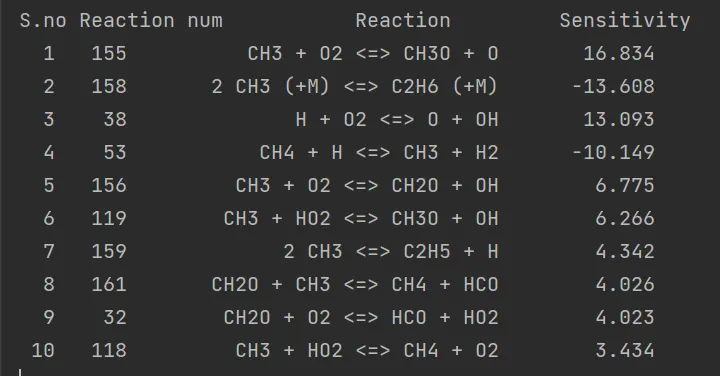
print("S.no Reaction num           Reaction         Sensitivity")
for i in range(n):
    print('%3d %5.0f %30s   %10.3f' % (i+1, sort_reac_num[i], sort_reaction[i], sort_S_max[i]))

# Ploting of Results
plt.figure(1)
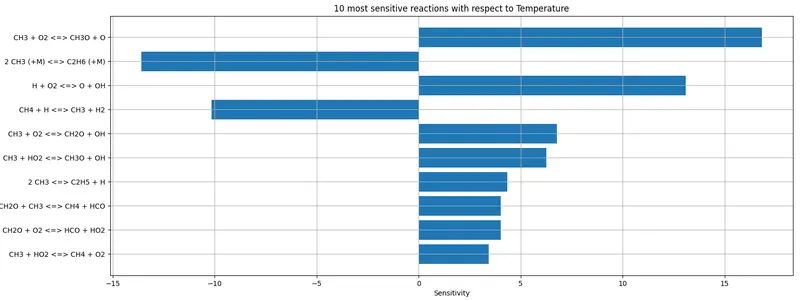
plt.barh(sort_reaction[0:n], sort_S_max[0:n], height=0.8)
plt.gca().invert_yaxis()
plt.xlabel("Sensitivity")
plt.ylabel("Reactions")
plt.grid('on')
plt.title(f"{n} most sensitive reactions with respect to Temperature")

def graph(X, Y, label):
    plt.plot(X, Y)
    plt.xlabel(label[0])
    plt.ylabel(label[1])

plt.figure(2)
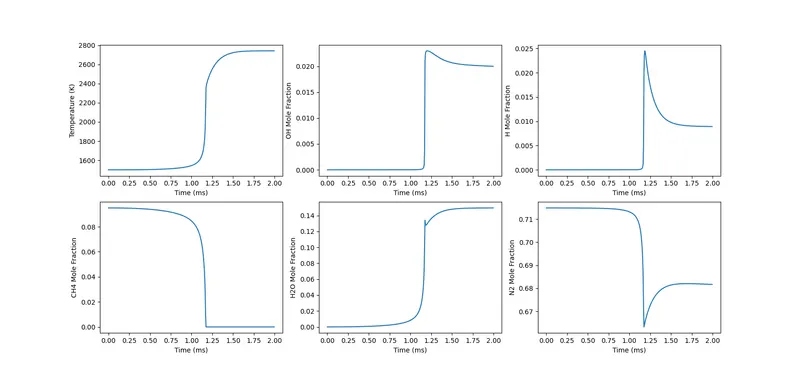
plt.subplot(2, 3, 1); graph(states.t, states.T, ["Time (ms)", "Temperature (K)"])
plt.subplot(2, 3, 2); graph(states.t, states('OH').X, ["Time (ms)", "OH Mole Fraction"])
plt.subplot(2, 3, 3); graph(states.t, states('H').X, ["Time (ms)", "H Mole Fraction"])
plt.subplot(2, 3, 4); graph(states.t, states('CH4').X, ["Time (ms)", "CH4 Mole Fraction"])
plt.subplot(2, 3, 5); graph(states.t, states('H2O').X, ["Time (ms)", "H2O Mole Fraction"])
plt.subplot(2, 3, 6); graph(states.t, states('N2').X, ["Time (ms)", "N2 Mole Fraction"])
plt.show()
Plots:-
Top 10 Temperature-sensitive reactions for methane combustion from GRI mechanism
Plot for Temperature, Mole fraction variation with respect to time
Conclusions:-
- We can observe that for reactions Temperature sensitivity is positive and for some reactions it is negative.
- Positive sensitivity indicates that the reaction is helping combustion to enhance the reaction rate for faster combustion leads to a decrease in ignition delay.
- Negative sensitivity indicates that the reaction is Prohibiting the combustion to reduce the speed of the reaction rate leads to an increase in ignition delay.