Week 3 - Solving second order ODEs
Pendulum motion
Aim: -
Writing a MATLAB program to simulate Pendulum motion.
Objectives: -
- Able to simulate Pendulum motion.
- Able to plot Displacement vs time graph & Angular velocity vs piston radius.
Description: -
The way the pendulum moves depends on Newton's second law of motion. When this law is written down, we get a second order Ordinary Differential Equation that describes the position of the "ball" w.r.t time & describes the transient behavior of a system.
The ode of the pendulum is described below
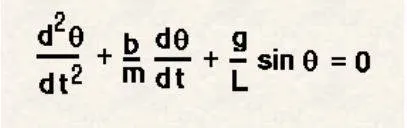
In the above equation,
- gravity g = 9.81 m/s2,
- length of the pendulum L = 1 m,
- mass of the ball m = 1 kg,
- damping coefficient b=0.05
- time interval = 0-20sec
- for angular displacement=0, angular velocity=3 rad/sec at time t=0.
Procedure: -
- Create an ode_function program for second order Ordinary Differential Equation of pendulum with dtheta_dt as function output & t,theta,b,g,l,m as input variables.
- Give values to input variables.
- Solve ode for given inputs.
- plot a graph between angular displacement, angular velocity vs time interval.
- plot a graph between angular velocity vs piston radius.
- creating for loop to trace the movement of the pendulum.
- create a horizontal reference line and vertical string line one end of the string line is fixed and another end depends on sine and cosine angles.
- Plot the bob with a marker at the end of the string.
- Define axis range, the grid on, pause for every 0.001sec
- Save each frame and increment the loop by one.
- Create a movie with frames and save the movie.
Function program: -
function  [dtheta_dt] = ode_function(t,theta,b,g,l,m);

theta1 = theta(1)
theta2 = theta(2)
dtheta1_dt = theta2;
dtheta2_dt = -(b/m)*theta2-(g/l)*sin(theta1);
[dtheta_dt] = [dtheta1_dt; dtheta2_dt]

end
Main Program: -
%writing a mat lab program to simulate the pendulum motion
clear all;close all;clc
%inputs
b = 0.05; %damping coefficient.
g = 9.81;%gravity m/s^2
l = 1;   %length of pendulum (m)
m = 0.1; %mass of ball in kg

%initial condition
theta_0 = [0;3];
%time
t_span = linspace(0,20,500);
%solving ode
[t, results] = ode45(@(t,theta) ode_function(t,theta,b,g,l,m),t_span,theta_0);

figure (1)%plotting a graph between angular displacement, angular velocity vs time interval
hold on
plot(t, results(:,1),'color','b')
plot(t, results(:,2),'color','r')
xlabel('time interval');
ylabel('angular displacement-velocity');

figure (2) %plotting a graph between angular velocity vs piston radius
plot(results(:,1),results(:,2))
xlabel('piston-radius');
ylabel('angular-velocity');
% creating for loop to trace the movement of pendulum to sumulate
ct = 1;
for i=1:length(results(1:310,1))
    x0=0;
    y0=0;
    x1=1*sin(results(i,1));
    y1=-1*cos(results(i,1));
    figure (3)
    %hold on
    %plot([-1 1], [0 0],'linewidth',3,'color', 'k'); % horizontal line
    %plot([x0 x1],[y0 y1], 'linewidth', 2, 'color', 'b'); % string
    %plot(x1, y1,'o', 'markers', 30,'markerfacecolor','r'); %Plotting the bob using marker and facecolor

    plot([-1 1], [0 0],[x0 x1],[y0 y1],x1, y1,'o', 'markers', 30,'markerfacecolor','r','linewidth',3,'color', 'k')
    axis([-1.2 1.2 -1.5 0.1]) %axis range
    grid on;
    pause (0.001);

    A(ct)=getframe(gcf);
    %Text = sprintf ("pendulum%d.png",ct);
    %saveas (3, Text) % to save every frame in motion simulation
    ct = ct+1;

end
% creating a movie to simulate the motion of pendulum
movie (A)
videofile=VideoWriter('Pendulum_damped.avi', 'uncompressed avi');
open(videofile)
writeVideo (videofile,A)
close(videofile)
Output/Result graph: -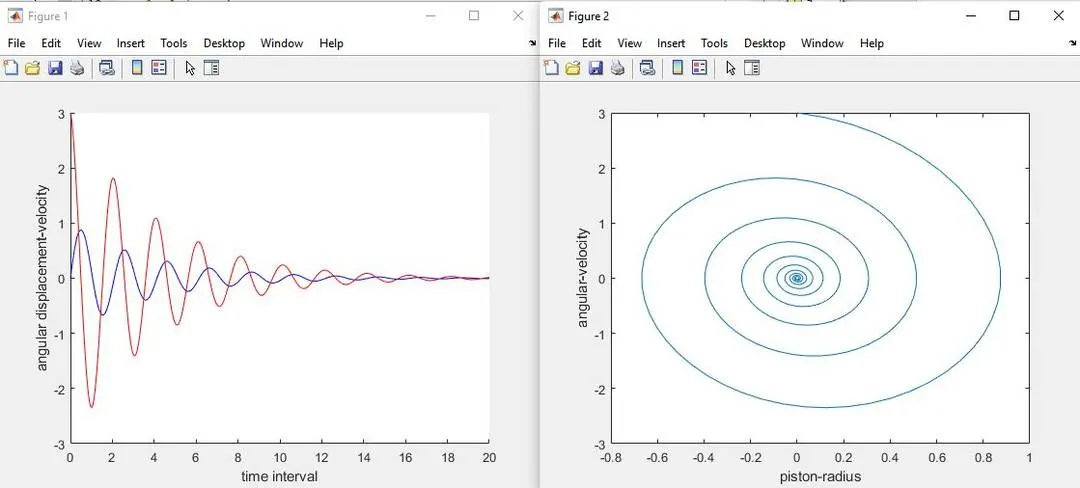
Animation:-
https://drive.google.com/file/d/1ddfyKTqcb4i2sLKtk_eGpDdkUmZJoMAL/view?usp=sharing