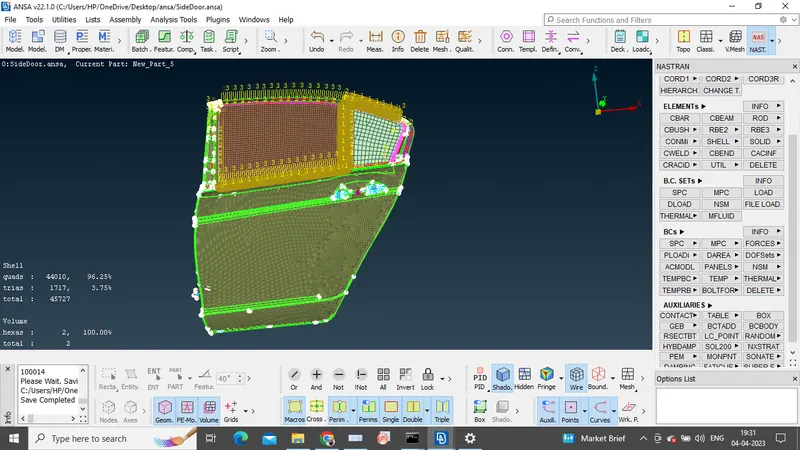
Week 9 - Creating connection for Rear door
AIM:
The aim of the challenge is to deploy connections to the FE model using DECK (NASTRAN) module.
Procedure:
1) Initially, the preprocesssor for structural analysis was started with, extracting the mid-surface for the individual components (Sheet metal and plastic components). Post which, meshing was applied to the mid-surfaces to make finite number of elements of the model.
2)Later, for complicated plastic components like IP console, casting is performed during which capturing of the features will not be proper, so with the help of align manager required features are captured.
4)To understand the model, different property IDs are created before entering into the DECK module.
3)To complete the part, all the individual components has to be connected. To study NVH of the system, connections are made with help of NASTRAN (DECK miodule).
4)Basically, rigid body elements are created to perform simulation.Metal to Metal connections are peformed using spot weld or seam welds, Fasteners like bolts are used for temporary connections.
5)Coming to Bolted connections, we can deploy manually or automatically. In manual method RBE2 command is used, this command creates a master node with the help of slave nodes to make the rigid connection using many nodes.
6)A stem node has to be deployed if the subsytems are to be connected with the help of two nodes.
7)To create a spot weld, first a COG has to created and the 3D point into the spotweld using the converter option and then with the help of connection manager assigning the property's the spot weld is created.
8)In the Side door, the glass part is a sliding, so the bushed are deployed to absord the vibrations and control the air conditioning inside the vehicle.
Learning Outcomes:
Delpoying the connections for bolts, seam welds and spot welds was learnt and also to add the bushes for the sliding part of the window.
Results:
Finally, proper connections are given to the side door model.