Week 8 - Simulation of a backward facing step in OpenFOAM
AIM- Simulation of a backward facing step in OpenFOAM
To Do- We are going to simulate an incompressible-laminar-viscous flow through the backward facing step geometry. we will be performing a transient simulation. The solver can be chosen based on the described physics of the flow. We will explain the entire simulation procedure (how you set up the case). We will also provide explanations to every change we make inside the reference case files obtained from OpenFOAM tutorials.
Procedure- First after installing the ubuntu system we will be installing openfoam which comes with its own tutorial files for references.
Secondly we will have to choose the icofoam solver to extract and copy our desired simulation into the RUN folder of OpenFOAM.
Now we will rename the file according to our conveniance .
the first case is the one where we will use simple garding 1 with velocity of 1 m/sec.
let us see how it is done.
The chosen simulation file i.e cavity_test contain 3 folder :
1. 0:containing initial pressure and velocity .
2. constant: containing the constant parameter polymesh and transport properties
3. System: containing blockMeshDict, controlDict, fvSchemes ,fvSolution
Let us first consider for the case of simple grading 1.
Let us take a look how we are naming the vertices.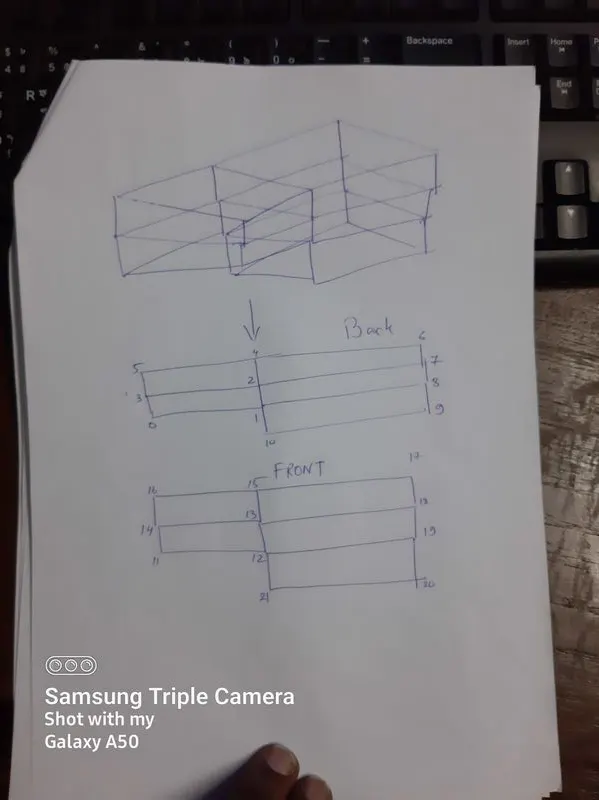
NOW TAKE A LOOK AT HOW THE blockMeshdICT FILE IS CREATED AND MODIFIED TO CHANGE THE MESH SIZE.
/*--------------------------------*- C++ -*----------------------------------*
  =========                 |
  \      /  F ield         | OpenFOAM: The Open Source CFD Toolbox
   \    /   O peration     | Website:  https://openfoam.org
    \  /    A nd           | Version:  8
     \/     M anipulation  |
*---------------------------------------------------------------------------*/
FoamFile
{
    version     2.0;
    format      ascii;
    class       dictionary;
    object      blockMeshDict;
}
// * * * * * * * * * * * * * * * * * * * * * * * * * * * * * * * * * * * * * //

convertToMeters 0.1;

vertices
(
    (0 0 0)
    (0.8 0 0)
    (0.8 0.05 0)
    (0 0.05 0)
    (0.8 0.1 0)
    (0 0.1 0)
    (2 0.1 0)
    (2 0.05 0)
    (2 0 0)
    (2 -0.1 0)
    (0.8 -0.1 0)
    (0 0 0.1)
    (0.8 0 0.1)
    (0.8 0.05 0.1)
    (0 0.05 0.1)
    (0.8 0.1 0.1)
    (0 0.1 0.1)
    (2 0.1 0.1)
    (2 0.05 0.1)
    (2 0 0.1)
    (2 -0.1 0.1)
    (0.8 -0.1 0.1)

);

blocks
(
    //you were missing spaces after (x y x) and after simpleGrading (x y z)
    hex (0 1 2 3 11 12 13 14) (80 5 1) simpleGrading (1 1 1)
    hex (3 2 4 5 14 13 15 16) (80 5 1) simpleGrading (1 1 1)
    hex (2 7 6 4 13 18 17 15) (120 5 1) simpleGrading (1 1 1)
    hex (1 8 7 2 12 19 18 13) (120 5 1) simpleGrading (1 1 1)
    hex (10 9 8 1 21 20 19 12) (120 10 1) simpleGrading (1 1 1)

);

edges
(
);

boundary
(
    inlet
    {
        //type wall;
        type patch; //Inlet should not be a wall. So inlet wall is not a correct terminology. HENCE PATCH
        faces
        (
            //(0 3 14 11)   You have to follow right hand thumb rule. The normal should be pointing outwards from the face.
            // (3 5 16 14)  You have to follow right hand thumb rule. The normal should be pointing outwards from the face.
            (11 14 3 0)
            (14 16 5 3)
        );
    }

    outlet
    {
        //type wall;
        type patch;  //Outlet should not be a wall. So inlet wall is not a correct terminology.HENCE PATCH.
        faces
        (
            (9 8 19 20)
            (8 7 18 19)
            (7 6 17 18)
        );
    }


    fixedWalls
    {
        type wall;
        faces
        (
            (5 16 15 4)
            (0 1 12 11)
            (10 9 20 21)
            (6 4 15 17)
            (1 10 21 12)
        );
    }
    frontAndBack
    {
        type empty;
        faces
        (
            (3 2 1 0)
            (5 4 2 3)
            (4 6 7 2)
            (2 7 8 1)
            (1 8 9 10)
            (13 14 11 12)
            (15 16 14 13)
            (17 15 13 18)
            (18 13 12 19)
            (19 12 21 20)
        );
    }
);

mergePatchPairs
(
);

// ************************************************************************* //
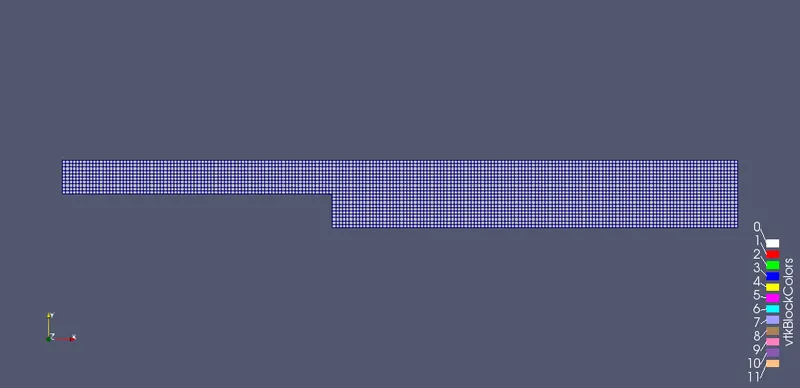
hence we have created a meshing with grading 1 which means the cells of mesh are of same size.
Then we get out of the folder and we will run blockMesh command in the terminal to generate the mesh.
this would give us the below result.
Now let us take a look in the primary initaila values of pressure and velocity of the flow.
Pressure term:
/*--------------------------------*- C++ -*----------------------------------*
  =========                 |
  \      /  F ield         | OpenFOAM: The Open Source CFD Toolbox
   \    /   O peration     | Website:  https://openfoam.org
    \  /    A nd           | Version:  8
     \/     M anipulation  |
*---------------------------------------------------------------------------*/
FoamFile
{
    version     2.0;
    format      ascii;
    class       volScalarField;
    object      p;
}
// * * * * * * * * * * * * * * * * * * * * * * * * * * * * * * * * * * * * * //

dimensions      [0 2 -2 0 0 0 0];

internalField   uniform 0;

boundaryField
{
    inlet
    {
        type            zeroGradient;
    }
    outlet
    {
        type            fixedValue;
        value           uniform 0;
    }

    fixedWalls
    {
        type            zeroGradient;
    }

    frontAndBack
    {
        type            empty;
    }
}

// ************************************************************************* //
Velocity terms defination.
/*--------------------------------*- C++ -*----------------------------------*
  =========                 |
  \      /  F ield         | OpenFOAM: The Open Source CFD Toolbox
   \    /   O peration     | Website:  https://openfoam.org
    \  /    A nd           | Version:  8
     \/     M anipulation  |
*---------------------------------------------------------------------------*/
FoamFile
{
    version     2.0;
    format      ascii;
    class       volVectorField;
    object      U;
}
// * * * * * * * * * * * * * * * * * * * * * * * * * * * * * * * * * * * * * //

dimensions      [0 1 -1 0 0 0 0];

internalField   uniform (0 0 0);

boundaryField
{
    inlet
    {
        type            fixedValue;
        value           uniform (1 0 0);
    }
    outlet
    {
        type             zeroGradient;
    }

    fixedWalls
    {
        type            noSlip;
    }

    frontAndBack
    {
        type            empty;
    }
}

// ************************************************************************* //
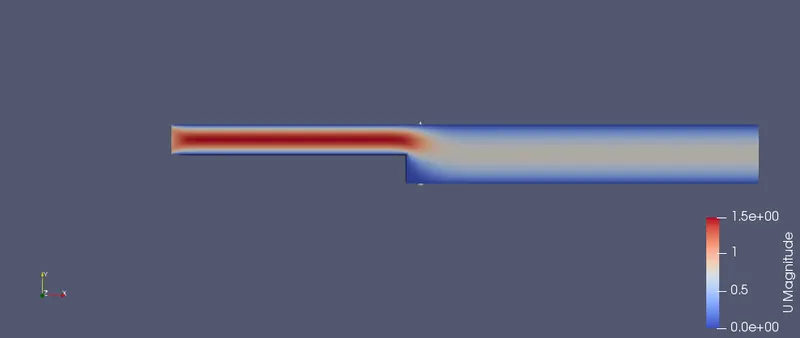
now we have set us the basic informations for the simulation and if we run the icoFoam command in the terminal we get the below result.
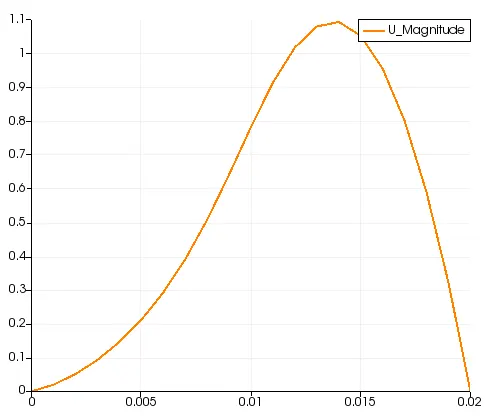
Let us also see the velocity profile at 0.02 m from the inlet.
The Profile is as follows. We found it using the LINE PROBE TOOL.
Now LET US TAKE A LOOK AT THE FINER GARDING TECHNIQUE WITH THE SIMPLEGRADING COMMAND.THE MODIFIED CODE IS AS FOLLOWS.ONLY THE BLOCKMESH DICT FILE IS MODIFIED.THE CODE IS AS FOLLOWS.
/*--------------------------------*- C++ -*----------------------------------*
  =========                 |
  \      /  F ield         | OpenFOAM: The Open Source CFD Toolbox
   \    /   O peration     | Website:  https://openfoam.org
    \  /    A nd           | Version:  8
     \/     M anipulation  |
*---------------------------------------------------------------------------*/
FoamFile
{
	version 2.0;
	format	ascii;
	class	dictionary;
	object	blockMeshDict;
}

convertToMeters 0.1;

vertices
(
    (0 0 0)
    (0.8 0 0)
    (0.8 0.05 0)
    (0 0.05 0)
    (0.8 0.1 0)
    (0 0.1 0)
    (2 0.1 0)
    (2 0.05 0)
    (2 0 0)
    (2 -0.1 0)
    (0.8 -0.1 0)
    (0 0 0.1)
    (0.8 0 0.1)
    (0.8 0.05 0.1)
    (0 0.05 0.1)
    (0.8 0.1 0.1)
    (0 0.1 0.1)
    (2 0.1 0.1)
    (2 0.05 0.1)
    (2 0 0.1)
    (2 -0.1 0.1)
    (0.8 -0.1 0.1)

);

blocks
(
    //you were missing spaces after (x y x) and after simpleGrading (x y z)
    hex (0 1 2 3 11 12 13 14) (80 5 1) simpleGrading (1 10 1)
    hex (3 2 4 5 14 13 15 16) (80 5 1) simpleGrading (1 0.1 1)
    hex (2 7 6 4 13 18 17 15) (120 5 1) simpleGrading (10 0.1 1)
    hex (1 8 7 2 12 19 18 13) (120 5 1) simpleGrading (10 10 1)
    hex (10 9 8 1 21 20 19 12) (120 10 1) simpleGrading (10 10 1)

);

edges
(
);

boundary
(
    inlet
    {
        //type wall;
        type patch; //Inlet should not be a wall. So inlet wall is not a correct terminology. Please research why patch?.
        faces
        (
            //(0 3 14 11)   You have to follow right hand thumb rule. The normal should be pointing outwards from the face.
            // (3 5 16 14)  You have to follow right hand thumb rule. The normal should be pointing outwards from the face.
            (11 14 3 0)
            (14 16 5 3)
        );
    }

    outlet
    {
        //type wall;
        type patch;  //Outlet should not be a wall. So inlet wall is not a correct terminology. Please research why patch?.
        faces
        (
            (9 8 19 20)
            (8 7 18 19)
            (7 6 17 18)
        );
    }


    fixedWalls
    {
        type wall;
        faces
        (
            (5 16 15 4)
            (0 1 12 11)
            (10 9 20 21)
            (6 4 15 17)
            (1 10 21 12)
        );
    }
    frontAndBack
    {
        type empty;
        faces
        (
            (3 2 1 0)
            (5 4 2 3)
            (4 6 7 2)
            (2 7 8 1)
            (1 8 9 10)
            (13 14 11 12)
            (15 16 14 13)
            (17 15 13 18)
            (18 13 12 19)
            (19 12 21 20)
        );
    }
);

mergePatchPairs
(
);


// ************************************************************************* //
THERE IS NO MODIFICATIONS MADE IN THE PRESSERE AND THE VELOCITY FOLDER OF THE INITIAL CONDITIONS.
THE MODIFIED MESH IS AS FOLLOWS.
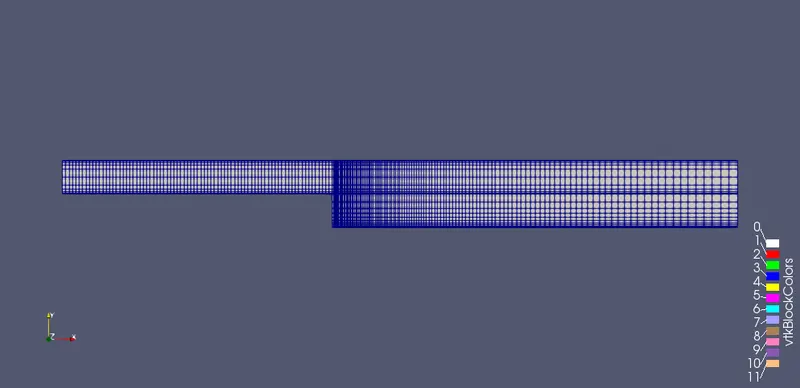
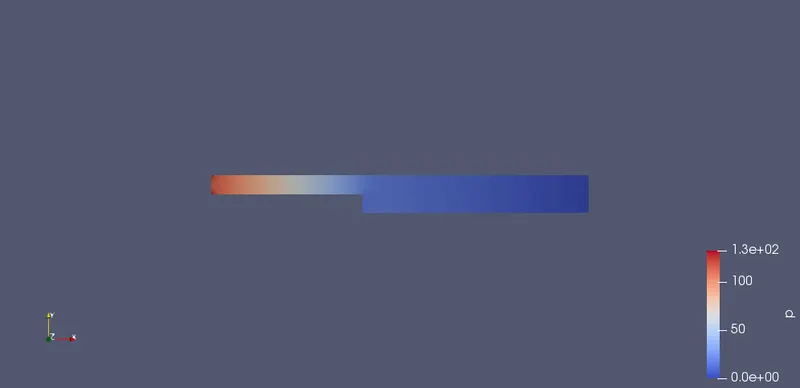
THE RESULTS ARE MORE OR LESS SAME.
THE PRESSURE VARIATION ARE BELOW:
THE VELOCITY VARIATION ARE BELOW:
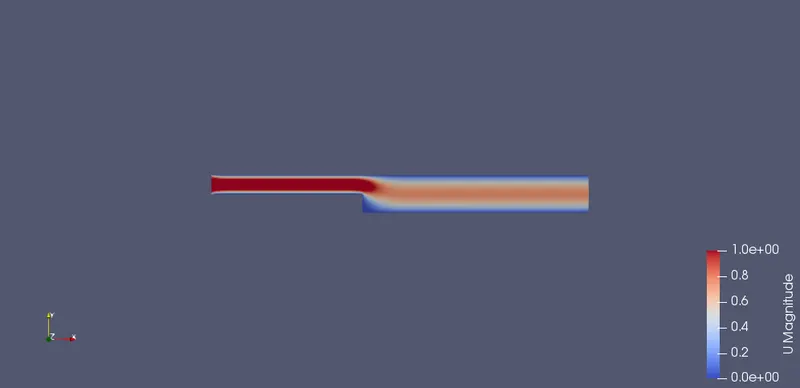
CONCLUSION-THERE IS NOT MUCH DIFFERENCE IN SIMPLEGRADING IN SUCH SMALL SIMULATION BUT THE NET RESULT WILL BE IMPROVEMENT OF THE MESH PROPERTIES AND FINER GRAPHS.