Week 3 - Solving second order ODEs
LINK TO MY YOUTUBE CHANNEL FOR THE OUTPUT ANIMATION: https://youtu.be/oIR9jkKgQMY
ALL THE STEPWISE EXPLANATION OF CODES ARE ATTACHED IN FORM OF COMMENT IN THE CODE.
AIM- Simulate the motion of a pendulam between 0-20 sec, for angular displacement=0,angular velocity=3 rad/sec at time t=0 and creating animation of the same.
THEORY- Here we use the conventional formula of pendulam as shown below which is a 2nd order differential equation.We break it into sets of 1st order differential equations and solve it using the ODE45 command through various other steps
PROCEDURE- Let us first understand the basics of the pendulam . Theta is the angular displacement and t is the time of the oscilation.The explanation is given below.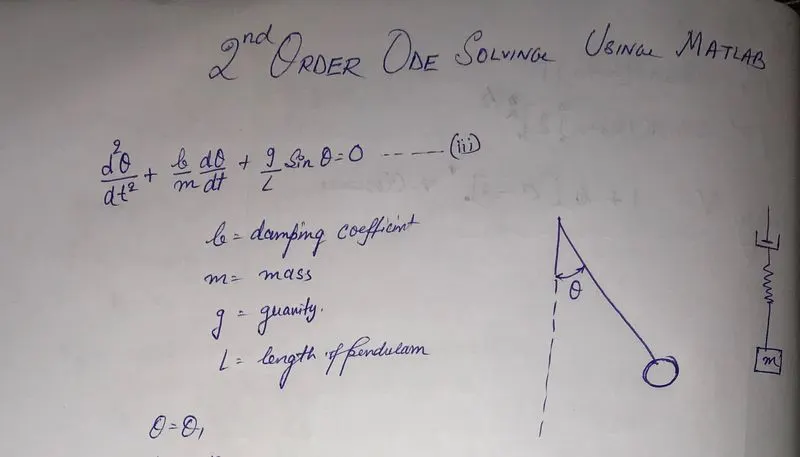
The procedure starts with the above 2nd order differential equation ie
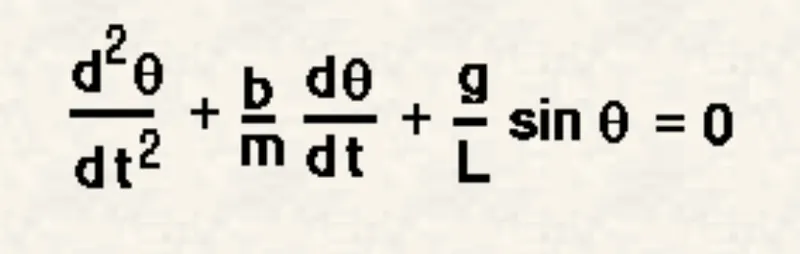
We break this ode into two 1st order ode as follows:-
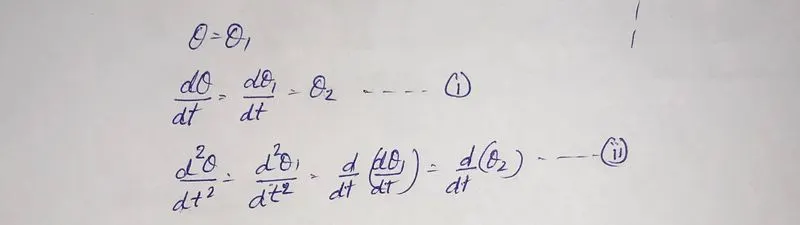
The next step is to apply these two equation in our principal formula at the top.
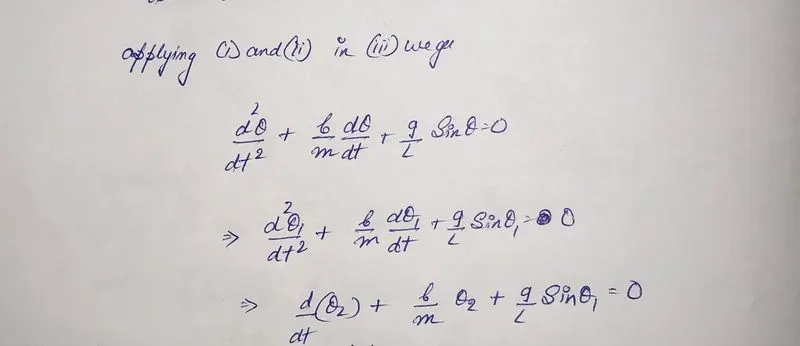
The last step is to consolidate these two 1st order ode into a single matrix which is a column matrix.
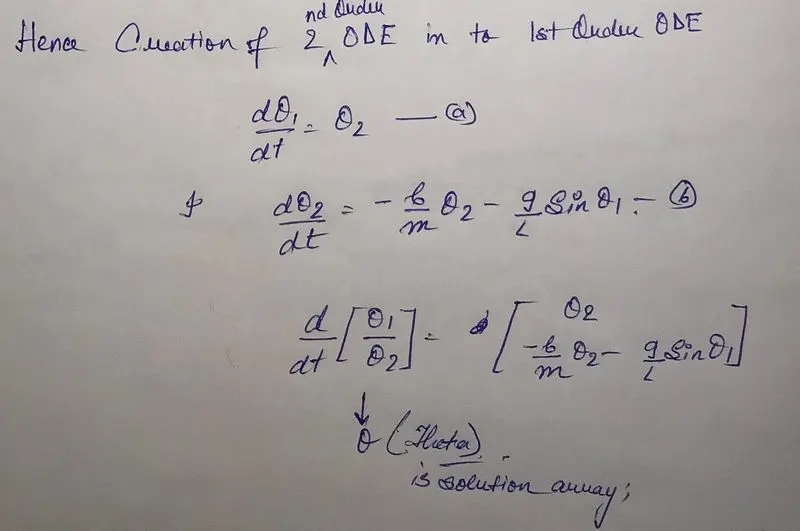
The inputs to the program are as follows:-
In the above equation,
g = gravity in m/s2,
L = length of the pendulum in m,
m = mass of the ball in kg,
b=damping coefficient.
L=1 metre,
m=1 kg,
b=0.05.
g=9.81 m/s2.
Simulatation of the motion between 0-20 sec, for angular displacement=0,angular velocity=3 rad/sec at time t=0.
Now lets have a look at the codes:-The codes are attached with comments to understand the code better:
clear all
close all
clc

%constants
b=0.05;%damping coeff
g=9.81;%gravitational constant
L=1;%length of the string
m=1;%mass of the pendulam

%initial conditions
theta_0=[0;3];%theta_0 is just a  variable containing two inputs displacement and velocity respectively


% timespan of intigration
t_span=linspace(0,20,500);  %t_span is the duration upto which we want the pendulam to oscilate.The intigration will occur from 0 to 20 seconds

%solving ODE
[t,result]=ode45(@(t,stand) ode_func(t,stand,b,g,L,m),t_span,theta_0)

%TO UNDERSTAND ode_func please refer to my second program
%here we define that ode45 is a function of (t&stand ie(theta)),t_span is
%the range of integration and theta_0 is the initial condition of the
%pendulam containing  displacement and velocity .
%[t,result] is a matrix which stores the solutuion of the ode using a
%inbuilt command called ode45 using the RANGA_KUTTA_METHOD.

%plots
figure(1)
hold on
plot(t,result(:,1))%PLOTTING THE VARIATION OF TIME AND DISPLACEMENT
plot(t,result(:,2))%P;LOTTING THE VARIATION OF TIME AND VELOCITY
xlabel('TIME')
ylabel('PLOT')
grid on

ct=1;

for i=1:length(t_span);%Here we are specifying the total length over which the i should vary!!!!
    THETA=result(i,1);%here we are taking variable THETA to store the values for the displacement which is a result of solving the ode giving 'result'.
    %the 'result' have who values, namelu displacement and velocity.
    %result(i,1) represents selecting all 500 values of displacement
    %present in column 1
    %OR
    %theta=result(i,1);
    %THETA=theta(i)


    %coordinate1
       x0=0;
       y0=0;

       %coordinate2
       x1=L*sin(THETA);
       y1=-L*cos(THETA);

       figure(2)
       plot([x0 x1],[y0 y1],'linewidth',2.5)%PLOTTING THE STRING OF PENDULAM
       hold on
       plot(x1,y1,'o','markersize',25,'markerfacecolor','g')%PLOTTING THE BOB OF THE PENDULAM
     axis([-1 1 -1.5 1.5])

       %ct represents each and every frame.Followed by individual saving of frames in an array called M

       M(ct)=getframe(gcf)%IT IS A BUILT IN COMMAND TO SAVE THE PRESENT OUTPUT FRAME
       hold off %the hold off command helps to prevent the merging of 1 frame with the second and creates a neat loop
       %the hold off command is required only because we are using a marker
       %and the two plots will get merged in same figure creating a ugly
       %image.

       ct=ct+1 %INCREMENTAL VALUE TO SAVE THE NEXT FRAME


end


movie(M)%command used to create movie with the total array of frames in M
videofile=VideoWriter('pendulam_test.avi','uncompressed avi')%charecteristics of the video file format


open(videofile)%procedure
writeVideo(videofile,M)%running
close(videofile)%closing
The code runs only if the function of ode ie 'ode_func' is active.The code is attached below.The code is attached with comments for better understanding.
function [dtheta_dt]= ode_func(t,stand,b,g,L,m)%creation of a function
%t,stand,b,g,L,m are the input variables
theta1=stand(1)%alloting the value of strand in a variable called theta1
%strand have actually two values displacement and velocity
theta2=stand(2)%do
dtheta1_dt=theta2%1st firstorder differential
dtheta2_dt=-(b/m)*theta2-(g/L)*sin(theta1)%2nd firstorder differential
dtheta_dt=[dtheta1_dt;dtheta2_dt]%consolidating it into an array to store the data.The format required by ode45 to solve the given problem
end
OUTPUTS FROM THE CODES ARE
1.TIME VS VELOCITY AND DISPLACEMENT:- The red curve depicts the velocity as it starts from 3. The blue curve depicts the displacement.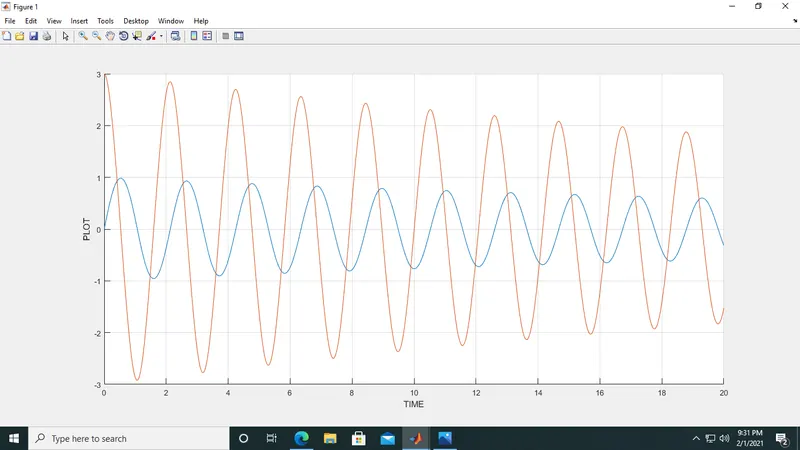
2.The animation video is attched in form of attchment.
IMPORTENT POINT TO NOTICE IN CODE
1.The hold on and hold off commnds are very necessary in this code.If the hold off command is not implied then the marker will keep repearting itself after every iteration and will get printed on the screen as follow:-
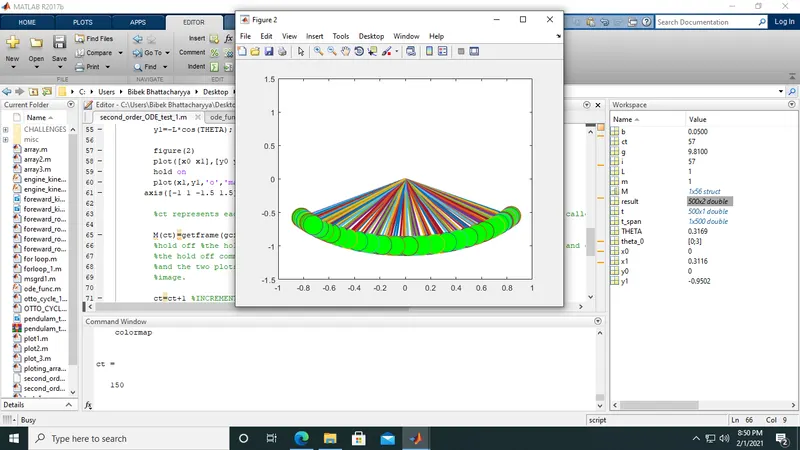
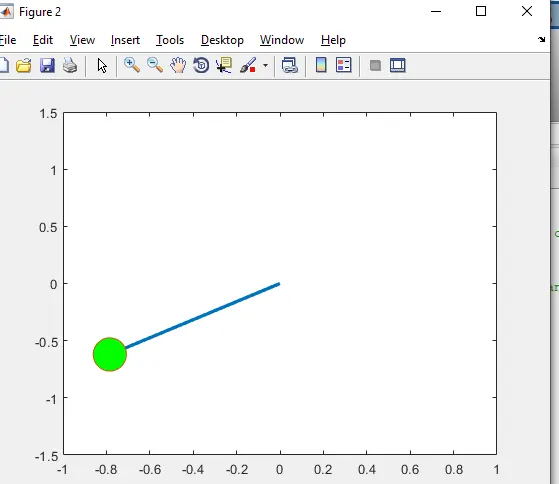
But using the hold off command after the getframe(gcf) in line 65 will erase the problem and will produce a smooth graph.
The plot will look as follows
2.Using ode45 doesnot needs the trigonometric terms in degree rather in radian or rad/sec.so giving sign'd'(theta) will lead to faulty results.
The necessary codes and the screenshots, videoes are attached below.
ERRORS:-
THE ERRORS IN THE CODES WERE ESPECIALLY IN FOR LOOPS WHICH WAS OVERCOME AFTER TALKING TO THE SUPPORT ENGINEER. THE MAIN PROBLEM WAS IN THE DETERMINATION IN THE INCREMANTAL VALUE OF i WHICH RANGES FROM 1:length(t_span). BUT I MISTOOK AND WROTE IT length(t_span) WHICH WAS PRINTING ONLY 1 OUTPUT PLOT IN THE ANIMATION VIDEO.
CONCLUSION:- THE ABOVE EXPERIMENT WAS DONE DONE SUCCESSFULY WITH SATISFACTORY OUTPUT RESULTS.
- Bibek Bhattacharyya.