Week 8 - Simulation of a backward facing step in OpenFOAM
Aim:
Transient simulation of an incompressible-laminar-viscous flow through the backward facing step geometry
Objective:
- To simulate the flow without using any grading factor (i.e., GF = 1)
- To simulate the flow with grading factor of 0.2
Procedure:
- Choose a solver
- Choosing a solver tutorial
- Setting up the case
- Post processing
- Plotting results
Choosing a solver:
The suitable solver for our problem has to be chosen, The given conditions are
Incompressible, Laminar and viscous flow.
The solver that satisfies all these conditions is icoFoam(Incompressible,laminar and Newtonian flows)
hence icoFoam is chosen as the solver.
Choosing a solver tutorial:
A tutorial from this solver is to be choosed and then copied to openFoam/Run folder for setting up the geometry and the case. For this problem the cavity tutorial is chosen and is copied to the run folder.
Setting up the case:
- Geometry
Now we have to change the geometry, for this we need to edit the blockMeshDict file.
To change the geomtry we have to seperate it into blocks and give coordinates to each vertices, as shown below
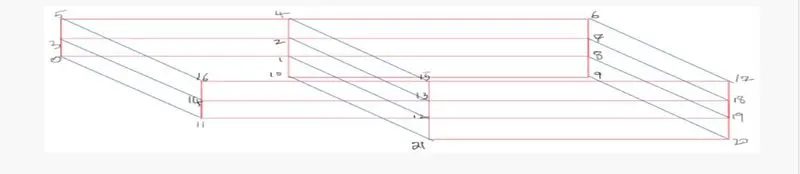
For this problem the geometry as been divided into 5 blocks with 0 to 21 vertrices now each of vertices will be given the suitable coordinates and then covert them into blocks for meshing.
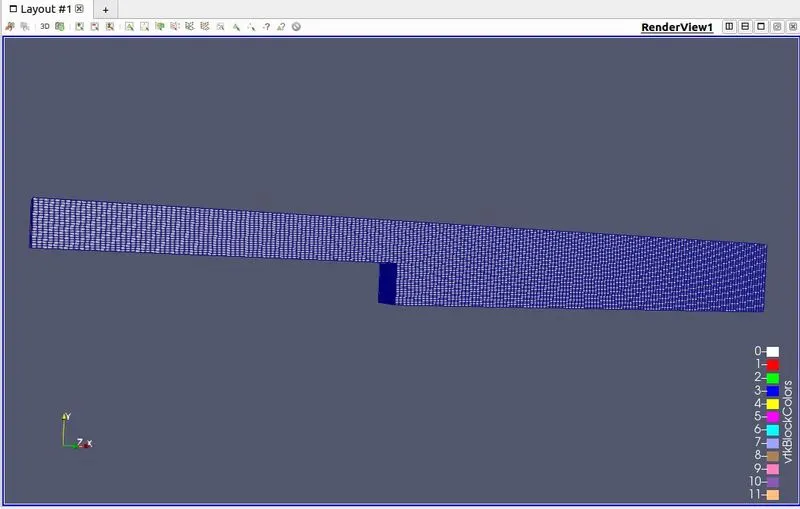
The final geometry we get after meshing without grading factor
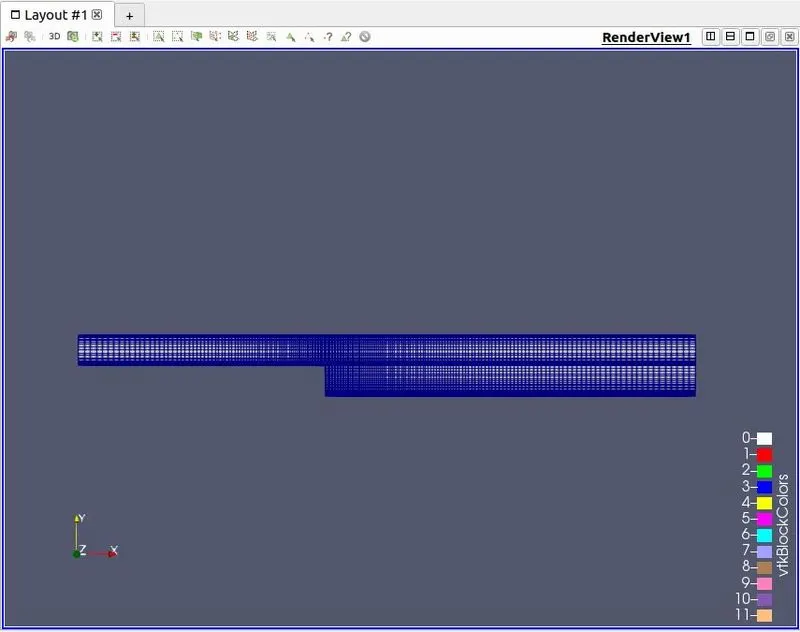
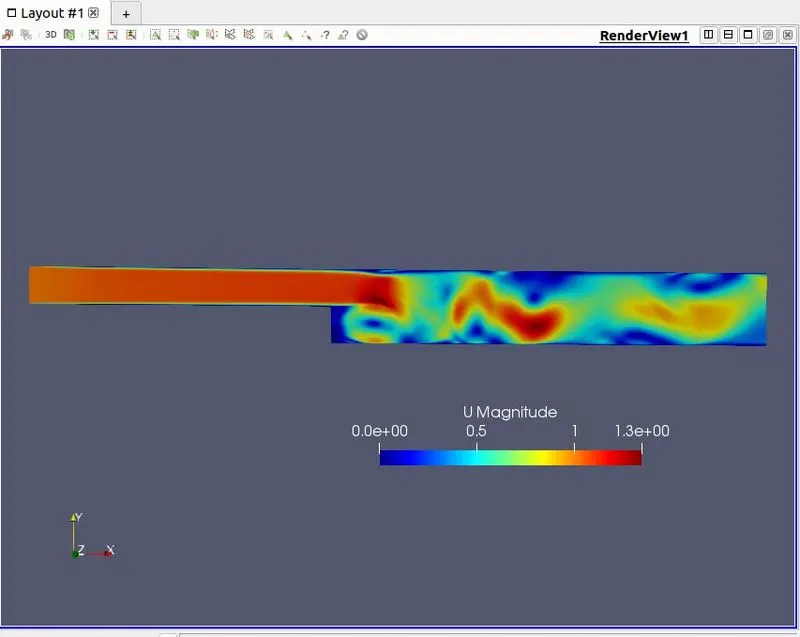
The final geometry with grading factor
- Boundary conditions
Giving the right value in the blockMeshDict file for the boundary conditions as show below
/*--------------------------------*- C++ -*----------------------------------*\
  =========                 |
  \\      /  F ield         | OpenFOAM: The Open Source CFD Toolbox
   \\    /   O peration     | Website:  https://openfoam.org
    \\  /    A nd           | Version:  8
     \\/     M anipulation  |
\*---------------------------------------------------------------------------*/
FoamFile
{
    version     2.0;
    format      ascii;
    class       dictionary;
    object      blockMeshDict;
}
// * * * * * * * * * * * * * * * * * * * * * * * * * * * * * * * * * * * * * //

convertToMeters 0.01;

vertices
(
    (0 0 0)    //0
    (8 0 0)    //1
    (8 0.5 0)  //2
    (0 0.5 0)  //3
    (8 1 0)    //4
    (0 1 0)    //5
    (20 1 0)   //6
    (20 0.5 0) //7
    (20 0 0)   //8
    (20 -1 0)//9
    (8 -1 0) //10

    (0 0 1)  //11
    (8 0 1)  //12
    (8 0.5 1)//13
    (0 0.5 1)//14
    (8 1 1)  //15
    (0 1 1) //16
    (20 1 1) //17
    (20 0.5 1) //18
    (20 0 1) //19
    (20 -1 1) //20
    (8 -1 1)  //21

);

blocks
(
    hex (0 1 2 3 11 12 13 14) (80 10 1) simpleGrading (0.2 5 1)
    hex (3 2 4 5 14 13 15 16) (80 10 1) simpleGrading (0.2 0.2 1)
    hex (2 7 6 4 13 18 17 15) (120 10 1) simpleGrading (5 0.2 1)
    hex (1 8 7 2 12 19 18 13) (120 10 1) simpleGrading (5 5 1)
    hex (10 9 8 1 21 20 19 12) (120 20 1) simpleGrading (5 5 1)
);

edges
(
);

boundary
(
    inlet
    {
        type patch;
        faces
        (
            (0 11 14 3)
            (3 14 16 5)
        );
    }
    outlet
    {
        type patch;
        faces
        (
            (9 8 19 20)
            (8 7 18 19)
            (7 6 17 18)
        );
    }
    noSlipWalls
    {
        type wall;
        faces
        (
            (15 4 5 16)
            (17 6 4 15)
            (10 21 12 1)
            (11 0 1 12)
            (21 10 9 20)
        );
    }
    frontAndBack
    {
        type empty;
        faces
        (
            (0 3 2 1)
            (3 5 4 2)
            (10 1 8 9)
            (1 2 7 8)
            (2 4 6 7)
            (11 12 13 14)
            (14 13 15 16)
            (21 20 19 12)
            (12 19 18 13)
            (13 18 17 15)
        );
    }
);

mergePatchPairs
(
);

// ************************************************************************* //- Initial conditions
For Pressure
/*--------------------------------*- C++ -*----------------------------------*\
  =========                 |
  \\      /  F ield         | OpenFOAM: The Open Source CFD Toolbox
   \\    /   O peration     | Website:  https://openfoam.org
    \\  /    A nd           | Version:  8
     \\/     M anipulation  |
\*---------------------------------------------------------------------------*/
FoamFile
{
    version     2.0;
    format      ascii;
    class       volScalarField;
    object      p;
}
// * * * * * * * * * * * * * * * * * * * * * * * * * * * * * * * * * * * * * //

dimensions      [0 2 -2 0 0 0 0];

internalField   uniform 0;

boundaryField
{
    inlet
    {
        type            zeroGradient;
    }

    outlet
    {
        type            fixedValue;
        value           uniform 0;

    }

    noSlipWalls
    {
        type            zeroGradient;
    }

    frontAndBack
    {
        type            empty;
    }
}

// ************************************************************************* //
For velocity
/*--------------------------------*- C++ -*----------------------------------*\
  =========                 |
  \\      /  F ield         | OpenFOAM: The Open Source CFD Toolbox
   \\    /   O peration     | Website:  https://openfoam.org
    \\  /    A nd           | Version:  8
     \\/     M anipulation  |
\*---------------------------------------------------------------------------*/
FoamFile
{
    version     2.0;
    format      ascii;
    class       volVectorField;
    object      U;
}
// * * * * * * * * * * * * * * * * * * * * * * * * * * * * * * * * * * * * * //

dimensions      [0 1 -1 0 0 0 0];

internalField   uniform (0 0 0);

boundaryField
{
    inlet
    {
        type            fixedValue;
        value           uniform (1 0 0);
    }

    outlet
    {
        type            zeroGradient;
    }

    noSlipWalls
    {
        type            noSlip;
    }

    frontAndBack
    {
        type            empty;
    }
}

// ************************************************************************* //- Simulation settings
This can be changed by editing the controlDict file for this simulations the endtime was given as 0.3s and the time step as 0.0003
/*--------------------------------*- C++ -*----------------------------------*\
  =========                 |
  \\      /  F ield         | OpenFOAM: The Open Source CFD Toolbox
   \\    /   O peration     | Website:  https://openfoam.org
    \\  /    A nd           | Version:  8
     \\/     M anipulation  |
\*---------------------------------------------------------------------------*/
FoamFile
{
    version     2.0;
    format      ascii;
    class       dictionary;
    location    "system";
    object      controlDict;
}
// * * * * * * * * * * * * * * * * * * * * * * * * * * * * * * * * * * * * * //

application     icoFoam;

startFrom       startTime;

startTime       0;

stopAt          endTime;

endTime         0.3;

deltaT          0.0003;

writeControl    timeStep;

writeInterval   20;

purgeWrite      0;

writeFormat     ascii;

writePrecision  6;

writeCompression off;

timeFormat      general;

timePrecision   6;

runTimeModifiable true;


// ************************************************************************* //
Then in the constant folder we open transportProperties file and change the viscosity value to 1e-6
/*--------------------------------*- C++ -*----------------------------------*\
  =========                 |
  \\      /  F ield         | OpenFOAM: The Open Source CFD Toolbox
   \\    /   O peration     | Website:  https://openfoam.org
    \\  /    A nd           | Version:  8
     \\/     M anipulation  |
\*---------------------------------------------------------------------------*/
FoamFile
{
    version     2.0;
    format      ascii;
    class       dictionary;
    location    "constant";
    object      transportProperties;
}
// * * * * * * * * * * * * * * * * * * * * * * * * * * * * * * * * * * * * * //

nu              [0 2 -1 0 0 0 0] 1e-6;


// ************************************************************************* //
Post-Processing:
The results can be visualised from paraview using the paraFoam command in the terminal
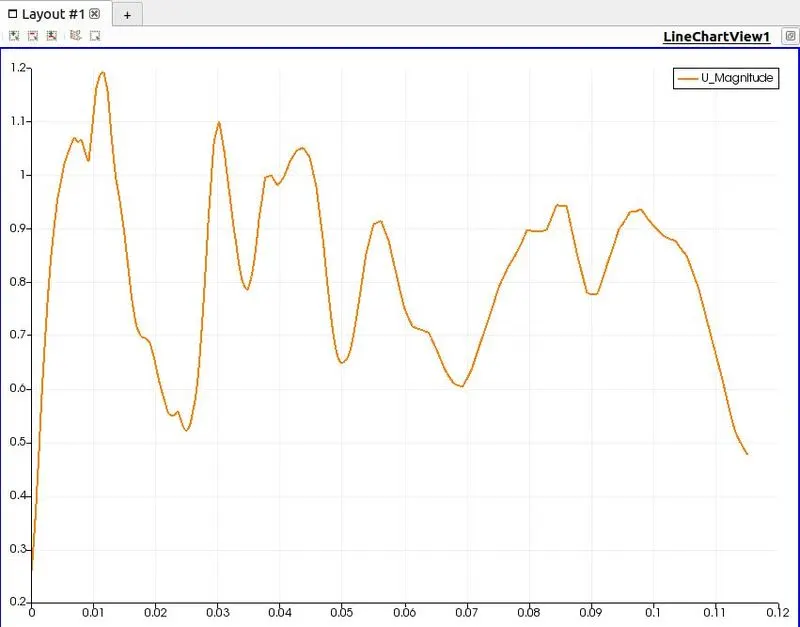
Without grading factor(GF=1)
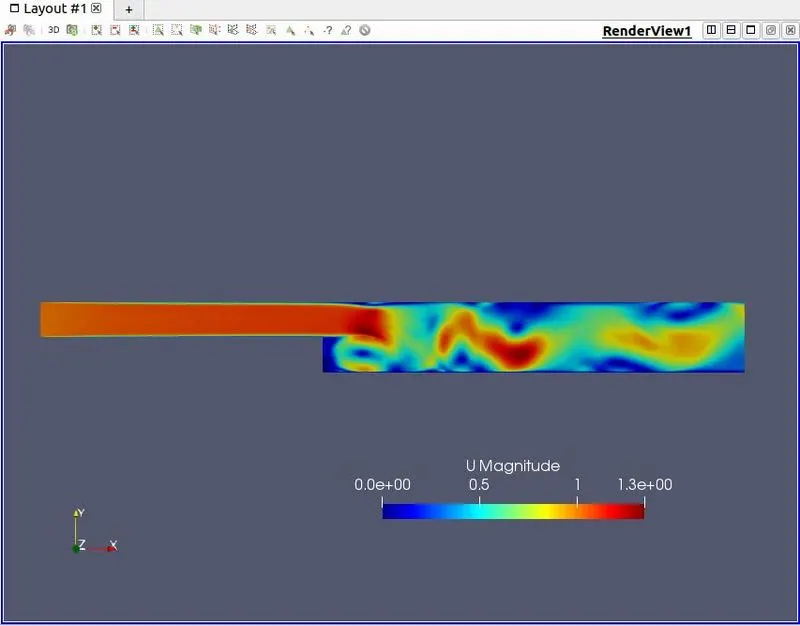
Graph for distance vs velocity (from x=0.085m to x=0.2m)
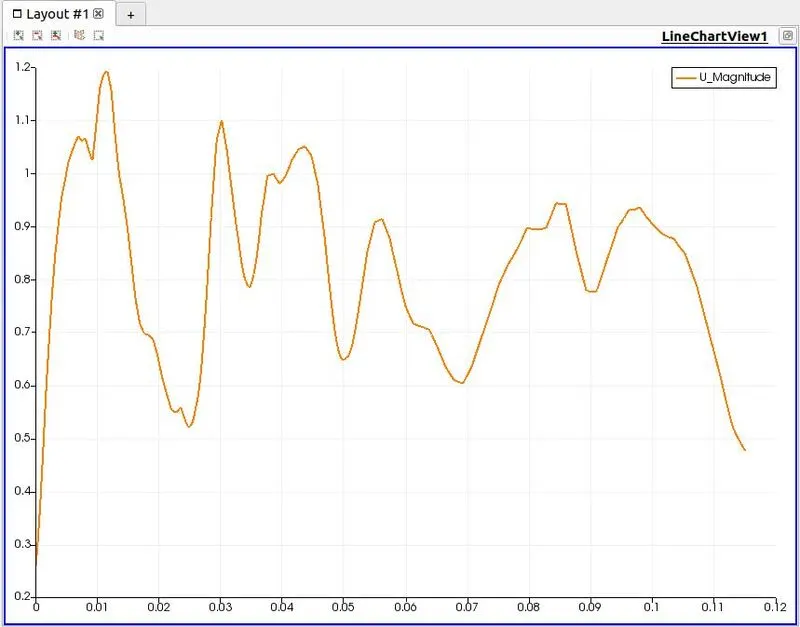
With grading factor
Graph for distance vs velocity (from x=0.085m to x=0.2m)
Conclusion:
From the above results we can see that the regions in which the mesh is finer the results are more accurate, So if the size is reducing the results will be more accurate.
Hence grading factor should be given in the right regions where we need accurate results in a problem, this may vary according to the problem.With grading factor the simulation time was also faster compared to the mesh without any grading factor(i.e GF=1)