Week 8 - Simulation of a backward facing step in OpenFOAM
Aim:- To simulate an incompressible-laminar-viscous flow through the backward facing step geometry.
Case 1 - Simulate the flow without using any grading factor (i.e., GF = 1)
Case 2 - Simulate the flow with grading factor of 0.2. The cells should be finer near the walls (includig the step wall).
Incompressible-laminar-viscous flow -
Incompressible laminar viscous flow refers to the behavior of a fluid that is flowing steadily and smoothly, without any significant fluctuations or turbulence, and is not compressed or expanded significantly. In such a flow, the fluid has a constant density, and its velocity and pressure vary continuously.
Laminar flow refers to the type of flow where the fluid moves in well-defined layers, with each layer moving smoothly past the adjacent layers. This type of flow is typically characterized by low velocities and high viscosity.
Viscosity is a measure of a fluid's resistance to flow. In a viscous flow, the fluid molecules stick together and move past each other slowly, resulting in a smooth, laminar flow.
Incompressibility refers to the property of a fluid that does not change its volume when subjected to pressure changes. In an incompressible flow, the density of the fluid remains constant, and the flow properties are determined only by the velocity and pressure of the fluid.
Mesh grading:-
Mesh grading is a factor that is,
Grading Factor = Size of the last cell / Size of the first cell
Procedure :-
- First we need to create a folder called run which will be run our simulation in OpenFOAM.
- Then we need to copy cavity folder in run folder so that we can edit our files blockMesh,conrolDict, pressure and velocity files as required.
- Then required changes in blockMeshDict files as we need geometry so there are vertices and blocks, we need to change this.in this case there are 21 vertices and 5 blocks while creating blocks we also need to specify the number of mesh points needed along the x, y, and z-direction and also the simple grading should be done along the boundaries.
- After doing change in blockmeshdict file,we need to change in pressure, velocity for initial conditions and controldict file for the timesteps we need as per our question.
- After this need to perform mesh. use 'blockMesh' command for perform mesh.
- Then for open in paraview need to make a file using 'touch' command then file name so that file will create.
- After creating file use "explorer.exe . " command to get file in folders for open and open.
- use p and U and surface with edges for check pressure,velocity and mesh.
BlockMshDict :-
/*--------------------------------*- C++ -*----------------------------------*\
  =========                 |
  \\      /  F ield         | OpenFOAM: The Open Source CFD Toolbox
   \\    /   O peration     | Website:  https://openfoam.org
    \\  /    A nd           | Version:  10
     \\/     M anipulation  |
\*---------------------------------------------------------------------------*/
FoamFile
{
    format      ascii;
    class       dictionary;
    object      blockMeshDict;
}
// * * * * * * * * * * * * * * * * * * * * * * * * * * * * * * * * * * * * * //

convertToMeters 0.01;

vertices
(
    	(0 0 0)
    	(8 0 0)
    	(8 0.5 0)
    	(0 0.5 0)
    	(8 1 0)
    	(0 1 0)
    	(20 1 0)
    	(20 0.5 0)
    	(20 0 0)
    	(20 -1 0)
	(8 -1 0)

	(0 0 0.6)
	(8 0 0.6)
	(8 0.5 0.6)
	(0 0.5 0.6)
	(8 1 0.6)
	(0 1 0.6)
	(20 1 0.6)
	(20 0.5 0.6)
	(20 0 0.6)
	(20 -1 0.6)
	(8 -1 0.6)
);

blocks
(
      hex (0 1 2 3 11 12 13 14) (80 10 1) simpleGrading (1 1 1)

	hex (3 2 4 5 14 13 15 16) (80 10 1) simpleGrading (1 1 1)

	hex (2 7 6 4 13 18 17 15) (120 10 1) simpleGrading (1 1 1)

	hex (1 8 7 2 12 19 18 13) (120 10 1) simpleGrading (1 1 1)

	hex (10 9 8 1 21 20 19 12) (120 20 1) simpleGrading (1 1 1)
);

boundary
(
    inlet
    {
        type patch;
        faces
        (
        	(0 11 14 3)
		(3 14 16 5)
        );
    }
    outlet
    {
        type patch;
        faces
        (
        	(9 8 19 20)
        	(8 7 18 19)
        	(7 6 17 18)
        );
    }
    frontAndBack
    {
        type empty;
        faces
        (
        	(0 3 2 1)
        	(11 12 13 14)
	  	(3 5 4 2)
	  	(14 13 15 16)
	  	(2 4 6 7)
	  	(13 18 17 15)
	  	(1 2 7 8)
 	  	(12 19 18 13)
	  	(10 1 8 9)
	  	(21 20 19 12)
        );
    }
    noSlipWall
    {
	  type wall;
	  faces
	  (
		(4 5 16 15)
		(4 15 17 6)
		(0 1 12 11)
		(1 10 21 12)
		(10 9 20 21)
	   );
     }
);

mergePatchPairs
(
);

// ************************************************************************* //
Pressure File :-
/*--------------------------------*- C++ -*----------------------------------*\
  =========                 |
  \\      /  F ield         | OpenFOAM: The Open Source CFD Toolbox
   \\    /   O peration     | Website:  https://openfoam.org
    \\  /    A nd           | Version:  10
     \\/     M anipulation  |
\*---------------------------------------------------------------------------*/
FoamFile
{
    format      ascii;
    class       volScalarField;
    object      p;
}
// * * * * * * * * * * * * * * * * * * * * * * * * * * * * * * * * * * * * * //

dimensions      [0 2 -2 0 0 0 0];

internalField   uniform 0;

boundaryField
{
    inlet
    {
        type            zeroGradient;

    }
    outlet
    {
        type            fixedValue;
	  value           uniform 0;

    }

    frontAndBack
    {
        type            empty;
    }

	noSlipWall
	{
	 type			zeroGradient;
	}
}

// ************************************************************************* //
Velocity:-
/*--------------------------------*- C++ -*----------------------------------*\
  =========                 |
  \\      /  F ield         | OpenFOAM: The Open Source CFD Toolbox
   \\    /   O peration     | Website:  https://openfoam.org
    \\  /    A nd           | Version:  10
     \\/     M anipulation  |
\*---------------------------------------------------------------------------*/
FoamFile
{
    format      ascii;
    class       volVectorField;
    object      U;
}
// * * * * * * * * * * * * * * * * * * * * * * * * * * * * * * * * * * * * * //

dimensions      [0 1 -1 0 0 0 0];

internalField   uniform (0 0 0);

boundaryField
{
    inlet
    {
        type            fixedValue;
        value           uniform (10 0 0);
    }
    outlet
    {
        type            zeroGradient;
    }

    frontAndBack
    {
        type            empty;
    }

    noSlipWall
    {
	 type			noSlip;

	}
}

// ************************************************************************* //
BlockMeshDict when Grading Factor 0.2
/*--------------------------------*- C++ -*----------------------------------*\
  =========                 |
  \\      /  F ield         | OpenFOAM: The Open Source CFD Toolbox
   \\    /   O peration     | Website:  https://openfoam.org
    \\  /    A nd           | Version:  10
     \\/     M anipulation  |
\*---------------------------------------------------------------------------*/
FoamFile
{
    format      ascii;
    class       dictionary;
    object      blockMeshDict;
}
// * * * * * * * * * * * * * * * * * * * * * * * * * * * * * * * * * * * * * //

convertToMeters 0.01;

vertices
(
    	(0 0 0)
    	(8 0 0)
    	(8 0.5 0)
    	(0 0.5 0)
    	(8 1 0)
    	(0 1 0)
    	(20 1 0)
    	(20 0.5 0)
    	(20 0 0)
    	(20 -1 0)
	(8 -1 0)

	(0 0 0.6)
	(8 0 0.6)
	(8 0.5 0.6)
	(0 0.5 0.6)
	(8 1 0.6)
	(0 1 0.6)
	(20 1 0.6)
	(20 0.5 0.6)
	(20 0 0.6)
	(20 -1 0.6)
	(8 -1 0.6)
);

blocks
(
      hex (0 1 2 3 11 12 13 14) (80 10 1) simpleGrading (0.2 5 1)

	hex (3 2 4 5 14 13 15 16) (80 10 1) simpleGrading (0.2 0.2 1)

	hex (2 7 6 4 13 18 17 15) (120 10 1) simpleGrading (5 0.2 1)

	hex (1 8 7 2 12 19 18 13) (120 10 1) simpleGrading (5 5 1)

	hex (10 9 8 1 21 20 19 12) (120 20 1) simpleGrading (5 5 1)
);

boundary
(
    inlet
    {
        type patch;
        faces
        (
        	(0 11 14 3)
		(3 14 16 5)
        );
    }
    outlet
    {
        type patch;
        faces
        (
        	(9 8 19 20)
        	(8 7 18 19)
        	(7 6 17 18)
        );
    }
    frontAndBack
    {
        type empty;
        faces
        (
        	(0 3 2 1)
        	(11 12 13 14)
	  	(3 5 4 2)
	  	(14 13 15 16)
	  	(2 4 6 7)
	  	(13 18 17 15)
	  	(1 2 7 8)
 	  	(12 19 18 13)
	  	(10 1 8 9)
	  	(21 20 19 12)
        );
    }
    noSlipWall
    {
	  type wall;
	  faces
	  (
		(4 5 16 15)
		(4 15 17 6)
		(0 1 12 11)
		(1 10 21 12)
		(10 9 20 21)
	   );
     }
);

mergePatchPairs
(
);

// ************************************************************************* //
controlDict :-
/*--------------------------------*- C++ -*----------------------------------*\
  =========                 |
  \\      /  F ield         | OpenFOAM: The Open Source CFD Toolbox
   \\    /   O peration     | Website:  https://openfoam.org
    \\  /    A nd           | Version:  10
     \\/     M anipulation  |
\*---------------------------------------------------------------------------*/
FoamFile
{
    format      ascii;
    class       dictionary;
    location    "system";
    object      controlDict;
}
// * * * * * * * * * * * * * * * * * * * * * * * * * * * * * * * * * * * * * //

application     icoFoam;

startFrom       startTime;

startTime       0;

stopAt          endTime;

endTime         3;

deltaT          1e-3;

writeControl    timeStep;

writeInterval   20;

purgeWrite      0;

writeFormat     ascii;

writePrecision  6;

writeCompression off;

timeFormat      general;

timePrecision   6;

runTimeModifiable true;


// ************************************************************************* //
Output :-
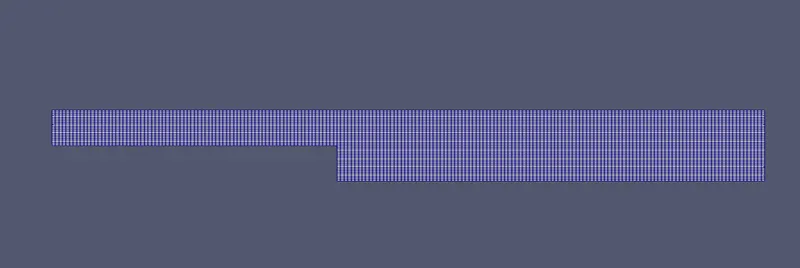
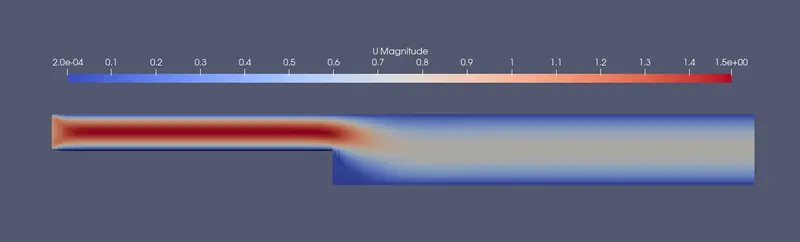
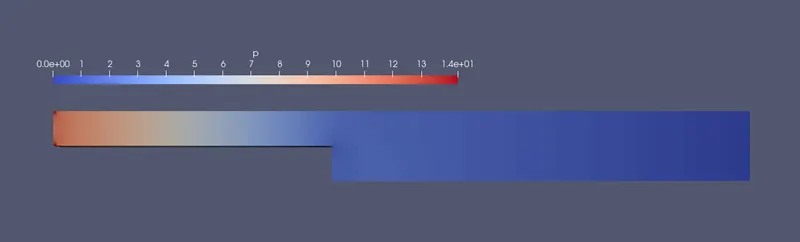
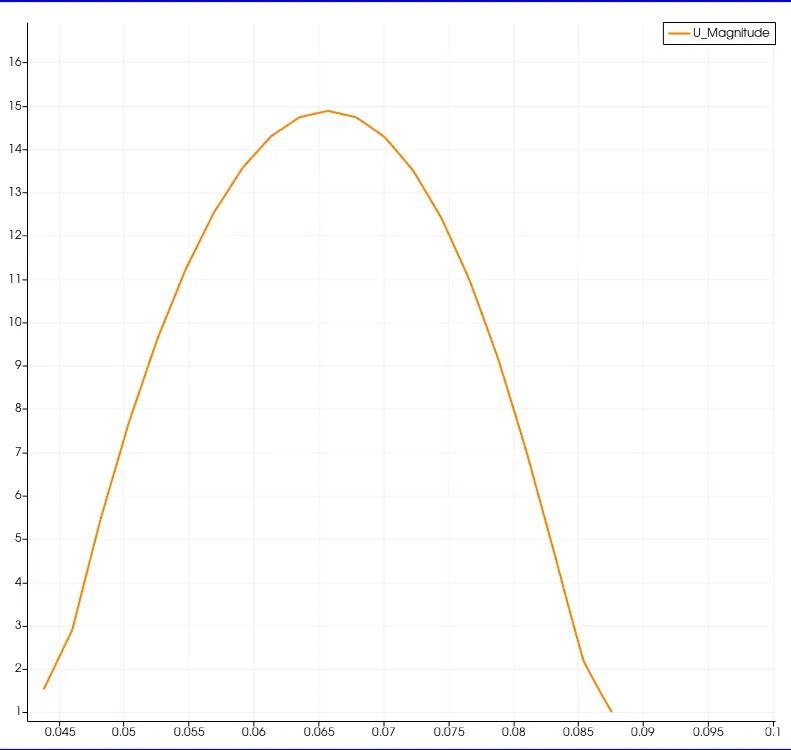
without Grading
Mesh-
Velocity contour -
Pressure Contour -
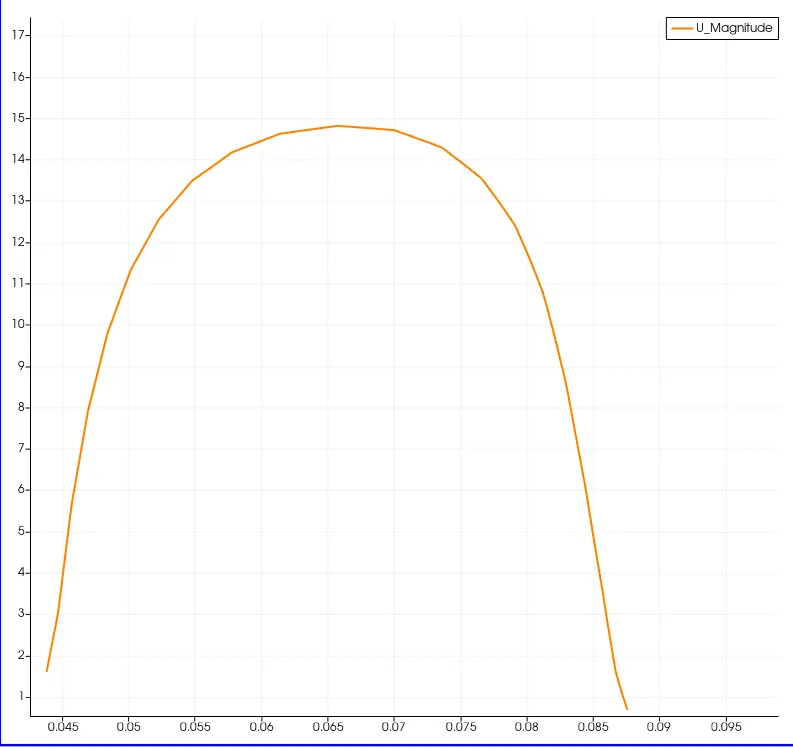
Velocity profile with 0.085 domain Length-
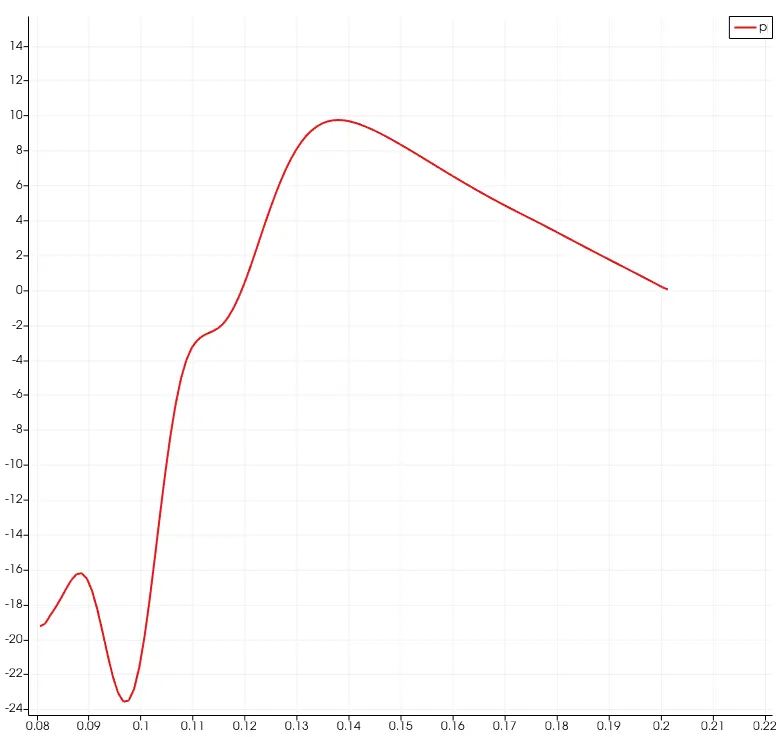
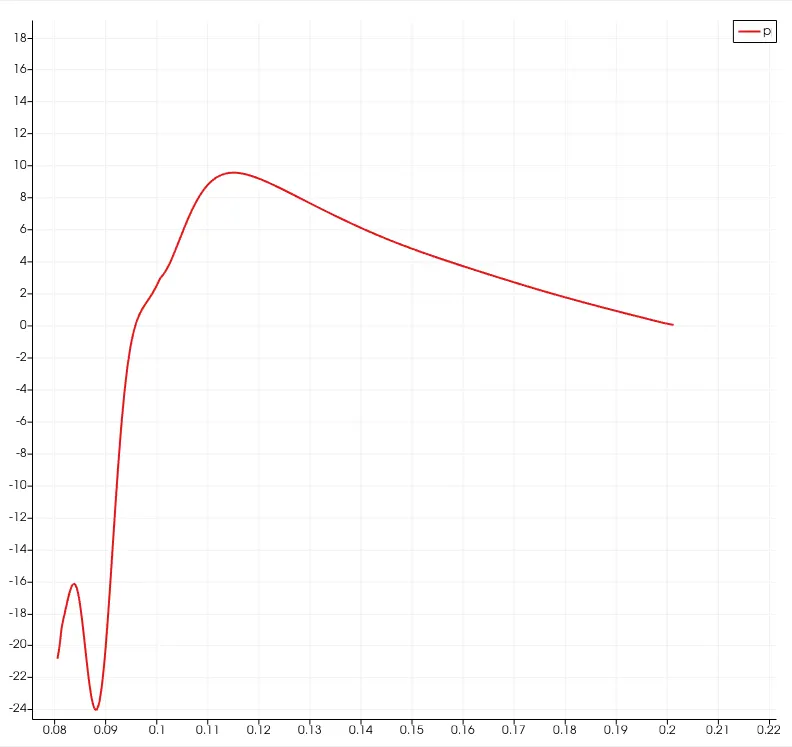
Pressure for full length-
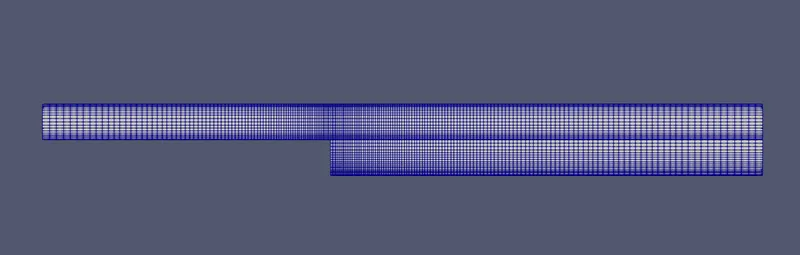
When grading factor 0.2
Mesh -
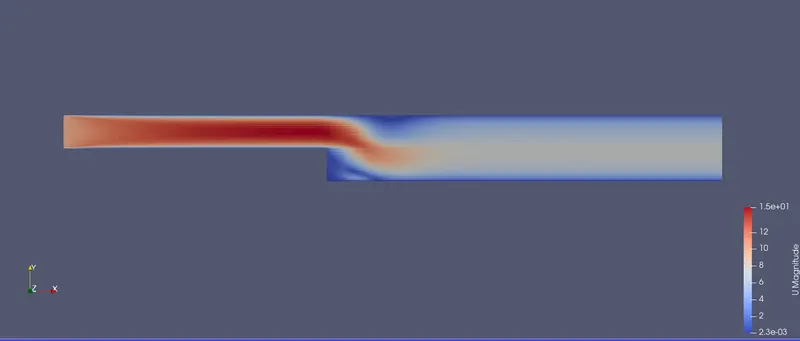
Velocity Contour-
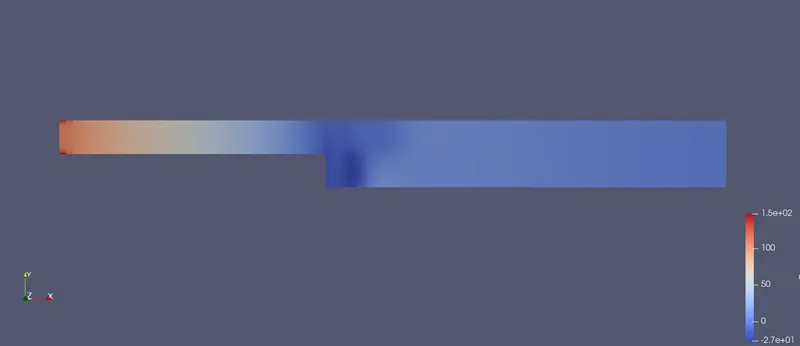
Pressure Contour-
Velocity profile for domain lenght 0.085-
Pressure profile for full-
Conclusion :-
- When the grading factor is 0.2 mesh can be easily seen as it is less congested.
- Overall the grading schemes gives us the same results, but due to the mesh grading factor we can say that velocity gradient of 0.2 shows more accurate results as compared to the GF = 1
- The execution time is lower for lower meshing grading factor.