Week 8 - Simulation of a backward facing step in OpenFOAM
Simulation of a backward facing step in OpenFOAM
Aim: To simulate an incompressible-laminar-viscous flow through the backward facing step geometry.
Objectives:
1. To perform a transient simulation.
2. To perform 2 case studies
Case 1 - Simulate the flow without using any grading factor (i.e., GF = 1)
Case 2 - Simulate the flow with a grading factor of 0.2. The cells should be finer near the walls (including the step wall).
Given Data:
Mesh specification
- Number of cells along the x direction (longer dimension) = 200
- Number of cells along the longer y direction = 20;
Boundary condition specification:
The domain specifications are provided in the following figure.
Procedure: using WSL (openFoam for Windows 10 )
CASE:1(G.F.=1)
1. Open the terminal by just running the Ubuntu app.
2. Type $FOAM_TUTORIALS or TUT in the terminal window.
3. We have to solve incompressible flow simulation for this problem so select incompressible directory by typing ‘cd incompressible’ and then again type 'ls' to explore folders in incompressible folders.
4. For this particular case we need a solver for laminar-viscous flow. So here we have to choose ‘icoFoam’.Therefore, we will select icoFoam folder by typing ‘cd icoFoam’ and by typing ‘ls’ we explore this folder in the terminal.
5.Here, we have, again two options, cavity and elbow. They both are part of the icoFoam solver and cavity section is used to create required domain and black mesh so select the ‘cavity’ folder.By typing ‘cd cavity’ and then again typing 'ls' to explore folders in cavity folder.(0,constant,system)
6. We are not going to make any changes here in the tutorial section. So, we are going to copy this cavity folder using the ‘cp -r cavity’ command and paste it into OpenFOAM run folder by typing ‘cp -r cavity $FOAM_RUN/cavity_test’.
7. Then open the run folder by typing ‘cd $FOAM_RUN’. where we can see the cavity_test file.
8.Type 'ls' to explore folders in cavity_test file.(0,constant,system).
9.We have to open the system folder by typing 'cd system'.There are 4 script files in the system folder(blockMeshDict controlDict fvSchemes fvSolution )and by opening blockMeshDict we can create domain and provide the required specification for block mesh.
10.Type notepad.exe blockMeshDict to open the blockMeshDict .We have to edit the file and save it.
/*--------------------------------*- C++ -*----------------------------------*\
  =========                 |
  \\      /  F ield         | OpenFOAM: The Open Source CFD Toolbox
   \\    /   O peration     | Website:  https://openfoam.org
    \\  /    A nd           | Version:  10
     \\/     M anipulation  |
\*---------------------------------------------------------------------------*/
FoamFile
{
    format      ascii;
    class       dictionary;
    object      blockMeshDict;
}
// * * * * * * * * * * * * * * * * * * * * * * * * * * * * * * * * * * * * * //

convertToMeters 1;

vertices
(
    (0 0 0)
    (0.08 0 0)
    (0.08 0.005 0)
    (0 0.005 0)
    (0.08 0.01 0)
    (0 0.01 0)
    (0.20 0.01 0)
    (0.20 0.005 0)
    (0.20 0 0)
    (0.20 -0.01 0)
    (0.08 -0.01 0)
    (0 0 0.1)
    (0.08 0 0.1)
    (0.08 0.005 0.1)
    (0 0.005 0.1)
    (0.08 0.01 0.1)
    (0 0.01 0.1)
    (0.20 0.01 0.1)
    (0.20 0.005 0.1)
    (0.20 0 0.1)
    (0.20 -0.01 0.1)
    (0.08 -0.01 0.1)
);

blocks
(
    hex (0 1 2 3 11 12 13 14) (80 5 1) simpleGrading (1 1 1)
    hex (3 2 4 5 14 13 15 16) (80 5 1) simpleGrading (1 1 1)
    hex (2 7 6 4 13 18 17 15) (120 5 1) simpleGrading (1 1 1)
    hex (1 8 7 2 12 19 18 13) (120 5 1) simpleGrading (1 1 1)
    hex (10 9 8 1 21 20 19 12) (120 10 1) simpleGrading (1 1 1)

);

boundary
(
    inlet
    {
        type patch;
        faces
        (
            (0 11 14 3)
            (3 14 16 5)
        );
    }
    outlet
    {
        type patch;
        faces
        (
            (9 8 19 20)
            (8 7 18 19)
            (7 6 17 18)
        );
    }
    noslipwalls
    {
        type wall;
        faces
         (
             (4 5 16 15)
             (4 15 17 6)
             (1 10 21 12)
             (9 20 21 10)
             (1 12 11 0)
          );
      }
      frontAndBack
    {
        type empty;
        faces
        (
            (0 3 2 1)
            (11 12 13 14)
            (3 5 4 2)
            (14 13 15 16)
            (1 2 7 8)
            (12 19 18 13)
            (2 4 6 7)
            (13 18 17 15)
            (10 1 8 9)
            (21 20 19 12)
        );
    }
);

mergePatchPairs
(
);


// ************************************************************************* //
blockMeshDict file is used for creating geometry, generating mesh, and defining boundary conditions. The following procedures need to be followed in creating geometry in blockMesh.
Let us consider creating the geometry using 5 blocks as shown in the figure below,
Now let’s, start indexing the Vertices on the Back side of the Blocks, Since openFoam uses C++ programming, we start the index from “0”.
Similarly, the indexing for the frontside of the Blocks are,
To View the Bigger Picture,
- At first, vertices should be defined for each block.
- After creating blocks meshing is done by using hex .It represents a hexahedral mesh.
- Simple grading alters the size of each element.
- The boundary condition is specified in the blockMeshDict file.
We have modified the mesh specification for uniform mesh distribution (nx,ny and nz respectively)
for block 1 (80 5 1)
block 2 (80 5 1)
block 3 (120 5 1)
block 4 (120 5 1)
block 5 (120 10 1)
11. The next step is to navigate to the controlDict folder and specify the simulation time as 0.2 seconds and time step deltaT as 0.001 .
/*--------------------------------*- C++ -*----------------------------------*\
  =========                 |
  \\      /  F ield         | OpenFOAM: The Open Source CFD Toolbox
   \\    /   O peration     | Website:  https://openfoam.org
    \\  /    A nd           | Version:  10
     \\/     M anipulation  |
\*---------------------------------------------------------------------------*/
FoamFile
{
    format      ascii;
    class       dictionary;
    location    "system";
    object      controlDict;
}
// * * * * * * * * * * * * * * * * * * * * * * * * * * * * * * * * * * * * * //

application     icoFoam;

startFrom       startTime;

startTime       0;

stopAt          endTime;

endTime         0.2;

deltaT          0.001;

writeControl    timeStep;

writeInterval   20;

purgeWrite      0;

writeFormat     ascii;

writePrecision  6;

writeCompression off;

timeFormat      general;

timePrecision   6;

runTimeModifiable true;


// ************************************************************************* //
12. Making changes in boundary condition and U and p textfile in 0 folder.
/*--------------------------------*- C++ -*----------------------------------*\
  =========                 |
  \\      /  F ield         | OpenFOAM: The Open Source CFD Toolbox
   \\    /   O peration     | Website:  https://openfoam.org
    \\  /    A nd           | Version:  10
     \\/     M anipulation  |
\*---------------------------------------------------------------------------*/
FoamFile
{
    format      ascii;
    class       volScalarField;
    object      p;
}
// * * * * * * * * * * * * * * * * * * * * * * * * * * * * * * * * * * * * * //

dimensions      [0 2 -2 0 0 0 0];

internalField   uniform 0;

boundaryField
{
    inlet
    {
        type            zeroGradient;
    }

    outlet
    {
        type            fixedValue;
        value           uniform 0;
    }

    noslipwalls
    {
         type           zeroGradient;
    }

    frontAndBack
    {
        type            empty;
    }
}

// ************************************************************************* //
/*--------------------------------*- C++ -*----------------------------------*\
  =========                 |
  \\      /  F ield         | OpenFOAM: The Open Source CFD Toolbox
   \\    /   O peration     | Website:  https://openfoam.org
    \\  /    A nd           | Version:  10
     \\/     M anipulation  |
\*---------------------------------------------------------------------------*/
FoamFile
{
    format      ascii;
    class       volVectorField;
    object      U;
}
// * * * * * * * * * * * * * * * * * * * * * * * * * * * * * * * * * * * * * //

dimensions      [0 1 -1 0 0 0 0];

internalField   uniform (0 0 0);

boundaryField
{
    inlet
    {
        type            fixedValue;
        value           uniform (1 0 0);
    }

    outlet
    {
        type            zeroGradient;
    }

    noslipwalls
    {
        type             noSlip;
        //value            uniform(0 0 0);

    frontAndBack
    {
        type            empty;
    }
}
// ************************************************************************* //
13.Type 'checkMesh' to check the blockMesh.
14. Type 'icoFoam' to run the solver.
15. Now, view the results in ParaView by using the ‘paraFoam’ command.
Meshing with grading factor 1.
grading factor=size of last cell/size of first cell=1
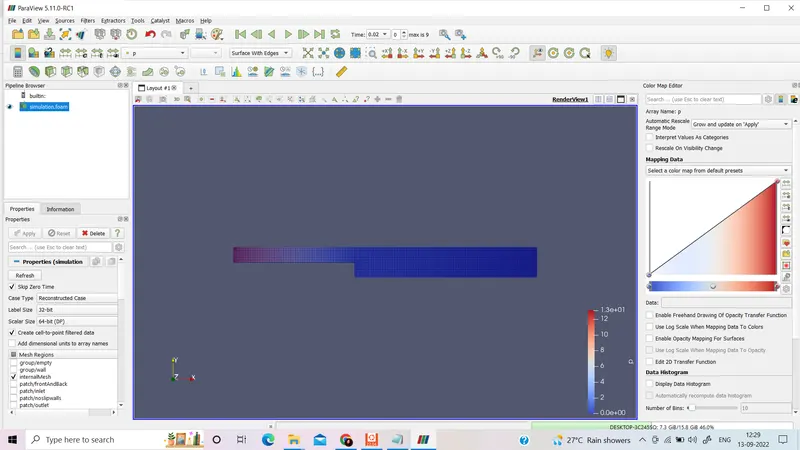
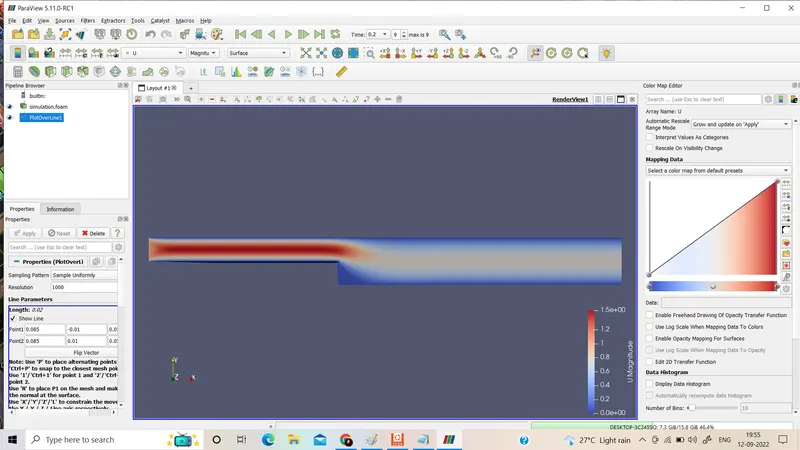
U:
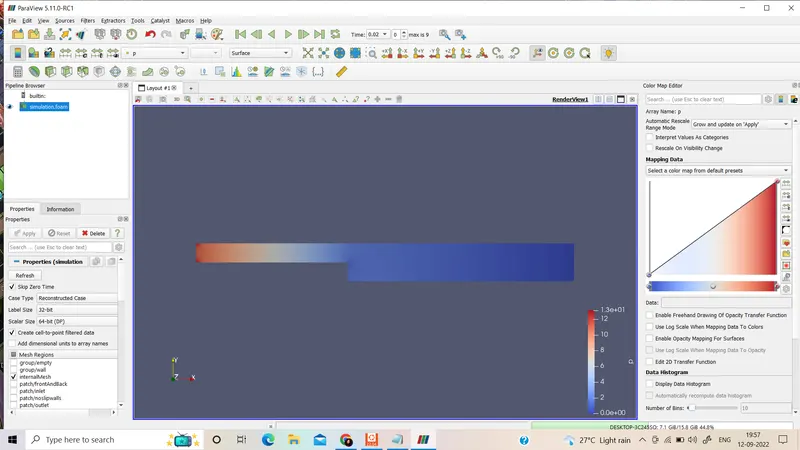
P:
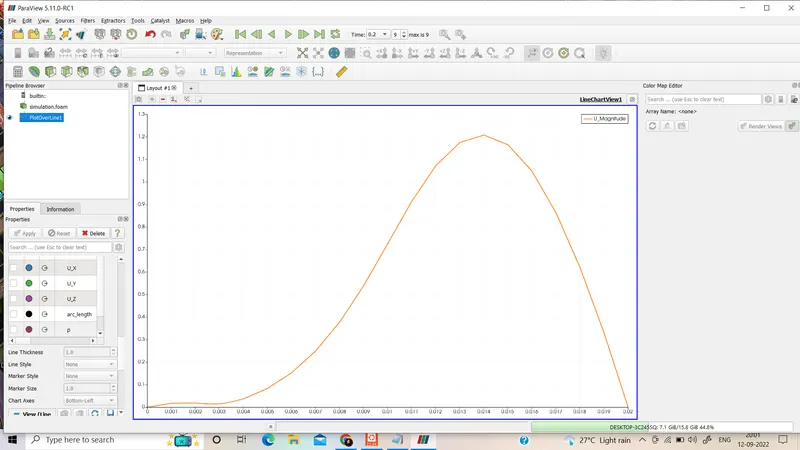
The velocity profile at 0.085 m from the inlet of the geometry :
CASE:1(G.F.=0.2)
We have to copy the cavity folder using the ‘cp -r cavity’ command and paste it into OpenFOAM run folder by typing ‘cp -r cavity $FOAM_RUN/cavity_test2’.All the procedures are the same.Only we have to change the blockMeshDict file in the hex part.
blocks
(
hex (0 1 2 3 11 12 13 14) (80 5 1) simpleGrading (0.2 5 1)
hex (3 2 4 5 14 13 15 16) (80 5 1) simpleGrading (0.2 0.2 1)
hex (2 7 6 4 13 18 17 15) (120 5 1) simpleGrading (5 0.2 1)
hex (1 8 7 2 12 19 18 13) (120 5 1) simpleGrading (5 5 1)
hex (10 9 8 1 21 20 19 12) (120 10 1) simpleGrading (5 5 1)
);
BlockMeshDict:
/*--------------------------------*- C++ -*----------------------------------*\
  =========                 |
  \\      /  F ield         | OpenFOAM: The Open Source CFD Toolbox
   \\    /   O peration     | Website:  https://openfoam.org
    \\  /    A nd           | Version:  10
     \\/     M anipulation  |
\*---------------------------------------------------------------------------*/
FoamFile
{
    format      ascii;
    class       dictionary;
    object      blockMeshDict;
}
// * * * * * * * * * * * * * * * * * * * * * * * * * * * * * * * * * * * * * //

convertToMeters 1;

vertices
(
    (0 0 0)
    (0.08 0 0)
    (0.08 0.005 0)
    (0 0.005 0)
    (0.08 0.01 0)
    (0 0.01 0)
    (0.20 0.01 0)
    (0.20 0.005 0)
    (0.20 0 0)
    (0.20 -0.01 0)
    (0.08 -0.01 0)
    (0 0 0.1)
    (0.08 0 0.1)
    (0.08 0.005 0.1)
    (0 0.005 0.1)
    (0.08 0.01 0.1)
    (0 0.01 0.1)
    (0.20 0.01 0.1)
    (0.20 0.005 0.1)
    (0.20 0 0.1)
    (0.20 -0.01 0.1)
    (0.08 -0.01 0.1)
);

blocks
(
    hex (0 1 2 3 11 12 13 14) (80 5 1) simpleGrading (0.2 5 1)
    hex (3 2 4 5 14 13 15 16) (80 5 1) simpleGrading (0.2 0.2 1)
    hex (2 7 6 4 13 18 17 15) (120 5 1) simpleGrading (5 0.2 1)
    hex (1 8 7 2 12 19 18 13) (120 5 1) simpleGrading (5 5 1)
    hex (10 9 8 1 21 20 19 12) (120 10 1) simpleGrading (5 5 1)
);

boundary
(
    inlet
    {
        type patch;
        faces
        (
            (0 11 14 3)
            (3 14 16 5)
        );
    }
    outlet
    {
        type patch;
        faces
        (
            (9 8 19 20)
            (8 7 18 19)
            (7 6 17 18)
        );
    }
    noslipwalls
    {
        type wall;
        faces
         (
             (4 5 16 15)
             (4 15 17 6)
             (1 10 21 12)
             (9 20 21 10)
             (1 12 11 0)
          );
      }
      frontAndBack
    {
        type empty;
        faces
        (
            (0 3 2 1)
            (11 12 13 14)
            (3 5 4 2)
            (14 13 15 16)
            (1 2 7 8)
            (12 19 18 13)
            (2 4 6 7)
            (13 18 17 15)
            (10 1 8 9)
            (21 20 19 12)
        );
    }
);

mergePatchPairs
(
);


// ************************************************************************* //
grading factor=size of last cell/size of first cell
grading factor=0.2
size of last cell/size of first cell=0.2=2/10=1/5
The cells should be finer near the walls (including the step wall).
meshing by applyling grading factor 0.2
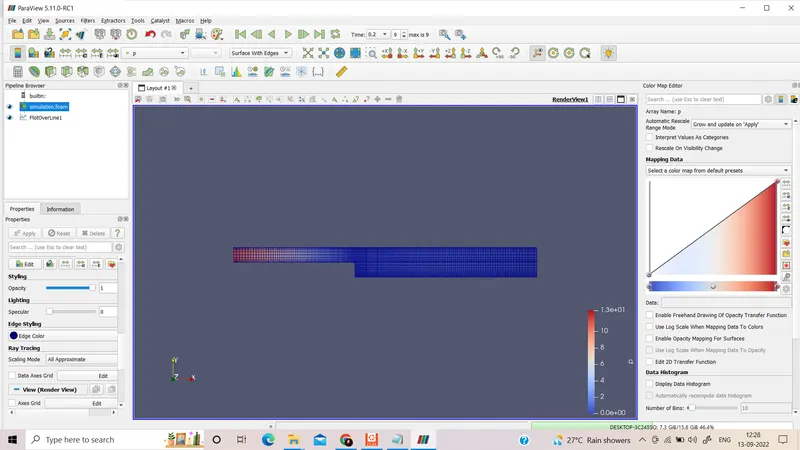
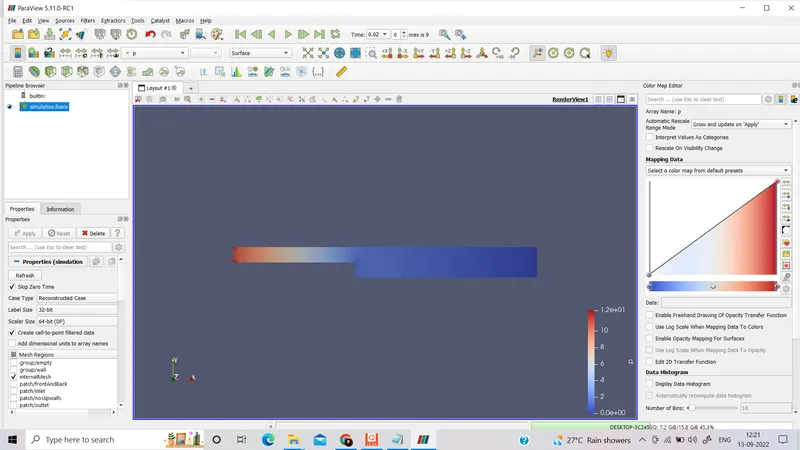
p:
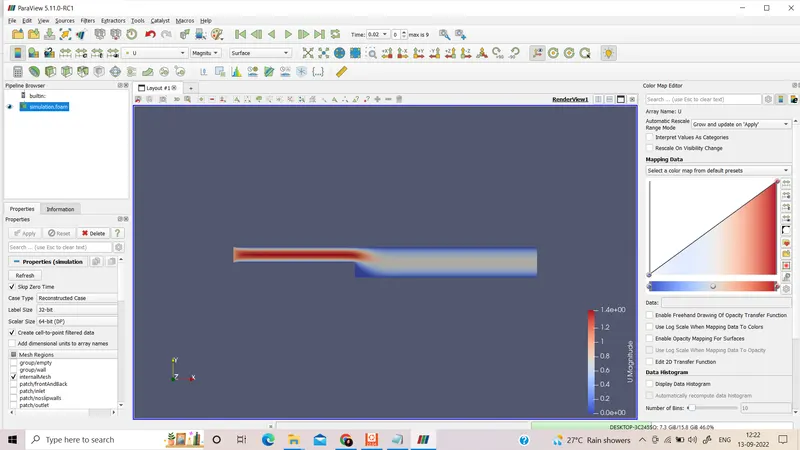
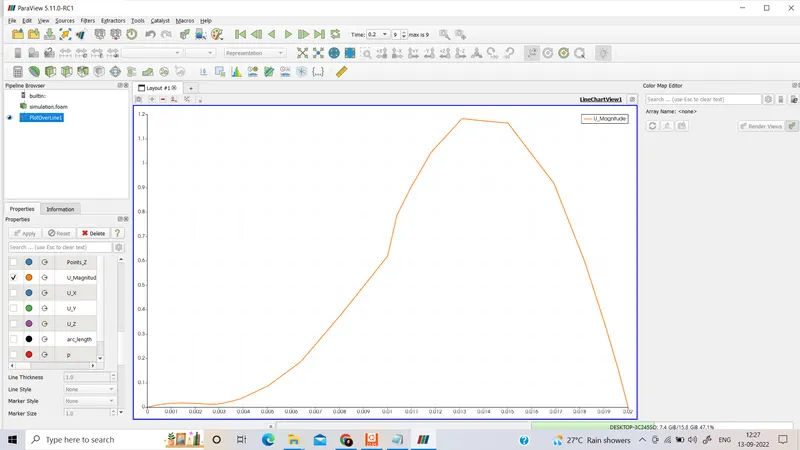
The velocity profile at 0.085 m from the inlet of the geometry :
Conclusion:
By changing the simple grading factor from the value of 1 to 0.2 the mesh becomes finer and the solution becomes very accurate.
Overall the change in the size of the simple grading factor (mesh size) the results remain the same as approximately.