Week 8 - Simulation of a backward facing step in OpenFOAM
/*--------------------------------*- C++ -*----------------------------------*\
  =========                 |
  \\      /  F ield         | OpenFOAM: The Open Source CFD Toolbox
   \\    /   O peration     | Website:  https://openfoam.org
    \\  /    A nd           | Version:  10
     \\/     M anipulation  |
\*---------------------------------------------------------------------------*/
FoamFile
{
    format      ascii;
    class       dictionary;
    object      blockMeshDict;
}
// * * * * * * * * * * * * * * * * * * * * * * * * * * * * * * * * * * * * * //

convertToMeters 1;

vertices
(
    (0 0 0)//0
    (0.08 0 0)//1
    (0.08 0.005 0)//2
    (0 0.005 0)//3
    (0.08 0.01 0)//4
    (0 0.01 0)//5
    (0.20 0.01 0)//6
    (0.20 0.005 0)//7
    (0.20 0 0)//8
    (0.20 -0.01 0)//9
    (0.08 -0.01 0)//10
    (0 0 0.1)//11
    (0.08 0 0.1)//12
    (0.08 0.005 0.1)//13
    (0 0.005 0.1)//14
    (0.08 0.01 0.1)//15
    (0 0.01 0.1)//16
    (0.20 0.01 0.1)//17
    (0.20 0.005 0.1)//18
    (0.20 0 0.1)//19
    (0.20 -0.01 0.1)//20
    (0.08 -0.01 0.1)//21
);

blocks
(
    hex (0 1 2 3 11 12 13 14) (80 5 1) simpleGrading (1 1 1)
    hex (3 2 4 5 14 13 15 16) (80 5 1) simpleGrading (1 1 1)
    hex (2 7 6 4 13 18 17 15) (120 5 1) simpleGrading (1 1 1)
    hex (1 8 7 2 12 19 18 13) (120 5 1) simpleGrading (1 1 1)
    hex (10 9 8 1 21 20 19 12) (120 10 1) simpleGrading (1 1 1)
);

boundary
(
    inlet
    {
        type wall;
        faces
        (
            (0 11 14 3)
            (3 14 16 5)
        );
    }
    outlet
    {
        type wall;
        faces
        (
            (9 8 19 20)
            (8 7 18 19)
            (7 6 17 18)
        );
    }
    frontAndBack
    {
        type empty;
        faces
        (
            (11 12 13 14)
            (14 13 15 16)
            (13 18 17 15)
            (12 19 18 13)
            (21 20 19 12)
            (0 3 2 1)
            (3 5 4 2)
            (2 4 6 7)
            (1 2 7 8)
            (10 1 8 9)
        );
    }
    fixedWalls
    {
        type wall;
        faces
        (
            (5 16 15 4)
            (0 1 12 11)
            (4 15 17 6)
            (10 9 20 21)
            (10 21 12 1)
        );
    }
);

mergePatchPairs
(
);

// ************************************************************************* //
/*--------------------------------*- C++ -*----------------------------------*\
========= |
\\ / F ield | OpenFOAM: The Open Source CFD Toolbox
\\ / O peration | Website: https://openfoam.org
\\ / A nd | Version: 10
\\/ M anipulation |
\*---------------------------------------------------------------------------*/
FoamFile
{
format ascii;
class dictionary;
location "system";
object controlDict;
}
// * * * * * * * * * * * * * * * * * * * * * * * * * * * * * * * * * * * * * //
application icoFoam;
startFrom startTime;
startTime 0;
stopAt endTime;
endTime 0.1;
deltaT 0.00001;
writeControl timeStep;
writeInterval 20;
purgeWrite 0;
writeFormat ascii;
writePrecision 6;
writeCompression off;
timeFormat general;
timePrecision 6;
runTimeModifiable true;
// ************************************************************************* ///*--------------------------------*- C++ -*----------------------------------*\
========= |
\\ / F ield | OpenFOAM: The Open Source CFD Toolbox
\\ / O peration | Website: https://openfoam.org
\\ / A nd | Version: 10
\\/ M anipulation |
\*---------------------------------------------------------------------------*/
FoamFile
{
format ascii;
class volScalarField;
object p;
}
// * * * * * * * * * * * * * * * * * * * * * * * * * * * * * * * * * * * * * //
dimensions [0 2 -2 0 0 0 0];
internalField uniform 0;
boundaryField
{
inlet
{
type zeroGradient;
}
outlet
{
type fixedValue;
value uniform 0;
}
fixedWalls
{
type zeroGradient;
}
frontAndBack
{
type empty;
}
}
// ************************************************************************* ///*--------------------------------*- C++ -*----------------------------------*\
========= |
\\ / F ield | OpenFOAM: The Open Source CFD Toolbox
\\ / O peration | Website: https://openfoam.org
\\ / A nd | Version: 10
\\/ M anipulation |
\*---------------------------------------------------------------------------*/
FoamFile
{
format ascii;
class volVectorField;
object U;
}
// * * * * * * * * * * * * * * * * * * * * * * * * * * * * * * * * * * * * * //
dimensions [0 1 -1 0 0 0 0];
internalField uniform (0 0 0);
boundaryField
{
inlet
{
type fixedValue;
value uniform (1 0 0);
}
outlet
{
type zeroGradient;
}
fixedWalls
{
type noSlip;
}
frontAndBack
{
type empty;
}
}
// ************************************************************************* //In order to run the simulation, we need to open the tutorials folder, then incompressible flow, then the solver icofoam, then cavity and copy the entire cavity folder to our local folder so that the original tutorials remain untouched using "cp -r cavity $FOAM_RUN/cavity_test" folder. Now, we can see the files inside our cavity folder using cd $FOAM_RUN command, and then choosing cavity_test, and use the gedit command to edit the blockMeshDict file to change the necessary parameters.
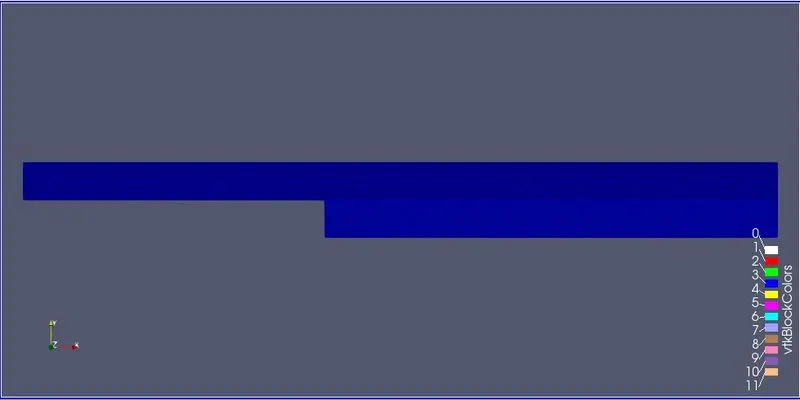
Inside the blockMeshDict, we add the backward step vertices, we define the hexahedral mesh size for the 5 blocks, and define all the faces where the necessary parameters or boundary conditions going to be defined are applicable.
Then, after saving and exitting the file, we use the gedit command to edit the controlDict file to input the time paramaters. Now, we come outside the current folder and go the the folder named 0 and inside the folders for pressure and velocity, input the desired boundary conditions for the corresponding parameters.
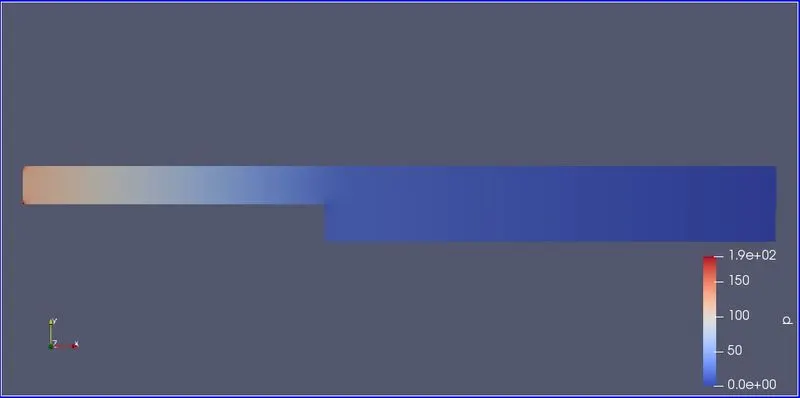
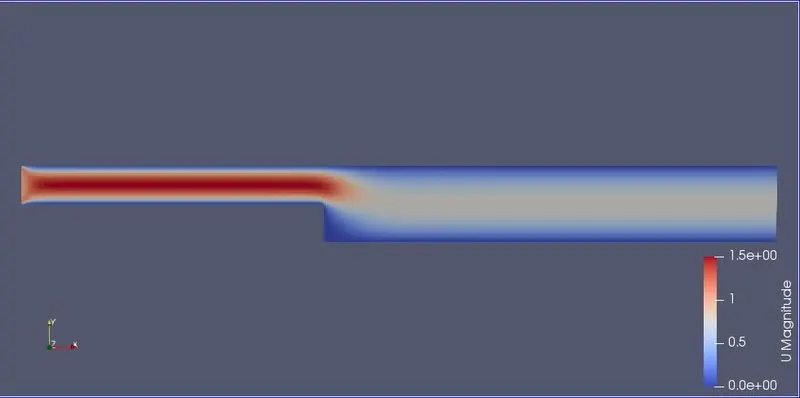
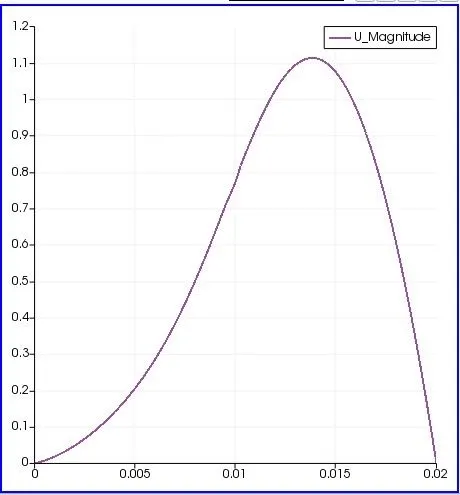
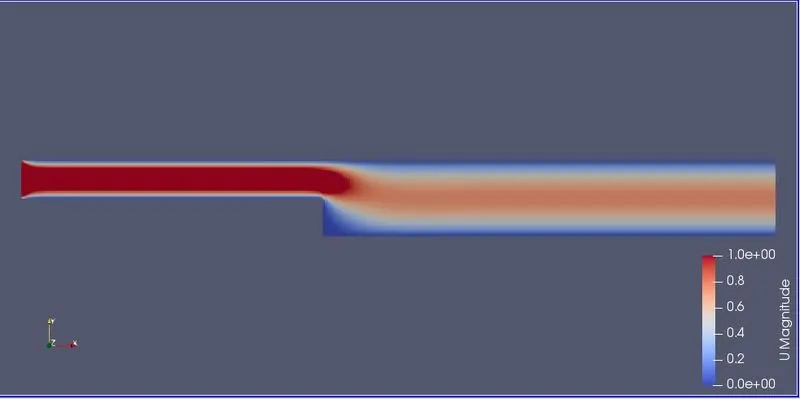
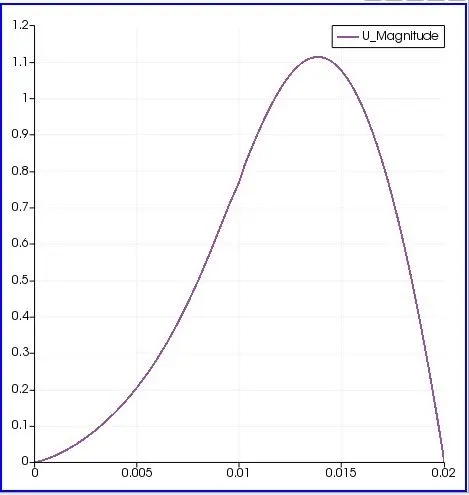
Now, after entering all the parameters, we use blockMesh command to deploy the mesh and checkMesh command to find any errors in the mesh parameters. Then, we use icoFoam command to run the simulation and after the simulation has been run, use paraFoam command to open paraView, and choose the desired outcomes and apply. We choose the parameters to be viewed such as the mesh using surface with edges, and we can view the velocity profiles, pressure profiles for the simulation run time. After that we can use the plot over line option to plot the velocity plot to obtain the value at a distance of 0.085m. All these procedures are repeated for the grading factor of 0.2.
MESHGRID:
PRESSURE DISTRIBUTION:
VELOCITY DISTRIBUTION:
VELOCITY PLOT FOR GRADING FACTOR = 1:
/*--------------------------------*- C++ -*----------------------------------*\
  =========                 |
  \\      /  F ield         | OpenFOAM: The Open Source CFD Toolbox
   \\    /   O peration     | Website:  https://openfoam.org
    \\  /    A nd           | Version:  10
     \\/     M anipulation  |
\*---------------------------------------------------------------------------*/
FoamFile
{
    format      ascii;
    class       dictionary;
    object      blockMeshDict;
}
// * * * * * * * * * * * * * * * * * * * * * * * * * * * * * * * * * * * * * //

convertToMeters 1;

vertices
(
    (0 0 0)//0
    (0.08 0 0)//1
    (0.08 0.005 0)//2
    (0 0.005 0)//3
    (0.08 0.01 0)//4
    (0 0.01 0)//5
    (0.20 0.01 0)//6
    (0.20 0.005 0)//7
    (0.20 0 0)//8
    (0.20 -0.01 0)//9
    (0.08 -0.01 0)//10
    (0 0 0.1)//11
    (0.08 0 0.1)//12
    (0.08 0.005 0.1)//13
    (0 0.005 0.1)//14
    (0.08 0.01 0.1)//15
    (0 0.01 0.1)//16
    (0.20 0.01 0.1)//17
    (0.20 0.005 0.1)//18
    (0.20 0 0.1)//19
    (0.20 -0.01 0.1)//20
    (0.08 -0.01 0.1)//21
);

blocks
(
    hex (0 1 2 3 11 12 13 14) (80 5 1) simpleGrading (0.2 5 1)
    hex (3 2 4 5 14 13 15 16) (80 5 1) simpleGrading (0.2 0.2 1)
    hex (2 7 6 4 13 18 17 15) (120 5 1) simpleGrading (5 0.2 1)
    hex (1 8 7 2 12 19 18 13) (120 5 1) simpleGrading (5 5 1)
    hex (10 9 8 1 21 20 19 12) (120 10 1) simpleGrading (5 5 1)
);

boundary
(
    inlet
    {
        type wall;
        faces
        (
            (0 11 14 3)
            (3 14 16 5)
        );
    }
    outlet
    {
        type wall;
        faces
        (
            (9 8 19 20)
            (8 7 18 19)
            (7 6 17 18)
        );
    }
    frontAndBack
    {
        type empty;
        faces
        (
            (11 12 13 14)
            (14 13 15 16)
            (13 18 17 15)
            (12 19 18 13)
            (21 20 19 12)
            (0 3 2 1)
            (3 5 4 2)
            (2 4 6 7)
            (1 2 7 8)
            (10 1 8 9)
        );
    }
    fixedWalls
    {
        type wall;
        faces
        (
            (5 16 15 4)
            (0 1 12 11)
            (4 15 17 6)
            (10 9 20 21)
            (10 21 12 1)
        );
    }
);

mergePatchPairs
(
);

// ************************************************************************* //
PRESSURE DISTRIBUTION FOR GF = 0.2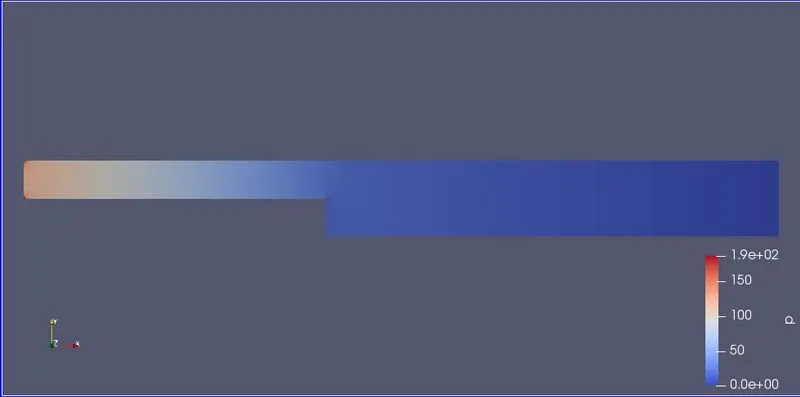
VELOCITY DISTRIBUTION FOR GF = 0.2
VELOCITY PLOT FOR GF = 0.2
The effect of grading factor for meshing is that for finer mesh size, the simulation time is very large, the time taken to solve is also long compared to coarse mesh structures. Also, for finer mesh sizes, the solutions obtained are near accurate and we can alter the mesh from fine to coarse by changing the grading factor. Higher the grading factor, coarse the mesh will be and less time taken for simulation but less accurate results are obtained.