Week 8 - Simulation of a backward facing step in OpenFOAM
OBJECTIVE
- Transient simulation of an incompressible-laminar-viscous flow through the backward facing step geometry
- Simulate the flow without using any grading factor and also using a grading factor of 0.2
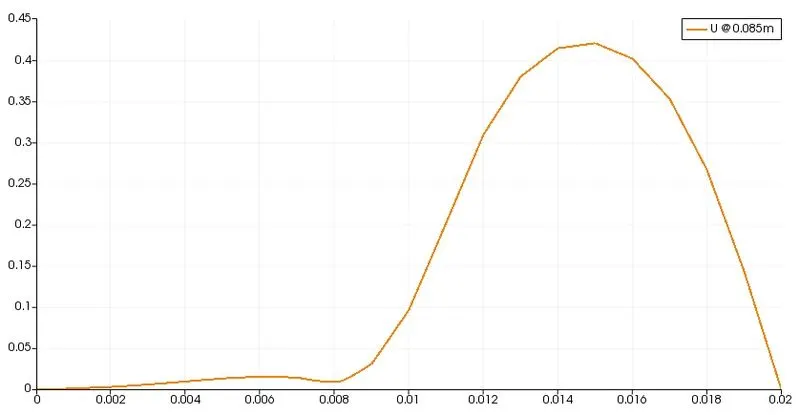
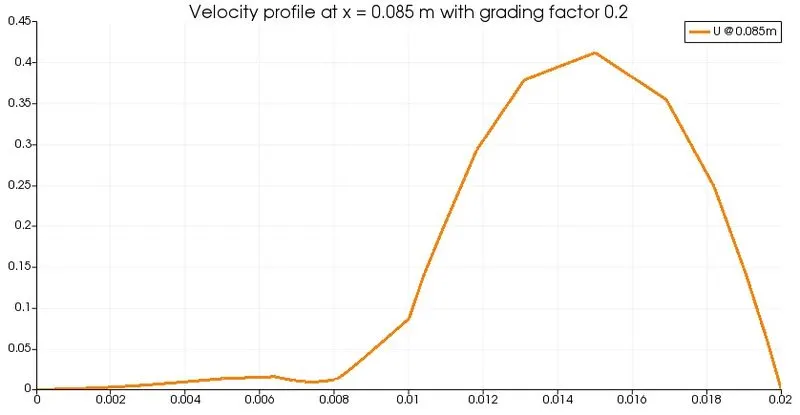
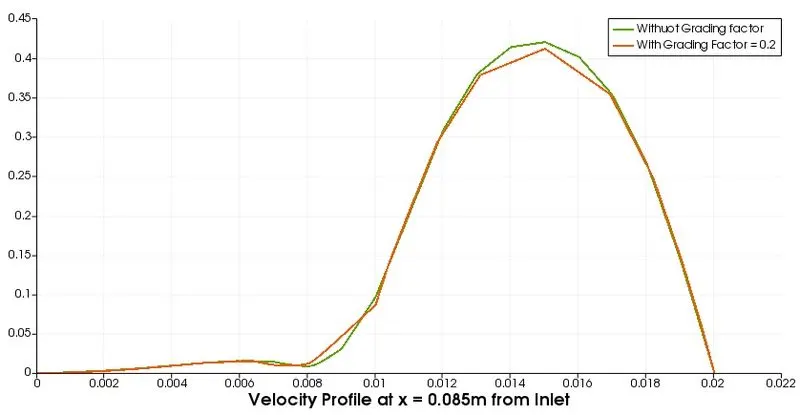
- Compare the velocity profile at 0.085 m from the inlet of the geometry for both case studies
- Explain why Grading/Growth factor is essential for meshing.
GEOMETRY
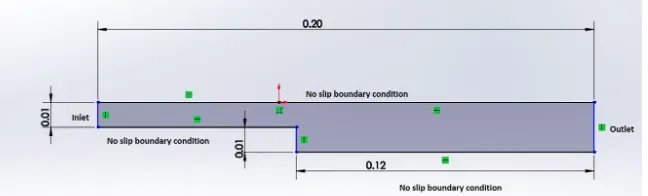
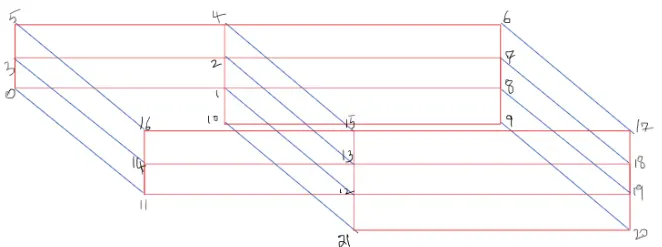
Recreating the geometry as blocks, we get to see the following arrangement with all the vertices given.
SELECTING THE SOLVER AND TUTORIAL
Assuming the fluid to be Newtonian and neglecting the frictional losses, for a incompressible-laminar flow icoFoam solver can be used.
In OpenFoam, the tutorial we select is incompressible icoFoam and copy the cavity folder into the run folder so that the files can be coded in order to suit the objectives of the problem.
As per the geometry and the blocks we edit the blockMeshDict file so that it has all the vertices from 0-21, 5 blocks with and without grading factor and specifying the type of each boundary. The mesh specifications need to be
- Number of cells along the x direction (longer dimension) = 200
- Number of cells along the longer y direction = 20.
In blockMesh Directory, the boundary types are
- inlet and outlet as patches,
- front and back faces as empty and
- the rest including the backward facing step as walls.
On executing the blockMesh command, a polymesh is created.
The initial conditions for the problem must be given. This is done by editing the velocity and pressure files in the 0 directory to our choice such that they respect the objectives. Finally, the controlDict file needs to be edited.
OPENFOAM SETUP FOR SIMULATION OF FLOW WITHOUT ANY GRADING FACTOR
blockMeshDict code
/*--------------------------------*- C++ -*----------------------------------*\
  =========                 |
  \\      /  F ield         | OpenFOAM: The Open Source CFD Toolbox
   \\    /   O peration     | Website:  https://openfoam.org
    \\  /    A nd           | Version:  10
     \\/     M anipulation  |
\*---------------------------------------------------------------------------*/
FoamFile
{
    format      ascii;
    class       dictionary;
    object      blockMeshDict;
}
// * * * * * * * * * * * * * * * * * * * * * * * * * * * * * * * * * * * * * //

convertToMeters 0.01;

vertices
(
    (0 0 0) //Vertex 0
    (8 0 0) // Vertex 1
    (8 0.5 0) //Vertex 2
    (0 0.5 0) //Vertex 3
    (8 1 0) //Vertex 4
    (0 1 0) //Vertex 5
    (20 1 0) //Vertex 6
    (20 0.5 0) ///Vertex 7
    (20 0 0) //Vertex8
    (20 -1 0) //Vertex 9
    (8 -1 0) //Vertex 10

    (0 0 0.1) //Vertex 11
    (8 0 0.1) //Vertex 12
    (8 0.5 0.1) //Vertex 13
    (0 0.5 0.1) //Vertex 14
    (8 1 0.1) //Vertex 15
    (0 1 0.1) //Vertex 16
    (20 1 0.1) //Vertex 17
    (20 0.5 0.1) //Vertex 18
    (20 0 0.1) //Vertex 19
    (20 -1 0.1) //Vertex 20
    (8 -1 0.1) //Vertex 21
);

blocks
(
    hex (0 1 2 3 11 12 13 14) (80 5 1) simpleGrading (1 1 1)
    hex (3 2 4 5 14 13 15 16) (80 5 1) simpleGrading (1 1 1)
    hex (2 7 6 4 13 18 17 15) (120 5 1) simpleGrading (1 1 1)
    hex (1 8 7 2 12 19 18 13) (120 5 1) simpleGrading (1 1 1)
    hex (10 9 8 1 21 20 19 12 ) (120 10 1) simpleGrading (1 1 1)
);

edges
(
);

boundary
(
    Inlet
    {
        type patch;
        faces
        (
            (0 11 14 3)
            (3 14 16 5)
        );
    }
    Outlet
    {
        type patch;
        faces
        (
            (9 8 19 20)
            (8 7 18 19 )
            (7 6 17 18)
        );
    }
    Walls
    {
        type wall;
        faces
        (
            (4 5 16 15)
            (6 4 15 17)
            (0 1 12 11)
            (10 9 20 21)
            (1 10 21 12)
        );
    }
);
mergePatchPairs
(
);

// ************************************************************************* //
Velocity U code
/*--------------------------------*- C++ -*----------------------------------*\
  =========                 |
  \\      /  F ield         | OpenFOAM: The Open Source CFD Toolbox
   \\    /   O peration     | Website:  https://openfoam.org
    \\  /    A nd           | Version:  10
     \\/     M anipulation  |
\*---------------------------------------------------------------------------*/
FoamFile
{
    format      ascii;
    class       volVectorField;
    object      U;
}
// * * * * * * * * * * * * * * * * * * * * * * * * * * * * * * * * * * * * * //

dimensions      [0 1 -1 0 0 0 0];

internalField   uniform (0 0 0);

boundaryField
{
    Inlet
    {
        type            fixedValue;
        value		uniform (0.3 0 0);
    }

    Outlet
    {
        type            zeroGradient;
    }

    Walls
    {
        type            noSlip;
    }
}

// ************************************************************************* //
Pressure p code
/*--------------------------------*- C++ -*----------------------------------*\
  =========                 |
  \\      /  F ield         | OpenFOAM: The Open Source CFD Toolbox
   \\    /   O peration     | Website:  https://openfoam.org
    \\  /    A nd           | Version:  10
     \\/     M anipulation  |
\*---------------------------------------------------------------------------*/
FoamFile
{
    format      ascii;
    class       volScalarField;
    object      p;
}
// * * * * * * * * * * * * * * * * * * * * * * * * * * * * * * * * * * * * * //

dimensions      [0 2 -2 0 0 0 0];

internalField   uniform 0;

boundaryField
{
    Inlet
    {
        type            zeroGradient;
    }

    Outlet
    {
        type            fixedValue;
        value 		uniform 0;
    }

    Walls
    {
        type           zeroGradient;
    }
}

// ************************************************************************* //
transport/physical properties code
/*--------------------------------*- C++ -*----------------------------------*\
  =========                 |
  \\      /  F ield         | OpenFOAM: The Open Source CFD Toolbox
   \\    /   O peration     | Website:  https://openfoam.org
    \\  /    A nd           | Version:  10
     \\/     M anipulation  |
\*---------------------------------------------------------------------------*/
FoamFile
{
    format      ascii;
    class       dictionary;
    location    "constant";
    object      physicalProperties;
}
// * * * * * * * * * * * * * * * * * * * * * * * * * * * * * * * * * * * * * //

nu              [0 2 -1 0 0 0 0] 1e-5;


// ************************************************************************* //
controlDict code
/*--------------------------------*- C++ -*----------------------------------*\
  =========                 |
  \\      /  F ield         | OpenFOAM: The Open Source CFD Toolbox
   \\    /   O peration     | Website:  https://openfoam.org
    \\  /    A nd           | Version:  10
     \\/     M anipulation  |
\*---------------------------------------------------------------------------*/
FoamFile
{
    format      ascii;
    class       dictionary;
    location    "system";
    object      controlDict;
}
// * * * * * * * * * * * * * * * * * * * * * * * * * * * * * * * * * * * * * //

application     icoFoam;

startFrom       startTime;

startTime       0;

stopAt          endTime;

endTime         1;

deltaT          0.0005;

writeControl    timeStep;

writeInterval   200;

purgeWrite      0;

writeFormat     ascii;

writePrecision  6;

writeCompression off;

timeFormat      general;

timePrecision   6;

runTimeModifiable true;


// ************************************************************************* //
Output
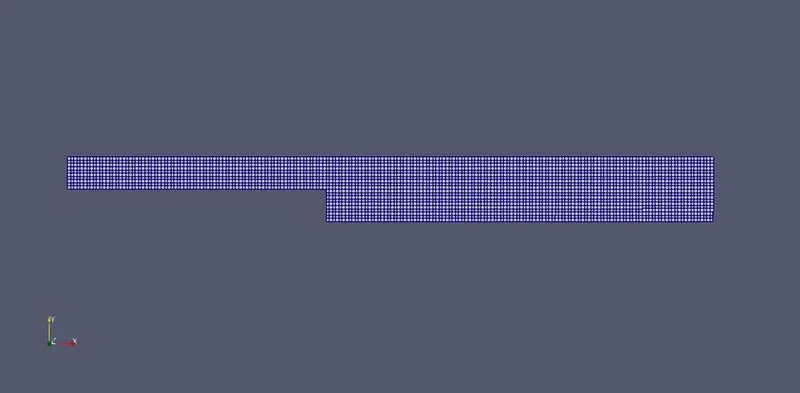
Mesh
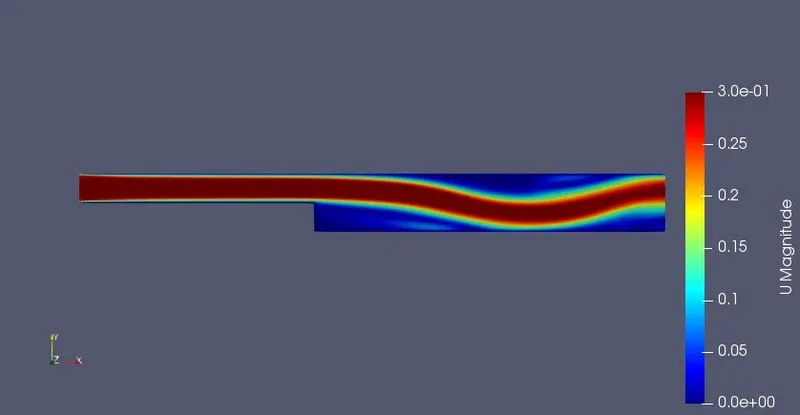
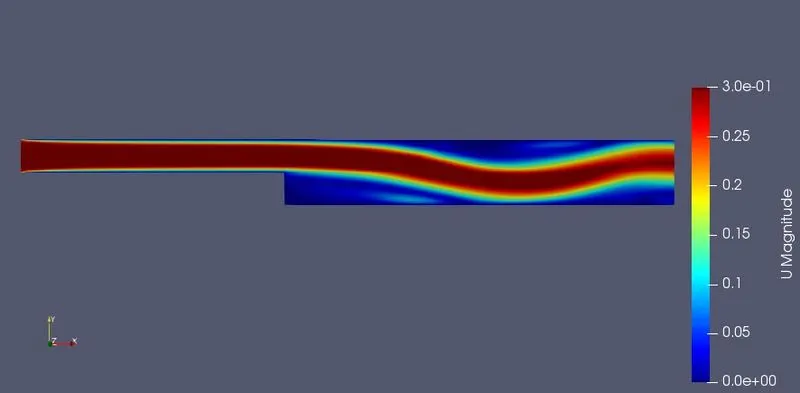
Velocity Contours
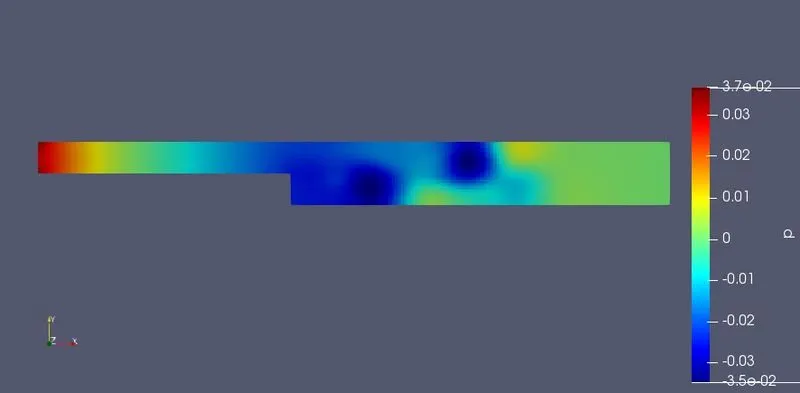
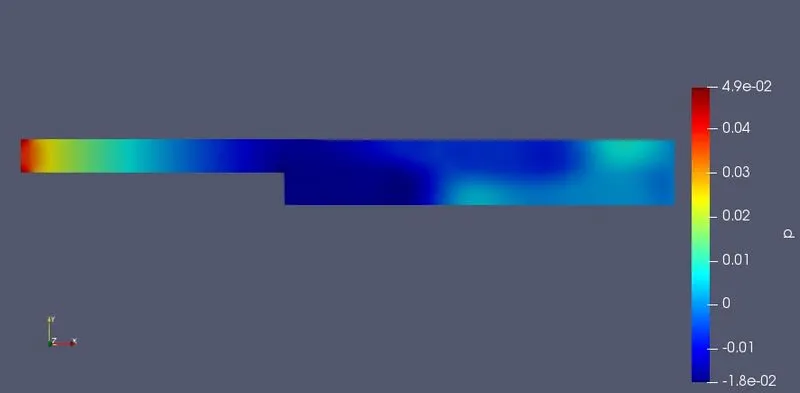
Pressure Contours
Velocity Profile at x = 0.085m from inlet without grading factor
OPENFOAM SETUP FOR SIMULATION OF FLOW WITH "0.2" GRADING FACTOR
For 0.2 grading factor, block mesh will be changed and remining setup will remain same as of witout grading facor.
blockMesh code
/*--------------------------------*- C++ -*----------------------------------*\
  =========                 |
  \\      /  F ield         | OpenFOAM: The Open Source CFD Toolbox
   \\    /   O peration     | Website:  https://openfoam.org
    \\  /    A nd           | Version:  10
     \\/     M anipulation  |
\*---------------------------------------------------------------------------*/
FoamFile
{
    format      ascii;
    class       dictionary;
    object      blockMeshDict;
}
// * * * * * * * * * * * * * * * * * * * * * * * * * * * * * * * * * * * * * //

convertToMeters 0.01;

vertices
(
    (0 0 0) //Vertex 0
    (8 0 0) // Vertex 1
    (8 0.5 0) //Vertex 2
    (0 0.5 0) //Vertex 3
    (8 1 0) //Vertex 4
    (0 1 0) //Vertex 5
    (20 1 0) //Vertex 6
    (20 0.5 0) ///Vertex 7
    (20 0 0) //Vertex8
    (20 -1 0) //Vertex 9
    (8 -1 0) //Vertex 10

    (0 0 0.1) //Vertex 11
    (8 0 0.1) //Vertex 12
    (8 0.5 0.1) //Vertex 13
    (0 0.5 0.1) //Vertex 14
    (8 1 0.1) //Vertex 15
    (0 1 0.1) //Vertex 16
    (20 1 0.1) //Vertex 17
    (20 0.5 0.1) //Vertex 18
    (20 0 0.1) //Vertex 19
    (20 -1 0.1) //Vertex 20
    (8 -1 0.1) //Vertex 21
);

blocks
(
    hex (0 1 2 3 11 12 13 14) (80 5 1) simpleGrading (0.2 5 1)
    hex (3 2 4 5 14 13 15 16) (80 5 1) simpleGrading (0.2 0.2 1)
    hex (2 7 6 4 13 18 17 15) (120 5 1) simpleGrading (5 0.2 1)
    hex (1 8 7 2 12 19 18 13) (120 5 1) simpleGrading (5 5 1)
    hex (10 9 8 1 21 20 19 12 ) (120 10 1) simpleGrading (5 5 1)
);

edges
(
);

boundary
(
    Inlet
    {
        type patch;
        faces
        (
            (0 11 14 3)
            (3 14 16 5)
        );
    }
    Outlet
    {
        type patch;
        faces
        (
            (9 8 19 20)
            (8 7 18 19 )
            (7 6 17 18)
        );
    }
    Walls
    {
        type wall;
        faces
        (
            (4 5 16 15)
            (6 4 15 17)
            (0 1 12 11)
            (10 9 20 21)
            (1 10 21 12)
        );
    }
);
mergePatchPairs
(
);


// ************************************************************************* //
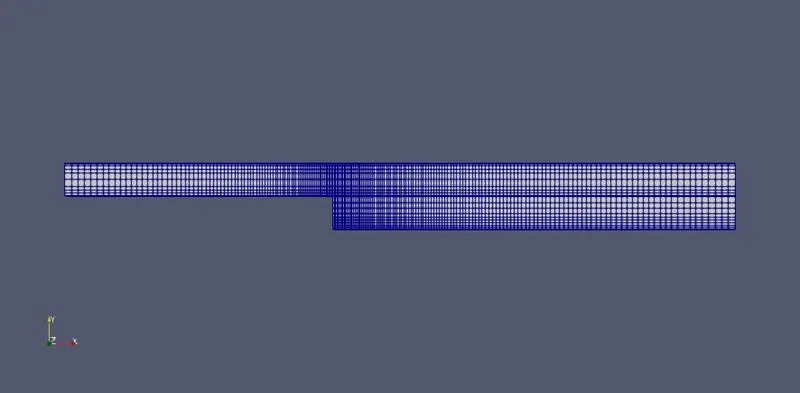
Output
Mesh
Velocity Contour
Pressure Contour
Velocity Profile
Without Grading Factor vs With "0.2" Grading Factor: Velocity Profile at x = 0.005m from Inlet
Results/Discussion
-
By changing the simple grading factor from the value of 1 to 0.2 the mesh becomes finer at walls and the solution becomes very accurate.
-
As mesh gets coarser, the solution might start drift away from the original value. Hence grading factor is essential while meshing so as to get accurate solutions.