Week 8 - Simulation of a backward facing step in OpenFOAM
Simulation of a backward-facing step in OpenFOAM
Aim
we are going to perform a transient simulation on incompressible-laminar-viscous flow through the backward-facing step geometry.
Cases:
Case 1 - Simulate the flow without using any grading factor (i.e., GF = 1)
Case 2 - Simulate the flow with a grading factor of 0.2. The cells should be finer near the walls (including the step wall).
Desired output:
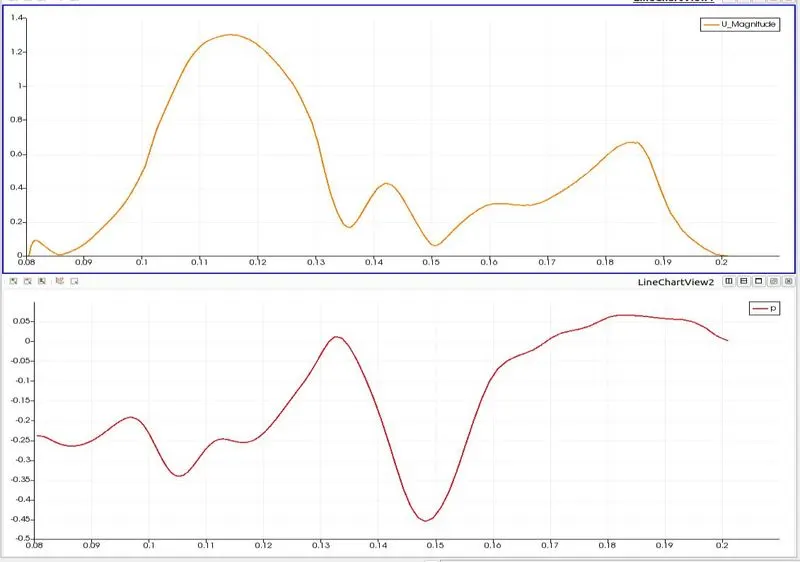
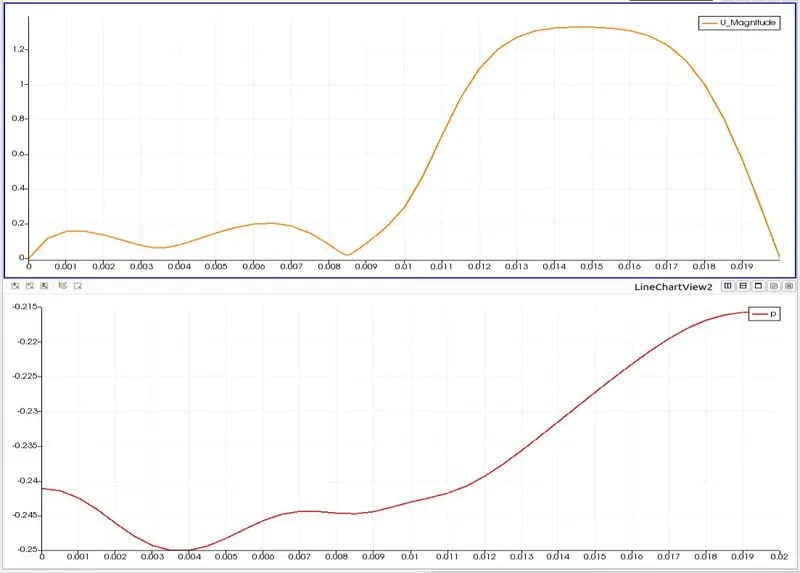
Measure the velocity profile at 0.085 m from the inlet of the geometry for both case studies and compare the results.
Procedure:
- The solver can be chosen based on the described physics of the flow. use this https://www.openfoam.com/documentation/user-guide/standard-solvers.php
- The physics of our problem is Transient incompressible, laminar flow of Newtonian fluids so icoFoam solver has chosen.
- After choosing the right solver for our problem search for tutorials files of that solver copy the tutorial files of icoFoam solver to the RUN folder.
- open terminal(command-line-based interface) in Linux OS.
- type 'tut' shortcut for $FOAM_TUTORIALS
- cd incompressible/icoFoam/cavity/ ==> navigation to required tutorial file
- cp -r cavity/ $FOAM_RUN ==> this command copies the cavity tutorial file to the run folder
- type 'run' it will directly navigate to run folder 'run' is shortcut of $FOAM_RUN
- cd cavity/system/ ==>navigation to system folder
- gedit blockMeshDict ==>edit file according to the geometry.
- gedit controlDict ==>edit file according to the time dt.
- don't edit fvSchemes, fvSolution files leave as it is they are. they are finite volume-based schemes and solutions to solve our problem
- in constant folder edit transport-Properties give proper kinematic viscosity value as the fluid medium in our problem
- in '0' folder edit initial, final boundary conditions & all walls are have no-slip boundary condition. initial velocity 1.5m/s, & final pressure is 1bar.
- after changing all parameters in the tutorial file according to our problem run the simulation using the icoFoam command.
- use paraFoam command to post-process & visualize the results in ParaView. use cell data to point data filter for smoother results.
- Create proper graphs.
Geometry:
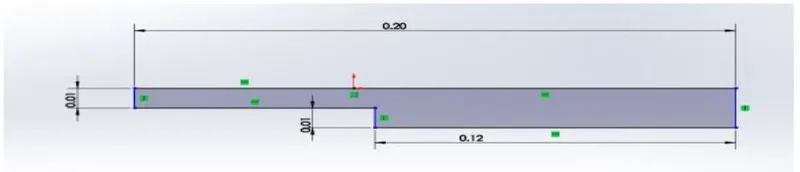
splitting of geometry

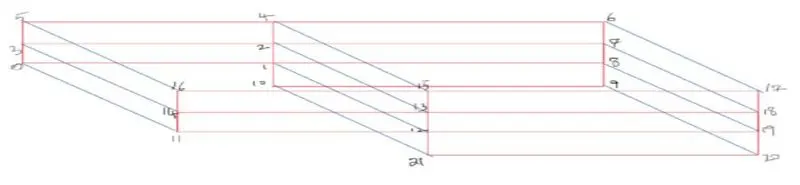
blockMeshDict file code:
/--------------------------------- C++ -----------------------------------\
  =========                 |
  \\      /  F ield         | OpenFOAM: The Open Source CFD Toolbox
   \\    /   O peration     | Website:  https://openfoam.org
    \\  /    A nd           | Version:  8
     \\/     M anipulation  |
\---------------------------------------------------------------------------/
FoamFile
{
    version     2.0;
    format      ascii;
    class       dictionary;
    object      blockMeshDict;
}
// * * * * * * * * * * * * * * * * * * * * * * * * * * * * * * * * * * * * * //

convertToMeters 1;

vertices
(
	(0      0       0)       //00
	(0.08   0       0)       //01
	(0.08 	0.005 	0)       //02
	(0 	0.005 	0)           //03
	(0.08 	0.01 	0)       //04
    (0 	0.01 	0)           //05
	(0.2 	0.01 	0)       //06
	(0.2 	0.005 	0)       //07
	(0.2 	0 	0)           //08
	(0.2 	-0.01 	0)       //09
	(0.08 	-0.01 	0)       //10
	(0 	0 	0.01)            //11
	(0.08 	0 	0.01)        //12
	(0.08 	0.005 	0.01)    //13
	(0 	0.005 	0.01)        //14
	(0.08 	0.01 	0.01)    //15
	(0 	0.01 	0.01)        //16
	(0.2 	0.01 	0.01)    //17
	(0.2 	0.005 	0.01)    //18
	(0.2 	0 	0.01)        //19
	(0.2 	-0.01 	0.01)    //20
	(0.08 	-0.01 	0.01)    //21
);

blocks
(
	hex (0 1 2 3 11 12 13 14)  (80 10 1)   simpleGrading (1 1 1) //block1
	hex (3 2 4 5 14 13 15 16)  (80 10 1)   simpleGrading (1 1 1) //block2
	hex (2 7 6 4 13 18 17 15)  (120 10 1)  simpleGrading (1 1 1) //block3
	hex (1 8 7 2 12 19 18 13)  (120 10 1)  simpleGrading (1 1 1) //block4
	hex (10 9 8 1 21 20 19 12) (120 20 1)  simpleGrading (1 1 1) //block5
);

edges
(
);

boundary
(
    inlet
    {
        type patch;
        faces
        (
            (11 14 3 0)
            (14 16 5 3)
        );
    }

    outlet
    {
        type patch;
        faces
        (
            (19 20 9 8)
            (18 19 8 7)
            (17 18 7 6)
        );
    }

    front_back
    {
        type empty;
        faces
        (
            (16 14 13 15)
            (14 11 12 13)
            (15 13 18 17)
            (13 12 19 18)
            (12 21 20 19)
            (0 3 2 1)
            (3 5 4 2)
            (2 4 6 7)
            (1 2 7 8)
            (10 1 8 9)
        );
    }

    top_bottom_step
    {
        type wall;
        faces
        (
            (16 15 4 5)
            (15 17 6 4)
            (11 0 1 12)
            (21 10 9 20)
            (21 12 1 10)
        );
    }

);

mergePatchPairs
(
);

//*******************//
controlDict code :
/--------------------------------- C++ -----------------------------------\
  =========                 |
  \\      /  F ield         | OpenFOAM: The Open Source CFD Toolbox
   \\    /   O peration     | Website:  https://openfoam.org
    \\  /    A nd           | Version:  8
     \\/     M anipulation  |
\---------------------------------------------------------------------------/
FoamFile
{
    version     2.0;
    format      ascii;
    class       dictionary;
    location    "system";
    object      controlDict;
}
// * * * * * * * * * * * * * * * * * * * * * * * * * * * * * * * * * * * * * //

application     icoFoam;

startFrom       startTime;

startTime       0;

stopAt          endTime;

endTime         1.2;

deltaT          0.00005;

writeControl    timeStep;

writeInterval   100;

purgeWrite      0;

writeFormat     ascii;

writePrecision  6;

writeCompression off;

timeFormat      general;

timePrecision   6;

runTimeModifiable true;


// ************************* //
fvSchemes:
/--------------------------------- C++ -----------------------------------\
  =========                 |
  \\      /  F ield         | OpenFOAM: The Open Source CFD Toolbox
   \\    /   O peration     | Website:  https://openfoam.org
    \\  /    A nd           | Version:  8
     \\/     M anipulation  |
\---------------------------------------------------------------------------/
FoamFile
{
    version     2.0;
    format      ascii;
    class       dictionary;
    location    "system";
    object      fvSchemes;
}
// * * * * * * * * * * * * * * * * * * * * * * * * * * * * * * * * * * * * * //

ddtSchemes
{
    default         Euler;
}

gradSchemes
{
    default         Gauss linear;
    grad(p)         Gauss linear;
}

divSchemes
{
    default         none;
    div(phi,U)      Gauss linear;
}

laplacianSchemes
{
    default         Gauss linear orthogonal;
}

interpolationSchemes
{
    default         linear;
}

snGradSchemes
{
    default         orthogonal;
}


// ************************* //
fvSolution:
/--------------------------------- C++ -----------------------------------\
  =========                 |
  \\      /  F ield         | OpenFOAM: The Open Source CFD Toolbox
   \\    /   O peration     | Website:  https://openfoam.org
    \\  /    A nd           | Version:  8
     \\/     M anipulation  |
\---------------------------------------------------------------------------/
FoamFile
{
    version     2.0;
    format      ascii;
    class       dictionary;
    location    "system";
    object      fvSolution;
}
// * * * * * * * * * * * * * * * * * * * * * * * * * * * * * * * * * * * * * //

solvers
{
    p
    {
        solver          PCG;
        preconditioner  DIC;
        tolerance       1e-06;
        relTol          0.05;
    }

    pFinal
    {
        $p;
        relTol          0;
    }

    U
    {
        solver          smoothSolver;
        smoother        symGaussSeidel;
        tolerance       1e-05;
        relTol          0;
    }
}

PISO
{
    nCorrectors     2;
    nNonOrthogonalCorrectors 0;
    pRefCell        0;
    pRefValue       0;
}


// ************************* //
Initial & final boundary conditions:
Pressure:
/--------------------------------- C++ -----------------------------------\
  =========                 |
  \\      /  F ield         | OpenFOAM: The Open Source CFD Toolbox
   \\    /   O peration     | Website:  https://openfoam.org
    \\  /    A nd           | Version:  8
     \\/     M anipulation  |
\---------------------------------------------------------------------------/
FoamFile
{
    version     2.0;
    format      ascii;
    class       volScalarField;
    object      p;
}
// * * * * * * * * * * * * * * * * * * * * * * * * * * * * * * * * * * * * * //
dimensions      [0 2 -2 0 0 0 0];

internalField   uniform 0;

boundaryField
{
    inlet
    {
        type            zeroGradient;
    }

    outlet
    {
        type            fixedValue;
        value           uniform 0;
    }

    front_back
    {
        type            empty;
    }
    top_bottom_step
    {
        type            zeroGradient;
    }
}

// ************************* //
Velocity:
/--------------------------------- C++ -----------------------------------\
  =========                 |
  \\      /  F ield         | OpenFOAM: The Open Source CFD Toolbox
   \\    /   O peration     | Website:  https://openfoam.org
    \\  /    A nd           | Version:  8
     \\/     M anipulation  |
\---------------------------------------------------------------------------/
FoamFile
{
    version     2.0;
    format      ascii;
    class       volVectorField;
    object      U;
}
// * * * * * * * * * * * * * * * * * * * * * * * * * * * * * * * * * * * * * //

dimensions      [0 1 -1 0 0 0 0];

internalField   uniform (0 0 0);

boundaryField
{
     inlet
    {
        type            fixedValue;
        value           uniform (1.5 0 0);
    }

    outlet
    {
        type            zeroGradient;
    }

    front_back
    {
        type            empty;
    }

    top_bottom_step
    {
        type            noSlip;
    }
}

// ************************* //
transportProperties:
/--------------------------------- C++ -----------------------------------\
  =========                 |
  \\      /  F ield         | OpenFOAM: The Open Source CFD Toolbox
   \\    /   O peration     | Website:  https://openfoam.org
    \\  /    A nd           | Version:  8
     \\/     M anipulation  |
\---------------------------------------------------------------------------/
FoamFile
{
    version     2.0;
    format      ascii;
    class       dictionary;
    location    "constant";
    object      transportProperties;
}
// * * * * * * * * * * * * * * * * * * * * * * * * * * * * * * * * * * * * * //

nu              [0 2 -1 0 0 0 0] 1.48e-5;


// ************************* //
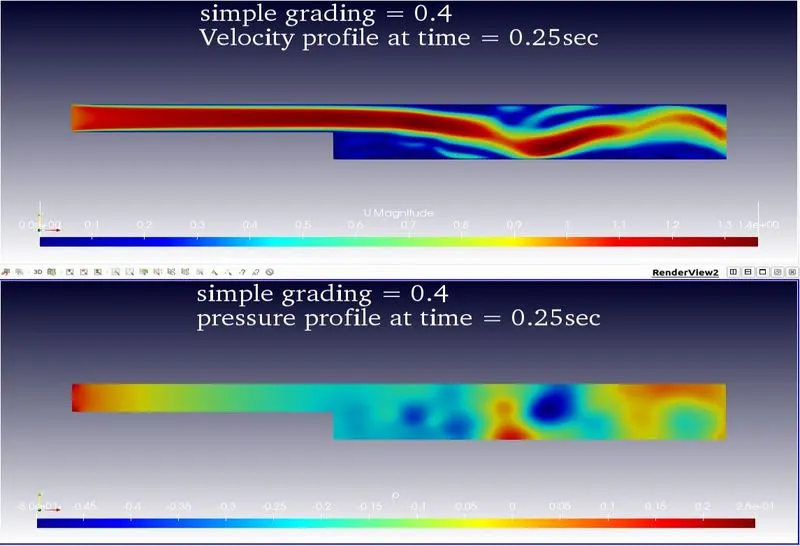
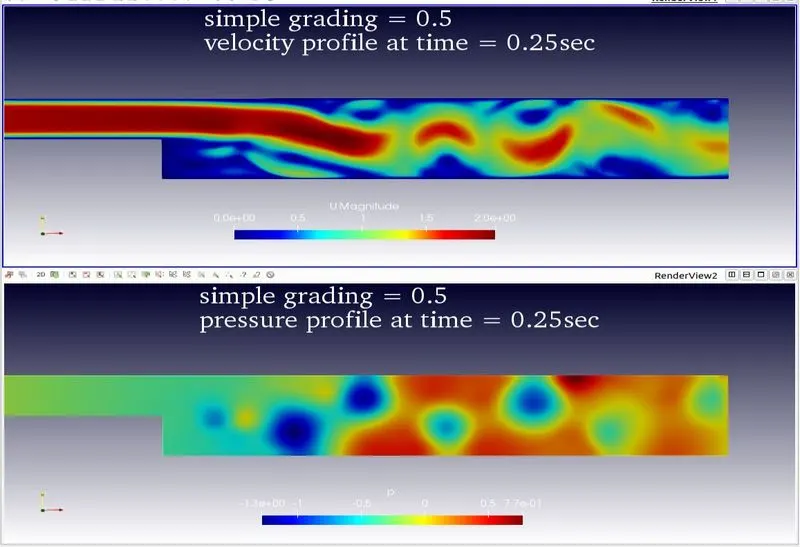
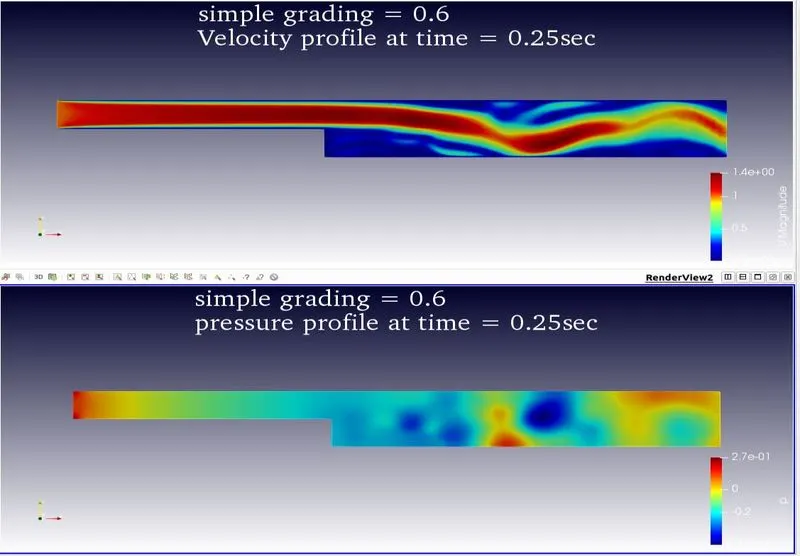
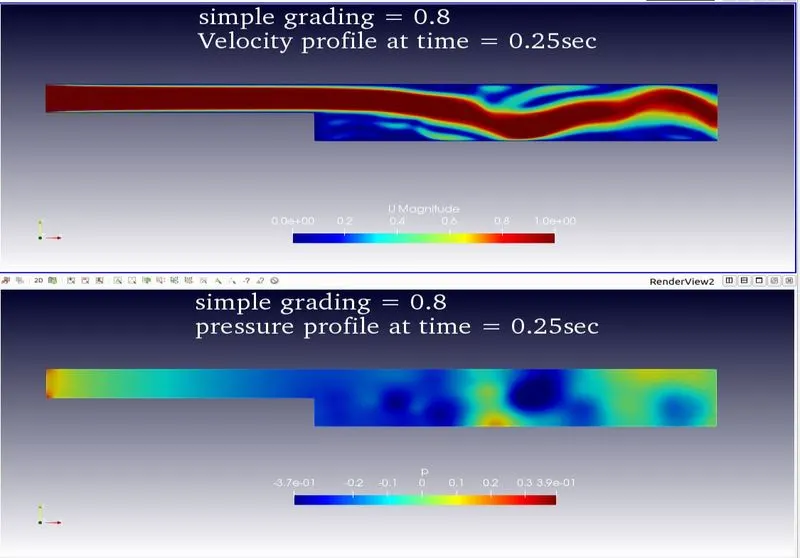
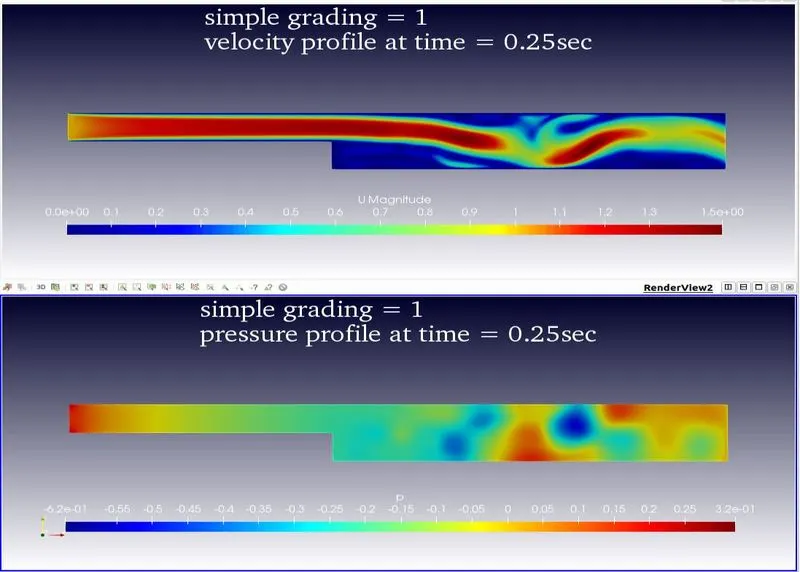
NOTE:- for various simple gradings we have to modify lines 47-51 in blockMeshDict code according to the grading factor
Grading factor 0.2:
    hex (0 1 2 3 11 12 13 14)  (80 10 1)   simpleGrading (0.2 5 1) //block1
	hex (3 2 4 5 14 13 15 16)  (80 10 1)   simpleGrading (0.2 0.2 1) //block2
	hex (2 7 6 4 13 18 17 15)  (120 10 1)  simpleGrading (5 0.2 1) //block3
	hex (1 8 7 2 12 19 18 13)  (120 10 1)  simpleGrading (5 5 1) //block4
	hex (10 9 8 1 21 20 19 12) (120 20 1)  simpleGrading (5 5 1) //block5

Grading factor 0.4:
    hex (0 1 2 3 11 12 13 14)  (80 10 1)   simpleGrading (0.4 5 1) //block1
	hex (3 2 4 5 14 13 15 16)  (80 10 1)   simpleGrading (0.4 0.4 1) //block2
	hex (2 7 6 4 13 18 17 15)  (120 10 1)  simpleGrading (5 0.4 1) //block3
	hex (1 8 7 2 12 19 18 13)  (120 10 1)  simpleGrading (5 5 1) //block4
	hex (10 9 8 1 21 20 19 12) (120 20 1)  simpleGrading (5 5 1) //block5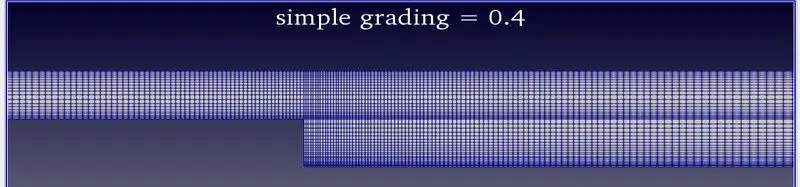
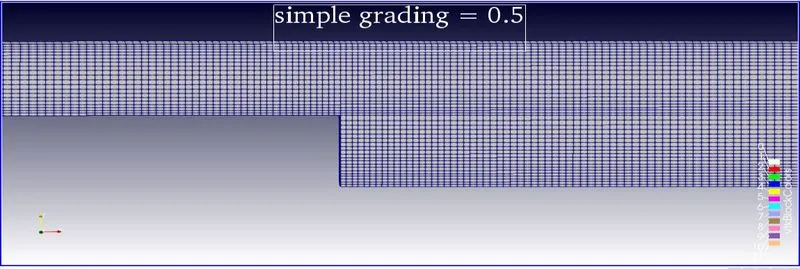
Grading factor 0.5:
    hex (0 1 2 3 11 12 13 14)  (80 10 1)   simpleGrading (0.2 5 1) //block1
	hex (3 2 4 5 14 13 15 16)  (80 10 1)   simpleGrading (0.2 0.2 1) //block2
	hex (2 7 6 4 13 18 17 15)  (120 10 1)  simpleGrading (5 0.2 1) //block3
	hex (1 8 7 2 12 19 18 13)  (120 10 1)  simpleGrading (5 5 1) //block4
	hex (10 9 8 1 21 20 19 12) (120 20 1)  simpleGrading (5 5 1) //block5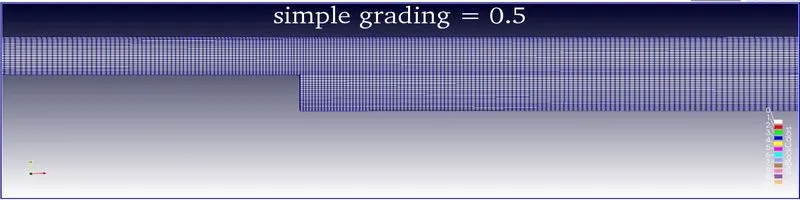
Grading factor 0.6:
     hex (0 1 2 3 11 12 13 14)  (80 10 1)   simpleGrading (0.6 5 1) //block1
	hex (3 2 4 5 14 13 15 16)  (80 10 1)   simpleGrading (0.6 0.6 1) //block2
	hex (2 7 6 4 13 18 17 15)  (120 10 1)  simpleGrading (5 0.6 1) //block3
	hex (1 8 7 2 12 19 18 13)  (120 10 1)  simpleGrading (5 5 1) //block4
	hex (10 9 8 1 21 20 19 12) (120 20 1)  simpleGrading (5 5 1) //block5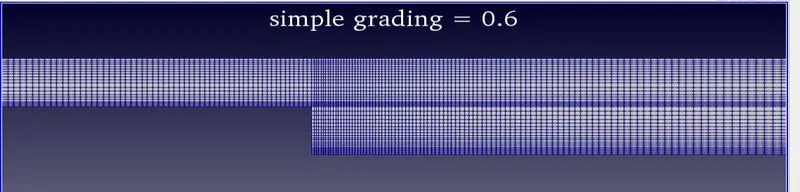
Grading factor 0.8:
    hex (0 1 2 3 11 12 13 14)  (80 10 1)   simpleGrading (0.8 5 1) //block1
	hex (3 2 4 5 14 13 15 16)  (80 10 1)   simpleGrading (0.8 0.8 1) //block2
	hex (2 7 6 4 13 18 17 15)  (120 10 1)  simpleGrading (5 0.8 1) //block3
	hex (1 8 7 2 12 19 18 13)  (120 10 1)  simpleGrading (5 5 1) //block4
	hex (10 9 8 1 21 20 19 12) (120 20 1)  simpleGrading (5 5 1) //block5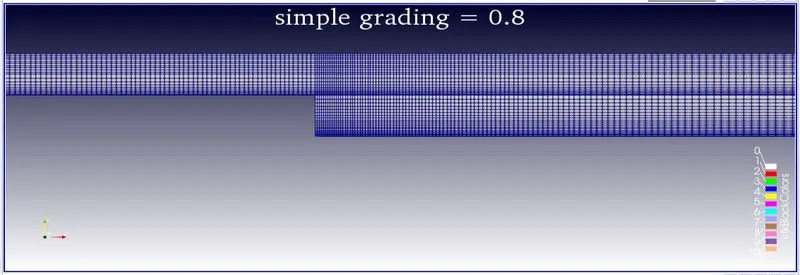
Grading factor 1:
	hex (0 1 2 3 11 12 13 14)  (80 10 1)   simpleGrading (1 1 1) //block1
	hex (3 2 4 5 14 13 15 16)  (80 10 1)   simpleGrading (1 1 1) //block2
	hex (2 7 6 4 13 18 17 15)  (120 10 1)  simpleGrading (1 1 1) //block3
	hex (1 8 7 2 12 19 18 13)  (120 10 1)  simpleGrading (1 1 1) //block4
	hex (10 9 8 1 21 20 19 12) (120 20 1)  simpleGrading (1 1 1) //block5
Temperature profiles for various mesh gradings
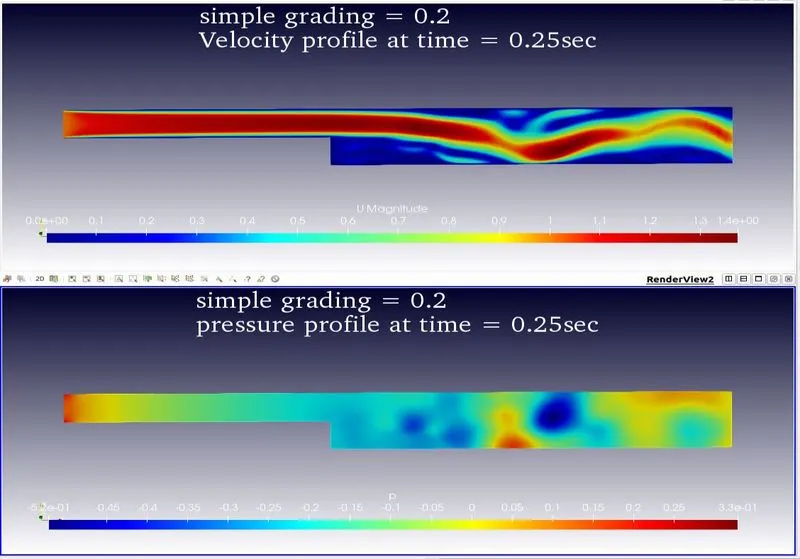
Glyph profiles for various mesh gradings
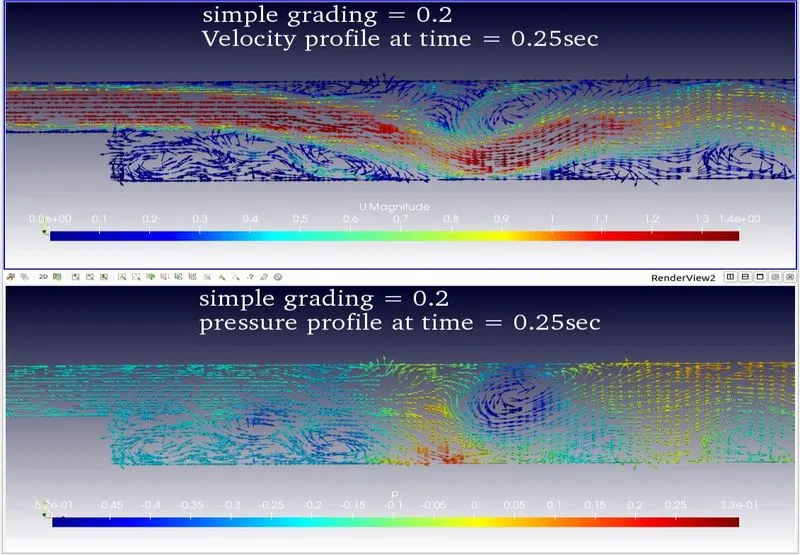
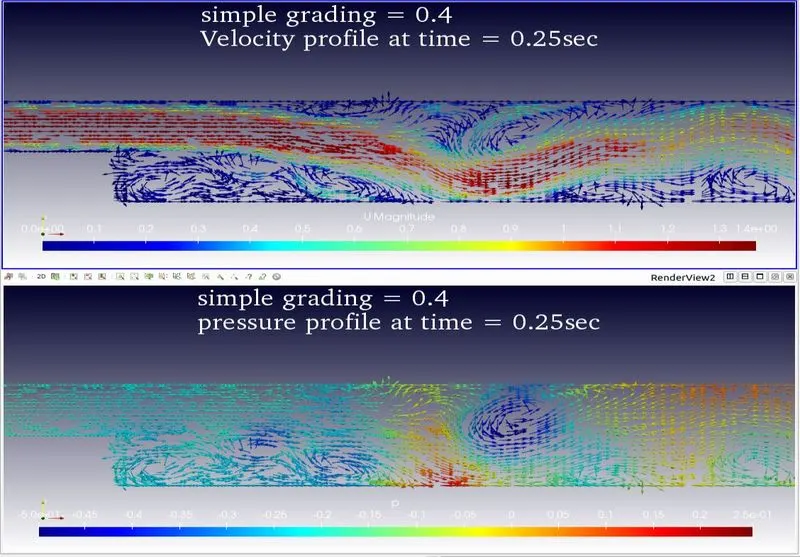
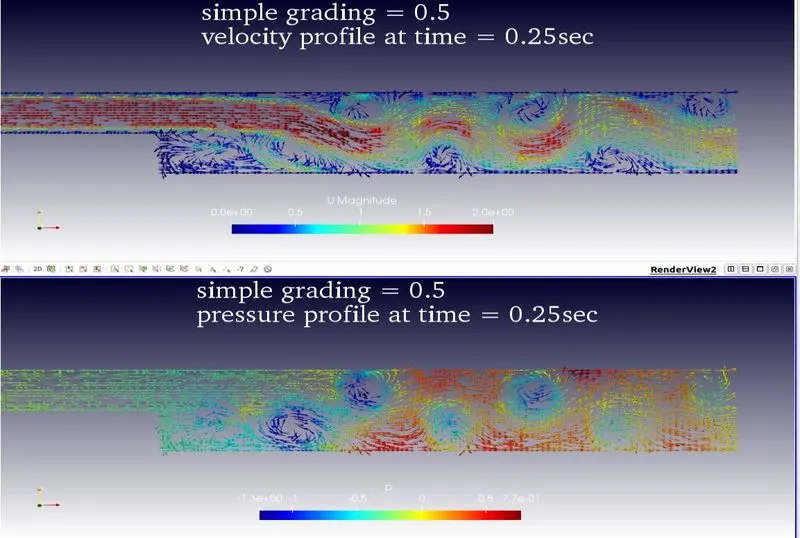
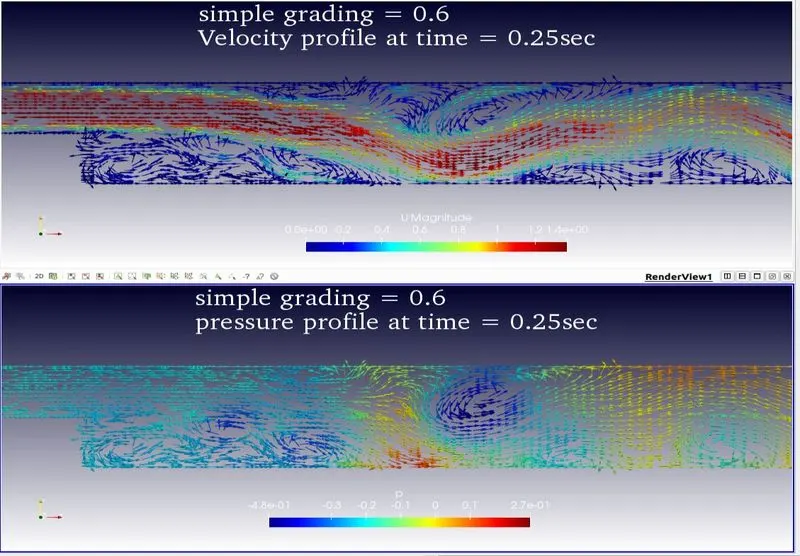
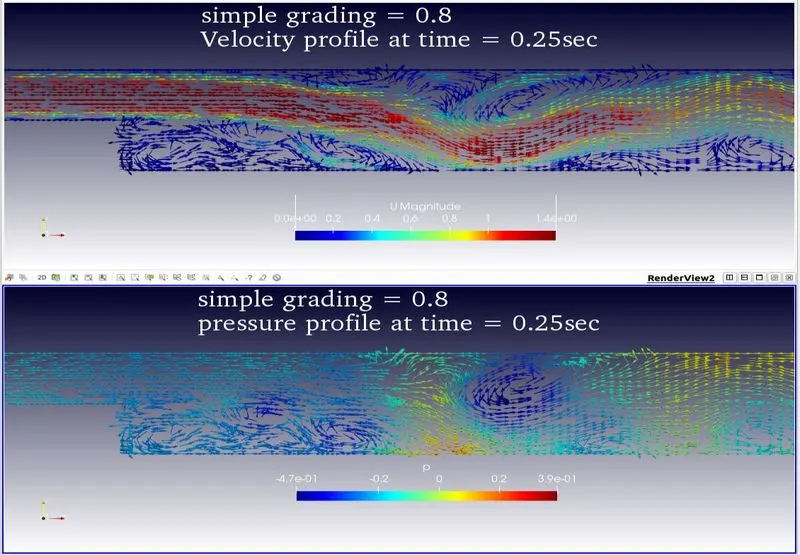
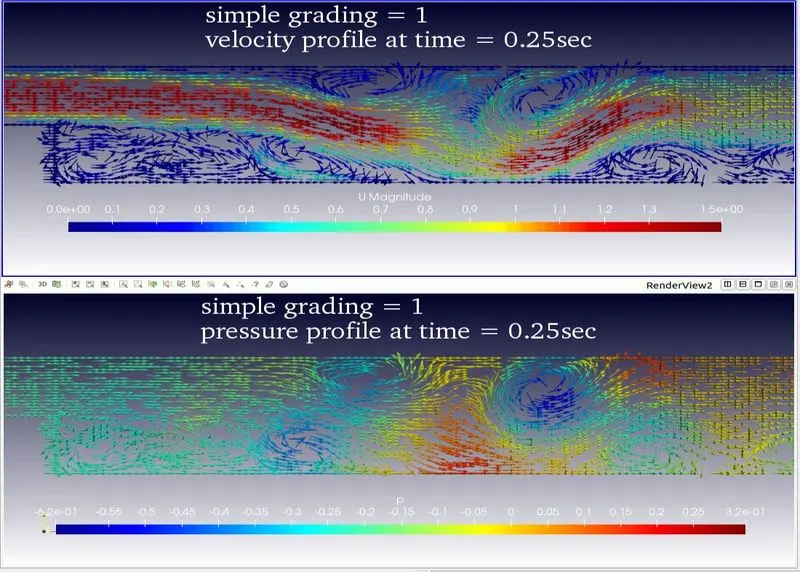
Graphs of velocity, pressure V/S length of the domain at 0.25second of simulation
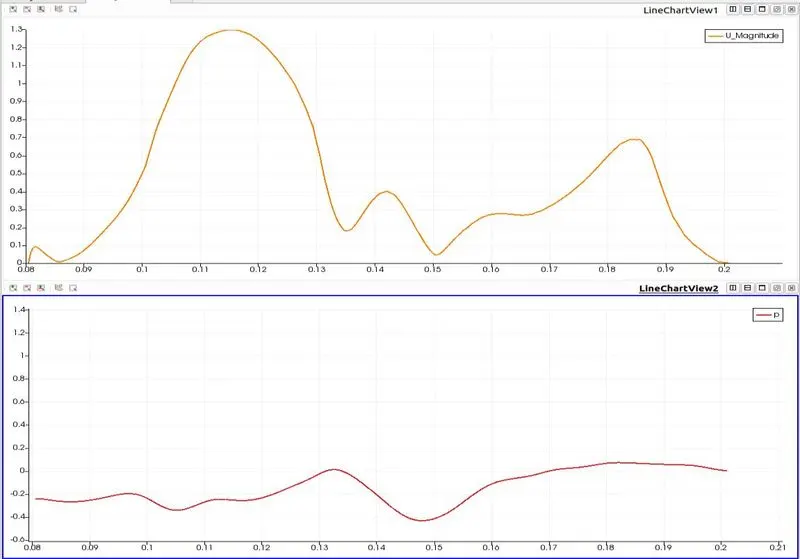
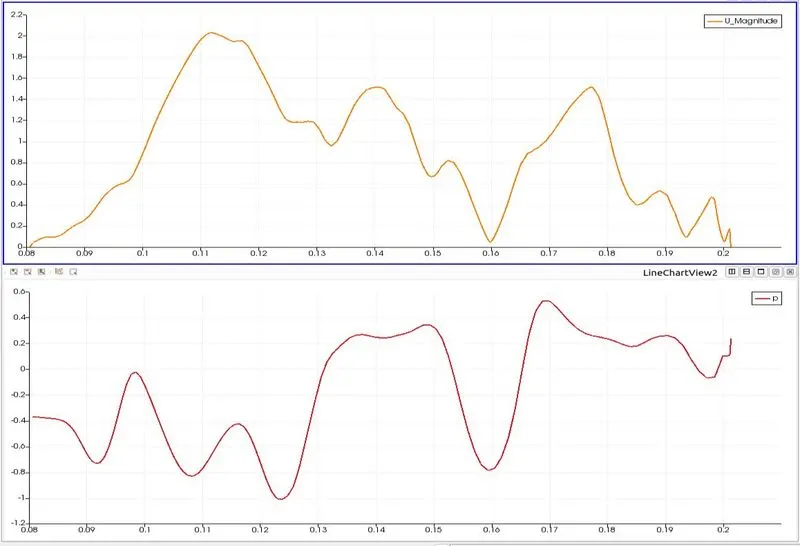
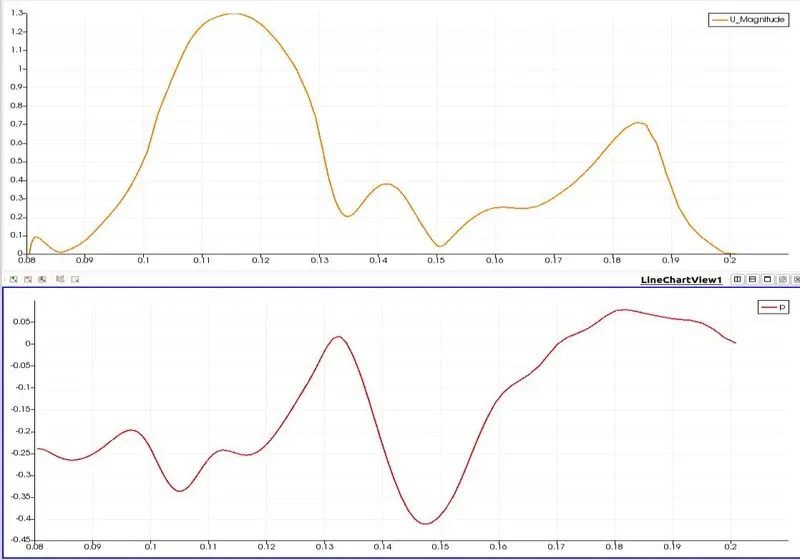
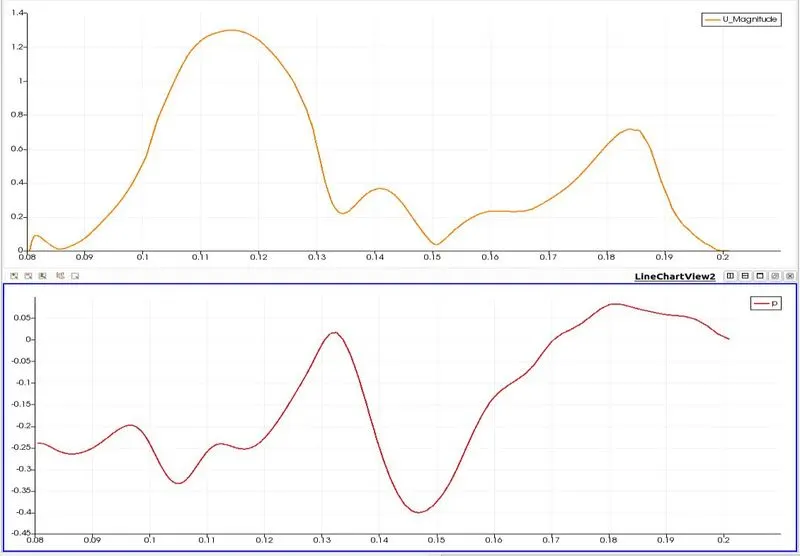
Simulation videos:
https://drive.google.com/file/d/12JkhRmmPxQNTKj1vlPzkibKoRIKuV7Yt/view?usp=sharing
https://drive.google.com/file/d/1Mft4kKXuE1lFQeg5OFGLa8p6tP00Y-G4/view?usp=sharing
Simple grading:
The accuracy of the solution mainly depends on the size of the mesh. if we reduce mesh size continuously computation time required to solve the problem increases so we cant go finer and finer mesh leads to more computation time. sample grading on such technique used to create finer mesh where required and the coarse mesh was not required. if we want to analyze a problem which contains the sudden change in geometry and some obstacles. the solution divers at the location so we need finer mesh at that location for good results and coarse mesh at other locations.
simple grading stretches cushes the mesh where required. The simple description specifies uniform expansions in the local x, y, and z directions respectively with only 3 expansion ratios,
simpleGrading(x y z)
conclusions:
As we decrease the grading ratio we are getting smoother results at backward-facing step.