Week 8 - Simulation of a backward facing step in OpenFOAM
AIM:
- To simulate an incompressible-laminar-viscous flow through the backward facing step geometry by performing transient simulation in OpenFOAM.
- To simulate the flow without using any grading factor (i.e., GF = 1).
- To simulate the flow with grading factor of 0.2. The cells should be finer near the walls.
SOLUTION:
Domain specifications:
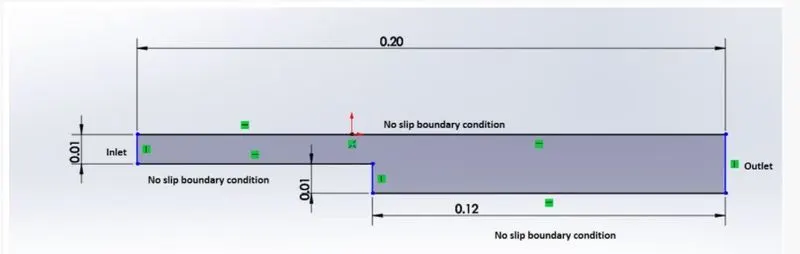
Mesh specification
- Number of cells along the x direction (longer dimension) = 200
- Number of cells along the longer y direction = 20;
Getting into the blockMeshDict:
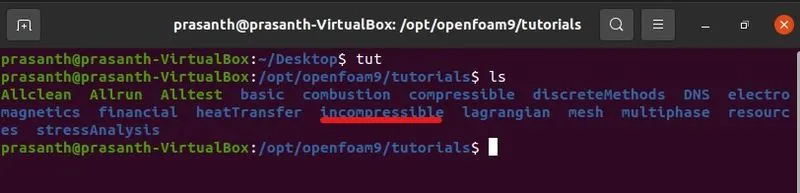
- First type 'tut' (which is tutorial command). To see the list of directories that is present in the tutorial , type 'ls' which lists the directories present in the tutorial file.
- Then select 'incompressible' using 'cd' command ('cd incompressible') which is change directory command.
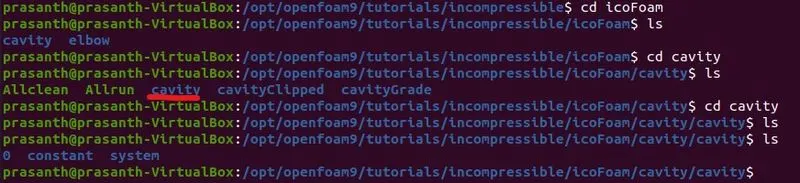
- Then go to 'icoFoam' by typing 'cd icoFoam'. Then select 'cavity'. Inside 'cavity' select 'cavity' once again.
- Then inside 'cavity', go to 'systems'.
- Now you find 'blockMeshDict' script file.
Step1:
Step2:

Step3:
Step4:

Copying 'cavity' into the 'FOAM_RUN':
- In order to edit the blockMesh, first we have to copy the 'cavity' into the '$FOAM_RUN'. Then 'run' it.
Step5:

Editing the 'blockMeshDict':
- Then go to cavity in 'run'. Then select 'system'.
- In the 'system' directory, you will find 'blockMeshDict'. Now you can edit the 'blockMeshDict' file using 'gedit' command. Then save it.
- In order to edit pressure and velocity script file, go to 'cavity'. Then go to '0' folder.
- There you will find 'p' and 'U' folder which is pressure and velocity script file. now you can edit them.
- Now go to terminal. You can go to the previous step using 'cd ..' command.
- Now you can run the blockMesh just by typing 'blockMesh' in the 'cavity' directory.
Step6:

Post processing in paraFoam:
- After running the 'blockMesh' open paraFoam by just typing it.
- You van view the post processing in the 'paraview'.
blockMeshDict script with grading factor 1:
/*--------------------------------*- C++ -*----------------------------------*\
  =========                 |
  \\      /  F ield         | OpenFOAM: The Open Source CFD Toolbox
   \\    /   O peration     | Website:  https://openfoam.org
    \\  /    A nd           | Version:  9
     \\/     M anipulation  |
\*---------------------------------------------------------------------------*/
FoamFile
{
    format      ascii;
    class       dictionary;
    object      blockMeshDict;
}
// * * * * * * * * * * * * * * * * * * * * * * * * * * * * * * * * * * * * * //

convertToMeters 1;

vertices
(
    (0 0 0)
    (0.08 0 0)
    (0.08 0.005 0)
    (0 0.005 0)
    (0.08 0.01 0)
    (0 0.01 0)
    (0.2 0.01 0)
    (0.2 0.005 0)
    (0.2 0 0)
    (0.2 -0.01 0)
    (0.08 -0.01 0)
    (0 0 0.001)
    (0.08 0 0.001)
    (0.08 0.005 0.001)
    (0 0.005 0.001)
    (0.08 0.01 0.001)
    (0 0.01 0.001)
    (0.2 0.01 0.001)
    (0.2 0.005 0.001)
    (0.2 0 0.001)
    (0.2 -0.01 0.001)
    (0.08 -0.01 0.001)
);

blocks
(
    hex (0 1 2 3 11 12 13 14) (80 5 1) simpleGrading (1 1 1)
    hex (3 2 4 5 14 13 15 16) (80 5 1) simpleGrading (1 1 1)
    hex (10 9 8 1 21 20 19 12) (120 10 1) simpleGrading (1 1 1)
    hex (1 8 7 2 12 19 18 13) (120 5 1) simpleGrading (1 1 1)
    hex (2 7 6 4 13 18 17 15) (120 5 1) simpleGrading (1 1 1)
);

edges
(
);

boundary
(
   inlet
    {
        type patch;
        faces
        (
        	(0 11 14 3)
        	(3 14 16 5)

        );
    }

    outlet
    {
    type patch;
    faces
    (
    		(9 8 19 20)
    		(8 7 18 19)
    		(7 6 17 18)
    );
    }
    fixedWalls
    {
        type wall;
        faces
        (
            (0 1 12 11)
            (5 4 15 16)
            (10 9 20 21)
            (4 6 17 15)
            (1 10 21 12)
        );
    }
    frontAndBack
    {
        type empty;
        faces
        (
            (0 1 2 3)
            (3 2 4 5)
            (11 12 13 14)
            (14 13 15 16)
            (10 9 8 1)
            (1 8 7 2)
            (2 7 6 4)
            (21 20 19 12)
            (12 19 18 13)
            (13 18 17 15)
        );
    }
);

mergePatchPairs
(
);

// ************************************************************************* //
Explaination:
- We have to edit the script file for the vertices that is mentioned above for the following mesh specification.
- We have to start from the origin which is 'O' here.
- Then we have to modify the blocks which represents the hexagon. The total number of units in the 'X' direction is given as 200 and in 'Y' direction is given as 20. So the blocks are classified according to the mesh specifications for each block.
- Since the grading factor is given as 1, the 'simpleGrading' is given as (1 1 1).
- Then we have to specify inlet and outlet boundary condition which is goverened by 'right hand thumb' rule.
- Then the modifications of fixed walls and stepped walls are need to be done.
Boundary conditions:
Pressure script file:
/*--------------------------------*- C++ -*----------------------------------*\
  =========                 |
  \\      /  F ield         | OpenFOAM: The Open Source CFD Toolbox
   \\    /   O peration     | Website:  https://openfoam.org
    \\  /    A nd           | Version:  9
     \\/     M anipulation  |
\*---------------------------------------------------------------------------*/
FoamFile
{
    format      ascii;
    class       volScalarField;
    object      p;
}
// * * * * * * * * * * * * * * * * * * * * * * * * * * * * * * * * * * * * * //

dimensions      [0 2 -2 0 0 0 0];

internalField   uniform 0;

boundaryField
{
    inlet
    {
        type             zeroGradient;
    }

    fixedWalls
    {
     type 		zeroGradient;

    }

    frontAndBack
    {
        type			 empty;
    }
    outlet
    {
    	type		fixedValue;
    	value		uniform 0;
    }
}

// ************************************************************************* //
Velocity script file:
/*--------------------------------*- C++ -*----------------------------------*\
  =========                 |
  \\      /  F ield         | OpenFOAM: The Open Source CFD Toolbox
   \\    /   O peration     | Website:  https://openfoam.org
    \\  /    A nd           | Version:  9
     \\/     M anipulation  |
\*---------------------------------------------------------------------------*/
FoamFile
{
    format      ascii;
    class       volVectorField;
    object      U;
}
// * * * * * * * * * * * * * * * * * * * * * * * * * * * * * * * * * * * * * //

dimensions      [0 1 -1 0 0 0 0];

internalField   uniform (0 0 0);

boundaryField
{
    inlet
    {
        type             fixedValue;
        value           uniform (1 0 0);
    }

    fixedWalls
    {
     type 		noSlip;

    }

    frontAndBack
    {
        type			 empty;
    }
    outlet
    {
    	type		zeroGradient;
    }
}

// ************************************************************************* //
Time step variation:
/*--------------------------------*- C++ -*----------------------------------*\
  =========                 |
  \\      /  F ield         | OpenFOAM: The Open Source CFD Toolbox
   \\    /   O peration     | Website:  https://openfoam.org
    \\  /    A nd           | Version:  9
     \\/     M anipulation  |
\*---------------------------------------------------------------------------*/
FoamFile
{
    format      ascii;
    class       dictionary;
    location    "system";
    object      controlDict;
}
// * * * * * * * * * * * * * * * * * * * * * * * * * * * * * * * * * * * * * //

application     icoFoam;

startFrom       startTime;

startTime       0;

stopAt          endTime;

endTime         0.5;

deltaT          0.0005;

writeControl    timeStep;

writeInterval   20;

purgeWrite      0;

writeFormat     ascii;

writePrecision  6;

writeCompression off;

timeFormat      general;

timePrecision   6;

runTimeModifiable true;


// ************************************************************************* //
Transport properties:
/*--------------------------------*- C++ -*----------------------------------*\
  =========                 |
  \\      /  F ield         | OpenFOAM: The Open Source CFD Toolbox
   \\    /   O peration     | Website:  https://openfoam.org
    \\  /    A nd           | Version:  9
     \\/     M anipulation  |
\*---------------------------------------------------------------------------*/
FoamFile
{
    format      ascii;
    class       dictionary;
    location    "constant";
    object      transportProperties;
}
// * * * * * * * * * * * * * * * * * * * * * * * * * * * * * * * * * * * * * //

nu              [0 2 -1 0 0 0 0] 0.01;


// ************************************************************************* //
Geometry after meshing:
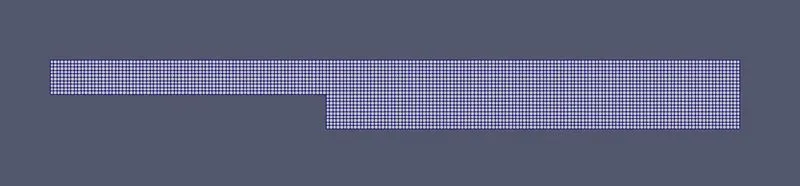
This view is seen using surface with edges option.
Pressure profile:

Velocity profile:
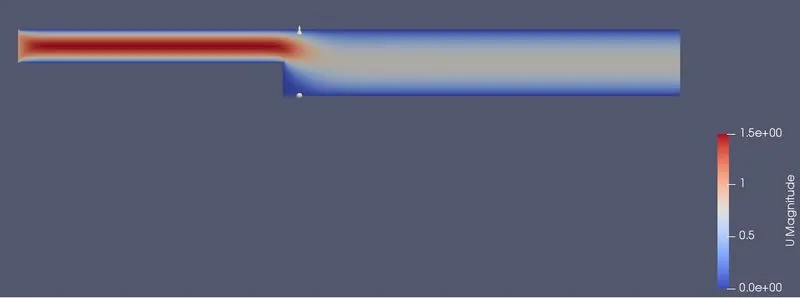
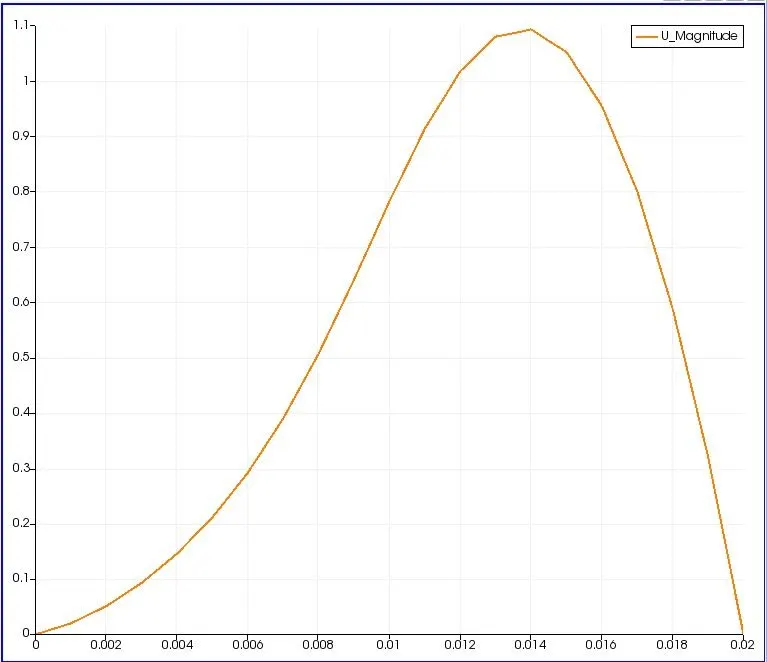
Velocity plot:
Code for blockMeshDict script with grading factor 0.2:
/*--------------------------------*- C++ -*----------------------------------*\
  =========                 |
  \\      /  F ield         | OpenFOAM: The Open Source CFD Toolbox
   \\    /   O peration     | Website:  https://openfoam.org
    \\  /    A nd           | Version:  9
     \\/     M anipulation  |
\*---------------------------------------------------------------------------*/
FoamFile
{
    format      ascii;
    class       dictionary;
    object      blockMeshDict;
}
// * * * * * * * * * * * * * * * * * * * * * * * * * * * * * * * * * * * * * //

convertToMeters 1;

vertices
(
    (0 0 0)
    (0.08 0 0)
    (0.08 0.005 0)
    (0 0.005 0)
    (0.08 0.01 0)
    (0 0.01 0)
    (0.2 0.01 0)
    (0.2 0.005 0)
    (0.2 0 0)
    (0.2 -0.01 0)
    (0.08 -0.01 0)
    (0 0 0.001)
    (0.08 0 0.001)
    (0.08 0.005 0.001)
    (0 0.005 0.001)
    (0.08 0.01 0.001)
    (0 0.01 0.001)
    (0.2 0.01 0.001)
    (0.2 0.005 0.001)
    (0.2 0 0.001)
    (0.2 -0.01 0.001)
    (0.08 -0.01 0.001)
);

blocks
(
    hex (0 1 2 3 11 12 13 14) (80 5 1) simpleGrading (0.2 5 1)
    hex (3 2 4 5 14 13 15 16) (80 5 1) simpleGrading (0.2 0.2 1)
    hex (10 9 8 1 21 20 19 12) (120 10 1) simpleGrading (5 5 1)
    hex (1 8 7 2 12 19 18 13) (120 5 1) simpleGrading (5 5 1)
    hex (2 7 6 4 13 18 17 15) (120 5 1) simpleGrading (5 0.2 1)
);

edges
(
);

boundary
(
   inlet
    {
        type patch;
        faces
        (
        	(0 11 14 3)
        	(3 14 16 5)

        );
    }

    outlet
    {
    type patch;
    faces
    (
    		(9 8 19 20)
    		(8 7 18 19)
    		(7 6 17 18)
    );
    }
    fixedWalls
    {
        type wall;
        faces
        (
            (0 1 12 11)
            (5 4 15 16)
            (10 9 20 21)
            (4 6 17 15)
            (1 10 21 12)
        );
    }
    frontAndBack
    {
        type empty;
        faces
        (
            (0 1 2 3)
            (3 2 4 5)
            (11 12 13 14)
            (14 13 15 16)
            (10 9 8 1)
            (1 8 7 2)
            (2 7 6 4)
            (21 20 19 12)
            (12 19 18 13)
            (13 18 17 15)
        );
    }
);

mergePatchPairs
(
);

// ************************************************************************* //
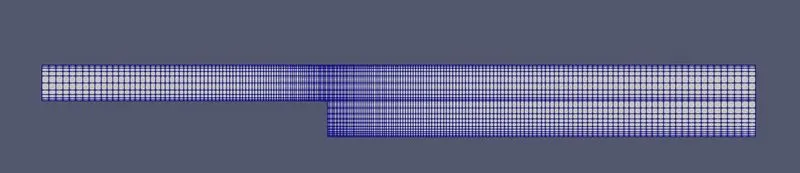
Mesh after grading with grading factor 0.2:
Pressure profile(GF = 0.2):
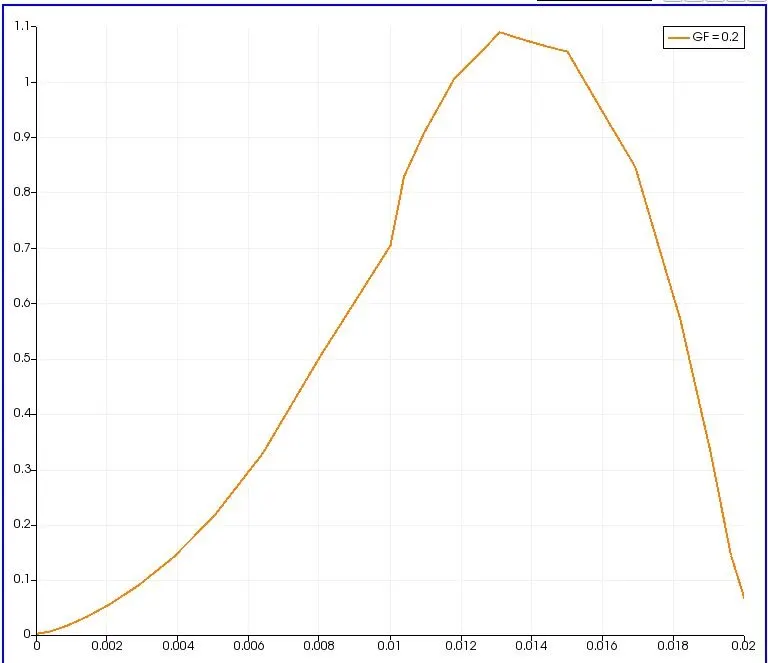
Velocity profile(GF=0.2):
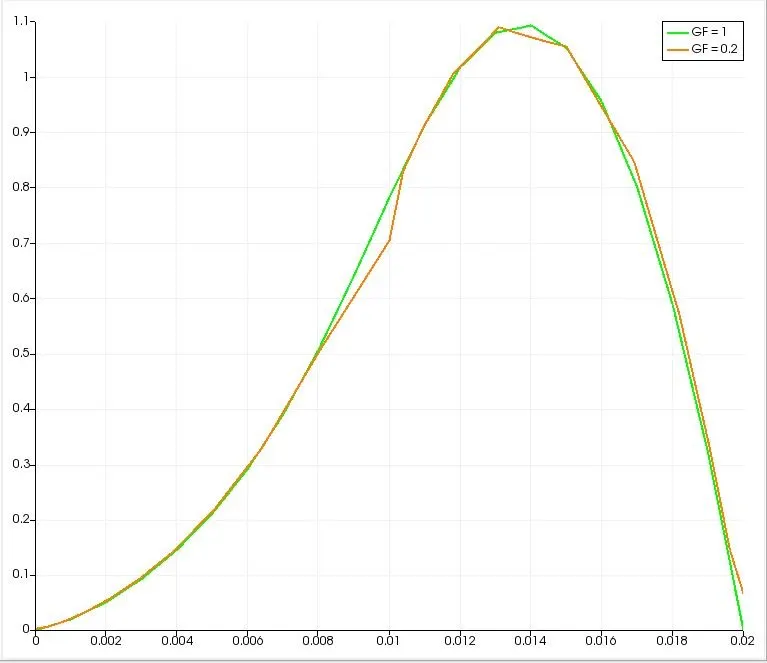
Comparing the results:
Necessity of Grading/Growth factor for meshing:
Grading factor is essential in meshing when we need more accurate results. During the flow in the section, suppose inorder to examine the flow pattern in a particular domain in the mesh with high accuracy and presicion, we need to enlarge the particular area of profile. By enlarging the area, the mesh grading also gets enlarged. So the proper study is difficult to make. So during enlarging the mesh needs to be finer to make study finer.
Thus grading factor is necessary for studying flow profiles with high accuracy.
CONCLUSION:
- From the graph plotted abbove, both the mesh with grading factor 1 and 0.2 shows almost same results approximately.
- From the distance of 0.085m, the velocity shows 1.1 m/s for both mesh specifications approximately.
- For grading factor 0.2, the velocity profile shows sharp at the finer meshes near walls compared to the other regions which is smoother. In case of grading factor 1, the profile is smooth for the entire region.