Week 8 - Simulation of a backward facing step in OpenFOAM
We will be simulating an incompressible laminar-viscous flow over a backward step geometry. According to OpenFOAM documentation:
hence, we will be using the icofoam solver and as a result use the cavity tutorial from the incompressible tutorials to set up our case.

First, we will copy the tutorial to our working directory using the following command:

$ cp -r $FOAM_TUTORIALS/incompressible/icoFoam/cavity .
We have the geometry of the case: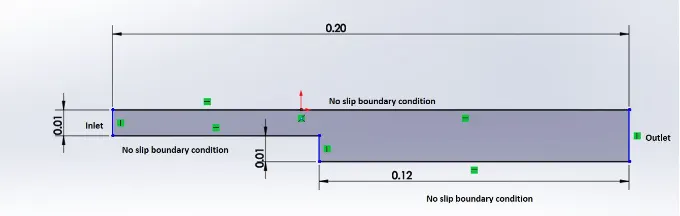
We will divide this geometry into blocks for simplification as follows:


Next, we will edit the blockMeshDict file in the tutorial to define our profile using gedit as follows:
/*--------------------------------*- C++ -*----------------------------------*\
  =========                 |
  \\      /  F ield         | OpenFOAM: The Open Source CFD Toolbox
   \\    /   O peration     | Website:  https://openfoam.org
    \\  /    A nd           | Version:  9
     \\/     M anipulation  |
\*---------------------------------------------------------------------------*/
FoamFile
{
    format      ascii;
    class       dictionary;
    object      blockMeshDict;
}
// * * * * * * * * * * * * * * * * * * * * * * * * * * * * * * * * * * * * * //

convertToMeters 0.01;

vertices
(
    (0 0 0)
    (8 0 0)
    (8 0.5 0)
    (0 0.5 0)
    (8 1 0)
    (0 1 0)
    (20 1 0)
    (20 0.5 0)
    (20 0 0)
    (20 -1 0)
    (8 -1 0)
    (0 0 0.1)
    (8 0 0.1)
    (8 0.5 0.1)
    (0 0.5 0.1)
    (8 1 0.1)
    (0 1 0.1)
    (20 1 0.1)
    (20 0.5 0.1)
    (20 0 0.1)
    (20 -1 0.1)
    (8 -1 0.1)

);

blocks
(
    hex (0 1 2 3 11 12 13 14) (80 5 1) simpleGrading (1 1 1)
    hex (3 2 4 5 14 13 15 16) (80 5 1) simpleGrading (1 1 1)
    hex (2 7 6 4 13 18 17 15) (120 5 1) simpleGrading (1 1 1)
    hex (1 8 7 2 12 19 18 13) (120 5 1) simpleGrading (1 1 1)
    hex (10 9 8 1 21 20 19 12) (120 10 1) simpleGrading (1 1 1)
);

edges
(
);

boundary
(
    inlet
    {
        type patch;
        faces
        (
            (11 14 3 0)
            (5 3 14 16)
        );
    }
    outlet
    {
        type patch;
        faces
        (
            (19 20 9 8)
            (8 7 18 19)
            (18 7 6 17)
        );
    }
    frontAndBack
    {
        type empty;
        faces
        (
            (15 13 14 16)
            (11 14 13 12)
            (13 15 17 18)
            (19 12 13 18)
            (19 20 21 12)
            (4 2 3 5)
            (2 1 0 3)
            (6 7 2 4)
            (7 8 1 2)
            (8 9 10 1)
        );
    }
    No_Slip_walls
    {
        type wall;
        faces
        (
            (16 15 4 5)
            (15 17 6 4)
            (1 10 21 12)
            (0 1 12 11)
            (9 20 21 10)
        );
     }
);

mergePatchPairs
(
);

// ************************************************************************* //
We have redefined the vertices, blocks and walls according to our needs in the blockmeshdict file. We will also need to define velocity and pressure fields by editing their respective files located in the 0 folder according to the boundary conditions.
PRESSURE:
/*--------------------------------*- C++ -*----------------------------------*\
  =========                 |
  \\      /  F ield         | OpenFOAM: The Open Source CFD Toolbox
   \\    /   O peration     | Website:  https://openfoam.org
    \\  /    A nd           | Version:  9
     \\/     M anipulation  |
\*---------------------------------------------------------------------------*/
FoamFile
{
    format      ascii;
    class       volScalarField;
    object      p;
}
// * * * * * * * * * * * * * * * * * * * * * * * * * * * * * * * * * * * * * //

dimensions      [0 2 -2 0 0 0 0];

internalField   uniform 0;

boundaryField
{
    inlet
    {
        type            zeroGradient;
    }

    outlet
    {
        type            fixedValue;
        value		 uniform 0;
    }

    frontAndBack
    {
        type            empty;
    }
    No_Slip_walls
    {
        type            zeroGradient;
    }
}

// ************************************************************************* //VELOCITY:
/*--------------------------------*- C++ -*----------------------------------*\
  =========                 |
  \\      /  F ield         | OpenFOAM: The Open Source CFD Toolbox
   \\    /   O peration     | Website:  https://openfoam.org
    \\  /    A nd           | Version:  9
     \\/     M anipulation  |
\*---------------------------------------------------------------------------*/
FoamFile
{
    format      ascii;
    class       volVectorField;
    object      U;
}
// * * * * * * * * * * * * * * * * * * * * * * * * * * * * * * * * * * * * * //

dimensions      [0 1 -1 0 0 0 0];

internalField   uniform (1 0 0);

boundaryField
{
    inlet
    {
        type            fixedValue;
        value           uniform (1 0 0);
    }

    outlet
    {
        type            zeroGradient;
    }

    frontAndBack
    {
        type            empty;
    }
    No_Slip_walls
    {
        type            noSlip;
    }
}

// ************************************************************************* //
After setting up the pre-requisite parameters, we run the following commands in the order of their appearance:
blockMeshThis command operates on our blockMeshDict file and forms the geometry as defined in the same.
icoFoamThis command invokes our incompresssible flow solver and computes the solution.
paraFoamparaFoam is a GUI tool, which helps us visualise the result computed by our solver. The results observed in parafoam are shared below.
CASE 1: GF = 1
GF is the grading factor for our mesh mentioned in blockMeshDict. Grading factor is defined as the ratio of the size of the end cell to the size of the beginning cell.
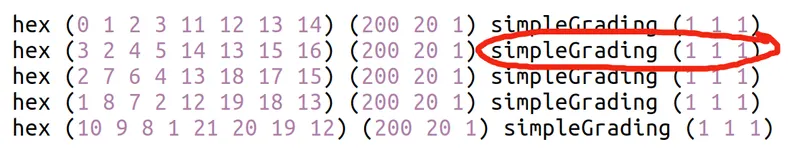
the highlighted part shows the grading in x,y and z direction respectively, coming to the results:
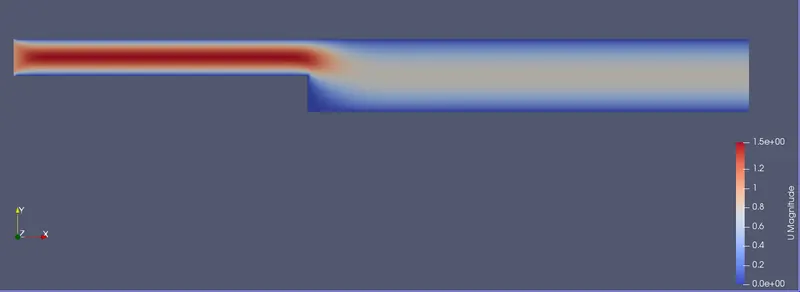
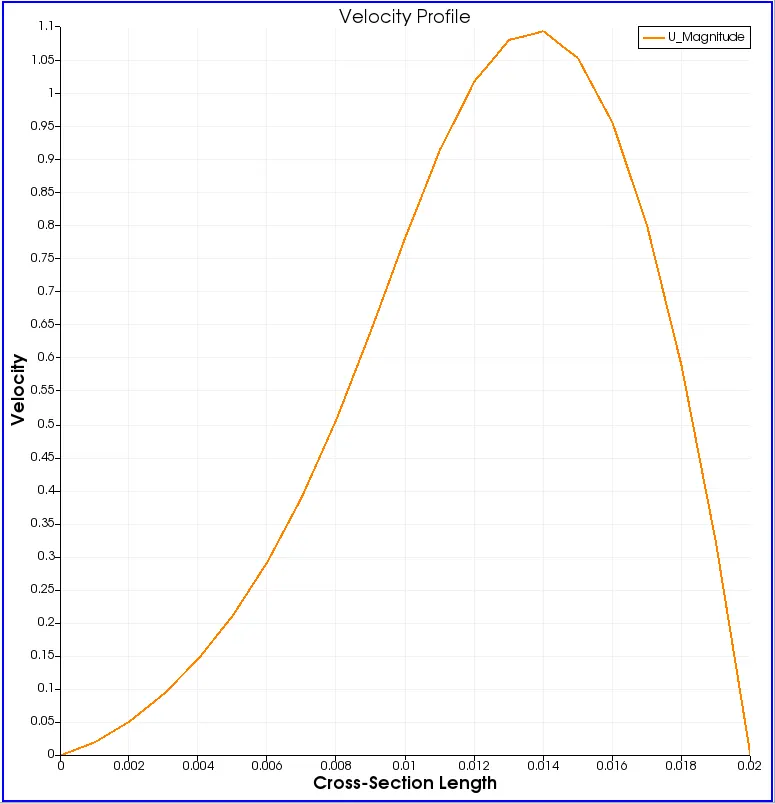
End-time Simulation and Velocity profile are shown below. We only consider Velocity profile since pressure does not play significant role in incompressible flow.
MESH:

VELOCITY PROFILE:
VELOCITY PROFILE AT BACKSTEP:
CASE 2 : GF = 0.2
We have to keep finer steps towards the walls therefore we will adopt the following arrangement:
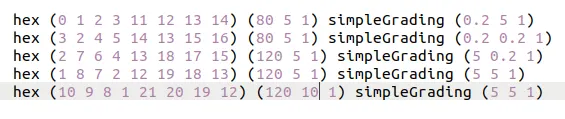
Since, we have made changes we have to perform our calculations again and rerun blockMesh, icoFoam and paraFoam commands:
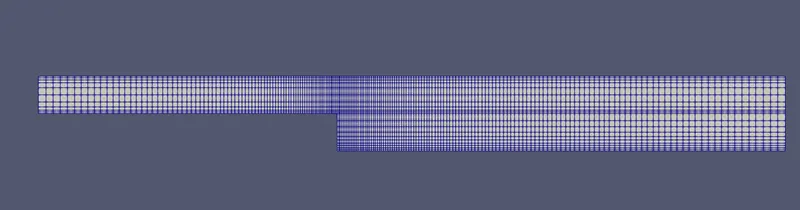
MESH:
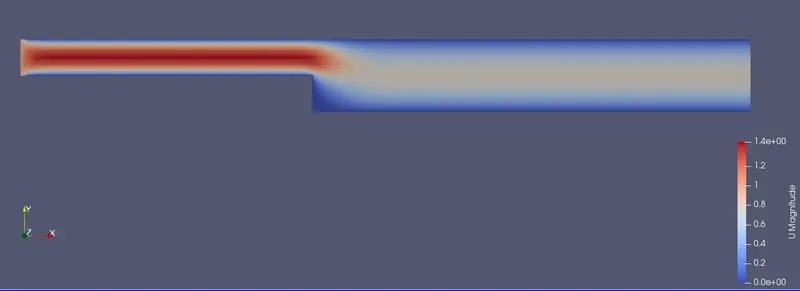
VELOCITY PROFILE:
VELOCITY PROFILE AT BACKSTEP:
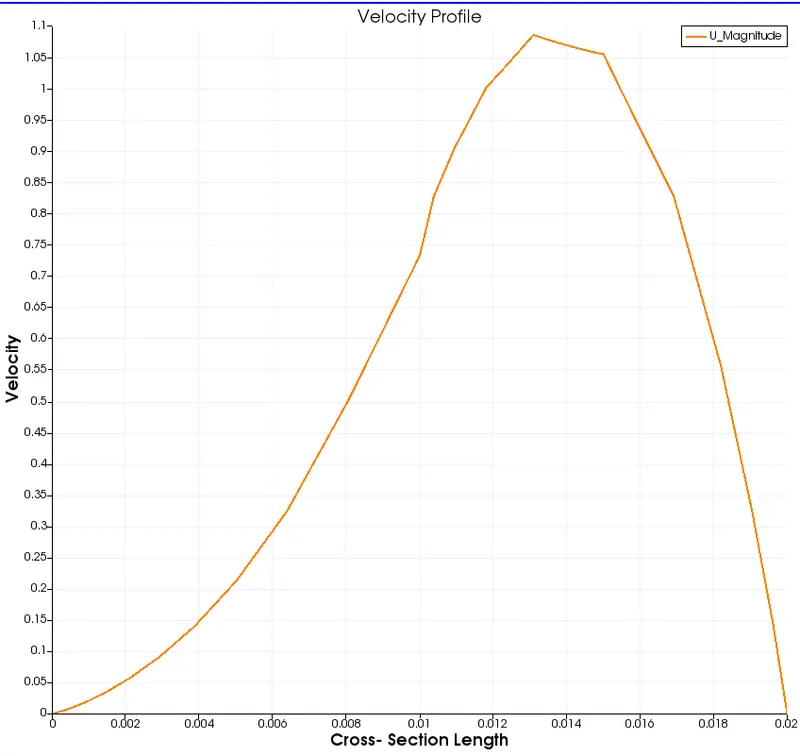
As we can see from the results, changes from grading are negligible if any on the end result, hence it doesn't affect the solution. However, Mesh grading has an essential role. Mesh Grading allows us to produce mesh of varying coarseness. This enables us to make the mesh coarser in regions of non focus and finer in the areas of interests. Since the fineness of mesh is directly proportional to the computation time, It enables us to save time on unnecessary calculation.