Week 8 - Simulation of a backward facing step in OpenFOAM
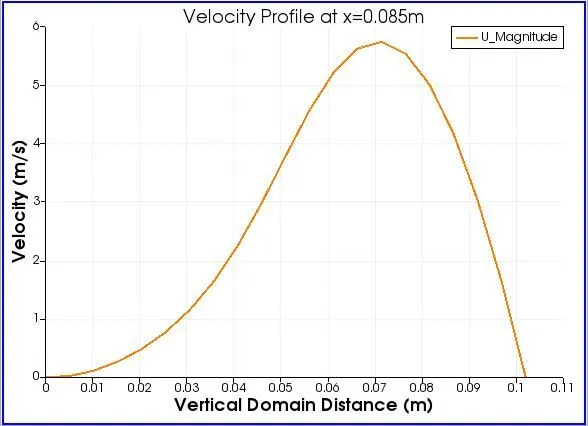
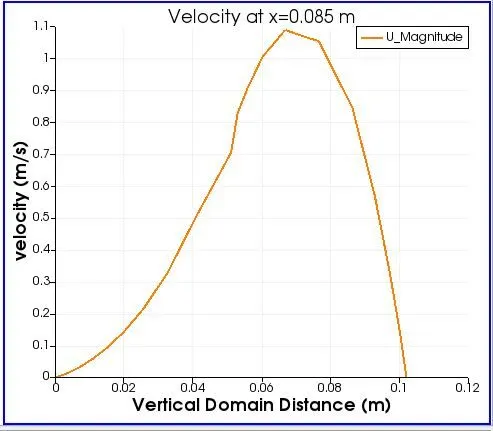
The objective in this problem is to simulate an Incompressible laminar viscous flow through a backward facing step in OpenFoam and plot the velocity at 0.085m.
The geometry of the backward facing step:
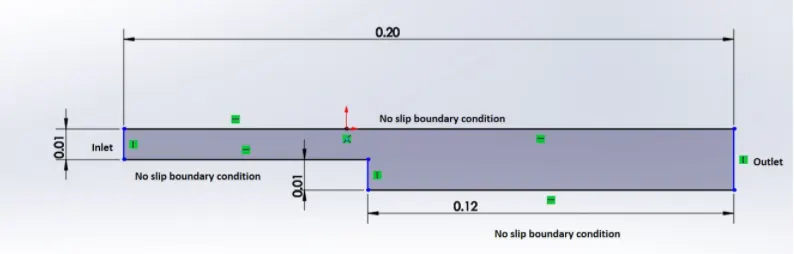
The above geometry is converted into 5 blocks in order to solve the problem and the vertices are numbered as below.

Here the inlet part having dimesnsion 10mm is converted into 2 parts 5mm each and the bottom part is remained as same as shown in figure with thickness 10mm.
The vertices are numbered as:
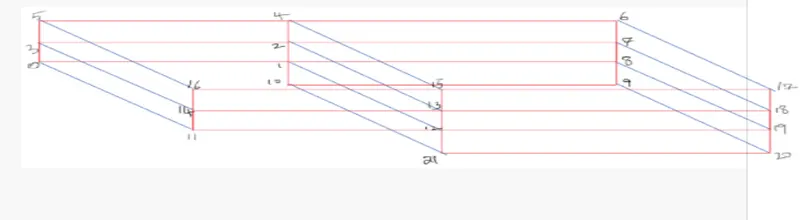
The above problem can be solved from the tutorials of OpenFoam by using the cavity problem.
The cavity directory can be found as below:
Tutorial `Rightarrow` Incompressible `Rightarrow` IcoFoam `Rightarrow` cavity
After finding the cavity directory in tutorials we should not simulate in the tutorials directory. So first we have to copy the cavity directory to run directory by giving the following command:
cp -r cavity/ $FOAM_RUN/cavity_test
The above command copies the cavity directory present in the tutorial to run directry in the name 'cavity_test'.
Now we can edit the 'blockMeshDict' file according to our requirement which is present in 'system' directory.
In this file the different vertices are defined according to their numbers and different faces are defined.
Vertices:
0. (0 0 0)
1. (80 0 0)
2. (80 5 0)
3. (0 5 0)
4. (80 10 0)
5. (0 10 0)
6. (200 10 0)
7. (200 5 0)
8. (200 0 0)
9. (200 -10 0)
10. (80 -10 0)
11. (0 0 100)
12. (80 0 100)
13. (80 5 100)
14. (0 5 100)
15. (80 10 100)
16. (0 10 100)
17. (200 10 100)
18. (200 5 100)
19. (200 0 100)
20. (200 -10 100)
21. (80 -10 100)
The vertices are numbered according to the diagram shown above and are represented through its respective co-ordinates.
All the coordinates are formed in millimetres and a conversion factor of 0.001 is given at the begining to convert it into metres.
After defining the coordinates of different vertices the blocks are formed.
1. hex (0 1 2 3 11 12 13 14) (80 5 1) simpleGrading (1 1 1)
2. hex (3 2 4 5 14 13 15 16) (80 5 1) simpleGrading (1 1 1)
3. hex (1 8 7 2 12 19 18 13) (120 5 1) simpleGrading (1 1 1)
4. hex (2 7 6 4 13 18 17 15) (120 5 1) simpleGrading (1 1 1)
5. hex (10 9 8 1 21 20 19 12) (120 10 1) simpleGrading (1 1 1)
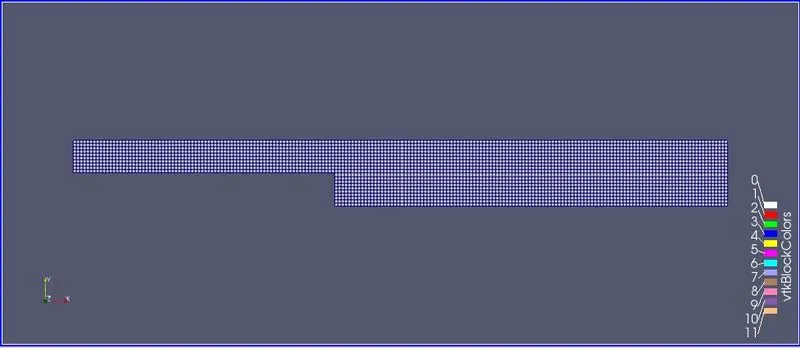
Here we are using hexahedral mesh elements.
Each block should always contain 8 vertices and all the 8 vertices should be defined in such a order that it defines the x-axis and y-axis and the normal formed using Right hand Thumb rule will be the z-axis.
After the number of mesh in each direction is defined and the grading factor is kept 1 in the above problem.
The same method is used to define all the 5 blocks.
After defining the blocks we need to define the boundary conditions like the inlet and outle, Empty walls, walls with no slip condition and front and back walls.
To define the faces of the walls we used the right hand thumb rule such that the normal vector always points away from the geometry, that is we should name the vertices in such a direction so that the thumb will point away to from the geometry.
Using the method different faces of different walls are defined.
After editing the blockMesh file we can check for error using the 'blockMesh' command.
Then we need to define our initial conditions of velocity which present in the '0' directory.
Inside the '0' directory we need to edit the 'U' file in which we will define the velocity at inlet and different conditions required for different walls.
In the pressure file named as 'p' inside the '0' directory we need to define our different walls as like we did in the 'U' file.
Then we need to define our time interval and time steps in the 'controlDict' file which is present inside the 'system' directory in order to satisy our CFL criteria.
If the time interval and time steps are very much larger then the Courant number will be greater than 1 which will give error message and we will not get our solution, So in order to satisfy the CFL criteria to keep the Courant number below 1 we must define the Time Intervals and Time steps so that our solution will converge and we will get the required result.
After editing the required data need to solve the problem we can give the command 'blockMesh' to execute the blocks and form 'polymesh' file and creating the blockmesh we can give the command of the solver to solve the problem.
In our case 'icoFoam' is the solver so we can directly give the command in the terminal to solve or problem.
After the terminal displays end we can assume that our problem is solved without any error and we can check the geometry and simulation of velocity and pressure in the paraview by giving the command 'paraFoam'.
CASE 1: WITH GRADING FACTOR 1
blockMeshDict file:
/*--------------------------------*- C++ -*----------------------------------*\
  =========                 |
  \\      /  F ield         | OpenFOAM: The Open Source CFD Toolbox
   \\    /   O peration     | Website:  https://openfoam.org
    \\  /    A nd           | Version:  9
     \\/     M anipulation  |
\*---------------------------------------------------------------------------*/
FoamFile
{
    format      ascii;
    class       dictionary;
    object      blockMeshDict;
}
// * * * * * * * * * * * * * * * * * * * * * * * * * * * * * * * * * * * * * //

convertToMeters 0.001;

vertices
(
    (0 0 0)
    (80 0 0)
    (80 5 0)
    (0 5 0)
    (80 10 0)
    (0 10 0)
    (200 10 0)
    (200 5 0)
    (200 0 0)
    (200 -10 0)
    (80 -10 0)
    (0 0 100)
    (80 0 100)
    (80 5 100)
    (0 5 100)
    (80 10 100)
    (0 10 100)
    (200 10 100)
    (200 5 100)
    (200 0 100)
    (200 -10 100)
    (80 -10 100)
);

blocks
(
    hex (0 1 2 3 11 12 13 14) (80 5 1) simpleGrading (1 1 1)
    hex (3 2 4 5 14 13 15 16) (80 5 1) simpleGrading (1 1 1)
    hex (1 8 7 2 12 19 18 13) (120 5 1) simpleGrading (1 1 1)
    hex (2 7 6 4 13 18 17 15) (120 5 1) simpleGrading (1 1 1)
    hex (10 9 8 1 21 20 19 12) (120 10 1) simpleGrading (1 1 1)
);

edges
(
);

boundary
(
     Inlet
    {
        type patch;
        faces
        (
            (0 11 3 14)
            (3 14 16 5)
        );
    }
    Outlet
    {
        type patch;
        faces
        (
            (9 8 19 20)
            (8 7 18 19)
            (7 6 17 18)
        );
    }
    frontAndBack
    {
        type empty;
        faces
        (
            (0 3 2 1)
            (3 5 4 2)
            (10 1 8 9)
            (1 2 7 8)
            (2 4 6 7)
            (11 12 13 14)
            (14 13 15 16)
            (21 20 19 12)
            (12 19 18 13)
            (13 18 17 15)
        );
    }
    NoSlipWalls
    {
        type wall;
        faces
        (
            (16 15 4 5)
            (15 17 6 4)
            (11 0 1 12)
            (21 10 9 20)
            (12 1 10 21)
        );
    }
);

mergePatchPairs
(
);

// ************************************************************************* //
controlDict file:
/*--------------------------------*- C++ -*----------------------------------*\
  =========                 |
  \\      /  F ield         | OpenFOAM: The Open Source CFD Toolbox
   \\    /   O peration     | Website:  https://openfoam.org
    \\  /    A nd           | Version:  9
     \\/     M anipulation  |
\*---------------------------------------------------------------------------*/
FoamFile
{
    format      ascii;
    class       dictionary;
    location    "system";
    object      controlDict;
}
// * * * * * * * * * * * * * * * * * * * * * * * * * * * * * * * * * * * * * //

application     icoFoam;

startFrom       startTime;

startTime       0;

stopAt          endTime;

endTime         5;

deltaT          0.002;

writeControl    timeStep;

writeInterval   20;

purgeWrite      0;

writeFormat     ascii;

writePrecision  6;

writeCompression off;

timeFormat      general;

timePrecision   6;

runTimeModifiable true;


// ************************************************************************* //
Velocity 'U' file:
/*--------------------------------*- C++ -*----------------------------------*\
  =========                 |
  \\      /  F ield         | OpenFOAM: The Open Source CFD Toolbox
   \\    /   O peration     | Website:  https://openfoam.org
    \\  /    A nd           | Version:  9
     \\/     M anipulation  |
\*---------------------------------------------------------------------------*/
FoamFile
{
    format      ascii;
    class       volVectorField;
    object      U;
}
// * * * * * * * * * * * * * * * * * * * * * * * * * * * * * * * * * * * * * //

dimensions      [0 1 -1 0 0 0 0];

internalField   uniform (0 0 0);

boundaryField
{
    Inlet
    {
        type            fixedValue;
        value           uniform (5 0 0);
    }
    Outlet
    {
        type            zeroGradient;
    }

    frontAndBack
    {
        type            empty;
    }

    NoSlipWalls
    {
        type            noSlip;
    }
}

// ************************************************************************* //
pressure 'p' file:
/*--------------------------------*- C++ -*----------------------------------*\
  =========                 |
  \\      /  F ield         | OpenFOAM: The Open Source CFD Toolbox
   \\    /   O peration     | Website:  https://openfoam.org
    \\  /    A nd           | Version:  9
     \\/     M anipulation  |
\*---------------------------------------------------------------------------*/
FoamFile
{
    format      ascii;
    class       volScalarField;
    object      p;
}
// * * * * * * * * * * * * * * * * * * * * * * * * * * * * * * * * * * * * * //

dimensions      [0 2 -2 0 0 0 0];

internalField   uniform 0;

boundaryField
{
    Inlet
    {
        type            zeroGradient;
    }
    Outlet
    {
        type            fixedValue;
        value		 uniform 0;
    }

    frontAndBack
    {
        type            empty;
    }
    NoSlipWalls
    {
        type            zeroGradient;
    }
}


// ************************************************************************* //
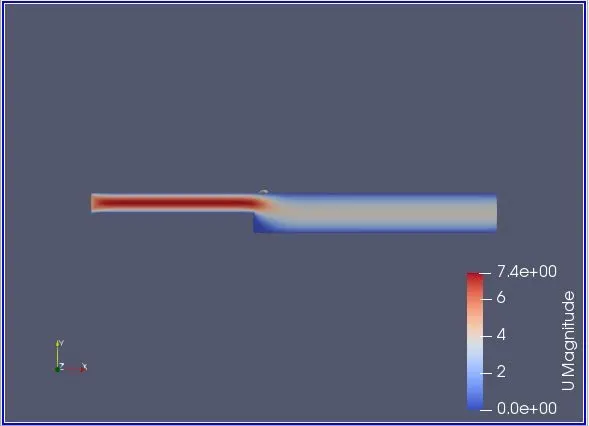
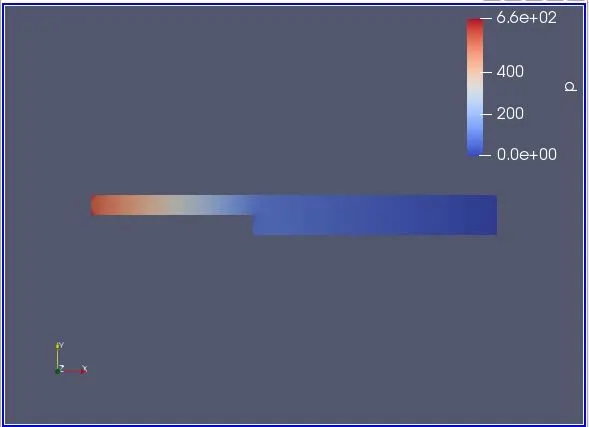
In the above problem we have defined the velocity 'U' at inlet as 5m/sec.
Time Interval = 5sec
Time Interval = dt = 0.002 sec.
OUTPUTS:

MESH:
VELOCITY:
PRESSURE:
VELOCITY PLOT AT 0.085m:
CASE 2: WITH GRADING FACTOR 0.2:
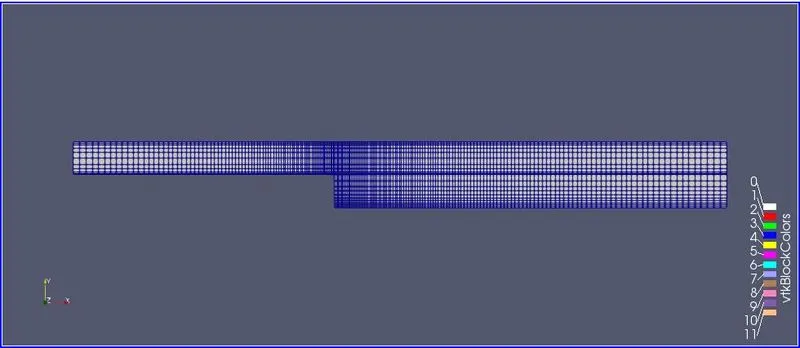
In this case we have to solve the same problem by introducing a grading factor of 0.2 in the mesh.
Grading Factor (GF) = (size of ending cell)/(size of starting cell).
Grading factor can be introduced in all the 3 axeses.
According to the question we need to provide the grading factor such that the mesh becomes finer towards the walls of the step.
Introducing Grading Factor:
1. hex (0 1 2 3 11 12 13 14) (80 5 1) simpleGrading (0.2 5 1)
2. hex (3 2 4 5 14 13 15 16) (80 5 1) simpleGrading (0.2 0.2 1)
3. hex (1 8 7 2 12 19 18 13) (120 5 1) simpleGrading (5 5 1)
4. hex (2 7 6 4 13 18 17 15) (120 5 1) simpleGrading (5 0.2 1)
5. hex (10 9 8 1 21 20 19 12) (120 10 1) simpleGrading (5 5 1)
Grading Factors are provided such that the mesh becomes finer towards the wall.
In order to satisfy the CFL criteria we have defined the
velocity 'U' = 1m/sec
Time Interval = 0.1 sec
Time Steps = dt = 0.001 sec
blockMeshDict file:
/*--------------------------------*- C++ -*----------------------------------*\
  =========                 |
  \\      /  F ield         | OpenFOAM: The Open Source CFD Toolbox
   \\    /   O peration     | Website:  https://openfoam.org
    \\  /    A nd           | Version:  9
     \\/     M anipulation  |
\*---------------------------------------------------------------------------*/
FoamFile
{
    format      ascii;
    class       dictionary;
    object      blockMeshDict;
}
// * * * * * * * * * * * * * * * * * * * * * * * * * * * * * * * * * * * * * //

convertToMeters 0.001;

vertices
(
    (0 0 0)
    (80 0 0)
    (80 5 0)
    (0 5 0)
    (80 10 0)
    (0 10 0)
    (200 10 0)
    (200 5 0)
    (200 0 0)
    (200 -10 0)
    (80 -10 0)
    (0 0 100)
    (80 0 100)
    (80 5 100)
    (0 5 100)
    (80 10 100)
    (0 10 100)
    (200 10 100)
    (200 5 100)
    (200 0 100)
    (200 -10 100)
    (80 -10 100)
);

blocks
(
    hex (0 1 2 3 11 12 13 14) (80 5 1) simpleGrading (0.2 5 1)
    hex (3 2 4 5 14 13 15 16) (80 5 1) simpleGrading (0.2 0.2 1)
    hex (1 8 7 2 12 19 18 13) (120 5 1) simpleGrading (5 5 1)
    hex (2 7 6 4 13 18 17 15) (120 5 1) simpleGrading (5 0.2 1)
    hex (10 9 8 1 21 20 19 12) (120 10 1) simpleGrading (5 5 1)
);

edges
(
);

boundary
(
     Inlet
    {
        type patch;
        faces
        (
            (0 11 3 14)
            (3 14 16 5)
        );
    }
    Outlet
    {
        type patch;
        faces
        (
            (9 8 19 20)
            (8 7 18 19)
            (7 6 17 18)
        );
    }
    frontAndBack
    {
        type empty;
        faces
        (
            (0 3 2 1)
            (3 5 4 2)
            (10 1 8 9)
            (1 2 7 8)
            (2 4 6 7)
            (11 12 13 14)
            (14 13 15 16)
            (21 20 19 12)
            (12 19 18 13)
            (13 18 17 15)
        );
    }
    NoSlipWalls
    {
        type wall;
        faces
        (
            (16 15 4 5)
            (15 17 6 4)
            (11 0 1 12)
            (21 10 9 20)
            (12 1 10 21)
        );
    }
);

mergePatchPairs
(
);

// ************************************************************************* //
controlDict file:
/*--------------------------------*- C++ -*----------------------------------*\
  =========                 |
  \\      /  F ield         | OpenFOAM: The Open Source CFD Toolbox
   \\    /   O peration     | Website:  https://openfoam.org
    \\  /    A nd           | Version:  9
     \\/     M anipulation  |
\*---------------------------------------------------------------------------*/
FoamFile
{
    format      ascii;
    class       dictionary;
    location    "system";
    object      controlDict;
}
// * * * * * * * * * * * * * * * * * * * * * * * * * * * * * * * * * * * * * //

application     icoFoam;

startFrom       startTime;

startTime       0;

stopAt          endTime;

endTime         0.1;

deltaT          0.0001;

writeControl    timeStep;

writeInterval   20;

purgeWrite      0;

writeFormat     ascii;

writePrecision  6;

writeCompression off;

timeFormat      general;

timePrecision   6;

runTimeModifiable true;


// ************************************************************************* //
Velocity 'U' file:
/*--------------------------------*- C++ -*----------------------------------*\
  =========                 |
  \\      /  F ield         | OpenFOAM: The Open Source CFD Toolbox
   \\    /   O peration     | Website:  https://openfoam.org
    \\  /    A nd           | Version:  9
     \\/     M anipulation  |
\*---------------------------------------------------------------------------*/
FoamFile
{
    format      ascii;
    class       volVectorField;
    object      U;
}
// * * * * * * * * * * * * * * * * * * * * * * * * * * * * * * * * * * * * * //

dimensions      [0 1 -1 0 0 0 0];

internalField   uniform (0 0 0);

boundaryField
{
    Inlet
    {
        type            fixedValue;
        value           uniform (1 0 0);
    }
    Outlet
    {
        type            zeroGradient;
    }

    frontAndBack
    {
        type            empty;
    }

    NoSlipWalls
    {
        type            noSlip;
    }
}

// ************************************************************************* //
Pressure 'p' file:
/*--------------------------------*- C++ -*----------------------------------*\
  =========                 |
  \\      /  F ield         | OpenFOAM: The Open Source CFD Toolbox
   \\    /   O peration     | Website:  https://openfoam.org
    \\  /    A nd           | Version:  9
     \\/     M anipulation  |
\*---------------------------------------------------------------------------*/
FoamFile
{
    format      ascii;
    class       volScalarField;
    object      p;
}
// * * * * * * * * * * * * * * * * * * * * * * * * * * * * * * * * * * * * * //

dimensions      [0 2 -2 0 0 0 0];

internalField   uniform 0;

boundaryField
{
    Inlet
    {
        type            zeroGradient;
    }
    Outlet
    {
        type            fixedValue;
        value		 uniform 0;
    }

    frontAndBack
    {
        type            empty;
    }
    NoSlipWalls
    {
        type            zeroGradient;
    }
}


// ************************************************************************* //
OUTPUTS:

MESH:
VELOCITY 'U':
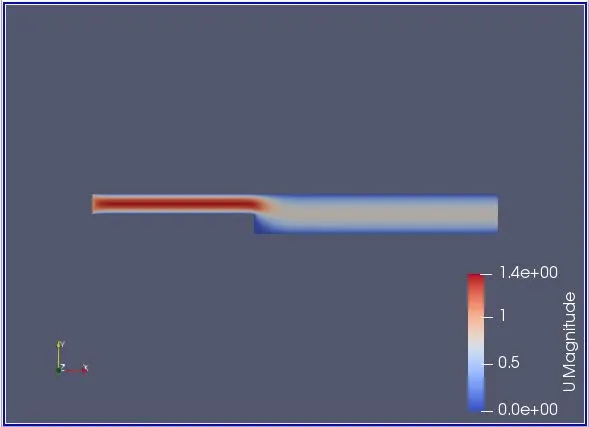
PRESSURE 'p':
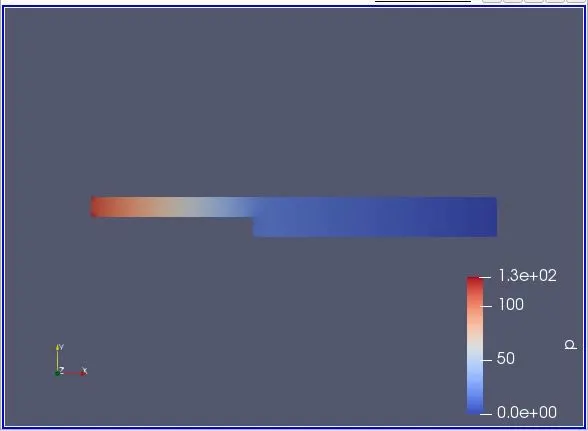
VELOCITY PLOT AT X=0.085m:
WHY GRADING FACTOR IS ESSENTIAL FOR MESHING:
By giving a grading factor we tend to make the mesh more finer which results in better results.
By providing a grading factor we stretch our mesh in one direction.
Grading factor increases the computational efficiency of a mesh.