Week 8 - Simulation of a backward facing step in OpenFOAM
Aim
Simulate an incompressible-laminar-viscous flow through the backward facing step geometry. Perform a transient simulation. Explain the entire simulation procedure (how you set up the case). Provide explanations to every change you make inside the reference case files obtained from OpenFOAM tutorials. flow is laminar.
Perform 2 case studies as described below and compare the results.
Case 1 - Simulate the flow without using any grading factor (i.e., GF = 1)
Case 2 - Simulate the flow with grading factor of 0.2. The cells should be finer near the walls (includig the step wall).
You can use the following mesh parameters but you can feel free to modify these values.
Mesh specification
- Number of cells along the x direction (longer dimension) = 200
- Number of cells along the longer y direction = 20
Boundary Condition
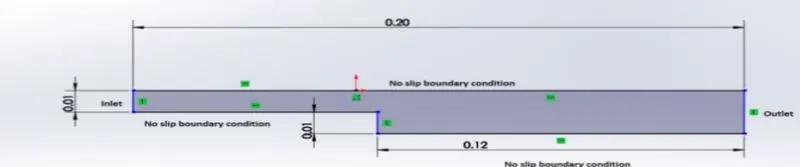
Procedures for Computation of given problem
- Start the terminal in Linux using ctrl+alt+T keys
- Open the tutorial folder using the command 'tut' which is a shortcut and then list see what solvers are availible
- Incompressible flow solver can be seen in the list which suits our current problem
- Now open incompressible folder and it can be seen that there are different types of solvers availible I have selected the icoFoam solver here since it is used as transient solver for incompressible, laminar flow of newtonian fluids
- Now open the icoFoam folder and list it using ls command and a folder named cavity can be found
- So cavity folder contains the files where we input according to problem, but we cant edit from tutorial folder becouse it changes the main files so openFoam wont allow us to edit it
- To run the solver we copy the folder to FOAM_RUN folder that is availible in the openFoam using command 'cp -r cavity/$FOAM_RUN/cavity_test'
- In the system folder there will be four files and each files serve a purpose, blockMeshDict file is used to inpute our geometry into openFoam ,ControlDIct holds time steps ,start time and end time for the solver, while fvschemes contains the information how to discretize (methods such as euler,Gauss-siedel and Fv solutions contains what solver it going to use for the problem
- Inorder to input a geometry open up blockMeshDict file and edit it. Here we assume the geometry contains 5 blocks as shown below
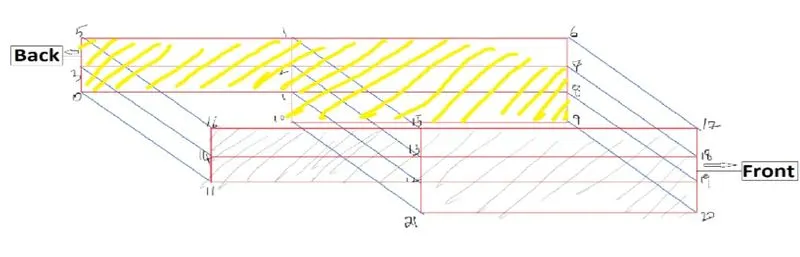
- Now for editing the blockMeshDict file we input using the numbers shown in above figure .As you can see there is a part for vertices this information will be used to build and openFoam will have an idea of the size and shape of the meshfile.
- There is also a part called blocks. hex indicates the type of mesh we are using (hexahedral) and the next set of numbers indicates the blocks,after that there is another set of numbers for specifyng number of grids along x,y,z . In the problem it was stated to use uniform grid of total 200 grids along x axis and 20 along y axis, so to do that the left side blocks are given 80 grids and right side blocks are 120 grids to make it 200 grids along x-axis, similarly for y axis each left and right side blocks except bottom block on the right are given 5 grids along y-axis and the bottom block on the right side is given 10 grid points which consitutes 20 grids along y-axis. The very next set of values indicate the Mesh grading factor where it is defined as the ratio of size of end cell to size of end cell, as a first case of the problem we have chosen it as (1 1 1) represents(x y z).
- Boundary conditions are also given by using the set of numbers shown in above figure
-
blockMeshDict file
/*--------------------------------*- C++ -*----------------------------------*\ ========= | \\ / F ield | OpenFOAM: The Open Source CFD Toolbox \\ / O peration | Website: https://openfoam.org \\ / A nd | Version: 9 \\/ M anipulation | \*---------------------------------------------------------------------------*/ FoamFile { version 2.0; format ascii; class dictionary; object blockMeshDict; } // * * * * * * * * * * * * * * * * * * * * * * * * * * * * * * * * * * * * * // convertToMeters 1; vertices ( (0 0 0) //0 (0.08 0 0) //1 (0.08 0.005 0) //2 (0 0.005 0) //3 (0.08 0.01 0) //4 (0 0.01 0) //5 (0.2 0.01 0) //6 (0.2 0.005 0) //7 (0.2 0 0) //8 (0.2 -0.01 0) //9 (0.08 -0.01 0) //10 (0 0 0.1) //11 (0.08 0 0.1) //12 (0.08 0.005 0.1) //13 (0 0.005 0.1) //14 (0.08 0.01 0.1) //15 (0 0.01 0.1) //16 (0.2 0.01 0.1) //17 (0.2 0.005 0.1) //18 (0.2 0 0.1) //19 (0.2 -0.01 0.1) //20 (0.08 -0.01 0.1) //21 ); blocks ( hex (0 1 2 3 11 12 13 14) (80 5 1) simpleGrading (1 1 1) //block1 hex (3 2 4 5 14 13 15 16) (80 5 1) simpleGrading (1 1 1) //block2 hex (2 7 6 4 13 18 17 15) (120 5 1) simpleGrading (1 1 1) //block3 hex (1 8 7 2 12 19 18 13) (120 5 1) simpleGrading (1 1 1) //block4 hex (10 9 8 1 21 20 19 12) (120 10 1) simpleGrading (1 1 1) //block5 ); edges ( ); boundary ( Inlet { type wall; faces ( (0 11 14 3) (3 14 16 5) ); } Outlet { type wall; faces ( (9 8 19 20) (8 7 18 19) (7 6 17 18) ); } fixedWalls { type wall; faces ( (6 4 15 17) (4 5 16 15) (10 21 12 1) (12 11 0 1) (20 21 10 9) ); } frontAndBack { type empty; faces ( (0 3 2 1) (3 5 4 2) (2 4 6 7) (1 2 7 8) (10 1 8 9) (11 12 13 14) (14 13 15 16) (13 18 17 15) (12 19 18 13) (21 20 19 12) ); } ); mergePatchPairs ( ); // ************************************************************************* // - Now open upen up controlDict file , here we specify the start time (0) and end time , i have used end time as 0.2 also time steps as 1e-5
/*--------------------------------*- C++ -*----------------------------------*\ ========= | \\ / F ield | OpenFOAM: The Open Source CFD Toolbox \\ / O peration | Website: https://openfoam.org \\ / A nd | Version: 9 \\/ M anipulation | \*---------------------------------------------------------------------------*/ FoamFile { format ascii; class dictionary; location "system"; object controlDict; } // * * * * * * * * * * * * * * * * * * * * * * * * * * * * * * * * * * * * * // application icoFoam; startFrom startTime; startTime 0; stopAt endTime; endTime 0.2; deltaT 1e-5; writeControl timeStep; writeInterval 20; purgeWrite 0; writeFormat ascii; writePrecision 6; writeCompression off; timeFormat general; timePrecision 6; runTimeModifiable true; // ************************************************************************* // - Now we input the initial values using the files in 0 folder , we have to spcify the initial conditions for pressure and velocity such that the flow is laminar , so the initial conditions for pressure and velocity is given as follows
For pressure
/*--------------------------------*- C++ -*----------------------------------*\ ========= | \\ / F ield | OpenFOAM: The Open Source CFD Toolbox \\ / O peration | Website: https://openfoam.org \\ / A nd | Version: 9 \\/ M anipulation | \*---------------------------------------------------------------------------*/ FoamFile { format ascii; class volScalarField; object p; } // * * * * * * * * * * * * * * * * * * * * * * * * * * * * * * * * * * * * * // dimensions [0 2 -2 0 0 0 0]; internalField uniform 0; boundaryField { Inlet { type zeroGradient; } Outlet { type fixedValue; value uniform 0; } fixedWalls { type zeroGradient; } frontAndBack { type empty; } } // ************************************************************************* //For velocity (v = 1 m/s)
/*--------------------------------*- C++ -*----------------------------------*\ ========= | \\ / F ield | OpenFOAM: The Open Source CFD Toolbox \\ / O peration | Website: https://openfoam.org \\ / A nd | Version: 9 \\/ M anipulation | \*---------------------------------------------------------------------------*/ FoamFile { format ascii; class volVectorField; object U; } // * * * * * * * * * * * * * * * * * * * * * * * * * * * * * * * * * * * * * // dimensions [0 1 -1 0 0 0 0]; internalField uniform (0 0 0); boundaryField { Inlet { type fixedValue; value uniform (1 0 0); } Outlet { type zeroGradient; } fixedWalls { type noSlip; value uniform 0 } frontAndBack { type empty; } // ************************************************************************* // - So ofter this point it is time to check the blockMesh so for doing this simply go back to cavity folder and type blockmesh to create the mesh and then type checkMesh to check if there is an error
- After that the created block can be viewed by typing paraFoam in the terminal
- To start solving the solution we will have to type 'icoFoam' from the cavity folder in terminal.
- After the computation is done it can be viewed in paraview by typing paraFoam, where we can observe the obtained solution
- For the case 2 we take grading factor as 0.2
Obtained solutions
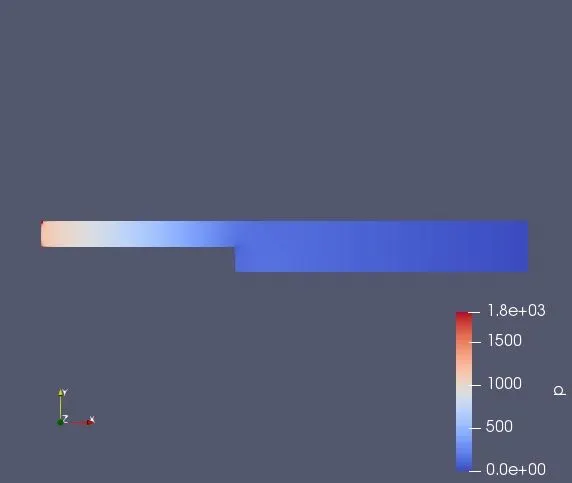
Case 1
Pressure
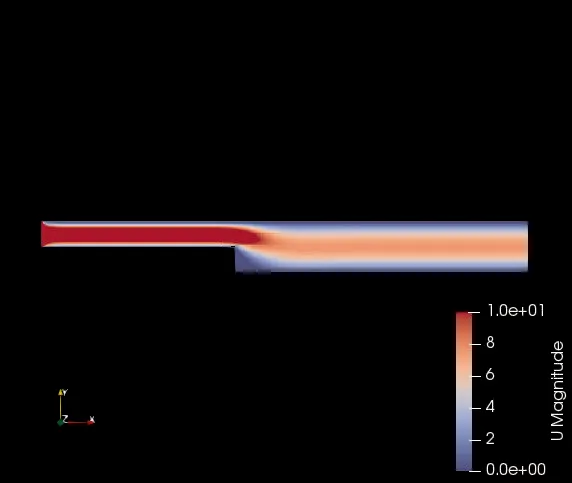
Velocity
Plot
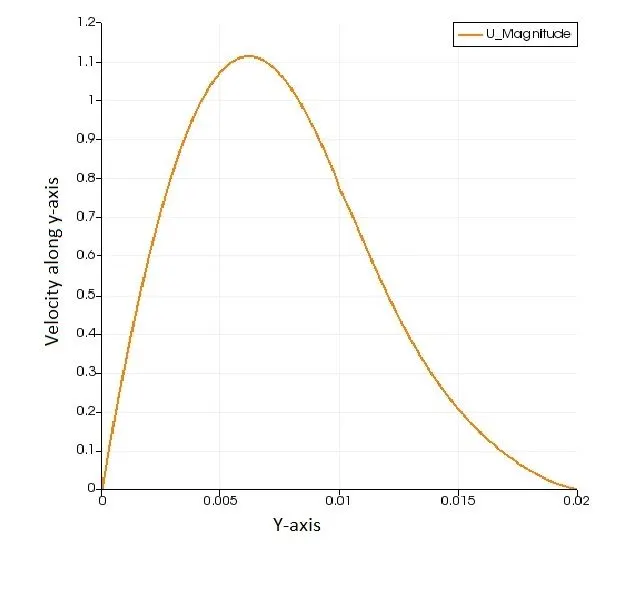
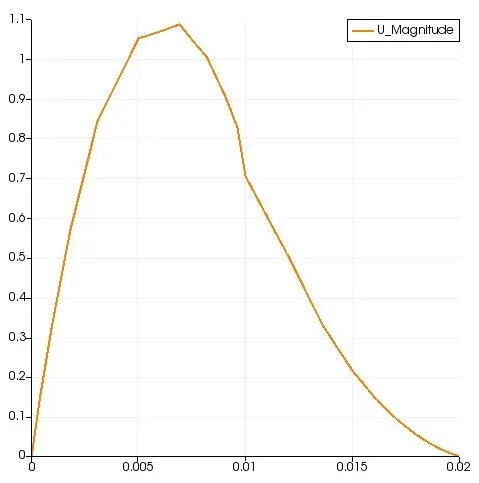
To observe the variation of velocity at 0.085 m in length , the variation of velocity from bottom to upper portion that is in y axis -0.01 to 0.01
Case 2
For doing this we have to change the values in blockMeshDict file as shown below
    hex (0 1 2 3 11 12 13 14) (80 5 1) simpleGrading (1 5 1)  //block1
    hex (3 2 4 5 14 13 15 16) (80 5 1) simpleGrading (1 0.2 1)  //block2
    hex (2 7 6 4 13 18 17 15) (120 5 1) simpleGrading (5 0.2 1)  //block3
    hex (1 8 7 2 12 19 18 13) (120 5 1) simpleGrading (5 5 1)  //block4
    hex (10 9 8 1 21 20 19 12) (120 10 1) simpleGrading (5 5 1)  //block5
So our mesh would look like this
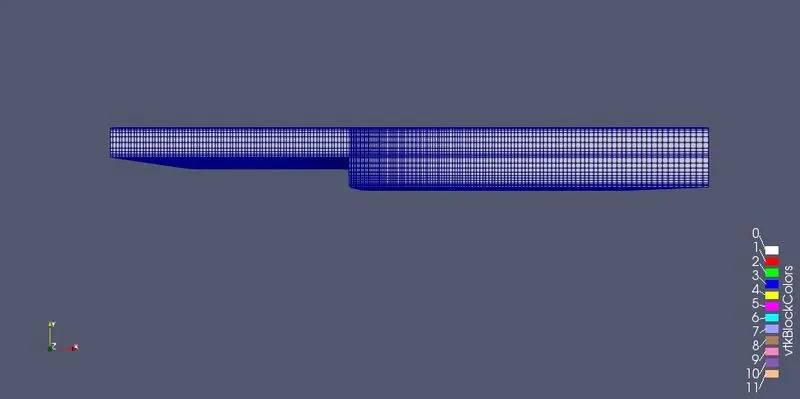
You can see that the meshes are finer near to the walls
Also for running the simulation I have also changed the values in controlDict as well since the dt is very small the CFL number got higher and higher and showed error also when I simulated for the case 1 I also noted that the time Intervel was too short which is why it took longer time to come to final solution
/*--------------------------------*- C++ -*----------------------------------*\
  =========                 |
  \\      /  F ield         | OpenFOAM: The Open Source CFD Toolbox
   \\    /   O peration     | Website:  https://openfoam.org
    \\  /    A nd           | Version:  9
     \\/     M anipulation  |
\*---------------------------------------------------------------------------*/
FoamFile
{
    format      ascii;
    class       dictionary;
    location    "system";
    object      controlDict;
}
// * * * * * * * * * * * * * * * * * * * * * * * * * * * * * * * * * * * * * //

application     icoFoam;

startFrom       startTime;

startTime       0;

stopAt          endTime;

endTime         0.2;

deltaT          1e-4;

writeControl    timeStep;

writeInterval   100;

purgeWrite      0;

writeFormat     ascii;

writePrecision  6;

writeCompression off;

timeFormat      general;

timePrecision   6;

runTimeModifiable true;


// ************************************************************************* //
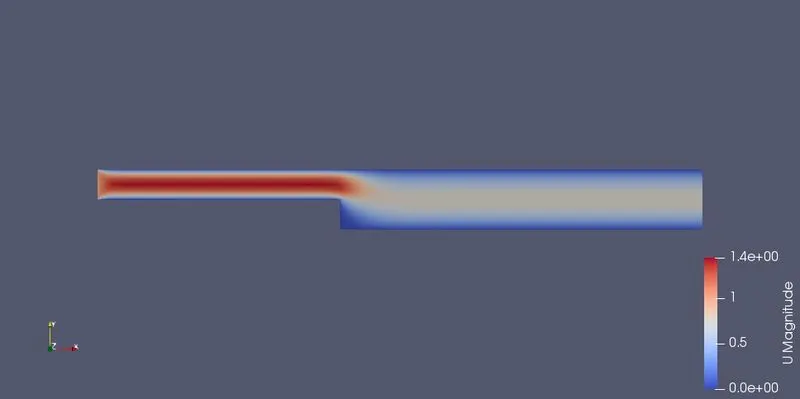
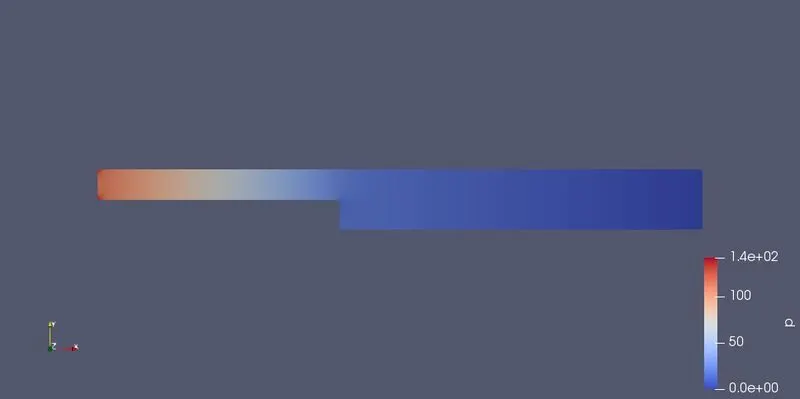
Obtained Solution
Velocity
Pressure
Velocity plot at 0.085m
Conclusions
- From the simulation it was obtained that at step area the fluid flow changes distrubtly where the physics changed all of a sudden
- The study was done on two cases, one in which we had uniform mesh grading along the geometry of backward facing step and another one with mesh grading of 0.2 in a way that that the meshes are finer near to the wall
- For the comparison we plotted velocity variation at a point of 0.085 metre from the inlet
- It was obtained that there is some difference between these two where the uniform graded plot showed almost a uniform curve when approaching a distance of 0.02 (wall area) in y-axis ,since we made the cells finer near to the walls the accuracy of the solution also increased which is clear why mesh grading factor is important
- When the meshes are made fine the quality of simulation increases at that area