Mass Scaling LSDYNA
AIM
To perform the simulation in order to reduce the run time with the help of mass scaling LS-DYNA
OBJECTIVE:
- To learn about the mass scaling technique to reduce the computational time for the analysis
- The hard limit on mass scaling is 8% and stability should be completely intact.
- Run same model using an implicit solver at last with required keywords.
EXPLANATION
Mass-scaling refers to a technique whereby nonphysical mass is added to a structure in order to acheive a larger explicit timestep.
Anytime you add nonphysical mass to increase the timestep in a dynamicanalysis, you affect the results (think of F=m*a). Sometimes the effect is insignificant and in those cases adding nonphysical mass is justifiable. Examples of such cases may include the addition of mass to just a few small elements in a noncritical area or quasi-static simulations where the velocity is low and the kinetic energy is very small relative to the peak internal energy. In the end, it's up to the judgement of the analyst to gage the affect of mass scaling. You may have to reduce or eliminate mass scaling in a second run to gage the sensitivity of the results to the amount of mass added.
One can employ mass scaling in a selective manner by artificially increasing material density of the parts you want to mass-scale. This manual form of mass scaling is done independently of the automatic mass scaling invoked with DT2MS in *Control_step.
When DT2MS is input as a negative value, mass is added only to those elements whose timestep would otherwise be less than DT2MS . By adding mass to these elements, their timestep becomes equal to |DT2MS|. An infinite number of combinations of TSSFAC and DT2MS will give the same product, i.e., timestep but the added mass will be different for each of those combinations. The trend is that the bigger DT2MS (and the smaller TSSFAC while TSSFAC*DT2MS =CONS), the greater the added mass. In return, stability may improve as TSSFAC is reduced (just as in non-mass-scaled solutions). If stability is a problem with the default TSSFAC of 0.9, try 0.8 or 0.7. If you reduce TSSFAC, you can increase DT2MS proportionally so that their product, and hence timestep, is unchanged.
Negative: Mass is added to only those elements whose timestep would otherwise be less than TSSFAC*DT2MS. When mass scaling is appropriate, I recommend this method.
Positive: Mass is added or taken away from elements so that the timestep of every element is the same. My opinion is there is no advantage to using this method over the negative DT2MS method and I find it harder to rationalize.
The parameter MS1ST in *Control_timestep controls whether mass is added only once during initialization (MS1ST =1) or anytime as necessary to maintain the desired timestep specified via DT2MS(MS1ST = 0)
You can use ENDMAS in *Control_termination to stop the calculation aftera certain amount of mass has been added (active for automatic mass scaling only).
TIMESTEP SIGNIFICANCE:
LS-DYNA calculates your solution by running over all the nodes in the model at each time step. In a very simplified explanation, LS-DYNA will look at the total force on each node from the previous time step, use that to find the acceleration of that node, and then to find the displacement of that node. The node is then moved by this much. The calculation then updates the strain on the connecting element. This then goes through the material constitutive equation to get stress, which is applied as a force on the neighboring node in the next time step.
You can imagine this series of calculations behaving like a wave, propagating through your mesh. The critical thing, however, is you want to calculate all the node positions of your model at the same time, without it being affected by the calculations from the previously calculated node. This basically means that you need to set your time increment such that the code can calculate the displacements of the next node before the wave from the previous node calculation can hit it.
For instance, if my boundary conditions on the mesh shown below were along the left and bottom edges, and I applied a downward load at node 25, the calculations at t=0 would go as follows:
F at N25 = F0.
This gives acceleration (from F=ma, with mass at 1/4th the mass on element 16).
From acceleration, I calculate displacement for my next time step and move N25.
Now, the movement of this node imposes a strain on element 16, which generates a stress in element 16 (from the material law) which will apply a force on N20. However, I still haven't calculated the displacement of N20 at t=0. I must do this before the wave propagating from N25's displacement hits N20.
This wave travels through the material at the speed of sound through that material, which depends directly on density, Young's modulus and Poisson's ratio of that material.
The wave propagation velocity in a 2D shell element is given below:
So the speed of sound through my material, and my mesh size determines how much time I have before I need to calculate N20 displacements. (Note, I am using N20 as an example. LS-DYNA also needs to calculate N19 and N24 as the wave is propagating in all directions.)
I would also like to have a little margin for safety. If I set my time step to exactly the time for the wave to hit N20, it would be a little risky and can lead to instability. Therefore, LS-DYNA has a parameter in the *CONTROL_TIMESTEP card called TSSFAC, which is set to a default of 0.9. This is basically a scale factor on the calculated time step to ensure that N20 is calculated well in advance of the wave front.
Now, that makes sense for a regular mesh (I hope). All the elements have the same time-step, and everything works out great. What happens if my mesh is not regular? I have some smaller elements, some larger elements, different materials (affecting wave speeds), etc. This is unavoidable in real parts because of the necessity of capturing the geometry accurately. Then LS-DYNA will use the smallest time step calculated over all the elements to ensure that none of the elements get unstable because of the above-explained phenomenon. That means if you have one element with a tiny time step, the time-step of your entire model is dictated by that one element, necessitating a lot more calculations than are necessary.
Which is why a uniform mesh is strove for when meshing an LS-DYNA model. And materials with a high wave propagation speed (generally metals) are meshed more coarsely than materials with low propagation speeds (plastics, rubbers) when used together in the same model. However, even that can only go so far.
The list of your hundred lowest time steps is given in the d3hsp file. Search for the term 'smallest' and you should be able to find it in the file once your deck starts to run through the time steps (after estimated run time is given in your stdout). Use this list to see if you can re-mesh locally to remove small elements.
The other alternative is called mass-scaling. Here, I artificially increase the mass of my smallest elements, and so increase the density of that element, without affecting any other property. This then means that my wave propagation speed gets artificially reduced, increasing the time step for that element. Looking at this in reverse, if I have a target time step for my entire model, LS-DYNA can look at which elements are below that time step, and apply just enough mass to those elements to ensure that their time-steps hit your target. You can set a time step manually in the *CONTROL_TIMESTEP card under the dt2ms field. Note, you need to input this value as a negative of your timestep. (There are different ways to mass-scale. Read the manual for the different definitions.)
Just because this method allows you to set your own time step does not mean that you can set whatever value you want. Remember, you are artificially increasing the mass in a dynamic simulation as the analysis is progressing. This means that your kinetic energy of that element is artificially going up. LS-DYNA is essentially creating energy from nothing. LS-DYNA will output how much your mass-scaling is in the stdout at the beginning of the run. I would suggest a mass scaling value (as percentage of original mass of your model) of not more than 2%. Note this is just the initial mass scaling. The amount of mass added may go up through the simulation (as elements deform). At the end of the run, check the glstat file for mass-scaling over time. If it is a relatively flat curve and stays under 2% at all times, your result should be close enough to the ideal result (without mass-scaling). Of course, the best way would be to run one case without mass scaling and compare the results to make sure the level of mass scaling still gives you accurate results.
I hope this helps in giving an intuitive sense of how LS-DYNA calculates the time step, and how you can control your mesh size to maximize your time step (within reason), and how mass scaling can allow a higher time step when you have small elements you cannot clean up.
In explicit integration, the numerical stress wave must have always propagate less than one element width per time step. The time step in anyone deformable finite element in the mesh. The above relation is called the Courant-Friedrichs-Lewy(CFL) condition and the determines the stable time step in an element.
The CFL condition requires that the explicit time step be smaller than the time needed by the physical wave to cross the element. 0.9 is the time step scale factor(TSSFAC). Based on the conditions, the time step can be increased to provide faster solution times by artificially increasing the density of the material by using techniques like(mass scaling, lowering the modulus, or by increasing the element size of mesh).
PROCEDURE
EXPLICIT SOLVER:
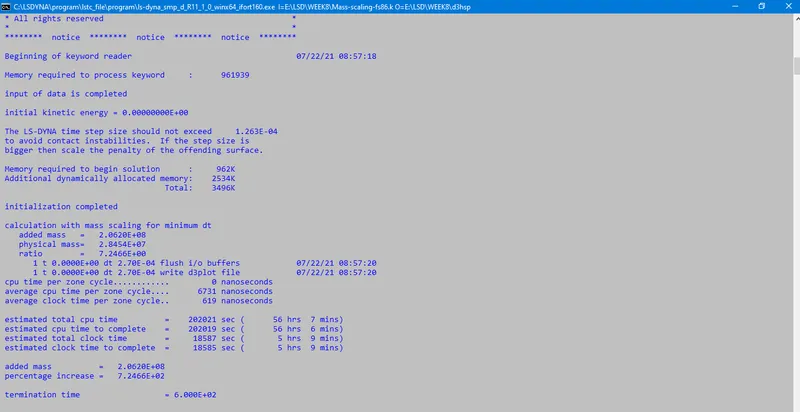
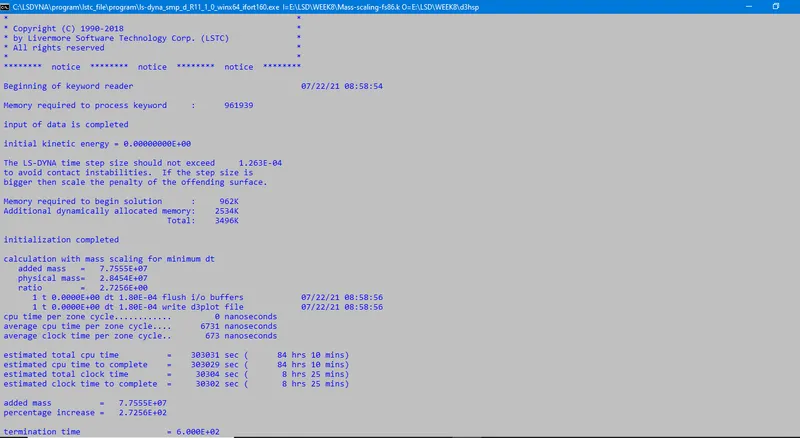
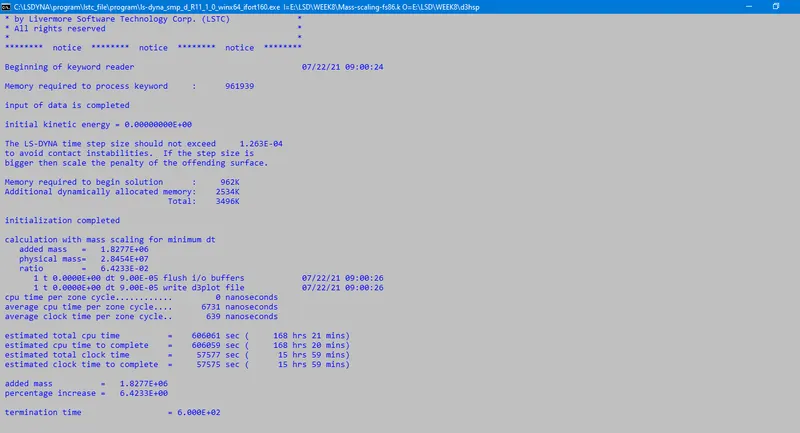
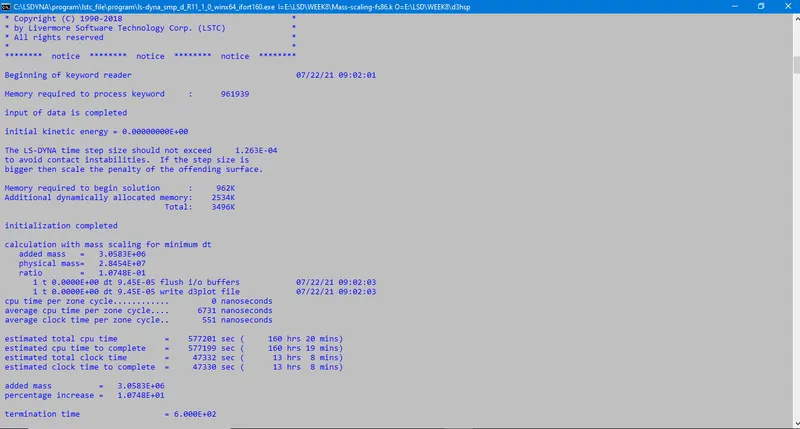
Since DTMS and TSSFAC are the important parameters is the *control_timestep card that affects the timestep and the runtime of simulation, so we will change these values in each iteration to obtain an optimized runtime with a stable solution and to make sure scaling doesn't go beyond 8%.
Iteration1:

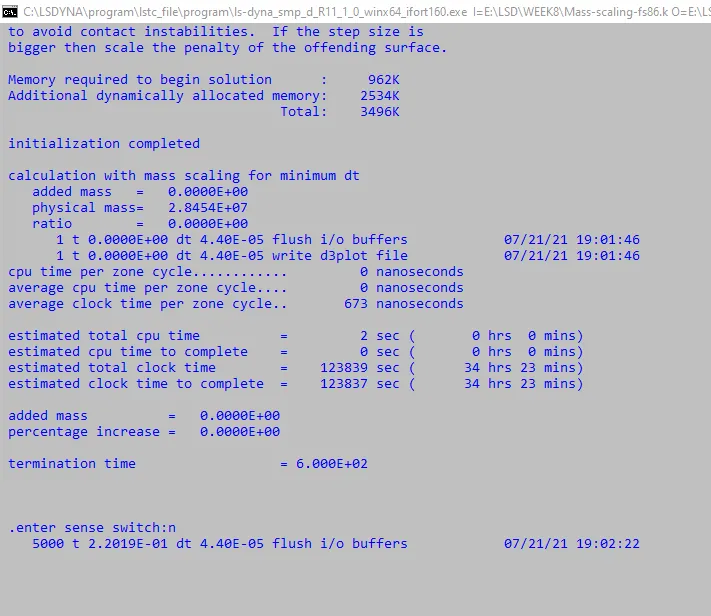
In above step both the DT2MS and TSSFAC were default and no added mass scale.
ITERATION 2:

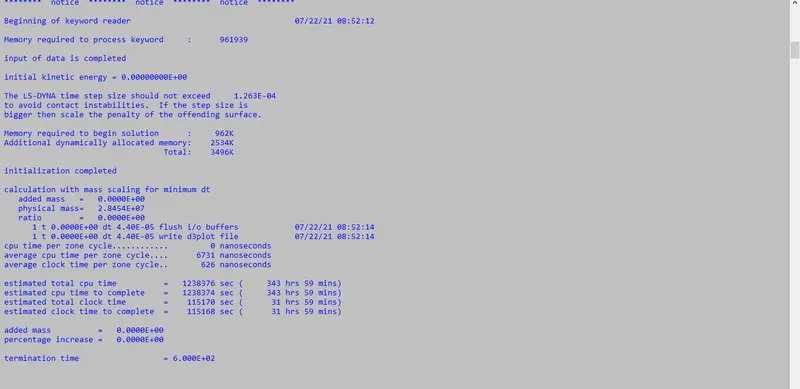
From above iterations the DT2MS value will be increased further until we attain the optimized mass scale percent.
ITERATION 3:

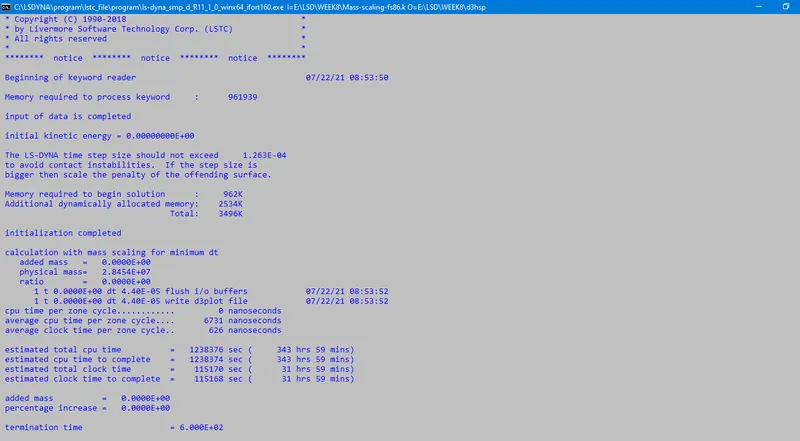
ITERATION 4:

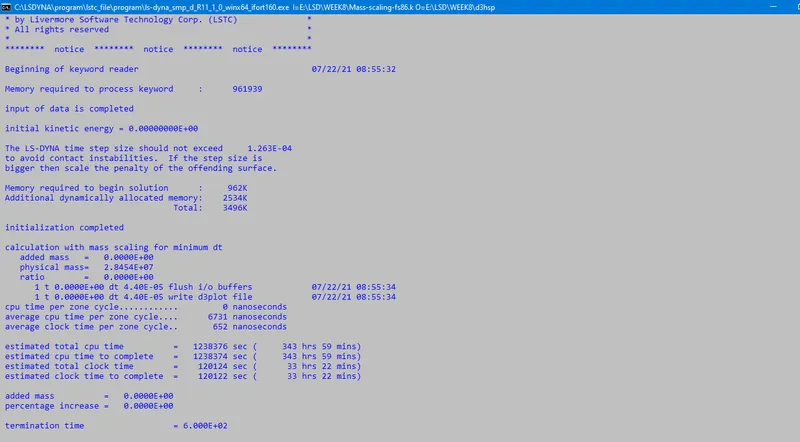
ITERATION 5:

ITERATION 6:

ITERATION 7:

ITERATION 8:

ITERATION 9:

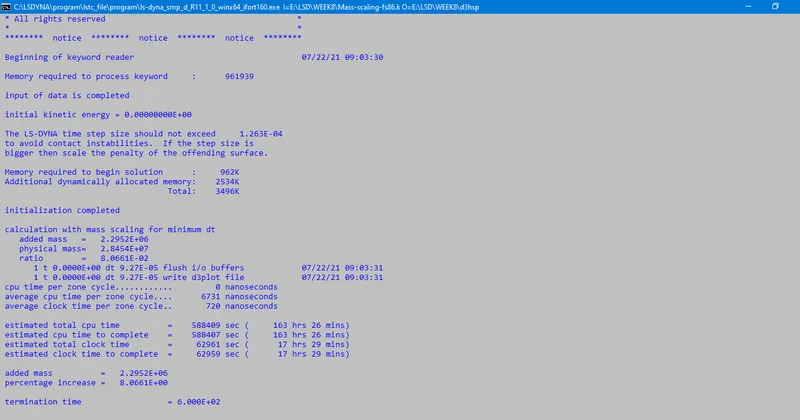
ITERATION 10:

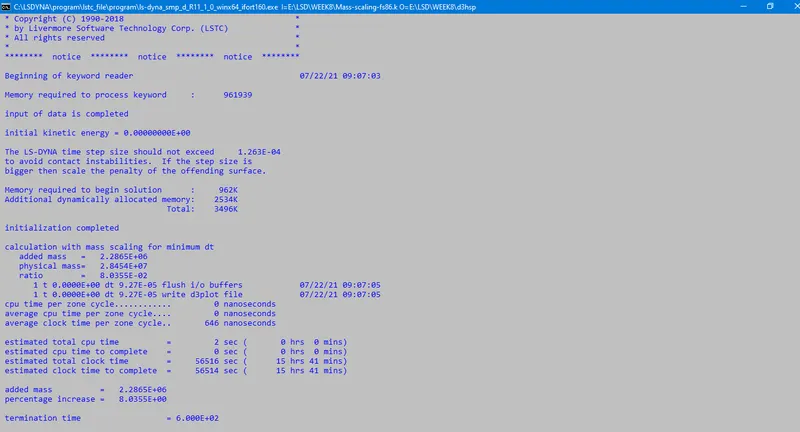
ITERATION 11:

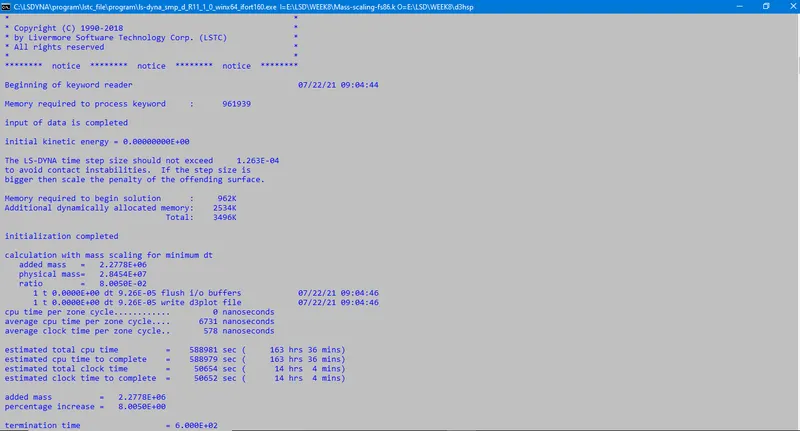
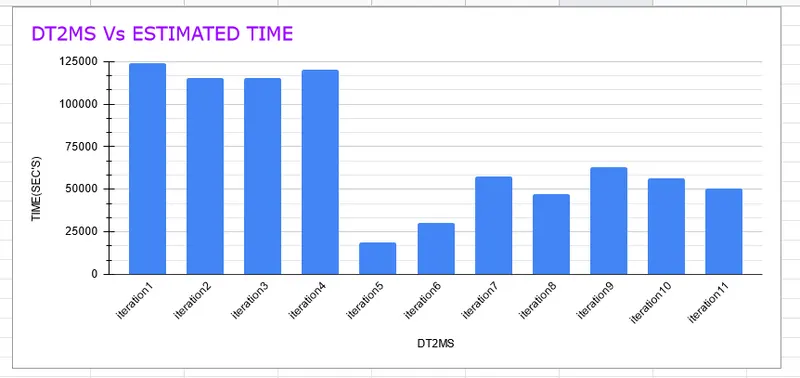
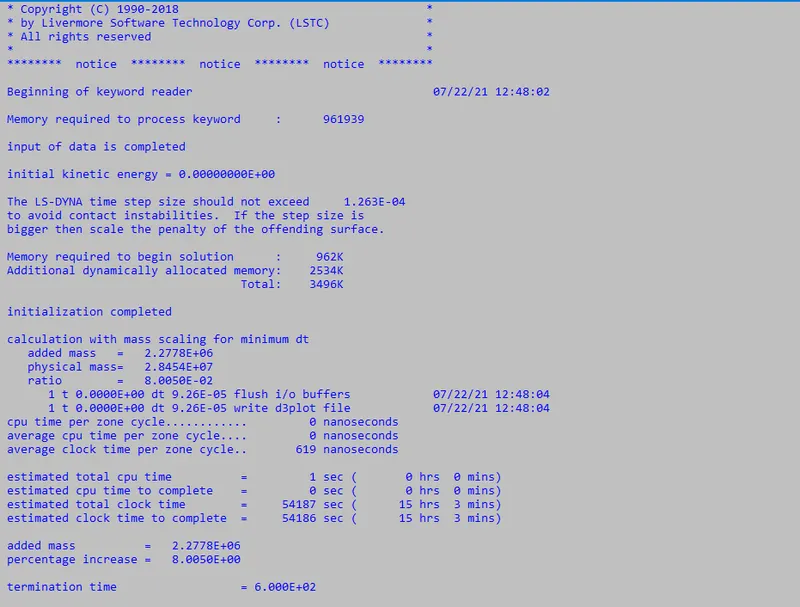
As expected the estimated time has reduces by decreasing the DT2MS value and if we notice the mass percentage is 8% which has reached its limit value, as more than 8% of the mass is not accepted,so further decreases of DT2MS will only increase and the mass percentage of the system.
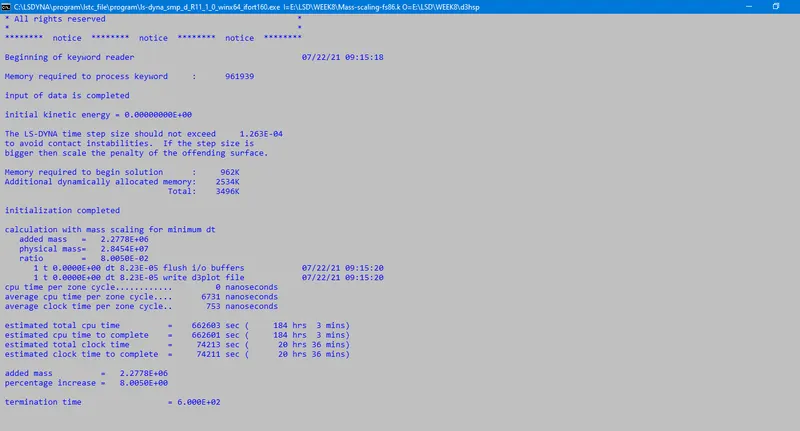
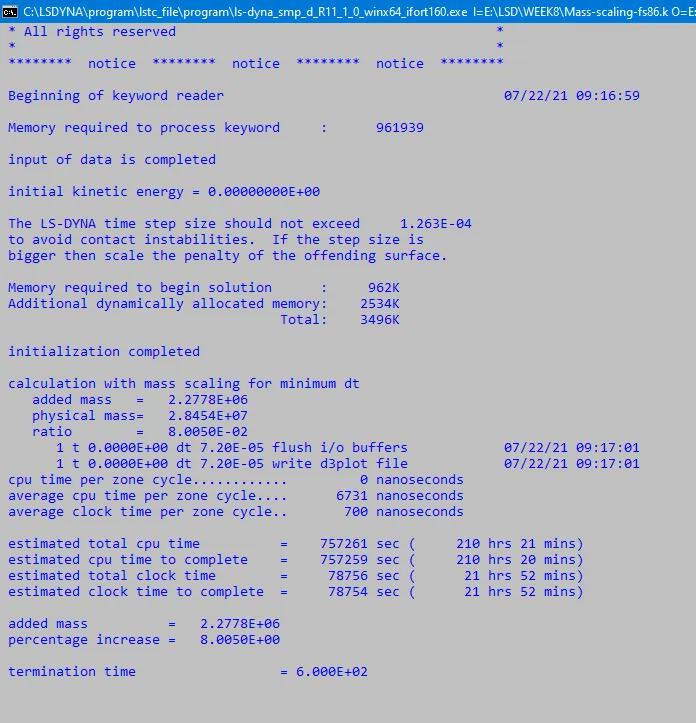
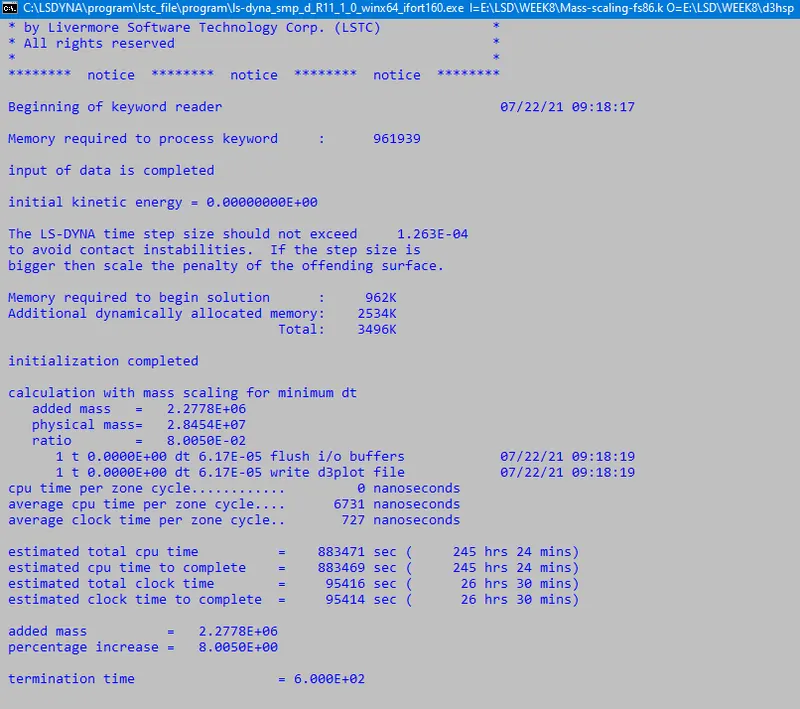
NOW control_timestep card will be implementd with value of DTMS from last iteration and TSSFAC is decreased further
CASE 1: TSSFAC 0.9

CASE 2: TSSFAC 0.8

CASE 3 : TSSFAC 0.7

CASE 4: TSSFAC 0.6

CASE 5: TSSFAC 0.5

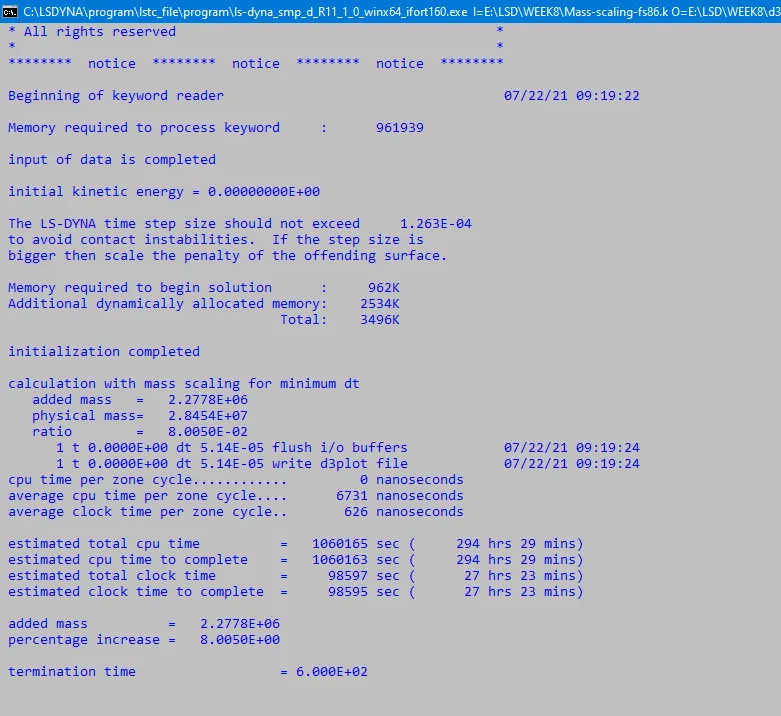
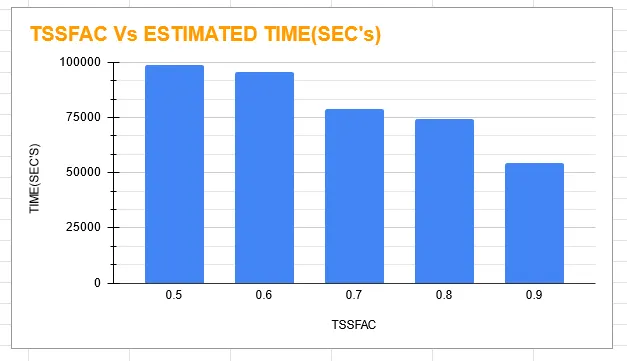
As we know the TSSFAC parameter won't affect the additional mass added to the system and that's why the mass percentage has remained unchanged. But as we see TSSFAC parameters affect timestep or estimated time that's there is increase in estimate time compared to previous iteration.
IMPLICIT ANALYSIS
Now we wil run same model using an implicit solver.
Inputs for implicit solver
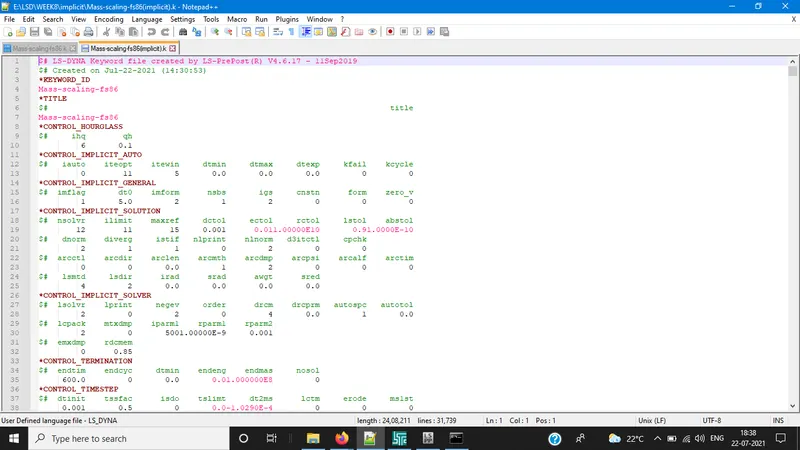
In above image control implicit general,auto, solver and solution keywords with neccessary values has been used to activate the Implicit solver.
RESULTS:
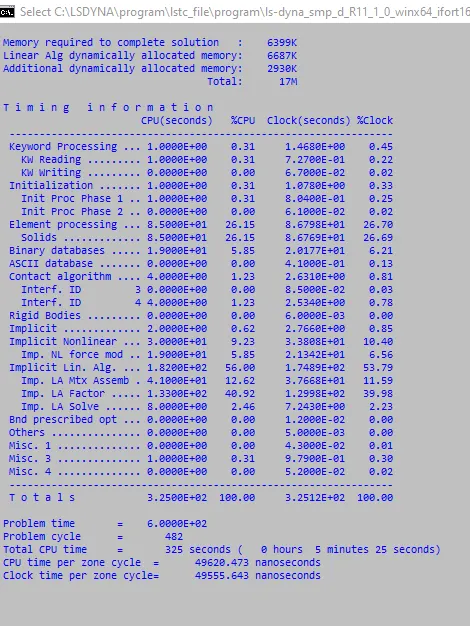
- It shows that the implicit method took 5 mins solve.
- If you notice the initial timestep is 6 and we have constant timestep formulation because our termination time is very large
- Basic thumb rule to calculate initial time step is DT0 = termination time/100 i.e. 600/100
- And this value of the initial time DT0 is defined in *Control_implicit_general.
Conclusion:
Using mass scaling technique we reduce simulation time by adjusting timestep which is limited by the courant's stability criteria.
We noticed how the DTMS and TSSFAC parameters affect the simulation run time and how the DTMS value affect mass scaling and it evidently proved TSFC values don't affect the mass scaling value.
Implicit and explicit analysis differ in the approach to time increments.
In Implicit analysis, each time increment has to converge, but we can set pretty long time increments. Explicit on the other hand doesn't have to converge each increment, but for the solution to be accurate time increments must be super small.
Though the running time for implicit analysis is shorter than explicit analysis method, the because the timestep is defined larger in implicit compare to explicit analysis and we have used constant timestep formulation.
https://docs.google.com/spreadsheets/d/1DvQYcfP4-Hfy5qPPSuHtYgIjPXmVB3P0T0-zZrgoKNI/edit#gid=0