Week 8 - BlockMesh Drill down challenge
BlockMesh Drilldown challenge - Simulation of transient incompressible-laminar-viscous flow through the backward facing step geometry
Aim : To setup the case to simulate the transient incompressible-laminar-viscous flow through the backward facing step in OpenFOAM.
Objectives : 1. Explain the creration of the geometry - Speciification of vertices, faces, number of cells and cell size.
2. Selection of the solver.
3. Conditions for the simulation - Initial and boundary conditions.
Theory : Incompressible - laminar - Viscous flow
Incompressible flow : The flow in which there is no change in the density is called the incompressible flow.
Mathematically, an incompressible flow can be expressed as `nabla * u = 0`
Laminar flow : A laminar flow is one where the fluid motion is regular and there is no mixing . It can be visualized by the pathlines that do not intersect each other.
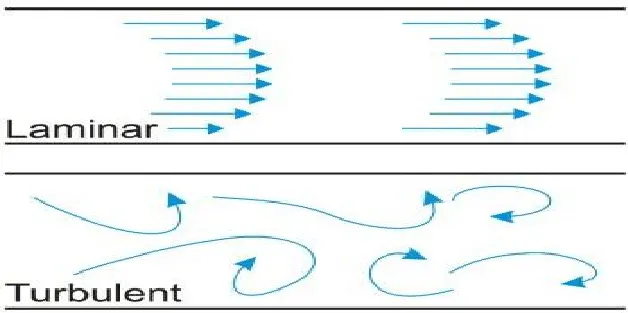
Reynolds number is the parameter to differentiate a flow as laminar or turbulent.
Mathematically, Reynolds number is the ratio of inertial force to the viscous force.
`Re = (rho * v*L)/(mu)`
rho corresponds to the density of the fluid.
v is the density of the fluid.
L is the characteristic length of the passage through which the fluid flows. (In case of a fluid flow through the pipe, the charactersitic length is the diameter of the pipe.)
`mu`is the absolute viscosity of the fluid.
For internal flows of Re `leq`1000 represent a laminar flow regime`
Viscous flow : Viscosity is the property of fluid by the virtue of which it exhibits a inertia to the fluid motion.
In case of the flow of a viscous fluid a layer of the fluid opposes the motion of another layer of fluid above it. This results in the velocity gradient in the direction perpendicular to the fluid flow.
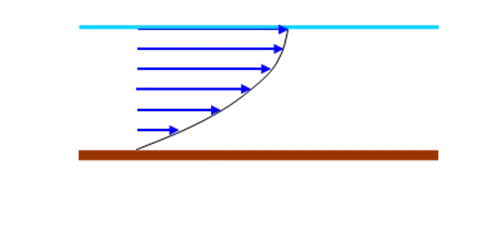
Consider the top layer of fluid moving with the velocity V. However as the fluid is viscous, the layer just underneath it has a velocity less than V. This is because the bottom layer of the fluid exerts an opposition to the movement of the top layer. This results in the velocity gradient across the cross section.
Equations of motion governing the Incompressible - laminar - Viscous flow 2D case:
1. Continuity equation :
a. Conservation form :
`(partialrho)/(partial t) + nabla *(rho * V) = 0`
b. Non Conservation form :
`(Drho)/(Dt) + rhonabla* V = 0`
2. Momentum Equation :
a. Conservation form :
x-component : `(del(rho*u))/(delt) +nabla*(rho*u*V) = - [(delp)/(delx)] + ((del tau_(x x))/(delx)) + ((del tau_(y x))/(dely)) + ((del tau_(z x))/(delz)) + rho*f_x`
y-component : `(del(rho*v))/(delt) +nabla*(rho*v*V) = - [(delp)/(dely) ]+ ((del tau_(x y))/(delx)) + ((del tau_(y y))/(dely)) + ((del tau_(z y))/(delz)) + rho*f_y`
b. Non conservation form :
x-component : `rho*((Du)/(Dt)) = - (delrho)/(delx) + (del tau_(x x ))/(delx) + (del tau_(y x ))/(dely) + (del tau_(z x))/(del z) + rho*f_x`
y-component : `rho*((Dv)/(Dt)) = - (delrho)/(dely) + (del tau_(x y))/(delx) + (del tau_(y y))/(dely) + (del tau_(z y))/(del z) + rho*f_y`
OpenFOAM uses the Finite volume approach to solve the system of the PDE.
The simulation in this project corresponds to a Reynolds number(Re) = 1000, for which the internal flow is laminar.
| Parameter | Value | Significance |
| Domain length | 0.2 m | |
| Inlet diameter (d) | 0.01 m | |
| Density of the fluid (`rho`) | 1000 `(kg)/(m^3)` | |
| Reynolds number (Re) | 1000 | Laminar flow |
Geometry creation in OpenFOAM :
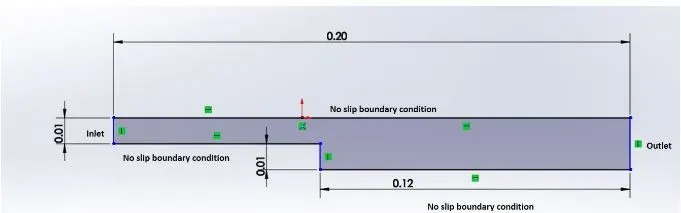
Fig.1 : CAD drawing of the backward facing step
The above drawing corresponds to the geometry of the Backward facing step with the exact dimension in meters. Also illustrated in the drawing are the boundary conditions corresponding to the problem.
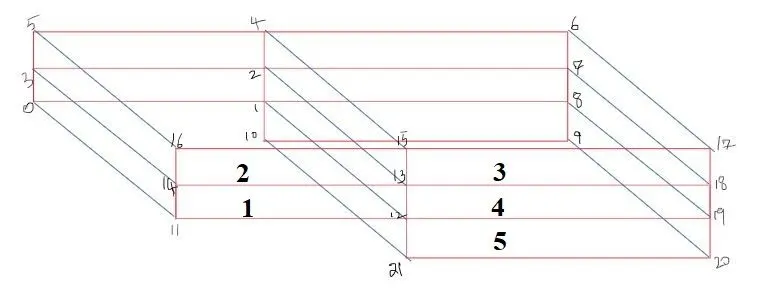
Fig.2 : Backward step marked with the vertices(1-21) and split into 5 blocks.
The given geometry corresponds to the backward facing step which is divided into blocks numbered from 1 through 5. The vertices of each block has been assigned the numbers.
Procedure :
Part - I
[The procedure mentioned here corresponds to the OpenFOAM software installed on UBUNTU flavour of Linux.]
1. Open the terminal of the Ubuntu OS and type in the command tut. The tut command changes the present working directory to the tutorials folder of the OpenFOAM.

Fig. 1 : Terminal - Navigating to the tutorials folder of openfoam
2. Make sure that the present working directory is tutorials by checking the path opt/openfoam7/tutorials.
3. Use the ls command that shows the files/ directories in the tutorials directory of the tutorials folder.
4. Navigate to the incompressible directory by usind the command cd (cd stands for change directory). Type cd incompressible as the syntax in the terminal.

Ensure that the path of the present working directory is opt/openfoam7/tutorials/incompressible. Now use the syntax ls to list down the folders present in the directory " incompressible".
Upon executing the ls command, the terminal displays the following folders :
adjointShapeOptimizationFoam boundaryFoam icoFoam nonNewtonianIcoFoam pimpleFoam pisoFoam porousSimpleFoam shallowWaterFoam simpleFoam SRFPimpleFoam SRFSimpleFoam .
5. Now navigate to the "adjointShapeOptimizationFoam" folder by typing the command cd adjointShapeOptimizationFoam. (case sensitive).
6. To see the list of the directories/ folders present in the adjointShapeOptimizationFoam use the ls command.

The terminal dispalys ''pitzDaily'' as the only folder present in the present working directory.
7. The pitzDaily folder has the files corresponding to the backward facing step. In order to view them use the ls command in the terminal.

As displayed, the folders present in the pitzDaily are 0 constant system.
0 is the folder which contains the property values at the time step 0. Simply, the 0 folder contians script files corresponding to the properties velocity U, pressure P and Turbulence terms k and epsilon.

The property values can be altered by simply editing the preset value to the desired value.
Consider the velocity script file :
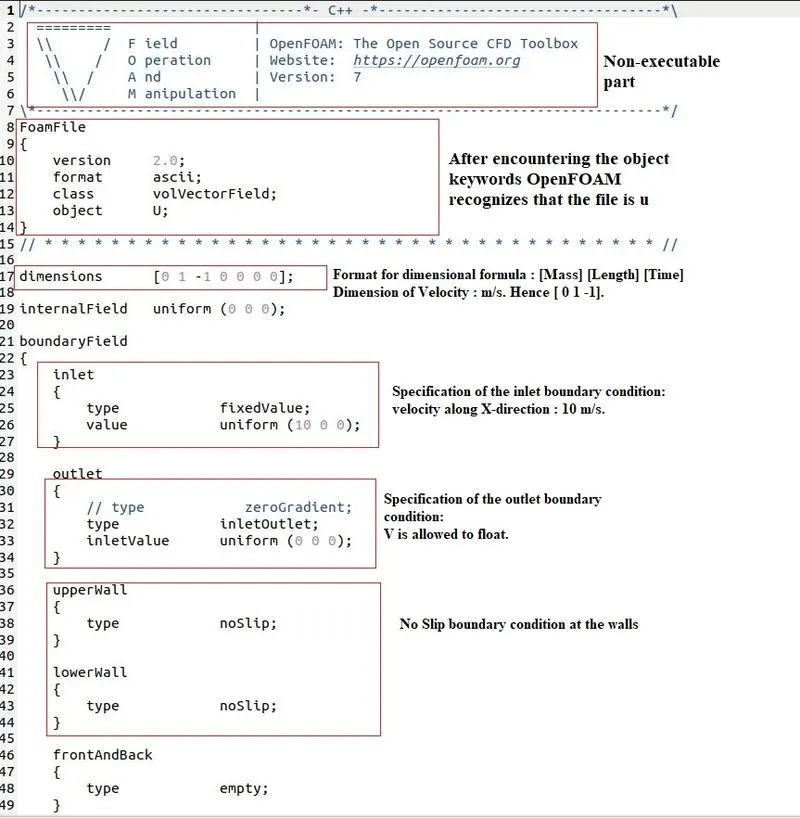
8. As and when we locate the folder pitzDaily, its contents are to be copied to a folder run present in the directory OpenFOAM.It can be easily located by its path : home/--xxx-/OpenFOAM/--xx-/run. (varies from individual to individual).
9. In order to copy a file from source folder to the destination folder the following command has to be used:
Syntax : cp -r source-folder-path destination-folder-path
In this case the synatx is cp -r $FOAM_TUTORIALS/incompressible/simpleFoam/PitzDaily home/--xx-x/OpenFOAM/--X--/run.
The cp command represents the copy function and -r represents the recursive copying. The recursive copying method has to be followed when the desired file is present in a folder.
Part - II :
Now that the file ''pitzDaily is successfully copied from the tutorials directory to the run directory, the next steps to be follwed are :
I. Geometry generation
Either through the commands / GUI navigation, we proceed to the blockMeshDict script file present in the system folder in the pitzDaily.
path : OpenFOAM/USERNAME/run/pitzDaily/system.

The blockMeshDict file is a script file which contains the information regarding all aspects of the geometry.
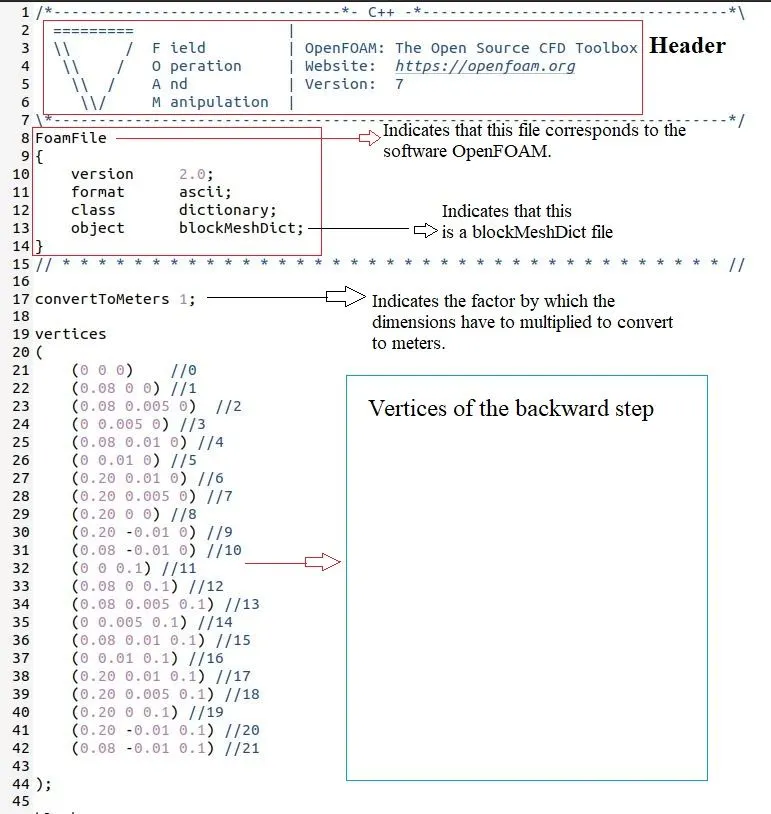
The vertices in the above figure correspond to the backward step. Now that the vertices are specified, the faces that form the geometry have to be specified.
case . I : Mesh generation without any grading factor
In the same blockMesh file go to the lines where we the word hex can be found. That is the line where we specify the faces of the blocks and also the number of cells in X, Y and Z direction.
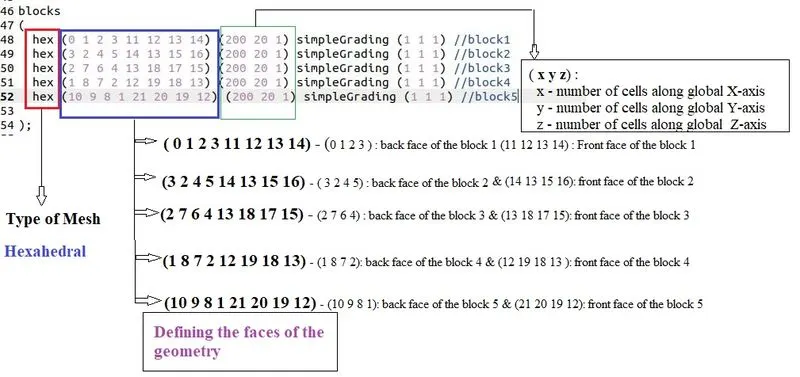
Also we specify the faces as the inlet, outlet and walls as shown in the picture below
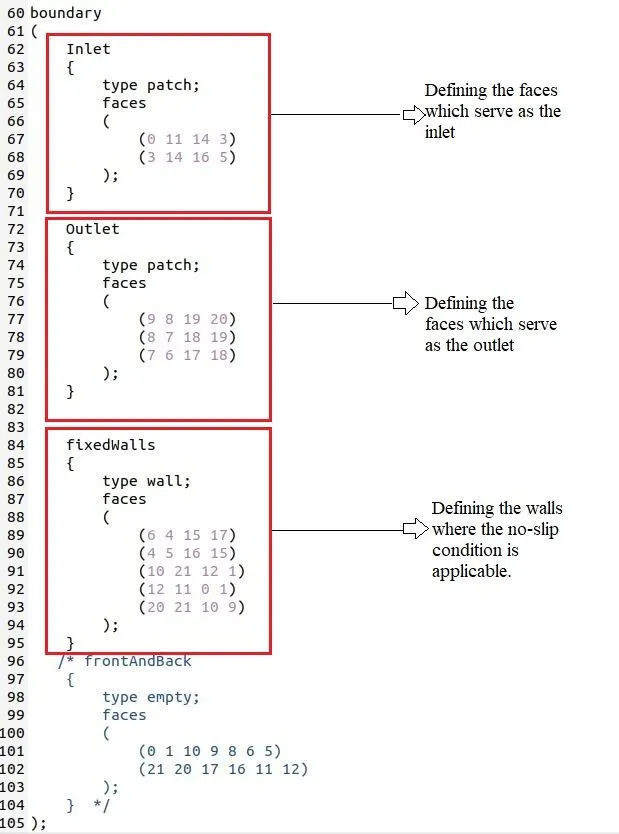
The blockMeshDict file is edited as shown in the above.
The next step is to navigate to the controlDict folder and specify the simulation time as 200 seconds.The script file looks as follows.
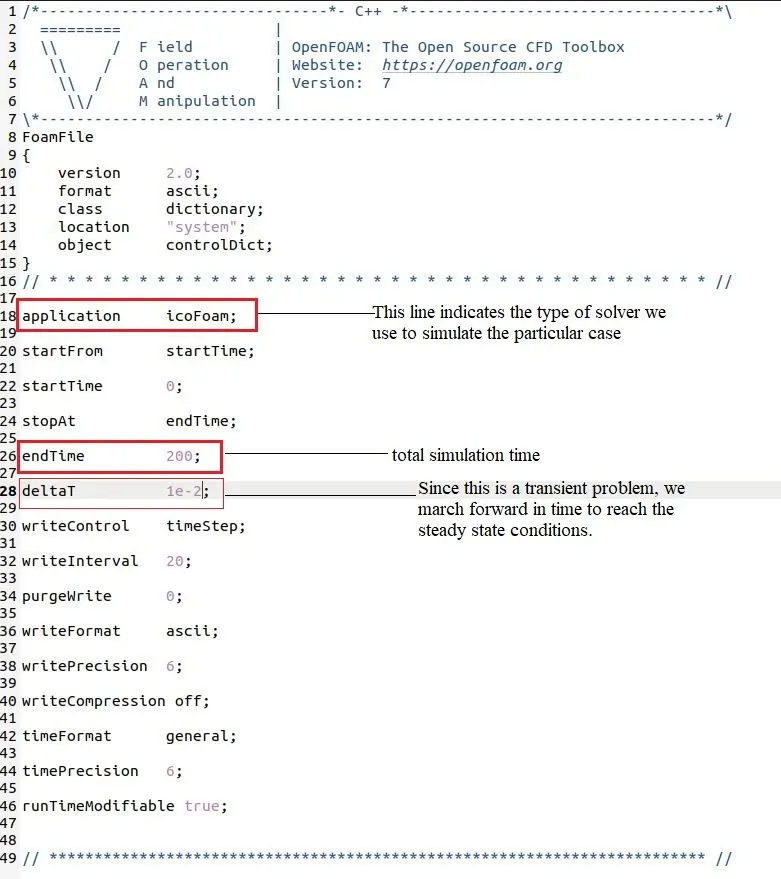
Code :
The blockMeshDict file
/*--------------------------------*- C++ -*----------------------------------*\
  =========                 |
  \\      /  F ield         | OpenFOAM: The Open Source CFD Toolbox
   \\    /   O peration     | Website:  https://openfoam.org
    \\  /    A nd           | Version:  7
     \\/     M anipulation  |
\*---------------------------------------------------------------------------*/
FoamFile
{
    version     2.0;
    format      ascii;
    class       volScalarField;
    object      p;
}
// * * * * * * * * * * * * * * * * * * * * * * * * * * * * * * * * * * * * * //

dimensions      [0 2 -2 0 0 0 0];

internalField   uniform 0;

boundaryField
{
    Inlet
    {
        type            zeroGradient;
    }

    Outlet
    {
        type            fixedValue;
        value           uniform 0;
    }

    fixedWalls
    {
        type            zeroGradient;
    }
}

// ************************************************************************* //
Pressure boundary conditions
/*--------------------------------*- C++ -*----------------------------------*\
  =========                 |
  \\      /  F ield         | OpenFOAM: The Open Source CFD Toolbox
   \\    /   O peration     | Website:  https://openfoam.org
    \\  /    A nd           | Version:  7
     \\/     M anipulation  |
\*---------------------------------------------------------------------------*/
FoamFile
{
    version     2.0;
    format      ascii;
    class       volScalarField;
    object      p;
}
// * * * * * * * * * * * * * * * * * * * * * * * * * * * * * * * * * * * * * //

dimensions      [0 2 -2 0 0 0 0];

internalField   uniform 0;

boundaryField
{
    Inlet
    {
        type            zeroGradient;
    }

    Outlet
    {
        type            fixedValue;
        value           uniform 0;
    }

    fixedWalls
    {
        type            zeroGradient;
    }
}

// ************************************************************************* //
Velocity boundary conditions :
/*--------------------------------*- C++ -*----------------------------------*\
  =========                 |
  \\      /  F ield         | OpenFOAM: The Open Source CFD Toolbox
   \\    /   O peration     | Website:  https://openfoam.org
    \\  /    A nd           | Version:  7
     \\/     M anipulation  |
\*---------------------------------------------------------------------------*/
FoamFile
{
    version     2.0;
    format      ascii;
    class       volVectorField;
    object      U;
}
// * * * * * * * * * * * * * * * * * * * * * * * * * * * * * * * * * * * * * //

dimensions      [0 1 -1 0 0 0 0];

internalField   uniform (0 0 0);

boundaryField
{
    Inlet
    {
        type            fixedValue;
        value           uniform (0.01 0 0);
    }

    Outlet
    {
        type            zeroGradient;
    }

    fixedWalls
    {
        type            noSlip;
    }
}

// ************************************************************************* //
ControlDict conditions
/*--------------------------------*- C++ -*----------------------------------*\
  =========                 |
  \\      /  F ield         | OpenFOAM: The Open Source CFD Toolbox
   \\    /   O peration     | Website:  https://openfoam.org
    \\  /    A nd           | Version:  7
     \\/     M anipulation  |
\*---------------------------------------------------------------------------*/
FoamFile
{
    version     2.0;
    format      ascii;
    class       dictionary;
    location    "system";
    object      controlDict;
}
// * * * * * * * * * * * * * * * * * * * * * * * * * * * * * * * * * * * * * //

application     icoFoam;

startFrom       startTime;

startTime       0;

stopAt          endTime;

endTime         200;

deltaT          1e-2;

writeControl    timeStep;

writeInterval   20;

purgeWrite      0;

writeFormat     ascii;

writePrecision  6;

writeCompression off;

timeFormat      general;

timePrecision   6;

runTimeModifiable true;


// ************************************************************************* //
Mesh for the simple grading :

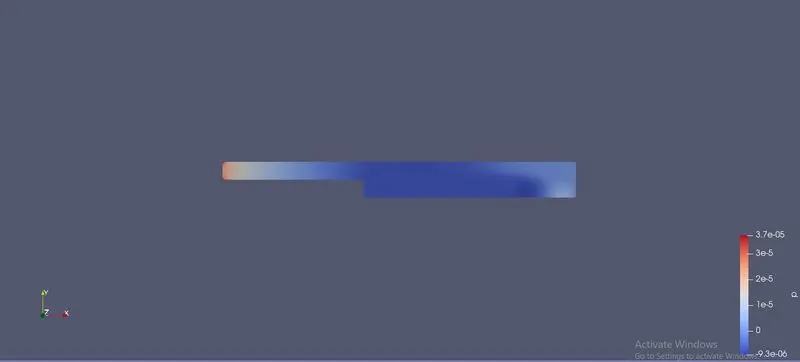
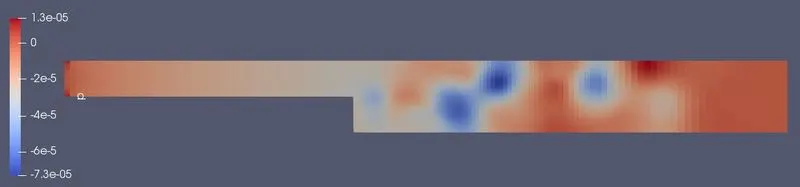
Contour for pressure inside the backward facing step :
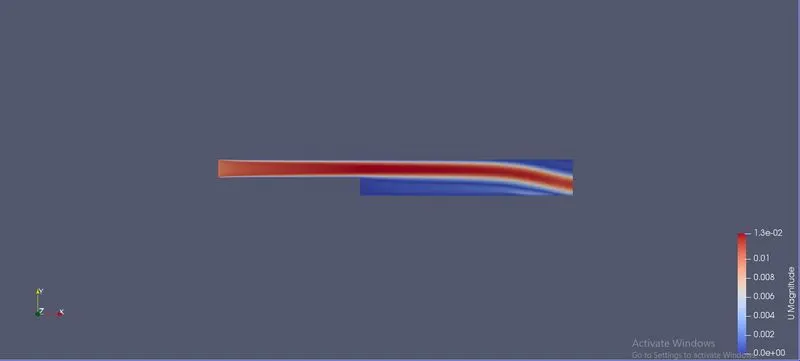
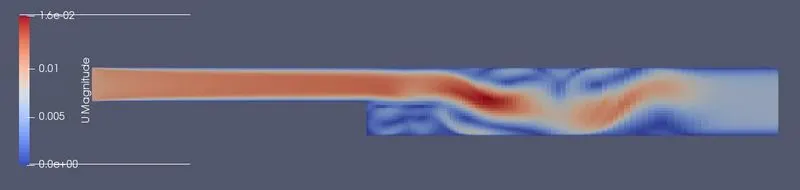
Contour for velocity inside the backward facing step :
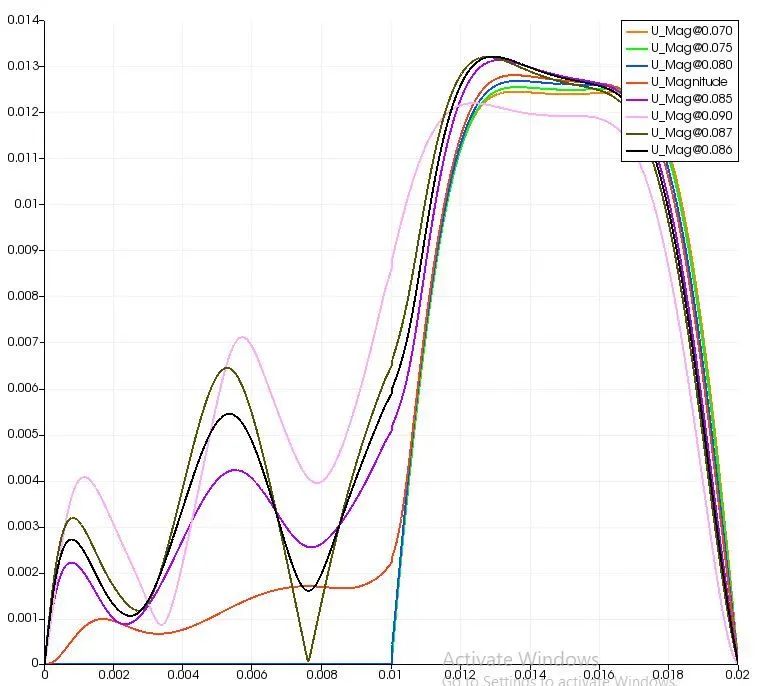
Magnitude of the velocity at the lateral locations of x = 0.075, 0.085 and 0.19.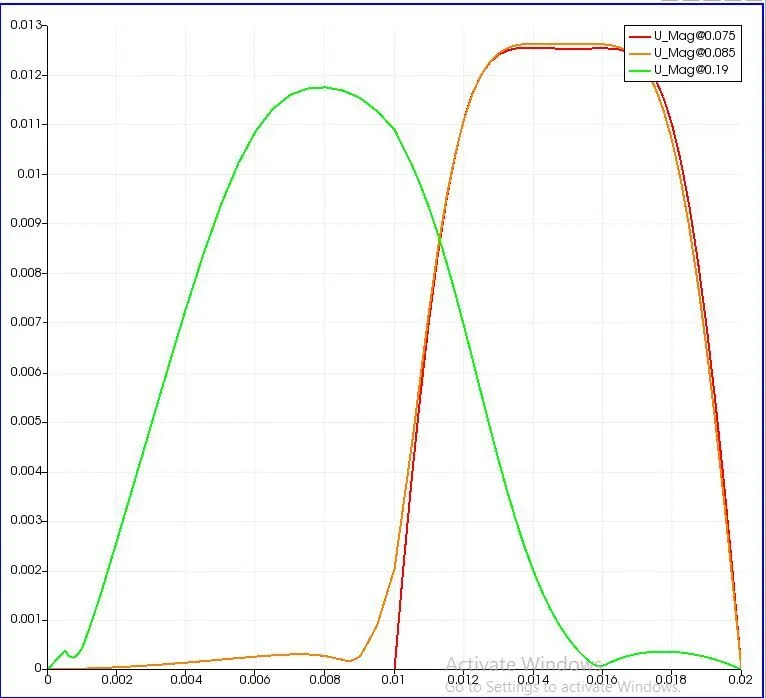
For a Meshing grade scheme with the factor 0.2
The initial conditions, property values, simulation time everything remain constant except the grading factor in the mesh.
Formula for the grading factor(f) :
f = (size of the end cell)/(size of the starting cell).
The terms starting cell and end cell are with reference to the coordinate axes. The cell at which the local coordinate is located is the starting cell and the cell which is far off/ after a desired or choosen distance from the initial position is the end cell.
- Suppose the grading factor be < 1, which means the the size of the ending cell is smaller than the size of the starting cell.
Consider a sample case of f = 0.1. This means the ending cell is 10 times smaller in size compared to the starting cell.
- Suppose the grading factor be > 1, which means the size of the ending cell is larger than the size of the starting cell.
Consider a case where grading factor is 2. This means the size of the ending cell is twice as the size of the starting cell.
Advantages of using the grading factor :
Strategic usage of the grading factor has the advantages like better capturing of the boundary effects, sharp changes in the property values and increased accuracy in the results with the same number of the cells which in turn has the benefit of lower computational cost.
Mesh for the the grading scheme with the factor 0.2 :

Magnified image of the mesh for viewing the refined mesh at the walls:
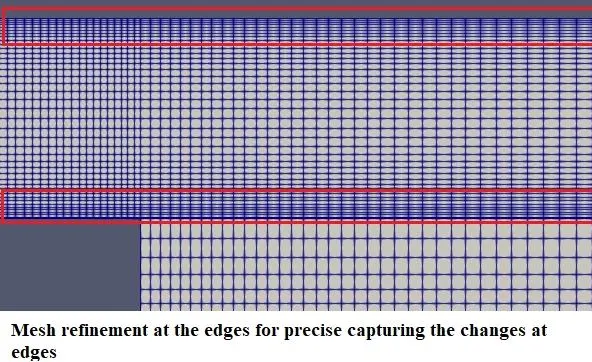
For enhanced capturing the changes in velocity at the edges particularly at the step mesh refinement with the grading factor of 0.2 has been done.
BlockMeshDict script for the simple grading factor of 0.2 :
/*--------------------------------*- C++ -*----------------------------------*\
  =========                 |
  \\      /  F ield         | OpenFOAM: The Open Source CFD Toolbox
   \\    /   O peration     | Website:  https://openfoam.org
    \\  /    A nd           | Version:  7
     \\/     M anipulation  |
\*---------------------------------------------------------------------------*/
FoamFile
{
    version     2.0;
    format      ascii;
    class       dictionary;
    object      blockMeshDict;
}
// * * * * * * * * * * * * * * * * * * * * * * * * * * * * * * * * * * * * * //

convertToMeters 1;

vertices
(
    (0 0 0)    //0
    (0.08 0 0) //1
    (0.08 0.005 0)  //2
    (0 0.005 0) //3
    (0.08 0.01 0) //4
    (0 0.01 0) //5
    (0.20 0.01 0) //6
    (0.20 0.005 0) //7
    (0.20 0 0) //8
    (0.20 -0.01 0) //9
    (0.08 -0.01 0) //10
    (0 0 0.1) //11
    (0.08 0 0.1) //12
    (0.08 0.005 0.1) //13
    (0 0.005 0.1) //14
    (0.08 0.01 0.1) //15
    (0 0.01 0.1) //16
    (0.20 0.01 0.1) //17
    (0.20 0.005 0.1) //18
    (0.20 0 0.1) //19
    (0.20 -0.01 0.1) //20
    (0.08 -0.01 0.1) //21

);

blocks
(
  hex (0 1 2 3 11 12 13 14) (200 20 1) simpleGrading (0.2 5 1) //block1
  hex (3 2 4 5 14 13 15 16) (200 20 1) simpleGrading (0.2 0.2 1) //block2
  hex (2 7 6 4 13 18 17 15) (200 20 1) simpleGrading (5 0.2 1) //block3
  hex (1 8 7 2 12 19 18 13) (200 20 1) simpleGrading (5 5 1) //block4
  hex (10 9 8 1 21 20 19 12) (200 20 1) simpleGrading (5 5 1) //block5

);

edges
(
);

boundary
(
    Inlet
    {
        type patch;
        faces
        (
            (0 11 14 3)
            (3 14 16 5)
        );
    }

    Outlet
    {
        type patch;
        faces
        (
            (9 8 19 20)
            (8 7 18 19)
            (7 6 17 18)
        );
    }


    fixedWalls
    {
        type wall;
        faces
        (
            (6 4 15 17)
            (4 5 16 15)
            (10 21 12 1)
            (12 11 0 1)
            (20 21 10 9)
        );
    }
   /* frontAndBack
    {
        type empty;
        faces
        (
            (0 1 10 9 8 6 5)
            (21 20 17 16 11 12)
        );
    }  */
);

mergePatchPairs
(
);

// ************************************************************************* //
Initial conditions for pressure :
/*--------------------------------*- C++ -*----------------------------------*\
  =========                 |
  \\      /  F ield         | OpenFOAM: The Open Source CFD Toolbox
   \\    /   O peration     | Website:  https://openfoam.org
    \\  /    A nd           | Version:  7
     \\/     M anipulation  |
\*---------------------------------------------------------------------------*/
FoamFile
{
    version     2.0;
    format      ascii;
    class       volScalarField;
    object      p;
}
// * * * * * * * * * * * * * * * * * * * * * * * * * * * * * * * * * * * * * //

dimensions      [0 2 -2 0 0 0 0];

internalField   uniform 0;

boundaryField
{
    Inlet
    {
        type            zeroGradient;
    }

    Outlet
    {
        type            fixedValue;
        value           uniform 0;
    }

    fixedWalls
    {
        type            zeroGradient;
    }
}

// ************************************************************************* //
Initial conditions for velocity :
/*--------------------------------*- C++ -*----------------------------------*\
  =========                 |
  \\      /  F ield         | OpenFOAM: The Open Source CFD Toolbox
   \\    /   O peration     | Website:  https://openfoam.org
    \\  /    A nd           | Version:  7
     \\/     M anipulation  |
\*---------------------------------------------------------------------------*/
FoamFile
{
    version     2.0;
    format      ascii;
    class       volVectorField;
    object      U;
}
// * * * * * * * * * * * * * * * * * * * * * * * * * * * * * * * * * * * * * //

dimensions      [0 1 -1 0 0 0 0];

internalField   uniform (0 0 0);

boundaryField
{
    Inlet
    {
        type            fixedValue;
        value           uniform (0.01 0 0);
    }

    Outlet
    {
        type            zeroGradient;
    }

    fixedWalls
    {
        type            noSlip;
    }
}

// ************************************************************************* //
Solution shemes for the simulatiuon :
/*--------------------------------*- C++ -*----------------------------------*\
  =========                 |
  \\      /  F ield         | OpenFOAM: The Open Source CFD Toolbox
   \\    /   O peration     | Website:  https://openfoam.org
    \\  /    A nd           | Version:  7
     \\/     M anipulation  |
\*---------------------------------------------------------------------------*/
FoamFile
{
    version     2.0;
    format      ascii;
    class       dictionary;
    location    "system";
    object      fvSolution;
}
// * * * * * * * * * * * * * * * * * * * * * * * * * * * * * * * * * * * * * //

solvers
{
    p
    {
        solver          PCG;
        preconditioner  DIC;
        tolerance       1e-06;
        relTol          0.05;
    }

    pFinal
    {
        $p;
        relTol          0;
    }

    U
    {
        solver          smoothSolver;
        smoother        symGaussSeidel;
        tolerance       1e-05;
        relTol          0;
    }
}

PISO
{
    nCorrectors     2;
    nNonOrthogonalCorrectors 0;
    pRefCell        0;
    pRefValue       0;
}


// ************************************************************************* //
Simulation controls :
/*--------------------------------*- C++ -*----------------------------------*\
  =========                 |
  \\      /  F ield         | OpenFOAM: The Open Source CFD Toolbox
   \\    /   O peration     | Website:  https://openfoam.org
    \\  /    A nd           | Version:  7
     \\/     M anipulation  |
\*---------------------------------------------------------------------------*/
FoamFile
{
    version     2.0;
    format      ascii;
    class       dictionary;
    location    "system";
    object      controlDict;
}
// * * * * * * * * * * * * * * * * * * * * * * * * * * * * * * * * * * * * * //

application     icoFoam;

startFrom       startTime;

startTime       0;

stopAt          endTime;

endTime         20;

deltaT          1e-2;

writeControl    timeStep;

writeInterval   20;

purgeWrite      0;

writeFormat     ascii;

writePrecision  6;

writeCompression off;

timeFormat      general;

timePrecision   6;

runTimeModifiable true;


// ************************************************************************* //
Contour for Pressure :
Contour for velocity :
Magnitude of velocity at the lateral locations of x = 0.075 m, 0.085 m and 0.19 m
Result analysis :
The peak value of the average velocity `U_avg` = 0.0319 m/s is maximum at x = 0.086 m which is higher than the initial velocity value of 0.01 m/s. This is due to the formation of the recirculation zones where the vortices formed might have created increased the local acceleration and hence an increase in local velocity.
Conclusion :
Simulations on the backward facing step are performed using the OpenFOAM for two different meshes. It is found that a fine mesh helps in better resolution of the property values as it correctly captures boundary layers and recirculation effects.