Project 1 - Parsing NASA thermodynamic data
Aim : To parse the "THERMO.dat" file for extracting the coefficients which can be used to calculate the Thermodynamic properties - Specific Heat(Cp), Enthalpy(H) and Entropy(s).
Here is a snip of the contents of the ''THERMO.dat" file:
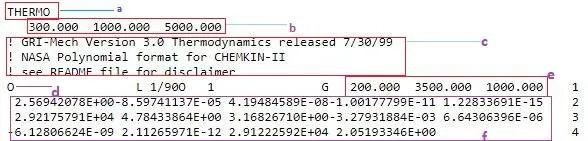
With respect to the snip,
a indicates the name of the file.
b indicates the Global temperature range.
c indicates the comments made by the creator. These are insignificant and can be omitted while parsing.
d indicates the name of the species. In this case the species shown is the 'Oxygen'.
e indicates the local temperature range of the species.
f indicates the coefficients which are used in the calcualation of thermodynamic properties for the respective species.
Formulae for the calculation of Cp, H and S :
A1, A2, A3,............,A14 are the coefficients.
Cp = `(A_1 + A_2*T+A_3*T^2 + A_4*T^3 + A_5 * T^4)*(R)`
H = `(A_1 + (A_2*T)/2+ (A_3*T^2)/3+(A_4*T^3)/4+(A_5*T^4)/4+(A_6)/T)*(R*T)`
S = `(A_1*lnT + A_2*T+(A_3*T^2)/2+(A_4*T^3)/3+(A_5*T^4)/4+A_7)*R`
Here,
R is the Universal gas constant [R =8.31446261815324 J⋅K−1⋅mol−1]
Units of Cp: J⋅Kg−1⋅K−1
Units of H : J
Units of S : J⋅K−1
MATLAB functions and features used :
- Cell Array : A Cell array is an array which can store values of multiple data types. Each value is stored in a cell which is a primitive unit of the cell array. Any value stored in the cell array acn be accessed using the index of the cell.
Example : A = {'Introduction', 'to', '150','areas'};
A is a cell array with 4 cells. A{1} is used to access the data in the first cell of the cell array.
2. Menu: Creates a list of options. The options should be passed as input arguments to the menu function.
Syntax : Selection = menu(header, item1,item2,........).
The choice (a selected item from the list) made by the user has the index which is equal to its position in the list
In our case, the index number gets assigned to a variable, which is used to call the choice made by the user in the forthcoming lines of the code.
3. Switch : The switch function enables to switch to the case in the program where the statements for the particaular choice are executed.
Syntax : switch switch_expression
case case_expression
statement1............
case case_expression
statement2............
.
.
otherwise
statement..........
end
In our case, the program takes in the the numerical value assigned to the varible selection and uses it as an expression for the switch.
4. File functions :
- fopen() : fopen is a file function which opens a file in the mode specified.
Syntax : f1 = fopen('file_name.extension','mode').
Here, file_name.extension represents the name of the file which the user intends to open and .extension refers to the file format respectively.
modes : 'r' - open the file for reading.
'w' - open the file for writing and discard the existing contents.
'a' - open or create a file and append the data to be written at the end of the file.
ii. fgetl() : prints the next line of the data present in the file.
5. directory functions:
- pwd : outputs the path of the present working directory.
- cd : changes the path to the path input by the user.
- mkdir : creates a directory( or a file) in the present working directory.
Algorithm:
- A cell array 'list' is assigned the names of all the species.
- Using the menu function, a menu of options is created. In our case all the items present in the cell array 'list' are displayed.
- using fopen function the 'THERMO.dat' file is opened in the read mode.
- using the fgetl function, the first line of the 'THERMO.dat' file is read. Next, the second line of the file is read and the global high, medium and low temperatures are declared.
- A switch case is initiated, which takes in the serial number of the species for which the thermodynamic properties are to be calculated and plotted thereafter.
- A for loop with fgetl() as the statement is initiated to skip the comments of the 'THERMO.dat' file.
- The line where the species is presents and sequesntially the species_temperature values are read and assigned to the respective variables.
- The fgetl() function is used once again to proceed to the line where the coefficients are located.
- The individual coefficients are read and then stored in the variables A1, A2, A3.....A5.
- Once again fgetl() is used to proceed to the next line where the coefficients A6, A7, A8......A10 are present and they are simultaneously stored.
- All these coefficients are input to a function thermo, which eventually calculates the Specific heat(Cp) , Enthalpy(H) and Entropy(S) values.
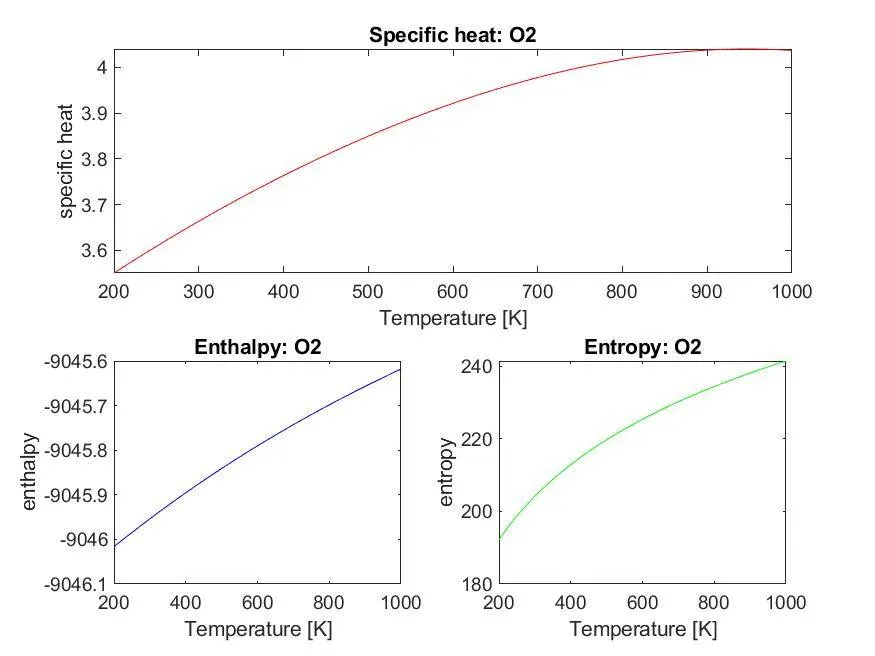
- Next, the plots for temperature vs property are drawn and are stored in the file which correspond to the particular species.
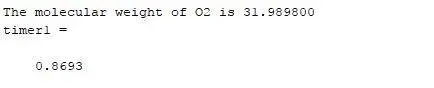
- The molecular weight for the desired species is the calculated by passing the input arguments to the mol_wt function.
- The file 'THERMO.dat', which is opened for reading is closed by using the file function fclose().
Thermo.m function file which takes in the required input arguments and computes the value of Specific heat, Enthalpy and Entropy.
% Function file that takes in the input arguments to calculate specific
% heat, enthalpy and entropy

function [cp, h, s] = thermo(A1,A2,A3,A4,A5,A6,A7,A8,A9,A10,A11,A12,A13,A14,R,T,species_mid_temp)

for x = 1: length(T)

   if T(x)< species_mid_temp

       cp = ((A1) + (A2.*T) + (A3.*T.^2) + (A4.* T.^3) + (A5.*T.^4)*(R));
       h = (A1 + (A2.*T./2))+ (A3.*(T.^2)./3) + (A4.*T.^3)./4 + (A5.*(T.^4)./5) +((A6./T)).*(R.*T);
       s = ((A1.*log(T)) + (A2.*T) + (A3.*T.^2) + (A4.*T.^3) + (A5.*T.^4) + A7) * R;

   else
       cp = ((A8) + (A9.*T) + (A10.*T.^2) + (A11.* T.^3) + (A12.*T.^4)*(R));
       h =  (A8 + (A9.*T./2))+ (A10.*(T.^2)./3) + (A11.*T.^3)./4 + (A12.*(T.^4)./5) +((A13./T)*(R.*T));
       s = ((A8.*log(T)) + (A9.*T) + (A10.*T.^2) + (A11.*T.^3) + (A12.*T.^4) + A14) * R;
    end
end
mol_wt.m function file which calculates the molecular weight of the desired species
function [molecular_weight] = mol_wt(species)

% A sample program to calculate the molecular weights of the species

elements = {'H','C','N','O','A'};

atomic_wt = [1.0078 12.0107 14.0067 15.9949 39.9480];

molecular_weight = 0;

for ik = 1: length(species)
    for jk = 1:length(elements)

        if strcmp(species(ik),elements(jk))
            molecular_weight = molecular_weight + atomic_wt(jk);
            c = jk;
        end


    n = str2double(species(ik));
    if n > 1
        molecular_weight = molecular_weight + (atomic_wt(c) * 0.2*(n-1));
    end
    end
end
Main function file sample_parse.m :
clear; close all;
clc;
list = {'O','O2','H','H2','OH','H2O','HO2','H2O2','C','CH','CH2','CH2(S)','CH3','CH4','CO','CO2','HCO','CH2O','CH2OH','CH3O','CH3OH','C2H','C2H2','C2H3','C2H4','C2H5','C2H6','CH2CO','HCCO','HCCOH','H2CN','HCN','HNO','N','NNH','N2O','NH','NH2','NH3','NO','NO2','HCNO','HOCN','HNCO','NCO','CN','HCNN','N2','AR','C3H8','C3H7','CH3CHO','CH2CHO'};

% menu() is a MATLAB in-built function that displays a pop-up window of the list of the %input arguments.
data = menu('select one of the species form the following',list);

R = 8.314;

% fid is the file handler which gets assigned a positive numerical value upon the successful execution of any of the file functions. In case of unsuccessful execution fid gets assigned a negative integer.

% fgetl() is an inbuilt MATLAB function that reads and displays the next line of the %file being read

fid = fopen('THERMO.dat','r');
for i =1 : 5
    t = fgetl(fid);
end
switch data
    case data
        tic;
        rep = 0;
        for j = 1:((4*data)-3)

            tline = fgetl(fid);
        end
            l1 = strsplit(tline,' ');
            species = (l1{1});
            species_low_temp = str2double(l1{1,(length(l1)) - 3});
            species_mid_temp = str2double(l1{1,(length(l1)) - 2});
            species_high_temp = str2double(l1{1,(length(l1)) - 1});

            T = linspace(species_low_temp,species_high_temp,500);

            % extracting all the 14 coefficients for each species
            t1 = fgetl(fid);
            a = strfind(t1,'E');
            % proceeding to the line 1 where the coefficients numbered from 1 to 5
            % eTist
            A1 = str2double(t1(1:a(1) + 3));
            A2 = str2double(t1(a(1)+4 : a(2)+3));
            A3 = str2double(t1(a(2)+4 : a(3)+3));
            A4 = str2double(t1(a(3)+4 : a(4)+3));
            A5 = str2double(t1(a(4)+4 : a(5)+3));

            % proceeding to the line 2 where the coefficients numbered from 6 to 10

            t2 = fgetl(fid);

            b = strfind(t2, 'E');

            A6 = str2double(t2(1:b(1) + 3));
            A7 = str2double(t2(b(1)+4 : b(2)+3));
            A8 = str2double(t2(b(2)+4 : b(3)+3));
            A9 = str2double(t2(b(3)+4 : b(4)+3));
            A10 = str2double(t2(b(4)+4 : b(5)+3));
            % proceeding to the line 2 where the coefficients numbered from 11 to 14

            t3 = fgetl(fid);

            c = strfind(t3, 'E');

            A11 = str2double(t3(1:c(1) + 3));
            A12 = str2double(t3(c(1)+4 : c(2)+3));
            A13 = str2double(t3(c(2)+4 : c(3)+3));
            A14 = str2double(t3(c(3)+4 : c(4)+4));

            [cp, h, s] = thermo(A1,A2,A3,A4,A5,A6,A7,A8,A9,A10,A11,A12,A13,A14,R,T,species_mid_temp);

%creating a folder for each species

f_name = sprintf('%s',species);
c_dir = pwd;
mkdir(f_name);
cd(f_name);

subplot(2,2,1:2)
plot(T,cp,'color','r');
xlabel('Temperature [K]');
ylabel('specific heat');
title(['Specific heat: ',species])

subplot(2,2,3)
plot(T,h,'color','b');
xlabel('Temperature [K]');
ylabel('enthalpy');
title(['Enthalpy: ',species])

subplot(2,2,4)
plot(T,s,'color','g');
xlabel('Temperature [K]');
ylabel('entropy');
title(['Entropy: ',species])

image = sprintf('TP_%s.jpg',species);
saveas(gca,image);

cd(c_dir);
 [molecular_weight] = mol_wt(species)
end
timer1 = toc
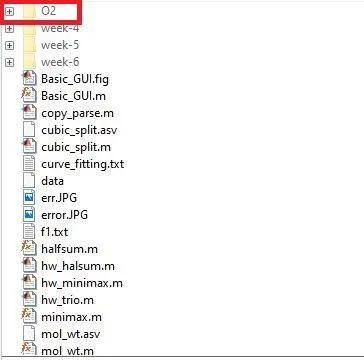
Test case 1 : Computing the Thermodynamic property values for O2
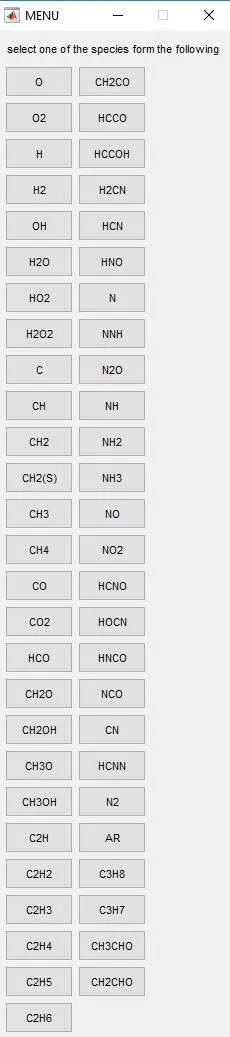
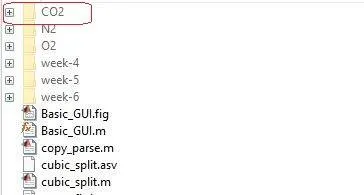
The user is provided the list of options. When the user selects the choice as O2 the program calculates Cp,H and S values and plots the gragh which is saved as TP_O2 in a folder of the same name.
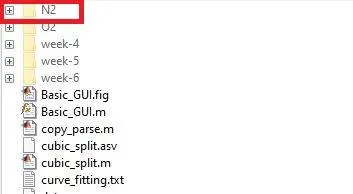
Test case 2 :Computing the Thermodynamic property values for N2
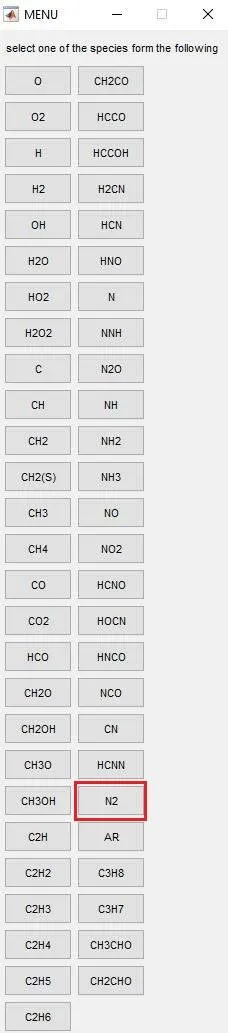
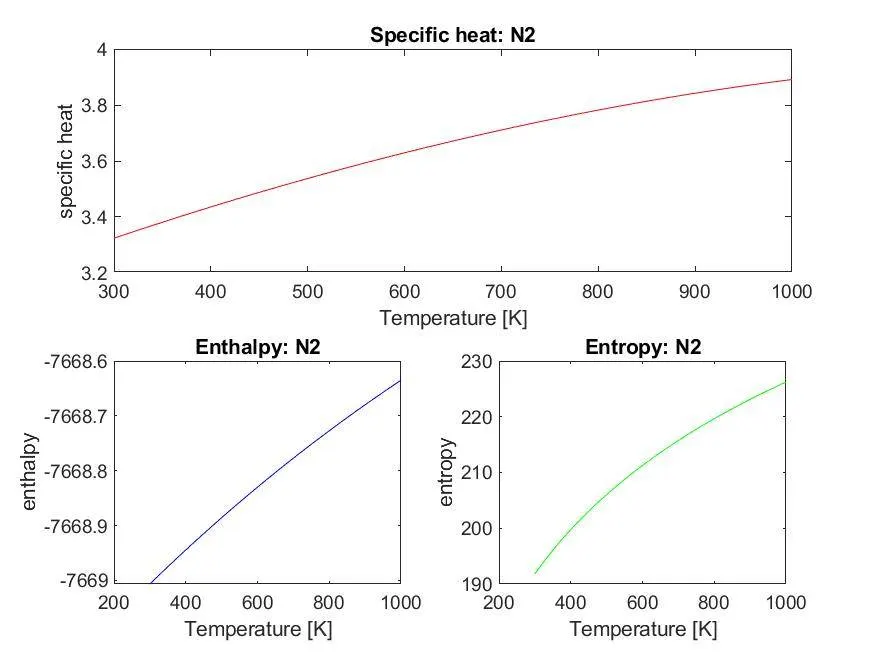
The user is provided the list of options. When the user selects the choice as N2 the program calculates Cp,H and S values and plots the gragh which is saved as TP_N2 in a folder of the same name.
Test case 3 : Computing the thermodynamic values for CO2.
A menu pops up which requires the user to him to choose for his choice which in this case is CO2.
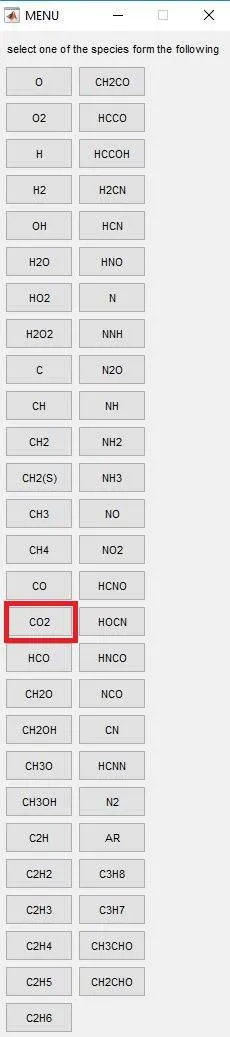
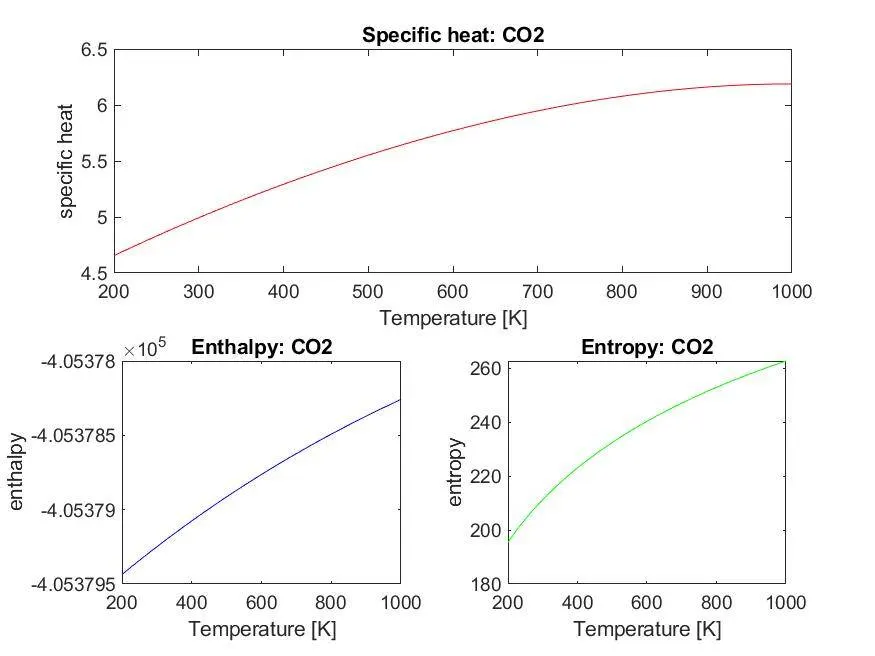
The user is provided the list of options. When the user selects the choice as CO2 the program calculates Cp,H and S values and plots the gragh which is saved as TP_CO2 in a folder of the same name.
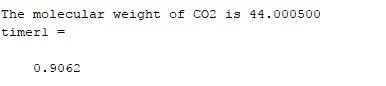
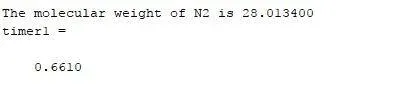
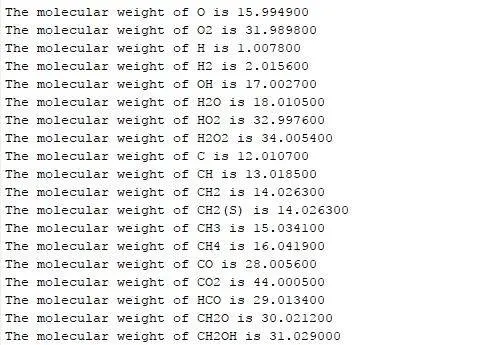
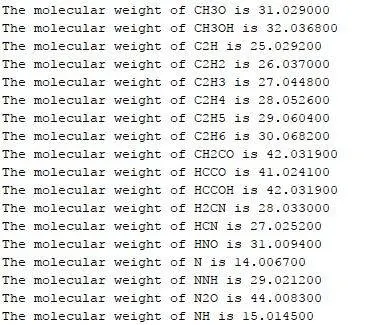
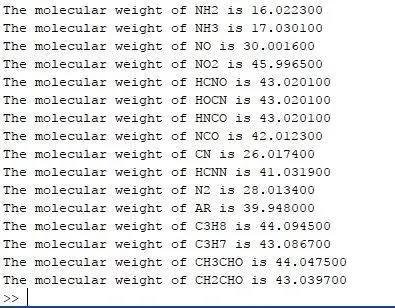
Displaying the molecular weight of species in the command window :
Errors :
1. Syntactical errors :
- Error 1: Error generated while trying to access the elements of a cell array using the parantheses instead of curly braces.

2. Semantics errors :
- Faulty logic to calculate the molecular weight :
The formula used in the calculation of the molecular weights in the early stages was inappropraite. The program proved to be effective in calculation of molecular weights of the mono-atomic species while failed it failed to accurately calculate the molecular weights of the chemical compounds.
corrected formula : molecular_weight = molecular_weight + (atomic_wt(c) * 0.2*(n-1)).
References :
1. File operations in MATLAB : https://www.mathworks.com/help/matlab/file-operations.html
2. Help on fgetl function : https://www.mathworks.com/help/matlab/ref/fgetl.html
3. Help on Menu function of MATLAB : https://www.mathworks.com/help/matlab/ref/menu.html.
4. Help on switch case of MATLAB : https://www.mathworks.com/help/matlab/ref/switch.html