Week 8 - BlockMesh Drill down challenge
Aim: To simulate incompressible-laminar-viscous flow through the backward facing step geometry.
Objective:
- Performing transient simulation of incompressible-laminar-viscous flow through the backward facing step geometry.
- Write a code in openfoam to perform above simulation.
- Explaining the effect of change in grading factor for mesh generation.
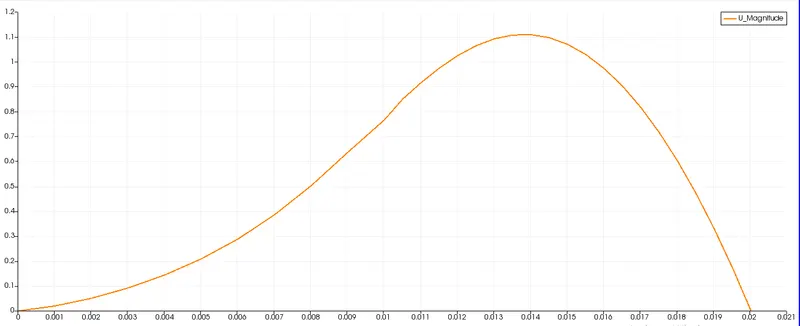
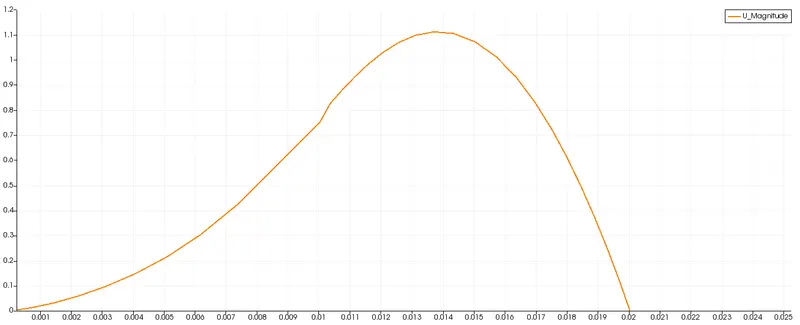
- Plotting velocity at distance 0.085 m from inlet of the geometry.
Introduction:
Incompressible flow:A flow in which the material density is constant.
Laminar flow:A flow in which the liquid layer flow parallel to each other in the form of streamline.
Transient state:A simulation in which the flow varies with respect to time.
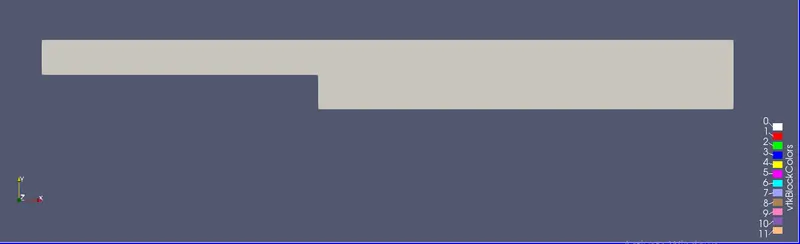
Backward facing step in the problem means we are considering the domain is 2 dimensional, consisting of a short inlet, a step(which faces backward) and outlet.
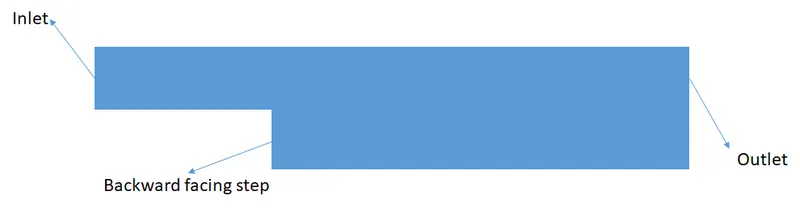
Desired shape of cavity from side view
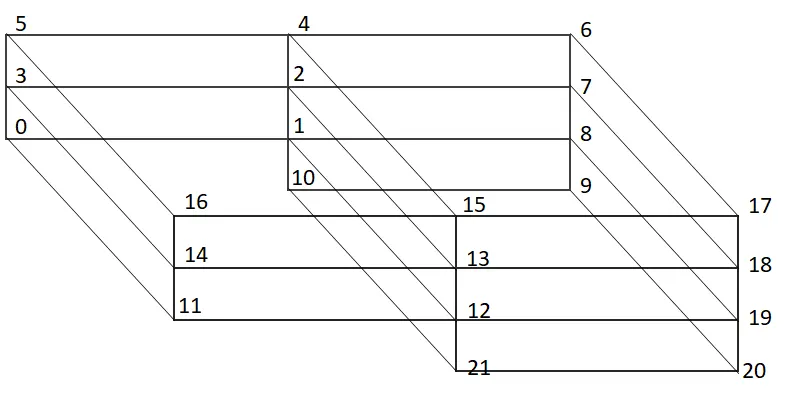
Block diagram of the cavity
The above block diagram is for programming the shape we need in openfoam.
The numbers are used to define each particular box/block, here in our case there are 5 blocks which completes our shape.
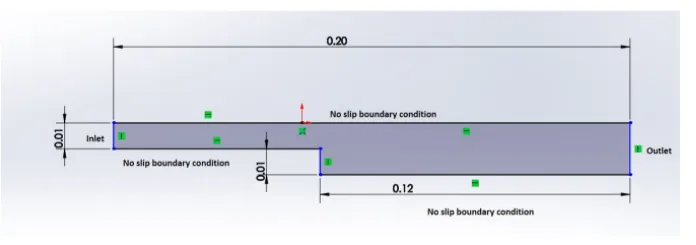
The dimension for our cavity is given according to which we must define vertices for each blocks.
Steps:
- Open the terminal in ubuntu type> foam this command will open opt/openfoam directory.
- Type> tut to get into tutorial folder under which open incompressible case using command> cd incompressible.
- Now in incompressible folder we have number of solvers for our problem select >icoFoam and in icoFoam we will see two examples> cavity >elbow. Select cavity >cd cavity.
- Since openFoam does not permit us to change any files present in it,we must copy this file to FOAM_RUN folder this is created by default to run the cases in openfoam.
- To copy cavity folder we can use command > cp -r cavity/ $FOAM_RUN/cavity_test.
- After copying the case we can open run folder just by typing > cd $FOAM_RUN and select our new case created and open 'system' folder in cavity_test, in system folder we should edit 'Blockmeshdict' and 'ControlDict codes'.
- To edit BlockMeshDict file use >gedit BlockMeshDict this will open code, In the code we should edit vertices, blocks, and boundary conditions after which enter save.
Mesh specification:
Number of cells along the x direction (longer dimension) = 200
Number of cells along the longer y direction = 20;
- After completing this process you can check your shape in parafoam.
- Now to edit 'ControlDict' file enter a command >gedit controlDict this will open a code. In this file we can specify the starttime, endtime, time step etc.
- After editing controlDict file save it,also take care of time step, provide a valid time step using courant number criterion or the openfoam will stop the simulation if it does not converges,and display the fatal error.
- Now after editing this file the next changes must be performed on pressure and velocity code which we will find in '0' folder after editing this folders we can save them and exit the code.
- Now we should step back to previous folder using command> cd .. , after which perform blockmesh command you will see the generation of patches, and once finished with creating blockmesh we can check mesh using checkmesh command.
- Also check for a file named blockmesh in constant folder.
- Now to finally run the solution use the solver name which in our case is icoFoam >icoFoam.
- Once the simulation is done we will find a number of values in cavity folder now to visualize the value we can view it in paraFoam by typing the command >paraFoam
- Once completed will visualizing all the results we can change the value of grading factor in BlockMeshDict file inside block to different values and examine the changes in our results.
BlockMeshDict code:
/*--------------------------------*- C++ -*----------------------------------*\
  =========                 |
  \\      /  F ield         | OpenFOAM: The Open Source CFD Toolbox
   \\    /   O peration     | Website:  https://openfoam.org
    \\  /    A nd           | Version:  8
     \\/     M anipulation  |
\*---------------------------------------------------------------------------*/
FoamFile
{
    version     2.0;
    format      ascii;
    class       dictionary;
    object      blockMeshDict;
}
// * * * * * * * * * * * * * * * * * * * * * * * * * * * * * * * * * * * * * //

convertToMeters 0.01;

vertices
(
    (0 0 0)
    (8 0 0)
    (8 0.5 0)
    (0 0.5 0)
    (8 1 0)
    (0 1 0)
    (20 1 0)
    (20 0.5 0)
    (20 0 0)
    (20 -1 0)
    (8 -1 0)
    (0 0 0.1)
    (8 0 0.1)
    (8 0.5 0.1)
    (0 0.5 0.1)
    (8 1 0.1)
    (0 1 0.1)
    (20 1 0.1)
    (20 0.5 0.1)
    (20 0 0.1)
    (20 -1 0.1)
    (8 -1 0.1)
);

blocks
(
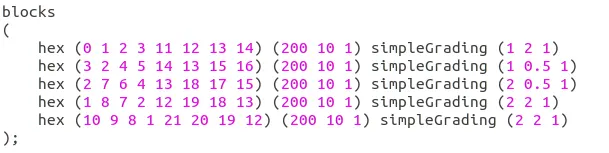
    hex (0 1 2 3 11 12 13 14) (200 10 1) simpleGrading (1 2 1)
    hex (3 2 4 5 14 13 15 16) (200 10 1) simpleGrading (1 0.5 1)
    hex (2 7 6 4 13 18 17 15) (200 10 1) simpleGrading (2 0.5 1)
    hex (1 8 7 2 12 19 18 13) (200 10 1) simpleGrading (2 2 1)
    hex (10 9 8 1 21 20 19 12) (200 10 1) simpleGrading (2 2 1)
);

edges
(
);

boundary
(
    inlet
    {
        type patch;
        faces
        (
            (0 11 14 3)
	    (3 14 16 5)
        );
    }
    outlet
    {
        type patch;
        faces
        (
	    (9 8 19 20)
            (8 7 18 19)
	    (7 6 17 18)

        );
    }
    frontAndBack
    {
        type empty;
        faces
        (
            (0 3 2 1)
            (3 5 4 2)
            (2 4 6 7)
            (1 2 7 8)
            (10 1 8 9)
	    (11 12 13 14)
	    (14 13 15 16)
	    (13 18 17 15)
	    (12 19 18 13)
     	    (21 20 19 12)
        );
     }

    noslipWalls
    {
        type wall;
        faces
        (
            (0 1 12 11)
            (5 16 15 4)
            (4 15 17 6)
	    (10 9 20 21)
	    (1 10 21 12)
        );
    }

    );

mergePatchPairs
(
);

// ************************************************************************* //
ControlDict code:
/*--------------------------------*- C++ -*----------------------------------*\
  =========                 |
  \\      /  F ield         | OpenFOAM: The Open Source CFD Toolbox
   \\    /   O peration     | Website:  https://openfoam.org
    \\  /    A nd           | Version:  8
     \\/     M anipulation  |
\*---------------------------------------------------------------------------*/
FoamFile
{
    version     2.0;
    format      ascii;
    class       dictionary;
    location    "system";
    object      controlDict;
}
// * * * * * * * * * * * * * * * * * * * * * * * * * * * * * * * * * * * * * //

application     icoFoam;

startFrom       startTime;

startTime       0;

stopAt          endTime;

endTime         0.3;

deltaT          0.00001;

writeControl    timeStep;

writeInterval   15;

purgeWrite      0;

writeFormat     ascii;

writePrecision  6;

writeCompression off;

timeFormat      general;

timePrecision   6;

runTimeModifiable true;


// ************************************************************************* //
Code for pressure in '0' folder:
/*--------------------------------*- C++ -*----------------------------------*\
  =========                 |
  \\      /  F ield         | OpenFOAM: The Open Source CFD Toolbox
   \\    /   O peration     | Website:  https://openfoam.org
    \\  /    A nd           | Version:  8
     \\/     M anipulation  |
\*---------------------------------------------------------------------------*/
FoamFile
{
    version     2.0;
    format      ascii;
    class       volScalarField;
    object      p;
}
// * * * * * * * * * * * * * * * * * * * * * * * * * * * * * * * * * * * * * //

dimensions      [0 2 -2 0 0 0 0];

internalField   uniform 0;

boundaryField
{
    inlet
    {
        type            zeroGradient;
    }

    outlet
    {
        type           fixedValue;
        value          uniform 0;
    }

    noslipWalls
    {
        type            zeroGradient;
    }

    frontAndBack
    {
        type            empty;
    }


}
Code for velocity in '0' folder:
/*--------------------------------*- C++ -*----------------------------------*\
  =========                 |
  \\      /  F ield         | OpenFOAM: The Open Source CFD Toolbox
   \\    /   O peration     | Website:  https://openfoam.org
    \\  /    A nd           | Version:  8
     \\/     M anipulation  |
\*---------------------------------------------------------------------------*/
FoamFile
{
    version     2.0;
    format      ascii;
    class       volVectorField;
    object      U;
}
// * * * * * * * * * * * * * * * * * * * * * * * * * * * * * * * * * * * * * //

dimensions      [0 1 -1 0 0 0 0];

internalField   uniform (0 0 0);

boundaryField
{
    inlet
    {
        type            fixedValue;
        value           uniform (1 0 0);
    }

    outlet
    {
        type            zeroGradient;
    }

    noslipWalls
    {
        type            noSlip;
        value           uniform (0 0 0);
    }

    frontAndBack
    {
        type            empty;
}
}
CASES:
Case 1 : grading factor 1.
Grading factor:
Grading factors defines the quality of mesh that can be applied to the solution,it can be calculated using formula,
G.F = length of the end cell/length of the starting cell
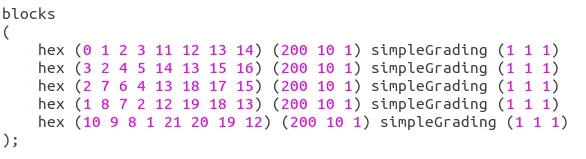
In case-1, we don't need to change any value since grading factor tends to '1'.
Grading factor '1' gives us relation as,
length of the end cell = length of the starting cell
The changes to implement grading factor are made in BlockMeshDict file under blocks-
Results:
Shape of cavity:
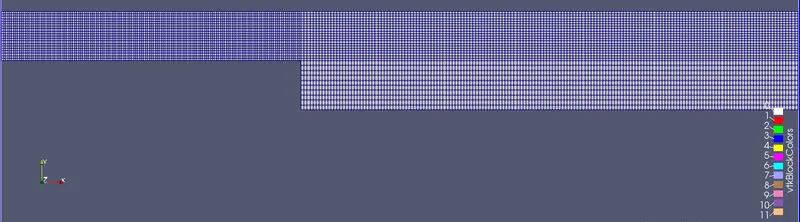
Mesh lines for grading factor 1:
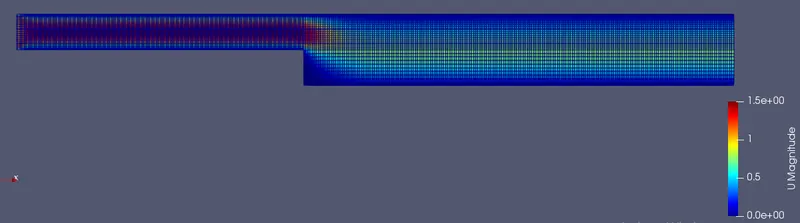
Velocity profile inside a cavity:
Graph for velocity at 0.085m from inlet:
Graph for pressure at 0.085m from inlet:
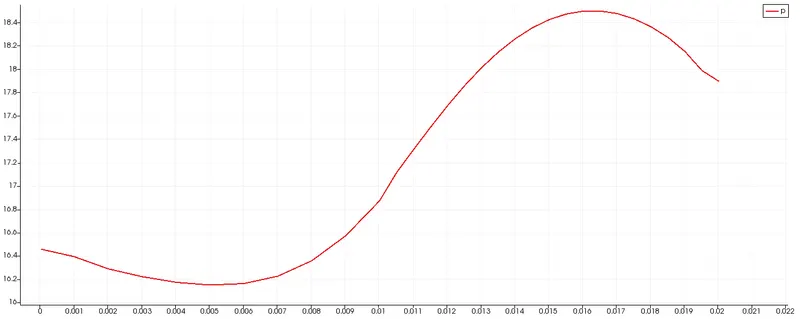
Case 2 : grading factor 0.2.
Grading factor:
Grading factors defines the quality of mesh that can be applied to the solution,it can be calculated using formula,
G.F = length of the end cell/length of the starting cell
Grading factor '0.2' gives us relation as,
length of the end cell = 0.2 * (length of the starting cell)
The changes to implement grading factor are made in BlockMeshDict file under blocks-
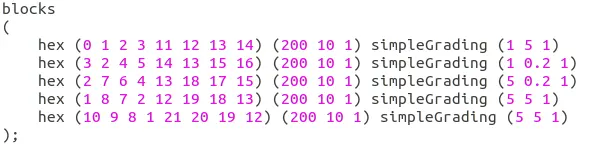
Results:
Mesh lines for grading factor 0.2:
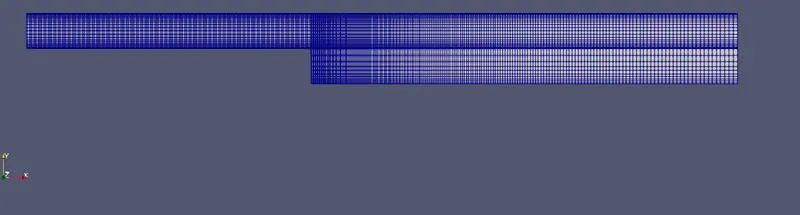
Velocity profile inside a cavity:
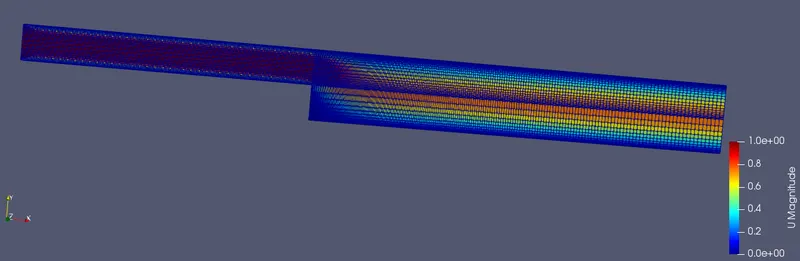
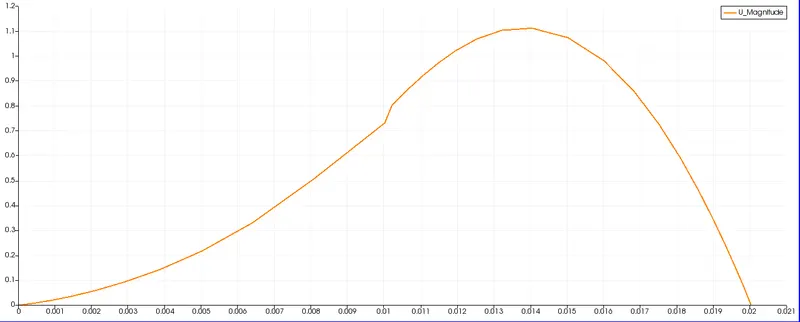
Graph for velocity at 0.085m from inlet:
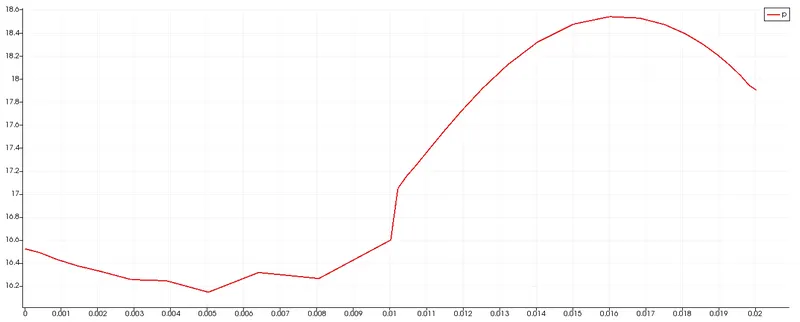
Graph for pressure at 0.085m from inlet:
Case 2 : grading factor 0.5.
Grading factor:
Grading factors defines the quality of mesh that can be applied to the solution,it can be calculated using formula,
G.F = length of the end cell/length of the starting cell
Grading factor '0.5' gives us relation as,
length of the end cell = 0.5 * (length of the starting cell)
The changes to implement grading factor are made in BlockMeshDict file under blocks-
Results:
Mesh lines for grading factor 0.5:

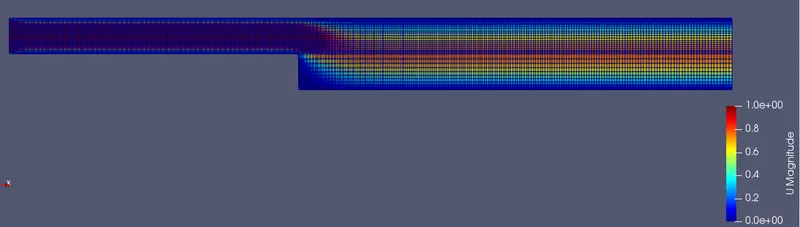
Velocity profile inside a cavity:
Graph for velocity at 0.085m from inlet:
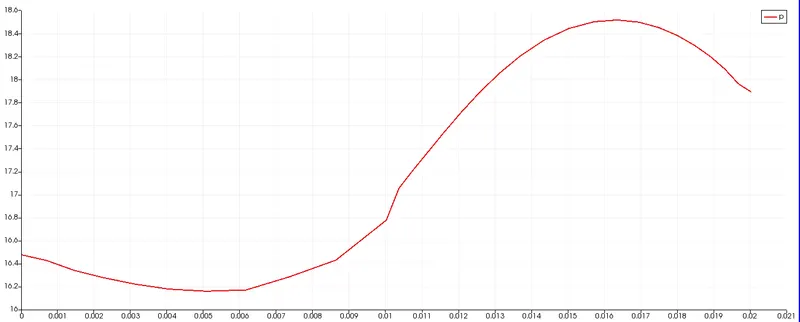
Graph for pressure at 0.085m from inlet:
Conclusion:
From the plots we can see that as we change the grading factor there is small change in graphs which can be examined by zooming them, this small changes do matter when we need to analyse a complex problems where the accuracy level needed is higher, Using appropriate grading factor will result in more accurate solutions.
Also when we apply grading factor for cavity the care should be taken for mesh inconsistency which occurs due to non-linear mesh created.
In the above problem we use hexmesh which is more accurate then tri and quad mesh, if in certain complex CFd problems where using hexmesh is not possible we can use tri and quad mesh.
The accuracy of mesh according to order is:
hexmesh>trimesh>quadmesh
References: