Project 1 - Parsing NASA thermodynamic data
Aim: Reading nasa thermodynamic data and calculating Cp,enthalpy,entropy and molecular weight of species
Objective:
- To read the data from thermodynamic file and Select required data for calculation.
- To plot a calculated value for Cp,enthalpy,entropy and molecular weight of species.
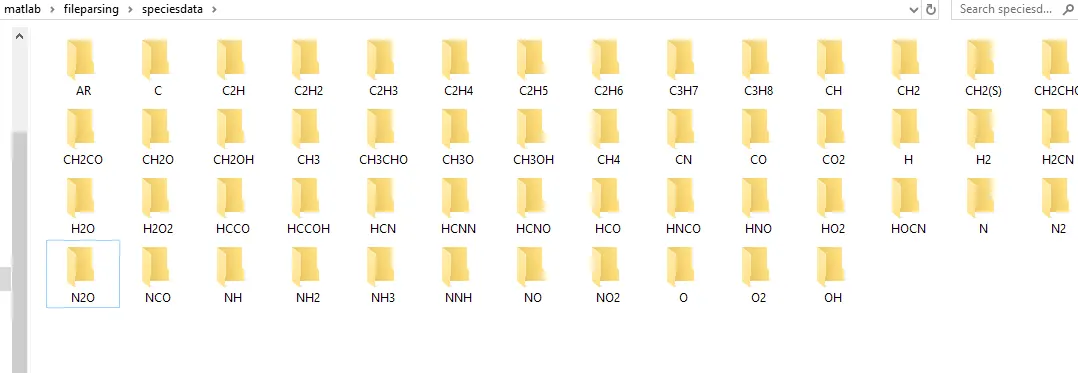
- To create a folder in current directory and store all the species data for a specified species.
- To create a text file, and dump the value of molecular weight into it, then store the value in specified species name.
Theory:
File parsing is technique of reading any file/external file, and choose a required values to calculate the parameters.
To parse any file we need a set of command in matlab such as:
- fopen
- fgetl
- fprintf
- fscanf
- sprintf
write mode:
To write a data in the file syntax is:
f=fopen('filename','w')
where,
fopen = open a file with file name defined in syntax.
w=function to be performed in this case its write.
fprintf(file id,formatspec,A1,A2....An)
where file id is variable we used for 'fopen' command,and format specifier is '%d' for double '%s' for string '%f' for floating point and so on.
Example for fprintf:
x = 0:.1:6;
y = exp(x);
A = [x;y]

f1 = fopen('exp.txt','w');
fprintf(f1,'%6.2f %12.8f\n',A);
fclose(f1);
here %6.2f says that space for 6 digits before decimal and 2 after decimal point
\n=is for line spacing
Read mode:
To read data from a file the syntax is:
f=fopen('filename','r')
where fopen= open a file with file name defined in syntax.
r=function to be performed in this case its read.
fscanf(file id,formatspec,sizeA)
where file id is variable we used for 'fopen' command,and format specifier is '%d' for double '%s' for string '%f' for floating point and so on.
Example for fscanf:
fscanf(f1,'%6.2f %12.8f\n',[2 inf]);
fclose(f1);
fgetl:
To skip a line/ get a first line of the file
syntax:
line=fgetl(fileID)
fgetl will return the character value and remove new line characters, if file is empty it will return negative value '-1'.
sprintf:
format data into string or character value
syntax:
sprintf(formatspec,A1,A2...An);
stringsplit:
Split string or character vector at specified delimiter.
syntax:
q=strsplit(str,delimiter)
where,
delimiter is any operator at which you want to split a string such as ',' , '.' , '_' ,'/' .
String2number:
To covert string/character vector to a number, such that we can carry on mathematical operation .
syntax:
N=str2num(chr)
stringcomparison:
compare the strings and returns the value
syntax:
y=strcmp(str1,str2)
mkdir:
creating new folder.
syntax:
mkdir('foldername')
current directory:
changing current folder
syntax:
oldfolder=cd('newfolder')
saveas:
Saving figure to specific file format
saveas(fig,filename,formattype)
where,
fig=figure number
formattype= Figure should be saved as .png or .jpeg
strtok:
selecting a part of string.
syntax:
h=strtok(str,delimiter)
findstring:
finding a specified string.
syntax:
r=strfind(str,delimiter)
Steps to be followed for writing program/logic:
There are three parts for writing this program:
1).Main program
2).Program to calculate molecular weight
3).Program to calculate specific heat, enthalpy, and entropy.
part1-Main program:
- Open the file using fopen command a read it using 'r' command in syntax of fopen.
- Get first line using fgetl command, also get next line using fgetl command store it in variable convert it from string to number.
- Skip next three line from data file using for loop and fgetl command.
- To get species data use 'for loop' for number of species, and extract species name, use fgetl command again to get next line, and to read a number specify a delimiter in 'strfind' command get its value, then construct a mathematical formula.
- Create a new folder using mkdir command.
- Define the temperature range and value of R=gas constant.
- Call the function for calculation of specific heat, enthalpy and entropy.
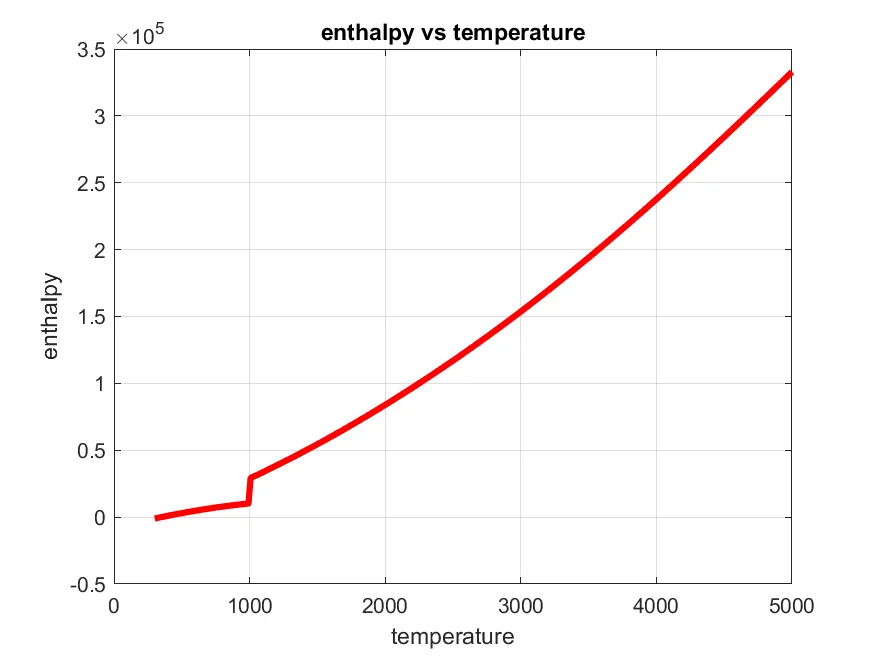
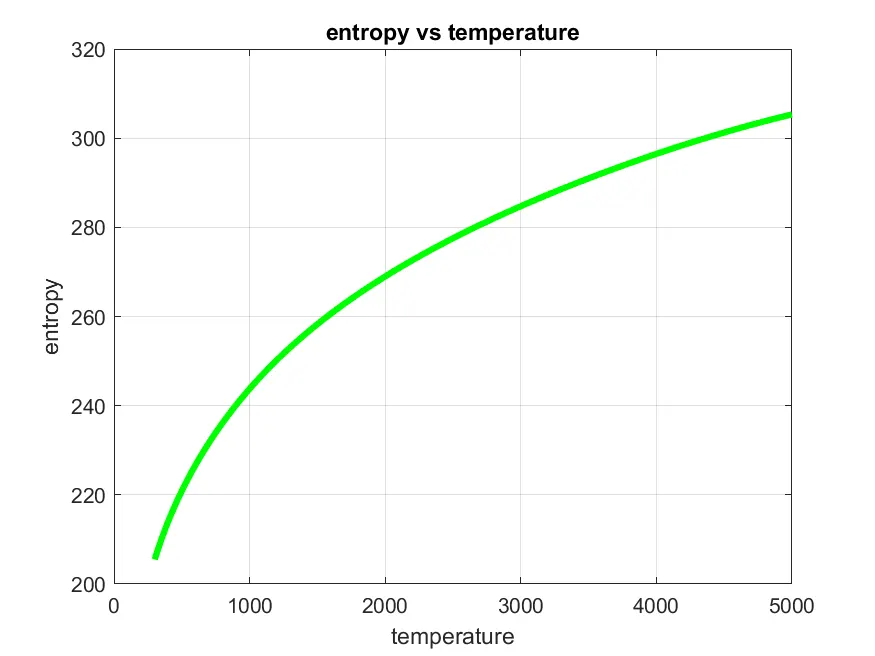
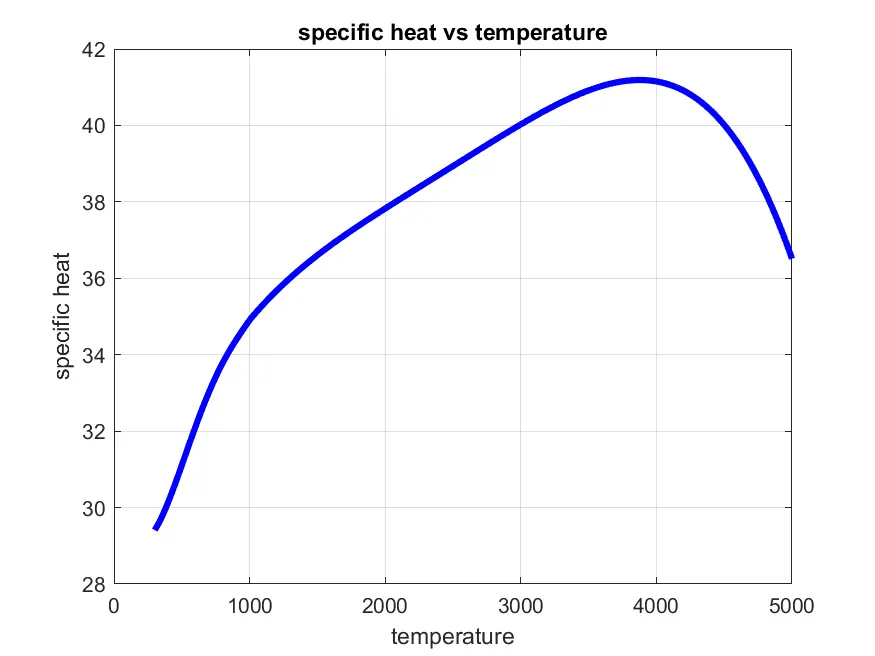
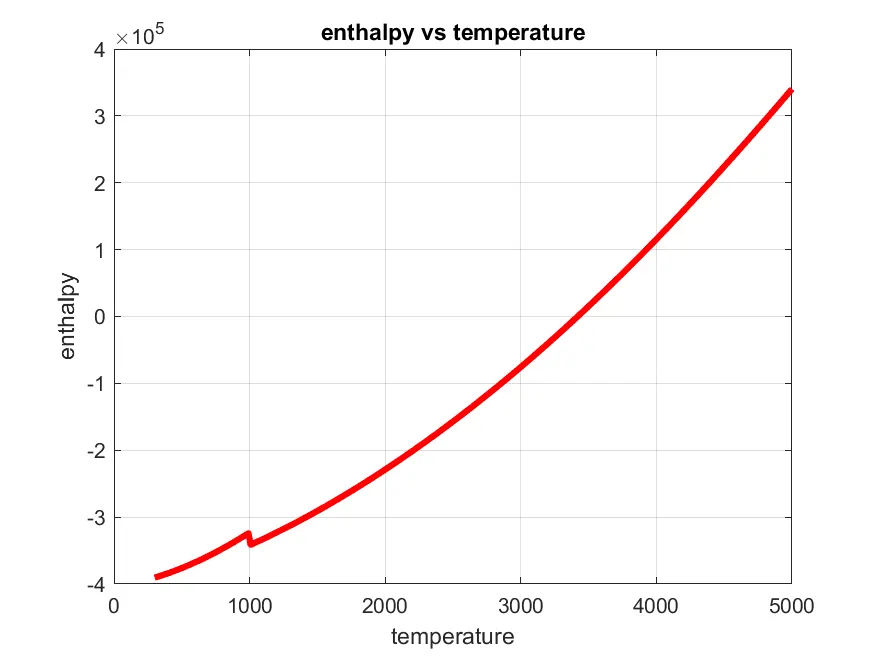
- Create a plot for temperature vs (Cp,enthaply,entropy).
- Save a data in new folder.
- Call the function for calculation of molecular weight.
- Store a data in form of text in new folder under species.
- Define current directory
Part2-function for calculation of Cp, enthalpy, and entropy:
- Define a name of function and specify inputs.
- Create an matrix of size trange with zeros.
- Create a for loop for temperature range and if temperature range is greater then global mid temperature calculate Cp , H, S using starting seven constants else use other seven constants.
formulas for calculation of Cp, H , and S:

The first 7 coefficients are high-temperature coefficients and the second 7 coefficients are low-temperature coefficients.
Also use the local temperature range which is unique for each individual species, not the global temperature range.
part3-function for calculation of molecular weight:
- Define fiunction name, and specify the inputs.
- Define the primary elements in array, and atomic mass of primary elements.
- Create a for loop for length of species, and length of primary elements.
- Compare string, if the species value match the value of primary element print the atomic mass of primary element, and calculate molecular weight also store the position.
- Convert the species from string to number, and if there is a number, calculate new molecular weight and store it in variable.
- Use sprintf to print the values of strings in command windows.
Matlab program for parsing nasa thermodynamic data file and calculate parameters:
close all
clear all
clc
%Program to read or parse a nasa thermodynamic data
f0=fopen('THERMO.dat','r'); % opening a file and reading it
header=fgetl(f0);

%extracting temperatures
tline=fscanf(f0,'%f \n',[1 3]);  %to extract temperatures
global_low_temp = tline(1);
global_mid_temp = tline(2);
global_high_temp = tline(3);

%skipping next three lines
for i=1:3
   s=fgetl(f0)
end

%extracting species data
%species name
for i=1:53
   Sp_name = fgetl(f0);
   Sp = strtok(Sp_name);

 %species value
   line1 = fgetl(f0);
   p = strfind(line1,'E'); %finding a string
   a1 = str2double(line1(1:(p(1)+3)));
   a2 = str2double(line1((p(1)+4):(p(2)+3)));
   a3 = str2double(line1((p(2)+4):(p(3)+3)));
   a4 = str2double(line1((p(3)+4):(p(4)+3)));
   a5 = str2double(line1((p(4)+4):(p(5)+3)));

   line2 = fgetl(f0);
   q = strfind(line2,'E');
   a6 = str2double(line2(1:(q(1)+3)));
   a7 = str2double(line2((q(1)+4):(q(2)+3)));
   a8 = str2double(line2((q(2)+4):(q(3)+3)));
   a9 = str2double(line2((q(3)+4):(q(4)+3)));
   a10 = str2double(line2((q(4)+4):(q(5)+3)));

   line3 = fgetl(f0);
   r = strfind(line3,'E');
   a11 = str2double(line3(1:(r(1)+3)));
   a12 = str2double(line3((r(1)+4):(r(2)+3)));
   a13 = str2double(line3((r(2)+4):(r(3)+3)));
   a14 = str2double(line3((r(3)+4):(r(4)+3)));

   %temperature value range
   mkdir('C:/Users/laxmikant/Desktop/matlab/fileparsing/speciesdata',Sp)%creating new %folder
   trange=linspace(global_low_temp,global_high_temp,300); %temperature range
   R= 8.321;
  [cp,H,s] = thermo_formulas(trange,a1,a2,a3,a4,a5,a6,a7,a8,a9,a10,a11,a12,a13,a14,R,global_mid_temp);
%PLOTTING

  figure(1)
  plot(trange,cp,'linewidth',3,'color','b')
  xlabel('temperature');
  ylabel('specific heat');
  title('specific heat vs temperature')
  grid on

  figure(2)
  plot(trange,H,'linewidth',3,'color','r')
  xlabel('temperature');
  ylabel('enthalpy');
  title('enthalpy vs temperature')
  grid on

  figure(3)
  plot(trange,s,'linewidth',3,'color','g')
  xlabel('temperature');
  ylabel('entropy');
  title('entropy vs temperature')
  grid on

  molecular_mass = molecular_weight(Sp);
  %saving all the plots
  save = (['C:/Users/laxmikant/Desktop/matlab/fileparsing/speciesdata/',Sp]);
  cd(save)
  saveas(1,'specific heat','png')
  saveas(2,'enthalpy','png')
  saveas(3,'entropy','png')


  f1=fopen('molecular_mass.txt','w'); %creating text file
  fprintf(f1,'%s\n %s %f \n',Sp,'molecular-mass',molecular_mass)
  fclose(f1);

  cd('C:/Users/laxmikant/Desktop/matlab/fileparsing/')
end
Function for calculation of Cp, enthalpy and entropy:
function [cp,H,s]= thermo_formulas(trange,a1,a2,a3,a4,a5,a6,a7,a8,a9,a10,a11,a12,a13,a14,R,global_mid_temp)
cp = zeros(size(trange));
H = zeros(size(trange));
s = zeros(size(trange));
for i=1:length(trange)
    if(trange(i)>global_mid_temp)
    cp(i)= R*(a1+a2*trange(i)+a3*trange(i)^2+a4*trange(i)^3+a5*trange(i)^4);
    H(i)= R*trange(i)*(a1+a2*trange(i)+a3*(trange(i)^2/3)+a4*(trange(i)^3/4)+a5*(trange(i)^4/5)+a6/trange(i));
    s(i)= R*(a1*log(trange(i))+a2*trange(i)+a3*trange(i)^2/2+a4*trange(i)^3/3+a5*trange(i)^4/4+a7);
    else
    cp(i)= R*(a8+a9*trange(i)+a10*trange(i)^2+a11*trange(i)^3+a12*trange(i)^4);
    H(i)= R*trange(i)*(a8+a9*trange(i)+a10*(trange(i)^2/3)+a11*(trange(i)^3/4)+a12*(trange(i)^4/5)+a13/trange(i));
    s(i)= R*(a8*log(trange(i))+a9*trange(i)+a10*trange(i)^2/2+a11*trange(i)^3/3+a12*trange(i)^4/4+a14);
    end
end
Function for calculation of molecular weight:
function [mw]= molecular_weight(Sp)
p_element = ['H','C','N','O','A'];
Atomic_mass = [1,12,14,16,40];
mw=0;
for i=1:length(Sp)
    for j=1:length(p_element)
      if strcmp(Sp(i),p_element(j))
       mw = mw +Atomic_mass(j);
        position = j;
      end
    end
    n = str2num(Sp(i));
    if (n>1)
        mw = mw + (Atomic_mass(position))*(n-1);
    end
end
    sprintf('molecular weight of %s is %f',Sp,mw)
end
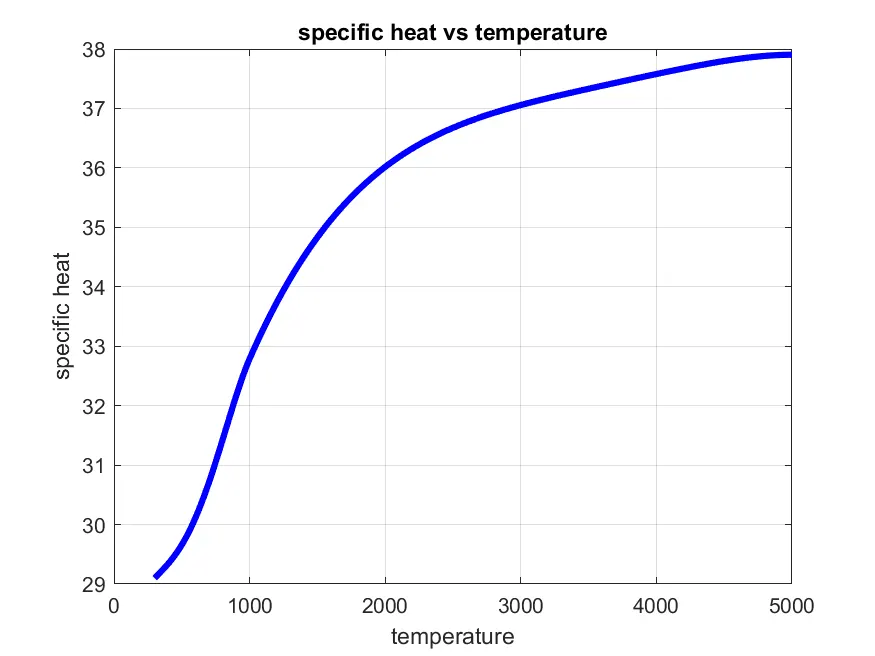
O2 enthalpy, entropy, and specific heat vs temperature:
CO2 enthalpy, entropy, and specific heat vs temperature:
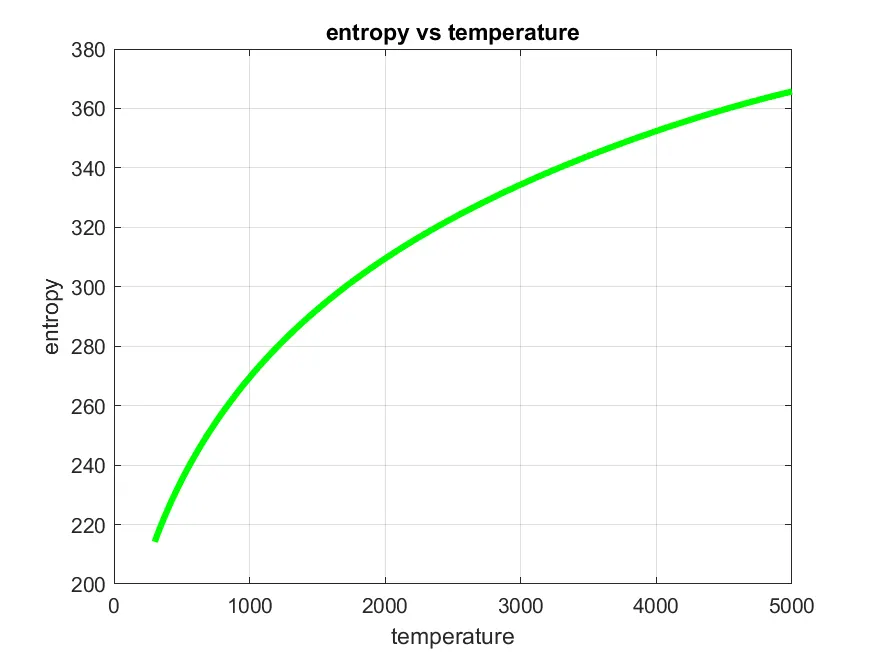
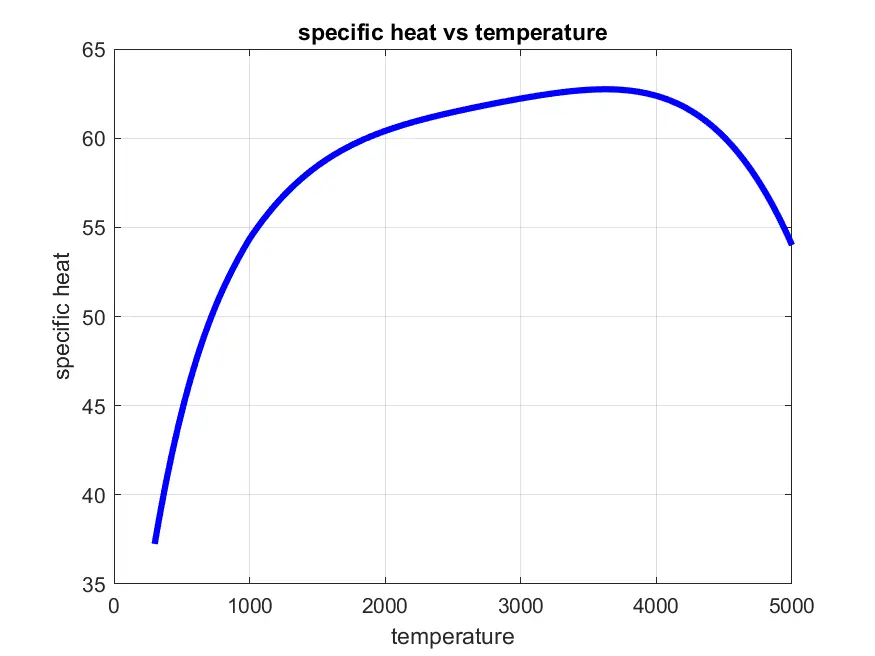
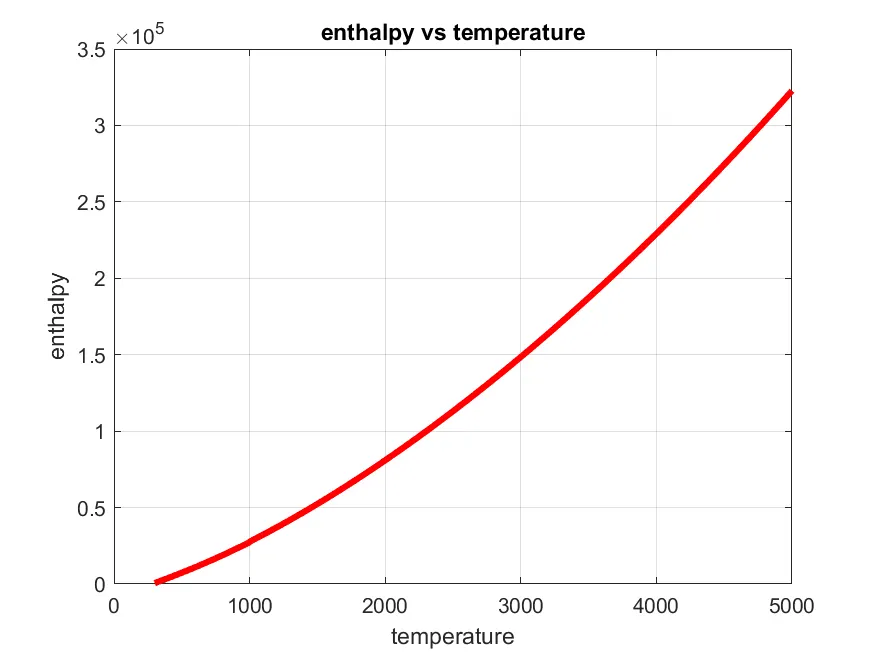
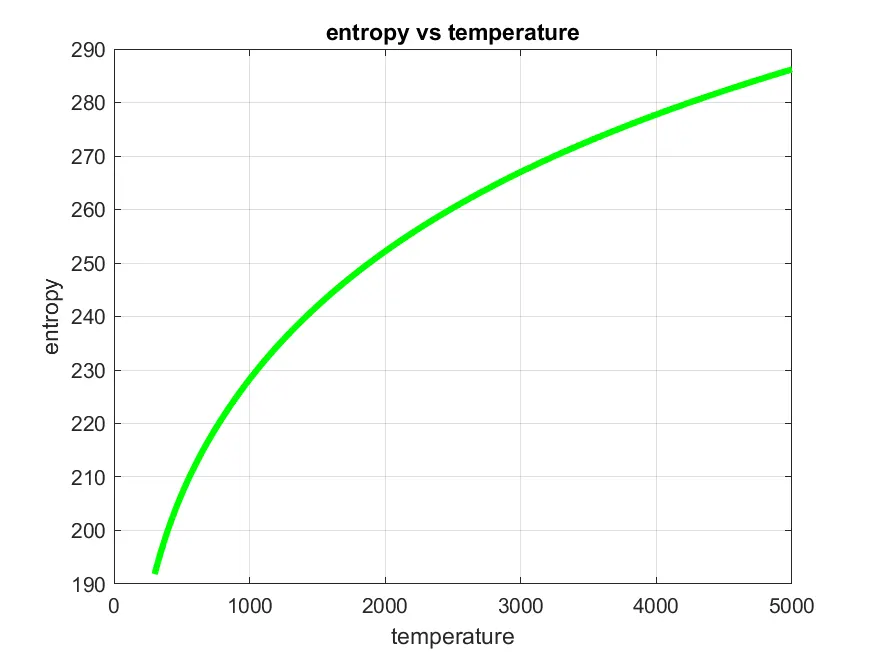
N2 enthalpy, entropy, and specific heat vs temperature:
Windows where all values are stored:
Molecular weight data file:
https://drive.google.com/file/d/13C1RGFVsUrt2l5v4lcCay2984CTShhra/view?usp=sharing
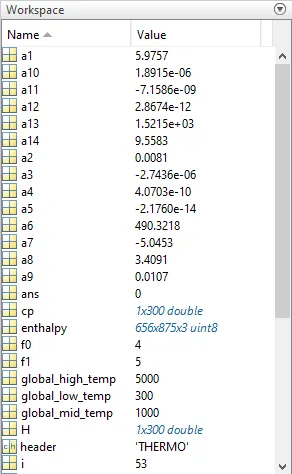
Workspace data:
Conclusion:
In this technique we can parse data from any file, and we can calculate any parameters out of it.
I got a plot for all values such as cp,H ,s and molecular weight and the calculated molecular weight is same to that of real molecular weight.
References: