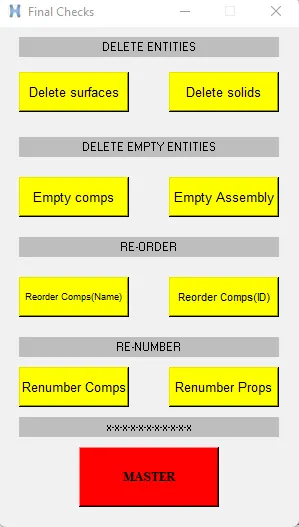
Week - 6 - Creating the GUI for final checks
AIM: To create GUI for final check using TCL/Tk
Procedure:
- So first we create the widget.
CODE:
#setting a window
set a .window
catch {destroy $a}
toplevel $a -class TopLevel
#managing window size and name
wm title $a "Final Checks"
wm geometry $a 300x500+50+50
wm resizable $a 0 0
wm deiconify $a
#assigning labels
label $a.01 -text "DELETE ENTITIES" -bg gray ; place $a.01 -x 20 -y 10 -width 260 -height 20
label $a.02 -text "DELETE EMPTY ENTITIES" -bg gray ; place $a.02 -x 20 -y 110 -width 260 -height 20
label $a.03 -text "RE-ORDER" -bg gray ; place $a.03 -x 20 -y 210 -width 260 -height 20
label $a.031 -text "RE-NUMBER" -bg gray ; place $a.031 -x 20 -y 310 -width 260 -height 20
label $a.032 -text "x-x-x-x-x-x-x-x-x-x-x" -bg gray ; place $a.032 -x 20 -y 390 -width 260 -height 20
#assigning buttons and procedure:
# 1 DELETE
button $a.04 -text "Delete surfaces" -command {delete surfaces} -bg yellow -font {arial 10 };
place $a.04 -x 20 -y 45 -width 110 -height 40
button $a.05 -text "Delete solids" -command {delete solids} -bg yellow -font {arial 10 };
place $a.05 -x 170 -y 45 -width 110 -height 40
proc delete {d} {
*createmark $d 1 "displayed"
if {[hm_marklength $d 1] !=0} {*deletemark $d 1}
}
# 2 EMPTY
button $a.06 -text "Empty comps" -command {empty comps} -bg yellow -font {arial 10 };
place $a.06 -x 20 -y 150 -width 110 -height 40
button $a.07 -text "Empty Assembly" -command {empty assemblies} -bg yellow -font {arial 10 };
place $a.07 -x 170 -y 150 -width 110 -height 40
proc empty {e} {
*EntityPreviewEmpty $e 1
if {[hm_marklength $e 1] !=0} {*deletemark $e 1}
}
# 3 RE-ORDER
button $a.08 -text "Reorder Comps(Name)" -command {reorderbyname comps} -bg yellow -font {arial 7 };
place $a.08 -x 20 -y 250 -width 110 -height 40
button $a.09 -text "Reorder Comps(ID)" -command {reorderbyid comps} -bg yellow -font {arial 8 };
place $a.09 -x 170 -y 250 -width 110 -height 40
proc reorderbyname {o} {
*clearmarkall 1
*createmark $o 1 "all"
if {[hm_marklength $o 1] !=0} {*collectormarkmove $o 1 1 1}
}
proc reorderbyid {o} {
*clearmarkall 1
*createmark $o 1 "all"
if {[hm_marklength $o 1] !=0} {*collectormarkmove $o 1 1 2}
}
# 4 RE- NUMBER
button $a.10 -text "Renumber Comps" -command {renumber comps} -bg yellow -font {arial 10 };
place $a.10 -x 20 -y 340 -width 110 -height 40
button $a.11 -text "Renumber Props" -command {renumber props} -bg yellow -font {arial 10 };
place $a.11 -x 170 -y 340 -width 110 -height 40
proc renumber {n} {
*clearmarkall 1
*createmark $n 1 "all"
if {[hm_marklength $n 1] !=0} {*renumber $n 1 100 1 0 0 }
}
# 5 MASTER BUTTON
button $a.12 -text "MASTER" -command {master} -bg RED -font {Times 10 bold};
place $a.12 -x 80 -y 420 -width 140 -height 60
proc master {} {
delete surfaces
delete solids
empty comps
empty assemblies
reorderbyid comps
reorderbyname comps
renumber props
renumber comps
}
OUTPUT: