Week 6 Challenge
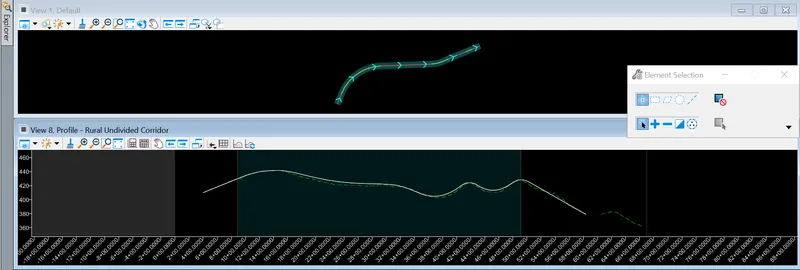
1. Open the profile model for the innermost shape. Create existing ground profile. Design profile at one constant elevation.
Aim & Introduction
To open the profile model for the innermost shape. Create existing ground profile. Design profile at one constant elevation.
Procedure
Openroads Modelling => Geometry => Open Profile Model => Select the geometry and click on any view.
Results & Conclusion
Thus, the profile model for the innermost shape has been done.
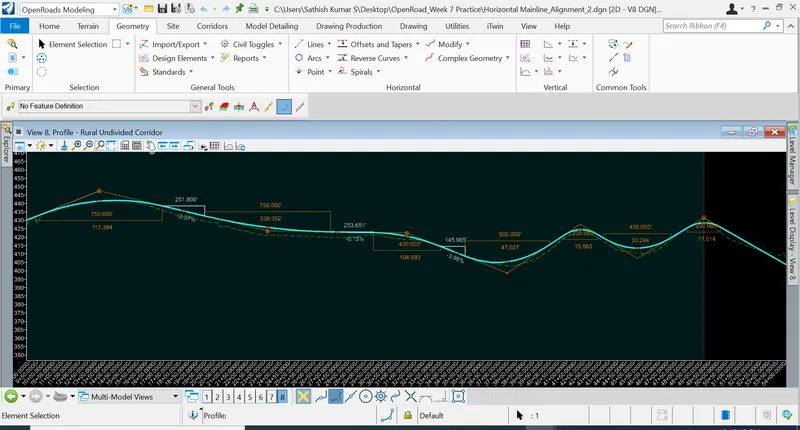
4. Change the designed profiles for all the shapes with constant or variable slopes of desired values.
Aim & Introduction
To change the designed profiles for all the shapes with constant or variable slopes of desired values.
Procedure
Openroads Modelling => Geometry => Open Profile Model => Select the geometry and click on any view.
Openroads Modelling => Geometry => Complex Profile by PI (To draw the curves and tangents)
Results & Conclusion
Thus, the designed profiles for all shapes are with constant slopes and values.