Week - 5 - Modelling Spotwelds
OBJECTIVE:
To model the spotwelds:-
1. via 1D beams using mesh generation tool on the given FE and assign material model and check failure with proper constraints and under prescribed motion.
- To check the time of failure for each element.
- To determine the maximum axial and shear force induced in welds.
- Interpret the SWFORC file.
2. via Solid element using mesh generation tool on the given FE and assign material model and check failure with proper constraints and under prescribed motion
- To check the time of failure for each element.
- To determine the maximum axial and shear force induced in welds.
- Interpret the SWFORC file.
PRE-REQUISITES:-
- Create 1D Beam.
- Create solid element.
- Material modelling for spot weld.
- SPC node set. (Globally constrained)
- Prescribed motion for elements.
- Post processing for failure.
- Contacts for spotweld and weld parts.
- Database files.
- Re-modelling of material to get optimized result.
- Reverse engineering and data analysis.
DESIGN OF EXPERIMENT:-
Spot welds are modelled as Beams with Element formulation 9 in LS DYNA.
Material_spotweld is material modelled with properties of Steel. The maximum axial stress,strain, torsion and moment is entered if any validated test data is present. If such data is not present then failure can be time dependent or values for failure stresses, moments and torsion can be high.
- The deformation is linear with time and it drives the stresses. once failure stresses are reached, failure happens.
- Also if failure is time dependent then element perishes at that time step.
- Failure is for tensile stresses, compressive stresses are also induced in some elements.
- Spot welds can also be modelled as solid elements with element formulation 1.
System of units:-
gm-mm-ms
EVENT1: Modelling spotwelds using 1D BEAM elements
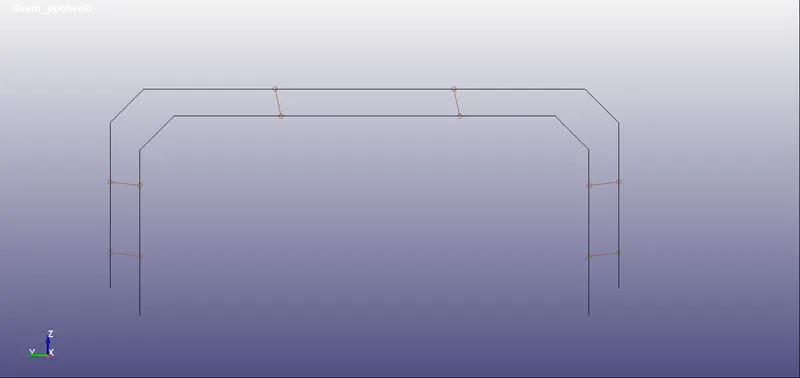
Creating Beam element:
- Go to "Element and Mesh."
- Go to "Element generation."
- Select "Beam."
- Enter the "Part ID."
- Select option "By 2 nodes."
- Pick node 1 and pick node 2.
- Click "Done."
- Click "Apply."
KEYWORDS USED:-
*CONTROL
Termination = 10 ms
*SET
SET_NODES
Procedure: Create entity>>Set>>Set_nodes>>create>>chhose by area>>apply.
- Set nodes are created to assign the prescribed motion.
- Set nodes are created to collect the weld nodes of beams.
- Set nodes are created to created SPC.
SET_PARTS
Procedure: Create entity>>set>>Set_parts>>create>>choose by pick>>apply.
A set segment for parts which are attached via weld.
*BOUNDARY
SPC: to constrain the nodes globally.
Prescribed boundary motion: To assign the motion as displacement/ velocity or acceleration.
*SECTION
Beam: A beam section to provide the element formulation and thickness.
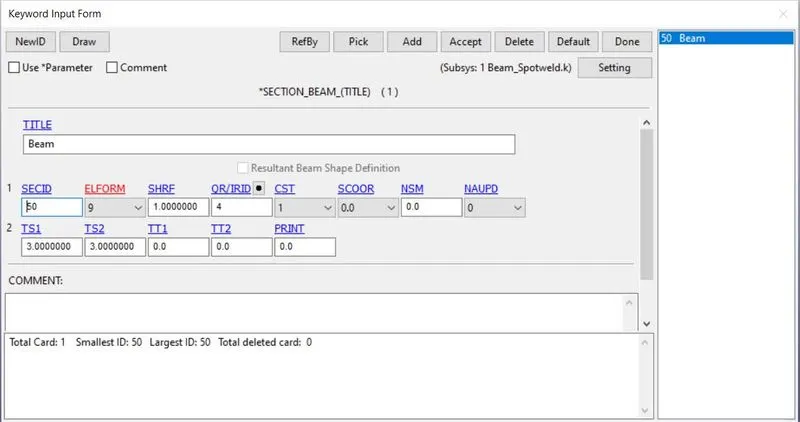
Shell: A shell section to assign thickness to the attached parts.
*MATERIAL
Elastic (001)
For shell element with steel properties:
E = 207000
Ro = 0.0076
PR = 0.3
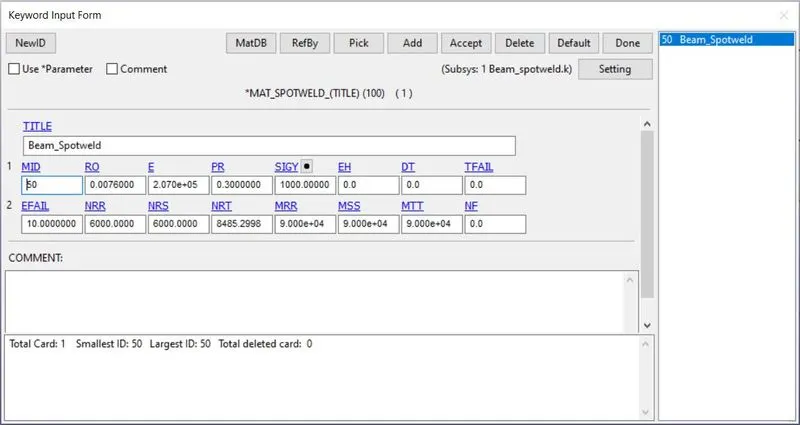
Spotweld (100)
For spotwelds with steel properties:
E = 207000
Ro = 0.0076
PR = 0.3
Failure loads
Effective plastic strain at failure, EFAIL = 10
Maximum tensile stress at failure, NRR = 6000
Maximum shear stress at failure, NRS = 6000
Resultant force at failure, NRT = 8485.299
Torsional resultant force at failure, MRR = 90000
Moment resultant at failure Mssf, MSS = 90000
Moment resultant Mttf, MTT = 90000
*CONTACT
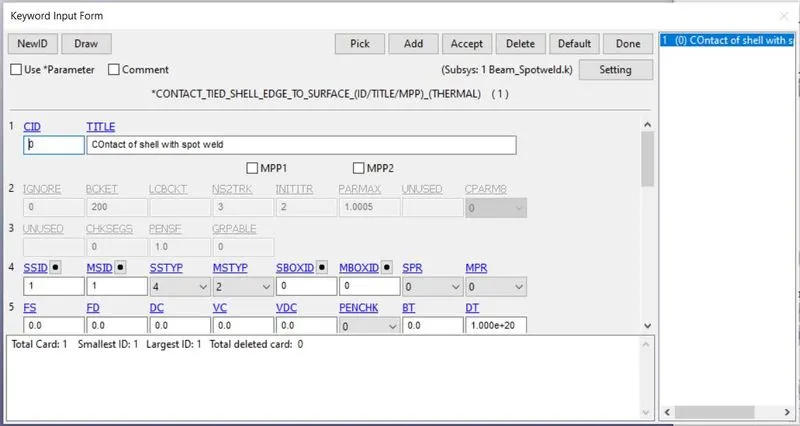
1. Contact between surfaces welded together and the weld itself.
Tied_sheel_edge_to_surface
This type of contact is defined when shell elements are to be welded via spotweld.
Slave ID, SSID = NodeID (set of nodes which form the weld)
Master ID, MSID = PartID (set of parts which form the welded parts)
Slave segment type, SSTYP = 4 (node set segment)
Master segment type, MSTYP = 2 (part set segment)
2. Contact with self as weld ruptures welded surfaces shouldnot penetrate into eachother.
Automatic_Single_Surface
SlaveID, SSID = PartID
MSTYP = 2
*DEFINE
A load curve to determine the deformation with time for the experiment to happen.
LCID = 1
x=0, y = 0
x= 10, y = 10
so deformation is linear with time. same LCID will be assigned as pre described motion of node set.
*BOUNDARY
SPC
Single point contact is defined using pre defined node set ID to constrain the corner of one surface globally.
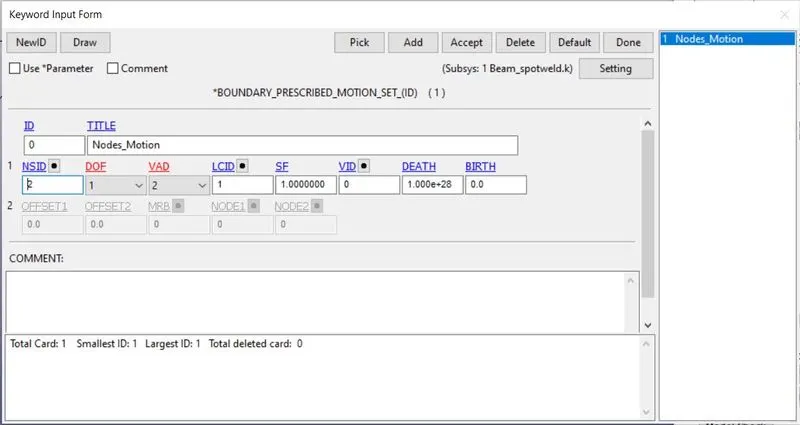
PRESCRIBED MOTION SET
To define the motion using pre-defined node set and pre defined load curve ID.
LCID = 1
DOF = 1 (motion in x)
VAD = 2 (to assign pre defined load curve as displacement with time.)
SF = 1 (to denote +x direction of motion)
*DATABASE
ASCII Format
GLSSTAT
NODOUT
SWFORC
Binary Format
d3out
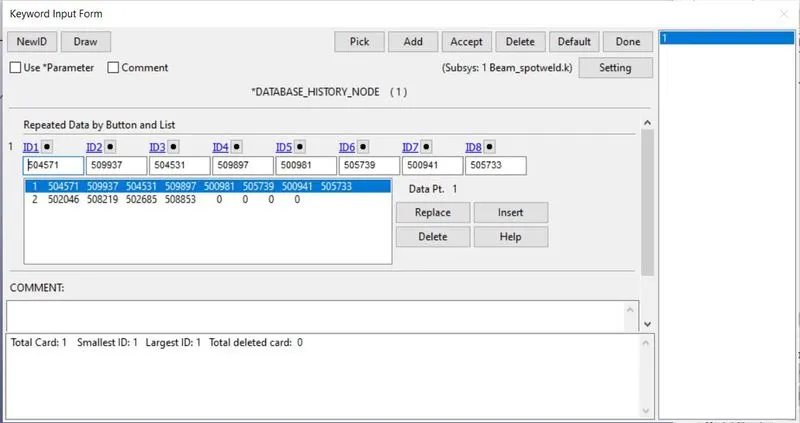
HISTORY_NODE
All the nodes of welds are to be recorded in history so that analysis for force and stresses can be done during post processing.
SOLVING AND INTERPRETAION:-
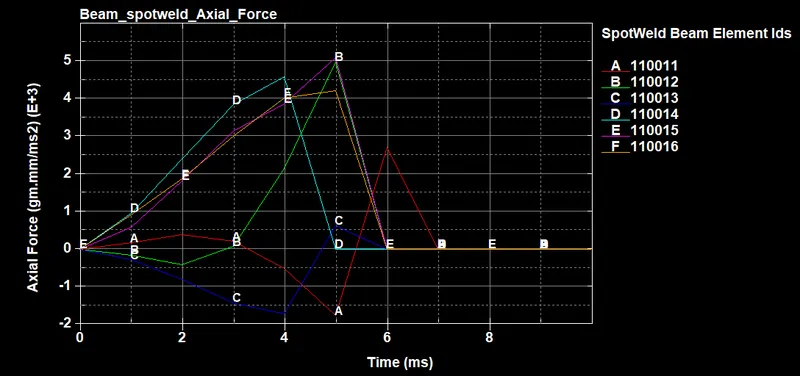
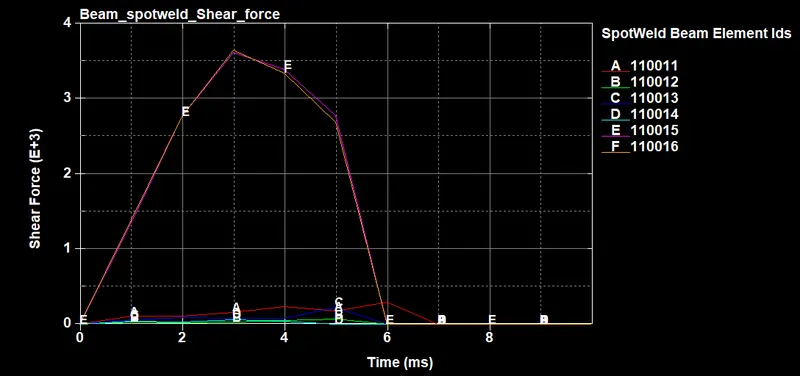
After the keyword file (Beam_Spotweld.k) is solved then after running the simulation it very much important to see when and at which stress value (tensile and shear) every beam element fails.
This helps in determining the stress value for our material model for weld at failure.
From time step 0.9 to 5.9 ms
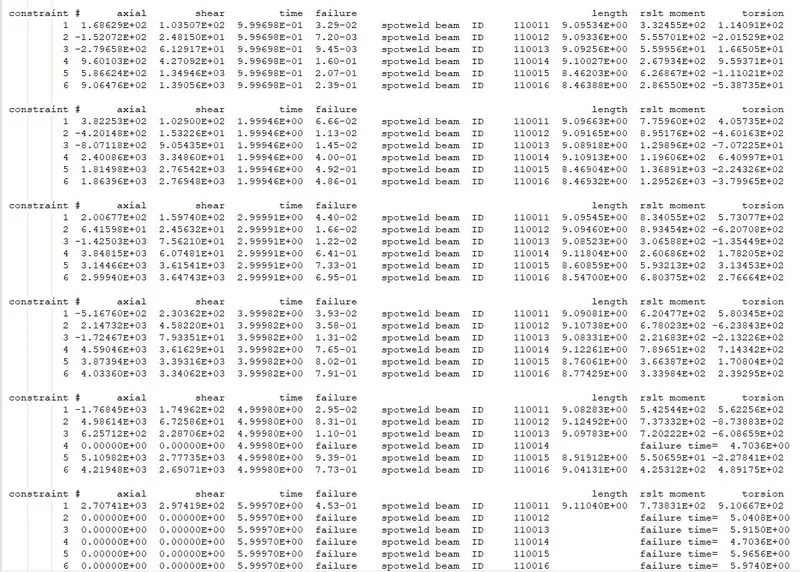
At time step 6.9 ms, all elements have failed. Last element to fail is element 1. (SWFORC file)
- First element to fail: Element #1100014 at 4.7036ms
- Second element to fail: Element #110012 at 5.0408ms
- Third element to fail: Element #110013 at 5.9150ms
- Fourth element to fail: Element #110015 at 5.9656ms
- Fifth element to fail: Element #110016 at 5.9740ms
- Fifth element to fail: Element #110011 at 6.9446ms
Importing data from notepad++ to excel:
- Open spreadsheet
- Click Get Data
- Text from TXT/CSV
- Delimit by spaces.
- cleanup
#Above import process can be automated for large number of time step files using VBA
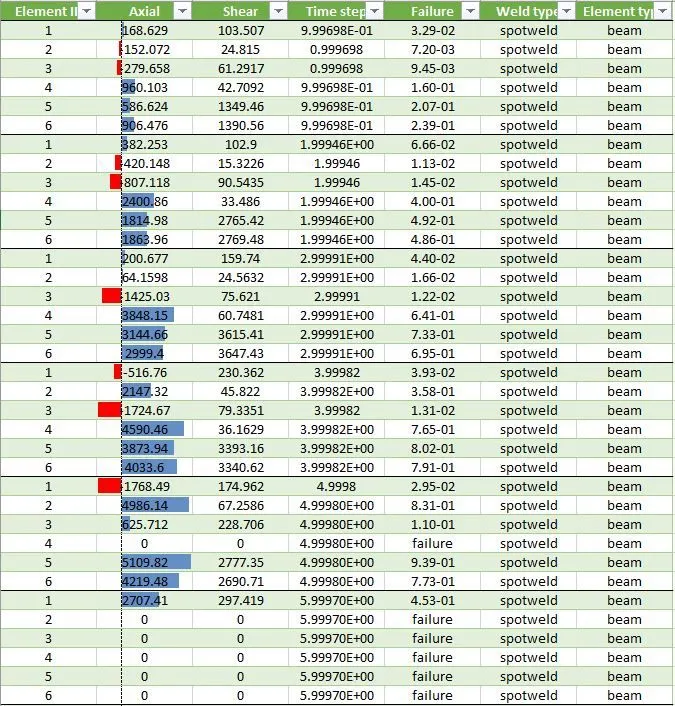
- Highest axial force induced is 5109.82 gm/mm.ms2 in element 110015
- Lowest axial force induced is 152.072 gm/mm.ms2 in element 110012
- Highest shear force induced is 3647.43 gm/mm.ms2 in element 110016
- Lowest axial force induced is 15.3226 gm/mm.ms2 in element 110012
Axial force:
Shear Force:
CONCLUSION:
- The failure of Beam happens because of prescribed motion of plate.
- All data for each time is available.
- Failure starts at 4.7ms and finishes at 6.9ms.
EVENT2: Modelling spotwelds using Solid elements
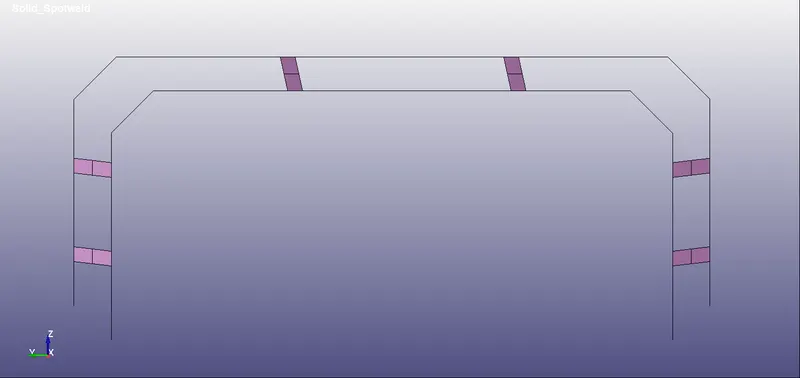
Creating Solid element:
- Go to "Element and Mesh."
- Go to "Element generation."
- Select "Solid."
- Enter the "Part ID."
- Select option "Two shell sets"
- Select sets set1 and set2.
- Pick node 1 and pick node 2.
- Click "Done."
- Click "Apply."
KEYWORDS USED:-
*CONTROL
Termination = 10 ms
*SET
SET_NODES
Procedure: Create entity>>Set>>Set_nodes>>create>>chhose by area>>apply.
- Set nodes are created to assign the prescribed motion.
- Set nodes are created to collect the weld nodes of beams.
- Set nodes are created to created SPC.
SET_PARTS
Procedure: Create entity>>set>>Set_parts>>create>>choose by pick>>apply.
A set segment for parts which are attached via weld.
*SECTION
SOLID: A solid section to provide the element formulation and thickness.
ELFORM = 1
SectionID = 51
Shell: A shell section to assign thickness to the attached parts.
*MATERIAL
Elastic (001)
For shell element with steel properties:
E = 207000
Ro = 0.0076
PR = 0.3
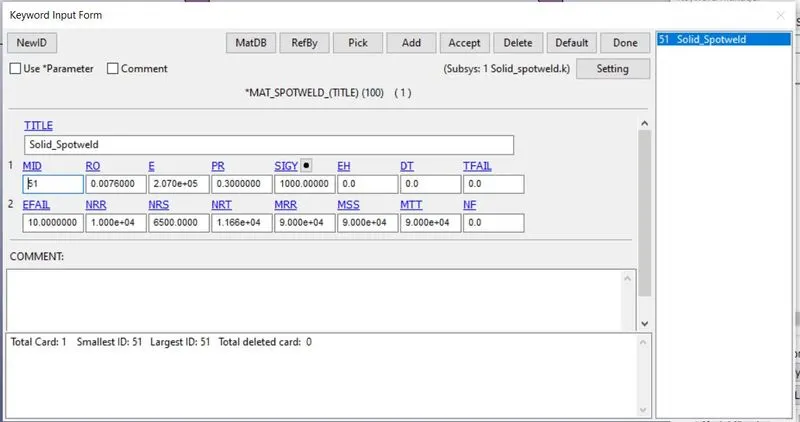
Spotweld (100)
For spotwelds with steel properties:
E = 207000
Ro = 0.0076
PR = 0.3
Failure loads
Effective plastic strain at failure, EFAIL = 10
Maximum tensile stress at failure, NRR = 10000
Maximum shear stress at failure, NRS = 6500
Resultant force at failure, NRT = 11612
Torsional resultant force at failure, MRR = 90000
Moment resultant at failure Mssf, MSS = 90000
Moment resultant Mttf, MTT = 90000
*CONTACT
1. Contact between surfaces welded together and the weld itself.
Tied_sheel_edge_to_surface
This type of contact is defined when shell elements are to be welded via spotweld.
Slave ID, SSID = NodeID (set of nodes which form the weld)
Master ID, MSID = PartID (set of parts which form the welded parts)
Slave segment type, SSTYP = 4 (node set segment)
Master segment type, MSTYP = 2 (part set segment)
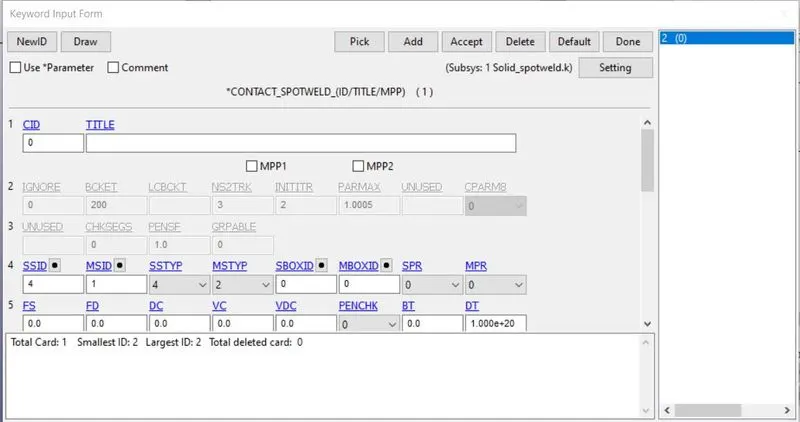
2. Contact with self as weld ruptures welded surfaces shouldnot penetrate into eachother.
Automatic_Single_Surface
SlaveID, SSID = PartID
MSTYP = 2
*DEFINE
A load curve to determine the deformation with time for the experiment to happen.
LCID = 1
x=0, y = 0
x= 10, y = 10
so deformation is linear with time. same LCID will be assigned as pre described motion of node set.
*BOUNDARY
SPC
Single point contact is defined using pre defined node set ID to constrain the corner of one surface globally.
PRESCRIBED MOTION SET
To define the motion using pre-defined node set and pre defined load curve ID.
LCID = 1
DOF = 1 (motion in x)
VAD = 2 (to assign pre defined load curve as displacement with time.)
SF = 1 (to denote +x direction of motion)
*DATABASE
ASCII Format
GLSSTAT
NODOUT
SWFORC
Binary Format
d3out
HISTORY_NODE
All the nodes of welds are to be recorded in history so that analysis for force and stresses can be done during post processing.
SOLVING AND INTERPRETAION:-
1st simulation: Running under material modelling for 10ms and without prior TFAIL value.
Axial:
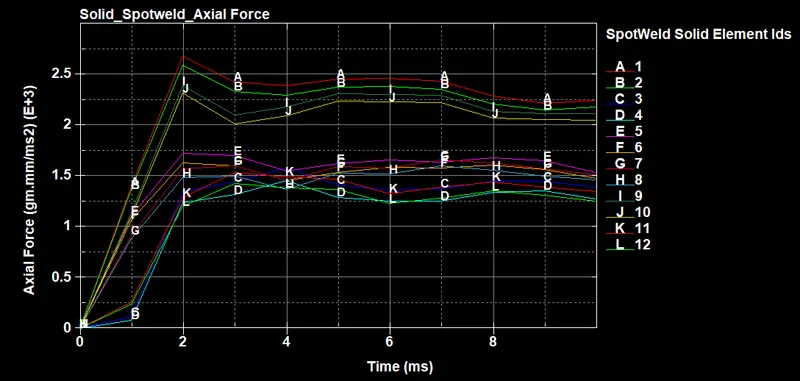
- Axial load is more on Elements joined with outer shell in right and left side.
- Minimum axial observed is ~1.25e+3 gm.mm/ms2.
- Maximum axial observed is ~2.60e+3 gm.mm/ms2.
Shear:
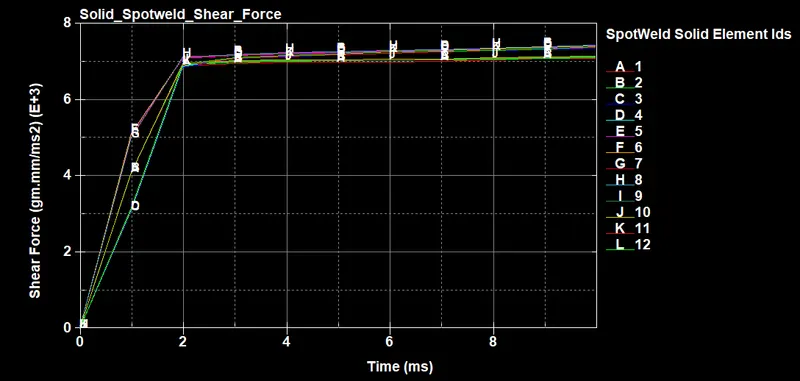
All shear forces are close to 7.0e+3 gm.mm/ms2 after 2ms.
2nd simulation: Running under material modelling for 10ms and with NRS = 7000 gm.mm/ms2
Axial:
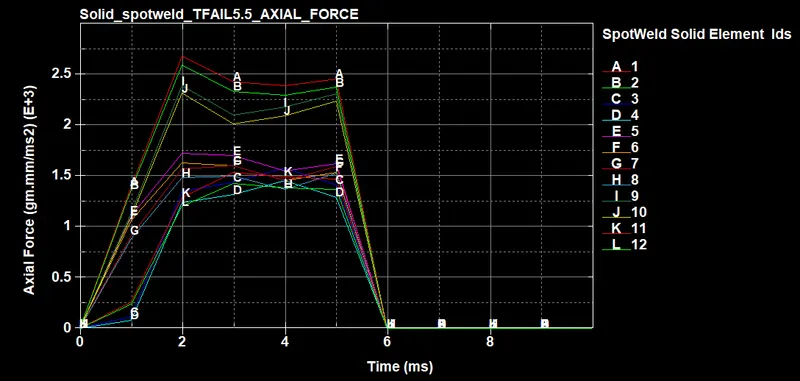
It is similar to above case but with elements failing at time step 5.5ms
Shear:
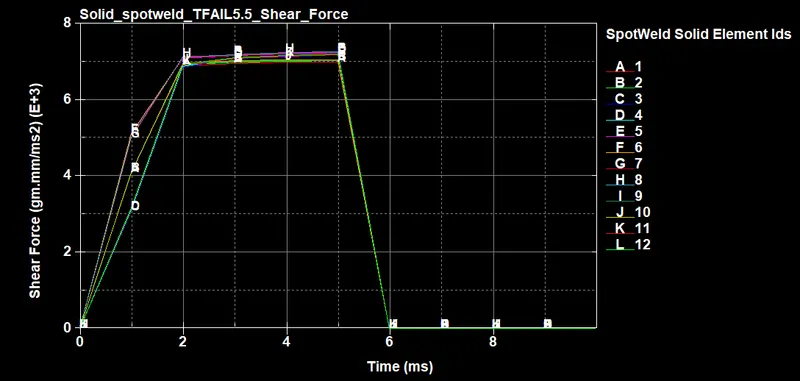
It is similar to above case but with elements failing at time step 5.5ms
COMPARISON BETWEEN BEAM_SPOTWELD and SOLID_ELEMENT:-
Beam_SPOTWELD.xlsx
- Highest axial force induced is 5109.82 gm/mm.ms2 in element 110015.
- Lowest axial force induced is 152.072 gm/mm.ms2 in element 110012.
- Highest shear force induced is 3647.43 gm/mm.ms2 in element 110016.
- Lowest axial force induced is 15.3226 gm/mm.ms2 in element 110012.
Solid_SPOTWELD.xlsx
- Highest axial force induced is 2619.01 gm/mm.ms2 in element 1.
- Lowest axial force induced is 81.416 gm/mm.ms2 in element 4.
- Highest shear force induced is 7275.43 gm/mm.ms2 in element 8.
- Lowest axial force induced is 3091.12 gm/mm.ms2 in element 3.
| BEAM | SOLID | |
| Axial force failure criteria | 6000 | NIL |
| Shear force failure criteria | 6000 | 7000 |
| Lowest Axial force | 152.072 | 81.416 |
| Highest Axial force | 5109.82 | 2619.01 |
| Lowest Shear force | 15.3226 | 3091.12 |
| Highest Shear force | 3647.43 | 7275.43 |
| Time of failure (ms) | 4.9-6.7 | 5.5 |
Since Beam is a structural member which can assess role in one direction only.
In case of Beam representation of spotweld, we have failure due to axial as well as shear.
In case of SOlid element we have failure based on shear.