Week - 5 - Checking and correcting the Normals
#Normals check and correct
set a .window
catch {destroy $a}
toplevel $a -class Toplevel
wm title $a "Normals"
wm geometry $a 300x100+200+50; update
wm resizable $a 1 1
wm deiconify $a
button $a.01 -text "Normals" -command {normals} -bg white -font {times 12 bold}; place $a.01 -x 20 -y 50 -width 100 -height 30
proc normals {} {
set a .window
catch {destroy $a}
toplevel $a -class Toplevel
wm title $a "Normals"
wm geometry $a 300x200+0+0; update
wm maxsize $a 400 300
wm minsize $a 50 50
wm resizable $a 1 0
wm deiconify $a
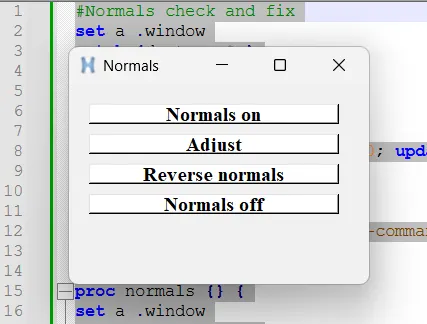
button $a.01 -text "Normals on" -command {normals_on} -bg white -font {times 12 bold}; place $a.01 -x 20 -y 20 -width 250 -height 20
button $a.02 -text "Adjust" -command {adjust} -bg white -font {times 12 bold}; place $a.02 -x 20 -y 50 -width 250 -height 20
button $a.03 -text "Reverse normals" -command {reverse} -bg white -font {times 12 bold}; place $a.03 -x 20 -y 80 -width 250 -height 20
button $a.04 -text "Normals off" -command {normals_off} -bg white -font {times 12 bold}; place $a.04 -x 20 -y 110 -width 250 -height 20
proc normals_on {} {
*clearmark all 1
*setnormalsdisplaytype 1
*createmark elements 1 "displayed"
*normalsdisplay elements 1
}
proc adjust {} {
*normalsadjust2 elements 1 0 0 0 0 0 50
}
}
proc reverse {} {
*createmarkpanel elements 1 "select the elements you want the normals to reverse for"
set i [hm_marklength elements 1]
if {$i !=0} {
*normalsreverse elements 1
*createmark elements 1 "displayed"
*normalsdisplay elements 1
}
}
proc normals_off {} {
*createmark elements 1 "displayed"
*normalsoff
}