Week 5 Challenge- Creating a test case in OpenFOAM
Creating a test case in OpenFOAM
In this challenge, we will find the value assigned to kinematic viscosity stored in a dictionary file transportProperties and add a variable to it and print the values of the variables.
Procedure
#include "fvCFD.H"
//using namespace Foam;

int main(int argc, char *argv[])
{
    //Foam::argList::noBanner(); //if you turn it off, this will print the OpenFOAM banner on the screen

    Foam::argList args(argc, argv);

    Foam::Time runTime
    (
        //Foam::Time::controlDictName,
        args.rootPath(),
        args.caseName()
    );

    IOdictionary ioDictObj
    (
        IOobject
        (
            "thermalProperties",
            //runTime.constant(),
            runTime,
            //mesh,
            IOobject::MUST_READ,
            IOobject::NO_WRITE
        )
    );

    /*double nu,T;
    nu=ioDictObj.lookup("nu");
    T=ioDictObj.lookup("T");*/

    scalar T = readScalar(ioDictObj.lookup("T"));
    scalar nu = readScalar(ioDictObj.lookup("nu"));

    /*vector nu = vector( ioDictObj.lookup("nu"));
    vector T = vector( ioDictObj.lookup("T"));*/

    Info<<nu<<"\n";
    Info<<T<<"\n";


    /*Info<< "Current Time:" <<runTime.timeName() <<nl<<endl;
    Info<< "Start Time:" <<runTime.startTime() <<nl<<endl;
    Info<< "End Time:" <<runTime.endTime() <<nl<<endl;*/

    return 0;
}
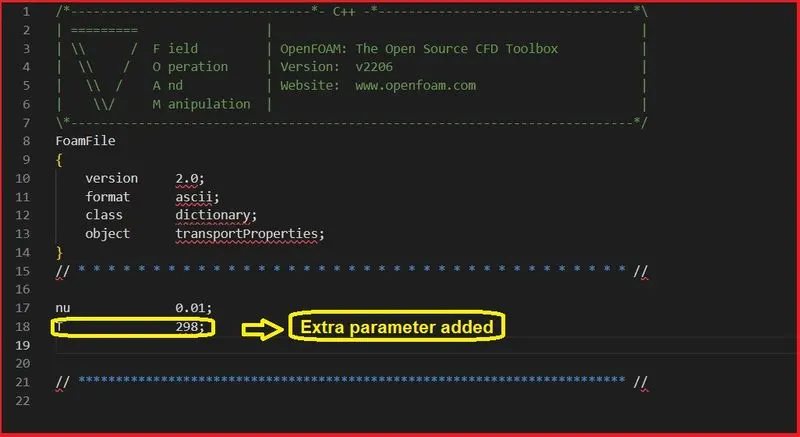
-> First, a transportProperties file is copied from $FOAM_TUTORIALS/incompressible/icoFoam and pasted in the run folder.
-> Once done, the file is renamed to thermalProperties and a variable is added.
-> The value of the variable is mentioned and saved and the file is closed.
-> 
-> To parse a file, we have to create a code.
-> In the code, we are using "fvCFD.H" library which contains the necessary commands used in OpenFOAM
-> The command Foam::Time runTime creates an object of the class Time.
-> args.rootPath() points to the present working directory.
-> args.caseName() points to the name of the file.
-> In the next step, we are creating an IOobject, which is a subset of IOdictionary.
-> The first command specifies the name of the file to be searched.
-> The next line specifies the object runTime (which is an objectregistry)
-> The next line specifies what operations needed to be carried out.
-> Here, we only want to read in from a file and we dont want to carry out any writing operation
-> The next set of commands looks for variables with values and stores them into a scalar variable.
-> Info prints out the values upon execution.
-> Once done, the next step is compilation.
Creation of Make files
In order to compile, we have to first create a Make folder that contains files and options within it.
The contents of the files and options are shown below:
Make ->files
readdata.cpp
EXE = readdata
Make->options
EXE_INC = \
-I$(LIB_SRC)/meshTools/lnInclude \
-I$(LIB_SRC)/finiteVolume/lnInclude \
-g
EXE_LIBS = \
-lfiniteVolume \
Once done, type ./readdata (which is the name of the executable) and it will throw out the values as shown below:
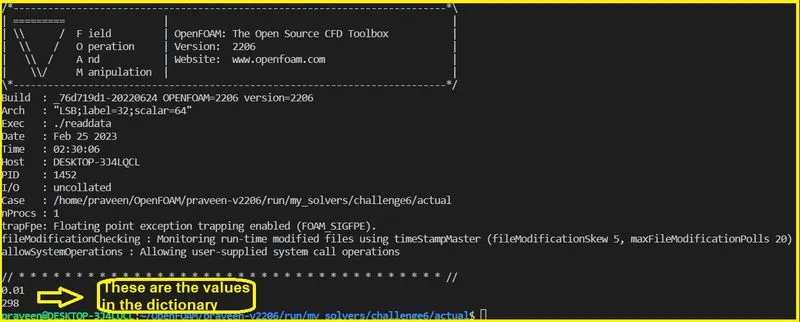
Thus, a test case is created and a code is written to read data from the file by creating an IOobject.