Week - 4 - Crash Box Simulation
OBJECTIVE:
To create the following events:
- 1.2 mm thick steel Crash box simulation using a rigid wall with elastic material properties.
- 1.5 mm thick steel Crash box simulation using a rigid wall with elastic material properties.
Under following circumstances:
- Initial velocity is 50 kmph in all the above events.
- System of units used is gm-mm-ms
Desired output:
- Keyword file as input.k file for each event as input1.k, and input2.k.
- Output files as: d3plot, glstat, sleout, rcforc.
- Animation of simulation for each event.
- Cross sectional force generated in the middle of crash box (along length)
- Acceleration plot of a node in the middle of crashbox. (along length)
- Maximum directional stress and strain along the length of crashbox (Global coordinates)
- Plot of all energies. - Total, Internal, Kinetic, Hourglass, sliding.
- Comparison for acceleration and stress/ strain plots of 1.2/ 1.5 mm crashboxes.
Desired outcomes:
- Crashbox crashes into rigid wall and rebounds completely.
- Crashbox crashes into rigid wall and buckles along its length to come in self contact.
DESIGN OF EXPERIMENT:
- There are total two events.
- .k file is to be made for each event with desired output files.
- Desired outcomes to be noted down.
- *Rigidwall keyword is used to define the collision surface.
CREATING RIGIDWALL:
It is important to create a rigidwall for simulation.
Steps to create rigidwall:
- Go to Create Entity
- Go to Rigidwall>>Rigidwall>>Create>>Planar>>Slect slave node>>Choose normal plane>>Trans -10
Here, Normal plane is "X"
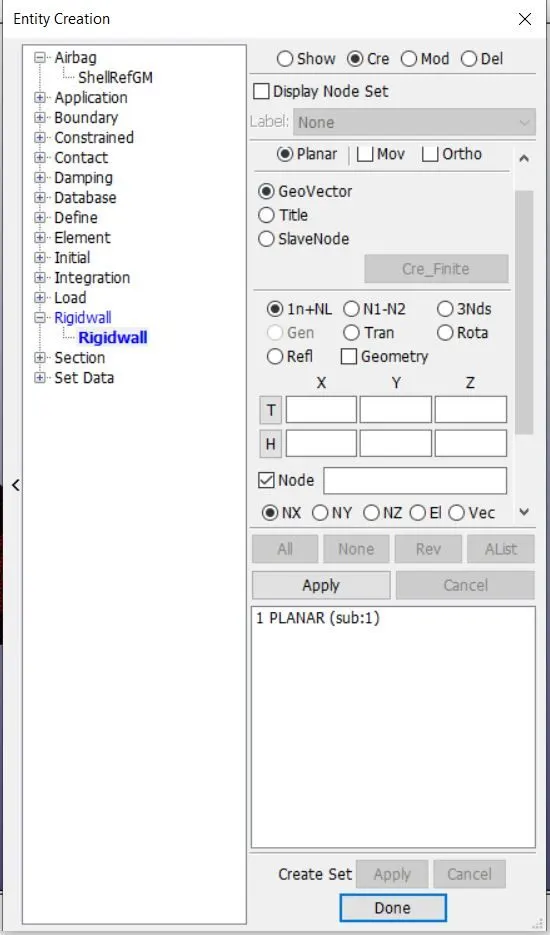
Fig- 1.1 shows the entity card for rigidwall
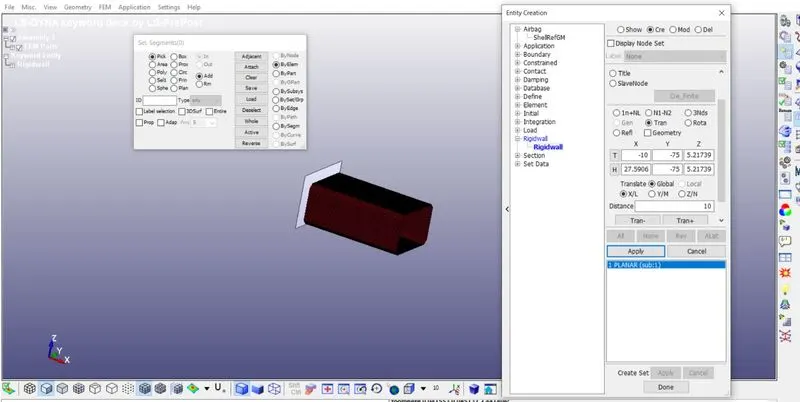
Fig- 1.2 shows the entity card for translational displacement of rigidwall
EVENT 1: 1.2 mm thick steel Crash box simulation using a rigid wall with elastic material properties.
Keywords used
*SET
SET_NODE for velocity
Node set created so that initial velocity can be assigned to this set id using INITIAL_VELOCITY card.
Go to Set>>SET NODE>>Create>>choose crash box nodes by area>>Apply
NSID = 1
SET_SEGMENT for self contact
Node set created to assign SLID for AUtomatic self contact.
*INITIAL_VELOCITY
The velocity given is 50kmph
so 50 * 5/18 = 13.8889 m/s
13.8889 * 1000/1000 = 13.8889 mm/ms
Now go to INITIAL>>VELOCITY>>Choose NSID = 1>>Assign VX = -13.889>>Accept>>Done
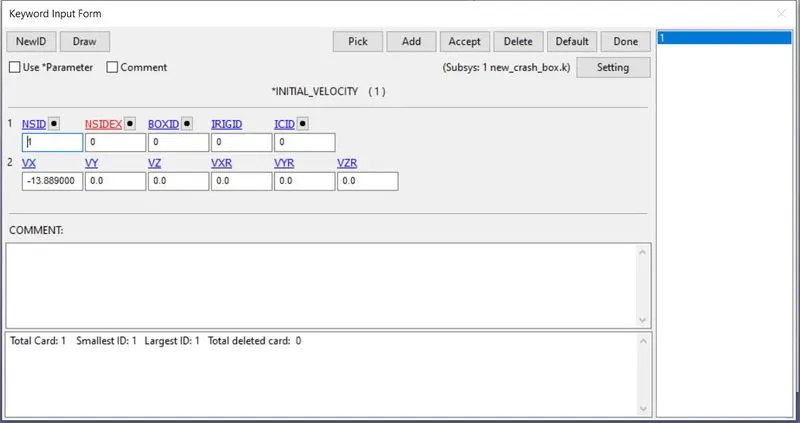
Fig- 1.3 shows the velocity card inside *INITIAL keyword with available *Node_Set.
*CONTACT
Self contact need to be defined in case crash box buxkles to come in self contact.
CONTACT_AUTOMATIC SINGLE SURFACE
SLID = 1
*MATERIAL
Elastic steel
E = 207 GPa
= 207e9 x e3 x e-3 x e-6
= 207000 gm.mm-1.ms-2
Ro = 7600 x e3 x e-9 gm/mm3
= 7600e-6 gm/mm3
PR = 0.3
*SECTION_SHELL
ELFORM = 2
Thickness = 1.2 mm
*PART
MATID = 1
SECID = 1
PID = 1
Title = Crash Box
*CONTROL
*CONTROL_TERMINATION
collision distance = 15mm
initial velocity = 13.889 mm/ms
Time of collision = 15/13.889 ms
Time of collision = 1.079 ms
so simulation has to be done from 1.079 ms
Total time = 1.079 + some for simulation to happen.
So total termination is to happen after 3 ms
Termination = 3 ms
*CONTROL_ENERGY
Hourglass = 2
Rigidwall = 2
to compute the energy associated with hourglass energy and provide energy balance.
*DATABASE
D3PLOT, DT = 1ms
GLSTAT, DT = 1ms
SLEOUT, DT = 1ms
RCFORC, DT = 1ms
SECFORC. DT = 1ms
Creating mid plane cross-section:-
Go to create entity>>Database>>cross section>>create>>3node>>select three node>>apply.
SECFORC is added in ASCII to get data for this section in post processing.
Attachments:
INPUT KEYWORD FILE:
Input1.k
SIMULATION:
EVENT1SIM_01FPS.wmv
OUTPUT FILES:
ASCII
EVENT1.glstat
EVENT1.rcforc
EVENT1.sleout
EVENT1.secforc
BINARY
EVENT1.d3plot
Post Processing:
Event happens in such way:
When crash box approaches rigid wall, a deacceleration induces within the crash box.
After contact, crash box rebounds under constant velocity.
GLOBAL DISPLACEMNT/ VELOCITY & ACCELEREATION
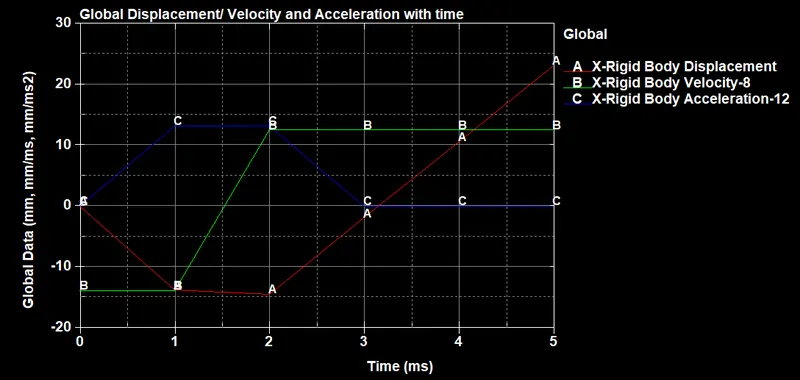
Plot- 1.1 shows the displacement, velocity and acceleration in global x direction for crash box.
GLOBAL ENERGY DATA
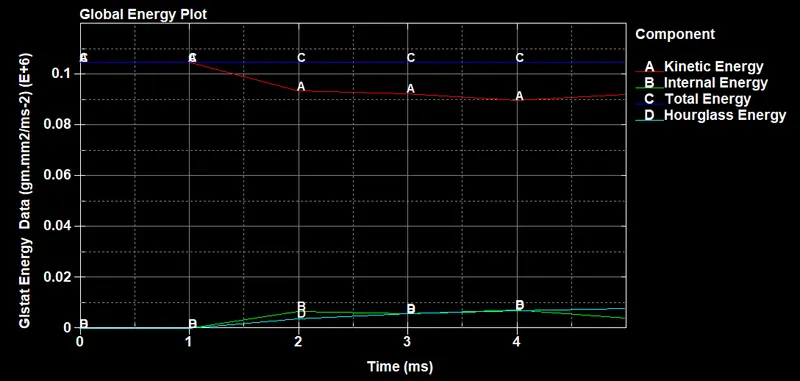
Plot- 1.2 shows the kinetic energy, internal energy, hourglass energy and total energy for each time step.
Desired Output:
1. Cross sectional force generated in the middle of crash box (along length)
Cross section is defined under database, which is the middle most cross-section.
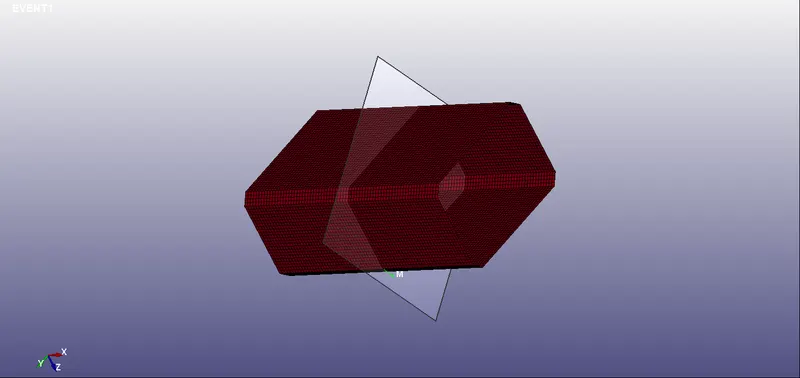
Fig- 1.4 shows the mid cross section for which sectional force is to be defined.
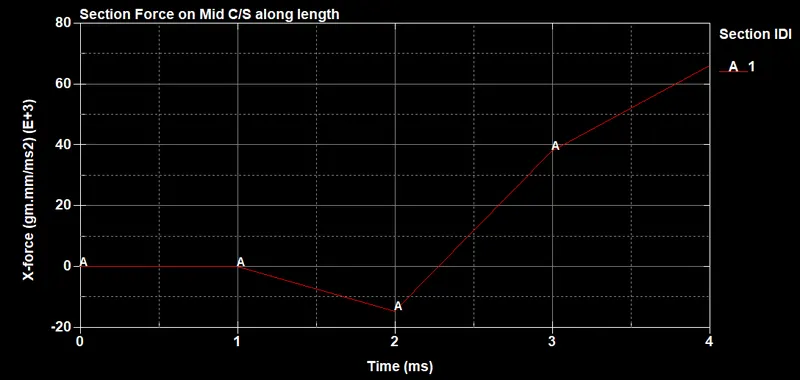
Plot- 1.3 shows sectional force induced due to crash at each time step at mid cross section.
This force is along X direction. on the cross sectional plane(refer picture above) defined under section ID = 1.
2. Acceleration plot of a node in the middle of crashbox. (along length)
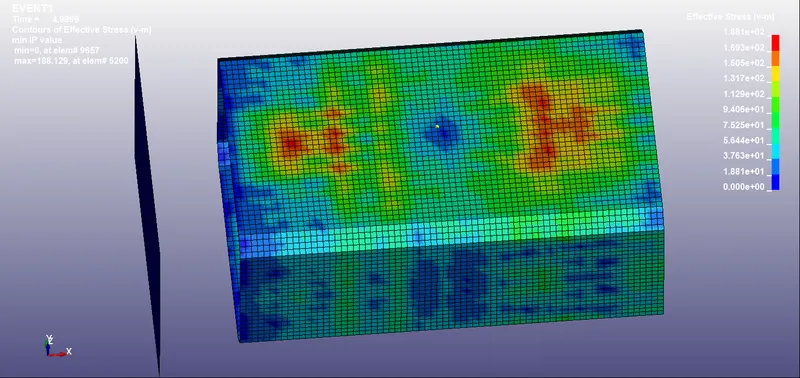
Fig- 1.5 shows the node (nodal id: 4864) in the middle of the crash box. (yellow color)
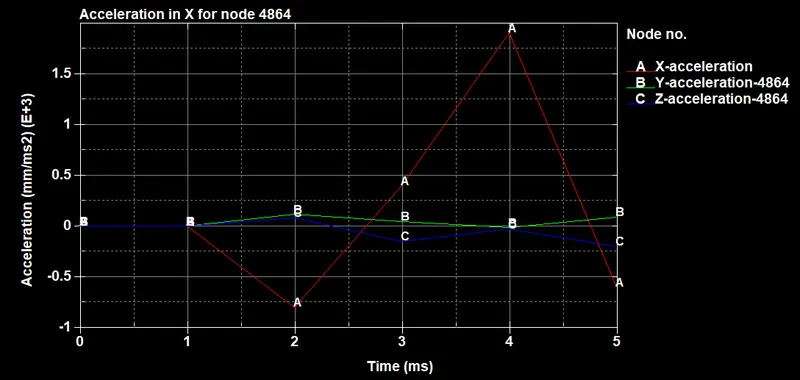
Plot- 1.4 shows acceleration of node 4864 with time in global x,y and z direction.
3. Maximum directional stress and strain along the length of crashbox (Global coordinates)
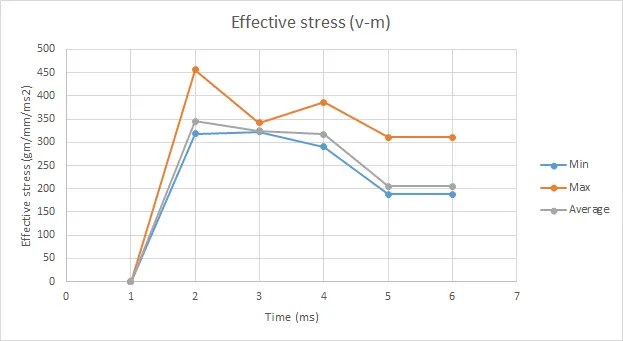
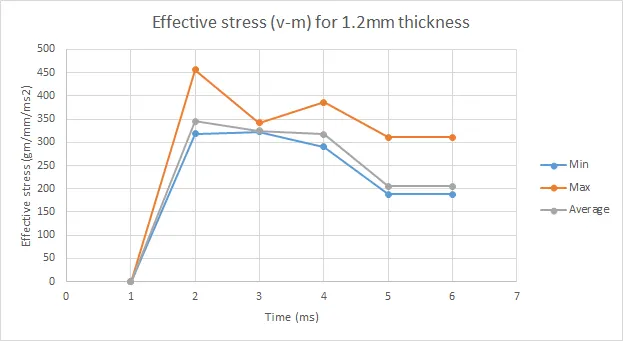
Plot- 1.5 shows Maximum, Minimum and Average effective stress (v-m) induced at each time step.
| Effective stress (V-m), Unit = gm/mm.ms2 | ||||||
| Time step | Min | Node no | Max | Node no. | Average | Node no |
| 1 | 0 | #1 | 0 | #1 | 0 | #1 |
| 2 | 318.567 | #3017 | 456.785 | #7405 | 345.043 | #7380 |
| 3 | 322.305 | #6048 | 341.742 | #5958 | 325.297 | #6048 |
| 4 | 290.324 | #6050 | 385.814 | #6048 | 317.754 | #6048 |
| 5 | 188.129 | #5200 | 311.227 | #5980 | 205.228 | #7380 |
| 6 | 188.129 | #5200 | 311.227 | #5980 | 205.228 | #7380 |
Table- 1.1 shows Maximum, Minimum and Average effective stress (v-m) induced at each time step along with nodeID.
Strain is zero since all deformations are elastic.
4. Plot of all energies. - Total, Internal, Kinetic, Hourglass, sliding.
Plot- 1.6 shows the kinetic energy, internal energy and total energy for each time step.
EVENT 2: 1.5 mm thick steel Crash box simulation using a rigid wall with elastic material properties.
Keywords used
*SET
SET_NODE for velocity
Node set created so that initial velocity can be assigned to this set id using INITIAL_VELOCITY card.
Go to Set>>SET NODE>>Create>>choose crash box nodes by area>>Apply
NSID = 1
SET_SEGMENT for self contact
Node set created to assign SLID for AUtomatic self contact.
*INITIAL_VELOCITY
The velocity given is 50kmph
so 50 * 5/18 = 13.8889 m/s
13.8889 * 1000/1000 = 13.8889 mm/ms
Now go to INITIAL>>VELOCITY>>Choose NSID = 1>>Assign VX = -13.889>>Accept>>Done
Fig- 1.6 shows the velocity card inside *INITIAL keyword with available *Node_Set.
*CONTACT
Self contact need to be defined in case crash box buxkles to come in self contact.
CONTACT_AUTOMATIC SINGLE SURFACE
SLID = 1
*MATERIAL
Elastic steel
E = 207 GPa
= 207e9 x e3 x e-3 x e-6
= 207000 gm.mm-1.ms-2
Ro = 7600 x e3 x e-9 gm/mm3
= 7600e-6 gm/mm3
PR = 0.3
*SECTION_SHELL
ELFORM = 2
Thickness = 1.5 mm
*PART
MATID = 1
SECID = 1
PID = 1
Title = Crash Box
*CONTROL
*CONTROL_TERMINATION
collision distance = 15mm
initial velocity = 13.889 mm/ms
Time of collision = 15/13.889 ms
Time of collision = 1.079 ms
so simulation has to be done from 1.079 ms
Total time = 1.079 + some for simulation to happen.
So total termination is to happen after 3 ms
Termination = 3 ms
*CONTROL_ENERGY
Hourglass = 2
Rigidwall = 2
to compute the energy associated with hourglass energy and provide energy balance.
*DATABASE
D3PLOT, DT = 1ms
GLSTAT, DT = 1ms
SLEOUT, DT = 1ms
RCFORC, DT = 1ms
SECFORC. DT = 1ms
Creating mid plane cross-section:-
Go to create entity>>Database>>cross section>>create>>3node>>select three node>>apply.
SECFORC is added in ASCII to get data for this section in post processing.
Attachments:
INPUT KEYWORD FILE:
Input2.k
SIMULATION:
EVENT2SIM_01FPS.wmv
OUTPUT FILES:
ASCII
EVENT2.glstat
EVENT2.rcforc
EVENT2.sleout
EVENT2.secforc
BINARY
EVENT2.d3plot
Post Processing:
Event happens in such way:
When crash box approaches rigid wall, a deacceleration induces within the crash box.
After contact, crash box rebounds under constant velocity.
GLOBAL DISPLACEMNT/ VELOCITY & ACCELEREATION
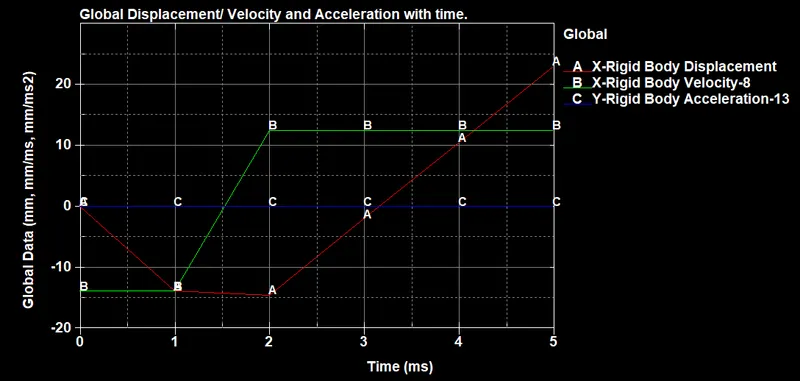
Plot- 1.7 shows the displacement, velocity and acceleration in global x direction for crash box.
GLOBAL ENERGY DATA
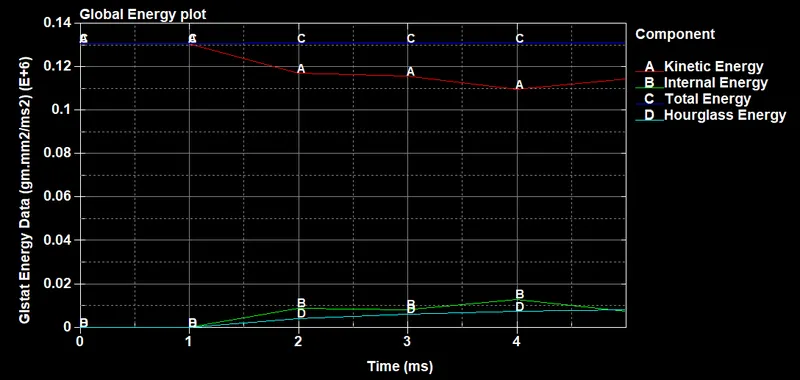
Plot- 1.8 shows the kinetic energy, internal energy, hourglass energy and total energy for each time step.
Desired Output:
1. Cross sectional force generated in the middle of crash box (along length)
Cross section is defined under database, which is the middle most cross-section.
Fig- 1.7 shows the mid cross section for which sectional force is to be defined.
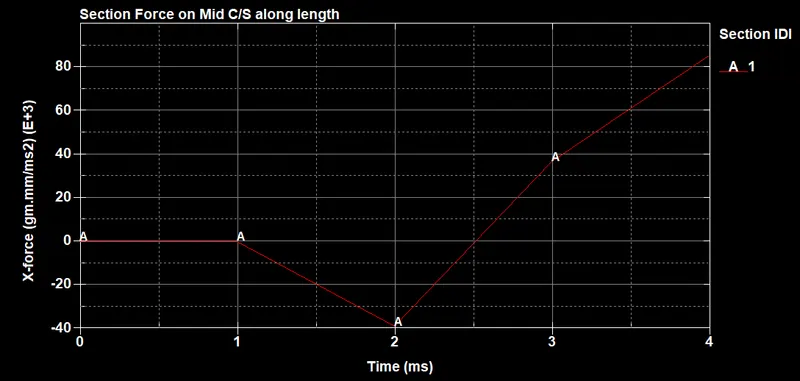
Plot- 1.9 shows sectional force induced due to crash at each time step at mid cross section.
This force is along X direction. on the cross sectional plane(refer picture above) defined under section ID = 1.
2. Acceleration plot of a node in the middle of crashbox. (along length)
Fig- 1.8 shows the node (nodal id: 4864) in the middle of the crash box. (yellow color)
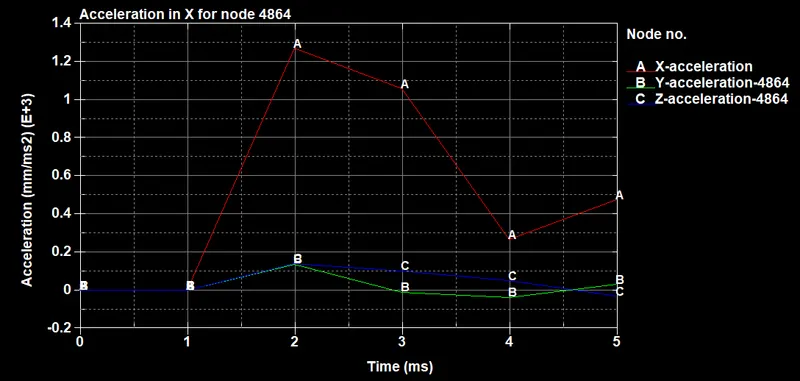
Plot- 1.10 shows acceleration of node 4864 with time.
Acceleration of Node in X,Y and Z direction.
3. Maximum directional stress and strain along the length of crashbox (Global coordinates)
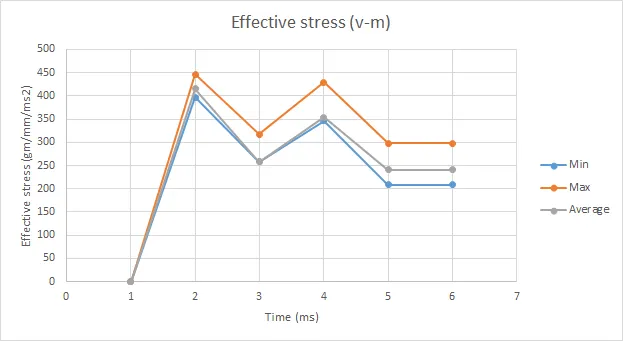
Plot- 1.11 shows Maximum, Minimum and Average effective stress (v-m) induced at each time step.
| Effective stress (V-m), Unit = gm/mm.ms2 | ||||||
| Time step | Min | Node no | Max | Node no. | Average | Node no |
| 1 | 0 | #1 | 0 | #1 | 0 | #1 |
| 2 | 397.41 | #7380 | 446.545 | #7380 | 415.148 | #7380 |
| 3 | 257.677 | #7375 | 316.83 | #9523 | 258.171 | #7375 |
| 4 | 346.515 | #3852 | 429.312 | #7916 | 354.511 | #5641 |
| 5 | 208.125 | #7958 | 297.67 | #9273 | 241.328 | #7942 |
| 6 | 208.125 | #7958 | 297.67 | #9273 | 241.328 | #7942 |
Table- 1.2 shows Maximum, Minimum and Average effective stress (v-m) induced at each time step along with nodeID.
Strain is zero since all deformations are elastic.
4. Plot of all energies. - Total, Internal, Kinetic, Hourglass, sliding.
Plot- 1.12 shows the kinetic energy, internal energy and total energy for each time step.
Comparison for acceleration and stress/ strain plots of 1.2/ 1.5 mm crashboxes.
Stress-strain plots
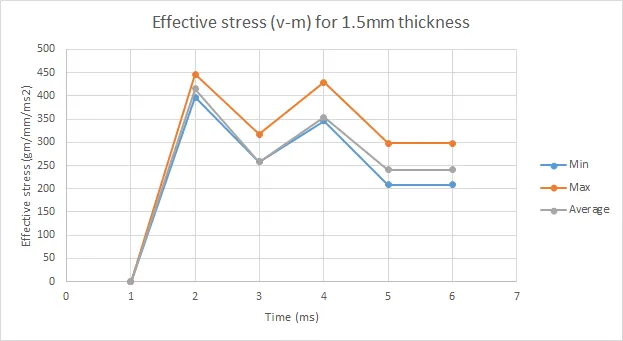 Plot- 1.13
 Plot- 1.14
Acceleration plots:
1.2mm thickness
Plot- 1.15
1.5mm thickness
Plot- 1.16
CONCLUSION:
- The sectional forces induced in case of 1.5mm thickness crash boxes are higher than in case of 1.2mm thickness. Refer Plot 1.3 and Plot 1.9
- The maximum stress induced is comparitively higher in case of 1.2mm thickness case. at every time step. Refer Plot 1.13 and 1.14
- The minimum stress induced is higher in case of 1.5mm thickness crash box, for each time step. Refer Plot 1.13 and 1.14
- The acceleration at mid point is different in magnitude and direction in both cases. Refer Plot 1.15 & 1.16.
- The crash box rebounds after collision in both events.
- The plastic strain generated in both events are zero.
- Total energy is more in case of 1.5mm crash box.
ATTACHMENTS:
EVENT1 prefix for 1.2 mm thickness crash box files.
EVENT2 prefix for 1.5mm thickness crash box files.
INPUT1.k is keyword file for EVENT1.
INPUT2.k is keyword file for EVENT2.