Week-4 Challenge WOT Condition Part-2
OBJECTIVE:
- The difference between mapped and dynamic model of engine, motor and generator and how to change the model type.
- To check How the model calculate miles per gallon and which factors are considered to model fuel flow.
- To run the HEV Reference Application with WOT drive cycle.
- Change the grade and wind velocity in the environment block of the HEV Reference Application and observe the results.
- Keeping all other parameters same, compare the simulated results of hybrid and pure electric powertrains.
SOLUTION METHODOLOGY:
OBJECTIVE - 1:
DIFFERENCE BETWEEN MAPPED AND DYNAMIC MODEL OF ENGINE, MOTOR AND GENERATOR:
MAPPED MODEL:
- This model uses a set of steady-state lookup tables to characterize component performance.
- The tables provide overall characteristics or properties to determine the performance of different components like Engine, Motor and Generator.
- In order to form the lookup tables, we need all the real time data and values that are required to provide the input to the Engine, Motor and Generator.
DYNAMIC MODEL:
- This model decomposes the components behavior into different characteristics or properties that are separated into lower-level components. By combining components in this way, the models capture the dynamic effects.
- These models are used to analyze the impact of individual parts of components on overall performance.
- No real time data values are required to provide input to this type of model.
- Very minimal data or the specifications of the components like the Engine, Motor and Generator are only required to provide and the components operate depending upon the situation of the operation.
HOW TO CHANGE THE MODEL TYPE:
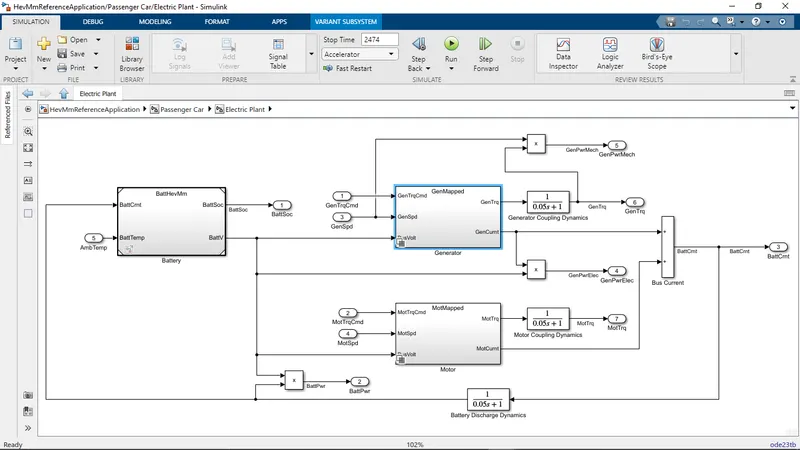
Step - 1:
- Identify the sub system where the Engine, Motor or Generator is used.
Step - 2:
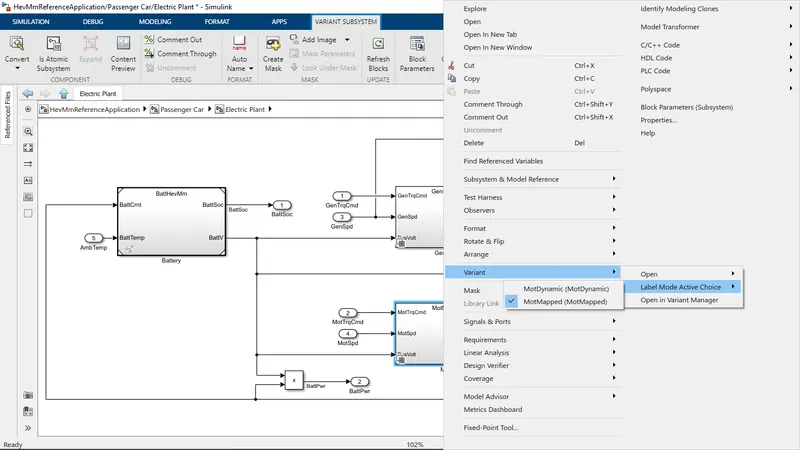
- Select the subsystem required.
- Right click on it and navigate to 'variant'
- In variant drop down menu navigate to 'label mode active choice'.
- From the label mode active choice select the required mapped or dynamic system from the drop down menu.
OR
Step - 2:
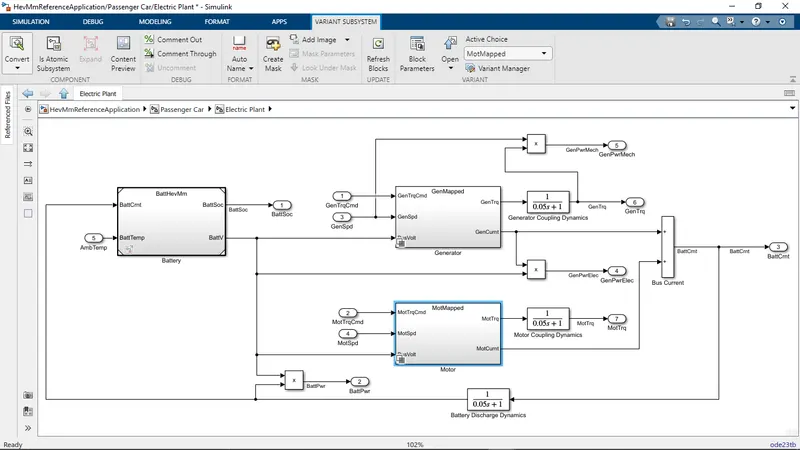
- Select the subsystem required.
- Then navigate to the 'VARIANT SUBSYSTEM' from the toolstrip or the top menu bar.
- In the VARIANT SUBSYSTEM drop down menu select the 'Variant manager'.
- Then select the required Mapped or Dynamic subsystem.
- Then right click on it and select the 'Set as Label Mode Active Choice'
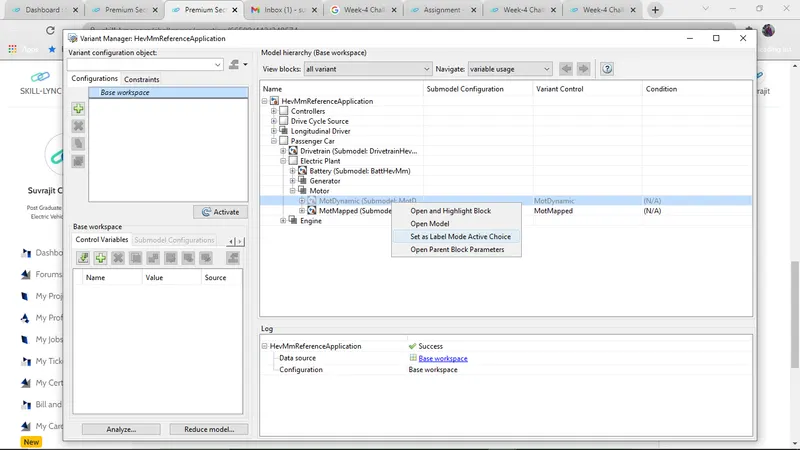
By following either of the steps we can change the model type.
OBJECTIVE - 2:
CALCULATION OF MILES PER GALLON (MPG):
- Miles Per Gallon (MPG) is calculated to determine the equivalent amount of fuel that may be used in order to travel the distance that is travelled by the Electric vehicle or the Hybrid Electric vehicle.
- MPG is calculated in the 'Visualization' block of the reference vehicle powertrain blockset.
- Inside Visualization 'Performance Calculation' block is present inside which the conversion to MPG is carried out.
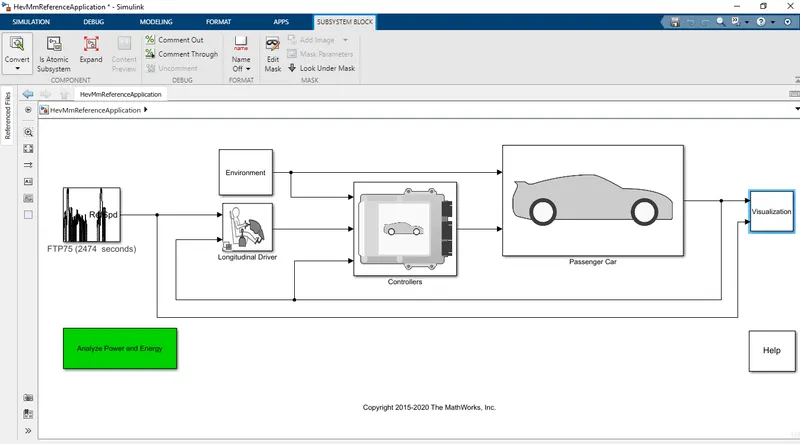
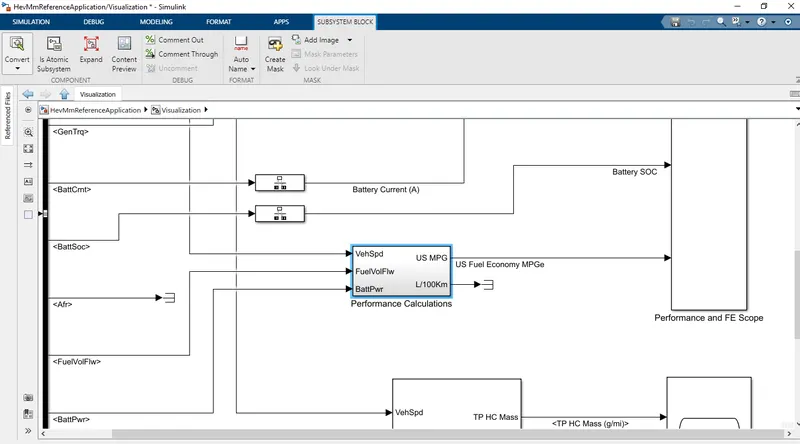
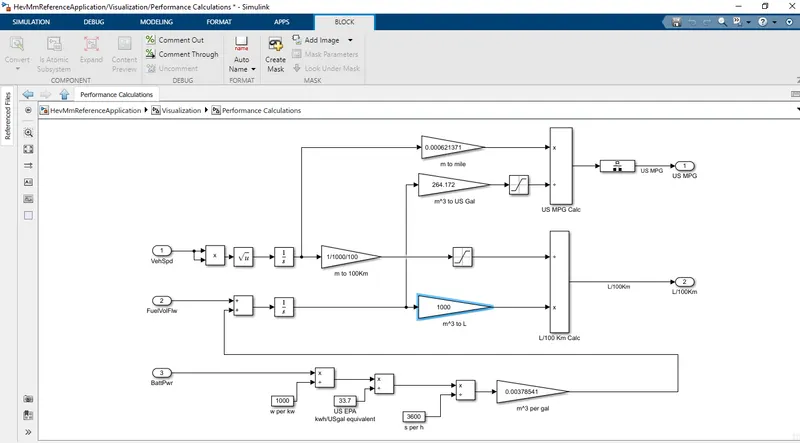
- To convert into MPG three inputs are required and they are:
- Vehicle Speed
- Fuel Volume Flow
- Battery Power
- From Vehicle speed the distance covered in meters is calculated and this distance in meters is then converted into miles.
- The meter to miles conversion factor is 1 meter = 0.000621371 miles.
- Then adding the battery power and fuel volume flow total fuel volume is calculated in cubic meters.
- Battery power conversion is 1 Gallon of gasoline gives 33.70 KWH of energy.
- The total fuel volume is then converted into gallons using the conversion factor 1 cubic meter = 264.172 US Gallons.
- And then this fuel volume is divided with distance covered in miles to get the fuel economy in Miles Per Gallon (MPG).
OBJECTIVE - 3:
HEV REFERENCE APPLICATION WITH WOT CYCLE:
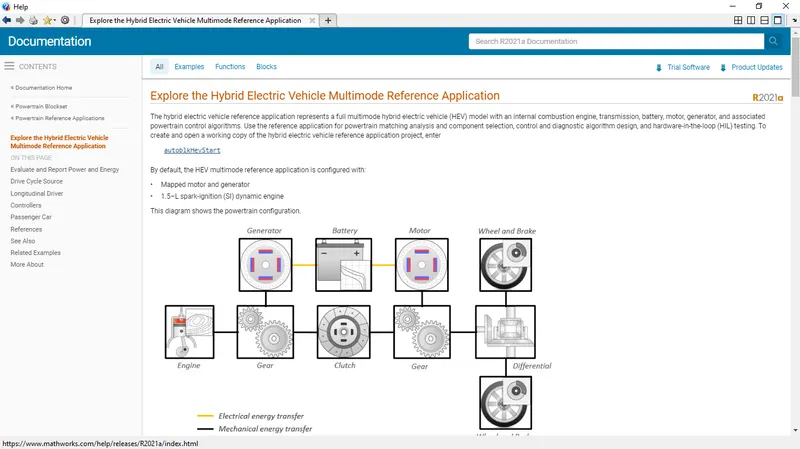
- Using the MATLAB help section, we can get information about 'Getting Started with Powertrain Blockset'.
- From the list of reference models, we can select the 'Hybrid Electric Vehicle (HEV) - Multimode' by clicking on the given link 'Explore the Hybrid Electric Vehicle Multimode Reference Application'.
- Inside it we can select the 'autoblkHevStart' link to start the reference model and run the simulation.
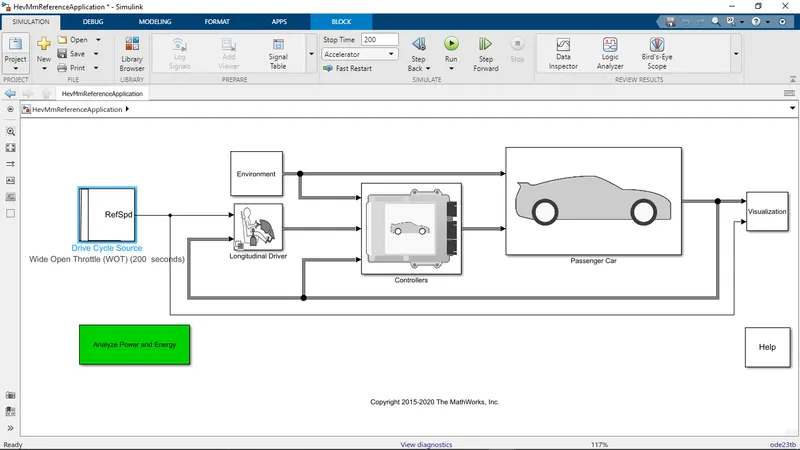
CASE - 1:
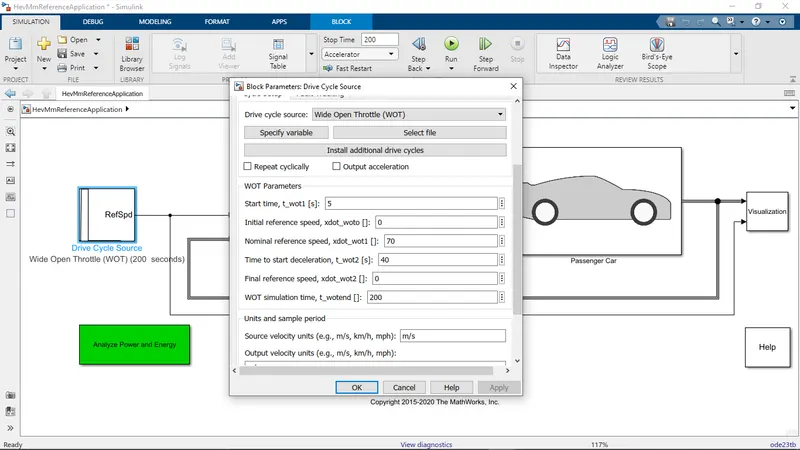
- Running the simulation with all the default conditions.
- Drive Cycle = Wide Open Throttle (WOT)
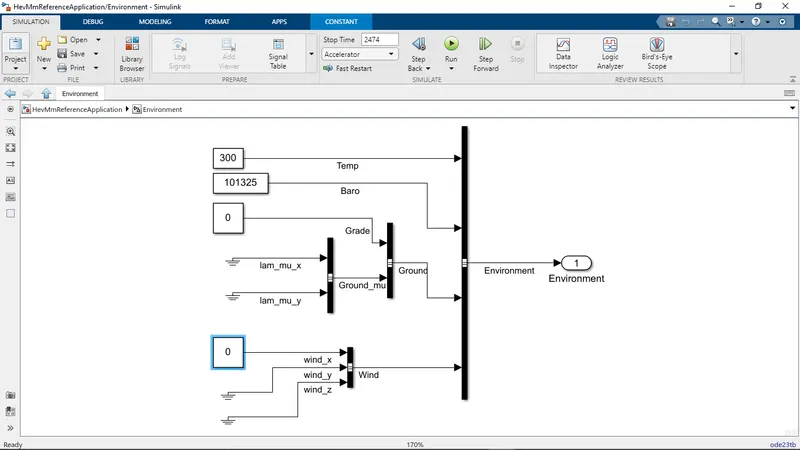
- Grade = 0%
- Wind Velocity = 0 m/s
RESULTS:
CASE - 2:
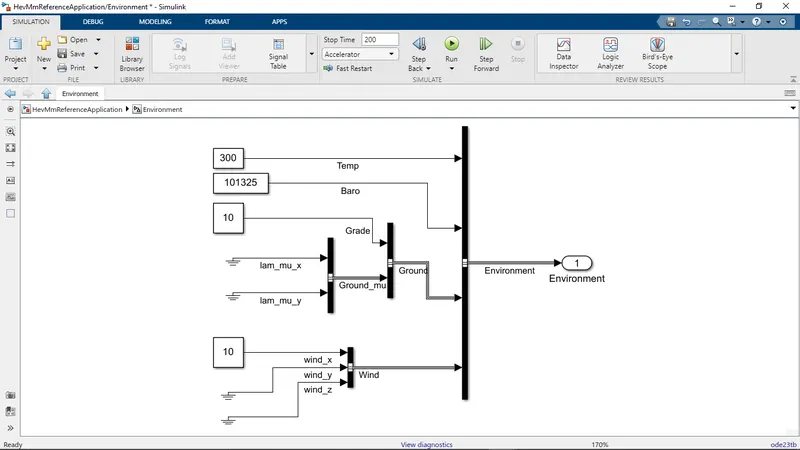
- Running the simulation by changing the grade and wind speed
- Drive Cycle = Wide Open Throttle (WOT)
- Grade = 10%
- Wind Velocity = 10 m/s
RESULTS:
CONCLUSION:
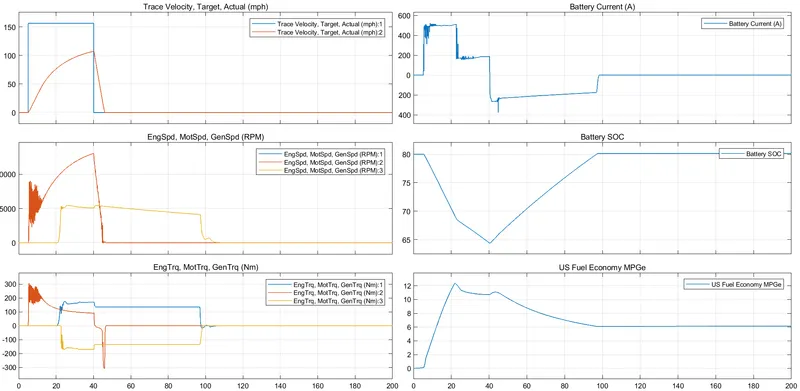
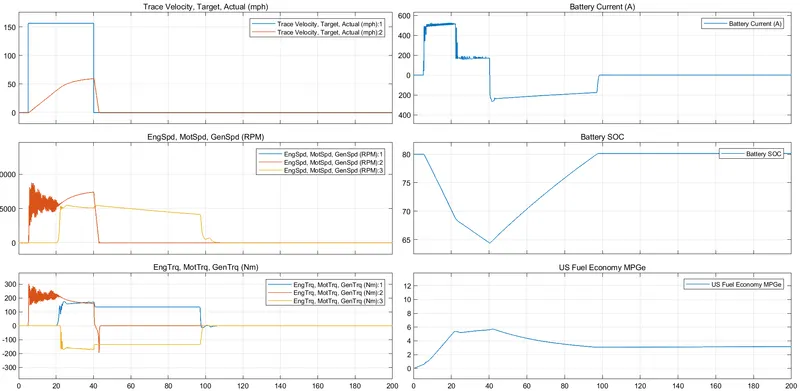
- In the first case without providing any grade condition or wind velocity we can observe from the plots that the vehicle accelerates and reaches a top speed of more than 100 mph and then starts decelerating.
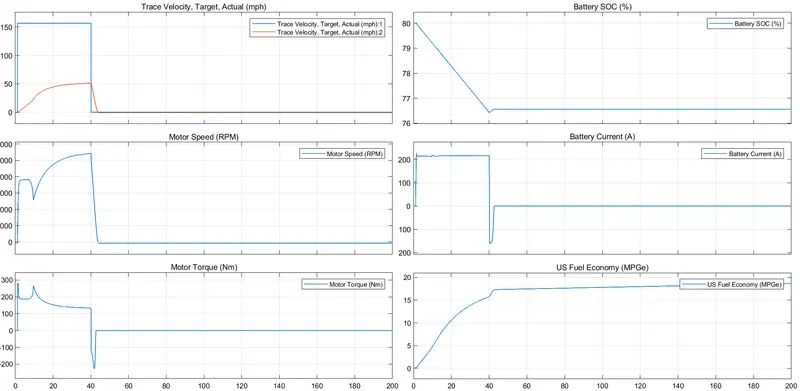
- But in the second case when we have provided grade condition and wind speed, we can observe from the plots that the vehicle can accelerate and reach a top speed of 50 mph and then starts decelerating.
- As there are conditions of slope and wind speed the vehicle cannot achieve the top speed as it achieved with no grade and wind condition.
- As more power is required to overcome the slope and wind resistance so it cannot achieve the initial top speed with no slope or wind conditions.
- Also, we can observe that Fuel economy decreases during the grade and wind condition
OBJECTIVE - 4:
COMPARISION BETWEEN HYBRID ELECTRIC VEHICLES (HEV) AND ELECTRIC VEHICLES (EV) POWERTRAIN:
EV REFERENCE APPLICATION WITH WOT CYCLE:
- Using the MATLAB help section, we can get information about 'Getting Started with Powertrain Blockset'.
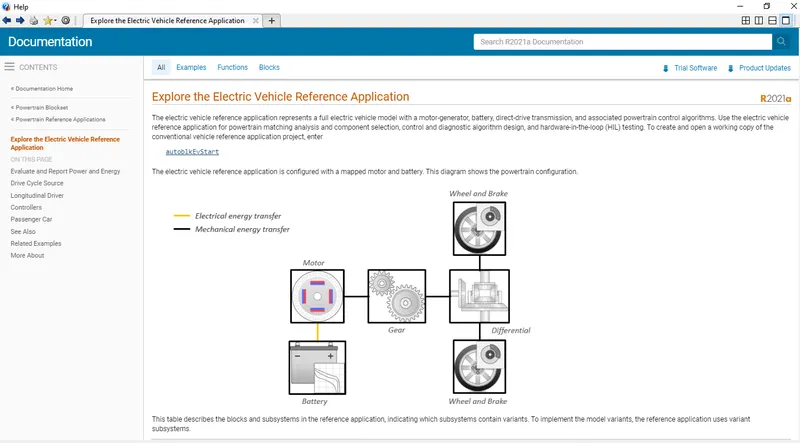
- From the list of reference models, we can select the 'Full Electric Vehicle (EV)' by clicking on the given link 'Explore the Electric Vehicle Multimode Reference Application'.
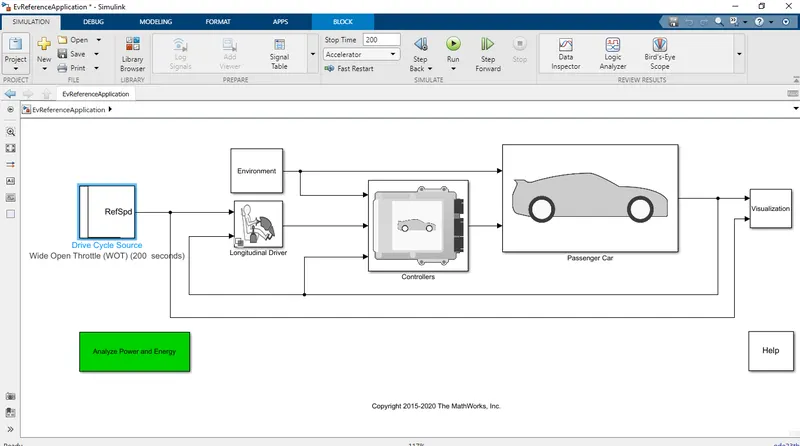
- Inside it we can select the 'autoblkEvStart' link to start the reference model and run the simulation.
CASE - 1:
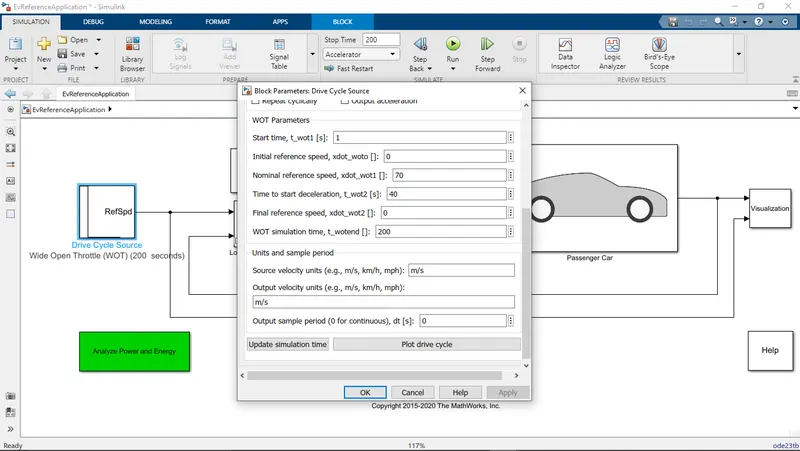
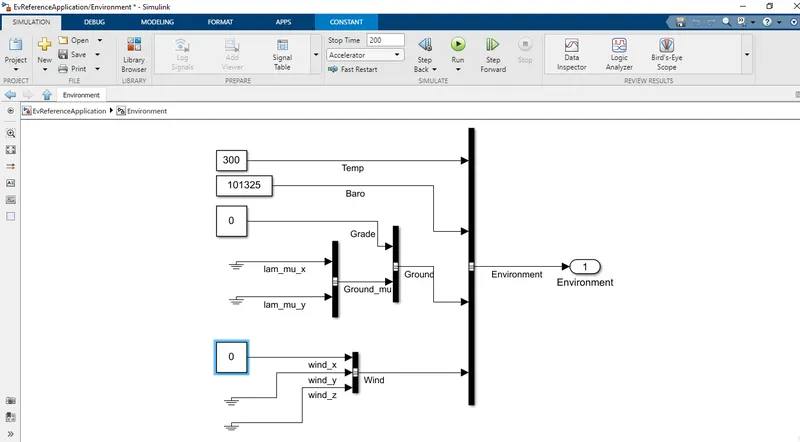
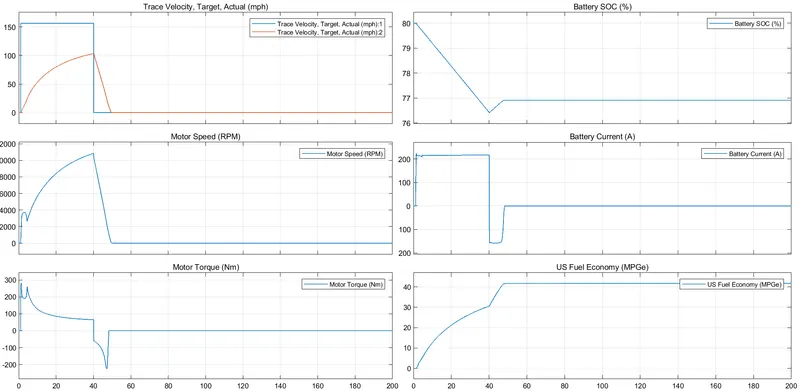
- Electric Vehicle Reference Application
- Drive Cycle = Wide Open Throttle (WOT)
- Grade = 0%
- Wind = 0 m/s
RESULTS:
CASE - 2:
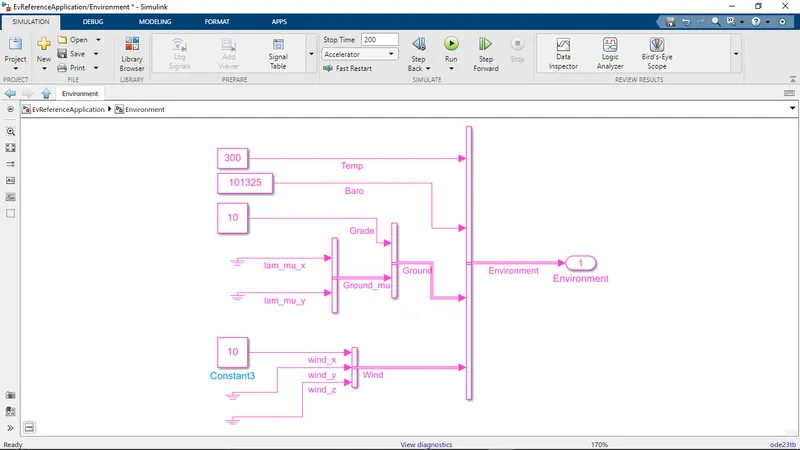
- Electric Vehicle Reference Application
- Drive Cycle = Wide Open Throttle (WOT)
- Grade = 10%
- Wind = 10 m/s
RESULTS:
HEV REFERENCE APPLICATION WITH WOT CYCLE:
- Using the MATLAB help section, we can get information about 'Getting Started with Powertrain Blockset'.
- From the list of reference models, we can select the 'Hybrid Electric Vehicle (HEV) - Multimode' by clicking on the given link 'Explore the Hybrid Electric Vehicle Multimode Reference Application'.
- Inside it we can select the 'autoblkHevStart' link to start the reference model and run the simulation.
CASE - 1:
- HEV reference application
- Drive Cycle = Wide Open Throttle (WOT)
- Grade = 0%
- Wind Velocity = 0 m/s
RESULTS:
CASE - 2:
- HEV reference application
- Drive Cycle = Wide Open Throttle (WOT)
- Grade = 10%
- Wind Velocity = 10 m/s
RESULTS:
CONCLUSION:
- In both the cases of EV and HEV we can see that the top speed is decreased during slope and wind velocity because more power is required to overcome the slope and the wind resistance.
- The current carrying capacity in case of a HEV is more than the EV.
- The recharging of battery during deceleration or regenerative braking is more in HEV as compared to a EV.
- The Fuel economy is greater in case of EV as compared to a HEV.