Week - 4
PART:1-
Aim:- Implement control logic of a “washing machine” using Stateflow in simulink.
Objective:-
Implement control logic of a “washing machine” using Stateflow as per given sequence:
a) If the power supply is available, the system gets activated.
b) If the Water supply is not available, stop the process & indicate through LED.
c) Soaking time should be 200s followed by Washing time of 100s.
d)Then rinsing happens for next 20s & dryer runs for 50s.
After all the processes have completed turn on the finished LED.
Theory:-
Washing machine:
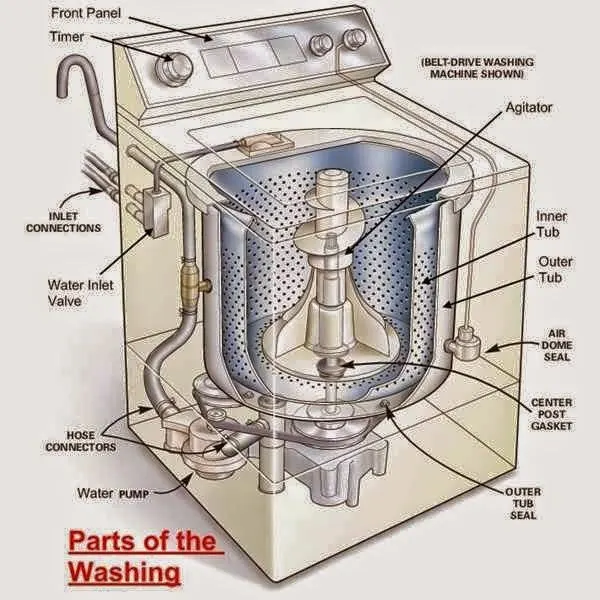
Washing machine is the machine used to wash the various types of clothes without applying any physical efforts. With washing machine you don’t have to rub the clothes with hand or squeeze them to remove the water from them. The washing machine is also called as clothes washer or simply the washer. The washing machine enables you to wash your clothes automatically without having to supervise its operation. All you have to do is put the clothes in the machine and select the wash mode. The washing machine automatically takes in the amount of water and detergent required and it also automatically sets the timer for washing, rinsing and drying as per the selected mode and the amount of clothes.
Model:-
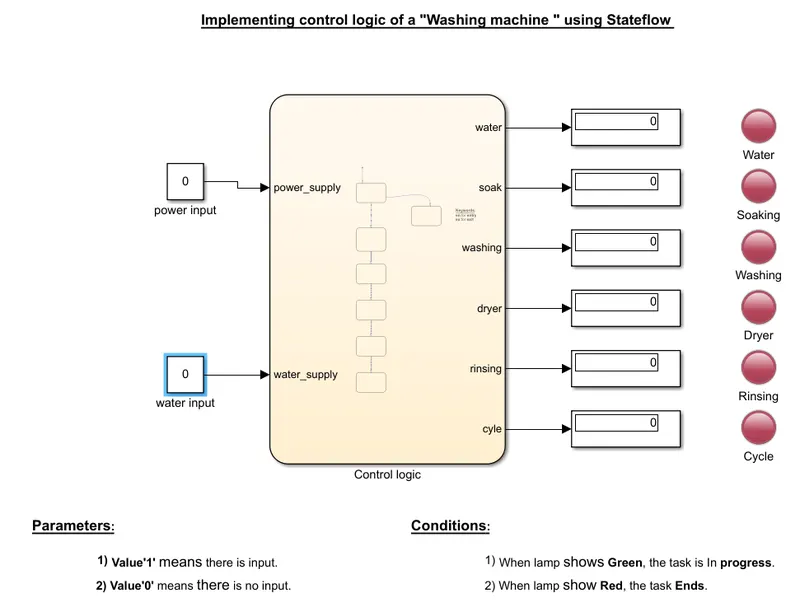
Chart Diagram:-
Parameters:-
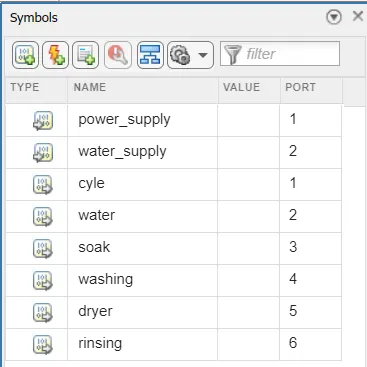
We have given water, soak, washing, rinsing, dryer, cycle, as outputs of the chart.
We have given water_supply & power_supply as inputs of the chart.
Blocks Used:-
1. Constant
2. Stateflow chart
3. State blocks
4. Display
5. Lamp
Explaination of Model:-
* We use constant blocks for give inputs to the model, one as a power_supply and other is a water_supply.
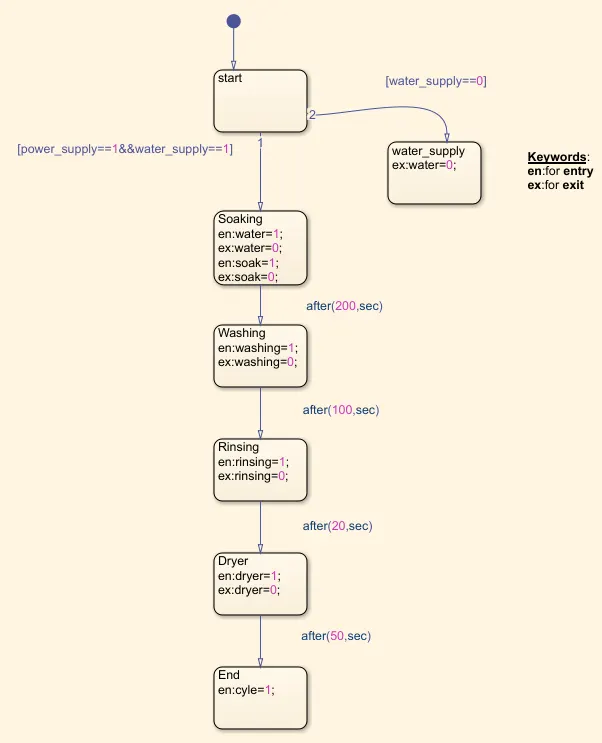
* And after this we take a stateflow chart in simulink interface and connect two inputs and by double clicking this chart a new stateflow window is open, In this window we create our washing machine states which is start , water supply , soaking , washing , rinshing , dryer and end.
* In this we create a chart in which soaking process take 200 seconds and washing process take 100 seconds and rinsing process take 20 seconds and drying process take 50 seconds.
* We take outputs from main chart and connect the display block to all the outputs which indicates the perticular state condition.
and we connect the lamp block to all the outputs which shows state condition as red and green color. red means task is end and green means task is in progress.
* In this simulation run time is 430 for the completion of whole processes.
Output:-
There are two conditions asked to solve in the question.
Condition-1: When water supply is off.
In this model we cut the supply of water and run the program and we get result which is shown in below image.
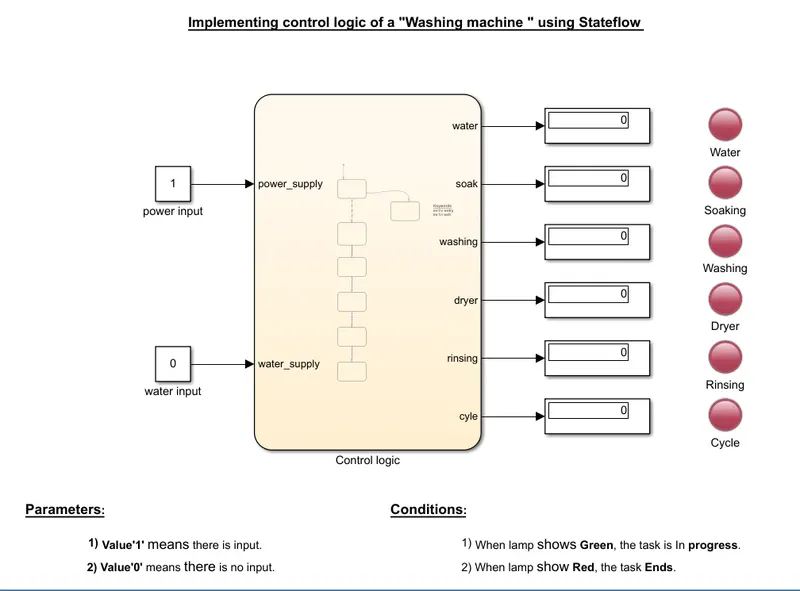
In this condition we can observed that all the indicator lamps are red that means no one process is in progress/done , because of water supply is off.
Condition-2: When water supply is on.
In this model we supply the water and run the program and we get result which is shown in below image.
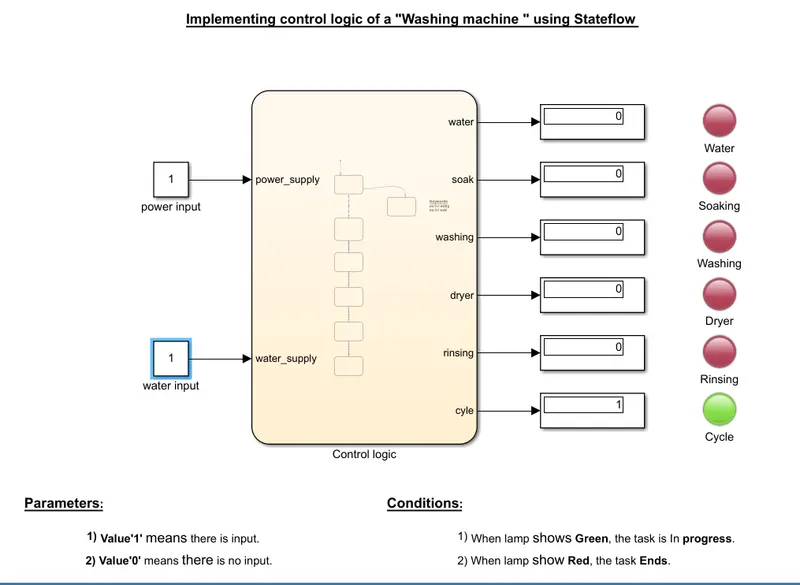
In this condition we can observed that all the 5 indicator lamps are red and 1 indicator lamp is green (process completion indicator) which shows cycle is done and all washing machine process are successfully done.
Conclusion:-
* The simulation of the Washing machine using State flow is done and the result is satisfactory.
PART:2-
Aim:- Make a Simulink chart for the “Gear shift” logic.
Objective:-
Make a Simulink chart for the “Gear shift” logic as per below conditions:
Speed Range(kmph) Gear
0 to 15 1
16 to 25 2
26 to 40 3
41 to 60 4
Above 61 5
Give speed input while the simulation is running & display the gear number.
Model:-
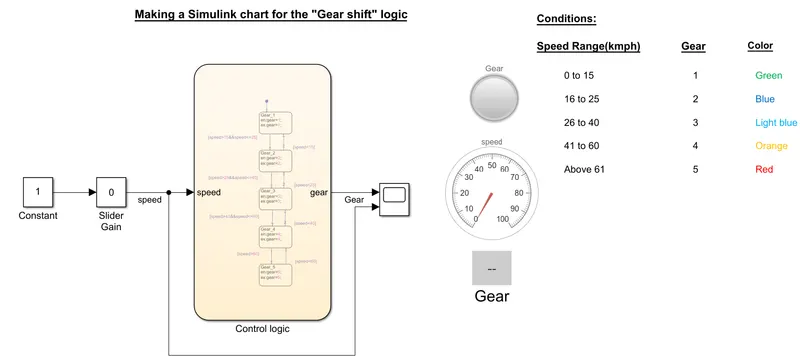
Chart Diagram:-
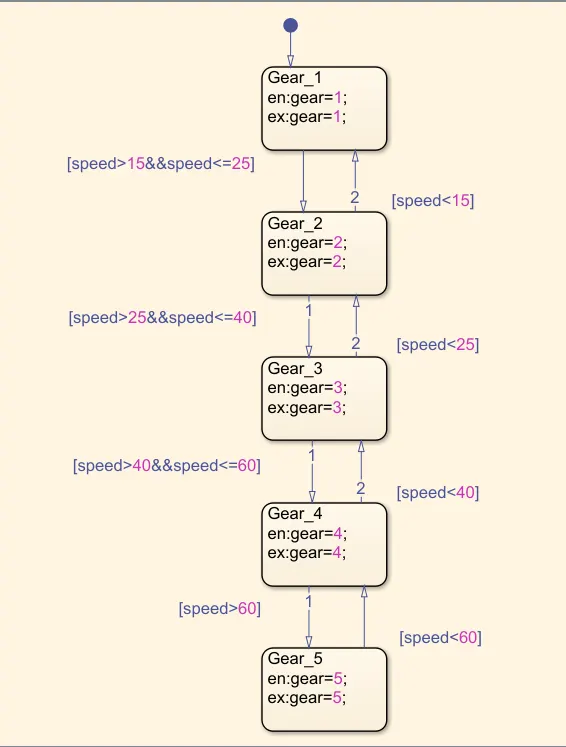
Parameters:-
Here we give Speed as a input for the chart.
and Gear as a output for the chart.
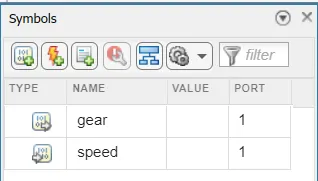
simulation time: here we give time as 'inf' for our simulation , which is run until we stop it.
Block used:-
1. Constant
2. Slider gain
3. Stateflow chart
4. State blocks
5. Scope
6. Lamp
7. Display
8. Gauge
Explanation:-
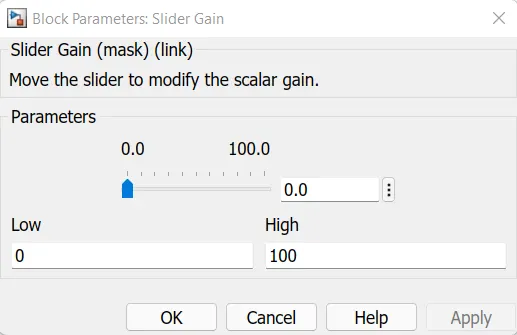
* We use a Constant block to give input to the slider gain block.
* Slider gain block is use to provide input as a speed in the range of 0 - 100 during the execution of simulink model.
* In simulink interface we double click and search the chart and take a stateflow chart. and by double clicking in the stateflow chart we enter in the new stateflow window in which we can create the states according to our gera shifter model.
* We create 1st state and give name as Gear_1 in this state the speed is within 0 - 15.
* We create 2nd state and give name as Gear_2 in this state the speed is within 16 - 25.
* We create 3rd state and give name as Gear_3 in this state the speed is within 26 - 40.
* We create 4th state and give name as Gear_4 in this state the speed is within 41- 60.
* We create 5th state and give name as Gear_5 in this state the speed is above 60kmph.
* And when the speed is decrease the gear also decreases as reverse path is also created in between each state.
* The out of stateflow chart which is 'gear' connect to scope block.
* For showing the gear with reference to speed we use display block which show the number of gear. and for showing the speed we use the Gauge block which works as speedometer. The display block is connected to the gear output and gauge block is connected to slider block.
* Lamp block is used for indicate gear as colors , when lamp glowing green that means 1st gear is engage , blue for 2nd , light blue for 3rd , orange for 4th and red for 5th. each gear have perticular speed range.
Output:-
The output produce is recorded when it's displaying the each gear.
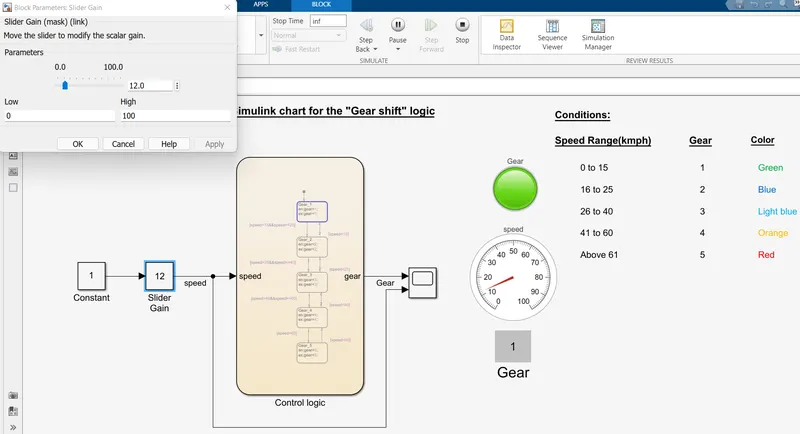
Gear-1:
Speed range: 0 to 15kmph
Input speed: 12kmph
Color: Green
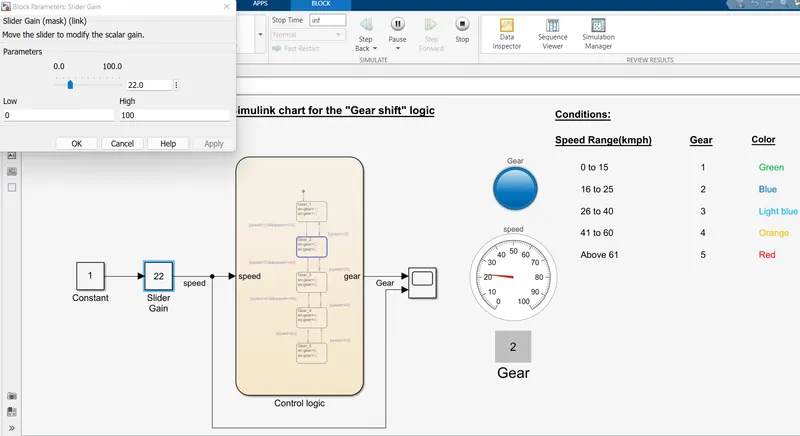
Gear-2:
Speed range: 16 to 25kmph
Input speed: 22kmph
Color: Blue
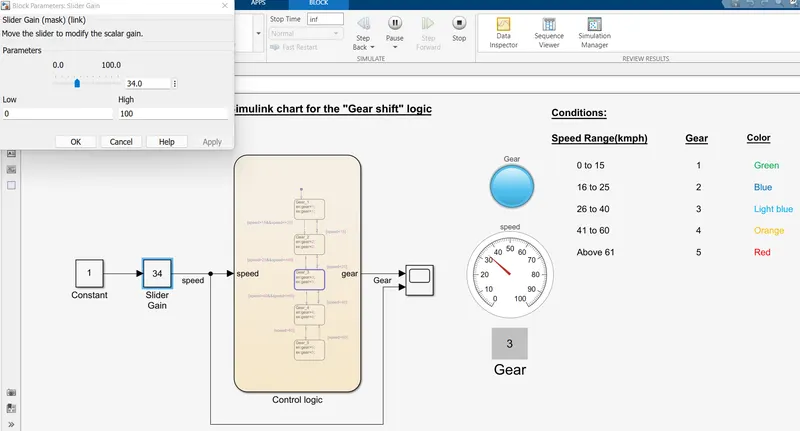
Gear-3:
Speed range: 26 to 40kmph
Input speed: 34kmph
Color: Light blue
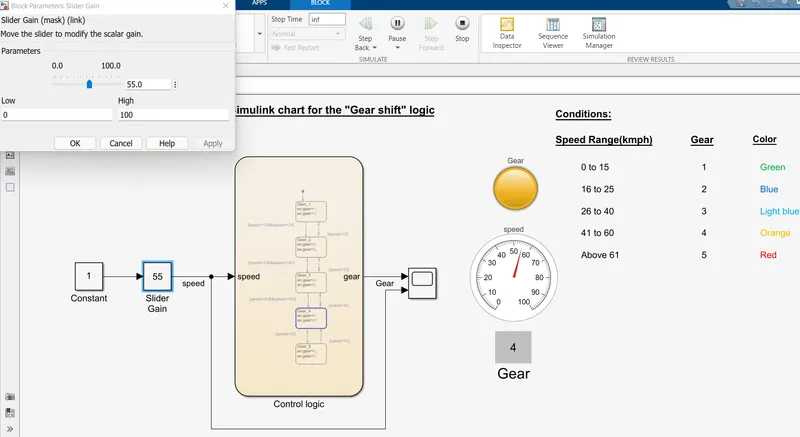
Gear-4:
Speed range: 41 to 60kmph
Input speed: 55kmph
Color: Orange
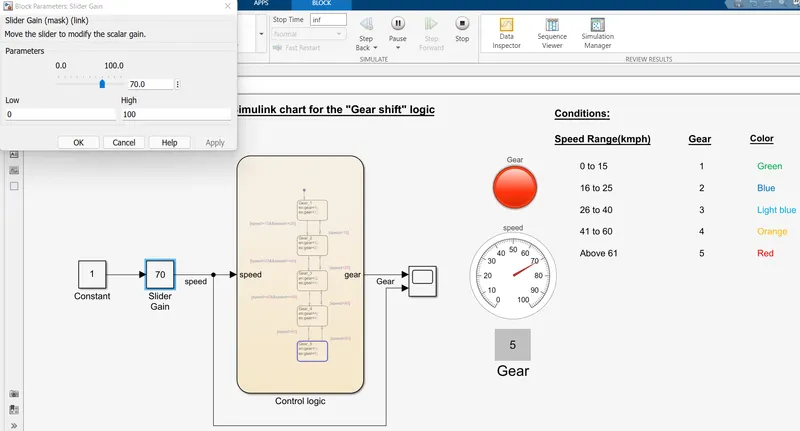
Gear-5:
Speed range: Above 60mph
Input speed: 70kmph
Color: Red
Conclusion:-
* Created a State Flow for Gear Shift using simulink and the results are satisfactory.