Week 2- 2R Robotic Arm Challenge
Aim:- Write a program in Matlab to simulate the forward kinematics of a 2R Robotic Arm.
Objective:-
*Step wise explanation of the code.
*Create an animation file of the plot.
Robotic Arm:-
Robotic arms, also known as articulated robotic arms, are fast, reliable, and accurate and can be programmed to do an infinite number of tasks in a variety of environments. They are used in factories to automate execution of repetitive tasks, such as applying paint to equipment or parts; in warehouses to pick, select, or sort goods from distribution conveyors to fulfill consumer orders; or in a farm field to pick and place ripe fruits onto storage trays.
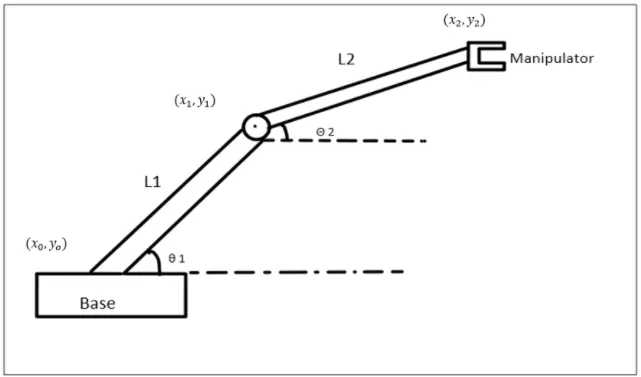
Code:-
% write a program for forward kinematics of 2-R Robotic arm
clear all
close all
clc

% inputs

l1 = 1;                              % Assuming a length of link 1 as 1m
l2 = 0.5;                            % Assuming a length of link 2 as 0.5m
theta1 = linspace(0,90,20);          % Angle of traverse of first link
theta2 = linspace(0,90,20);          % Angle of traverse of second link
ct = 1;

for i = 1:length(theta1)
    THETA1 = theta1(i);
    for j = 1:length(theta2)
        THETA2 = theta2(j);
        x0 = 0;                      % x coordinate of the start point of link 1
        y0 = 0;                      % y coordinate of the start point of link 1

        x1 = l1*cosd(THETA1);        % x coordinate of the end point of link 1
        y1 = l1*sind(THETA1);        % y coordinate of the end point of link 1

        x2 = x1 + l2*cosd(THETA2);   % x coordinate of the end point of link 2
        y2 = y1 + l2*sind(THETA2);   % y coordinate of the end point of link 2

%plotting

       plot([x0 x1],[y0 y1],[x1 x2],[y1 y2],'linewidth',3)
       axis([-0.1 1.7 0 1.9])
       xlabel('x-axis')              % Label the x axis
       ylabel('y-axis')              % Label the y axis
       pause(0.04)                   % Pause time for each frame
       m(ct) = getframe(gcf);        % For creating the animation
       ct = ct+1;                    % Increment of frame

    end
end

movie(m)
Videofile = VideoWriter('forward_kinematics.avi','Uncompressed AVI');
open(Videofile)
writeVideo(Videofile,m)
close(Videofile)
Step-wise explation of the code:-
1.clera all- To clear all variables from current workplace.
2.close all- close all figures whose handles are visible.
3.clc - clc clears all the text from the command window.
4.linspace()- the input value for θ1 and θ2 is determined with a command linspace in this we create a degree of freedom from 0 to 90 with 20 values between the degree of freedon.
5.Then initialize the counter command using ct.
6.To move the robotic arm continuously we are using for loop.
for i = 1:length(theta1)
THETA = theta1(i)
for j = 1:length(theta2)
THETA2 = theta2(j)
The value of 'i' is going to change from 1 to length of θ1 and value of 'j' is going to change from 1 to length of θ2. Here,as the values of 'i' and ;j' changes θ1 and θ2 are taken from original arrays and are assigned to variables 'THETA1' and 'THETA2' which contain only one value and not an array, loop counter variables are used to access particular value. for each value of θ1 i.e each position of link 1,link2 can take multiple position depends on θ2.
7.Then enter the values of co-ordinates ([x0 x1],[y0 y1],[x1 x2],[y1 y2]).
8.Plot():Then plot the values of ([x0 x1],[y0 y1],[x1 x2],[y1 y2]) with the 'linewidth',3.
9.axis():Then axis command is used for fixing axis.
10.xlabel(),Ylabel():Then label the axis.
11.pause():Then use pause command to slow down the output.
12.getframe(gcf):Then we use getframe command to get individual frame and stored in variable m.
13.Then incrementing the counter value by 1.
14.The end command is used to end the for loops, this terminates the set of instructions.
15.movie():Using movie command we can create a movie with the help of individual frame.
16.Using the different individual frames a new uncompressed avi file is created using videofile command .
17.open(videofile):Then we are opening the videofile using the open command and closing the videofile using the close command.
Animation:-
Conclusion:- Thus to simulate and animate the forward kinematics of the 2R robotic arm using MATLAB has been done and with this, we can see the workspace of the manipulator.