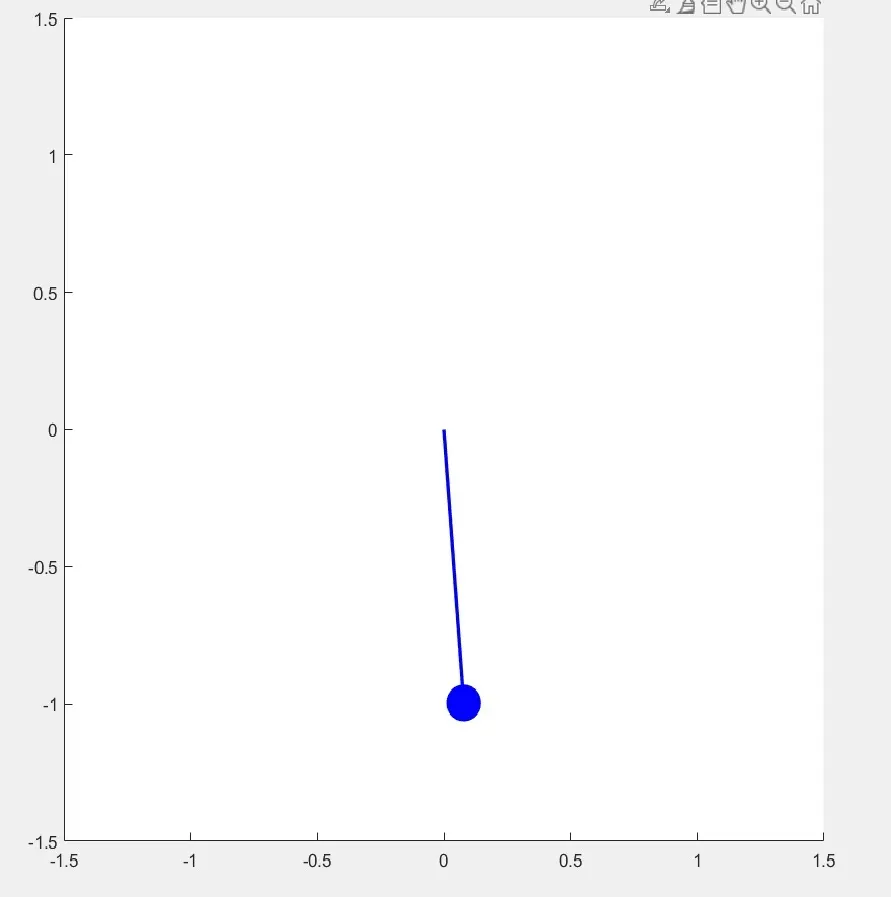
Week 4.1 - Solving second order ODEs
Objective :
Your objective is to write a program that solves the following ODE. This ODE represents the equation of motion of a simple pendulum with damping
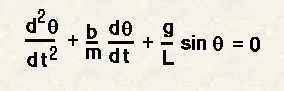
In the above equation,
g = gravity in m/s2,
L = length of the pendulum in m,
m = mass of the ball in kg,
b=damping coefficient.
Write a program in Matlab\Octave that will simulate the pendulum motion, just like the one shown in the start of this challenge.
use,
L=1 metre,
m=1 kg,
b=0.05.
g=9.81 m/s2.
Simulate the motion between 0-20 sec, for angular displacement=0,angular velocity=3 rad/sec at time t=0.
Representation :
What is the second order ODE?
This is a differential equation of second order,in an mat-lab ODE is a Solver,here are hundreds of ODEs that describe key phenomena.
In an engineering ODE is used to describe the transient behavior of system A simple example of this is pendulum the way to move the pendulum is depends on newtons second law when this law has written we got deferential equation .
ODE45 : solves non stiff deferential equation,medium order method,[TOUT,YOUT] = ode45(ODEFUN,TSPAN,Y0) integrator the simple differential equation y’= f(t,y) from time span (1) to time span (end),with initial condition y0.
Each row in the solution array YOUT corresponds to a time in the column vector TOUT
ODE is a function handle for scalar T and vector Y,ODEFUN(T,Y) must return a column vector corresponding to f(t,y).
TSPAN is a two element function [T0,TFINAL]
[TOUT,YOUT] = ode45(ODEFUN,TSPAN,Y0,OPTIONS) specifies integration option values in the fields of a structure
[TOUT,YOUT,TE,YE,IE] = ode45(ODEFUN,TSPAN,Y0,OPTIONS) produces additional outputs for events. An event occurs when a specified function of T and Y is equal to zero
Solution = ode45 returns a solution structure instead of numeric vectors .
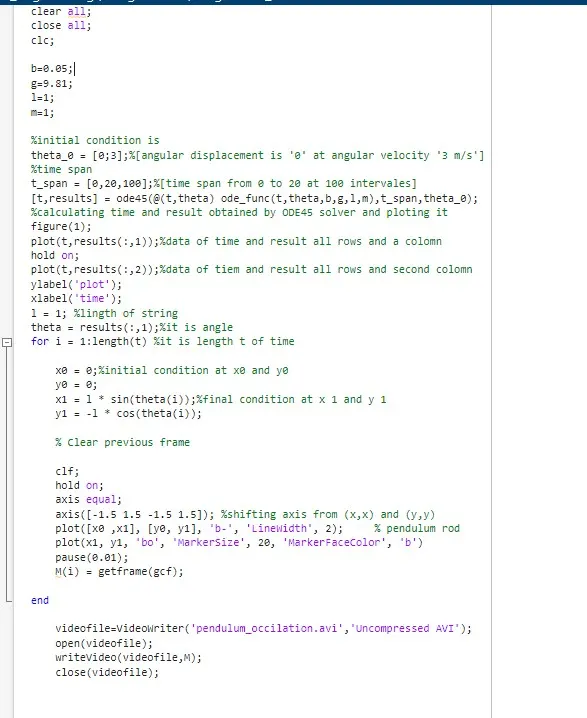
Program for Pendulum :
Step 1: Initial condition is theta_o (0;3) means at start velocity is zero
Step 2: T_span [0,20,100] this is time_span which is from zero to 20 sec. at 100 intervales.
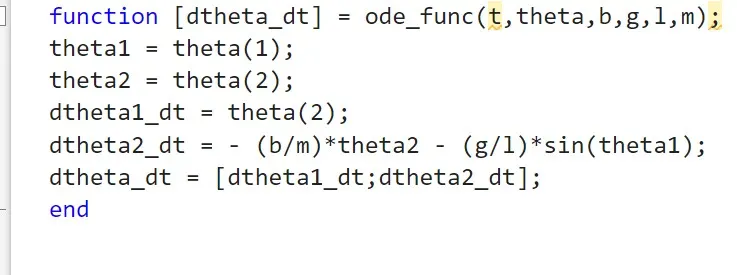
Step 3: then have used ODE45 it is function solver we have second order differential equation which we have split that into two parts one is for acceleration and other half is for displacement .
Step 4: output is [dtheta_dt] and input function is ode_function(t,theta,b,g,l,m,)
Step 5: theta1 and theta2 are variable and theta(1) and theta(2)
Step 6: dtheta1_dt = theta(1) and dtheta2_dt = - (b/m)* theta(2) - (g/l)*sin(theta1)
To the main function >>>>
Step 7: [t,results] = ode45(@(t,theta) ode_fun(t,theta,b,g,l,m),t_span,theta_0)
At particuler time it is display results for pendulum .
Step 8: now we are plotting it time and results of all the rows and first column ,hold it on ,then plot for (t,result(:,2)) time and result and all the rows and second column.
Step 9: Now we are setting parameters are as length of string is 1 meter,thete(:,1) all the rows and first column .
Step 10: Now creating for loop for this i = 1:length (t);
Step 11: then we have set it for x =0 and y = 0 and X1 = 1*sin(theta(i)) and Y1 = 1*cos(theta(i));clf we have used clear previous frame .
By shfting axis to - 1.5 to 1.5 -1.5 1.5 Now plot [x0 x1] [y0 y1]
Step 12: plot [x1,y1,’bo,’markersize’,20,’markerfacecolor’,’b’] …here bo is for blue circle and then we can define maker size as we wants then marker face color for blue.
Step 13: have taken pause for 0.01 second ,M(i) = getframe(gcf)
Lastly we have done movie clip for it .
Main program screen shot :
Movie clip creation :
M(i) = getframe(gcf) This is used to capture current figure window and store the frame in the array M at index (i)
Videowriter creates a new video file called pendulum_occlation.avi
Uncompressed.avi stores raw video large size and high quality
Open : to open the video file for writing
WriteVideo : write the array of frame into the video .
Close : finalize and close the vidio file .
function ODE45 :
we have created a small program related to pendulum motion according to angle we are not using ode45 function here to solve equation .
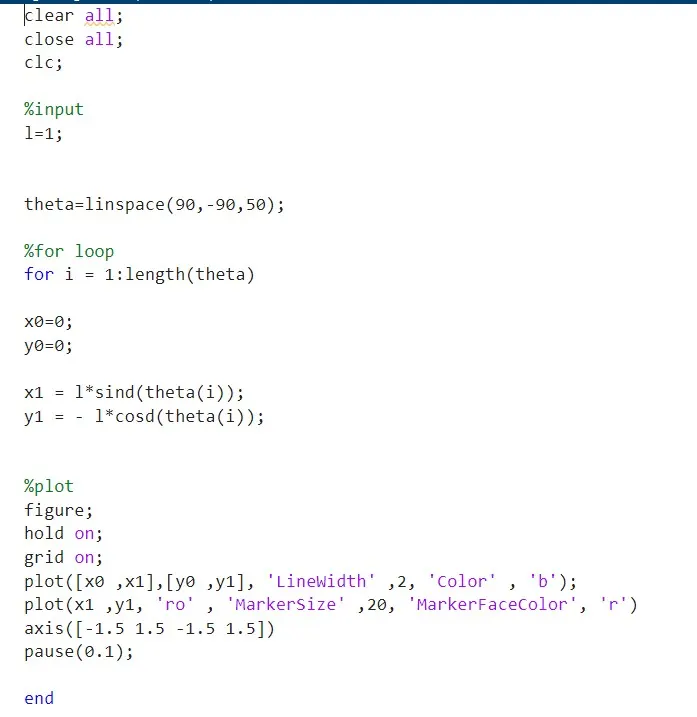
explanation:
Input given is l = 1;
Have set value for theta from 90 to -90 at 50 interval's
Creatign for loop for it
i = starts from 1 to length of theta
Initially it is at x =0 and y =0
To next position : x1 = l*sind(theta(i)) and y1 = - l*cosd(theta(i))
Means for each value of ‘i’ it is changing form 90 to - 90 and it is in foruth quadrant
Now plotting string at x0 x1 and y0 y1 with linwidth 2 and color blue
At x1 y1 positing we are creating a circular ball of color red so used ‘ro’ command and Markersize for define size for marker as 20 then markerfacecolor as red .
Next we have shifted of axis by x = -1.5 to 1.5 and y = -1.5 1.5 ie is (x,x) and (y,y)
We have taken paused of (0.1) sec.
And end the program