Week 4.1 - Solving second order ODEs
FUNCTION:
function [dy] = myODE_simple_pendulum(t,y,b,g,m,L)

dy = zeros(2,1); % creating the matrix

%Converting second order ODE into first order ODE
dy(1) = y(2); %y' = y2
dy(2) = ((-b/m)*y(2)) - ((g/L)*(sin(y(1)))); % y" = y2'

end
CODE:
clear all
close all
clc

t = [0,20]; %Simulation time
y0 =[0, 3]; %Intial conditions

b = 0.05; %Constants
g = 9.81;
m = 1;
L = 1;

[t, y] = ode45(@(t,y) myODE_simple_pendulum(t,y,b,g,m,L),t,y0); % ODE solver

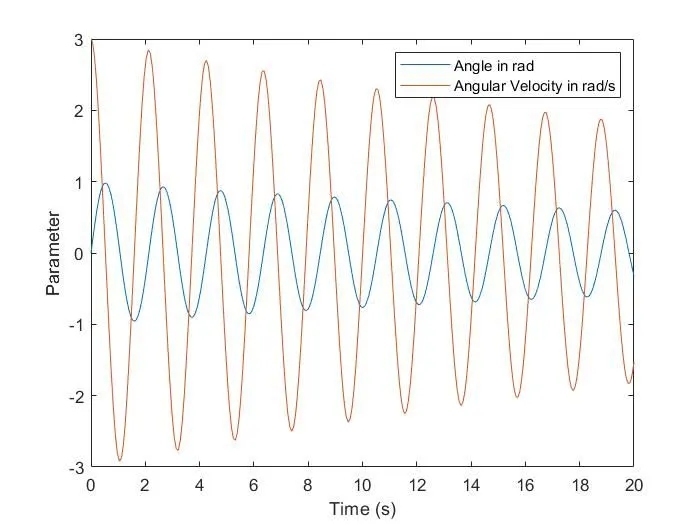
plot(t,y(:,1),t,y(:,2)) %Ploting the graph between Angle, Angular velocity and time
xlabel('Time (s)')
ylabel('Parameter')
legend('Angle in rad','Angular Velocity in rad/s')

%Animation of the simple pendulum
ct =1;
for i = 1:length(y(:,1)) %Loop for ploting the simulation
    x0 = 0; %Fixed point
    y0 = 0;
    x1 = L * sin(y(i,1)); %End point of the pendulum
    y1 = -L * cos(y(i,1));
    x2(i) = x1;
    y2(i) = y1;
    figure(2)
    plot([-0.75,0.75],[0,0], 'linewidth',8,'color','k')
    axis([-1.5 1.5 -1.5 0.5])
    hold on
    line([x0 x1],[y0 y1],'linewidth',3,'color','r')
    plot(x1,y1,'o','markersize',25,'markerfacecolor','y')
    plot([0 0],[0 -1],'--')
    plot(x2,y2)
    hold off
    M(ct) = getframe(gcf); %Capture Current figure using getframe command
    ct = ct+1; %Loop counter
end

movie(M);
videofile = VideoWriter('Simple_Pendulum_motion.avi','Uncompressed AVI');
open(videofile);
writeVideo(videofile,M)
close(videofile)
Initially, The second order ode has to be converted to a first order ode then a function is created and the output is 'dy' array. Then by using 'ode45' function calculating the y co ordinates of the function given
Then the plot is made at every instance and created a video with video writer function
RESULT:
VIDEO:
https://youtu.be/qWM3u9NowYA