Week 4.1 - Solving second order ODEs
Aim
To solves the ODE which represents the equation of motion of a simple pendulum with damping.
Objective
To write a program that solves the following ODE which represents the equation of motion of a simple pendulum with damping and create an animated video of output obtains by solving this ODE.
A simple pendulum consists of a ball (point-mass) m hanging from a (massless) string of length L and fixed at a pivot point P. When displaced to an initial angle and released, the pendulum will swing back and forth with periodic motion. By applying Newton's secont law for rotational systems, the equation of motion for the pendulum may be obtainedτ=Iα⇒−mgsinθL=mL2d2θdt2τ=Iα⇒−mgsinθL=mL2d2θdt2and rearranged asd2θdt2+gLsinθ=0d2θdt2+gLsinθ=0If the amplitude of angular displacement is small enough, so the small angle approximation ($\sin\theta\approx\theta$) holds true, then the equation of motion reduces to the equation of simple harmonic motiond2θdt2+gLθ=0
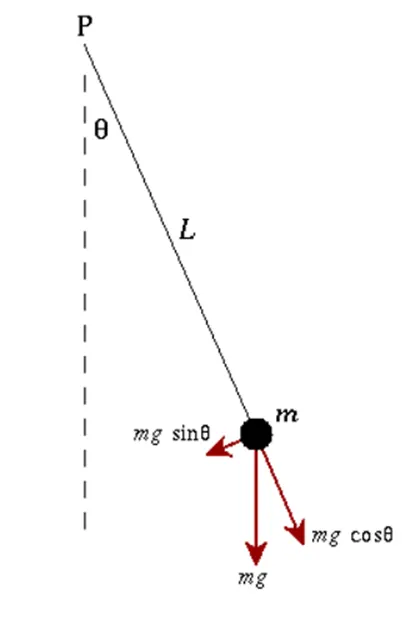
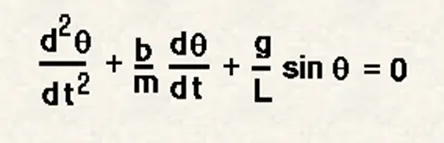
In the above equation,
g = gravity in m/s^2.
L = length of the pendulum in the meter.
m = mass of the ball in kg.
b = damping coefficient.
Inputs
L=1 metre
m=1 kg
b=0.05
g=9.81 m/s^2
Time span= 0-20 sec
angular displacement=0
angular velocity=3 rad/sec2 at time t=0
clear all
close all
clc
%inputs
b = 0.05;
g = 9.81;
l = 1;
m = 1;
% initial condition
theta_0 = [0;3];
% time points
t_span = linspace(0,20,500);
% solve ODE
[t, results] = ode45(@(t,theta) ode_func(t,theta,b,g,l,m),t_span, theta_0);
% ploting
plot(t,results(:,1))
hold on
plot(t,results(:,2))
ylabel('time in sec')
xlabel(angular velocity(rad/s)/displacement(rad))
legend('displacement','angular velocity')
% Iteration using for loop to create animation of simple pendulum
ct=1;
theta_1 = results(:,1);
for i= 1:length(results(:,1))
% initial co-ordinates
x_start= 0;
y_start= 0;
theta_2 = theta_1(i);
% final co-ordinates
x_end = 1*sin(theta_2);
y_end = -1*cos(theta_2);
% ploting for animation
figure(2)
% base of pendulum
plot([-1,1],[0,0], 'linewidth',4,'color','black')
hold on
% string of pendulum
line([x_start x_end],[y_start y_end],'linewidth',6,'color','b')
hold on
% bob of pendulum
plot(x_end,y_end,'marker','o','markersize', 28,'markerfacecolor','r')
axis([-2 2 -2 2])
pause(0.03)
hold off
M(ct)=getframe(gcf);
ct=ct+1;
end
% creating movie from captured frames
movie(M)
videofile = VideoWriter('simple_pendulum.avi','uncompressed AVI');
open(videofile);
writeVideo(videofile,M);
close(videofile);
%ODE function for the program
function [dtheta_dt] = ode_func(t,theta,b,g,l,m)
theta1 = theta(1)
theta2 = theta(2)
dtheta1_dt = theta2;
dtheta2_dt = -(b/m)*theta2 - (g/l)*sin(theta1);
dtheta_dt = [dtheta1_dt; dtheta2_dt];
end
Code Explanation
- 1. Clear all, close all, clc are used to clear the work space, to clear the graphs that’s exists, and clear the command window.
- 2 Input values for simple pendulum are specified
- 3 t_span is a command used in the ode45 solver which specifies the time span of the iterations that are going to solve the ordinary differential equation.
- 4 Simple ODEs that have a single solution component can be specified as an anonymous function in the call to the solver. The anonymous function must accept two inputs
(t,y) 5 Plotting the values for the angular velocity and the displacement by using plot command.6The label command is used to label the X & Y axis.- 7 Legend command is used to label the angular velocity and the displacement.
- 8 To animate the motion of simple pendulum, a for loop is used to create the specified set of points to keep the bob at different locations.
- 9 x0 and y0 be the fixed point at one end of the string and x1 and y1 be the different position of the bob
- 10 At each and every point of the bob the ‘ct’ command which is used to count each and every position and stores the data.
- At the end of the for loop there will be set of positions for each and every point.
- Movie(M) is used to create a film of the stored data of the motion of the pendulum.
- videoWriter command specifies the name of the file and type of data is stored in it.
- Open command is used to open the file where the video is going to store.
- Writevideo command is used to create the video animation by using M file.
- Close command is used to close the video file.
Output
- A plot is drawn between the angular acceleration and displacement of the motion of simple pendulum.
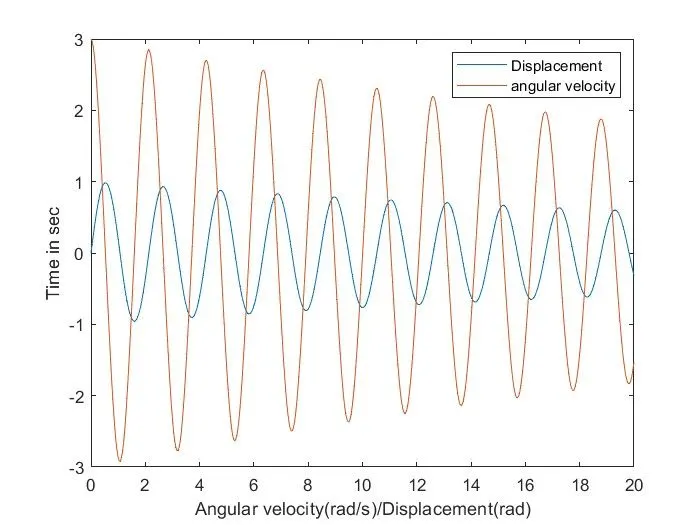
- The blue curve is the displacement where it starts from zero. And the angular velocity is starting at 3 (rad/sec).
- At the end of the t_span both the displacement and angular velocity becomes zero and motion of simple pendulum becomes zero which becomes rest.
Errors faced while programming Matlab
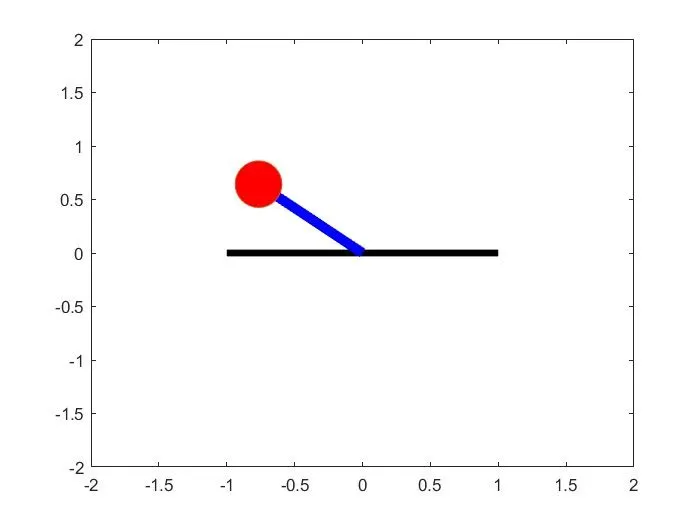
The Oscillation of a simple pendulum is oscillating in reverse direction
Steps to overcome this error
1 It has been observed the code that the while defining the final co ordinates for the Y co ordinate we have to use
following code