Week 4.1 - Genetic Algorithm
GENETIC ALGORITHM
AIM : The objective is to create a MATLAB program presenting the optimisation for a given function by using genetic algorithm process.
Genetic Algorithm
A genetic algorithm (GA) is a method for solving both constrained and unconstrained optimization problems based on a natural selection process that mimics biological evolution. The algorithm repeatedly modifies a population of individual solutions. It is requently used to find optimal or near-optimal solutions.
It is majorly applied in fields such as economics, multimodal optimization, aircraft design, and DNA analysis.
The workflow can be easily understood from the below given flowchart
- Initial Population : The process begins with a set of individuals which is called a Population. Each individual is a solution to the problem you want to solve.
- Fitness Function : The fitness function determines how fit an individual is (the ability of an individual to compete with other individuals). It gives a fitness score to each individual. The probability that an individual will be selected for reproduction is based on its fitness score.
- Selection : The idea of selection phase is to select the fittest individuals and let them pass their genes to the next generation.
- Crossover : Crossover is the most significant phase in a genetic algorithm. For each pair of parents to be mated, a crossover point is chosen at random from within the genes.
- Mutation : In certain new offspring formed, some of their genes can be subjected to a mutation with a low random probability. Mutation occurs to maintain diversity within the population and prevent premature convergence.
- Termination : The algorithm terminates if the population has converged (does not produce offspring which are significantly different from the previous generation). Then it is said that the genetic algorithm has provided a set of solutions to our problem.
The syntax for genetic algorithm in MATLAB is given by
ga(fun,nvars,Aineq,bineq,Aeq,beq,lb,ub,nonlcon,intcn)
where,
- fun - Objective function
- nvars - Number of variables
- A - Linear inequality constraints
- b - Linear inequality constraints
- Aeq - Linear equality constraints
- beq - Linear equality constraints
- lb - Lower bounds
- ub - Upper bounds
- nonlcon - non-linear constraint
- intcon - integer value
Function Code
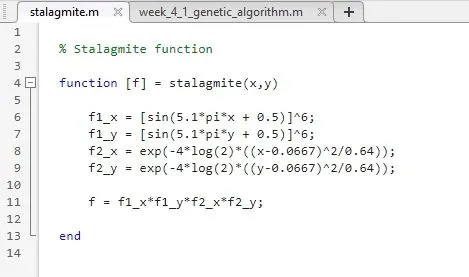
Write the stalagmite function as given.
% Stalagmite function

function [f] = stalagmite(input_vector)

    x = input_vector(1);
    y = input_vector(2);
    f1_x = [sin(5.1*pi*x + 0.5)]^6;
    f1_y = [sin(5.1*pi*y + 0.5)]^6;
    f2_x = exp(-4*log(2)*((x-0.0667)^2/0.64));
    f2_y = exp(-4*log(2)*((y-0.0667)^2/0.64));

    f = -(f1_x*f1_y*f2_x*f2_y);

end
Main code
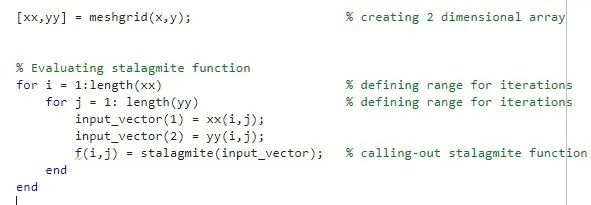
- Start with two -dimenional arrays as we have two variables and then create a 2-dimensional array out of it by using 'meshgrid' command
- Define the ranges for iterations and call-out the stalagmite function for its evaluation
- Now, check the optimisation process for 3 cases : unbounded, bounded with limits and bounded with increased numbers of iterations
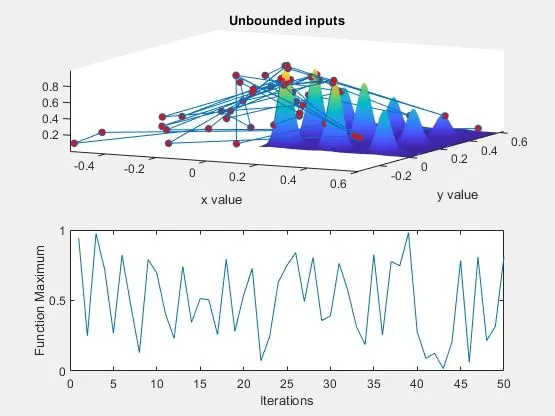
- For case 1, write ga code for unbounded limits
- Provide tic-toc code to calculate the time it will use
- Plot two sub-plots, where one will show the surface generation and the resultant points in 3-d and another one shows the function maxima values against the number of iterations. But, in this case the program does not know the limit and goes beyond the certain limit
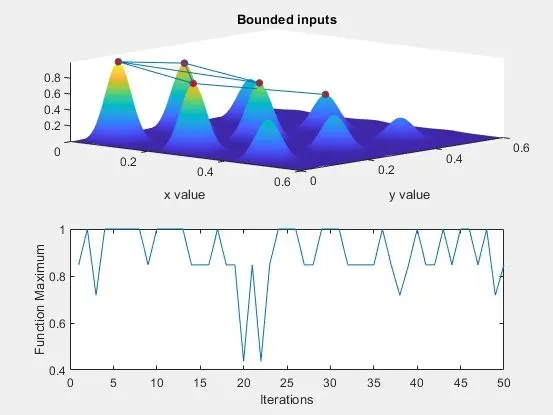
- For case 2, provide the upper and lower limits and write the same code. This will bound the program to chack within the limit as shown in figure
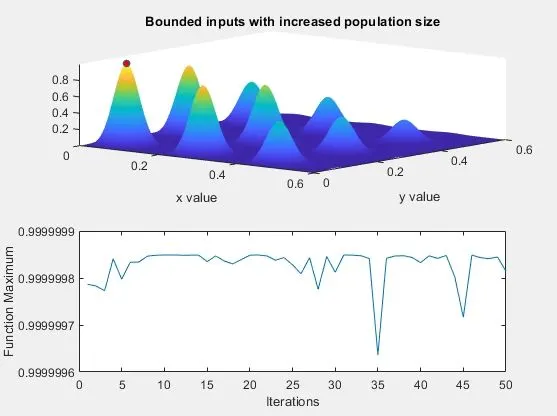
- For case 3, provide 'options' and increase the population size by using 'optimoptions' command. This will increase the number of iterations and give the best optimal solution
% Program to optimize the stalagmite function

clc, clear, close all


% Inputs
x = linspace(0,0.6,100);                       % 1 dimensional array
y = linspace(0,0.6,100);                       % 1 dimensional array
num_cases = 50;

[xx,yy] = meshgrid(x,y);                     % creating 2 dimensional array


% Evaluating stalagmite function
for i = 1:length(xx)                         % defining range for iterations
    for j = 1: length(yy)                    % defining range for iterations
        input_vector(1) = xx(i,j);
        input_vector(2) = yy(i,j);
        f(i,j) = stalagmite(input_vector);   % calling-out stalagmite function
    end
end


% Case 1 - Unbounded statistical behaviour
tic
for i = 1:num_cases
    [inputs,fopt(i)] = ga(@stalagmite,2);
    xopt(i) = inputs(1);
    yopt(i) = inputs(2);
end
study_time_1 = toc;

% Plotting
figure(1)
subplot(2,1,1);
hold on
surfc(xx,yy,-f)
xlabel 'x value'
ylabel 'y value'
shading interp
hold on
plot3(xopt,yopt,-fopt,'marker','o','markersize',5,'markerfacecolor','r')
title 'Unbounded inputs'
subplot(2,1,2);
plot(-fopt)
xlabel 'Iterations'
ylabel 'Function Maximum'


% Case 2 - Bounded statistical behaviour
tic
for i = 1:num_cases
    [inputs,fopt(i)] = ga(@stalagmite,2,[],[],[],[],[0,0],[1,1]);
    xopt(i) = inputs(1);
    yopt(i) = inputs(2);
end
study_time_2 = toc;

% Plotting
figure(2)
subplot(2,1,1);
hold on
surfc(xx,yy,-f)
xlabel 'x value'
ylabel 'y value'
shading interp
hold on
plot3(xopt,yopt,-fopt,'marker','o','markersize',5,'markerfacecolor','r')
title 'Bounded inputs'
subplot(2,1,2);
plot(-fopt)
xlabel 'Iterations'
ylabel 'Function Maximum'


% Case 3 - Increasing the number of itertions
options = optimoptions('ga');
options = optimoptions(options,'PopulationSize',200);
tic
for i = 1:num_cases
    [inputs,fopt(i)] = ga(@stalagmite,2,[],[],[],[],[0,0],[1,1],[],[],options);
    xopt(i) = inputs(1);
    yopt(i) = inputs(2);
end
study_time_3 = toc;

% Plotting
figure(3)
subplot(2,1,1);
hold on
surfc(xx,yy,-f)
xlabel 'x value'
ylabel 'y value'
shading interp
hold on
plot3(xopt,yopt,-fopt,'marker','o','markersize',5,'markerfacecolor','r')
title 'Bounded inputs with increased population size'
subplot(2,1,2);
plot(-fopt)
xlabel 'Iterations'
ylabel 'Function Maximum'
PLOTS
CASE 1
CASE 2
CASE 3
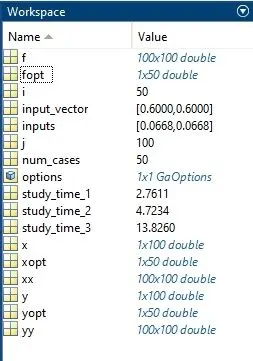
Workspace results
Error occured : Stalagmite function was created with input variables as x and y. But, later on while writing the main code, use of differet variables arose and on running the program, it was showing the error. So had to change the variable set in function and the error was resolved.