Week 4.1 - Genetic Algorithm
In this challenge, I am optimizing the stalagmite function and finding the global maxima of the function:
- Giving the inputs for x and y as an array. Then creating a 2Dimensional mesh of the inputs.
- Next, I am generating the stalagmite function.
- Then, I am going to run the genetic algorithm 50 times.
- Study1 is just calling the ga with 2 variables. Then save the x and y values and calculate the value the function predicts.
- Then I used the subplot command and plotted the surfc(x,y,f) and plot3(xopt,yopt,fopt,' marker,' 'o', 'markersize',5,'markerfacecolor', 'r') in the same figure and then I have plotted the plot(fopt).
- Then labeled the x and y-axis and then marked the title for the figure.
- Then to measure the time to complete the process, I have added the tic and toc commands.
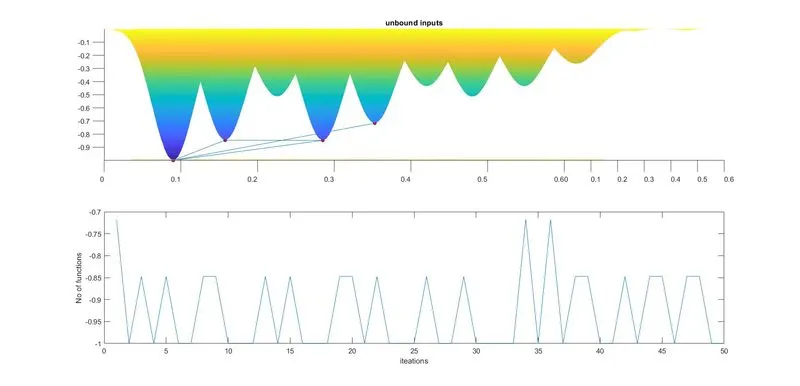
- Study 2 is the Statistical Behaviour with upper and lower bounds. In calling out the ga, I have added the upper and lower bounds.
- Then I used the subplot command and plotted the surfc(x,y,f) and plot3(xopt,yopt,fopt,' marker,' 'o', 'markersize',5,'markerfacecolor', 'r') in the same figure and then I have plotted the plot(fopt).
- Then labeled the x and y-axis and then marked the title for the figure.
- Then to measure the time to complete the process, I have added the tic and toc commands.
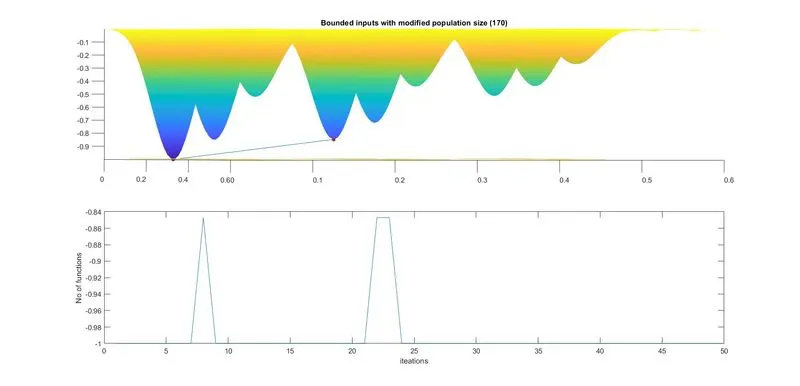
- In Study 3, I have added the population size of 170 into the ga function as a command called option.
- Then I used the subplot command and plotted the surfc(x,y,f) and plot3(xopt,yopt,fopt,' marker,' 'o', 'markersize',5,'markerfacecolor', 'r') in the same figure and then I have plotted the plot(fopt).
- Then labeled the x and y-axis and then marked the title for the figure.
- Then to measure the time to complete the process, I have added the tic and toc commands.
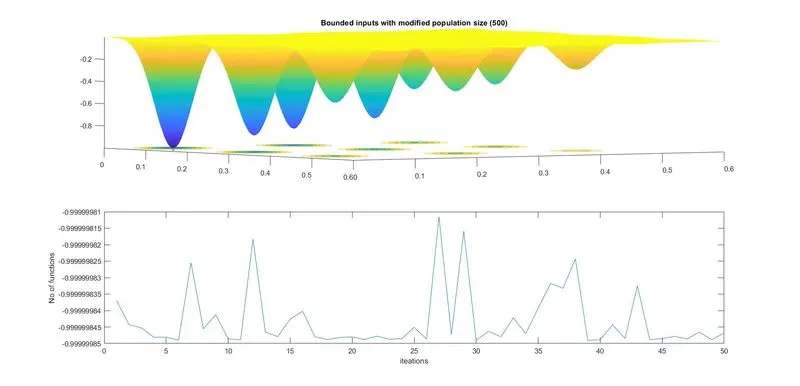
- In Study 4, I have added the population size of 500 into the ga function as a command called option.
- Then I used the subplot command and plotted the surfc(x,y,f) and plot3(xopt,yopt,fopt,' marker,' 'o', 'markersize',5,'markerfacecolor', 'r') in the same figure and then I have plotted the plot(fopt).
- Then labeled the x and y-axis and then marked the title for the figure.
- Then to measure the time to complete the process, I have added the tic and toc commands.
clear all
close all
clc

%inputs
x = linspace(0,0.6,150);
y = linspace(0,0.6,150);
[xx, yy] = meshgrid(x,y);
for i = 1:length(xx)
    for j = 1:length(yy)
        vector(1) = xx(i,j);
        vector(2) = yy(i,j);
        f(i,j)= stalagmite(vector);
    end
end
num_case = 50;

tic
%study_1 - Satistical behaviour
for i = 1:num_case
    [inputs, fopt(i)] = ga(@stalagmite, 2);
    xopt(i) = inputs(1);
    yopt(i) = inputs(2);
end
study1_time = toc

figure(1)
subplot(2,1,1)
hold on
surfc(x,y,f)
shading interp
plot3(xopt,yopt,fopt,'marker','o','markersize',5,'markerfacecolor','r')
title('unbound inputs')
subplot(2,1,2)
plot(fopt)
xlabel('iteations')
ylabel('No of functions')

tic
%Study_2- Statistical Behaviour - with upper and lower bounds
for i = 1:num_case
    [inputs, fopt(i)] = ga(@stalagmite,2,[],[],[],[],[0;0],[1;1]);
     xopt(i) = inputs(1);
     yopt(i) = inputs(2);
end
study2_time = toc

figure(2)
subplot(2,1,1)
hold on
surfc(x,y,f)
shading interp
plot3(xopt,yopt,fopt,'marker','o','markersize',5,'markerfacecolor','r')
title('Bounded inputs')
subplot(2,1,2)
plot(fopt)
xlabel('iteations')
ylabel('No of functions')

tic
%Study_3 Increasing GA Iterations by 170
options = optimoptions('ga')
options = optimoptions(options, 'populationsize', 170);

for i = 1:num_case
    [inputs, fopt(i)] = ga(@stalagmite,2,[],[],[],[],[0;0],[1;1],[],[], options);
     xopt(i) = inputs(1);
     yopt(i) = inputs(2);
end
study3_time = toc

figure(3)
subplot(2,1,1)
hold on
surfc(x,y,f)
shading interp
plot3(xopt,yopt,fopt,'marker','o','markersize',5,'markerfacecolor','r')
title('Bounded inputs with modified population size (170)')
subplot(2,1,2)
plot(fopt)
xlabel('iteations')
ylabel('No of functions')

tic
%Study_4 Increasing GA Iterations by 500
options = optimoptions('ga')
options = optimoptions(options, 'populationsize', 500);

for i = 1:num_case
    [inputs, fopt(i)] = ga(@stalagmite,2,[],[],[],[],[0;0],[1;1],[],[], options);
     xopt(i) = inputs(1);
     yopt(i) = inputs(2);
end
study4_time = toc

figure(4)
subplot(2,1,1)
hold on
surfc(x,y,f)
shading interp
plot3(xopt,yopt,fopt,'marker','o','markersize',5,'markerfacecolor','r')
title('Bounded inputs with modified population size (500)')
subplot(2,1,2)
plot(fopt)
xlabel('iteations')
ylabel('No of functions') 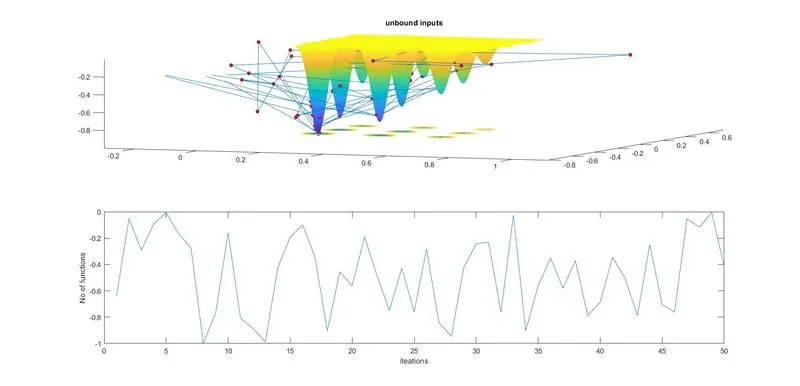
Genetic Algorithm:
A genetic algorithm (GA) is a solution for optimizing non-linear or non-differentiable problems. It is used to find the global minimum from an optimizing problem using the concepts from biology. Generates a population of points at each iteration. The best point in the population approaches an optimal solution. We can apply the genetic algorithm to take care of issues that are not appropriate for standard enhancement calculations, remembering issues for which the actual capacity is broken, nondifferentiable, stochastic, or profoundly nonlinear. The algorithm creates crossover children by combining pairs of parents in the current population. At each coordinate of the child vector, the default crossover function randomly selects an entry, or gene, at the same coordinate from one of the two parents and assigns it to the child. When there are integer constraints, (ga) does not accept nonlinear equality constraints, only nonlinear inequality constraints.
Syntax for GA:
f = ga(fun, nvars, A, B, [], [], lb, ub, nonlcon, Intcon, options)
fun - fitness function
nvars - number of variables
lb - lower bound
ub - upper bound
options - used to set the popolutaion size
References: