Week 3 - Solving second order ODEs
AIM: To create a program to stimulate the simple pendulum motion in matlab.
PROCEDURE:
- Starting a program in MATLAB with the following commands :
- clear all - To clear all datas stored in workspace.
- close all - To close previous figures and plots.
- clc - To clear the command window.
- Enter the given variables and assume length of pendulum=1m, mass of bob=0.5kg.
- For angle and angular velocity, use concatenation function to form array.
- Use linspace command to initiate span time.
- Enter the second order ODE derivative using function command in separate file.
- Function command declares multiple input arguments and write the derivatives of second order ODE function.
- Enter the input arguments as theta1 and theta2.
- Now use the function command's argumnent (dt and dtheta).
- Using'ode45' command is solver determined in matlab to solve ordinary differential equation.
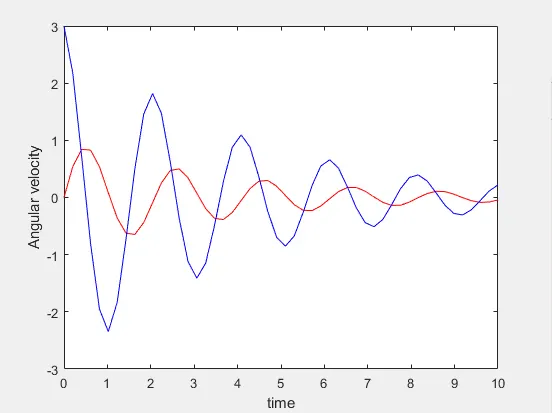
- Using 'plot' command, we can derive the time and angular velocity graph for simple pendulum.
- Also we can type required 'linewidth','marker','markersize','markerfacecolor', using respective commands.
- Then name the x-axis as time using 'xlabel' command and y-axis as angular velocity using 'ylabel' command.
- To retain and reset to defaults the current plot and some axes properties 'hold on' command is used.
- To generate animation, determine initil value as base.
- counter-loop operator 'ct' is initiated.
- Hence the end value can be determined by for-loop function.
- For-loop is a controlled form of repetition structure for specified number of times.
- Plot the arguments in graph array structure by using concatenation operator '[]'.
- Determine the axis for the graph.
- Plot the bob using marker command.
- using 'set' command, to specifies multiple property values in cell array.
- 'gca' command, get in current axes command to return the current axes.
- 'pause' command used to specify the speed of animation.
- Use 'getframe' command, to capture the frames and generate the animation.
- Use counter increment function to get next frames.
- create animation using 'movie' command and write it using videowriter file as AVI file.
- Then open it and close it using respective commands.
CODE:
function [dtheta_dt]=ode_func(t,theta,b,g,l,m)
theta1=theta(1)
theta2=theta(2)
dtheta1_dt=theta2;
dtheta2_dt=-(b/m)*theta2-(g/l)*sin(theta1);
dtheta_dt=[dtheta1_dt;dtheta2_dt];
end
clear all
close all
clc
% A program to solve 2nd order of ODE
% inputs
b=0.05; % damping coefficient
g=9.81; % acceleration due to gravity (m/s^2)
l=1; % length of pendulum (m)
m=0.1; % mass of bob (kg)
% initial conditions
theta_0=[0;3]; % angle and angular velocity (s^-1)
%time points
t_span=linspace(0,10,50);
%solve ODE
[t,results]=ode45(@(t,theta) ode_func(t,theta,b,g,l,m),t_span,theta_0);
% plotting
plot(t,results(:,1),'color','r')
hold on
plot(t,results(:,2),'color','b')
xlabel('time')
ylabel('Angular velocity')
%plotting the pendululm
figure
x_base=0;
y_base=0;
ct=1;
for i=1:length(t_span)
x_end= l*sin(results(i,1));
y_end= -l*cos(results(i,1));
plot([x_base x_end],[y_base y_end],[-1 1],[0 0],'linewidth',5)
hold on
plot(x_end,y_end,'marker','o','markersize',30,'markerfacecolor','r')
axis([-1 1 -1.5 0.2])
set(gca,'XTick',[],'YTick',[])
pause(0.03)
hold off
M(ct)= getframe(gcf);
ct=ct+1;
end
movie(M)
videofile=VideoWriter('simple_pendulum.avi','uncompressed AVI')
open(videofile)
writeVideo(videofile,M)
close(videofile)ERRORS: Only one error faced in this problem is without using for-loop function we only get the plot and animation is not shown.
PLOT:
RESULT:
https://drive.google.com/file/d/1sljY6JbKMSMN60KabxJFnEEZZGTpz0Ai/view?usp=sharing