Week 3 - Solving second order ODEs
SOLVING OSCILLATION OF A SINGLE PENDULUM USING SECOND ORDER ODE
EXPLANATION
1.AIM
To solve the equation of oscillation of a single pendulum using second order differential equation
Animation of single pendulum
2.GOVERNING EQUATIONS
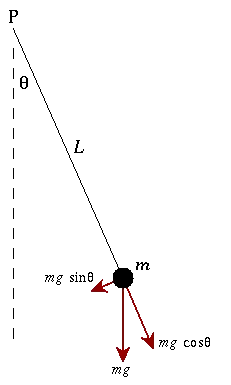
A simple pendulum consists of a ball (point-mass) hanging from a (massless) string of length L and fixed at a pivot point P. When displaced to an initial angle and released, the pendulum will swing back and forth with periodic motion. By applying Newton's second law for rotational systems, the equation of motion for the pendulum may be obtained

If the amplitude of angular displacement is small enough, so the small angle approximation ($\sin\theta\approx\theta$) holds true, then the equation of motion reduces to the equation of simple harmonic motion
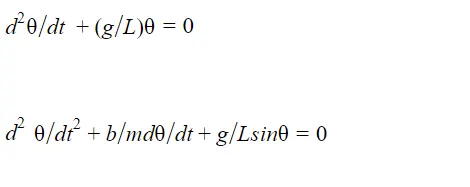
B-dambing , Damping is an influence within or upon an oscillatory system that has the effect of reducing or preventing its oscillation. To this end, the general assumption is that the drag force due to the air resistance on the bob of the pendulum is the cause of its damping, and normally the air resistance on the string of the pendulum is assumed to be negligibly small
M-mass
g-gravity
L-length
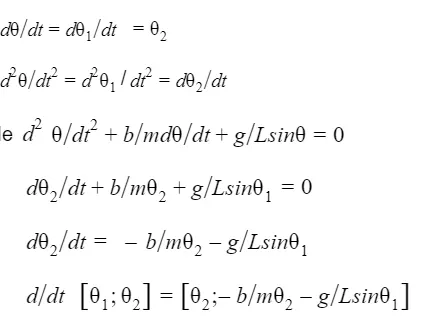
3.OBJECTIVES
A program to find a solution to oscillation of a single pendulum and to animate it ,using ODE[Ordinary differential equations] in matlab.
ALGORITAM
STEP1;Start the program
STEP2;input commands to clear and close all
STEP3;input given values of damp,gravity,length of pendulum,mass of bob
STEP4;assign as a column matrix of theta1& theta2 ,where theta1is displacement and theta2 is velocity
STEP5;t_span defined by linspace command ,where t_span is [t0 tf.]
eg:y'=f(t,y)from t0 to tf with initial conditiony0(initial conditions)Each row in the solution array y corresponds to the value returned in column vector t.
STEP6;ode45 is introduced in a subprogram .ode45(@(t,y) ode_fun,t_span,yo)
MATLAB® ODE solvers can solve systems of equations of the form y′=f(t,y), or problems that involve a mass matrix, M(t,y)y′=f(t,y). The solvers all use similar syntaxes. The ode23s solver only can solve problems with a mass matrix if the mass matrix is constant. ode15s and ode23t can solve problems with a mass matrix that is singular, known as differential-algebraic equations (DAEs). Specify the mass matrix using the Mass option of odeset.
ode45 is a versatile ODE solver and is the first solver you should try for most problems. However, if the problem is stiff or requires high accuracy, then there are other ODE solvers that might be better suited to the problem. See Choose an ODE Solver for more information.
[t,y] = ode45(odefun,tspan,y0,options) also uses the integration settings defined by options, which is an argument created using the odeset function. For example, use the AbsTol and RelTol options to specify absolute and relative error tolerances, or the Mass option to provide a mass matrix.
ode_fun dtheta_dt=ode_func (time,theta,b,g,l,m)
Theta(1 )is assigned to a variable theta1
theta(2)is assigned to a variable theta2
dtheta1_dt=theta(2)
dtheta2_dt=
d/dt (theta)[1;2]= [theta2;(b/m)theta2-g/Lsintheta1]
dtheta_dt=[dtheta1_dt;dtheta2_dt]
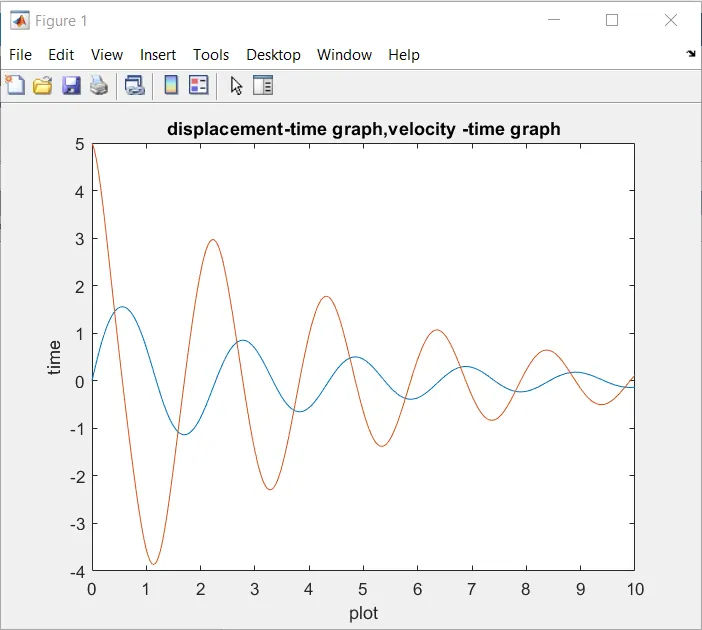
STEP7;plot (t,theta) as column matrix.where (t,theta(;,1)) is displacement
(t,theta(;,2)) is velocity
STEP8; Use xlabel and ylabel command to mark x and y axis .x as plot and y as time
TO MAKE ANIMATIONS
STEP8;Initialize contour
STEP9;for loop introduced to 1 to length of t_span
STEP10;input values of x0,yo
STEP11;imputed x1 and x2
STEP12;Plot commands for string and give axis
STEP13;marker command is used to visualize bob.marker size decides the size
STEP14;contour increased
STEP15;getframe command is used to appeared it as a movie frame
STEP17;a set of commands used to make it play as a movie
STEP18;movie(M) plays movie matric M once
STEP19;VideoWriter command to create video file VideoWriter('pendulum.avi','uncompressed AVI');
Pendulum avi file successfully created
STEP20;opened videofile using command open(videofile)
STEP21:Writevideo writes data from an array to the video file associated with videofile
STEP22;close the video
STEP23;stop the program
4.PROGRAM
clear all
close all
clc
%INPUTS
b=0.05;
g=9.81;
l=1;
m=0.1;
theta_0=[0;3];
%t_span=[to to tf]
t_span=linspace(0,20,500);
%ode_fun
[t,theta]=ode45(@(t,theta) ode_function(t,theta,b,g,l,m) ,t_span,theta_0)
%plotting
plot(t,theta(:,1))
hold on
plot(t,theta(:,2))
title('displacement-time and velocity time graph of pendulum')
xlabel('plot')
ylabel('time')
ct=1;
for i=1:length(t_span)
THETA1(i)=theta(i,1);
x0 =0
y0 =0
y1 =-1*cos(THETA1(i));
x1 = 1*sin(THETA1(i));
plot([x0 x1],[y0 y1],'linewidth',3,'color','r')
axis([-2 2 -1.5 0.5])
hold on
plot(x1,y1,'marker','o','markersize',15,'color','b')
hold off
M(ct)= getframe(gcf)
ct=ct+1;
end
%animation
movie(M)
videofile= VideoWriter('pendulum.avi','uncompressed AVI');
open(videofile)
writeVideo(videofile,M)
close(videofile)
SUBPROGRAM
function [dtheta_dt]=ode_function(t,theta,b,g,l,m)
theta1=theta(1)
theta2=theta(2)
dtheta1_dt=theta2;
dtheta2_dt=-(b/m)*theta2-(g/1)*sin(theta1);
dtheta_dt=[dtheta1_dt;dtheta2_dt];
end
OUTPUTS
ANIMATION OF PENDULUM
https://drive.google.com/file/d/1k30g_R3nYAzdN-g3VsXwVFHs8fv3lAcB/view?usp=sharing
WRONG PROGRAM[without holdoff command]
clear all
close all
clc
%INPUTS
b=0.05;
g=9.81;
l=1;
m=0.1;
theta_0=[0;3];
%t_span=[to to tf]
t_span=linspace(0,20,500);
[t,theta]=ode45(@(t,theta) ode_function(t,theta,b,g,l,m) ,t_span,theta_0)
plot(t,theta(:,1))
hold on
plot(t,theta(:,2))
xlabel('plot')
ylabel('time')
ct=1;
for i=1:length(t_span)
THETA1(i)=theta(i,1);
x0 =0
y0 =0
y1 =-1*cos(THETA1(i));
x1 = 1*sin(THETA1(i));
hold on
plot([x0 x1],[y0 y1],'linewidth',3,'color','r')
axis([-2 2 -1.5 0.5])
plot(x1,y1,'marker','o','markersize',15,'color','b')
pause(0.03)
ct=ct+1;
end
movie(M)
videofile= VideoWriter('pendulum.avi','uncompressed AVI');
open(videofile)
writeVideo(videofile,M)
close(videofile)
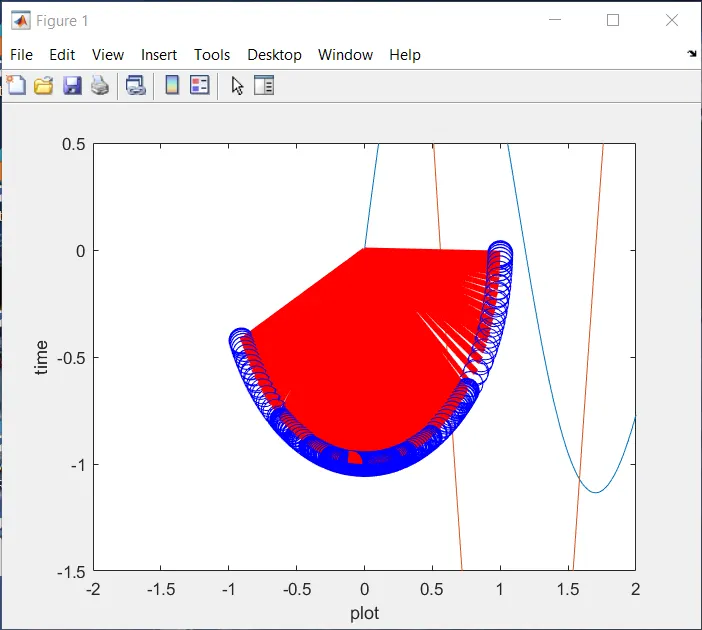
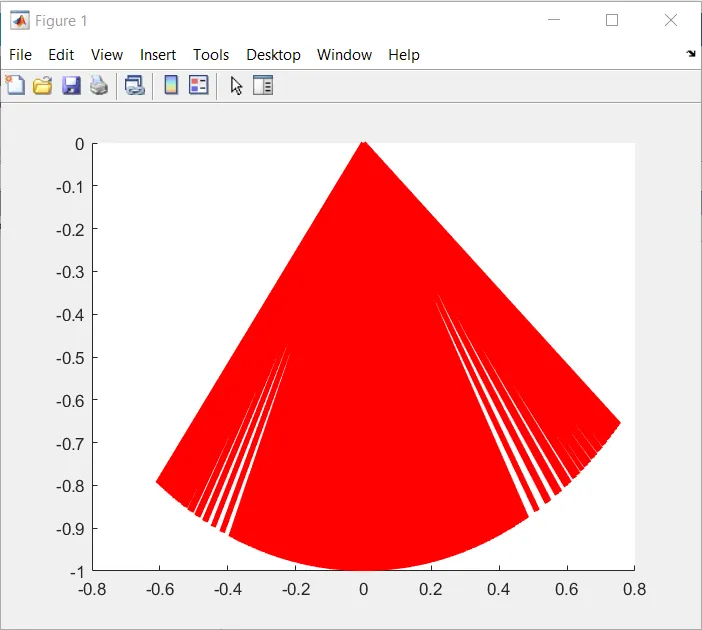
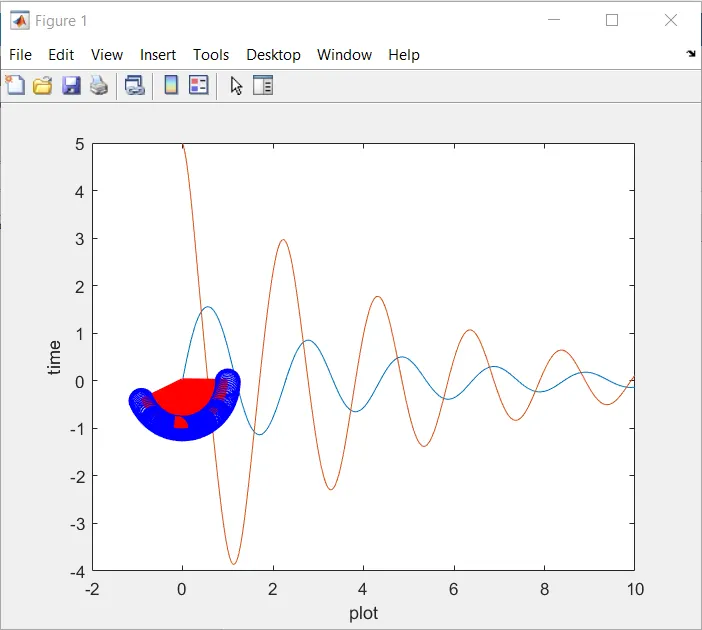
PROGRAM(without axis comand)
clear all
close all
clc
b=0.05;
g=9.81;
l=1;
m=0.1;
theta_0=[0;3];
%t_span=[to to tf]
t_span=linspace(0,20,500);
[t,theta]=ode45(@(t,theta) ode_function(t,theta,b,g,l,m) ,t_span,theta_0)
plot(t,theta(:,1))
hold on
plot(t,theta(:,2))
xlabel('plot')
ylabel('time')
ct=1;
for i=1:length(t_span)
THETA1(i)=theta(i,1);
x0 =0
y0 =0
y1 =-1*cos(THETA1(i));
x1 = 1*sin(THETA1(i));
hold on
plot([x0 x1],[y0 y1],'linewidth',3,'color','r')
plot(x1,y1,'marker','o','markersize',15,'color','b')
pause(0.03)
ct=ct+1;
end
CONCLUSION
The matlab program to make an animation of pendulum has been excuted successfully and the output is verified.
CODE
clear all
close all
clc
%inputs
b=0.05;
g=9.81;
l=1;
m=0.1;
theta_0=[0;3];

%t_span=[to to tf]
t_span=linspace(0,20,500);

%ode45
[t,theta]=ode45(@(t,theta) ode_function(t,theta,b,g,l,m) ,t_span,theta_0)

%plotting
plot(t,theta(:,1))
hold on
plot(t,theta(:,2))

%title
title('pendulum')

%label
xlabel('plot')
ylabel('time')

ct=1;
 for i=1:length(t_span)
     THETA1(i)=theta(i,1);

     x0 =0
     y0 =0
     y1 =-1*cos(THETA1(i));
     x1 = 1*sin(THETA1(i));


     title('pendulum_animation')
     plot([x0 x1],[y0 y1],'linewidth',3,'color','r')
     axis([-2 2 -1.5 0.5])
     hold on
     plot(x1,y1,'marker','o','markersize',15,'color','b')
     hold off

     M(ct)= getframe(gcf)


     ct=ct+1;
 end

%animation
 movie(M)
 videofile= VideoWriter('pendulum.avi','uncompressed AVI');
 open(videofile)
 writeVideo(videofile,M)
 close(videofile)


subprogram
function [dtheta_dt]=ode_function(t,theta,b,g,l,m)

         theta1=theta(1)
         theta2=theta(2)
         dtheta1_dt=theta2;
         dtheta2_dt=-(b/m)*theta2-(g/1)*sin(theta1);
         dtheta_dt=[dtheta1_dt;dtheta2_dt];
end