Week 3 - Solving second order ODEs
To solve ODE using the below equation
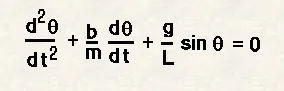
where,
b=damping coefficient
m=mass of the bob in kg
g = accelaration due to gravity m/s^2
l = length of the spring in m
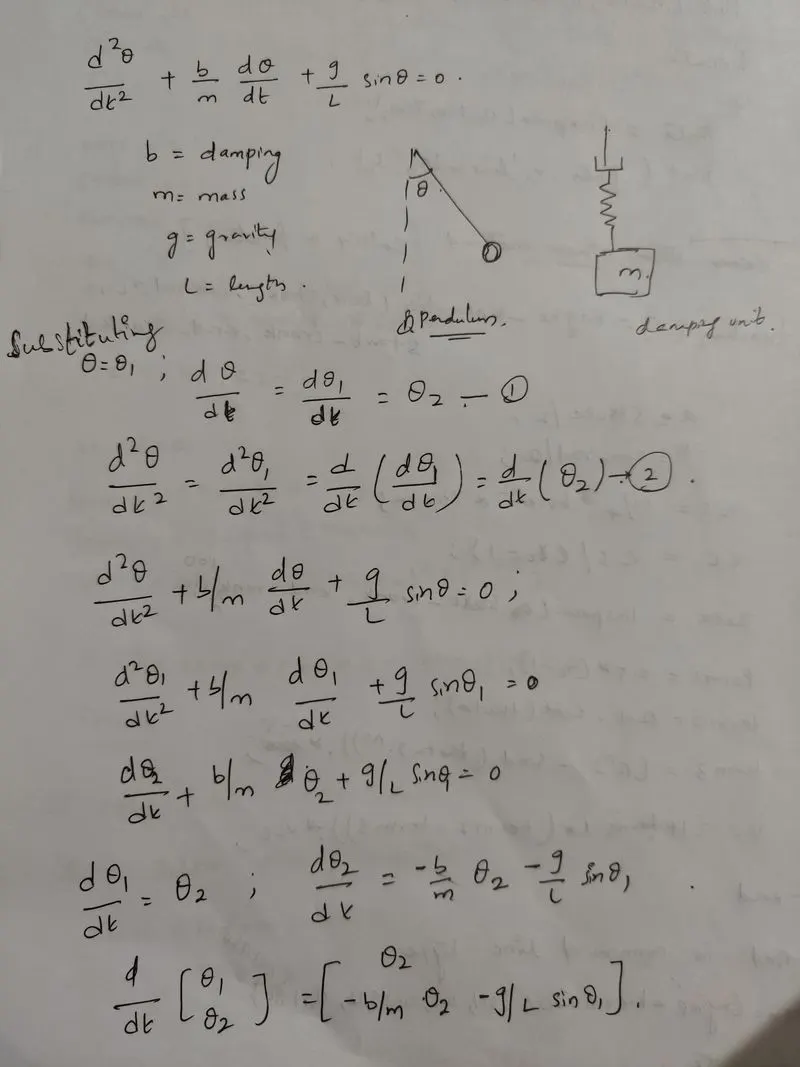
where d/dt [theta1 , theta2] is the solution vector
Program for solving second order ODEs and simulate its motion:
clear all
close all
clc

b=0.05;
g=9.81;
l=1;
m=1;

%initial condition
theta_0=[0,3];

%time points
time_span=linspace(0,20,500);

%solve ODE
[t,results]=ode45(@(t,theta) ode_func(t,theta, b,g,l,m),time_span,theta_0);
figure(1)
plot(t,results(:,1))
hold on
plot(t,results(:,2))
xlabel('time')
ylabel('plot')
code explanation:
1.Program started with clear all , close all and clc
2.As mentioned above all the inputs (b,g,l,m) data is provided.
3. (% initial condition)Array of initial theta is created which defines initial angular displacement and initial angular velocity.
4. (% time points) t_span is created by using linspace command which stores 500 equally spaced intervals between 0 to 20 seconds.
5.To solve second order ODE a calling function is created (ODE_function) which stores the above mentioned matrix in it
% ode_function

function [dtheta_dt] = ode_func(t,theta,b,g,l,m)
theta1 = theta(1)
theta2 = theta(2)

dtheta1_dt = theta2;
dtheta2_dt = -(b/m)*theta2-(g/l)*sin(theta1);
dtheta_dt = [dtheta1_dt ; dtheta2_dt];
end
dtheta_dt = [dtheta1_dt ; dtheta2_dt] is obtained
and the ode_function is called in the main function
6. (%solve ODE) the second order ODE is solved by using the ode45 command which is a default command in MATLAB with proper syntax and ode45 takes 3inputs ; the 3 inputs are initial conditions, ode_function and t_span
where [t,results] is the results that have been calculated wrt to time
7. After calculating the results a graph has to be plotted which shows the variation of angualar velocity and angular displacement wrt to time
Now to create the animation for obtained harmonic motion of pendulum:
8.A for loop(for loop is used where the program need to execute a specific number of times) and counter variable is initiated before for loop.
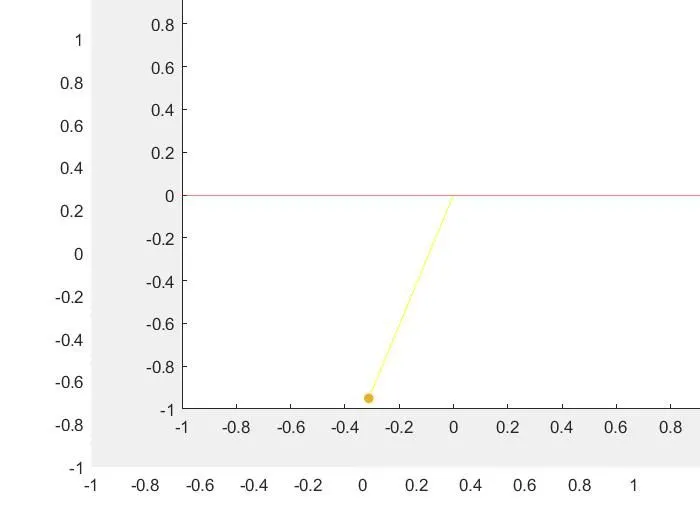
9.One end of the pendulum is fixed and the other end moves according to the solution of the solved ODE.
10. The coordinates x0,y0,x1,y1 are provided to form the string of the pendulum.
11.The figure 2 is plotted for each time interval
12. The bob is created by using the 'marker' command and can define the size of the bob by using 'markersize'
13.Pause is used to hold the command for 0.1 time.
14.M command is used to capture the frame when the for loop runs and ct=ct+1 is entered so that it adds the frame whenever the for loops runs
15.Now end command is used to close the for loop
16.Next step is to create a animation so movie(M) command is used
17. VideoWrite is a fixed variable and .avi is ithe format assigned to the video
18.Open ,write , close commands are used to open the video file , write the video file and close the video file.
After this a video file will be saved in the .avi format.
clear all
close all
clc

b=0.05;
g=9.81;
l=1;
m=1;

%initial condition
theta_0=[0,3];

%time points
time_span=linspace(0,20,500);

%solve ODE
[t,results]=ode45(@(t,theta) ode_func(t,theta, b,g,l,m),time_span,theta_0);
figure(1)
plot(t,results(:,1))
hold on
plot(t,results(:,2))
xlabel('time')
ylabel('plot')

ct=1;
for i=1:length(t)
    x0=0;
    y0=0;
    x1=l*sin(results(i,1));
    y1=-l*cos(results(i,1));
    figure(2)

    plot([x0 x1],[y0 y1],'color','y')
    hold on
    plot([1 -1],[0 0],'color','r')
    plot(x1,y1,'.' ,'markersize',20)
    axis([-1 1 -1 1])
    pause(0.1)
    hold off

 M(ct)=getframe(gcf);
ct=ct+1;
end
movie(M)
videofile=VideoWriter('simple_pendulum.avi','Uncompressed AVI');
open(videofile)
writeVideo(videofile,M)
close(videofile) 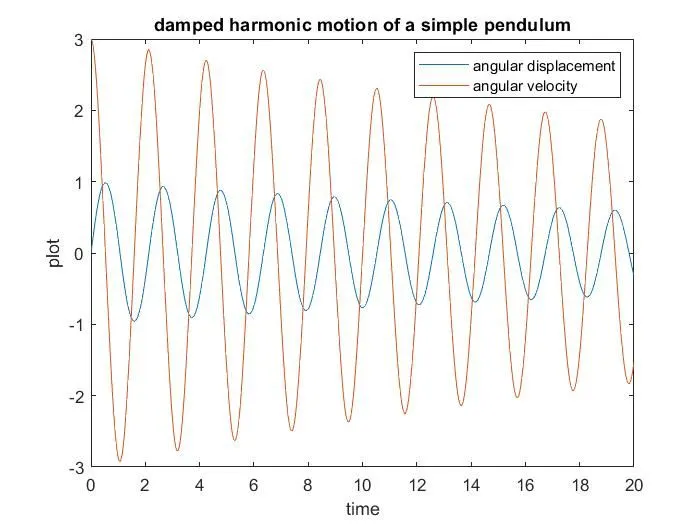
- Errors faced while programming.
ct=1;
for i=length(t)
    x0=0;
    y0=0;
    x1=l*sin(results(i,1));
    y1=-l*cos(results(i,1));
    figure(2)

    plot([x0 x1],[y0 y1],'color','y')
    hold on
    plot([1 -1],[0 0],'color','r')
    plot(x1,y1,'.' ,'markersize',20)
    axis([-1 1 -1 1])
    pause(0.1)
    hold off

 M(ct)=getframe(gcf);
ct=ct+1;
end
movie(M)
videofile=VideoWriter('simple_pendulum.avi','Uncompressed AVI');
open(videofile)
writeVideo(videofile,M)
close(videofile)
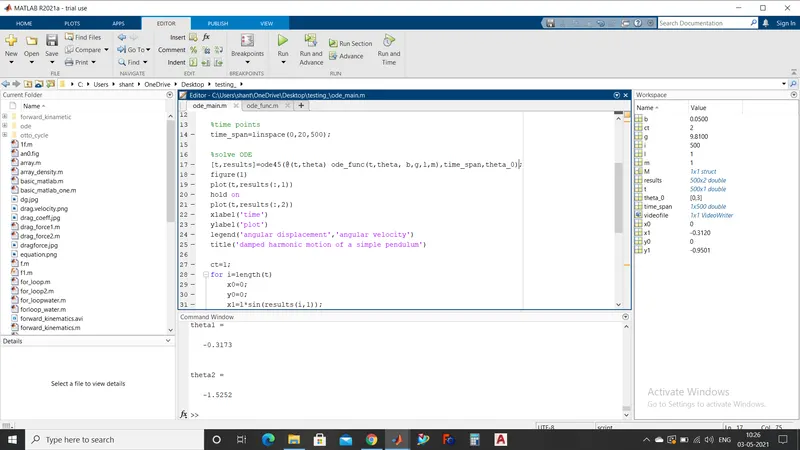
for creating animation , 'for loop' is used where i = 1:length(t) to be provided but in the above mentioned code i=length(t) is mentioned.
As the range is not mentioned from 1:length(t) the bob is not oscillating .
- How have you overcome those errors.
Error is removed by correcting the 'for loop' with i=1:length(t)
- Screenshots showing errors thrown in command window.
Link for animation
https://drive.google.com/file/d/1J-TfYwt4bBxpRsFnKDTgrB2iBa3hnap-/view?usp=sharing