Project 1 - Parsing NASA thermodynamic data
Parsing NASA thermodyamic data
File parsing refers to how the information or data can be read from a particular text file or any type of a file and how that data can be used in a computer program.
It can be readig form or writing to a file and obtaining information from it. The writing file will be usually a text file.
The raw data found in the file may be difficult to read and to comprehend as it contains unformatted or disorganised data.
Hence, by performig Parsing we can split the sequece of characters in the raw data into smaller parts and can transform the data for some or application.
To perform the Parsing we are using the NASA thermodynamic data(text file) as a raw data / input. This file contains 53 different species with its chemical name.
Each species contains 14 coefficients with its local temperatures. In this 14 coefficients first 7 are considered as high temperature coefficients ad the next 7 coefficients are considered as low temperature coefficients.
By using this data we will calculate the Specific heat Cp , Enthalpy H , Entrophy S.
The equations for three thermodynamic properties are mentioned below
where R is universal gas constant 8.314
T is the local temperature
a1,a2,a3,a4,a5,a6,a7 - coefficients
In this study we have 14 differents coefficients for each species we use these coefficients based on high and low temperature
a1,a2,a3,a4,a5,a6,a7 - high temperature coefficients
a8,a9,a10,a11,a12,a13,a14 - low temperature coefficients
Program to extract all the 14 coefficients and calculate the Cp,H,S :
- startig the program with clear all,close all,clc to reset all the values and variables from the previous study.
- Now we read and extract THERMO.dat file by opening it with fopen command. fopen('THERMO.dat','r') here 'r' represents to read file
- This text file is assigned to a variable f1.Everytime we excecute the program we get f1 is equal to some value.If this values gives a positive number then the file opened is sucessful if it is negative value then opened file is not successful.
- fgetl command is used here to skip comment lines.
- Readig the next line -global temperatures (300.000 1000.000 5000.000) . we split this 3 temperatures by using strsplit command and assigned to a variable g_values.
- By using str2num command we can convert the strings to number
- with this we can convert the 3 temperature strings to integer value. we assign low , mid , high global temperatures to assigned g_values
- In the below image, after temperature values we have comment lines called header information which can be considered as not using in this study.

- In this file we have 53 different species so by using for loop we have extracted species
- After the header information we have species chemical name with its local temperature. and next 2,3,4 lines are coefficients of each species.
- we assigned species chemical name with Species_SP and given as Species_SP{1} [here angular brackets are used for cell array] . ad we split the entire line strsplit command.
- we splitted the local temperatures and species name separately so we assigned local temperatures with Species_temp and splitted the temperatures and converted strings to number.
- we store the local temperatures in a variable by using the linspace command and skip to the next line.
- In the next line we seems to have a continuous data with exponential E for each value so we read the data by findig this exponential using findstr command.
- If we can able to find the 'E' in the each coefficient then we ca separate the data. As we can see that there are 3 characters after 'E' so the first coefficient starts at the index position 1 and stops after the 3characters from position 'E'
- For extracting subsequent coefficient we follow the same logic with little difference. Ex: for finding the 2nd cofficient , we start with 4 index position after the previous position of 'E' and ends after the 3index position of the second position of 'E'. the same logic is repeated to separate all the 14 coefficients.
- After separating each coefficient we will convert the string to integer by using the str2double. str2double and str2num both use for the same purpose but the str2double the advanced command used.
- After extracting we will calculate the Specific heat CP , Enthalpy H, Etrophy S
- 'For loop' is started by using the counter 'i' ranging from 1 to the length(T) as the function to be repeated for all 53 species. As the Cp,H,S required temperature values we need to retrive local temperature value for each species for the function to use.This has been done for the next 3 lines with each temperature assigned to a appropriate variable. As already discussed a1,a2,a3,a4,a5,a6,a7 are considered as high temperature cofficient ad a8,a9,a10,a11,a12,a13,a14 are considered as low temperature coefficient. 'For loop' is used so as to run the program the 53 species and to calculate Cp,H,S for each.
- 'if' statement is used to compare betweet temperature T and global mid temperature for each species and the equations for Cp,H & S for coded in different ways. when the temperature T is less than the global mid temperature then the a8,a9,a10,a11,a12,a13,a14 coefficients are used as they are for low temperature condition
- 'else' statement is then used for converse the arguement where a1,a2,a3,a4,a5,a6,a7 are used as they are for high temperature condition and value for R is given as input.
- The 'end' statement is used twice to terminate both 'for loop' and 'if' statement.
Molecular weight function :
function M = Molecular_weight(Species_SP)
% Atomic name of the species
atomic_name = ['H','C','O','N','A','S'];
% Atomic number of the species
atomic_number = [1.008 12.011 15.99 14.007 39.948];
M=0 ;
for i=1:length(Species_SP)
    for j=1:length(atomic_number)
        if strcmp(Species_SP(i),atomic_name(j))
            M=M+atomic_number(j);
            position = j;
        end
    end
    n=str2num(Species_SP);
    if n>1
        M=M+atomic_number(position)*(n-1);
    end
end
fprintf('Molecular weight %s :',Species_SP);
fprintf('%f',M);
disp(' ');
end
- In this function , molecular weight of the each species is calculated.To do this we need to tell MATLAB what are the different elements the 53 species contains.To calculate this we need to code atomic weight for each elements so that program knows how to calculate the molecular weight of particular species.It also able to find the difference between atomic species and molecular species.With this the program can find how to calculate the molecular weight of species if it consists more than 1 atom of an element.
- To calculate the Molecular weight we have a separate function.It is named as Molecular_weight and and the output of the data are stored in 'M'
- The 53 different species consists of 6 basic elements namely : Hydrogen (H),Carbon(C),Oxygen (O),Nitrogen(N),Argon(A),Sulphur(S).
- This elements are assigned to a variable 'atomic_name'.In the next line an array of atomic weights of this elements are stored and assigned to a variable 'atomic_number'
- To calculate molecular weight , initial molecular weight M is set to 0 and 'for loop' is initiated using a counter 'i' to the length of Species_SP and aother 'for loop' is initiated using a counter 'j' to the length of atomic_name . This is because to compare the Species name with basic elements.
- To do that we need to use 'if' statement and 'strcmp' to compare strings of the Species_SP, atomic_name (strcmp command is used if the comparison is case sensitive) if they are matching then it return 1 which means the output is true as opposed to false.
- If the 2 strings are matched then the loop can proceed with calculating molecular weight
- In the first part of molecular weight , formula is written and it only takes the species that are monoatomic (single atom) . For this molecular weight is equal to its atomic weight .
- A new variable called Position is created and assigned a value 'j' which is used to calculate the second part of molecular weight .
- The second part of molecular weight formula concerns the species which contains more than 1 atom. To calculate the molecular weight we need to find the number of molecules in each species. This is done by converting string to integer so that whatever no. is in the species name , can be use it as molecular number. Now this value is assigned to a variable 'n'.
- Now 'if' statement is initiated for second molecular formula. If the no. of molecules is greater than 1 and the second molecular weight formula is used.
- It is the sum of initial molecular weights and the atomic number at the position 'j' with the molecular weight minus 1.
- All this are stored in M and end statement is used to terminate the function.
- fprintf is used to indicate the molecular weight and species name in the command window . where %s is used for strings.
- with this molecular weight of all the species are generated in the command window as instructed in the above line
- The molecular weight calculation function is called in the main program. All the molecular weights of species are written in a text file .To write a text file we need to to give 'w' to write after the file id is mentioned.
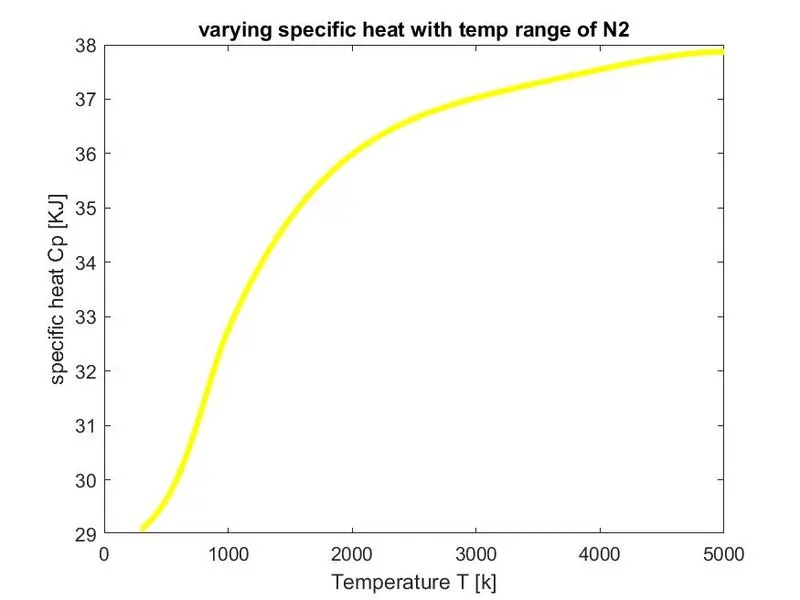
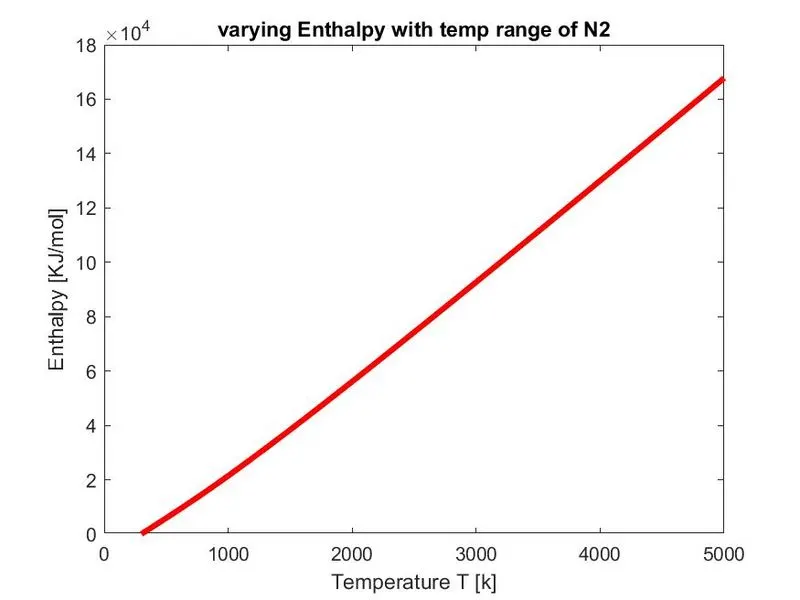
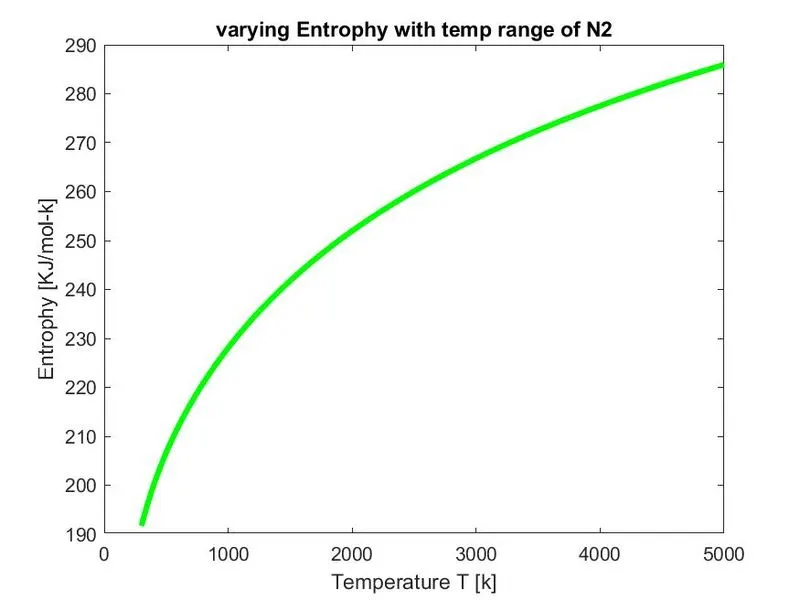
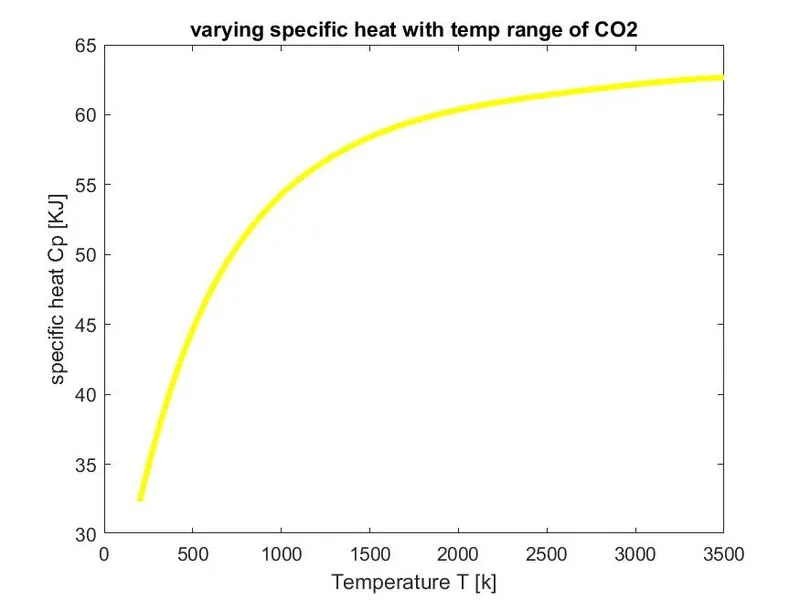
- Graphs are plotted for Cp,H,S with temperature T.
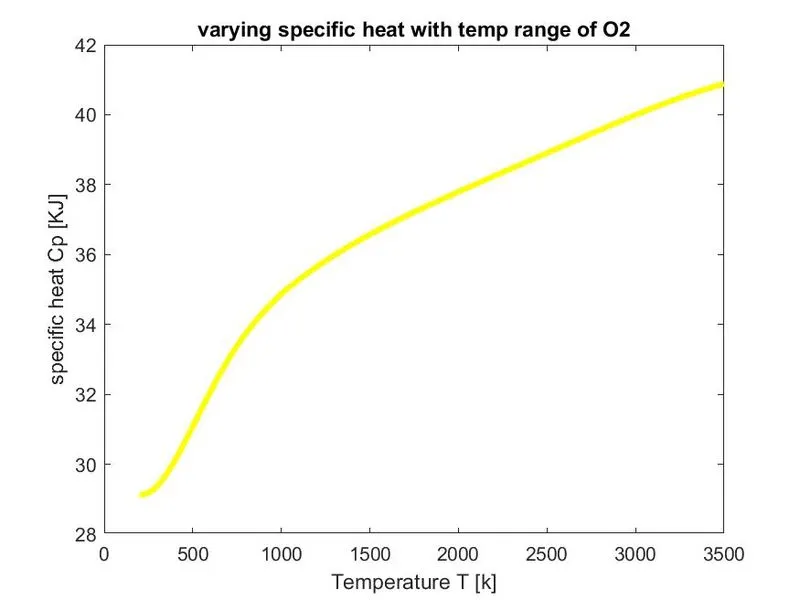
- Figure (1) represents plot Cp vs temperature T
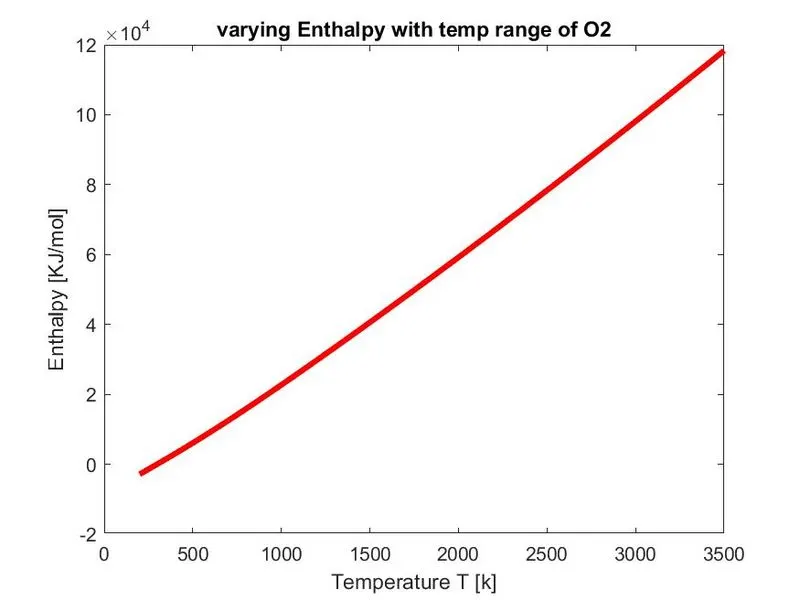
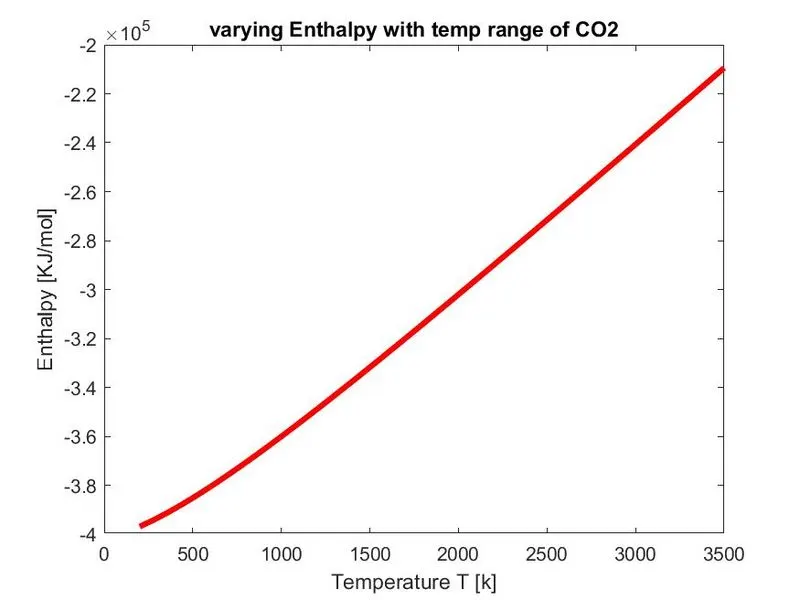
- Figure (2) represents plot H vs temperature T
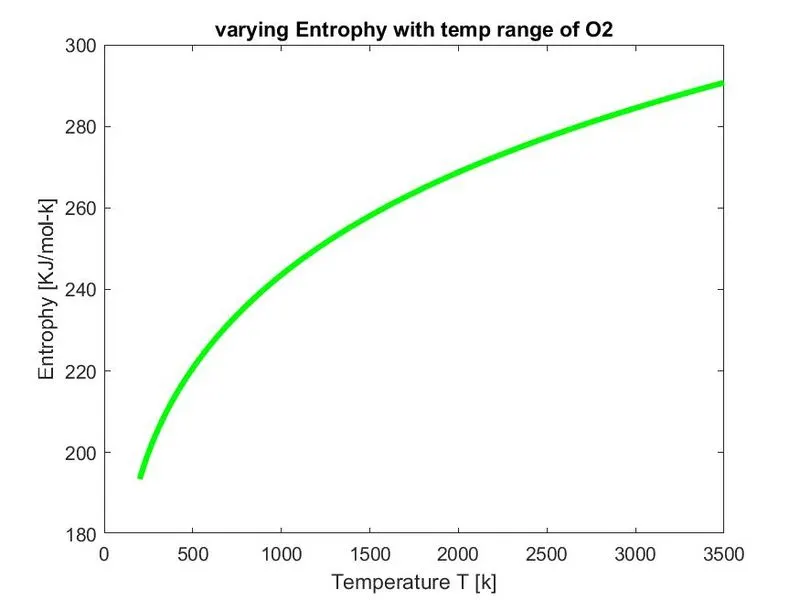
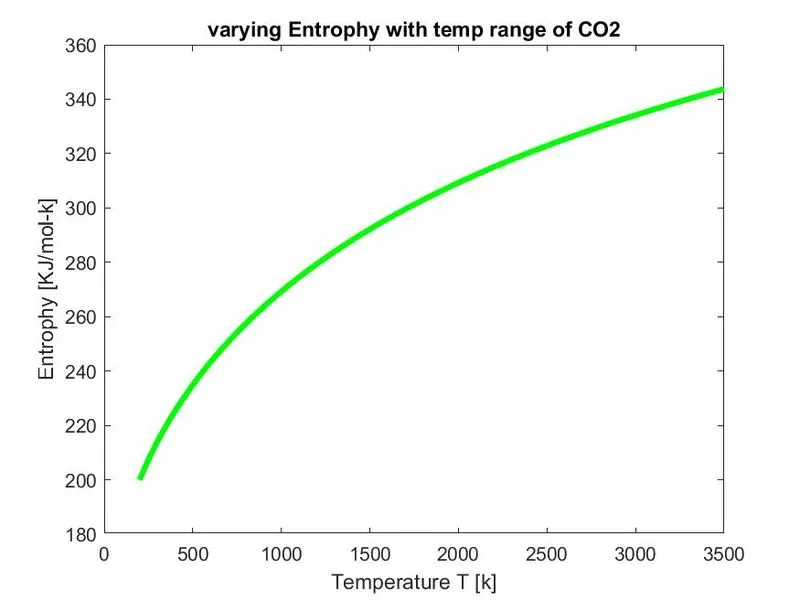
- Figure (3) represents plot S vs temperature T
- X label Y label and title are provided
- saveas is used to save the plot in jpg file.
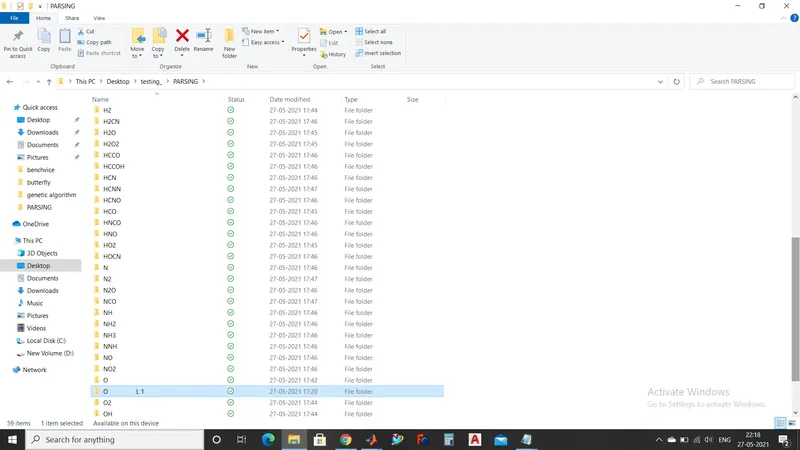
- All the graphs will be saved in the path directory by generating a folder for each species
cd('C:\Users\shant\OneDrive\Desktop\testing_\PARSING')
Main Program :
clear all
close all
clc

% Reading NASA thermodynamic file
f1=fopen('THERMO.dat','r')
line1=fgetl(f1);

% Reading header information - temperature
line2 = fgetl(f1);

%splitting global_temp
g_values = strsplit(line2,' ');

% converting string to numbers
global_low_temp = str2num(g_values{2});
global_mid_temp = str2num(g_values{3});
global_high_temp = str2num(g_values{4});

%skipping the comment lines
line3 = fgetl(f1);
line4 = fgetl(f1);
line5 = fgetl(f1);

%universal gas constant
R=8.314;

for j=1:53
    tline = fgetl(f1);

    % species name
    Species_SP =tline(1:45);
    Species_SP = strsplit(Species_SP,' ');
    Species_SP = Species_SP{1}

    % Local temperature ranges
    species_temp = tline(49:75);
    l_values = strsplit(species_temp , ' ');
    local_low_temp = str2num(l_values{1});
    local_mid_temp = str2num(l_values{3});
    local_high_temp = str2num(l_values{2});
    % storing temperature in variable
    temperature = [local_low_temp local_mid_temp local_high_temp];
    T= linspace(local_low_temp,local_high_temp,1000);
    tline1=fgetl(f1);
    a=findstr(tline1,'E');
    %extracting all the coefficients
    %extracting high temperature coefficients
    a1=tline1(1:a(1)+3);
    a1=str2double(a1);
    a2=tline1(a(1)+4:a(2)+3);
    a2=str2double(a2);
    a3=tline1(a(2)+4:a(3)+3);
    a3=str2double(a3);
    a4=tline1(a(3)+4:a(4)+3);
    a4=str2double(a4);
    a5=tline1(a(4)+4:a(5)+3);
    a5=str2double(a5);

    tline2 = fgetl(f1);
    b=findstr(tline2,'E');

    a6=tline2(1:b(1)+3);
    a6=str2double(a6);
    a7=tline2(b(1)+4:b(2)+3);
    a7=str2double(a7);
    %extracting low temperature coefficients
    a8=tline2(b(2)+4:b(3)+3);
    a8=str2double(a8);
    a9=tline2(b(3)+4:b(4)+3);
    a9=str2double(a9);
    a10=tline2(b(4)+4:b(5)+3);
    a10=str2double(a10);

     tline3 = fgetl(f1);
    c=findstr(tline3,'E');
    a11=tline3(1:c(1)+3);
    a11=str2double(a11);
    a12=tline3(c(1)+4:c(2)+3);
    a12=str2double(a12);
    a13=tline3(c(2)+4:c(3)+3);
    a13=str2double(a13);
    a14=tline3(c(3)+4:c(4)+3);
    a14=str2double(a14);

    % calculating specific heat Cp,enthalpy H,entrophy S
  for i=1:length(T)
if T(i) <= global_mid_temp
    Cp(i)= R*(a8+(a9*T(i))+(a10*T(i)^2)+(a11*T(i)^3)+(a12*T(i)^4));
    H(i) = (a8+((a9*T(i))/2)+((a10*T(i)^2)/3)+((a11*T(i)^3)/4)+((a12*T(i)^4)/5)+(a13/T(i)))*R*T(i);
    S(i) = R*((a8*log(T(i)))+(a9*T(i))+((a10*T(i)^2)/2)+((a11*T(i)^3)/3)+((a12*T(i)^4)/4)+a14);
else

  Cp(i)= R*(a1+(a2*T(i))+(a3*T(i)^2)+(a4*T(i)^3)+(a5*T(i)^4));
  H(i) =(a1+((a2*T(i))/2)+((a3*T(i)^2)/3)+((a4*T(i)^3)/4)+((a5*T(i)^4)/5)+(a6/T(i)))*R*T(i);
   S(i) = R*((a1*log(T(i)))+(a2*T(i))+((a3*T(i)^2)/2)+((a4*T(i)^3)/3)+((a5*T(i)^4)/4)+a7);
end
  end

 % calculating molecular weight of the species
  M = Molecular_weight(Species_SP)

  % writing molecular weight file
  M_file = fopen('molecular weight.txt','w');
  fprintf(M_file,'molecular weight of %s is %f',Species_SP);
  fclose(M_file);

  %plotting Cp,H,S with temperature T
  %saving in a folder
  cur_dir=pwd;
  mkdir(Species_SP);
  cd(Species_SP);

  %plot 1 specific heat (Cp) vs Temperature (T)
  figure(1)
  plot(T,Cp,'linewidth',3,'color','y')
  xlabel('Temperature T [k]');
  ylabel('specific heat Cp [KJ]');
  title(sprintf('varying specific heat with temp range of %s',Species_SP));
  saveas(figure(1),'specific heat.jpg');

  %plot 2 Enthalpy (H) vs Temperature (T)
  figure(2)

  plot(T,H,'linewidth',3,'color','r')
  xlabel('Temperature T [k]');
  ylabel('Enthalpy [KJ/mol]');
  title(sprintf('varying Enthalpy with temp range of %s',Species_SP));
  saveas(figure(2),'Enthalpy.jpg');

   %plot 3 Entrophy (S) vs Temperature (T)
   figure(3)
  plot(T,S,'linewidth',3,'color','r')
  xlabel('Temperature T [k]');
  ylabel('Entrophy [KJ/mol-k]');
  title(sprintf('varying Entrophy with temp range of %s',Species_SP));
  saveas(figure(3),'Entrophy.jpg');

  cd('C:\Users\shant\OneDrive\Desktop\testing_\PARSING')


  end
2. Calculate the molecular weight of each species and display it in the command window.
f1 =

    32


Species_SP =

    'O'

Molecular weight O :15.990000

M =

   15.9900


Species_SP =

    'O2'

Molecular weight O2 :15.990000

M =

   15.9900


Species_SP =

    'H'

Molecular weight H :1.008000

M =

    1.0080


Species_SP =

    'H2'

Molecular weight H2 :1.008000

M =

    1.0080


Species_SP =

    'OH'

Molecular weight OH :16.998000

M =

   16.9980


Species_SP =

    'H2O'

Molecular weight H2O :16.998000

M =

   16.9980


Species_SP =

    'HO2'

Molecular weight HO2 :16.998000

M =

   16.9980


Species_SP =

    'H2O2'

Molecular weight H2O2 :16.998000

M =

   16.9980


Species_SP =

    'C'

Molecular weight C :12.011000

M =

   12.0110


Species_SP =

    'CH'

Molecular weight CH :13.019000

M =

   13.0190


Species_SP =

    'CH2'

Molecular weight CH2 :13.019000

M =

   13.0190


Species_SP =

    'CH2(S)'

Molecular weight CH2(S) :13.019000

M =

   13.0190


Species_SP =

    'CH3'

Molecular weight CH3 :13.019000

M =

   13.0190


Species_SP =

    'CH4'

Molecular weight CH4 :13.019000

M =

   13.0190


Species_SP =

    'CO'

Molecular weight CO :28.001000

M =

   28.0010


Species_SP =

    'CO2'

Molecular weight CO2 :28.001000

M =

   28.0010


Species_SP =

    'HCO'

Molecular weight HCO :29.009000

M =

   29.0090


Species_SP =

    'CH2O'

Molecular weight CH2O :29.009000

M =

   29.0090


Species_SP =

    'CH2OH'

Molecular weight CH2OH :30.017000

M =

   30.0170


Species_SP =

    'CH3O'

Molecular weight CH3O :29.009000

M =

   29.0090


Species_SP =

    'CH3OH'

Molecular weight CH3OH :30.017000

M =

   30.0170


Species_SP =

    'C2H'

Molecular weight C2H :13.019000

M =

   13.0190


Species_SP =

    'C2H2'

Molecular weight C2H2 :13.019000

M =

   13.0190


Species_SP =

    'C2H3'

Molecular weight C2H3 :13.019000

M =

   13.0190


Species_SP =

    'C2H4'

Molecular weight C2H4 :13.019000

M =

   13.0190


Species_SP =

    'C2H5'

Molecular weight C2H5 :13.019000

M =

   13.0190


Species_SP =

    'C2H6'

Molecular weight C2H6 :13.019000

M =

   13.0190


Species_SP =

    'CH2CO'

Molecular weight CH2CO :41.020000

M =

   41.0200


Species_SP =

    'HCCO'

Molecular weight HCCO :41.020000

M =

   41.0200


Species_SP =

    'HCCOH'

Molecular weight HCCOH :42.028000

M =

   42.0280


Species_SP =

    'H2CN'

Molecular weight H2CN :27.026000

M =

   27.0260


Species_SP =

    'HCN'

Molecular weight HCN :27.026000

M =

   27.0260


Species_SP =

    'HNO'

Molecular weight HNO :31.005000

M =

   31.0050


Species_SP =

    'N'

Molecular weight N :14.007000

M =

   14.0070


Species_SP =

    'NNH'

Molecular weight NNH :29.022000

M =

   29.0220


Species_SP =

    'N2O'

Molecular weight N2O :29.997000

M =

   29.9970


Species_SP =

    'NH'

Molecular weight NH :15.015000

M =

   15.0150


Species_SP =

    'NH2'

Molecular weight NH2 :15.015000

M =

   15.0150


Species_SP =

    'NH3'

Molecular weight NH3 :15.015000

M =

   15.0150


Species_SP =

    'NO'

Molecular weight NO :29.997000

M =

   29.9970


Species_SP =

    'NO2'

Molecular weight NO2 :29.997000

M =

   29.9970


Species_SP =

    'HCNO'

Molecular weight HCNO :43.016000

M =

   43.0160


Species_SP =

    'HOCN'

Molecular weight HOCN :43.016000

M =

   43.0160


Species_SP =

    'HNCO'

Molecular weight HNCO :43.016000

M =

   43.0160


Species_SP =

    'NCO'

Molecular weight NCO :42.008000

M =

   42.0080


Species_SP =

    'CN'

Molecular weight CN :26.018000

M =

   26.0180


Species_SP =

    'HCNN'

Molecular weight HCNN :41.033000

M =

   41.0330


Species_SP =

    'N2'

Molecular weight N2 :14.007000

M =

   14.0070


Species_SP =

    'AR'

Molecular weight AR :39.948000

M =

   39.9480


Species_SP =

    'C3H8'

Molecular weight C3H8 :13.019000

M =

   13.0190


Species_SP =

    'C3H7'

Molecular weight C3H7 :13.019000

M =

   13.0190


Species_SP =

    'CH3CHO'

Molecular weight CH3CHO :42.028000

M =

   42.0280


Species_SP =

    'CH2CHO'

Molecular weight CH2CHO :42.028000

M =

   42.0280
Screenshot of the window where all the folders are saved :


Plots for o2, N2 and Co2 species :
O2
N2
CO2
Mention the errors faced while programming:
Screenshots showing errors thrown in command window:
Error-1
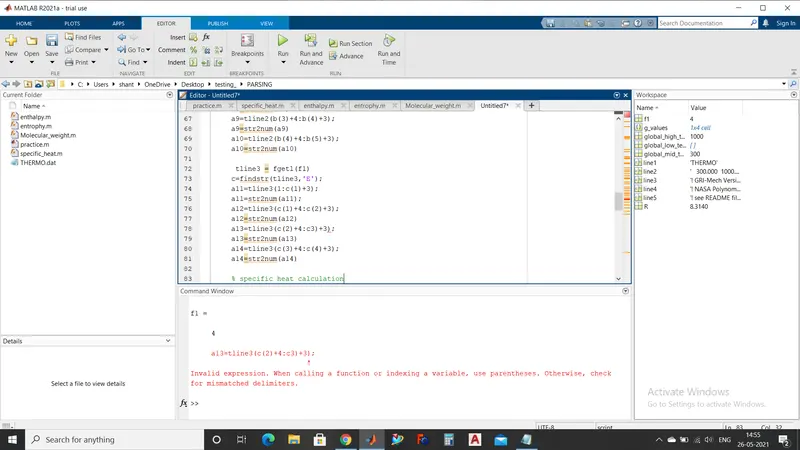
parentheses error for a13 coefficient
By using parentheses , error is corrected
Error-2
Mention the errors faced while programming:
Screenshots showing errors thrown in command window:
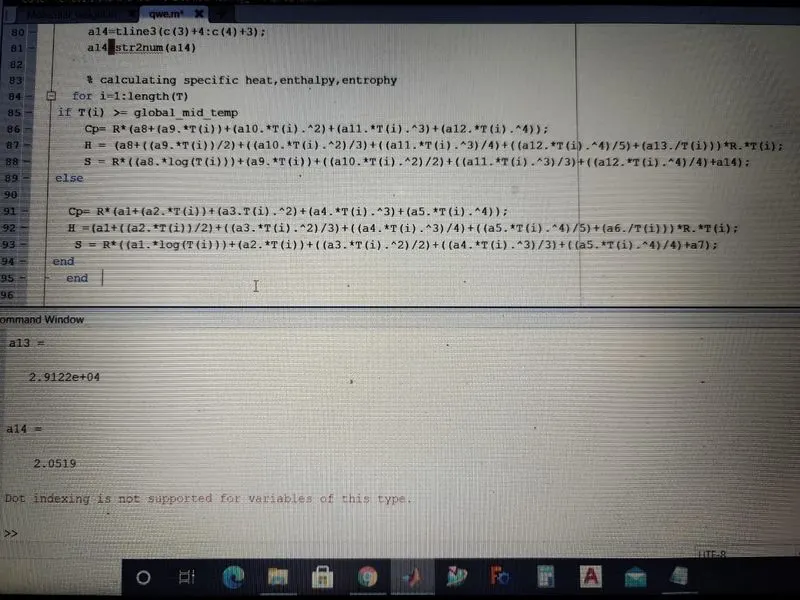
note : image taken from mobile (screenshot not taken before correcting the error)
To calculate the Specific heat Cp, Enthalpy H, Entrophy S we created a for loop. Dot operation is used to this equations.This dot operation is not supported and program couldnot run and shown a error in command window.
Steps taken to overcome those errors:
By eleminatig the dot operation error is corrected as shown below
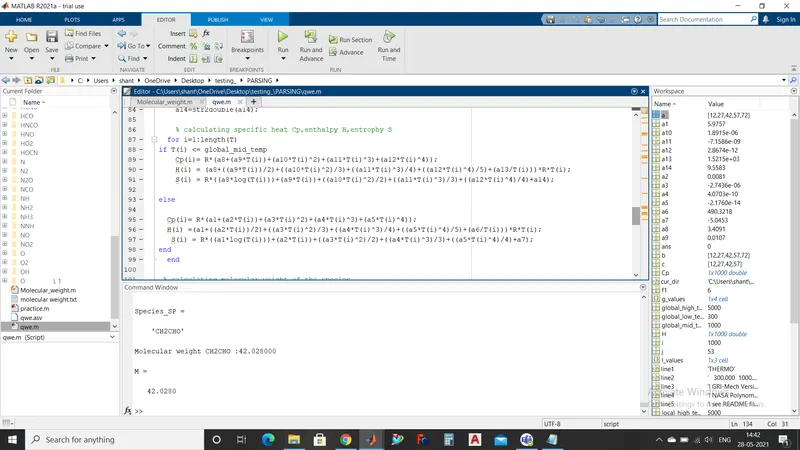
Error-3
Mention the errors faced while programming:
Screenshots showing errors thrown in command window:
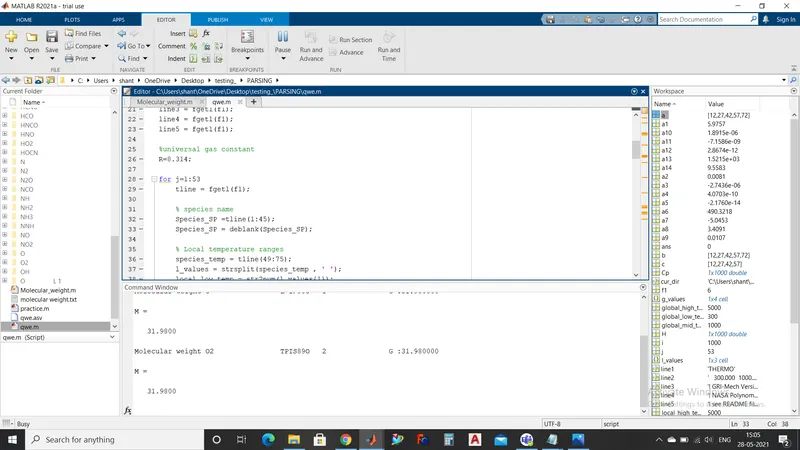
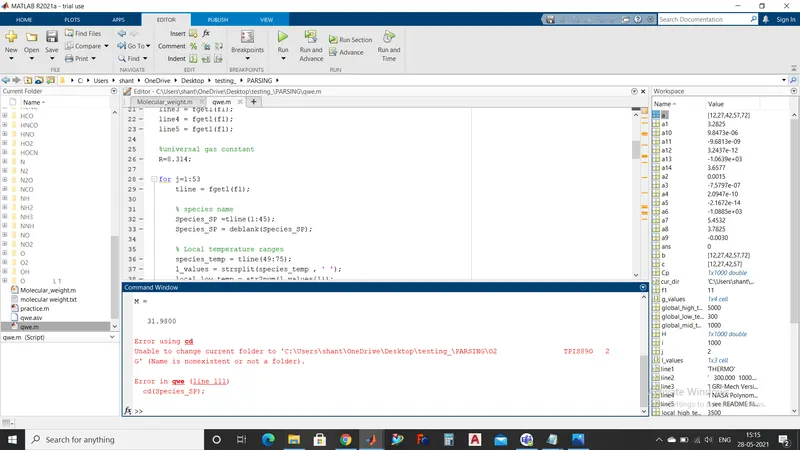
In the line 32,33 by using deblank tried to split the species name but unable to split the species name as we can see the command window with the whitespace we could see the species chemical name and other comments
Steps taken to overcome those errors:
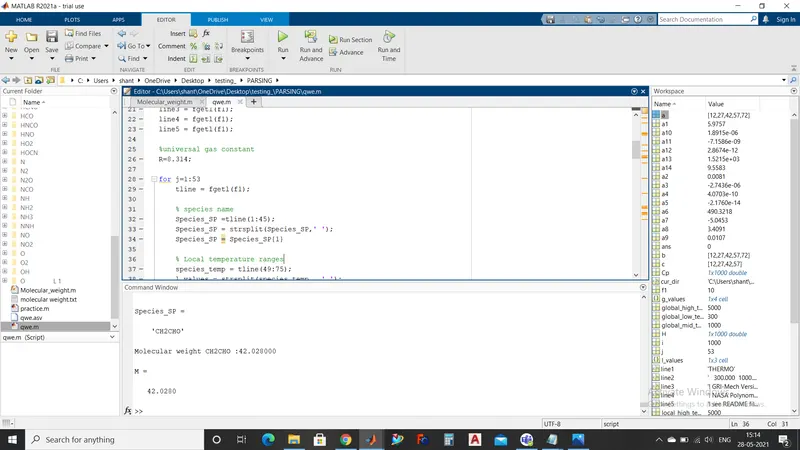
By using strsplit command we can split the species chemical name and other comments
Below link is for plots of all species
https://drive.google.com/drive/folders/1rrBK0HNB6NS3iloHtXefMtUYhXGKtQ83?usp=sharing