Week 3 - Solving second order ODEs
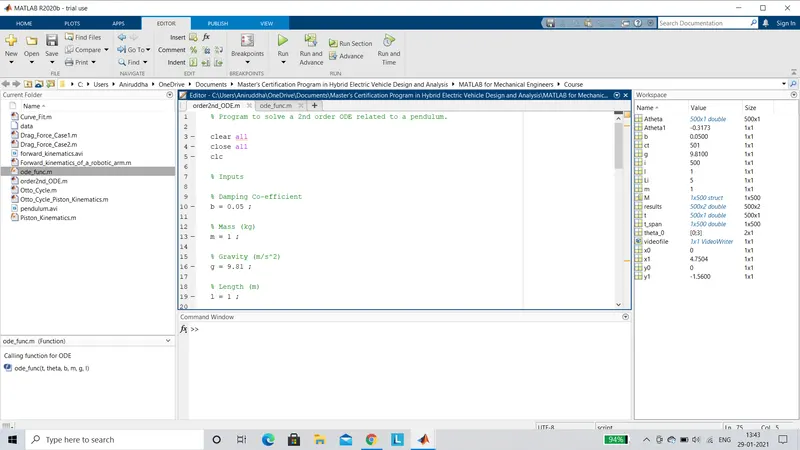
PROGRAM : To solve the second order ODE of a pendulum and also to simulate the oscillating motion of the pendulum.
Main Program :
% Program to solve a 2nd order ODE related to a pendulum.

clear all
close all
clc

% Inputs

% Damping Co-efficient
b = 0.05 ;

% Mass (kg)
m = 1 ;

% Gravity (m/s^2)
g = 9.81 ;

% Length (m)
l = 1 ;

% Initial Conditions
theta_0 = [0;3] ;

% Time Points
t_span = linspace(0,20,500) ;

% Solving ODE
[t,results] = ode45(@(t,theta) ode_func(t,theta,b,m,g,l),t_span,theta_0) ;

% Plotting Results
figure(1)
hold on
plot(t,results(:,1))
plot(t,results(:,2))
xlabel('Time (s)')
ylabel('Plot')
legend('Angular Displacement','Angular Velocity')

% Pendulum Animation

% Link Length
Li = 5 ;

% Angular Displacement
Atheta = results(:,1) ;

ct = 1 ;
for i = 1 : length(Atheta)
    Atheta1 = Atheta(i) ;

    x0 = 0 ;
    y0 = 0 ;

    x1 = Li*cos(Atheta1) ;
    y1 = Li*sin(Atheta1) ;

    figure(2)
    plot([x0 x1],[y0 y1],'.','MarkerSize',50,'color','r')
    line([x0 x1],[y0 y1],'linewidth',3)
    axis([-6 6 -5 5])
    xlabel('X-Axis')
    ylabel('Y-Axis')
    pause(0.02)
    M(ct) = getframe(gcf);
    ct = ct+1 ;
end
movie(M)
videofile = VideoWriter('pendulum.avi','Uncompressed AVI') ;
open(videofile)
writeVideo(videofile,M)
close(videofile)
Calling Function Program :
% Calling function for ODE

function [dtheta_dt] = ode_func(t,theta,b,m,g,l)
theta1 = theta(1) ;
theta2 = theta(2) ;
dtheta1_dt = theta2 ;
dtheta2_dt = -(b/m)*theta2 - (g/l)*sin(theta1);
dtheta_dt = [dtheta1_dt;dtheta2_dt];

end
OUTPUT :
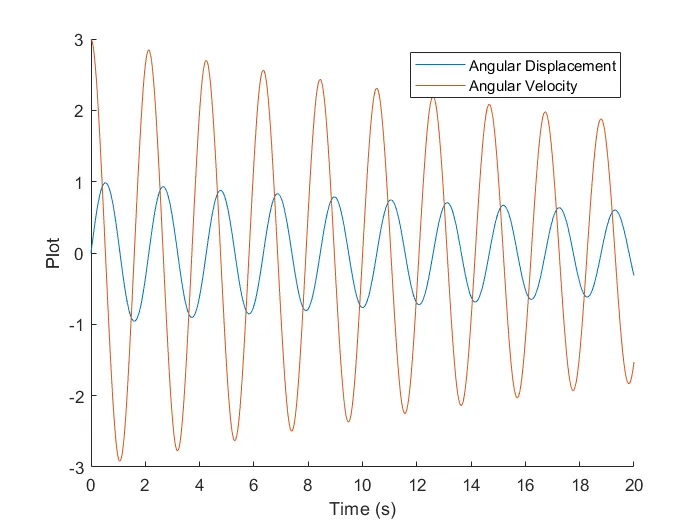
PLOTS : Angular Displacement and Angular Velocity plots with respect to time.
ANIMATION : Simulation of oscillating motion of a simple pendulum.
Google Drive Link : https://drive.google.com/file/d/1SOkDFTEzKGpY1kQilJoqIWdrG2BDPAKN/view?usp=sharing
YouTube Link : https://youtu.be/dBRvTgnAHbM
EXPLANATION :
- We begin by assigning values to the input variables.
- Then we provide the initial conditions and the time intervals for the integration of the ODE.
- Now in order to solve the ODE we use the 'ode45' command.It contains the function to be integrated,time span ie. integral limits and the initial conditions.It also contains the anonymous function '@(t,theta)' which denotes that 'ode_func' should be solved with respect to (t,theta).
- The calling function 'ode_func' contains all the input variables.It is represented by a column vector 'dtheta_dt'.
- Now the ode45 function is assigned to an array [t,results].
- Where [results] is an array containing a set of values for displacement and velocity.
- Further to plot the angular velocity and displacement curves we use the 'plot' command.
- 'Hold on' command is used so that later on other graphs can be plotted.Also the 'legend' command is used to differentiate the curves in the graph.
- Now in order to create the simulation of the pendulum we start by assigning a length for the link.Also the set of displacements obtained previously are assigned to a column vector called 'Atheta'.
- To create the animation we use the 'For loop' command to create a number of frames.We consider i = 1:length(Atheta) which denotes the number of loops to be performed.A variable called 'Atheta1' is used to house the varying values of 'Atheta' during each repetition of the loop.
- Now we determine the initial(x0 y0) and secondary(x1 y1) positions of the link and assign the co-ordinates.
- We now plot the various positions of the link and join the positions using the 'line' command.To create the ball of the pendulum we use 'markers' and also provide them size and colour.
- To create an animation of all the frames with brief intervals we use the 'pause()' command.Now in order to store all the frames in an array M(ct) we use the 'getframe(gcf)' command.Where 'ct' is the counter to count the number of frames.
- Further the frames are made into a movie(M).All the frames are now dumped into a 'videofile' using the 'VideoWriter' command.The videofile is named 'pendulum.avi'.
- Now the videofile is opened using the 'open' command and all the frames are written into it from 'movie(M)' using 'writeVideo' command.Finally the videofile is closed using the 'close(videofile)' command.