Solving second order ODEs
AIM:
Program to simulate the transient behaviour of a simple pendulum.
GOVERNING EQUATION and THEORY:
A pendulum motion is a simple Sin curve rotated on the x-y plane. The pendulum motion is hindered because of the damping coefficient `b`. A transient equation is defined to understand the motion of the bob in a simple pendulum:
`(d^2 theta)/dt^2+b/m(d theta)/dt+g/lsintheta=0`__________(1)
where `theta`is the angle made by the cord with the vertical, `g` is the gravitational force, `l` is the length of the cord and `b` is the damping coefficient.
For solving the 2nd order ODE, a new term `theta_2` is defined. An initial value for the parameter is also designated to start the computation of the displacement and velocity vectors.
Considering the equations are solved at an angle `theta=theta_1`
`(d theta)/dt=(d theta_1)/dt=theta_2`__________(2)
Therefore,
`(d^2 theta)/dt^2=(d^2 theta_1)/dt^2=(d theta_2)/dt`__________(3)
Substituting Eqn. 2 and 3 in 1,
`(d theta_2)/dt=-b/mtheta_2-g/lsintheta_1`__________(4)
To solve for `theta_1` and `theta_2`, a vector is created:
`d/dt[(theta_1),(theta_2)]=[(theta_2),(-b/mtheta_2-g/lsintheta_1)]`__________(5)
All the input parameters are input into the MATLAB function ode45, and the output vector formulated is Eqn.5. Explaination for the function is given in the code.
The formulated vector contains distance in the 1st row and velocity in the 2nd row, based on the distribution of desired time interval.
The distance vector is separated and designated as the x-coordinates of the final plot. The following figures provides a schematic on the calculation of the y-coordinate vector: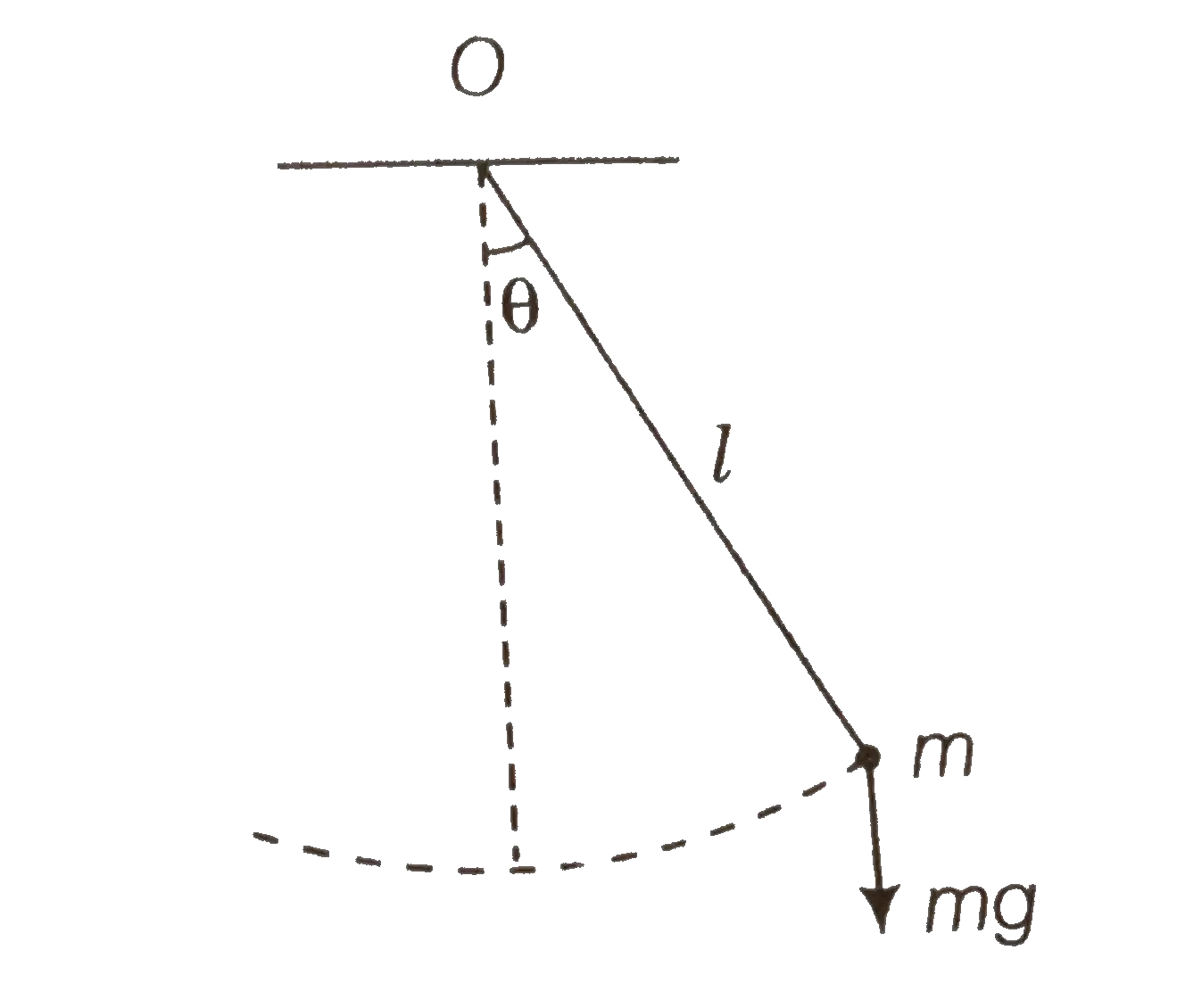
The point O denotes the origin, and the calculated x-cordinate vector specifies the x-coordinate on the plot for the specified time span. At any point during the motion:
`x=lsintheta`__________(6)
`y=lcostheta`__________(7)
`sin^2theta+cos^2theta=1`__________(8)
Using the above three relations, and the input value of `l`, the y-coordinate can be formulated and input in the y-coordinate vector.
Capturing each frame of the corresponding x and y coordinates, a movie is created.
CODE:
clear all
close all
clc
%Program to simulate transient motion of a simple pendulum
%Inputs
b=0.05; %damping coefficient, units(kg/s)
g=9.81;%gravitational acceleration, units(m/s^2)
l=1;%length of cord, units(m)
m=1; %mass of bob, units(kg)
theta_0=[0;3];%intial conditions of displacement(rads) and angular velocity(rads/sec)
t_span=linspace(0,20,200);%time interval of simulation
%The output of ode45 function is stored in results vector with its
%corresponding time values
%results vector 1st clumn represents displacement and 2nd represents angular velocity
%ode45 is an inbuild MATLAB function which takes the dependent and independent variables
%using (@), a function to solve the 2nd order equation (ode_func), the time interval
%for the integration(t_span) and the initial conditions(theta_0)
[t,results]= ode45(@(t,theta) ode_func(t, theta,b,g,l,m),t_span,theta_0);

%The x/l of each data point is stored in sin vector
sin=results(:,1)./l;
%cos of each data point is calculated
cos=(1-sin.^2).^0.5;
%using y=l*cos(theta), y coordinate vector is computed
y=cos.*(-l);
%x-coordinate vector is computed using results matrix
x=results(:,1);
%ct is used to store the frame number for creating the video file
ct=1;
time=0.1;
for i=1:length(y)
   %The bob and cord are plotted
   plot(x(i),y(i),'o','MarkerSize',30,'MarkerEdgeColor','red','MarkerFaceColor',[1 0 0])
   line([x(i) 0],[y(i) 0],'linewidth',3,'color',[0 0 0])
   line([-l l],[0 0],'linewidth',3,'color',[0 0 0])
   %Axis defined
   axis([-1.2 1.2 -1.5 0])
   xlabel('X Axis')
   ylabel('Y Axis')
   title('Transient Behaviour of a Simple Pendulum')
   %text command specifying time duration
   text(0.5,-1.25,sprintf('t= %gs',time),'Color','r','FontSize',20)
   time=time+0.1;
   %pause of o.1s is given after each frame
   pause(0.1)
   M(ct)=getframe(gcf);
   ct=ct+1;
end

%movie command is used for collaborating the array of frames in M into a
%movie
movie(M)
%videoeWriter is used to create a video file from an array of video frames.
%The video file is given a name "videofile" for MATLAB to detect
videofile= VideoWriter('simplependulum.avi','Uncompressed AVI');
%The following commands are perfomed to open the video, input the frames
%stored in M and close the video
open(videofile)
writeVideo(videofile,M)
close(videofile)
CODE FUNCTION:
function [dtheta_dt]= ode_func(t,theta,b,g,l,m)
   %substituting the initial conditions to variables
   theta1=theta(1);
   theta2=theta(2);
   %Using Eqn.1-4
   dtheta1_dt=theta2;
   dtheta2_dt=-(b/m)*theta2-(g/l)*sin(theta1);
   %Formulating the final vector
   dtheta_dt=[dtheta1_dt;dtheta2_dt];
end
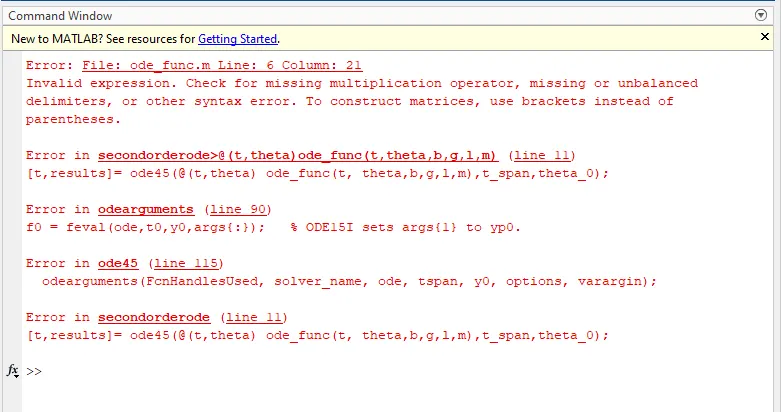
ERROR FACED:
The error was caused because of a missing multiplication operator in the function formula.
ERRORS SOLUTIONS:
The formula was rectified and submitted.
ERROR SCREENSHOT:
OUTPUT: