Week 3 - Solving second order ODEs
AIM :
To write a program that solves the second order ODE function using MATLAB
OBJECTIVES :
To create an Animation of the pendulum corresponding to the ODE equation represnting its motion.
where g = acceleration due to gravity (m/s^2)
L = length of the pendulum (m)
b = damping coefficient
m = mass of the bob (kg)
ABOUT :
A pendulum is a body suspended from a fixed support so that it swings freely back and forth under the influence of gravity.
When a pendulum is displaced sideways from its resting, equilibrium position, it is subject to a restoring force due to gravity that will accelerate it back toward the equilibrium position.
When released, the restoring force acting on the pendulum's mass causes it to oscillate about the equilibrium position, swinging it back and forth.
CODE & EXPLANATION :
1. Function Definition
The function func defines the differential equations that describe the motion of the pendulum:
- theta1 represents the angular position.
- theta2 represents the angular velocity.
- The differential equations are:
- dtheta1_dt = theta2
- dtheta2_dt = -(b/m)*theta2 - (g/l)*sin(theta1)
2. Constants and Initial Conditions
- b is the damping coefficient.
- g is the acceleration due to gravity.
- l is the length of the pendulum.
- m is the mass of the pendulum bob.
- theta_0 is the initial condition where the pendulum starts at a 90-degree angle (π/2 radians) with zero initial velocity.
3. Time Array
- t is a time array created using np.linspace, spanning from 0 to 10 seconds with 150 points.
4. Solving the ODE
- theta is the solution array obtained by integrating the differential equations using odeint.
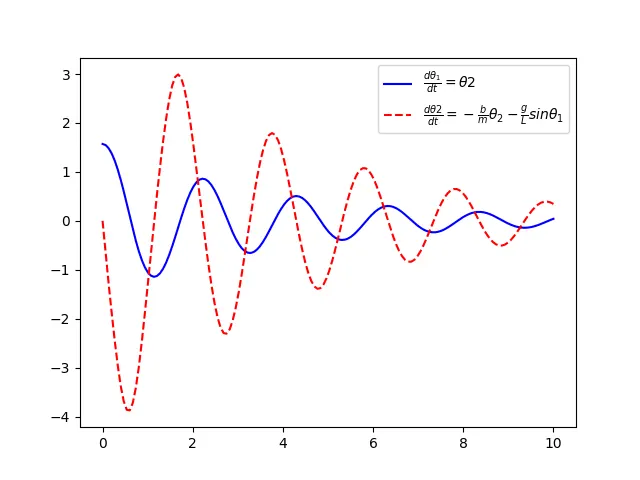
5. Plotting the Results
- The angular position (theta[:,0]) and velocity (theta[:,1]) are plotted over time using matplotlib.
6. Animation Function
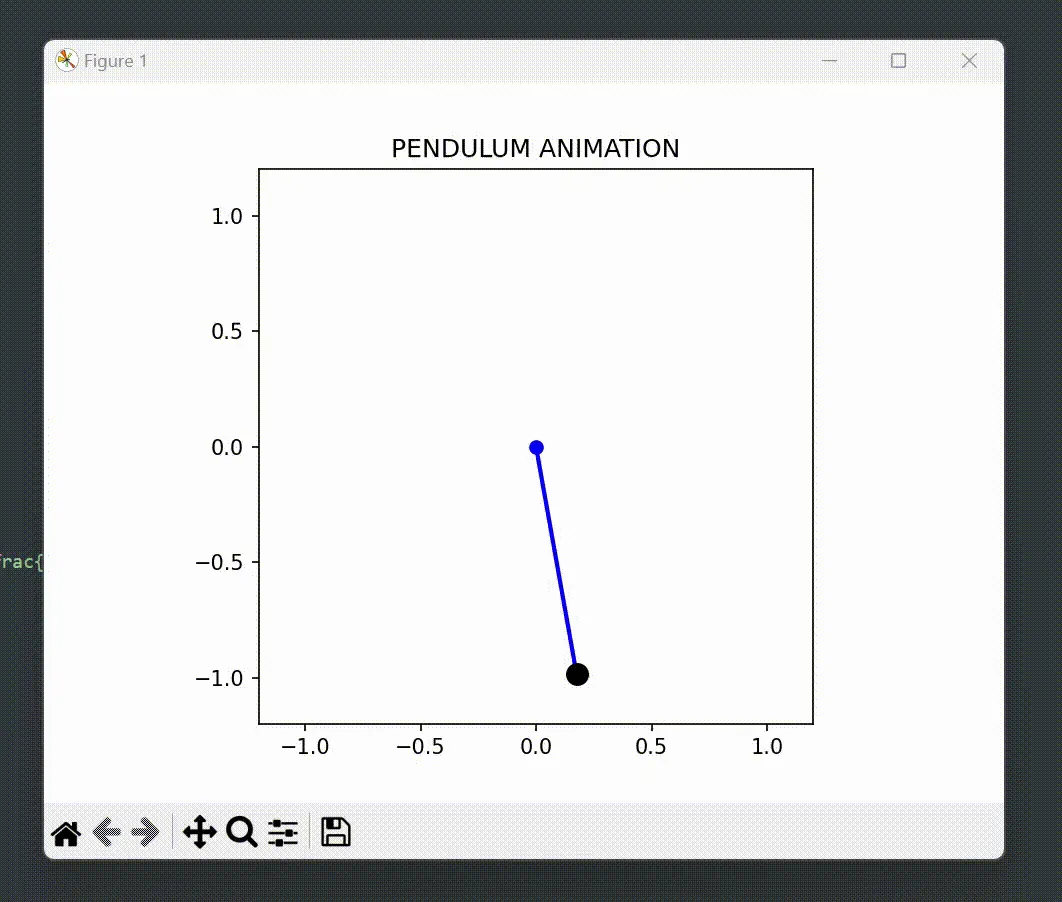
- animate updates the position of the pendulum for the animation.
- It calculates the x and y positions of the pendulum bob using the current angle.
- Updates the line and bob position for each frame.
7. Setting Up the Figure
- A figure and axis are created to display the pendulum.
- The axis limits are set to accommodate the pendulum's movement.
- The pendulum's line and bob are initialized.
8. Creating the Animation
- animation.FuncAnimation is used to create the animation, which updates the pendulum's position for each frame and displays it.
import math
import numpy as np
from scipy.integrate import odeint
import matplotlib.pyplot as plt
import matplotlib.animation as animation
# Function definition
def func(theta,t,b,g,l,m):
theta1 = theta[0]
theta2 = theta[1]
dtheta1_dt = theta2
dtheta2_dt = -(b/m)*theta2 - (g/l)*math.sin(theta1)
dtheta_dt = [dtheta1_dt, dtheta2_dt]
return dtheta_dt
b = 0.05
g = 9.81
l = 1
m = 0.1
# Initial condition
theta_0 = [math.pi/2, 0]
t = np.linspace(0,10,150)
# ODE Solver
theta = odeint(func,theta_0,t,args =(b,g,l,m))
# Plot
plt.plot(t,theta[:,0], 'b',label=r'$\frac{d\theta_1}{dt}=\theta2$')
plt.legend()
plt.plot(t,theta[:,1], 'r--',label=r'$\frac{d\theta2}{dt}=-\frac{b}{m}\theta_2-\frac{g}{L}sin\theta_1$')
plt.legend()
plt.show()
# Animation function
def animate(i):
x = l * np.sin(theta[i, 0])
y = -l * np.cos(theta[i, 0])
pendulum_line.set_data([0, x], [0, y])
bob.set_data(x, y)
return pendulum_line, bob
# Setting up the figure, axis, and plot elements
fig, ax = plt.subplots()
ax.set_xlim(-l-0.2, l+0.2)
ax.set_ylim(-l-0.2, l+0.2)
ax.set_aspect('equal', 'box')
pendulum_line, = ax.plot([], [], 'o-', lw=2,color='b')
bob, = ax.plot([], [], 'bo', markersize=10,color='black')
plt.title('PENDULUM ANIMATION')
# Creating the animation
ani = animation.FuncAnimation(fig, animate, frames=len(t), interval=50, blit=True)
plt.show()
CONCLUSION :
A Practical illustration of the motion of a pendulum was shown using an animation.
Actually, pendulums are at work every day in construction, recreation, music, ceremony, science and art.They are used in clocks,seismometers,metronomes,bungee jumping.