Week 3 - Solving second order ODEs
Program-1: differential equation
close all;
clear all;
clc;

b = 0.05;
g = 9.81;
l = 1;
m = 1;

% Initial conditions
theta_0 = [0;3];


t_span = linspace(0,20,150);

[t, results] = ode45(@(t,theta) ode_func(t,theta,b,g,l,m),t_span,theta_0);
figure(1)
plot(t,results(:,1))
hold on
plot(t,results(:,2))
ylabel('plot')
xlabel('time')

X0 = 0;
Y0 = 0;


ct =1;
for i = 1:length(t)
    figure(2)

    X1 = -l*sin(results(i,1));
    Y1 = -l*cos(results(i,1));


    plot([X0,X1], [Y0,Y1],'color', 'r');
    axis([-2 2 -2 2]);
    hold on;

    plot(X0,Y0,'O','MarkerSize',5,'MarkerFaceColor','y');
    plot(X1,Y1,'O','MarkerSize',20,'MarkerFaceColor','g');
    hold off;
    M(ct) = getframe(gcf);


    ct=ct+1;


end

movie(M);
videofile = VideoWriter('differential_equation_8.avi','Uncompressed AVI');
open(videofile);
writeVideo(videofile,M);
close(videofile);
Program-2: ode_function:
function [dtheta_dt] = ode_func(t,theta,b,g,l,m)
    theta1 = theta(1);
    theta2 = theta(2);

    dtheta1_dt = theta2;
    dtheta2_dt = (-b/m)*theta2 - (g/l)*sin(theta1);
    dtheta_dt = [dtheta1_dt ; dtheta2_dt];
end
Explanation:
1. The program is stated with close all, clear all & clc.
2. The parameter of a pendulum is taken as; damping coefficient(b) = 0.05, length of string(l) = 1m, mass(m) = 1kg.
3. Initial angular displacemnet = 0 rad , initial angular velocity = 0 rad / sec.
4. time interval (t_span) is taken as 150 values between 0 & 20 secs.
5. ode45 is an in-built matlab solver used to solve partial differential equations.
Syntax: [t,y] = ode45(ode_func, t_span, y0)
t_span = (initial_time , final_time), integrate the equation y' = f(t,y) taking y0 as the initial condition.
y --> solution array(in our case containing 'angular displacement' & 'angular velocity' corresponding to each value in column vector t
image-1

6. Regarding the ode_func: A separate program (refer to program-2) is made which contains the equation shown in image-1.
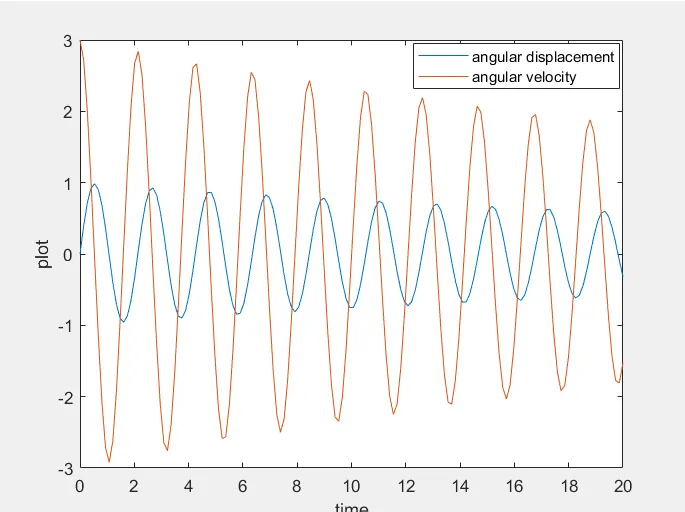
7. Now in program-1, the results are plotted, showing displacement & velocity variation with time (refer image-2)
image -2
8. Now, for making the animation of the pendulum,
for loop is used to get X1 & Y1(x & y coordinates of bob) for each value of 'i' which varies between 0 to 150 (i.e, the No. of values of time we have considered between 0 & 20 sec).
9. we have considered string length of marker size 5 & bob of marker size 20.
10. The counter is initiated before the the start of for loop & is revised at the end of for loop.
11. Video is created by recording the figures using getframe command and converting it into the video using videowriter command.
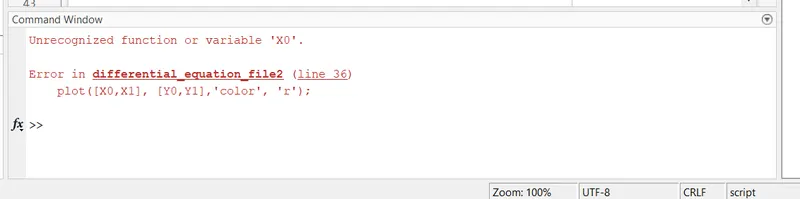
Error faced
Initial coordinates of x & y are not defined.
Explanation: To overcome it X0 & Y0 is defined. X0 = 0 , Y0 = 0.
Animation video link : https://www.youtube.com/watch?v=zFGpcicGRas