Week 2- 2R Robotic Arm Challenge
close all;
clear all;
clc;


l1 = 0.3;
l2 = 0.2;
THETA1 = linspace(0,90,10);
THETA2 = linspace(0,360,25);

counter = 1;
for i = 1:length(THETA1)
    theta1 = THETA1(i);
    for j= 1:length(THETA2)
        theta2 = THETA2(j);


        x0=0;
        y0=0;

        x1= l1*cosd(theta1);
        y1= l1*sind(theta1);

        x2= x1 + l2*cosd(theta2);
        y2= y1 + l2*sind(theta2);


        plot([x0 x1], [y0 y1],[x1 x2], [y1 y2], 'LineWidth',3)
        axis([-0.5 1 -0.5 1])
        pause(0.05)
        M(counter) = getframe(gcf);
        counter = counter + 1;

    end
end

movie(M)
videofile = VideoWriter('robo_try_13.avi ','Uncompressed AVI');
open(videofile)
writeVideo(videofile,M)
Movie clip video link: https://www.youtube.com/watch?v=rHCG-FSIips
The code is made in such a way that link 1 can be rotated for 0 to 90 deg & link 2 can be rotated by 360 deg
Code explanation
1) Clear all: Clear all the variables in the current workspace
2) Close all: Closes all the graphs, if anyone is opened
3) Clc: clears the command window.
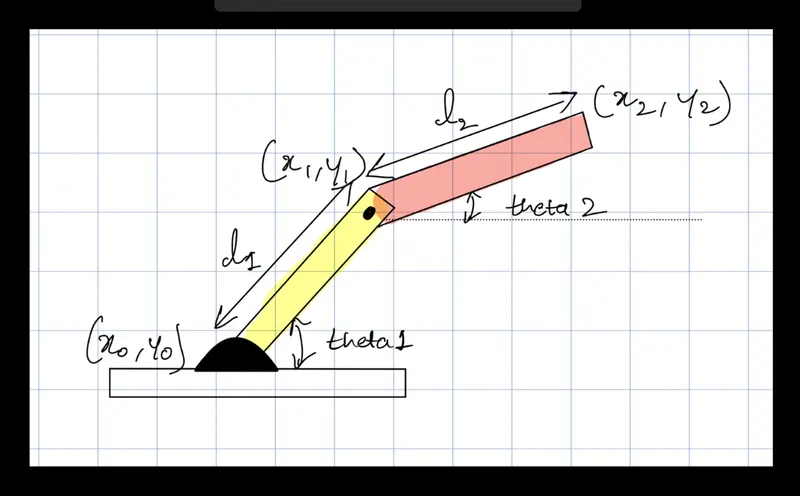
4) The length of link 1 is taken as 0.3 & length of link 2 is taken as 0.2.
5) The THETA1 is considered as 10 equally spaced values between 0 & 90. Whereas, THETA2 is taken as 25 equally spaced values between 0 & 360.
6) A variable is created as a "counter "& value is assigned "1" to keep a count of many figures that will be made during the program execution.
7) Focusing on an angle (theta): A "for " loop is used to keep a track of No. of values in THETA1 & assigned to theta1. For each value of theta1, No. of values of THETA2 is considered & assigned to theta2.
8) Focusing on the position: The initial coordinates are:
(x0, y0) = (0,0)
(x1,y1)= (l1*cosd(theta1), l1*sind(theta1))