Week 3 - Solving second order ODEs
AIM -:
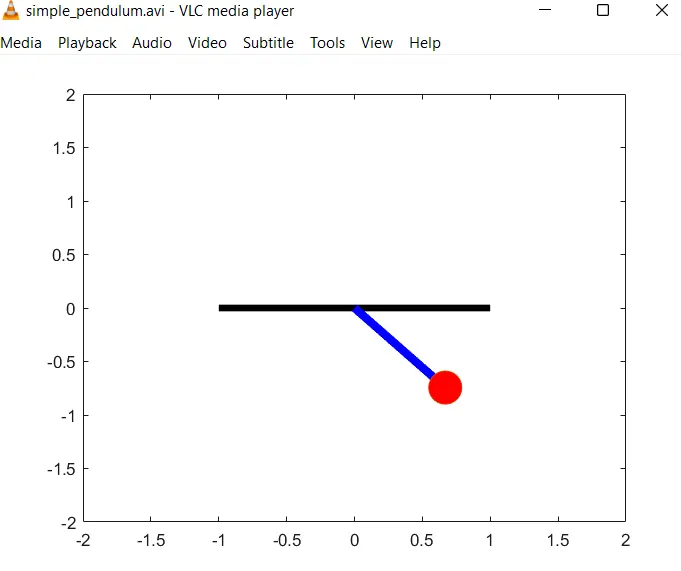
- TO create a animation of simple pendulum by using socond order differential equation by ODE solver fuction.
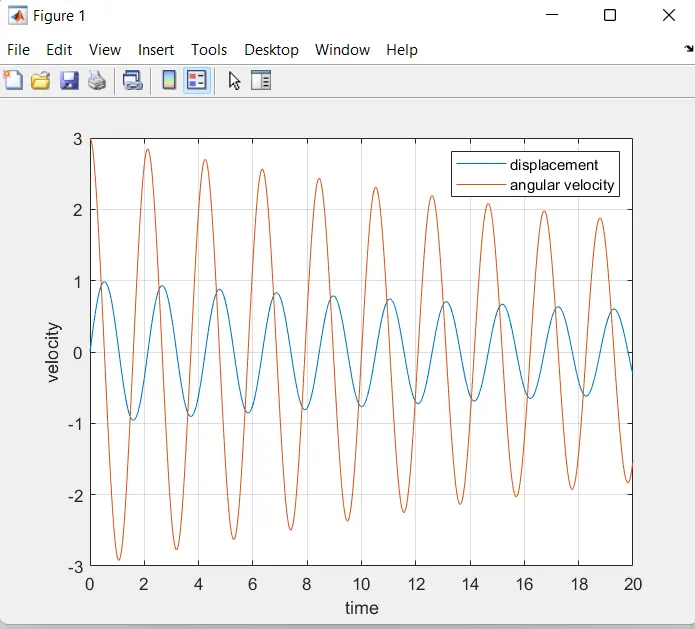
- To create a plot angular velocity and displacement of simple pendulum by ode45.
- Equation of simple pendulum
b= damping coefficient
m=mass of bob in kg
g= gravitational acceleration m/s^2
l=length of the string in m.
OBJECTIVE-: By using ode45 solver which is inbuilt solver in matlab .ODE solver require simple differential equation to solve any kind of higher order equation.
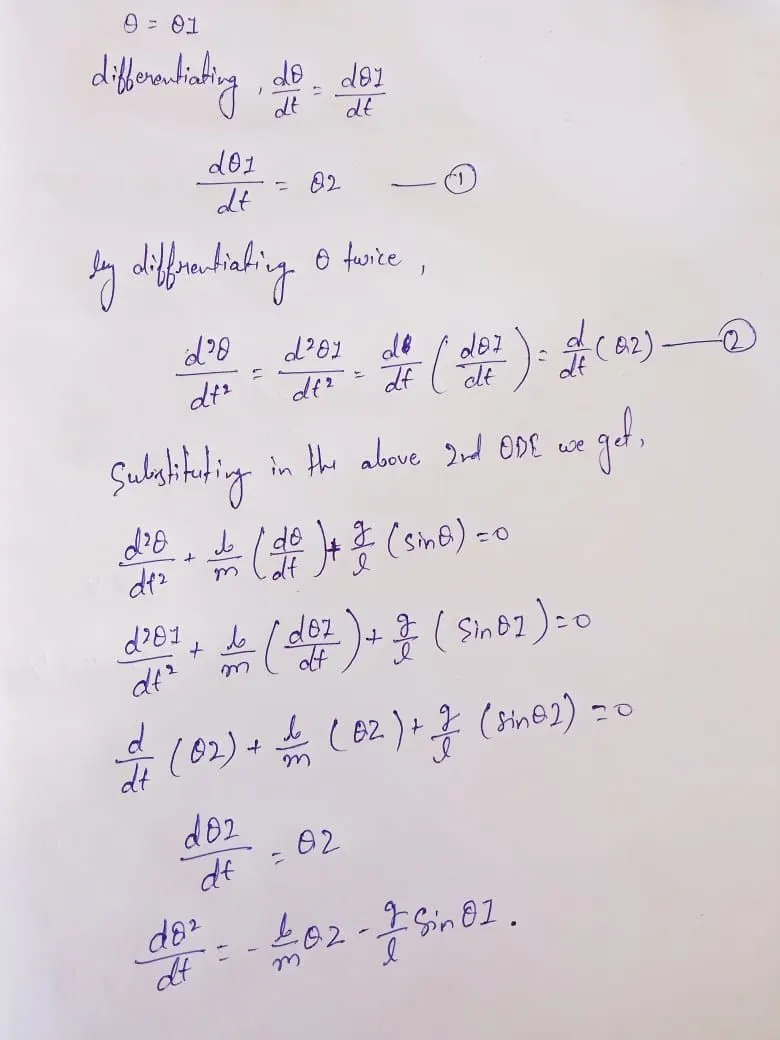
Breaking the 2nd order differential equation into two order.
let us consider ,
MATLAB PROGRAM :
%ode fuction
function [dtheta_dt]=ode_func(t,theta,b,g,l,m)
theta1=theta(1);
theta2=theta(2);

dtheta1_dt=theta2
dtheta2_dt=(-(b/m)*theta2-(g/1)*sin(theta1));
dtheta_dt=[dtheta1_dt;dtheta2_dt];
end
MAIN PROGRAM TO CREATE PLOT AND ANIMATION OF PENDULUM.
%solving the second order ODE and make the Animation

b=0.05;  %damping coefficient
l=1;     %lenth of pendulum in m.
m=1;     %mass of bob in kg
g=9.81;  %gravity in m/s^2

%initial condtion
theta_0=[0;3];

%time
t_span=linspace(0,20,500);

% ODE45 Function to solve second order ode.

[t,results]=ode45(@(t,theta) ode_func(t,theta,b,g,l,m),t_span,theta_0);

figure(1)
plot(t,results(:,1))
hold on
plot(t,results(:,2))
xlabel('time')
ylabel('velocity')
legend('displacement','angular velocity')
grid on
hold off


figure(2)
ct=1;
theta_1 = results(:,1);

for i=1:length(results(:,1));
    %initial co-ordinates
    x_start=0;
    y_start=0;
   theta_2 = theta_1(i);
   %final co-ordinates
    x_end=1*sin(theta_2);
    y_end=-1*cos(theta_2);
     %pendulum base

    plot([-1 1],[0,0],'linewidth',4,'Color','black')
    hold on
    %string of pendulum
    line([x_start x_end],[y_start y_end],'linewidth',5,'Color','b')
    hold on
    %bob of pendulum
    plot(x_end,y_end,'marker','o','markersize',20,'markerfacecolor','r')
    axis([-2 2 -2 2])
    pause(0.0004)
    M(ct)=getframe(gcf);
    hold off
    ct=ct+1;
end

%creating movie from images
movie(M)
videofile=VideoWriter('simple_pendulum.avi','uncompressed AVI');
open(videofile);
writeVideo(videofile,M);
close(videofile);
EXPLANATION :-
for program ,function is defined based on yhe derivation split the 2nd order differential equation into two order.
- inputs of the simple pendulm is given .
- t_span is a command used in the matlab ode45 solver which specifies the time span.
- ODE45 - program is written to solve ODE matlab inbuilt fuction ode 45 used with constant (theta ,t)another fucntion is used and defined seprate in fuction program.
- solve ODE
- co-ordinates is fed using for loop to crate animation
- the plot command is used to plot simple pendulum string and bob.
- Movie command is used to create an animates video of the simple oscillating pendulum.
OUTPUT:-
- The output obtained is graphical represntation velocity curve and displacement curve w.r.t. time
- Plot generated for range 20 sec.
- SIMPLE PENDULUM ANIMATION IMAGE .
- ANIMATION LINK
- https://youtu.be/TXMZhJcWI-o