Ordinary Differential Equation (ODE)
Aim:
To write the program in Matlab for solving the Second Order Ordinary Differential Equation (ODE) for Pendulum and also to obtain the Animation Video for Stimulation of Pendulum.
Introduction:
Ordinary Differential Equation:
Simple Pendulum:
A Simple Pendulum consists of Mass m hanging from a massless ,flexible and inextensible string of Length l and a fixed point. When displaced to a initial angle the pendulum will swing back and forth with a periodic motion.The period of swing of a pendulum depends on the length of string, accleration of gravity and amplitude that is a small extent of maximum angle at which the pendulum swing away from angle theta. The period of swing is independent of mass.
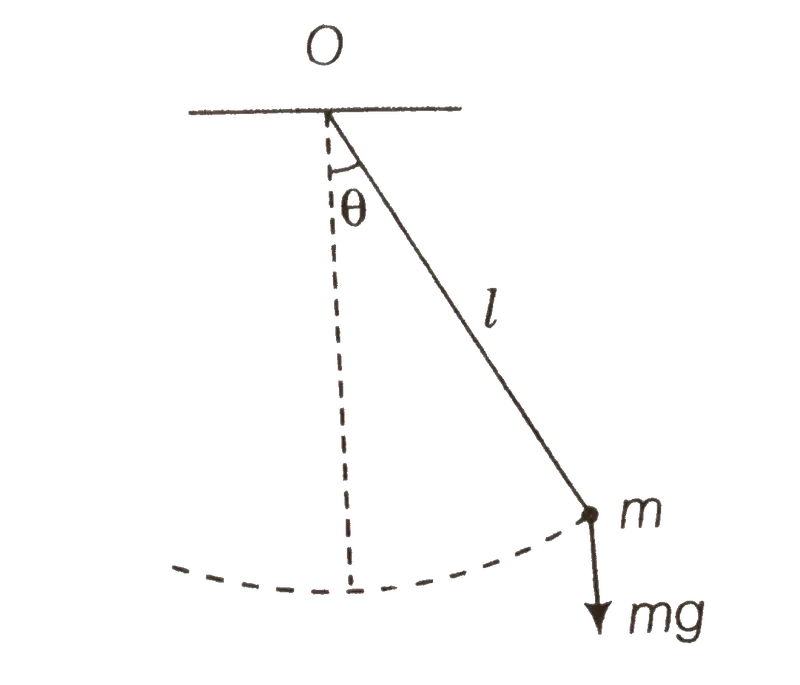
The acceleration of simple penduluim can be given by:
a = -g*sin(theta)
The time period of simple penduluim can be given by:
T = (2*pi)/omega
The value of angular velocity and acceleration of pendulum varies with amplitude theta and it can be solved by using Ordinary Differential Equation.
Second Order Ordinary Differential Equation (ODE) for Simple Pendulum:
The Ordinary Differential Equation is is a differential Equation containing one or more functions of one independent variable and the derivatives of those functions.The term ordinary is used in contrast with the term partial differential equation which may be with respect to more than one independent variable. The Ordinary Differential Equation for Simple pendulum is mentioned below,

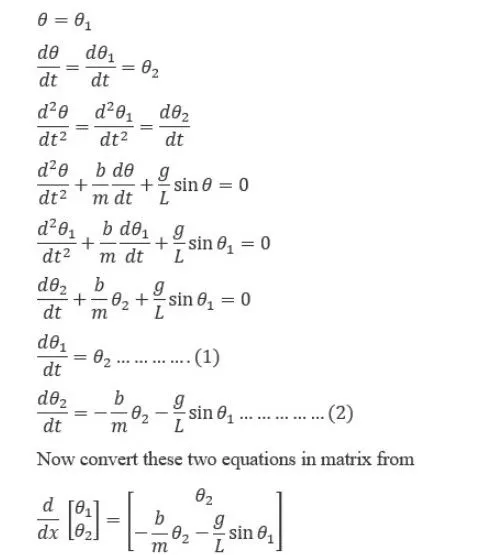
where
b = Damping Co-efficient;
m = Mass of the Bob;
g = Gravity;
L = Length of string attached;
The matrix is the solution of simple pendulum by solving the value for theta1 and theta2.
The given parameters are:
- l=1 metre;
- m=1 kg;
- b=0.05;
- g=9.81 m/s^2;
The initial condition are:
- Time interval t_span = 0-20 sec;
- Initial Angular Displacement = 0;
- Initial Angular Velocity = 3 rad/sec;
The Co-ordinates of the pendulum:
- The starting point co-ordinates of string in pendulum will be (x0,y0) where x0 = 0, y0 = 0;
- The ending point co-ordinates of string where bob is attached in pendulum wiil be (x1,y1) where x1 = l*sin(theta), y1 = -l*cos(theta);
x0 = 0;
y0 = 0;
x1 = l*sin(theta);
y1 = -l*cos(theta);
Progrm to solve an Second Order Ordinary Differential Equation (ODE) for Simple Pendulum:
Function Code:
%Function Program for Solving ODE which this Fucntion will be called in Main Program

function [dtheta_dt] = ode_function(t,theta,b,g,m,l)

   theta1 = theta(1);
   theta2 = theta(2);
   dtheta1_dt = theta2;
   dtheta2_dt = -((b/m)*theta2)-((g/l)*sin(theta1));
   dtheta_dt = [dtheta1_dt; dtheta2_dt];

end- The function code is used for solving the Second Order Ordinary Differential Equation (ODE) for Simple Pendulum.
- The function should contain function keyword followed by input arguments then the function name and folllowed by the output arguments In this program the function is defined as function
[dtheta_dt] = ode_function (t,theta,b,g,m,l) where function is the function keyword, [dtheta_dt] is input arguments, ode_function is function name and t,theta,b,g,m,l are output arguments.
- The file name stored and function name used in function definition should be same otherwise the program throws an error.
- The Function should contain input argument and the input which is to provided by user should match exact number of input arguments provided in the function definition .In this program the input arguments are t,theta,b,g,m,l the user should provide values for these inputs if not provided it shows error msessage that the input missing varialbe is not defined.
- Likerwise the output arguments should match the output variables defined in the function definition. In this program dtheta_dt is used as output arguments and it is also defined in the program.
- The theta1 and theta2 are defined.
- The dtheta1_dt and dtheta2_dt are mentioned as provided in above equation 1 and 2.
- The dtheta_dt is obtained by combining dtheta1_dt And dtheta2_dt into matrix.
- The 'end' command is used to stop the function running.
% To Calculate the Second Order ODE for a Pendulum and To Stimulate the Pendulum

clear all
close all
clc

%Inputs

%Damping Co-efficient
b = 0.05;
%Acceleration Due to Gravity in m/sec^2
g = 9.81;
%Mass of the Bob in kg
m = 1;
%Length of Pendulam in metre(m)
l = 1;

%Initial Conditions Of Angular Displacement and Angular Velocity
theta_0 = [0;3];

%Time Intervals in seconds(sec)
t_span = linspace(0,20,600);

%Solving ODE Equation
[t,results] = ode45(@(t,theta) ode_function(t,theta,b,g,l,m),t_span,theta_0);

%Plotting Time vs Angular Displacement and Angular Velocity
figure(1)
plot (t,(results (:,1)),'LineWidth',1)
hold on
plot (t,results(:,2),'LineWidth',1)
xlabel ('Time seconds')
ylabel('Angular Displacement and Angular Velocity')
legend('Change in Displacement','Change in Angular Velocity')

%To Create the Animation Video for Stimulation of Pendulum
theta_1 = results(:,1);
ct=1;
for i = 1:length(theta_1)
    Theta = theta_1(i);

    x0 = 0;
    y0 = 0;

    x1 = l*sin(Theta);
    y1 = -l*cos(Theta);

%To create the Animation Video
    figure(2)
    plot ([-1 1],[0,0],'LineWidth',3)
    hold on
    plot ([x0 x1],[y0 y1],'LineWidth',2,'Color','g')
    plot (x1,y1,'o','MarkerSize',20,'MarkerFaceColor','b')
    axis ([-1.5 1.5 -1.5 0.5])
    hold off
    pause (0.03)
    grid on
    M(ct) = getframe(gcf);
    ct=ct+1;

end
movie(M)
videofile = VideoWriter("Second Order ODE of Pendulam","Uncompressed AVI")
open(videofile)
writeVideo(videofile,M)
close(videofile)
- The Inputs such as damping co-efficient(b),mass(m),length of string(l)and gravity(g)are assigned as mentioned above in the program.Then the initial coditions such as Angular Displacement and Angular Velocity are assigned to theta_0 as mentioned above in the program.The time interlval is assigned using 'Linspace' command for evenly spaced time intervals betweent 0 to 20 sec to t_span.
- The 'ode45' is used for solving ordinary or partial differential equation and it is inbuilt function in Matlab.In this program the ode45 is defined by [t,results] = ode45(@(t,theta) ode_function(t,theta,b,g,l,m),t_span,theta_0) where (@(t,theta)) is where the ode is function of t and theta that is the ode is to be integrated with respect to t and theta and it is the main inputs, then the ode_function is defining the ode function where this function is called from function program which is return in seprate file in matlab, then t_span is the time array where how far the integration to be done, where theta_0 is initial condition,[t,results] are the output where t is time and results have two columns of angular dispalcement and angular velocity.
- The 'Figure(1)' command is used to create the figure graphical object of first figure.
- The The 'Plot' command is used to create the plot between (t,results(:,1)) to plot the time vs angular displacement.The 'LineWidth' command is used for thicker line of width 1.
- The 'Plot' command is used to create the plot between (t,results(:,2))to plot the time vs angular velocity.The 'LineWidth' command is used for thicker line of width 1.
- The 'Hold on' command is used for second line plot without deleting the existing line plot.
- The 'xlabel ('Time seconds')' is mentioned to show x-axis as Volume in the graph and 'ylabel (Angular Displacement/Angular Velocity')'command is used to y-axis as Pressure in the graph.
- The 'grid on' command is used to show the grids in the graph.
- The 'legend' command is used for describing the two plots in same graph such as legend('Change in Displacement','Change in Angular Velocity') where the one is decribed as Change in Displacement and another one as Change in Angular Velocity.
- The theta_1 = results(:,1) where thetya_1 is to store the results of first column that is angular displacement into seperate matrix to animate the stimulation of pendulam using For Loop.
- The 'ct' is the counter variable, the counter is a variable which is used to count an event in loop. the 'ct' is initially assigned the value as 1.
- To animate the stimulation of pendulam 'For Loop' is used.For loop is used to execute the set of command for specific number of times.
- The variable 'i' is used and set by i = 1 : Length(theta_1) that is the Length(theta1) indicates 600 values as the theta_1 contains 600x1, so 'i' variable will excute the for loop and have 600 values.
- The 'Theta' variable is used for iteration inside For loop.
- The co-ordinate of pendulum x0,y0,x1,y1 are defined in the for loop.
- The x1 and y1 are calculated using the co-ordinates.
- The 'Figure(2)' command is used to create the figure graphical object of second figure.
- The 'Plot' command is used for ploting the ceiling line or fixed support for pendulum in the graph such as ([-1 1], [0 0] that is the ceiling line or fixed support for pendulum is drawn upto -1 to 1 for x-axis and 0 to 0 for y-axis.The 'LineWidth' command is used for thicker line of width 3.
- The 'Hold on' command is used for second line plot without deleting the existing line plot.
- The 'Plot' command is used for ploting the x0,y0,x1 and y1 co-ordinates in the graph.The 'LineWidth' command is used for thicker line of width 3.The 'Color" command is used for coloring the line with 'g' as green color line.
- The 'o Marker' command is used to create the sphere at the end of x1 and y1 co-ordinates to represent the bob inb pendulum.'Markersize' command is used for thicker sphere of size 20.'Markerfacecolor' command is used for color of sphere with 'b' command for blue color sphere.
- The 'axis' command is used to set the limit for x-axis and y-axis.In this program the limit is set by -1.5 to 1.5 for x-axis and -1.5 to 0.5 for y-axis.
- The 'Hold Off' command is used to off the hold state so that new plots added to the axes clear existing plots and reset all axes properties.
- The 'pause' command is used for pausing the frame. In this program pause time is given as 0.03sec.
- The 'grid on' command is used to show the grids in the graph.
- The 'M' command is used for capturing the frame of each and every movements of the link everytime when for loop runs and place it one another .
- The 'getframe' command is used to make a video where every frame is caputred and stored in 'M'.
- The 'ct+1' is added to 'ct' variable to increment the frame while for loop run.
- The 'end' command is used to stop the for loop running.
- The 'movie' command is used create the movie of annimation of robotic arm.
- The 'VideoWriter" is used for storing the video format, in this program the video format is ".AVI.
- The 'open' command is used for opening the video.
- The 'write' command is used to write the video with the plot frames captured.
- The 'close' command is used for closing the video.
Error faced while progrming is:
While calling the function in the ode45,I mentioned wrong function name that is I mentioned ode_func as function name instead of ode_function which is the original function name. So the command window shows that the unrecognized function or variable ode_func and throws an error and stop the working of program.
Screen shot of the error displayed in the Command Window:
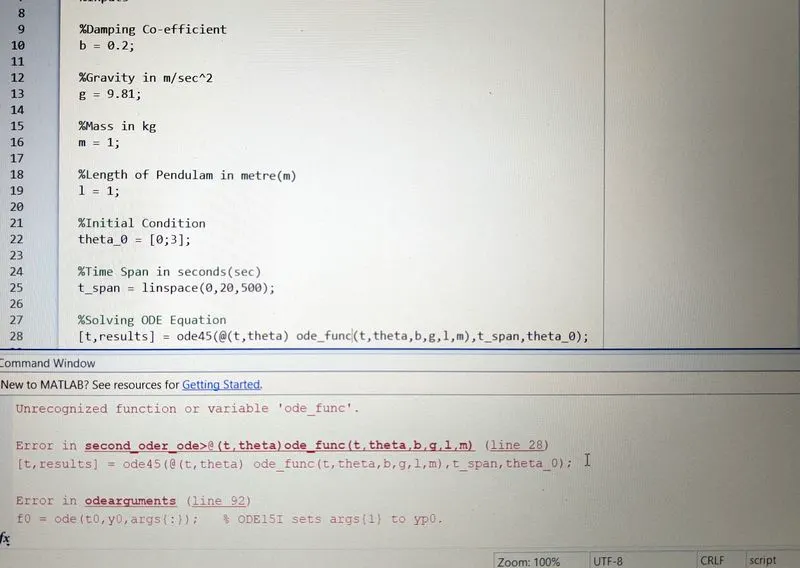
Steps taken to overcome those errors:
I changed the function name ode_func into ode_function in defining the function in the ode45 and the matlab excuted the programs without any error.
Output:
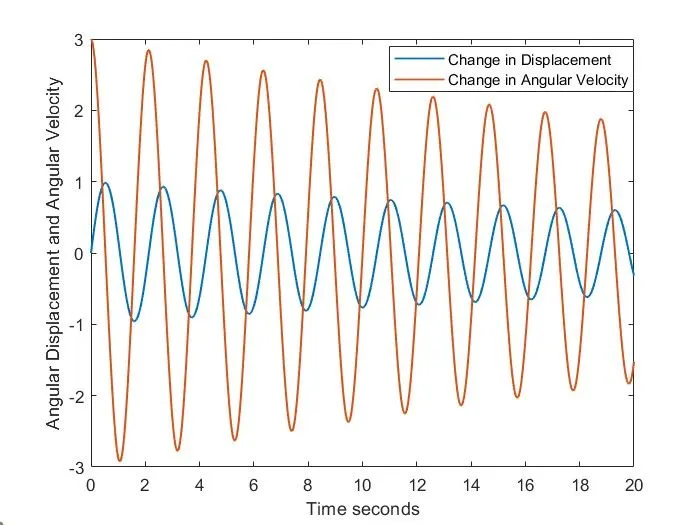
Ploting Time vs Angular displacement/Velocity
The Animation Video of Stimulation of Pendulum:
Conclusion:
Thus the program is written in Matlab for solving the Second Order Order Ordinary Differential Equation (ODE) for Pendulum and also Animation Video for Stimulation of Pendulum is obtained.