Project 1 - Parsing NASA thermodynamic data
Aim:
To write the program in Matalb for file parsing the NASA Thermodynamics Data and also calculate the thermodynamics properties of various gas species.
Objective:
- To write a function that extracts the 14 co-efficients and calculates the enthalpy, entropy and specific heats for all the species in the data file.
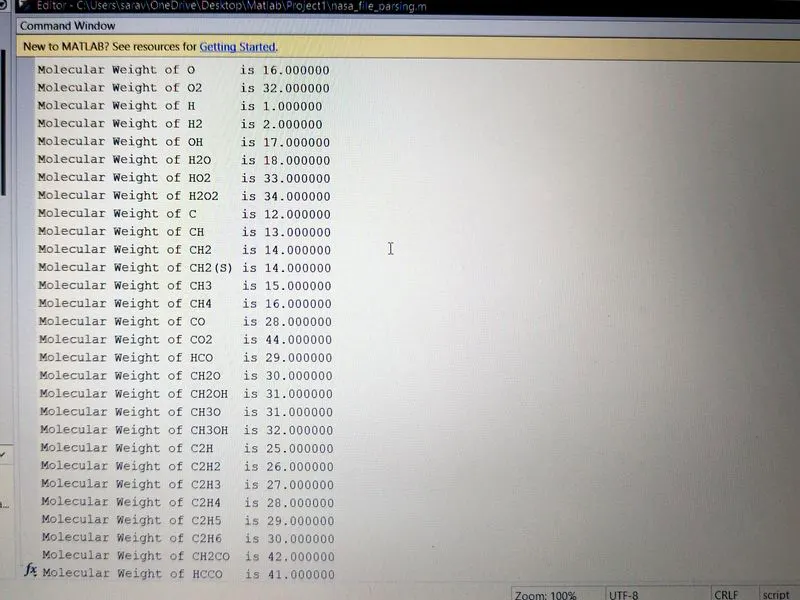
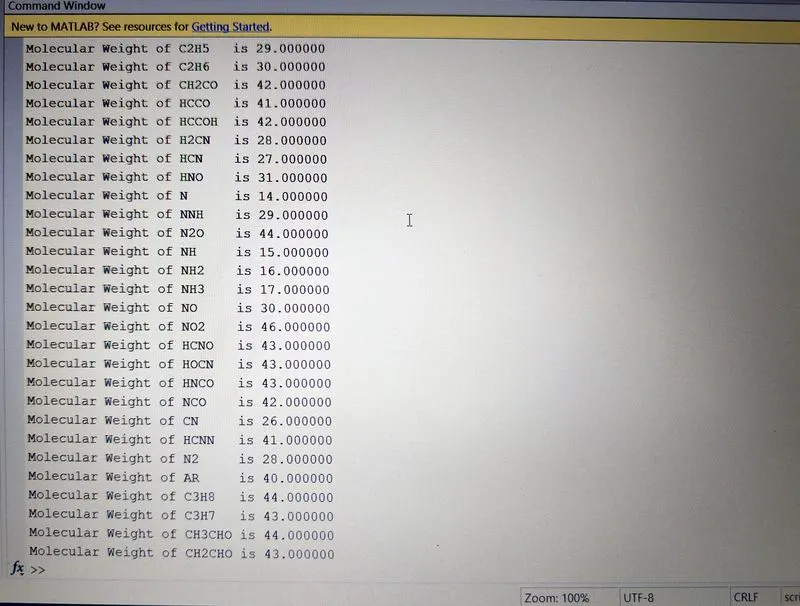
- To calculate the molecular weight of each species and also to display the molecular weight in the command window.
- To plot the Cp, Enthalpy and Entropy for the local temperature range (low temperature : high temperature) specific for each species.
- To save the plots as images with appropriate names and dump them in separate folders for each species with suitable name.
Introduction:
File Parsing:
File parsing is a process of extracting data from any type of file and also used to manipulate the data for any calculation or for our convenience and the data can be read or the data can be written in the file. In thgis program we file prasing the NASA Thermodynamics Data.
NASA Thermodynamics Data:
NASA came up with polynomials that can be used to evaluate thermodynamic properties such as Cp, H and S. They have also documented the co-efficients that are required to evaluate these polynomials for 1000+ species.
Thermo.dat is the data file consits of 14 co-efficient of 53 species given by NASA. These data is used for calculating the enthalpy, entropy and specific heat.The enthalpy, entropy and specific heat formulas are as follows
Enthaply Formula:
Program:
The program consists of one main program and four function program.The four functions are first one for calculating specific heat, second on for calculating enthalpy, third one for calculating entropy and last one for calculating the molecular weight of the species.
Main Program:
%File Parsing NASA Thermodynamics Data
close all
clear all
clc

%Reading the File Data
file = fopen('Thermo.dat','r');
fgetl(file);

%Reading Global Temperature
global_temprature = str2num(fgetl(file));
global_low_temperature = global_temprature(1);
global_medium_temperature = global_temprature(2);
global_high_temperature = global_temprature(3);

%Skipping the Header
header1 = fgetl(file);
header2 = fgetl(file);
header3 = fgetl(file);

%To Extract Individual Species Information
for k = 1:53
    f = fgetl(file);
    species = f(1:6);

 %Reading Local Temperature
    t = findstr(f,'.');

    local_low_temp = str2double(f(52-3:52+3));
    local_high_temp = str2double(f(62-4:62+3));
    local_mid_temp = str2double(f(72-4:72+4));
    T1 = local_low_temp;
    T2 = local_high_temp;
    T3 = local_mid_temp;

 %Reading Co-efficient of First Line
    f1 = fgetl(file);
    a = strfind(f1,'E');

    a1 = str2double(f1(1:a(1)+3));
    a2 = str2double(f1(a(1)+4:a(2)+3));
    a3 = str2double(f1(a(2)+4:a(3)+3));
    a4 = str2double(f1(a(3)+4:a(4)+3));
    a5 = str2double(f1(a(4)+4:a(5)+3));

 %Reading Co-efficient of Second Line
    f2 = fgetl(file);
    b = strfind(f2,'E');

    a6 = str2double(f2(1:b(1)+3));
    a7 = str2double(f2(b(1)+4:b(2)+3));
    a8 = str2double(f2(b(2)+4:b(3)+3));
    a9 = str2double(f2(b(3)+4:b(4)+3));
    a10 = str2double(f2(b(4)+4:b(5)+3));

 %Reading Co-efficient of Third Line
    f3 = fgetl(file);
    c= strfind(f3,'E');

    a11 = str2double(f3(1:c(1)+3));
    a12 = str2double(f3(c(1)+4:c(2)+3));
    a13 = str2double(f3(c(2)+4:c(3)+3));
    a14 = str2double(f3(c(3)+4:c(4)+3));

 %Creating Directory for each Spices a Seperate Folder
 mkdir (['C:UserssaravOneDriveDesktopMatlabProject1Plot',species])


 %Defining Temperature Range
 T = linspace(T1,T2,1000);

 %Defining the Universal Gas Constant, R in J/mol-K
 R = 8.314;

 %Calculating Specific Heat based on the Temperature Range
 Cp = specific_heat (R,T,T3,a1,a2,a3,a4,a5,a8,a9,a10,a11,a12);

 %Calculating Enthalpy based on the Temperature Range
 H =  enthalpy (R,T,T3,a1,a2,a3,a4,a5,a6,a8,a9,a10,a11,a12,a13);

 %Calculating Entropy based on the Temperature Range
 S = entropy (R,T,T3,a1,a2,a3,a4,a5,a7,a8,a9,a10,a11,a12,a14);

 %Plotting
 %Plotting Temperature vs Specific Heat
 figure(1)
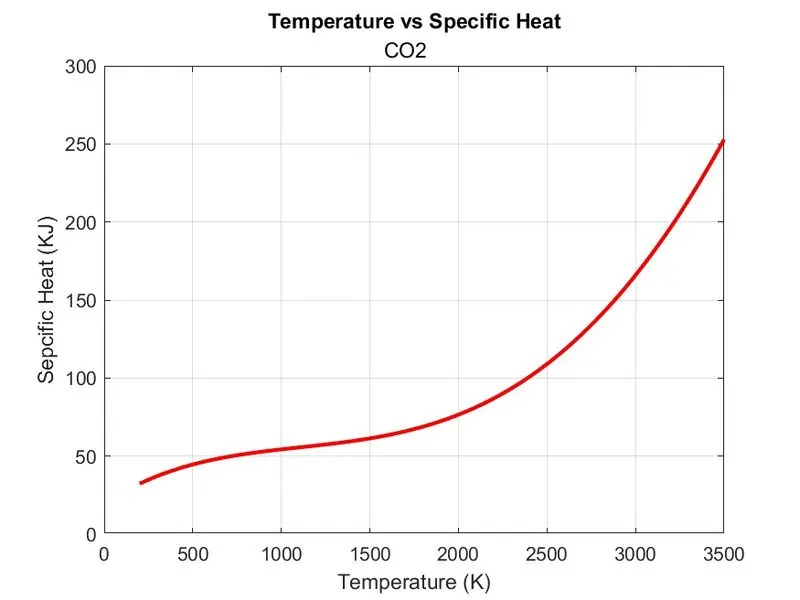
 plot(T,Cp,'LineWidth', 2, 'Color', 'r')
 xlabel ('Temperature (K)')
 ylabel ('Sepcific Heat (KJ)')
 title ('Temperature vs Specific Heat',species)
 grid on

 %Plotting Temperature vs Enthalpy
 figure(2)
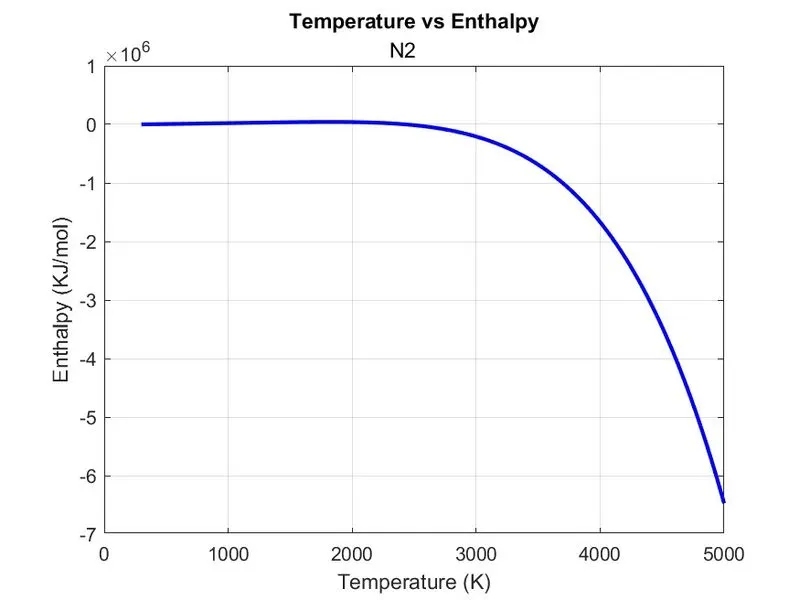
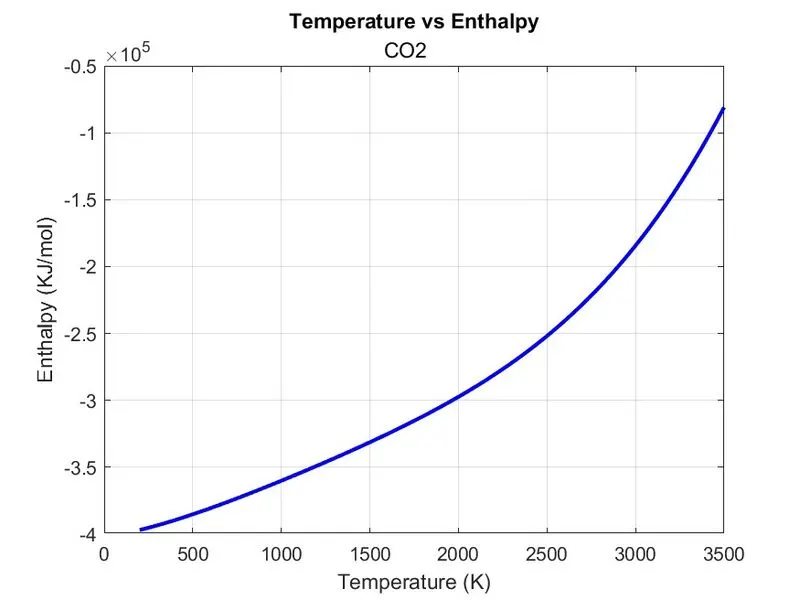
 plot(T,H,'LineWidth', 2, 'Color', 'b')
 xlabel ('Temperature (K)')
 ylabel ('Enthalpy (KJ/mol)')
 title ('Temperature vs Enthalpy',species)
 grid on

 %Plotting Temperature vs Entropy
 figure(3)
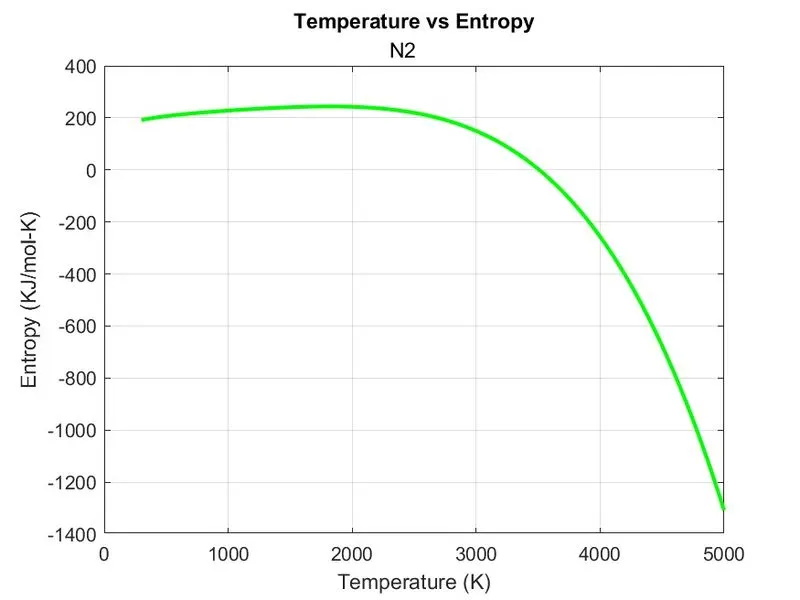
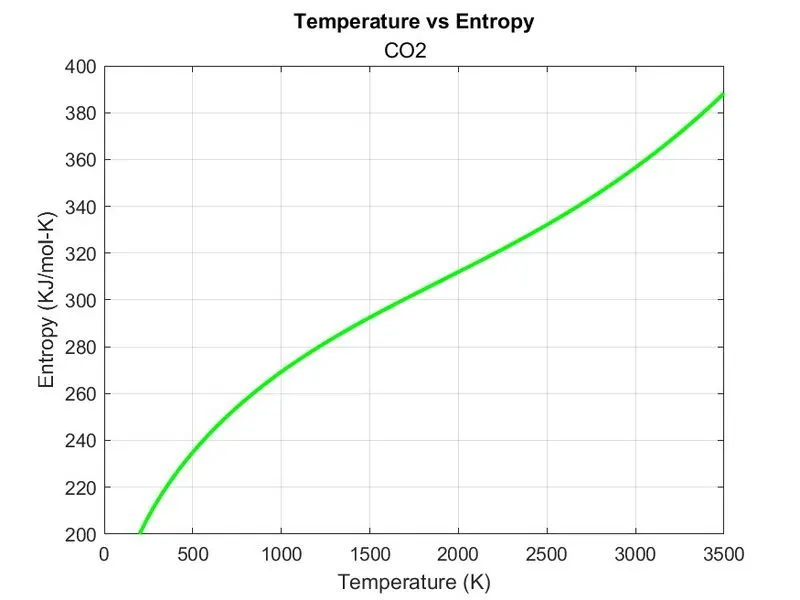
 plot(T,S,'LineWidth', 2, 'Color', 'g')
 xlabel ('Temperature (K)')
 ylabel ('Entropy (KJ/mol-K)')
 title ('Temperature vs Entropy',species)
 grid on

 %Changing the Directory for Saving the Plot in Particular Species Folder
 cd (['C:UserssaravOneDriveDesktopMatlabProject1Plot',species])
 saveas (figure(1),'Specific Heat.jpg')
 saveas (figure(2),'Enthalpy.jpg')
 saveas (figure(3),'Entropy.jpg')

 %Changing the Directory to Original Directory
 cd ('C:UserssaravOneDriveDesktopMatlabProject1')

 %Calculating Molecular Weight
 MW = molecular_weight (species);
 %To Display Molecular Weight of Species in Command Window
 w = sprintf('Molecular Weight of %s is %f',species,MW);
 disp(w)

end
fclose(file);- First we start with Close all, Clear all and clc before start of program,because Close all - deletes the current figures or thespecified figures, Clear all - deletes the data from workspace and clear the system memory and clc - clear the data present in the Command Window and gives clean Command Window.
- The 'fopen' command is used to open the data file that is in this program our data file is thermo.dat and 'r' commans is used for reading the data in the file and it is assigned to varialble called 'file'.(Note:The file should saved where the main program is saved otherwise the program throws an error)
- The 'fgetl' command is used for reading the line in the file.
- Now the global temperature is read using 'fgetl' command and it is assigned to varialble global_temperature.
- The 'str2num' command is used for converting the string data into numerical value which is used for obtaing the global temperature.
- The global_temperature 1st value is low temperature so it is assigned to 'global_low_temperature'.
- The global_temperature 2nd value is medium temperature so it is assigned to 'global_medium_temperature'.
- The global_temperature 3rd value is high temperature so it is assigned to 'global_high_temperature'.
- The three header lines are skipped using the 'fgetl' command and these three header are assigned to variables are 'header1', 'header2' and 'header3'.
- In the data file there are 53 species and these species has the seperate co-efficient, local temperature and the species name, instead of writing 53 seperate codes ,we use 'For loop'.
- The 'For loop' used to execute the set of command for specific number of times.
- The 'For loop' is used for obtaining the spicies name, 14 co-efficient of the species, their local temperatures and for calculating the specific heat, enthalpy and entropy and plot for the species based on those values for all 53 species which is provided in the data file and also to make the program simple and easier for understanding.
- In this loop 'k' variable is given as 1:53 as we want to calculate the specific heat, enthalpy and entropy and also to plot for all 53 species.
- The species first line is read using the 'fgetl' command and it is assigned to variable 'f'.
- The species name is obtained by assigning the f where we saved the first line of the species by 1 to 6 as the maximum range the speciesw name as 6 and assigned to variable species.
- The local temperature is present in the last three characters of the species line and we use 'Findstr' command and it assigned to 't' variable.
- The 'Findstr' is used to find the string based on the reference given, in this we gave '.' as reference.
- The 't' gives the value of 52 62 and 72 where the reference '.' is present.
- The local low temperature is obtained by specifing range of 52-3:52+3 in 'f'. and assigned to variable 'T1'
- In this 'str2double' command is used convert the string into double precision numerical value instead of 'str2num', and also 'str2double' will provide faster performance.
- The local high temperature is obtained by specifing range of 62-4:62+3 in 'f'. and assigned to variable 'T2' and numerical value is obtained by using 'str2double' command.
- The local medium temperature is obtained by specifing range of 72-4:72+3 in 'f'. and assigned to variable 'T3' and numerical value is obtained by using 'str2double' command.
- The co-efficient of species are present in three lines, so we seperately we read the co-efficient of each line.
- The species co-efficient first line is read using the 'fgetl' command and it is assigned to variable f1.
- The species co-efficient first line and we use 'Findstr' command and it assigned to 'a' variable and 'Findstr' is used to find the string based on the reference given, in this we gave 'E' as reference.
- The 'a' has five values as E present in five places and it five is refered as 'a(1)' as first 'a' value, 'a(2)' as second 'a' value, 'a(3)' as third 'a' value, 'a(4)' as fourth 'a' value, 'a(5)' as fifth 'a' value.
- The 1 co-efficient is obtained by specifing range of (1:a(1)+3) in 'f1' and assigned to variable 'a1' and numerical value is obtained by using 'str2double' command.
- The 2 co-efficient is obtained by specifing range of (a(1)+4:a(2)+3) in 'f1' and assigned to variable 'a2' and numerical value is obtained by using 'str2double' command.
- The 3 co-efficient is obtained by specifing range of (a(2)+4:a(3)+3) in 'f1' and assigned to variable 'a3' and numerical value is obtained by using 'str2double' command.
- The 4 co-efficient is obtained by specifing range of (a(3)+4:a(4)+3) in 'f1' and assigned to variable 'a4' and numerical value is obtained by using 'str2double' command.
- The 5 co-efficient is obtained by specifing range of (a(4)+4:a(5)+3) in 'f1' and assigned to variable 'a5' and numerical value is obtained by using 'str2double' command.
- The species co-efficient second line is read using the 'fgetl' command and it is assigned to variable f2.
- The species co-efficient second line and we use 'Findstr' command and it assigned to 'b' variable and 'Findstr' is used to find the string based on the reference given, in this we gave 'E' as reference.
- The 'b' has five values as E present in five places and it five is refered as 'b(1)' as first 'b' value, 'b(2)' as second 'b' value, 'b(3)' as third 'b' value, 'b(4)' as fourth 'b' value, 'b(5)' as fifth 'b' value.
- The 6 co-efficient is obtained by specifing range of (1:b(1)+3) in 'f2' and assigned to variable 'a6' and numerical value is obtained by using 'str2double' command.
- The 7 co-efficient is obtained by specifing range of (b(1)+4:b(2)+3) in 'f2' and assigned to variable 'a7' and numerical value is obtained by using 'str2double' command.
- The 8 co-efficient is obtained by specifing range of (b(2)+4:b(3)+3) in 'f2' and assigned to variable 'a8' and numerical value is obtained by using 'str2double' command.
- The 9 co-efficient is obtained by specifing range of (b(3)+4:b(4)+3) in 'f2' and assigned to variable 'a9' and numerical value is obtained by using 'str2double' command.
- The 10 co-efficient is obtained by specifing range of (b(4)+4:b(5)+3) in 'f2' and assigned to variable 'a10' and numerical value is obtained by using 'str2double' command.
- The species co-efficient third line is read using the 'fgetl' command and it is assigned to variable f3.
- The species co-efficient third line and we use 'Findstr' command and it assigned to 'c' variable and 'Findstr' is used to find the string based on the reference given, in this we gave 'E' as reference.
- The 'c' has five values as E present in five places and it five is refered as 'c(1)' as first 'c' value, 'c(2)' as second 'c' value, 'c(3)' as third 'c' value, 'c(4)' as fourth 'c' value, 'c(5)' as fifth 'c' value.
- The 11 co-efficient is obtained by specifing range of (1:c(1)+3) in 'f1' and assigned to variable 'a11' and numerical value is obtained by using 'str2double' command.
- The 12 co-efficient is obtained by specifing range of (c(1)+4:c(2)+3) in 'f1' and assigned to variable 'a12' and numerical value is obtained by using 'str2double' command.
- The 13 co-efficient is obtained by specifing range of (c(2)+4:c(3)+3) in 'f1' and assigned to variable 'a13' and numerical value is obtained by using 'str2double' command.
- The 14 co-efficient is obtained by specifing range of (c(3)+4:c(4)+3) in 'f1' and assigned to variable 'a14' and numerical value is obtained by using 'str2double' command.
- To create new folder for each species we use 'mkdir' command which is used for creating new folder.
- The Temperature is defined using 'Linspace ' command which is used to create evenly spaced elements.
- The R universal gas contant is defined as mentioned above.
- The specific heat is calculated by calling the function specific_heat (R,T,T3,a1,a2,a3,a4,a5,a8,a9,a10,a11,a12). The Call of Function is used to invoke the function by just mentioning the function name and input arguments.By specifing the function name and their inputs the function will be called of and runs the function program. It is assigned to variable 'Cp'.
- The enthalpy is calculated by calling the function enthalpy (R,T,T3,a1,a2,a3,a4,a5,a6,a8,a9,a10,a11,a12,a13).It is assigned to variable 'H'.
- The entropy is calculated by calling the function entropy (R,T,T3,a1,a2,a3,a4,a5,a7,a8,a9,a10,a11,a12,a14).It is assigned to variable 'S'.
- The 'Figure(1)' command is used to create the figure graphical object.
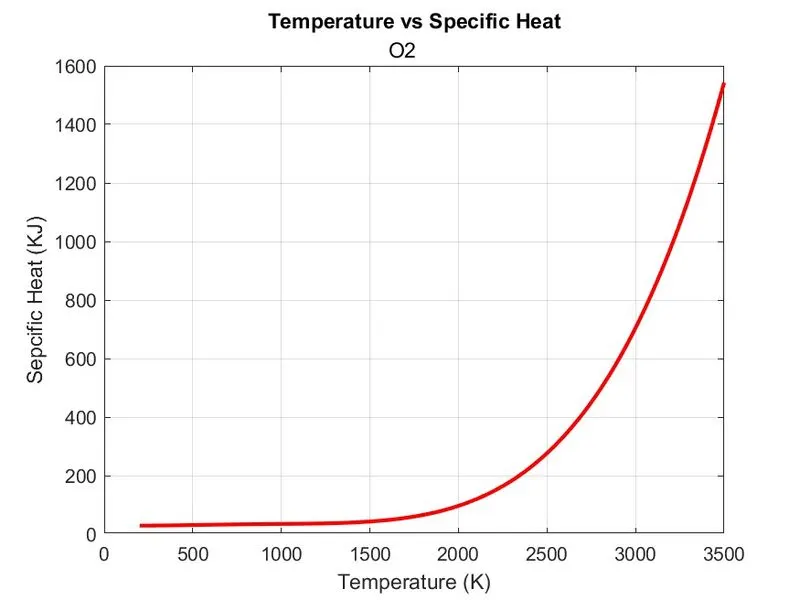
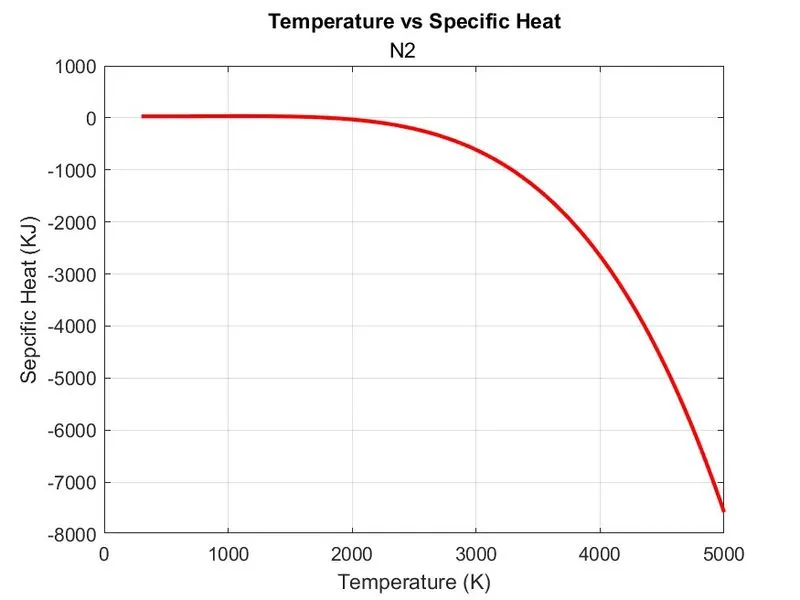
- The 'Plot' command is used to plot the graph Temperature vs Specific Heat and 'Linewidth' command is used for thicker line in the graph of width 2 is used to show thicker line and 'Color' command is used with 'r' for red color line.
- The 'xlabel ('Temperature')' is mentioned to show x-axis as Temperature in the graph and'ylabel (Specific Heat)' command is used to y-axis as Specific Heat in the graph.
- The 'Title' command is used for giving title of graph and the title is Temperature vs Specific Heat with respect to the species.
- The 'grid on' command is used to show the grids in the grpah.
- The 'Figure(2)' command is used to create the figure graphical object.
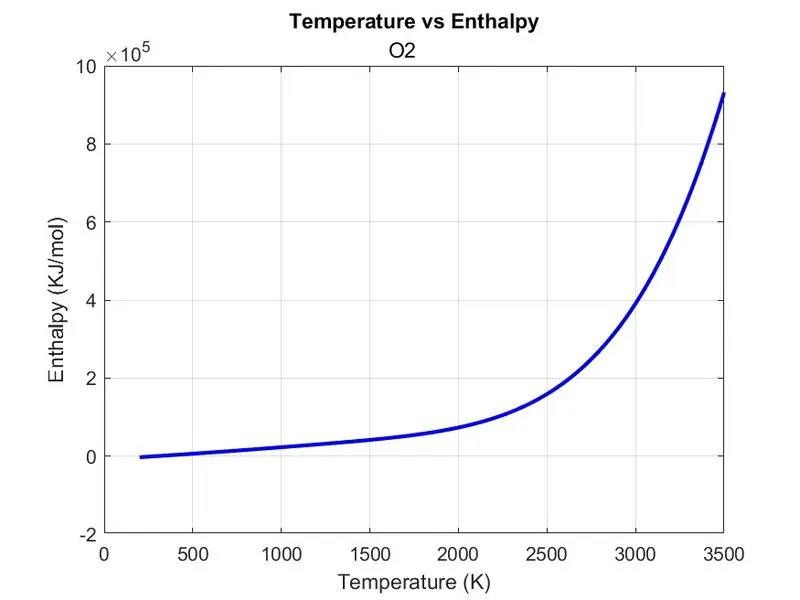
- The 'Plot' command is used to plot the graph Temperature vs Enthalpy and 'Linewidth' command is used for thicker line in the graph of width 2 is used to show thicker line and 'Color' command is used with 'b' for blue color line.
- The 'xlabel ('Temperature')' is mentioned to show x-axis as Temperature in the graph and'ylabel (Enthalpy)' command is used to y-axis as Enthalpy in the graph.
- The 'Title' command is used for giving title of graph and the title is Temperature vs Enthalpy with respect to the species.
- The 'grid on' command is used to show the grids in the grpah.
- The 'Figure(3)' command is used to create the figure graphical object.
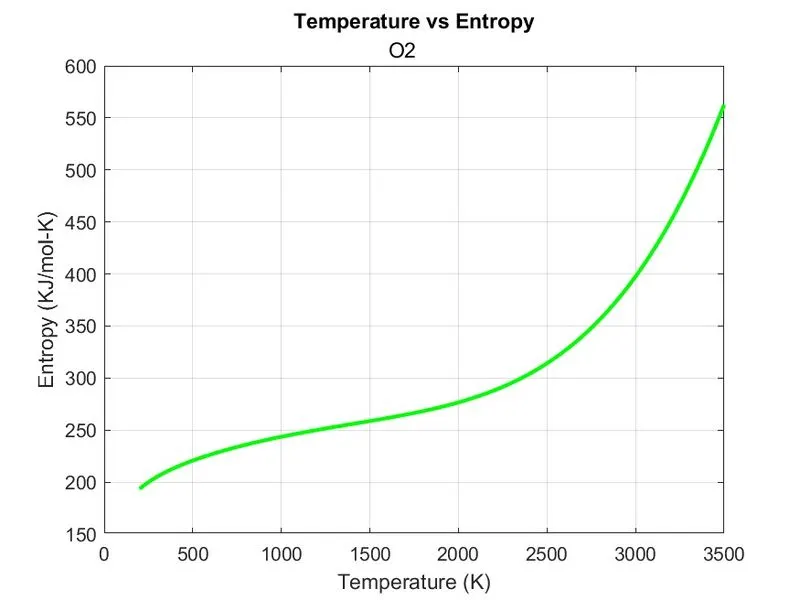
- The 'Plot' command is used to plot the graph Temperature vs Entropy and 'Linewidth' command is used for thicker line in the graph of width 2 is used to show thicker line and 'Color' command is used with 'g' for green color line.
- The 'xlabel ('Temperature')' is mentioned to show x-axis as Temperature in the graph and'ylabel (Entropy)' command is used to y-axis as Entropy in the graph.
- The 'Title' command is used for giving title of graph and the title is Temperature vs Entropy with respect to the species.
- The 'grid on' command is used to show the grids in the grpah.
- The 'cd' command is used to change the current folder that is in specified location the plots of the species will be saved individually for the species folder.
- The 'Saveas' command is used to save all there plots as figure(1) as Specific Heat, figure(2) as Enthalpy, figure(3) as Entropy and save in .jpg format.
- The 'cd' command is used to change the current folder location to the main program saved location.
- The molecular weight of species is calculated by calling the function molecular_weight (species). It is assigned to variable 'MW'.
- The 'Sprintf' command is used for pritn the strin data, in this molecular weight of species is to be printed in command window. %s used for output in string that is letters and %f used for output in floating point number.It is assigned to variable 'w'.
- The 'disp' is used for displaying the variables. The result of 'w' variable is displayed.
- The 'end' command is used to stop the for loop running.
- The 'fclose' command is used to close all the open files.
Function For Specific Heat:
%Function for Calculating Specific Heat based on the Temperature
function [Cp] =  specific_heat (R,T,T3,a1,a2,a3,a4,a5,a8,a9,a10,a11,a12)

if T>T3
    Cp = (a1 + (a2.*T )+ (a3.*T.^2) + (a4.*T.^3) + (a5.*T.^4))*R;

else
    Cp = (a8 + (a9.*T )+ (a10.*T.^2) + (a11.*T.^3) + (a12.*T.^4))*R;
end

end
- The function code is used for solving the specific heat.
- The function should contain function keyword followed by input arguments then the function name and folllowed by the output arguments In this program the function is defined as function
[Cp] = specific_heat (R,T,T3,a1,a2,a3,a4,a5,a8,a9,a10,a11,a12) where function is the function keyword, [Cp] is output arguments, specific_heat is function name and R,T,T3,a1,a2,a3,a4,a5,a8,a9,a10,a11,a12 are input arguments.
- The file name stored and function name used in function definition should be same otherwise the program throws an error.
- The Function should contain input argument and the input which is to provided by user should match exact number of input arguments provided in the function definition .In this program the input arguments are R,T,T3,a1,a2,a3,a4,a5,a8,a9,a10,a11,a12 the user should provide values for these inputs if not provided it shows error msessage that the input missing varialbe is not defined.
- Likerwise the output arguments should match the output variables defined in the function definition. In this program Cp is used as output arguments and it is also defined in the program.
- As we know there are two range of temperature co-efficients, so we use 'if else' condition for this function that is if temperature range 'T' is greater than local medium temperature 'T3' the high temperature co-efficient is used such as a1, a2, a3, a4, a5, a6. else that is Tis less than T3 the low temperature co-efficient is used such as a8, a9, a10, a11, a12, a13 is used.
- The Sepcific Heat formula is mentioned in the 'if else' condition.
- The 'end' command is used to stop the function running.
Function For Enthalpy:
%Function for Calculating Entalphy based on the Temperature
function [H] =  enthalpy (R,T,T3,a1,a2,a3,a4,a5,a6,a8,a9,a10,a11,a12,a13)

if T>T3
    H = R*T.*(a1 + ((a2.*T)./2) + ((a3.*T.^2)./3) + ((a4.*T.^3)./4) + ((a5.*T.^4)./5) +
        (a6./T));

else
    H = R*T.*(a8 + ((a9.*T)./2) + ((a10.*T.^2)./3) + ((a11.*T.^3)./4) + ((a12.*T.^4)./5)
        + (a13./T));

end

end
- The function code is used for solving the enthalpy.
- The function should contain function keyword followed by input arguments then the function name and folllowed by the output arguments In this program the function is defined as function
[H] = enthalpy (R,T,T3,a1,a2,a3,a4,a5,a6,a8,a9,a10,a11,a12,a13) where function is the function keyword, [H] is output arguments, specific_heat is function name and R,T,T3,a1,a2,a3,a4,a5,a6,a8,a9,a10,a11,a12,a13 are input arguments.
- As we know there are two range of temperature co-efficients, so we use 'if else' condition for this function that is if temperature range 'T' is greater than local medium temperature 'T3' the high temperature co-efficient is used such as a1, a2, a3, a4, a5, a6. else that is Tis less than T3 the low temperature co-efficient is used such as a8, a9, a10, a11, a12, a13 is used.
- The Enthalpy formula is mentioned in the 'if else' condition.
- The 'end' command is used to stop the function running.
Function For Entropy:
%Function for Calculating Entropy based on the Temperature
function [S] =  entropy (R,T,T3,a1,a2,a3,a4,a5,a7,a8,a9,a10,a11,a12,a14)

if T>T3
    S = R* ((a1.*log(T)) + a2.*T + ((a3.*T.^2)./2) + ((a4.*T.^3)./3) + ((a5.*T.^4)./4) + a7);

else
    S = R* ((a8.*log(T)) + a9.*T + ((a10.*T.^2)./2) + ((a11.*T.^3)./3) + ((a12.*T.^4)./4) + a14);

end

end- The function code is used for solving the entropy.
- The function should contain function keyword followed by input arguments then the function name and folllowed by the output arguments In this program the function is defined as function
[S] = specific_heat (R,T,T3,a1,a2,a3,a4,a5,a7,a8,a9,a10,a11,a12,a14) where function is the function keyword, [S] is output arguments, specific_heat is function name and R,T,T3,a1,a2,a3,a4,a5,a7,a8,a9,a10,a11,a12,a14 are input arguments.
- As we know there are two range of temperature co-efficients, so we use 'if else' condition for this function that is if temperature range 'T' is greater than local medium temperature 'T3' the high temperature co-efficient is used such as a1, a2, a3, a4, a5, a7. else that is Tis less than T3 the low temperature co-efficient is used such as a8, a9, a10, a11, a12, a14 is used.
- The Entropy formula is mentioned in the 'if else' condition.
- The 'end' command is used to stop the function running.
Function For Molecular Weight:
%Function for Calculating Molecular Weight
function [MW] = molecular_weight (species)

%Defining the Atoms and their Atomic Weight
Atoms = ['O', 'H', 'C', 'N', 'Ar'];
Atomic_weight = [16, 1, 12, 14, 40];

MW = 0;

%Comparing the Atoms and Calculating Molecular Weight
for i = 1:length(species)
    for j = 1:length(Atoms)
        if strcmp (species(i),Atoms(j))
            MW = MW + Atomic_weight(j);
            s = j;
        end
    end
    m = str2double (species(i));
    if m>1
        MW = MW + Atomic_weight(s)*(m-1);
    end
end

end
- The function code is used for solving the molecular weight.
- The function should contain function keyword followed by input arguments then the function name and folllowed by the output arguments In this program the function is defined as function
-
[MW] = molecular_weight (species) where function is the function keyword, [MW] is output arguments, molecular_weight is function name and species are input arguments.
- The atoms and their atomic weight are defined.
- The MW is initialy set as zero.
- The for loop is used for iteration of length of species and assigned by variable i and another for loop is used for length of atom that is number of atoms in species and assigned by variables j.
- The 'If' condition is used for comparing strings that is species and atoms using The 'Strcmp' command.
- The molecular weight formula that is MW = MW + Atomic_Weight(j) for variable j is used for calculating molecular weight.
- The value of j is stored to the variable s.
- The 'end' command is used to stop the one of the for loop and also for if condition running.
- Then the species numerical value is stored in m variable using 'str2num'.To add the molecular weight of remaining number of atoms that is in H2O the one H and O value will be obtained in above condition but in this species two H is present so we need to add the another H atom molecular weight
- For this another 'if' condition is used and the condition is m>1 the another atom of H is added to molecular weight by specifing the s variable to atomic weight and multiplying with m-1 that is MW = MW + Atomic_Weight(s)*(m-1).
- The 'end' command is used to stop the another of the for loop, for if condition and function running.
Output:
Plot of Specific Heat, Enthalpy and Entropy for O2:
Plot of Specific Heat, Enthalpy and Entropy for N2:
Plot of Specific Heat, Enthalpy and Entropy for CO2:
Screenshot of Molecular Weight displayed in Command Window:
Screenshot of Seperate Folder Saved in the System for each Species:

Error:
While changing the directory for saving the plot using 'cd' command, the command window throws an error has error in using cd and there are too many input arguments because i did not use parathesis'[]' while mentioning the location in 'cd' syntax.
Screenshots showing errors thrown in command window:
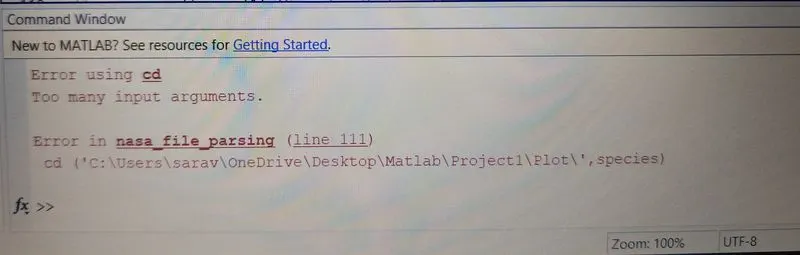
Steps taken to overcome those errors:
After mentioning the '[]' paranthesis in 'cd' syntax the program runs successfully without throwing an error.
Conclusion:
Thus the program is written for in Matalb for file parsing the NASA Thermodynamics Data and also calculated the thermodynamics properties of various gas species.
Reference:
- https://en.wikipedia.org/wiki/Parsing
- https://in.mathworks.com/help/matlab/ref/str2double.html
- https://in.mathworks.com/help/matlab/ref/cd.html
- https://www.wikihow.com/Calculate-Molecular-Weight