2R Robotic Arm
Aim:
To write a program in Matlab to simulate the forward kinematics of a 2R Robotic Arm.
Introduction:
The forward kinematics of a 2R Robotic Arm are as follows:
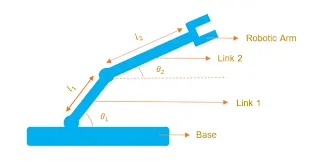
The above image represents the 2R Robotic Arm consists of two links link1 and link2 and a Manipulator or Robotic Arm.
- The length of link1 is represented as l1 and length of link2 is represented as l2.
- The theta1 is the angle made by the link1 with respect to the base.
- The theta2 is the angle made by the link2 with respect to the base.
The Coordinates of the two Links and the Manipulator or Robotic Arm will be as follows:
- The initial position of link1 will be (x0,y0), where x0 = 0 and y0 = 0 as it is the satrting point.
- The initial position of link2 will be (x1,y1), where x1 = l1*cos(theta1) and y1 = l1*sin(theta1).
- The position of Manipulator or Robotic Arm will be (x2,y2), where x2 = x1+ l2*cos(theta2) and y2 = y1+ l2*sin(theta2).
(x0,y0) = (0,0);
(x1,y1) = (l1*cos(theta1),l1*sin(theta1));
(x2,y2) = (x1+ l2*cos(theta2),y1+ l2*sin(theta2));
x0 = 0;
y0 = 0;
x1 = l1*cos(theta1);
y1 = l1*sin(theta1);
x2 = x1+ l2*cos(theta2);
y2 = y1+ l2*sin(theta2);
- The Length of link1 (l1) will be :
l1 = 1.5 m;
- The Length of link2 (l2) will be :
l2 = 2 m;
The Program to simulate the forward kinematics of a 2R Robotic Arm in Matlab as follows:
% FORWAR KINAMATICS OF 2R ROBOT ARM

clear all
close all
clc

% Inputs
%Link1 l1 Length in metre(m)
l1 = 1.5;

%Link2 l2 Length in metre(m)
l2 = 2;

%Value of theta1 and theta2 in Dgree
theta1 = linspace(0,90,10);
theta2 = linspace(0,90,10);

ct=1;

for i = 1:length(theta1)
    Theta1 = theta1(i)
    for j = 1:length(theta2)
        Theta2 = theta2(j)

        x0 = 0;
        y0 = 0;

         x1 = l1*cosd(Theta1);
         y1 = l1*sind(Theta1);

         x2 = x1 + l2*cosd(Theta2);
         y2 = y1 + l2*sind(Theta2);

        % Plotting
        plot([x0 x1], [y0 y1], [x1 x2], [y1 y2], 'LineWidth',4)
        axis([-0.1 3 -0.1 5])
        pause (0.1)
        M(ct) = getframe(gcf);
        ct=ct+1;
    end

end
movie(M)
videofile = VideoWriter("Forward Kinematics of 2R Robotic Arm","Uncompressed AVI")
open(videofile)
writeVideo(videofile,M)
close(videofile)
- The Inputs such as Length of link1 (l1) and link2 (l2) are assigned as mentioned above in the program.
- The angles at which the two arm rotate set from 0 to 90 for theta1 and theta2 repectively and used 'Linspace' Operator to create evenly spaced elements for theta1 and theta2 values from 0to 90 degree.
- The 'ct' is the counter variable, the counter is a variable which is used to count an event in loop. the 'ct' is initially assigned the value as 1.
- In this program 'For loop' is used to execute the set of command for specific number of times.
- The variable 'i' is used and set by i = 1 : Length(theta1) that is the Length(theta1) indicates 10 values as the theta1 contains 1x10, so 'i' variable will excute the for loop and have 10 values.
- The 'Theta1' variable is used for iteration inside For loop.
- Another For Loop is used for theta2 as the each angle of Theta1 the link2 take multiple positions.
- The variable 'j' is used and set by j = 1 : Lenght(theta2) that is the Length(theta2) indicates 10 values as the theta2 contains 1x10, so 'j' variable will excute the for loop and have 100 values as for every Theta1 value Theta2 will have 10 values.
- The 'Theta2' variable is used for iteration inside For loop.
- The Coordinates of the two Links and the Manipulator or Robotic Arm are specified in the program as mentioned above.
- The x1,y1,x2 and y2 are calculated using the coordinates.
- The 'Plot' command is used to plot all x0,y0,x1,y1,x2,y2.
- The 'axis' command is used to set the limit for x-axis and y-axis.In this program the limit is set by -0.1 to 3 for x-axis and -0.1 to 5 for y-axis.
- The 'pause' command is used for pausing the frame. In this program pause time is given as 0.1sec.
- The 'M' command is used for capturing the frame of each and every movements of the link everytime when for loop runs and place it one another .
- The 'getframe' command is used to make a video where every frame is caputred and stored in 'M'.
- The 'ct+1' is added to 'ct' variable to increment the frame while for loop run.
- The 'end' command is used to stop the for loop running.
- The 'movie' command is used create the movie of annimation of robotic arm.
- The 'VideoWriter" is used for storing the video format, in this program the video format is ".AVI.
- The 'open' command is used for opening the video.
- The 'write' command is used to write the video with the plot frames captured.
- The 'close' command is used for closing the video.
Error faced while progrming is:
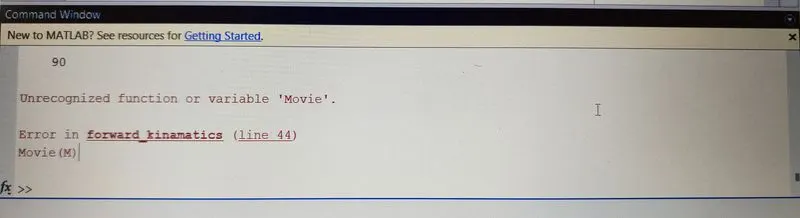
The error I encountered at the program was, I typed the movie command with upper case 'M' that is 'Movie' instead of lower case 'm' in the movie command. So the program shows that the Movie variable is not Unrecognized by the matlab as the Matlab is case sensitive programming language.
Screen shot of the error displayed in the Command Window:
Steps taken to overcome those errors:
I changed the uppercase 'M' with lower case 'm' in 'movie' command and the matlab excuted the programs without any error.
OutPut:
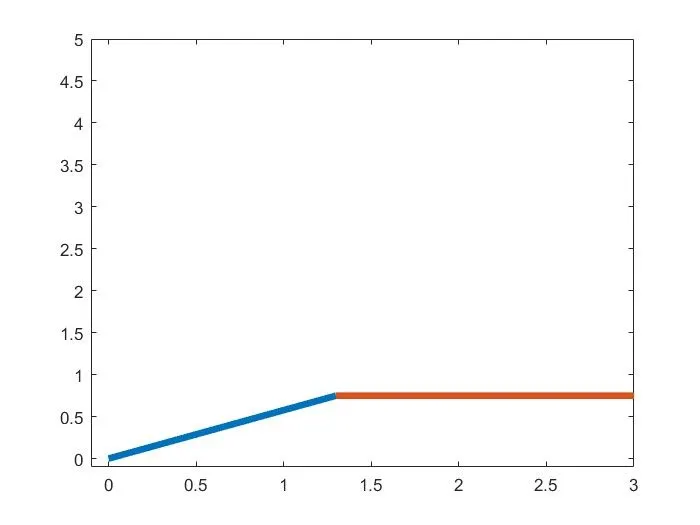
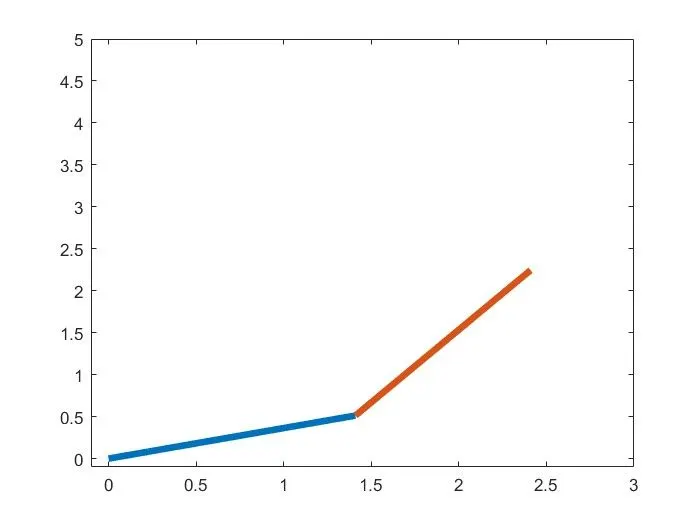
Screeshot of Movement of 2R Robotic Arm with respect to theta1 and theta2 :
Animation Video of 2R Robotic Arm:
- The graph and animation video of 2R Robotic Arm shows that the link2 with theta2 angle can take multiple postion with respect to the each angle of theta1 with link1.
Conclusion:
Thus the program is written in Matlab to simulate the forward kinematics of a 2R Robotic Arm and also generated Animation Video of a 2R Robotic Arm.