Week 3 - Solving second order ODEs
AIM : To make a plot between time and angular velocity of simple pendulum using second ODE.
To make an simple pendulum's animation using second ODE in matlab.
CONCEPT :
A differential equation is an equation that relates one or more unknown functions and their derivatives. In applications, the functions generally represent physical quantities, the derivatives represent their rates of change, and the differential equation defines a relationship between the two.
In second order ODE any derivative wrt to independent variable have order no greater then 2.
ODE also helps us to solve many sysytems such a ssimple harmonic motions, vibrations , dampings etc.
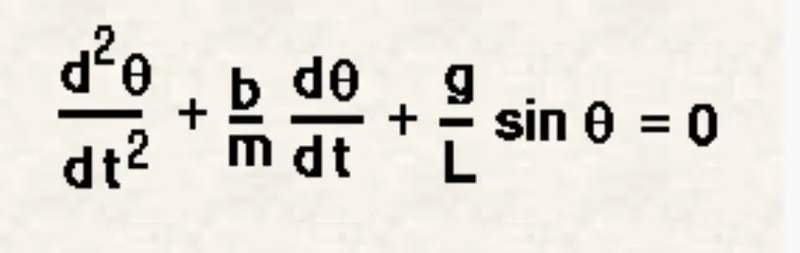
A simple pendulum consists of mass 'm' hanging at length 'l' at a fixed point. when it is displaced to an initial angle 'theta' and released the pendulum swings back and forth with certain periodic motion.
The equation is given by,
PROGRAM :
clear all
close all
clc

%INPUTS
b = 0.05;
g = 9.81;
l =1;
m = 0.1;

% INITIAL CONDITION
theta_0 = [0,5];

%TIME POINTS
t_span = linspace(0,10,500);

%SOLVING ODE
[t, results] = ode45(@(t,theta) ode_func(t, theta, b, g, l, m), t_span, theta_0);

plot(t,results(:,1))
hold on
plot(t,results(:,2))
xlabel('time(m/s)')
ylabel('displacement')
PROGRAM EXPLANATION :
we started with as usual clear all, close all and clc.
Then we defined the inputs i.e
b = damping coefficient = 0.05;
g = gravity = 9.8m/s
l = length = 1m;
m = mass = 0.1
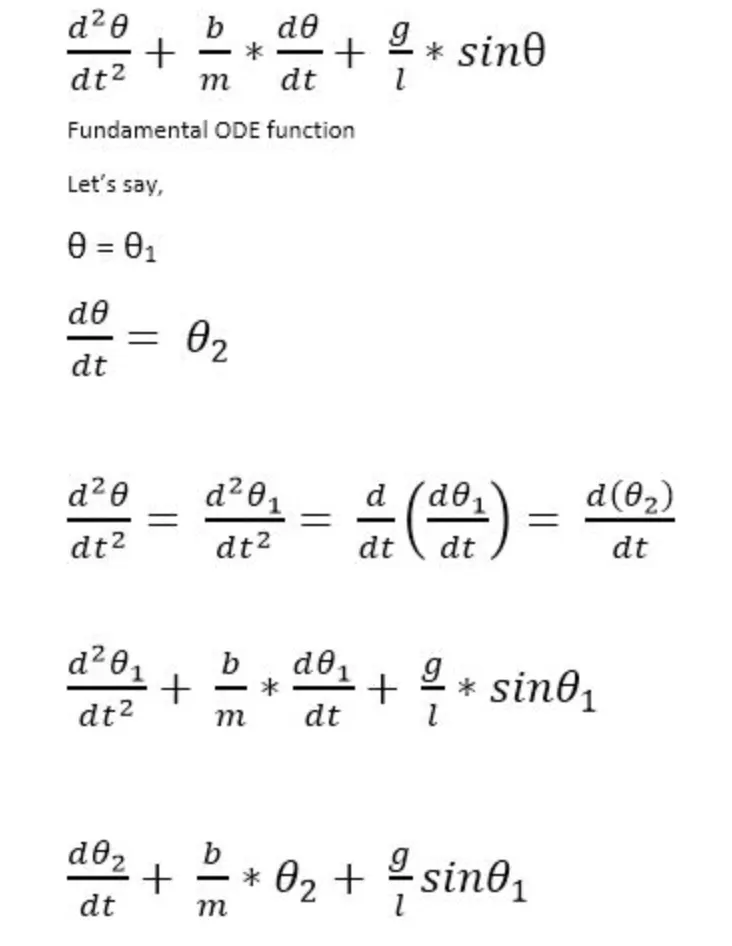
Then we defined the initial condition, So there are two first oorder ODE one for velocity and second for dispalcement. So while solving first ODE we gave the initial conditions for displacement.
theta_0 = [0,5];
where o is the initial displacemnt and 5 is the initial velocity.
Then we integrated to get the ODE for which we defined value for time i.e
t_span = linspace(0,10,500)
Then we called the ODE function and proceeded with the plot commands.
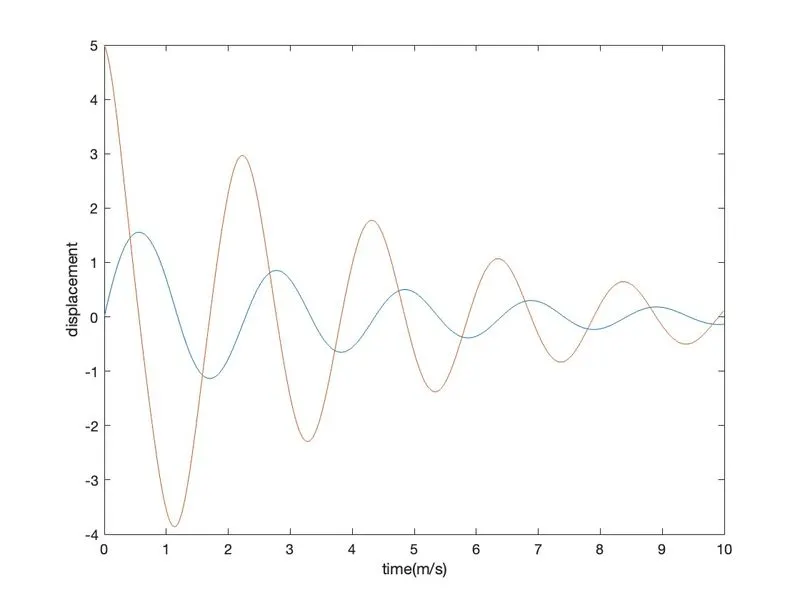
After we run this program we get the plot as follows.
OUTPUT :
FUNCTION CODE :
function [dtheta_dt] = ode_func(t,theta,b,g,l,m)

  theta1 = theta(1)
  theta2 = theta(2)
  dtheta1_dt = theta2;
  dtheta2_dt = -(b/m)*theta2 - (g/l)*sin(theta1);
  dtheta_dt = [dtheta1_dt; dtheta2_dt];
end
ode_func is the function made to solve the equation.
MAIN CODE :
clear all
close all
clc

%INPUTS
b = 0.05;
g = 9.81;
l =1;
m = 0.1;

% INITIAL CONDITION
theta_0 = [0,5];

%TIME POINTS
t_span = linspace(0,10,500);

%SOLVING ODE
[t, results] = ode45(@(t,theta) ode_func(t, theta, b, g, l, m), t_span, theta_0);

plot(t,results(:,1))
hold on
plot(t,results(:,2))
xlabel('time(m/s)')
ylabel('displacement')

%SIMPLE PENDULUM ANIMATION
figure(2)
ct =1;

for i = 1:length(results(:,1))
    x0 = 0;
    y0 = 0;

    x1 = l*sin(results(i,1));
    y1 = -l*cos(results(i,1));

    plot ([0,0],[-1.5 0.5])
    hold on
    plot([x0 x1],[y0 y1], 'linewidth',1,'color','b')
    axis([-1.5 1.5 -1.5 0.5])
    plot(x1, y1, 'o','MarkerSize',15,'color','b')
    pause(0.0002)
    M(ct) = getframe(gcf)
    hold off
    ct = ct+1
end

%MAKING VIDEO FILE

movie(M)
videofile = VideoWriter('simplependulum.avi')
open(videofile)
writeVideo(videofile,M)
close(videofile)
In the main code we used the for loop method as the bob moves with a velocity and displaces for the different time period.
And then we proceeded with the program and later moving onyo making a animation video file of the simple pendulum.
All are assigned to variable M,one at a time using ct folllowed by termination of for loop. Lastly, movie command is used to combine all the figures saved in M file to make a AVI format animation video.
RESULTS : We have obtained the plot between time and angular velocity of simple pendulum using second ODE.
We have obtained the simple pendulum's animation using second ODE in matlab.
LINK : https://www.youtube.com/watch?v=tpj6353YZbk