Week 2- 2R Robotic Arm Challenge
AIM : To create a program in Matlab to simulate the forward kinematics of a 2R Robotic Arm.
OBJECTIVES : To write the program for forward kinematics of robotic arm in matlab
To make and animation of 2R robotic arm.
CONCEPT :
A robotic arm is atype of mechanical arm which is usually controlled by programming with same fuctions as of humans arm. The arm may be the sum total of the mechanism or may be part of a more complex robot.
The links of such a manipulator are connected by joints allowing either rotational motion or linear displacement.
The links of the manipulator can be considered to form a kinematic chain. The terminus of the kinematic chain of the manipulator is called the end effector and it is analogous to the human hand.
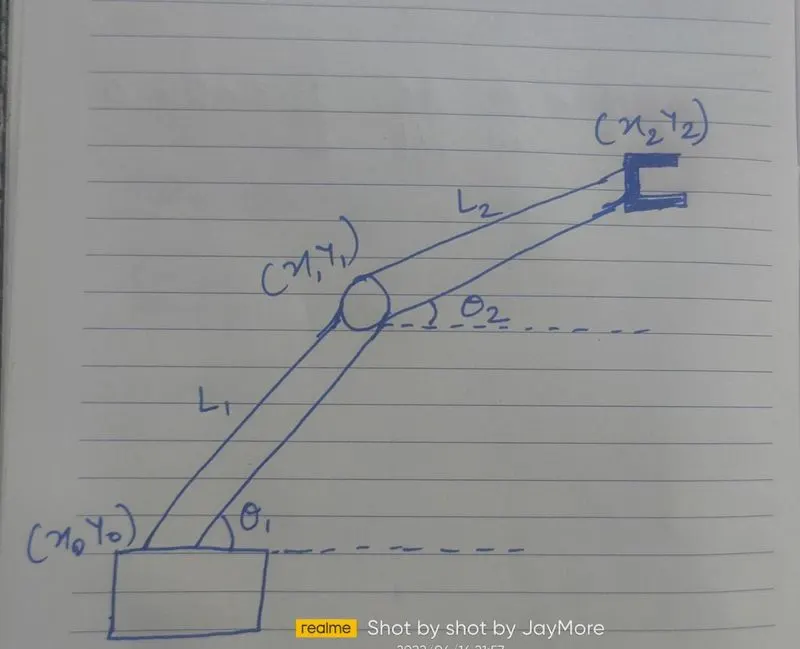
Firstly we drew the ase of robotic arm.. which contains 2 (l1 and l2) links and 2 rotatinal joints and shown in above figure.
Link 1 makes an angle of theta1 and
Link2 makes an angle of theta 2 wrt X axis respectibely.
Lets assume link1 = L1 and link2 = L2
Now we must calculate position of link1 . Link1 has 2 end points i.e. the starting point and ending point.
startting point is fixed to the base and end point is connectted to link2
so the co ordinates of starting point are (0,0) and co ordinates of end point are (L cos theta and L sind theta ) respectively.
where theta = theta1 i.e
x1 = l1cos theta1
y1 = l1sin theat1
and secondly we need to find position of link2 .
So for that we know that end point of link1 is starting point of link 2 so lets assign co ordinates(x1,y1) to this point. and lets assign co ordinates(x2,y2) to end point.
Thus,
x2 = x1+l2cos theta2
y2 = y1+l2sin theta2.
PROGRAM :
% forward kinematics of 2R robotic arm
clear all
close all
clc

%inputs
l1 = 1;
l2 = 0.5;

theta1 = 45;
theta2 = 30;

%co ordinates
x0 = 0;
y0 = 0;

x1 = l1*cosd(theta1);
y1 = l1*sind(theta1);

x2 = x1 + l2*cosd(theta2);
y2 = y1 + l2*sind(theta2);


%plot

line([x0 x1],[y0 y1],'linewidth',3,'color','b')
line([x1 x2],[y1 y2],'linewidth',3,'color','r')
PROGRAM EXPLANATION :
We started by assigning values to the inputs
l1 = 1st link length = 1m
l2 = 2nd length = 0.5m
Then we will need theta 1 and theta 2, so lets assume
theta 1 = 45
theta2 = 30
Then the co ordinates at starting point of link 1 are
x0 = 0 & y0 = 0,
x1 = l1*cosd(theta1);
y2 = l1*sind(theta1);
and
x2 = x1+l2*cosd(theta2);
y2 = y1+l2*sind(theta2);
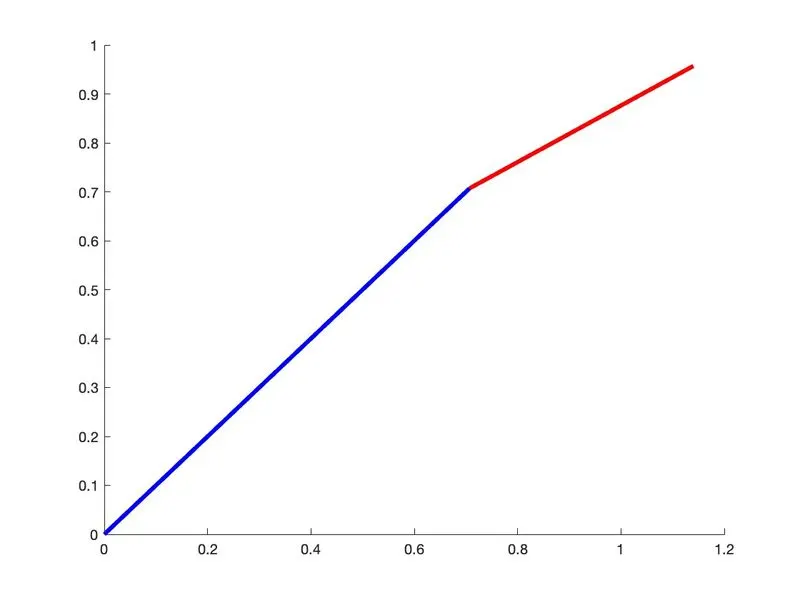
Now after we run the program we get the values for x0 x1 x2 and y0 y1 y2
Then we proceeded to plot with plot commands,
clear all
close all
clc

%INPUTS
l1 = 1;
l2 = 0.5;
theta1 = linspace(0,90,30);
theta2 = linspace(0,90,30);

ct = 1;
for i = 1:length(theta1)
    THETA1 = theta1(i);
   for j = 1:length(theta2)
    THETA2 = theta2(j);
    x0 = 0;
    y0 = 0;

    x1 = l1*cosd(THETA1);
    y1 = l1*sind(THETA1);

    x2 = x1 + l2*cosd(THETA2);
    y2 = y1 + l2*sind(THETA2);


    %plot


    plot([x0 x1],[y0 y1],[x1 x2],[y1 y2],'linewidth',3)
    axis([-0.1 1.5 0 2])
    pause(0.03)
    M(ct) = getframe(gcf);
    ct = ct+1;


   end
end

movie(M)
videofile = VideoWriter('forward_kinematics.avi','Uncompressed AVI');
open(videofile)
writeVideo(videofile,M)
close(videofile)